1996 TOYOTA 4RUNNER lock
[x] Cancel search: lockPage 72 of 217

69
(g) Driving in PWRº (power) mode
In the PWRº mode, the transmission is shifted up and down at a higher vehicle
speed
than in the NORMº (Normal) mode
and a more powerful acceleration is
achieved. To set the PWRº mode, push
in the driving pattern selector button. The
PWRº mode indicator light comes on.
For ordinary driving, Toyota recommends
using the NORMº mode to improve fuel
economy.
(h) If you cannot shift the selector lever
out of Pº position
If you cannot shift the selector lever from the Pº position even though the brake
pedal is depressed, use the shift lock
override button. For instructions, see If you cannot shift automatic transmissionselector leverº in Part 4.
Page 74 of 217
71
Your automatic transmission has a shift
lock system to minimize the possibility of
incorrect operation. This means you can
only shift out of Pº position when the brake
pedal is depressed (with the ignition
switch in ONº position and the lock re-
lease button depressed).
(a) Normal driving
1. Start the engine as instructed in How
to start the engineº in Part 3. The trans- mission must be in Pº or Nº.
When the front drive control lever is in L4º
(low-speed position, four-wheel drive),
the driving pattern selector setting has no
effect on gear shift timing. (See Four-
wheel drive systemº in this chapter for in-
formation of the front drive control lever.)
2. With your foot holding down the brake
pedal, shift the selector lever to Dº.
In Dº position, the automatic transmis-
sion system will select the most suitable
gear for running conditions such as nor-
mal cruising, hill climbing, hard towing, etc. Always turn the overdrive switch on for
better
fuel economy and quieter driving. If
the engine coolant temperature is low or
when the front drive control lever is in L4º
(low-speed position, four-wheel drive)
the transmission will not shift into the
overdrive gear even with the overdrive
switch on. (See Four-wheel drive sys-
temº in this chapter for information of the
front drive control lever.)
Never put your foot on the accelera- tor pedal while shifting. CAUTION
!
3. Release the parking brake and brake
pedal. Depress the accelerator pedal
slowly for smooth starting.
(b) Using engine braking
To use engine braking, you can downshift the transmission as follows: Turn off the overdrive switch. The O/D
OFFº indicator light will come on andthe transmission will downshift to the
third gear.
Shift into the 2º position. The trans-
mission will downshift to the second
gear when the vehicle speed dropsdown to or lower than the followingspeed, and more powerful engine
braking will be obtained.
Front drive control lever in H2º or H4º 3RZ-FE engine 105 km/h (65 mph) . .
5VZ-FE engine 114 km/h (70 mph) . . .
Front drive control lever in L4º
3RZ-FE engine 38 km/h (23 mph) . . . .
5VZ-FE engine 41 km/h (25 mph) . . . .
Shift into the Lº position. The trans-mission will downshift to the first gear
when the vehicle speed drops down to
or lower than the following speed, and
maximum engine braking will be ap-plied.
Front drive control lever in H2º or H4º 3RZ-FE engine 51 km/h (31 mph) . . . .
5VZ-FE engine 55 km/h (34 mph) . . . .
Front drive control lever in L4º
3RZ-FE engine 11 km/h (6 mph) . . . . .
5VZ-FE engine 12 km/h (7 mph) . . . . .
Page 76 of 217
73
While the vehicle is moving, never
attempt to move the selector lever
into Pº position under any circum-
stances. Serious mechanical dam-
age and loss of vehicle control mayresult.CAUTION
!
(f) Good driving practice If the transmission is repeatedly up-
shifted and downshifted between third
gear and overdrive when climbing a
gentle slope, the overdrive switch
should be turned off. Be sure to turn the switch on immediately afterward.
When towing a trailer, in order to main-
tain engine braking efficiency, do notuse overdrive.
Always keep your foot on the brake
pedal while stopped with the engine
running. This prevents the vehicle
from creeping. CAUTION
!
NOTICE
Do not hold the vehicle on an upgrade with the accelerator pedal.
It can cause the transmission tooverheat. Always use the brake pedal or parking brake.
(g) Driving in PWRº(Power) mode
In the PWRº mode, the transmission is shifted up and down at a higher vehicle
speed than in the NORMº (Normal) mode
and a more powerful acceleration is
achieved. To set the PWRº mode, push
in the driving pattern selector button. The
PWRº mode indicator light comes on.
For ordinary driving, Toyota recommends
using the NORMº mode to improve fuel
economy.
(h) If you cannot shift the selector lever
out of Pº position
If you cannot shift the selector lever from the Pº position even though the brake
pedal is depressed, use the shift lock
override lever. For instructions, see If you
cannot shift automatic transmission se- lector leverº in Part 4.
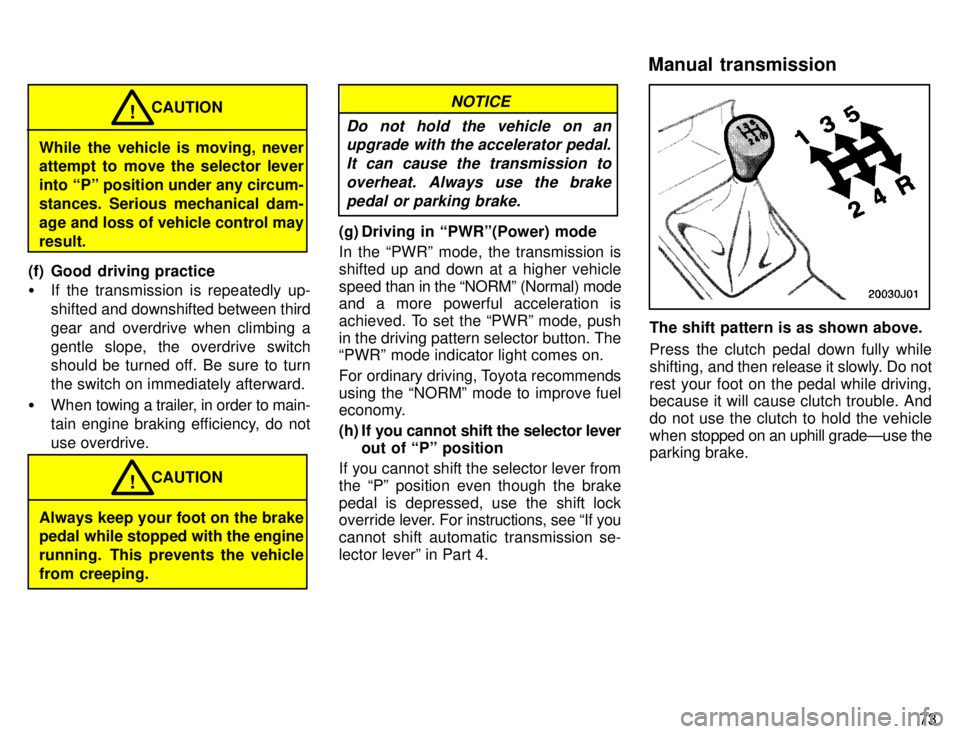
The shift pattern is as shown above.
Press the clutch pedal down fully while
shifting, and then release it slowly. Do not
rest your foot on the pedal while driving, because it will cause clutch trouble. And do not use the clutch to hold the vehicle
when stopped on an uphill gradeÐuse the
parking brake.
Manual transmission
Page 82 of 217
79
To shift from H4º to H2º
, push the
4WDº button again to turn it off. This can be done at any vehicle speed.
If the indicator light does not go off when you shift the transfer into H2º, drive
straight ahead while accelerating or de-celerating, or drive in reverse.
SHIFTING BETWEEN H2º OR H4º
AND L4º
To shift from H2º or H4º to L4º , stop
the vehicle and put the transmission in
Nº. With your foot holding down the brake
pedal, move the front drive control lever.
To shift from L4º to H2º or H4º , stop
the vehicle and put the transmission in
Nº. With your foot holding down the brake
pedal, move the front drive control lever.
When the 4WDº button is pushed in, the
transfer shifts into H4º; when the buttonis left out, the transfer shifts into H2º
If the indicator light does not go off when you shift the transfer into H2º, drive
straight ahead while accelerating or de- celerating, or drive in reverse.
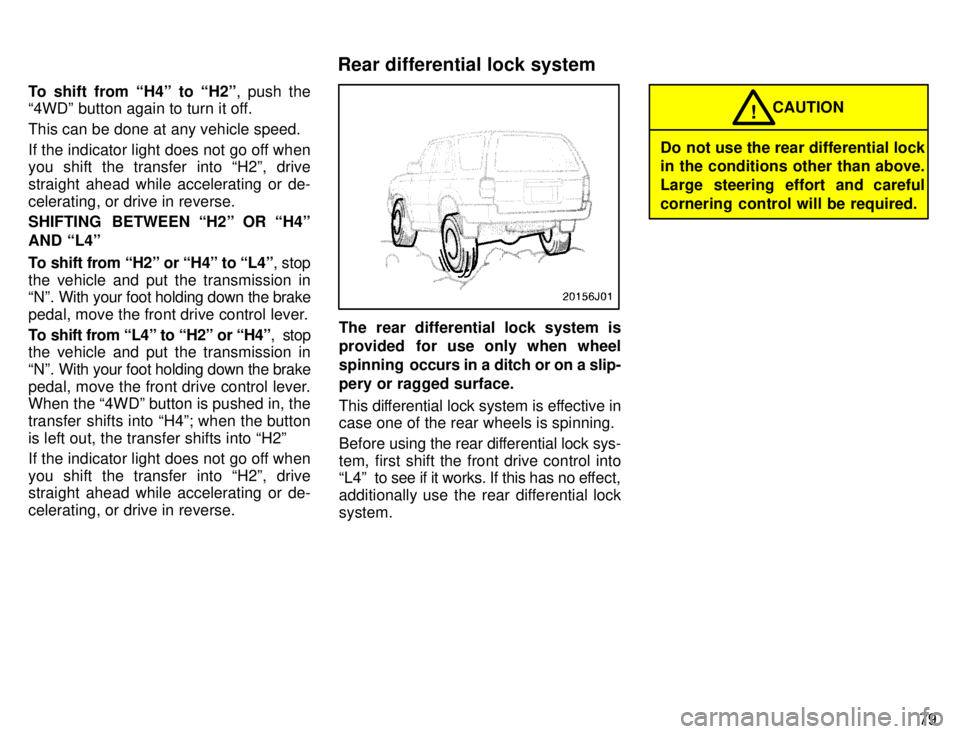
The rear differential lock system is
provided for use only when wheel
spinning occurs in a ditch or on a slip-
pery or ragged surface.
This differential lock system is effective in case one of the rear wheels is spinning.
Before using the rear differential lock sys-
tem, first shift the front drive control into
L4º to see if it works. If this has no ef fect,
additionally use the rear differential lock system.
Do not use the rear differential lock
in the conditions other than above.
Large steering effort and careful
cornering control will be required. CAUTION
!
Rear differential lock system
Page 83 of 217
80
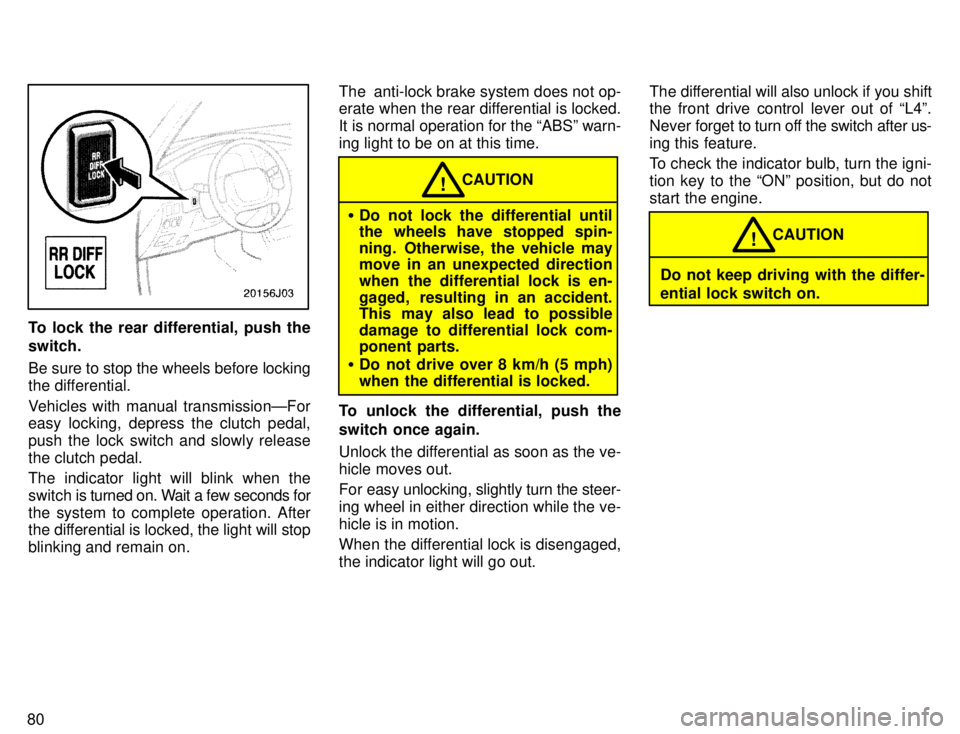
To lock the rear differential, push the switch.
Be sure to stop the wheels before locking
the differential.
Vehicles with manual transmissionÐFor
easy locking, depress the clutch pedal,
push the lock switch and slowly releasethe clutch pedal.
The indicator light will blink when the
switch is turned on. Wait a few seconds for
the system to complete operation. After
the differential is locked, the light will stop
blinking and remain on. The anti-lock brake system does not op-
erate when the rear differential is locked.
It is normal operation for the ABSº warn-
ing light to be on at this time.
Do not lock the differential until
the wheels have stopped spin-
ning. Otherwise, the vehicle may
move in an unexpected direction
when the differential lock is en-
gaged, resulting in an accident.
This may also lead to possible
damage to differential lock com-
ponent parts.
Do not drive over 8 km/h (5 mph)
when the differential is locked. CAUTION
!
To unlock the differential, push the
switch once again.
Unlock the differential as soon as the ve- hicle moves out.
For easy unlocking, slightly turn the steer-
ing wheel in either direction while the ve-hicle is in motion.
When the differential lock is disengaged, the indicator light will go out. The differential will also unlock if you shift
the front drive control lever out of L4º. Never
forget to turn off the switch after us-
ing this feature.
To check the indicator bulb, turn the igni-
tion key to the ONº position, but do not
start the engine.
Do not keep driving with the differ- ential lock switch on. CAUTION
!
Page 90 of 217

87
YOUR RADIO ANTENNA
To lower a manual antenna, carefully
push
it down.
To lower a power antenna, turn off the au-
dio system by pushing PWR VOLº or
PWR/VOLº, or turn the ignition key to LOCKº.
On some models, the power antenna au-
tomatically retracts when the radio mode
is switched off to turn on the cassette tape
player or compact disc player.
NOTICE
To prevent damage to the antenna, make sure it is retracted before
driving your Toyota through an automatic car wash.
YOUR CASSETTE PLAYER
When you insert a cassette, the exposed tape should be to the right.
NOTICE
Do not oil any part of the player and do not insert anything other than
cassette tapes into the slot, or thetape player may be damaged.
YOUR COMPACT DISC PLAYER
When you insert a disc, gently push it in with the label side up. (The player will au-
tomatically eject a disc if the label side is down.) The compact disc player will play
from track 1 through the end of the disc.Then it will play from track 1 through the
end of the disc. Then it will play from track 1 again.
NOTICE
Never try to disassemble or oil any part of the compact disc player. Do
not insert anything except a com- pact disc into the slot.
8 cm (3 in.) compact disc singles
Your compact disc player does not need an adaptor to play compact disc singles.
Compact disc singles are about 8 cm (3
in.) in diameterÐsmaller than standard discs.
After you eject a compact disc single, do
not insert a standard 12 cm (5 in.) disc un-
til DISCº disappears from the display.
NOTICE
Do not use an adaptor for compact disc singlesÐit could cause
tracking errors or interfere with the ejection of compact discs.
Page 96 of 217

93
1 2 3 4 5 6 (Preset buttons)
These buttons are used to preset and tune in radio stations.
To preset a station to a button: Tune in the
desired station (see TUNEº). Push and
hold down the button until you hear abeepÐthis will set the station to the but-
ton.
The button number will appear on the
display.
To tune in to a preset station: Push the
button for the station you want. The button
number and station frequency will appear
on the display.
Type 2-1ÐThese systems can store one
AM and one FM station for each button.
The preset station memory will be can-
celed out if the power source is inter- rupted (battery disconnected or fuseblown).
Type 2-2ÐThese systems can store one
AM and two FM stations for each button.
(The display will show AMº, FM1º, or
FM2º when you push AM VFMº.) To can-
cel out the preset station memory, push
1º, 2º, and 3º at the same time and hold
them in until you hear a beep.
(Eject button)
Push this button to eject a cassette.
After you turn the ignition to LOCKº, you
will be able to eject a cassette but you will
not be able to reinsert it. AM VFM
Push AM VFMº to switch between the AM
and FM bands.
Type 2-1кAMº or FMº will appear on
the display.
Type 2-2ÐAMº, FM1º or FM2º will ap-
pear on the display.
If the audio system is off, you can turn on
the radio by pushing AM VFMº. Also, push
AM VFMº to switch from cassette opera-
tion to radio operation. APS (Automatic program selection)
Type 2-2 only
The automatic program selection (APS)
feature allows you to program your cas-
sette player to skip forward or backward
to locate the song you want to hear. You can skip up to nine tracks at a time. Push APSº. APSº and 1º will appear on
the display. Next, push APSº until the number on the display reaches the number of tracks you want to skip. If you push APSº ten times,
the APS feature will be turned off.
If you choose the number 1º, the play- er will rewind to the beginning of the
current track.
When counting the number of tracksyou want to rewind, remember to count the current track as well. For ex-
ample, if you want to rewind to a song
that is two before the song you are lis-
tening to, push APSº until 3º appears
on the display.
Finally, push REWº or FFº to choose the
direction you want to skip. The player will
rewind or fast forward the selected num-
ber of tracks and play.
The APS number you select can be higher
than the number of tracks remaining on
the current casette side. After the begin-
ning or end of the tape is reached, the
player will automatically reverse sides
and rewind or fast forward the additional
number of tracks.
Page 101 of 217

98Your audio system shows three different
button displays that changes in accor-
dance with the audio mode you have se-lected. Radio display (display 1) Cassette player display (display 2)Compact disc player display (display 3)
Details of specific buttons, controls, and
features are described in
the alphabetical
listing that follows. 1 2 3 4 5 6 (Preset buttons)
These buttons are used to preset and tune in radio stations.
To preset a station to a button: Tune in the
desired station (see TUNEº button). Push and hold down the button until you
hear a
beepÐthis will set the station to the
button. The button number will appear on
the display.
To tune in to a preset station: Push the
button for the station you want. The button
number and station frequency will appear
on the display.
These systems can store one AM and two
FM stations for each button. (The display
will show AMº, FM1º, or FM2º when you
push AM VFMº) To cancel out the preset
station memory, push 1º, 2º, and 3º atthe same time and hold them in until you hear a beep.
(Eject Button)
Push the cassette tape eject button to eject a cassette. Push the compact disc eject button to eject a compact disc.
After you turn the ignition to LOCKº, you
will be able to eject a cassette or disc but you will not be able to reinsert it. l / l(Track down/up button)
By using this button, you can skip up or
down to a different track. Cassette Player
You can skip up to nine tracks at a time. Push the up or down side of the button. 1. FFº or 1. REWº will appear on the dis-
play.
Next, push either side of the track button
until the number on the display reachesthe number of tracks you want to skip. If
you push the button ten times, the skip
feature will be turned off.
When counting the number of tracks you want to rewind, remember to count the
current track as well. For example, if you
want to rewind to a song that is two before
the song you are listening to, push on the
down side of the button until 3. REWº ap-
pears on the display.