Page 107 of 320

4. Within five (5) seconds of pressing 1/2, enter
your personal code, pressing each digit within
five (5) seconds of the previous digit.
5. Enter a sixth digit to indicate which Personality
should be recalled by this personal code.
1/2 Recall Personality 1
3/4 Recall Personality 2
9/0 No recall
An of the vehicle doors will lock and then
unlock to confirm programming of the new
code.
The keyless entry system registers this new code.
To open your vehicle, you can now use either code.
To erase all of the personal entry codes and remote
entry transmitters programmed to a vehicle:
1. Enter the original permanent code.
1042.Press 1/2 within five (5) seconds of Step I.
3.Press and hold 1/2 for two (2) seconds.
All of the vehicle doors will lock and then
unlock to confirm erasure.
Do not set a code that presents the numbers in
sequential order, such as 1/2, 3/4, 5/6, 7/8, 9/0.
Studies show that people who idly press the
buttons usually press a sequential pattern. Also,
do not select a code that uses the same button
five times. Thieves can easily figure out these
types of codes.
Arming, disarmning and resettirig your anti-
theft system (If equipped) from the keyless
entry pad
If your vehicle is equipped with the optional
factory installed anti-theft system, the keyless
entry system will arm it when you use the 7/8 and
9/0 keys to lock the doors, and will disarm or
reset a triggered anti-theft alarm when you enter
in the five digit code to unlock the driver's door.
Page 109 of 320

To open the trunk, press the TRUNK button twice
within five (5) seconds.
Locking the doors
To lock all the doors, press the LOCK button.
This will also arm the anti-theft system (if
equipped).
A programmable door lock horn chirp can be
activated through the message center. Once
activated, every depression of the lock button will
cause the vehicle to honk its horn briefly.
Activating the remote personal alarm
If you wish to activate the remote personal alarm,
press the PANIC button. This will honk the horn
and flash the low beam headlamps and tail lamps
for approximately two minutes and forty-five
seconds. You can turn it OFF by pressing the
PANIC button again or by turning the ignition key
to the RUN position.
106Arming and disarming the alarm s system
If your vehicle is equipped with the factory
installed anti-theft system, the remote entry
system will automatically arm it when the doors
are locked with the remote entry LOCK button.
The remote entry UNLOCK button will disarm
or reset a triggered anti-theft alarm.
The remote entry system is designed to work
with the factory installed anti-theft system. It
may not work with other anti-theft systems.
Replacing the batteries
The remote entry transmitter is powered by two
coin type three-volt lithium 1616 batteries
(included) that should last for several years of
normal use. If you notice a significant decrease
in operating range, the batteries should be
replaced. Replacement batteries can be
purchased at most pharmacies, watch stores or at
your Ford or Lincoln-Mercury dealer.
Page 122 of 320
Memory Profile System
The Personality Memory Feature customizes your
Continental for up to two (2) drivers. The
following features are automatically recalled when
unlocking the doors using the remote entry
transmitter, keyless entry keypad, or by pressing
the Memory 1 or Memory 2 switches on the
driver's door: All driver's seat positions except power lumbar
and head restraint. Both left and right outside mirror settings. Radio station presets including the last selected
station and band and 0 preset preferences on
FMI, FM2, and AM. Instrument panel dimming setting. Autolamp delay time-out setting. Ride/Steering menu setting. Feature Menu settingsThe Ride/Steering menu is located in the
Message Center. The RIDE display allows you
to adjust the suspension feel to FIRM,
NORMAL, or PLUSH.
Pressing the Ride/Steering menu switch again
brings the STEERING display. This allows you
to adjust steering effort to LOW, NORMAL, or
HIGH.
For more information on ride/steering options,
see Road Calibrated Suspension later in this
chapter.
Personality Memory also allows you to
customize settings from the Feature menu
located in the Message Center. The Feature
menu contains five (5) features that you can
enable or disable. The features are listed in the
order they appear in the Feature menu. EXPRESS WINDOW - for one tap down
operation of the driver's window.
119
Page 124 of 320

keyless entry code or the Memory I or Memory 2
switches.
Keyless Entry
Up to three unique keyless entry codes can be
programmed by the customer. Two of the codes
can be assigned to recall Personality Memory I or
Memory 2. Each time the 5-digit code is entered on
the keypad, the driver's door will unlock and
Personality Memory 1 or Memory 2 will be
recalled.
NOTE: Please note that even though the driver's
Personality Memory may be recalled using remote
or keyless entry, the seats and mirrors will not
move to the driver's set positions until the driver's
door is opened.
Memory Switches
Pressing either the Memory I or Memory 2 switch
on the driver's door will also recall the Personality
Memory settings as selected, providing your
vehicle is in P (Park) or N (Neutral).Auto Save
Any change made by the driver to one of the
above Personality Memory settings will be
updated and saved automatically. The display,
SAVED TO DRIVER I or SAVED TO
DRIVER 2, will appear on the Message Center
for five (5) seconds as a confirmation of the
update to Personality Memory. If a radio preset
is changed the radio display will also show
SAVED.
If the driver does not use the remote entry
transmitter, or keyless entry keypad to unlock the
doors upon entering or does not press the
Memory I or Memory 2 switch, then any change
to one of the Personality Memory settings
(except radio presets) will not be automatically
saved. Instead the driver will be prompted by the
Message Center whether to save the settings to
Driver 1 or Driver 2.
121
Page 149 of 320
The operator verbally obtains details of Your
situation and, if necessary, ties your vehicle into a
three-way phone call with the United States Auto
Club or local 911 or other emergency services to
dispatch the appropriate assistance to your
location. Once the situation has been appropriately
handled, the operator will terminate the call, the
system warning light will stop flashing and the
system will be reset. In most situations, ONLY
the response center can terminate an assistance
request.
General Description
Lincoln's Remote Emergency Satellite Cellular
Unit (RESCU) is designed to expedite roadside or
emergency assistance to distressed motorists who
are uncertain of their location and/or are uncertain
of who to contact for assistance.
The Lincoln RESCU System utilizes Global
Positioning System (GPS) technology and the
146nation's cellular phone network to track vehicle
location and, at the touch of a button, put you in
voice contact with the Lincoln Security
Response Center.
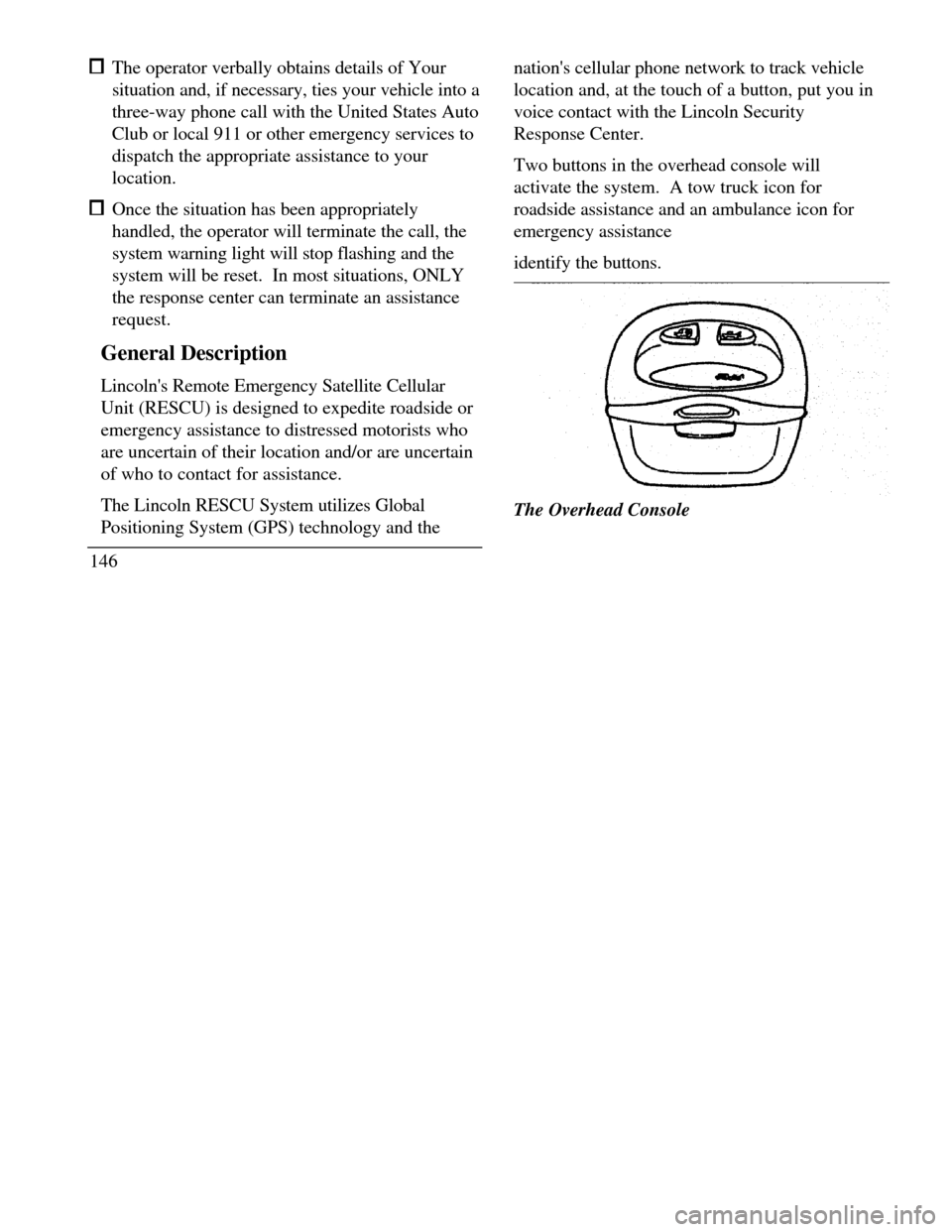
Two buttons in the overhead console will
activate the system. A tow truck icon for
roadside assistance and an ambulance icon for
emergency assistance
identify the buttons.The Overhead Console
Page 152 of 320

when appropriate, stay in direct phone contact
with you until emergency help arrives notify pre-designated family contacts or friends
of the emergency situation, if requested, or if no
response is received from the vehicle.
NOTE: If You are certain of your location, a direct
phone call to 911 or other emergency services may
provide a faster response.
Activation and Deactivation
When either of the two Lincoln RESCU buttons is
pressed, a warning light, located in the overhead
console, will begin to flash and status messages will
be displayed on the vehicle's message center,
confirming an assistance request has been made.
The warning light will continue to flash throughout
the activation.The RESCU Warning light
The system can be activated whenever your
ignition key is in the RUN/START Position and
for two Minutes after your vehicle is turned off.
In most situations, the assistance request can
ONLY be terminated and the system reset when
a special tone is sent to the vehicle by the
Lincoln Security Response Center. (See
Automatic Redial later in this chapter for
exceptions.) Operation will continue even if the
vehicle is turned off during an activation
(although visual feedback via the Message
Center will not be available in this situation).
149
Page 154 of 320

LON HDG XX
These messages respectively are the customer
identification number, vehicle latitude, vehicle
longitude and heading. Under special
circumstances, the operator may ask you to read the
information being displayed on the Message Center.
If vehicle messages are being displayed on the
Message Center (low washer fluid, low oil, door
ajar, etc.), they must be cleared in order to view the
LINCOLN RESCU messages. To clear the vehicle
messages, press the Message Center RESET button,
which is located to the right of the display.
Continue pressing the button until all vehicle
messages are cleared.
Automatic Redial
As described previously, when an assistance request
is made, the vehicle's cellular phone automatically
dials the Lincoln Security Response Center's central
computer and attempts to send an electronic datamessage. Occasionally, it can be difficult for the
computer to recognize the message if the
cellular connection is weak or noisy. If the
transmission of the message is unsuccessful, the
data call will be terminated and the message
"REDIAL IN PROGRESS" will be displayed on
the Message Center. A second call will
automatically be placed which bypasses the
response center's computer and is forwarded
directly to an operator.
Similarly, if the cellular call is disconnected by the
network prior to receipt of the termination tone,
another call to the response center will also
automatically be dialed. The message "REDIAL
IN PROGRESS" will be displayed on the Message
Center and voice communication with an operator
will be restored.
NOTE: During redial calls, full control of the
cellular phone is returned to you. Pressing
either the "PWR" or "END" button on the
cellular handset will terminate the assistance
request and reset the system.
151
Page 162 of 320
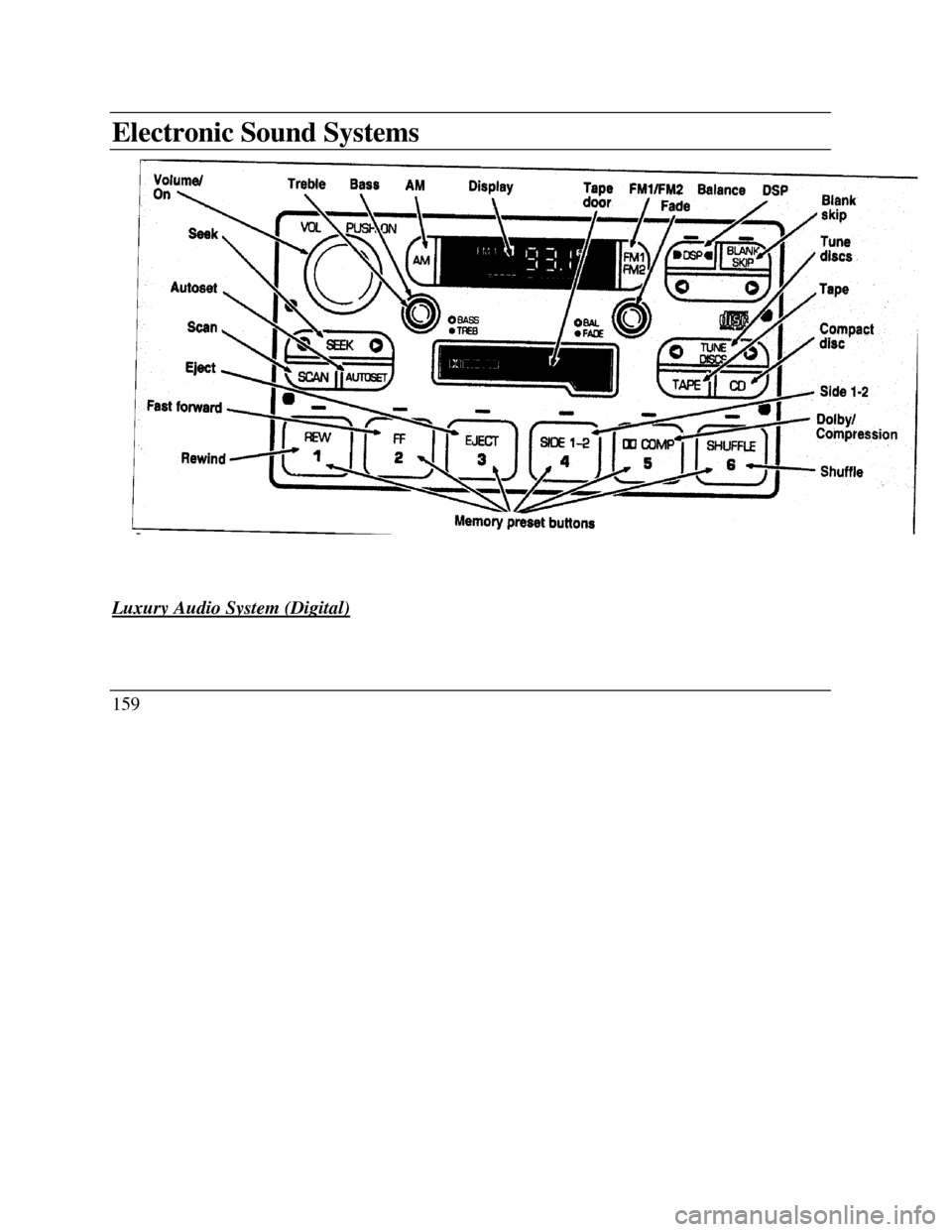
Electronic Sound SystemsVolume on Treble Bass AM Display Tape FM1/FM2 Balance DSP Blank skip
Fade Seek Autoset Scan Eject Fast forward BASS TREB Tune Compact discs Tape Dolby/
Compression Shuffle Rewind Memory preset buttons
Luxury Audio System (Digital)159