Page 114 of 320

Triggering the alarm system
The armed system will be triggered if: any door is opened without disarming the
system (see previous paragraphs), or the trunk lock cylinder is removed, or
NOTE: You can open the trunk with your key
without setting off the alarm. the hood is opened.
Disarming a triggered system
The alarm can be disarmed by: unlocking a front door with the key using the keyless entry unlock code using the UNLOCK button of the remote entry
transmitterNOTE: The flashing lights and honking horn
will shut off automatically approximately
three minutes after the system is triggered.
It will trigger again if another intrusion
occurs. However, the engine will not be
allowed to start until the system is disarmed.
Windows
Using the Power Windows
Each door has a power control that opens and
closes the window on that door. The driver's
door has a master control panel that operates all
four windows.
Power windows can only be opened or closed
when the ignition is in the ON or ACC position
or during the ten minute delayed accessory
period after the ignition is turned off.
111
Page 122 of 320
Memory Profile System
The Personality Memory Feature customizes your
Continental for up to two (2) drivers. The
following features are automatically recalled when
unlocking the doors using the remote entry
transmitter, keyless entry keypad, or by pressing
the Memory 1 or Memory 2 switches on the
driver's door: All driver's seat positions except power lumbar
and head restraint. Both left and right outside mirror settings. Radio station presets including the last selected
station and band and 0 preset preferences on
FMI, FM2, and AM. Instrument panel dimming setting. Autolamp delay time-out setting. Ride/Steering menu setting. Feature Menu settingsThe Ride/Steering menu is located in the
Message Center. The RIDE display allows you
to adjust the suspension feel to FIRM,
NORMAL, or PLUSH.
Pressing the Ride/Steering menu switch again
brings the STEERING display. This allows you
to adjust steering effort to LOW, NORMAL, or
HIGH.
For more information on ride/steering options,
see Road Calibrated Suspension later in this
chapter.
Personality Memory also allows you to
customize settings from the Feature menu
located in the Message Center. The Feature
menu contains five (5) features that you can
enable or disable. The features are listed in the
order they appear in the Feature menu. EXPRESS WINDOW - for one tap down
operation of the driver's window.
119
Page 123 of 320

AUTO DOOR LOCKS - automatically locks all
doors when the driver shifts out of PARK, all
doors are closed, and the vehicle speed is at
least three mph (five km/h). HORN CHIRP - sounds an audible "chirp"
when you press the LOCK button on the remote
entry transmitter to verify that the doors have
been locked and the vehicle's anti-theft system
has been armed (if equipped). SEAT ACCESS - moves the driver's seat back
two (2) inches or to the end of the seat track
when the vehicle is turned off and the ignition
key is removed. Upon the driver entering the
vehicle and closing the door, the seat will move
forward to its previous position. REVERSE MIRROR - when the vehicle is
shifted to REVERSE, the outside rearview
mirrors tilt down. This provides an improved
view of the side of the vehicle and curb area
when backing up. When you shift out of
REVERSE, the mirrors return to their previous
positions.
120Recalling Personality Memory
All of these settings are automatically recalled
when the driver unlocks the door using the
remote entry transmitter, keyless entry keypad or
presses either Memory I or Memory 2 switch
inside the driver's door. The vehicle must be in
PARK or NEUTRAL to recall Personality
Memory settings.
Remote Entry
Pressing the UNLOCK button on the remote
entry transmitter unlocks the driver's door and
recalls all of the Personality Memory settings.
Two transmitters are delivered with the vehicle.
One is programmed to always recall Memory I
and the other will always recall Memory 2.
Personality Memory 1 or 2 is indicated on the
back of the transmitter.
Personality Memory recall from the remote
transmitter can be disabled. This is done by sliding
the switch on the back of the transmitter to OFF.
Personality Memory can still be recalled using
Page 124 of 320

keyless entry code or the Memory I or Memory 2
switches.
Keyless Entry
Up to three unique keyless entry codes can be
programmed by the customer. Two of the codes
can be assigned to recall Personality Memory I or
Memory 2. Each time the 5-digit code is entered on
the keypad, the driver's door will unlock and
Personality Memory 1 or Memory 2 will be
recalled.
NOTE: Please note that even though the driver's
Personality Memory may be recalled using remote
or keyless entry, the seats and mirrors will not
move to the driver's set positions until the driver's
door is opened.
Memory Switches
Pressing either the Memory I or Memory 2 switch
on the driver's door will also recall the Personality
Memory settings as selected, providing your
vehicle is in P (Park) or N (Neutral).Auto Save
Any change made by the driver to one of the
above Personality Memory settings will be
updated and saved automatically. The display,
SAVED TO DRIVER I or SAVED TO
DRIVER 2, will appear on the Message Center
for five (5) seconds as a confirmation of the
update to Personality Memory. If a radio preset
is changed the radio display will also show
SAVED.
If the driver does not use the remote entry
transmitter, or keyless entry keypad to unlock the
doors upon entering or does not press the
Memory I or Memory 2 switch, then any change
to one of the Personality Memory settings
(except radio presets) will not be automatically
saved. Instead the driver will be prompted by the
Message Center whether to save the settings to
Driver 1 or Driver 2.
121
Page 138 of 320
Trunk
Opening the Trunk Manually
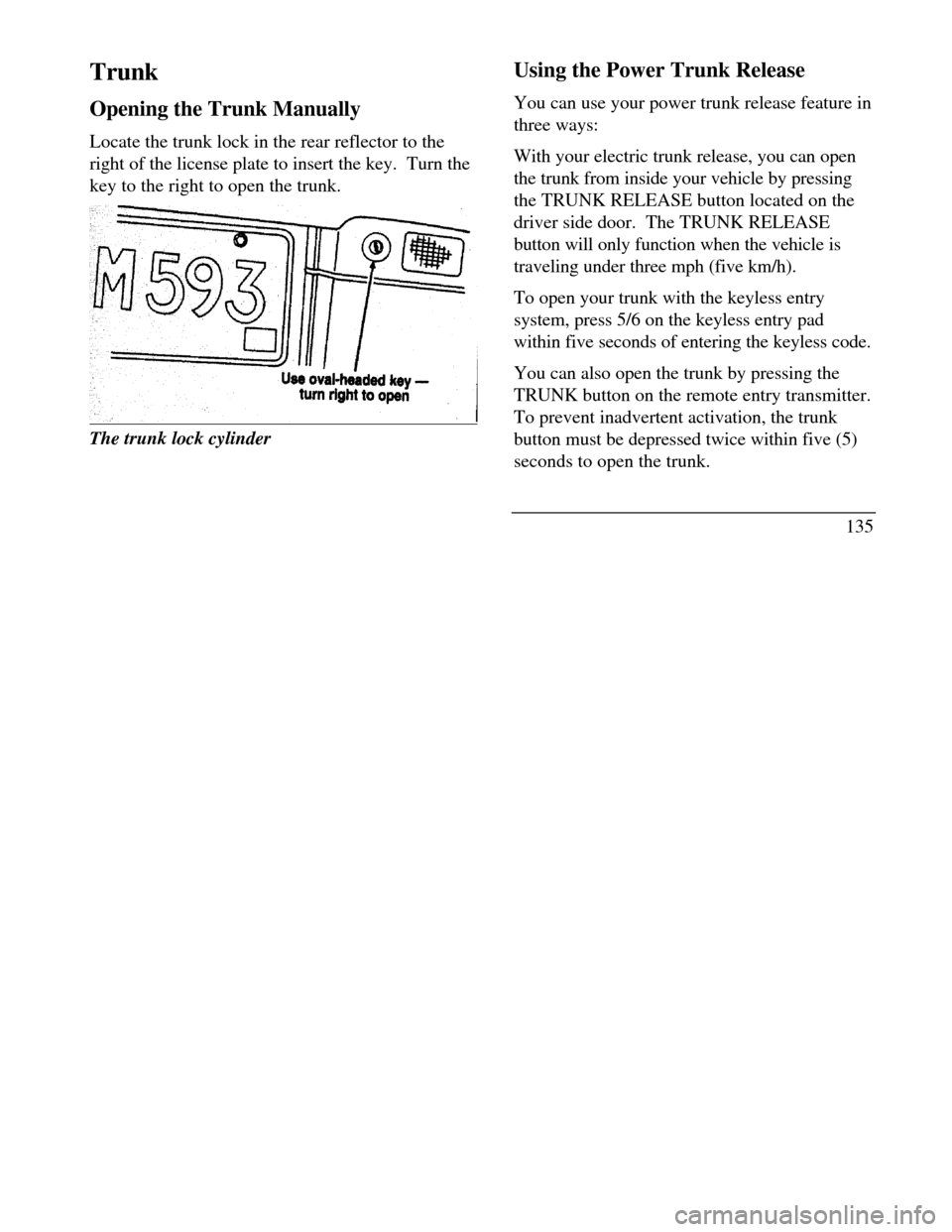
Locate the trunk lock in the rear reflector to the
right of the license plate to insert the key. Turn the
key to the right to open the trunk.The trunk lock cylinderUsing the Power Trunk Release
You can use your power trunk release feature in
three ways:
With your electric trunk release, you can open
the trunk from inside your vehicle by pressing
the TRUNK RELEASE button located on the
driver side door. The TRUNK RELEASE
button will only function when the vehicle is
traveling under three mph (five km/h).
To open your trunk with the keyless entry
system, press 5/6 on the keyless entry pad
within five seconds of entering the keyless code.
You can also open the trunk by pressing the
TRUNK button on the remote entry transmitter.
To prevent inadvertent activation, the trunk
button must be depressed twice within five (5)
seconds to open the trunk.
135
Page 165 of 320

Manual tuning adjusts your radio to any
allowable broadcast frequency, whether or not a
station is present on that frequency. (See All
About Radio Frequencies in this section.) Using the "SEEK" function
Press the right *) side of the 'SEEK" button to
select the next listenable station up the
frequency band. Press the left (.4) side of the
button to select the next listenable station
down the frequency band. By holding the
button down, listenable stations can be passed
over to reach the desired station. Using the 'SCAN" function
Pressing the "SCAN" button will begin the
scan mode up the frequency band, stopping on
each listenable station for approximately five
seconds.
To stop the scan mode on the presently
sampled station, press the "SCAN" button again.
162 Setting the station MEMORY PRESET buttons
Your radio is equipped with 6 station
memory buttons. These buttons can be used
to select up to 6 preset AM stations and 12
FM stations (6 in FMI and 6 in FM2)
1Select a band, then select a frequency.
2.Press one of the memory buttons and hold
until the sound returns and the lamp above
the memory button lights up. That
memory button is now set.
3.Follow the above steps for each memory
preset button.
NOTE:Custom memory presets
can be recalled using the keyless entry
system. See Memory Profile System in
the Features chapter.
Page 273 of 320

Fuse
LocationFuse Amp
RatingDescription2810A
· Shift interlock
· VDM logic power
· Instrument cluster logic power
· Rear defrost control2910A
· Luxury RCU station signal
· Navigation module signal3010A
· Heated mirror right
· Heated mirror left3115A
· Voltage dimming for FCU
and stand alone clock
· Courtesy lamps in the doors
Rear reading lamps
· Map lamps
· RH & LH I/P courtesy lamps
· Engine compartment lamp
· Visor lamps
· Storage bin lamp (5 passenger
only)
· Luggage compartment lamp
· Glove box lamp3215A
· Speed control brake deact
switch
· Stop lamp switchFuse
LocationFuse Amp
RatingDescription33(Not used)3415A
· Back-up L & R lamp ext.
· DRL module (Canada only)
· EATC clutch
· Speed control logic
· IMRC3520A
· L & R heated seat module power36(Not used)37(Not used)3810A
· OBD 11 scan tool connection3910A
· DSM logic power
· DDM logic power
· Door lock switches
· Keyless keypad switch
· Memory set switch
· Driver seat switch
· Power mirror switch4010A
· Blend door actuator
· LTPS4120A
· Door locks (DDM)271
Page 297 of 320
Engine compartment/ Servicing Windshield wipers Headlamp bulbs and Daytime Running Lights Hood latch Turn signal bulbs Parking lamp bulbs
Cornering lamp bulbs Moon roof Keyless entry Side view mirrors Tires299