Page 104 of 320
Illuminated Entry System with Theater
Lighting
The interior lights will illuminate for approximately
25 seconds when either front door handle is lifted,
any button on the keyless entry pad is pressed, or
the remote entry system UNLOCK button is
pushed. If the amount of light outside your vehicle
is below a predetermined level, the exterior lights
will also illuminate.
Using the Keyless Entry System
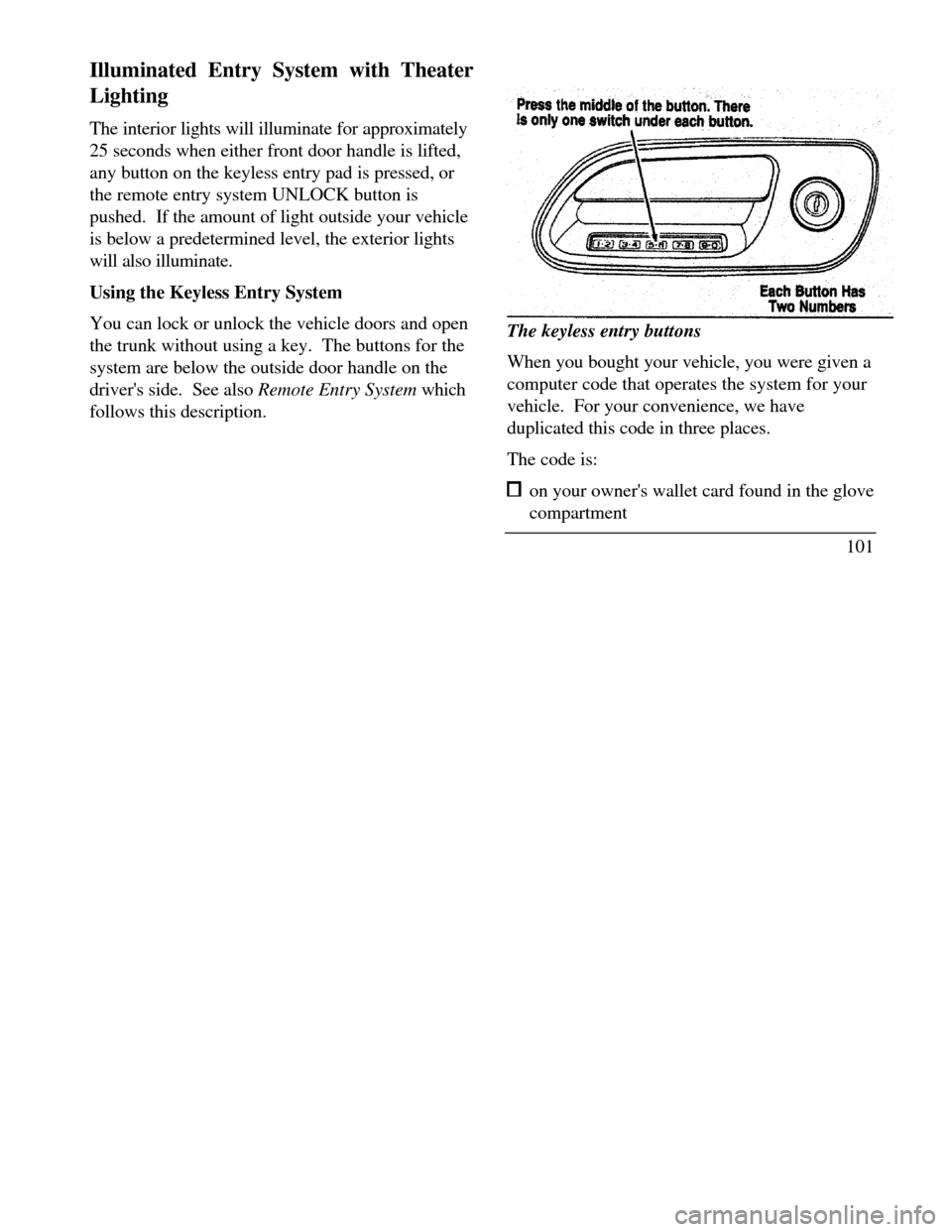
You can lock or unlock the vehicle doors and open
the trunk without using a key. The buttons for the
system are below the outside door handle on the
driver's side. See also Remote Entry System which
follows this description.The keyless entry buttons
When you bought your vehicle, you were given a
computer code that operates the system for your
vehicle. For your convenience, we have
duplicated this code in three places.
The code is: on your owner's wallet card found in the glove
compartment
101
Page 105 of 320

taped to the trunk lid's right hinge support bar taped to the computer module in your driver's
front door
When you use keyless entry, the illuminated entry
system turns on the interior lights for 25 seconds
and the buttons on the keypad light up. Do not
push the buttons with a key, ballpoint pen, pencil,
or any other hard object. These objects could
damage the buttons.
Unlocking the doors with the keyless entr .y
system
You must unlock the driver's door before you
unlock any of the other doors or trunk. If you let
more than five (5) seconds pass before pressing
numbers, the system shuts down, and you have to
enter the code again. The system has shut down if
the keypad light is out. If the keyless entry system
does not work properly, use the key or transmitters
to lock and unlock the doors or unlock the trunk.
1021 To unlock the driver's door, enter the factory
code or your personal code. All codes have
five (5) numbers. After you press the fifth
number, the driver's door unlocks.
2 To unlock all passenger doors, press the ¾
button within five (5) seconds of unlocking
the driver's door or trunk, or re-enter the
code to open the driver's door, then press
3/4.
3 To unlock the trunk, press the 5/6 button
within five seconds of unlocking the driver's
or passenger's doors, or re-enter the code to
open the driver's door, then press 5/6.
As long as the driver's door has been unlocked
first, you can open the passenger door or the
trunk in any order.
Locking the doors with the keyless entry system
Along with unlocking your doors, you can use
the keyless entry system to lock the doors.
Page 107 of 320

4. Within five (5) seconds of pressing 1/2, enter
your personal code, pressing each digit within
five (5) seconds of the previous digit.
5. Enter a sixth digit to indicate which Personality
should be recalled by this personal code.
1/2 Recall Personality 1
3/4 Recall Personality 2
9/0 No recall
An of the vehicle doors will lock and then
unlock to confirm programming of the new
code.
The keyless entry system registers this new code.
To open your vehicle, you can now use either code.
To erase all of the personal entry codes and remote
entry transmitters programmed to a vehicle:
1. Enter the original permanent code.
1042.Press 1/2 within five (5) seconds of Step I.
3.Press and hold 1/2 for two (2) seconds.
All of the vehicle doors will lock and then
unlock to confirm erasure.
Do not set a code that presents the numbers in
sequential order, such as 1/2, 3/4, 5/6, 7/8, 9/0.
Studies show that people who idly press the
buttons usually press a sequential pattern. Also,
do not select a code that uses the same button
five times. Thieves can easily figure out these
types of codes.
Arming, disarmning and resettirig your anti-
theft system (If equipped) from the keyless
entry pad
If your vehicle is equipped with the optional
factory installed anti-theft system, the keyless
entry system will arm it when you use the 7/8 and
9/0 keys to lock the doors, and will disarm or
reset a triggered anti-theft alarm when you enter
in the five digit code to unlock the driver's door.
Page 108 of 320
Remote Entry System
With the remote entry system, you can lock and
unlock the vehicle doors and open the trunk
without using a key. The buttons for the system
are located on the two hand held transmitters that
came with your vehicle. The remote also has a
personal alarm feature.
The system will work with up to four transmitters.
Your vehicle came with two transmitters.
Additional transmitters can be ordered from your
dealer.
The personal alarm feature operates only with the
ignition off. The LOCK, UNLOCK and TRUNK
features work whenever your vehicle is in Park or
Neutral.Remote entry transmitter
Unlocking the doors and opening the trunk
To unlock the driver's door, press the UNLOCK
button.
To unlock the other doors, press the UNLOCK
button a second time within five (5) seconds of
unlocking the driver's door.
105
Page 112 of 320

NOTE: The factory installed Remote Entry
System has a PANIC feature that also chirps the
vehicle horn and flashes the interior/exterior lamps
when the PANIC button on the remote entry
transmitter is pushed. The PANIC alarm and the
Anti-Theft alarm are two separate features.
Both the anti-theft alarm and the PANIC feature
can be active at the same time.
To tell the difference between a PANIC alarm anct
a triggered Anti-Theft alarm: only the Anti-Theft alarm will cause the alarm
indicator light (located in the center of the
instrument cluster) to flash on and off. only the Anti-Theft alarm will prevent the
engine from starting.
For more information on the PANIC alarm, see
Remote Entry System in the Index.Arming the system
To arm the system, do the following four steps in
sequence.
1. Remove the key from the ignition.
2. Open any door. The alarm indicator light
will start flashing to remind you to arm the
system.
3. Lock the doors by using the power door lock
switch, pressing the remote entry transmitter
LOCK button or pressing the last two
buttons (7/8, 9/0) of the keyless entry
keypad.
The alarm indicator will now glow steadily.
4. Close all doors. The alarm indicator light
will then remain on steadily for
approximately 30 more seconds and then go
out. When the light goes out the system is
armed.
109
Page 113 of 320

NOTE: Be sure to close all doors completely. If
not, the alarm indicator light will remain on.
Remember, your anti-theft system is armed only
after the alarm indicator light remains on steadily
for approximately 30 seconds after the last door is
closed, and then goes out.
You can also arm the anti-theft system with the
factory installed remote entry system or the keyless
entry system by following this sequence:
1.Remove key from ignition.
2.Close all of the doors.
3.Press the remote entry transmitter LOCK
button or press the last two buttons (7/8, 9/0)
of the keyless entry keypad to lock the doors.
The alarm indicator will come on for 30
seconds to show the alarm is arming and then
turn off to show that the alarm has armed.
110The anti-theft system is designed to work with
the factory installed remote entry system. It may
not work with other remote entry systems.
NOTE: The anti-theft system will not activate
whfle someone is sitting in the driver's seat or if
there is a heavy object in the driver's seat.
Disarming an untriggered anti-theft system
You can disarm the system by: unlocking a front door with the key (turn the
key all the way to the end of travel or the
system will not disarm). using the keyless entry unlock code. using the UNLOCK button of the remote
entry transmitter.
If you armed the system while inside your
vehicle, you can disarm it by turning the ignition
to the ON or ACC position. This allows you to
open the door and exit without triggering the
system.
Page 125 of 320
Pressing the SELECT switch will toggle between
1, 2 or no choice. If DRIVER I or DRIVER 2 is
selected, the display, SAVED TO DRIVER I or
SAVED TO DRIVER 2, will appear on the
Message Center to confirm the change has been
automatically saved with the Personality Memory.
If no choice is made by the driver, then the change
will not be automatically saved and there is no
effect on the Personality Memory.
Once this screen has been displayed, the driver will
not be asked again for the remainder of the drive.
Turning Personality OFF
The Personality Memory feature can be turned off
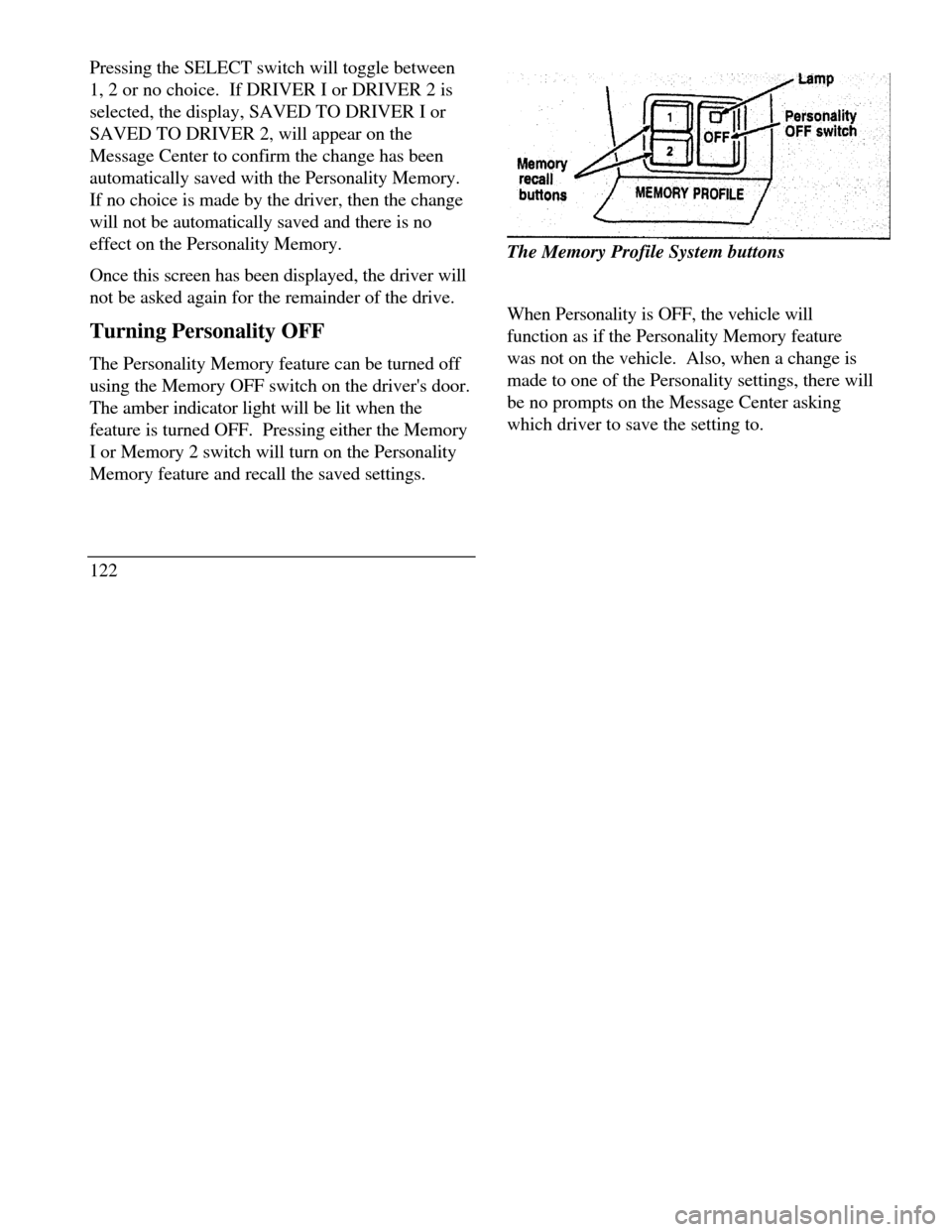
using the Memory OFF switch on the driver's door.
The amber indicator light will be lit when the
feature is turned OFF. Pressing either the Memory
I or Memory 2 switch will turn on the Personality
Memory feature and recall the saved settings.
122Memory recall buttonsThe Memory Profile System buttons
When Personality is OFF, the vehicle will
function as if the Personality Memory feature
was not on the vehicle. Also, when a change is
made to one of the Personality settings, there will
be no prompts on the Message Center asking
which driver to save the setting to.
Page 134 of 320
Programming the Universal Transmitter
NOTE: It is recommended that your hand-held
transmitter contain fresh batteries prior to
programming./!\ WARNINGMake sure that people or objects are clearof the garage door, gate, etc. while you areprogramming the system.To program the Universal Transmitter:
I.Make sure your vehicle's engine is off.
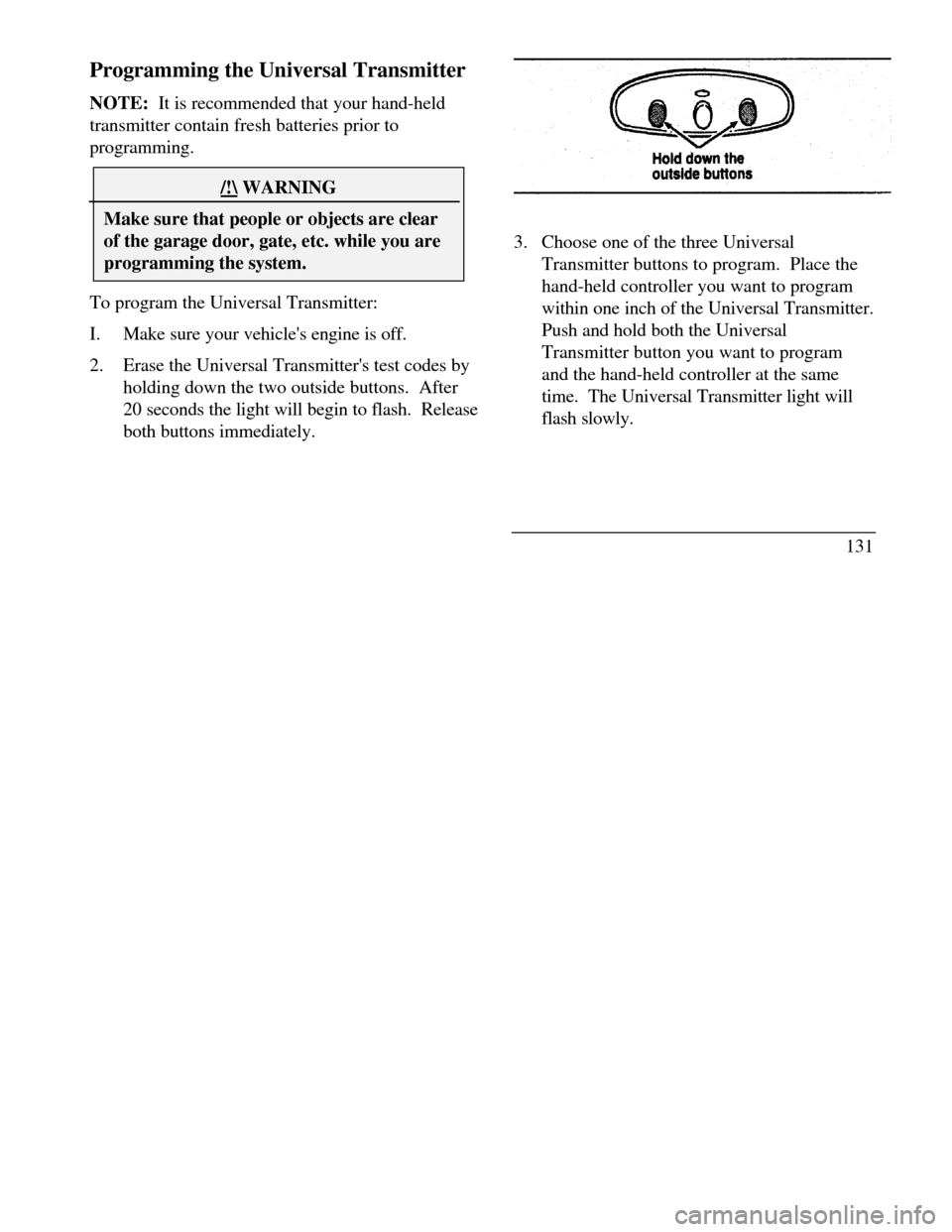
2.Erase the Universal Transmitter's test codes by
holding down the two outside buttons. After
20 seconds the light will begin to flash. Release
both buttons immediately.3. Choose one of the three Universal
Transmitter buttons to program. Place the
hand-held controller you want to program
within one inch of the Universal Transmitter.
Push and hold both the Universal
Transmitter button you want to program
and the hand-held controller at the same
time. The Universal Transmitter light will
flash slowly.
131