Page 69 of 240
Dashboard Compartment, Center Pocket, Vanity Mirror
Dashboard Compartment
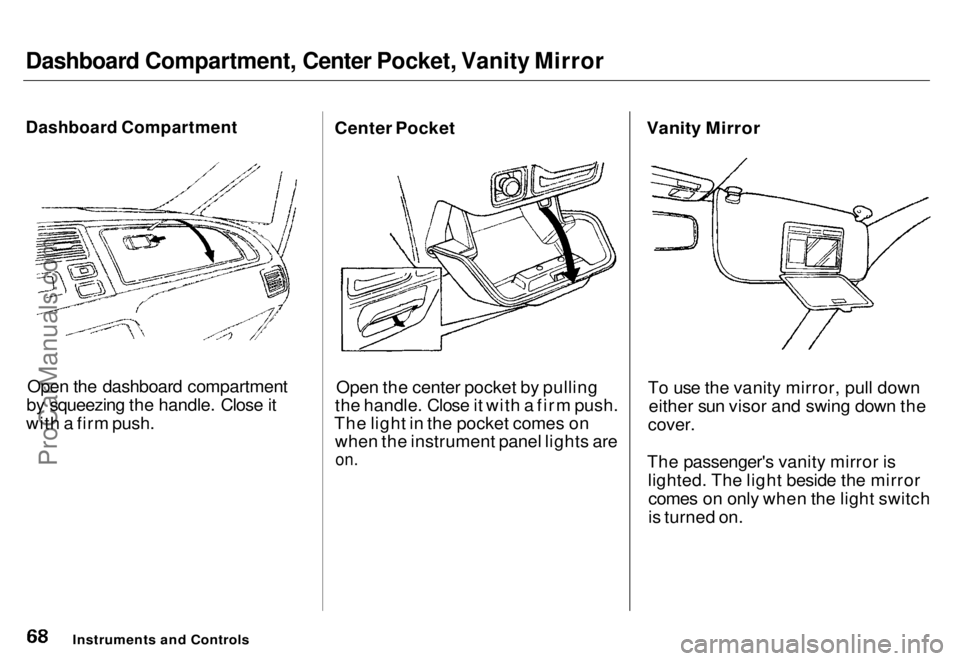
Open the dashboard compartment
by squeezing the handle. Close it
with a firm push. Center Pocket
Open the center pocket by pulling
the handle. Close it with a firm push.
The light in the pocket comes on when the instrument panel lights are
on.
Vanity Mirror
To use the vanity mirror, pull downeither sun visor and swing down the
cover.
The passenger's vanity mirror is lighted. The light beside the mirrorcomes on only when the light switch
is turned on.
Instruments and ControlsProCarManuals.coms t Main Menu Table of Contents
Page 70 of 240
Cigarette Lighter, Ashtrays
Cigarette Lighter
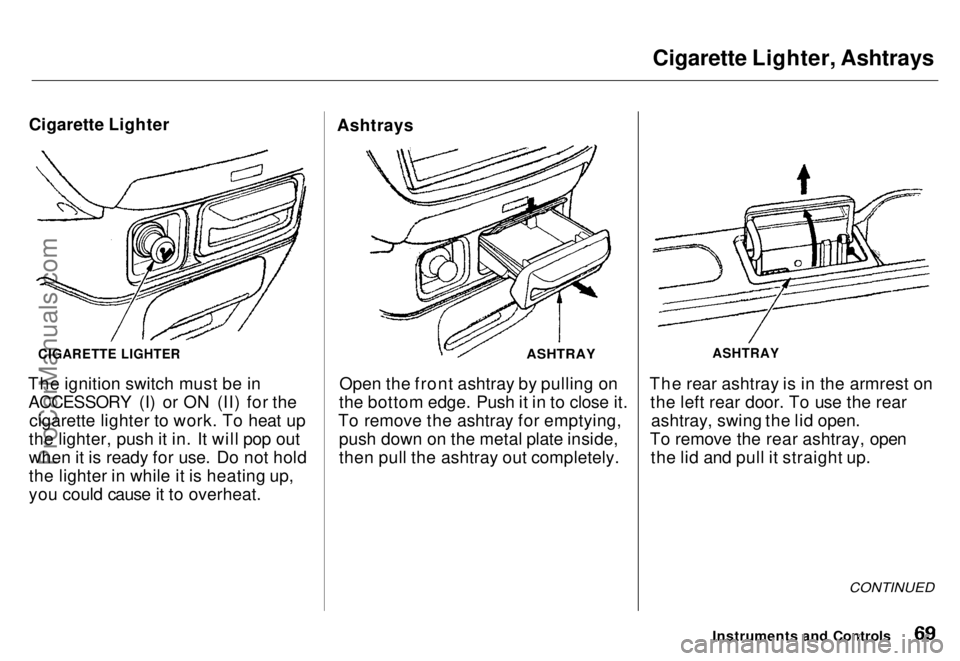
The ignition switch must be in ACCESSORY (I) or ON (II) for the cigarette lighter to work. To heat up
the lighter, push it in. It will pop out
when it is ready for use. Do not hold
the lighter in while it is heating up,
you could cause it to overheat. Ashtrays
ASHTRAY
Open the front ashtray by pulling on
the bottom edge. Push it in to close it.
To remove the ashtray for emptying, push down on the metal plate inside,
then pull the ashtray out completely. ASHTRAY
The rear ashtray is in the armrest on the left rear door. To use the rearashtray, swing the lid open.
To remove the rear ashtray, open the lid and pull it straight up.
CONTINUED
Instruments and Controls
CIGARETTE LIGHTERProCarManuals.coms t Main Menu Table of Contents
Page 71 of 240
Ashtrays, Interior Lights
Use the ashtray only for cigarettes,
cigars and other smoking materials. To
prevent a possible fire and damage to your car, don't put paper or other things that can burn in the ashtray.
Ceiling Lights
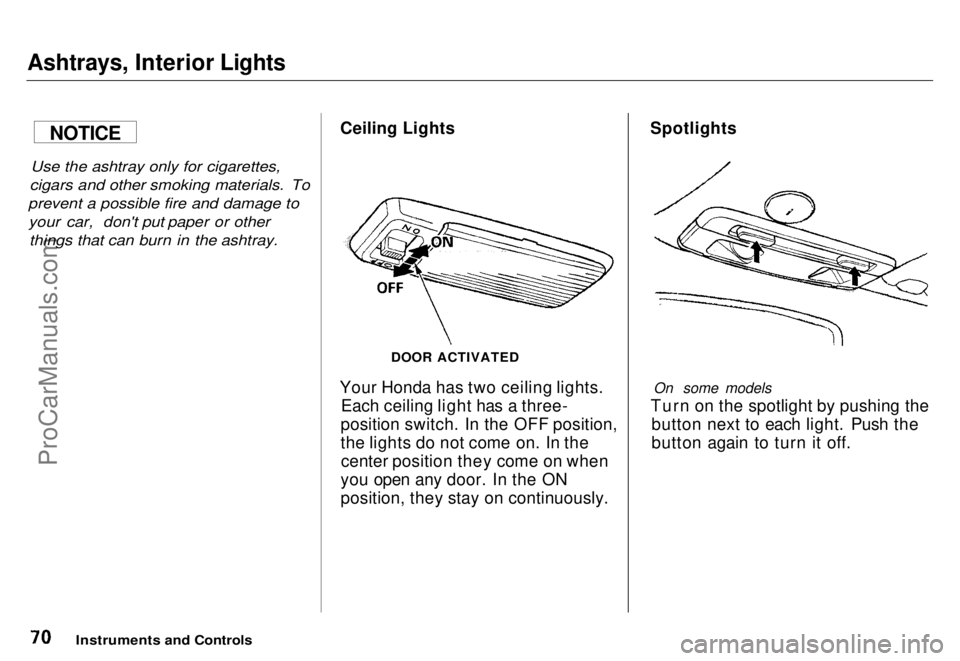
Your Honda has two ceiling lights. Each ceiling light has a three-
position switch. In the OFF position,
the lights do not come on. In the center position they come on when
you open any door. In the ON
position, they stay on continuously. Spotlights
On some models
Turn on the spotlight by pushing the button next to each light. Push the
button again to turn it off.
Instruments and Controls
NOTICE
DOOR ACTIVATEDProCarManuals.comMain Menu s t Table of Contents
Page 72 of 240
Interior Lights
Tailgate Light
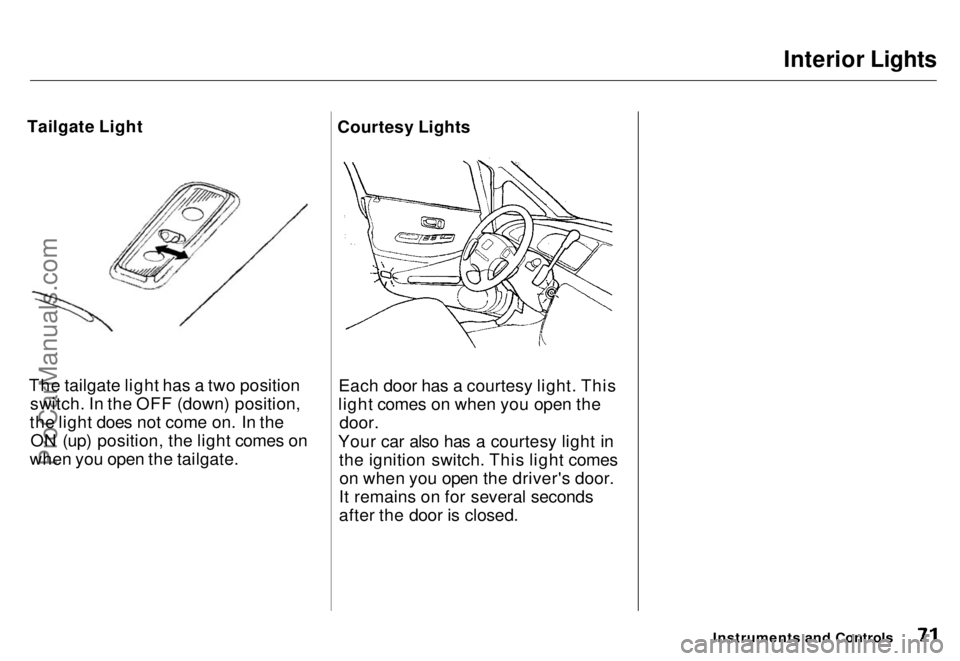
The tailgate light has a two positionswitch. In the OFF (down) position,
the light does not come on. In the ON (up) position, the light comes on
when you open the tailgate. Courtesy Lights
Each door has a courtesy light. This
light comes on when you open the door.
Your car also has a courtesy light in the ignition switch. This light comeson when you open the driver's door.
It remains on for several seconds
after the door is closed.
Instruments and ControlsProCarManuals.comMain Menu s t Table of Contents
Page 74 of 240
Heating and Cooling
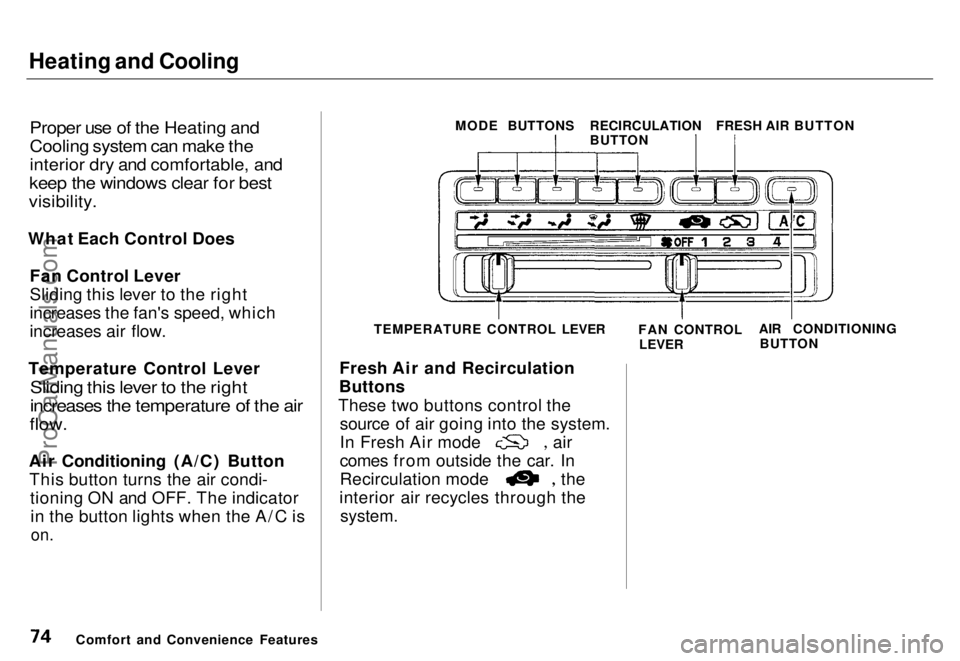
Proper use of the Heating and
Cooling system can make the
interior dry and comfortable, and
keep the windows clear for best
visibility.
What Each Control Does Fan Control Lever
Sliding this lever to the right
increases the fan's speed, which
increases air flow.
Temperature Control Lever
Sliding this lever to the right
increases the temperature of the air
flow.
Air Conditioning (A/C) Button This button turns the air condi- tioning ON and OFF. The indicatorin the button lights when the A/C is
on.
Fresh Air and Recirculation
Buttons
These two buttons control the source of air going into the system. In Fresh Air mode air
comes from outside the car. In
Recirculation mode the
interior air recycles through the
system.
Comfort and Convenience Features TEMPERATURE CONTROL LEVER
FAN CONTROL
LEVER AIR CONDITIONING
BUTTON
MODE BUTTONS
RECIRCULATION
BUTTONFRESH AIR BUTTONProCarManuals.comMain Menu s t Table of Contents
Page 78 of 240
Heating and Cooling
To Cool with A/C
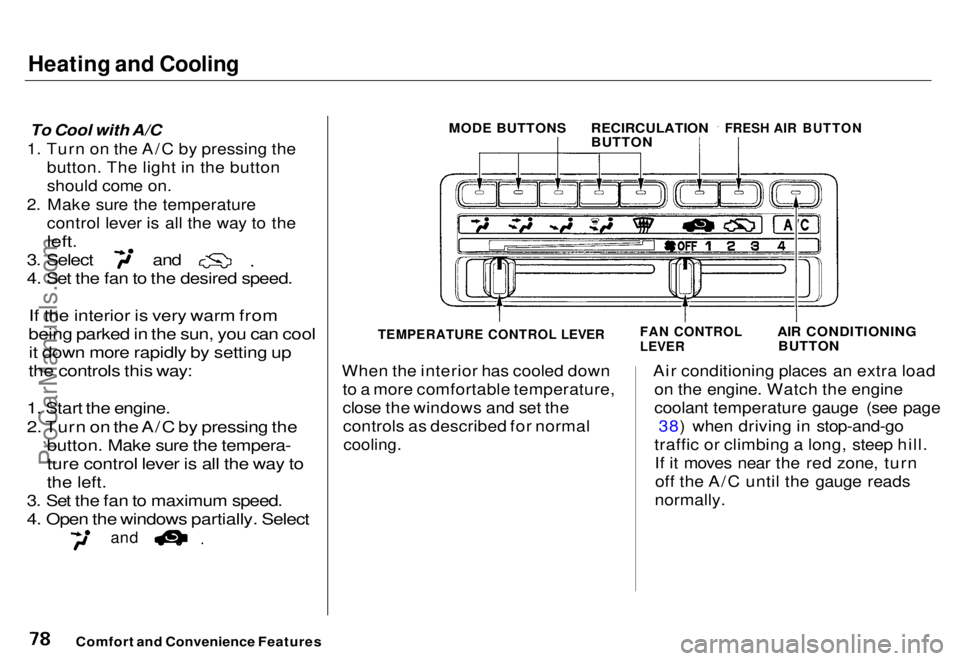
1. Turn on the A/C by pressing the button. The light in the button
should come on.
2. Make sure the temperature control lever is all the way to the
left.
3. Select and
4. Set the fan to the desired speed.
If the interior is very warm from
being parked in the sun, you can cool
it down more rapidly by setting up
the controls this way:
1. Start the engine.
2. Turn on the A/C by pressing the
button. Make sure the tempera-
ture control lever is all the way to
the left.
3. Set the fan to maximum speed.
4. Open the windows partially. Select
and
When the interior has cooled down
to a more comfortable temperature,
close the windows and set thecontrols as described for normal
cooling.
Air conditioning places an extra load
on the engine. Watch the engine
coolant temperature gauge (see page 38) when driving in stop-and-go
traffic or climbing a long, steep hill. If it moves near the red zone, turnoff the A/C until the gauge reads
normally.
Comfort and Convenience Features
MODE BUTTONS
RECIRCULATION
BUTTON
FRESH AIR BUTTON
AIR CONDITIONINGBUTTON
FAN CONTROL
LEVER
TEMPERATURE CONTROL LEVERProCarManuals.comMain Menu s t Table of Contents
Page 86 of 240
Audio System
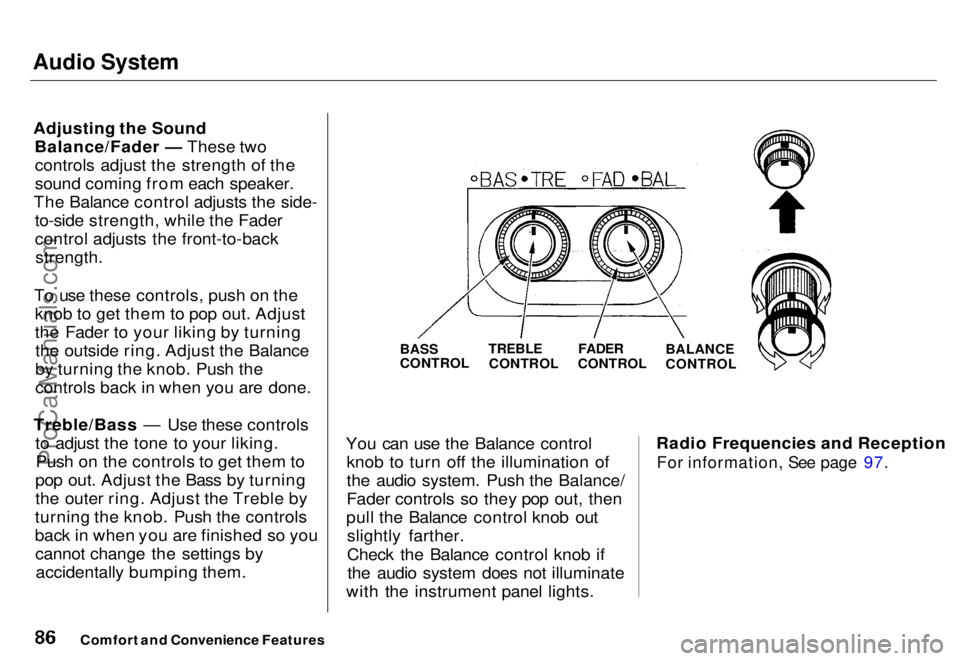
Adjusting the Sound Balance/Fader — These twocontrols adjust the strength of the
sound coming from each speaker.
The Balance control adjusts the side- to-side strength, while the Fader
control adjusts the front-to-back
strength.
To use these controls, push on the knob to get them to pop out. Adjust
the Fader to your liking by turningthe outside ring. Adjust the Balance
by turning the knob. Push the
controls back in when you are done.
Treble/Bass — Use these controls to adjust the tone to your liking.Push on the controls to get them to
pop out. Adjust the Bass by turning
the outer ring. Adjust the Treble by
turning the knob. Push the controls
back in when you are finished so you cannot change the settings byaccidentally bumping them.
BASS
CONTROL
You can use the Balance control knob to turn off the illumination of
the audio system. Push the Balance/
Fader controls so they pop out, then
pull the Balance control knob out slightly farther.
Check the Balance control knob ifthe audio system does not illuminate
with the instrument panel lights. Radio Frequencies and Reception
For information, See page 97.
Comfort and Convenience Features
TREBLE
CONTROL
FADER
CONTROL
BALANCE
CONTROLProCarManuals.comMain Menu s t Table of Contents
Page 87 of 240
Audio System
Operating the Cassette Player
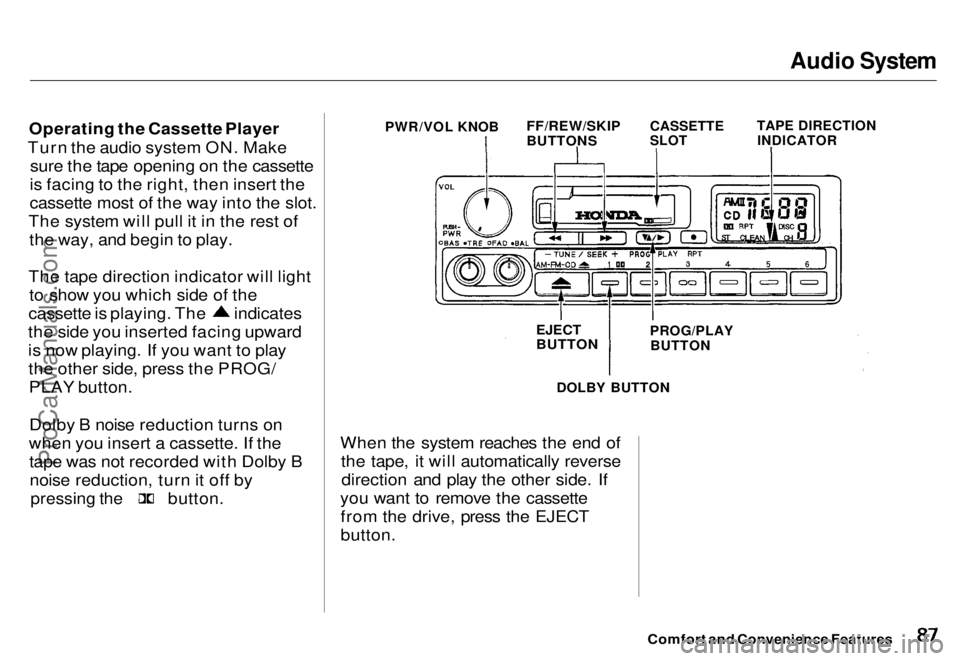
Turn the audio system ON. Make sure the tape opening on the cassette
is facing to the right, then insert the
cassette most of the way into the slot.
The system will pull it in the rest of the way, and begin to play.
The tape direction indicator will light to show you which side of the cassette is playing. The indicates
the side you inserted facing upward
is now playing. If you want to play the other side, press the PROG/PLAY button.
Dolby B noise reduction turns on
when you insert a cassette. If the tape was not recorded with Dolby Bnoise reduction, turn it off by
pressing the
button.
DOLBY BUTTON
When the system reaches the end of the tape, it will automatically reversedirection and play the other side. If
you want to remove the cassette from the drive, press the EJECT
button.
Comfort and Convenience Features
PWR/VOL KNOB
FF/REW/SKIP
BUTTONS
CASSETTE
SLOT
TAPE DIRECTION
INDICATOR
EJECT
BUTTON
PROG/PLAY
BUTTONProCarManuals.comMain Menu s t Table of Contents