Page 39 of 240

Gauges
Temperature Gauge This shows the temperature of the engine's coolant. During normal
operation, the pointer should rise
from the bottom white mark to about
the middle of the gauge. In severe driving conditions, such as very hot
weather or a long period of uphill driving, the pointer may rise to the
upper white mark. If it reaches the
red "H" (Hot) mark, pull safely to
the side of the road. Turn to page 202 for instructions and precautions
on checking the engine's cooling
system.
Fuel Gauge
This shows how much fuel you have. It is most accurate when the car is on
level ground. It may show slightly
more or less than the actual amount
when you are driving on curvy or hilly roads. The gauge stays at the same fuel
level reading after you turn off theignition. When you add fuel, thegauge slowly changes to the new
reading after you turn the ignition
back ON (II).
Maintenance Required Indicator
This indicator reminds you that it is nearing 12,000 km (7,500 miles)since the last scheduled maintenance.
Refer to the Maintenance Schedules
for Normal and Severe driving conditions on page 140 . When the distance driven since the
last scheduled maintenance nears 12,000 km (7,500 miles), the
indicator will turn yellow. If you
exceed 12,000 km (7,500 miles), the indicator will turn red.
Your dealer will reset the indicator when he performs the scheduledmaintenance. If someone else
performs the maintenance, reset the indicator by inserting your key in theslot beside the indicator.
Instruments and Controls SLOT
INDICATORProCarManuals.comMain Menu s t Table of Contents
Page 41 of 240
Controls Near the Steering Wheel
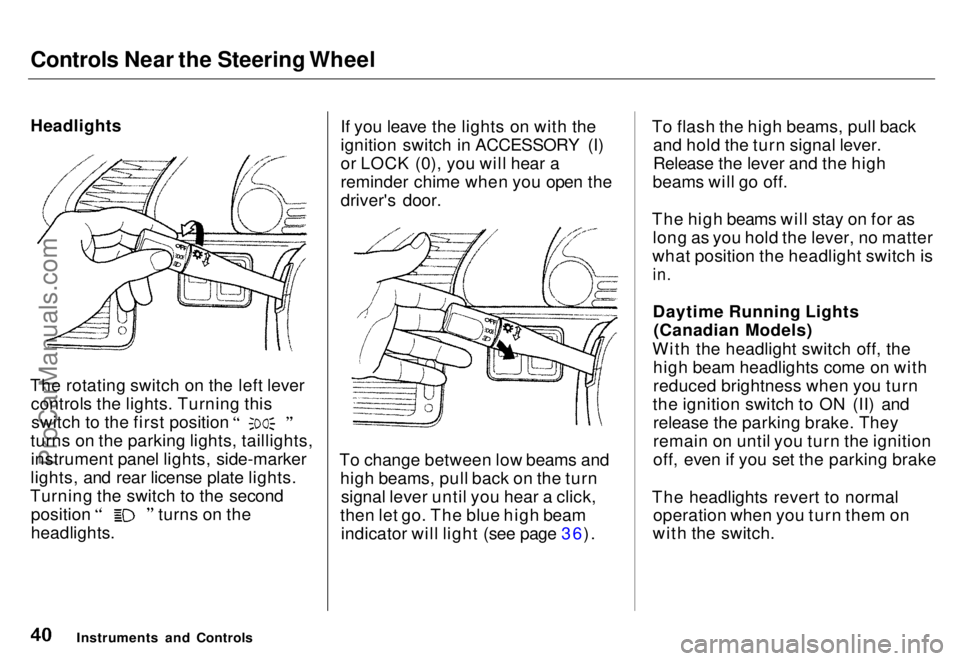
Headlights
The rotating switch on the left lever controls the lights. Turning this switch to the first position
turns on the parking lights, taillights, instrument panel lights, side-marker
lights, and rear license plate lights.
Turning the switch to the second position turns on the
headlights. If you leave the lights on with the
ignition switch in ACCESSORY (I)
or LOCK (0), you will hear a
reminder chime when you open the
driver's door.
To change between low beams and high beams, pull back on the turnsignal lever until you hear a click,
then let go. The blue high beam indicator will light (see page 36). To flash the high beams, pull back
and hold the turn signal lever.
Release the lever and the high
beams will go off.
The high beams will stay on for as long as you hold the lever, no matter
what position the headlight switch is
in.
Daytime Running Lights (Canadian Models)
With the headlight switch off, the high beam headlights come on with
reduced brightness when you turn
the ignition switch to ON (II) and release the parking brake. They
remain on until you turn the ignition
off, even if you set the parking brake
The headlights revert to normal operation when you turn them on
with the switch.
Instruments and ControlsProCarManuals.comMain Menu s t Table of Contents
Page 44 of 240
Controls Near the Steering Wheel
Rear Window Wiper and Washer
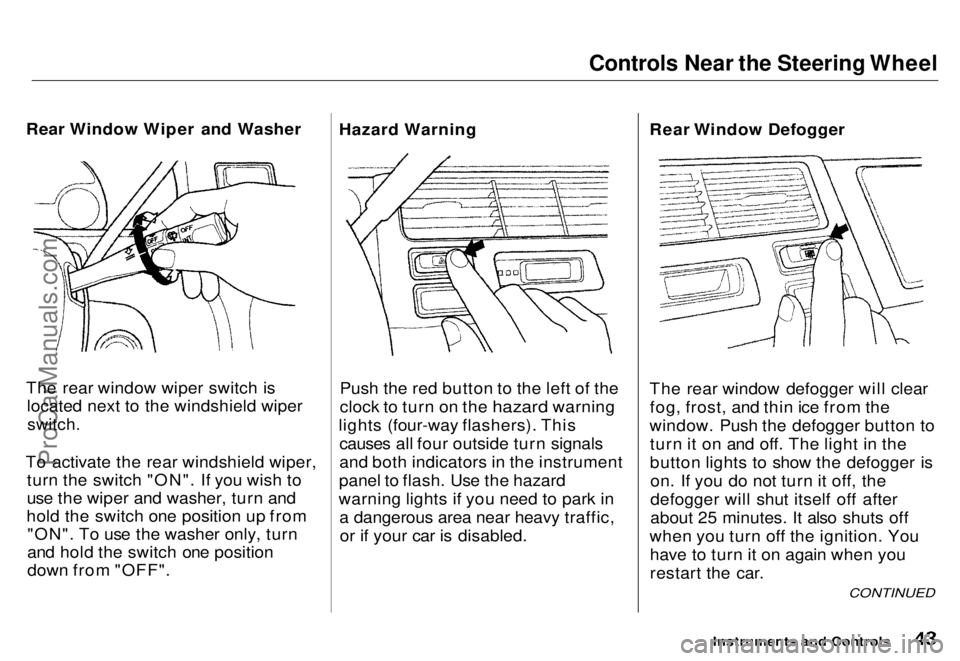
The rear window wiper switch is located next to the windshield wiper
switch.
To activate the rear windshield wiper, turn the switch "ON". If you wish to
use the wiper and washer, turn and
hold the switch one position up from "ON". To use the washer only, turn
and hold the switch one position
down from "OFF". Hazard Warning
Push the red button to the left of the
clock to turn on the hazard warning
lights (four-way flashers). This causes all four outside turn signals
and both indicators in the instrument
panel to flash. Use the hazard
warning lights if you need to park in a dangerous area near heavy traffic,or if your car is disabled. Rear Window Defogger
The rear window defogger will clear
fog, frost, and thin ice from the
window. Push the defogger button to turn it on and off. The light in the
button lights to show the defogger ison. If you do not turn it off, the
defogger will shut itself off after
about 25 minutes. It also shuts off
when you turn off the ignition. You have to turn it on again when you
restart the car.
Instruments and Controls
CONTINUED
ProCarManuals.comMain Menu s t Table of Contents
Page 50 of 240
Keys and Locks
Keys
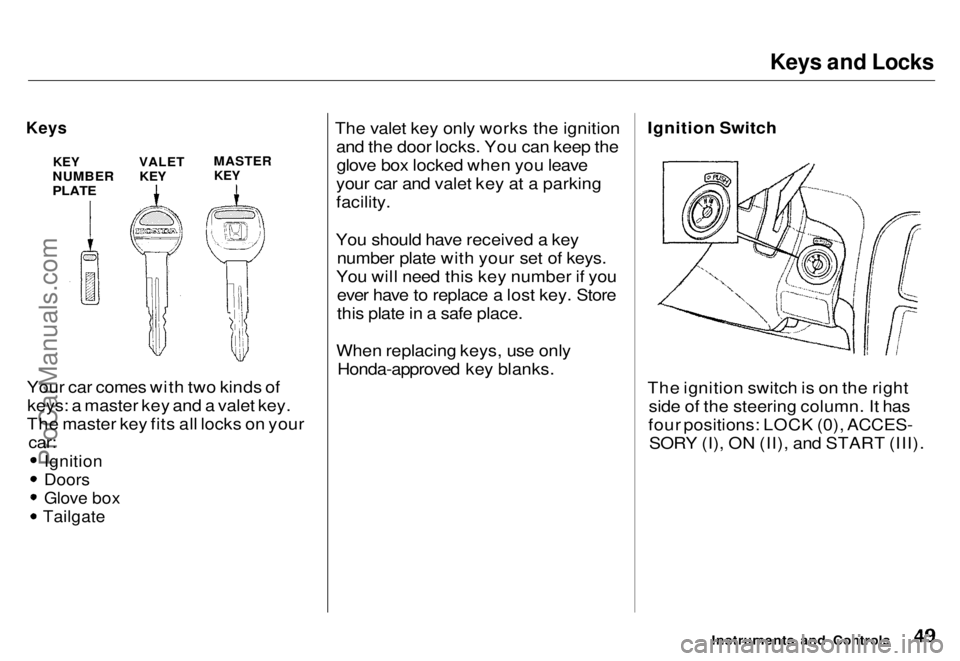
Your car comes with two kinds ofkeys: a master key and a valet key.
The master key fits all locks on your
car:
Ignition
Doors
Glove box
Tailgate
The valet key only works the ignition
and the door locks. You can keep theglove box locked when you leave
your car and valet key at a parking
facility.
You should have received a key number plate with your set of keys.
You will need this key number if you ever have to replace a lost key. Store
this plate in a safe place.
When replacing keys, use only Honda-approved key blanks.
Ignition Switch
The ignition switch is on the right
side of the steering column. It has
four positions: LOCK (0), ACCES- SORY (I), ON (II), and START (III).
Instruments and Controls
KEY
NUMBER
PLATE
VALET
KEY
MASTER
KEYProCarManuals.comMain Menu s t Table of Contents
Page 51 of 240
Keys and Locks
LOCK (0) — You can insert or
remove the key only in this position.
When you turn the key from LOCK to ACCESSORY, you may have to
turn the steering wheel to release the anti-theft lock. To switch from
ACCESSORY to LOCK, you must push the key in slightly as you turn it.
The shift lever must also be in Park. The anti-theft lock will lock the steering column when you remove
the key.
ACCESSORY (I) — In this position, you can operate the audio systemand cigarette lighter.
ON (II) — This is the normal key
position when driving. All features and accessories on the car are usable.
Several of the lights on the instru-
ment panel come on as a test when
you turn the ignition switch from
ACCESSORY to ON (see page 35 ). START (III) — Use this position
only to start the engine. The switch
returns to ON when you let go of the
key.
You will hear a reminder beeper if
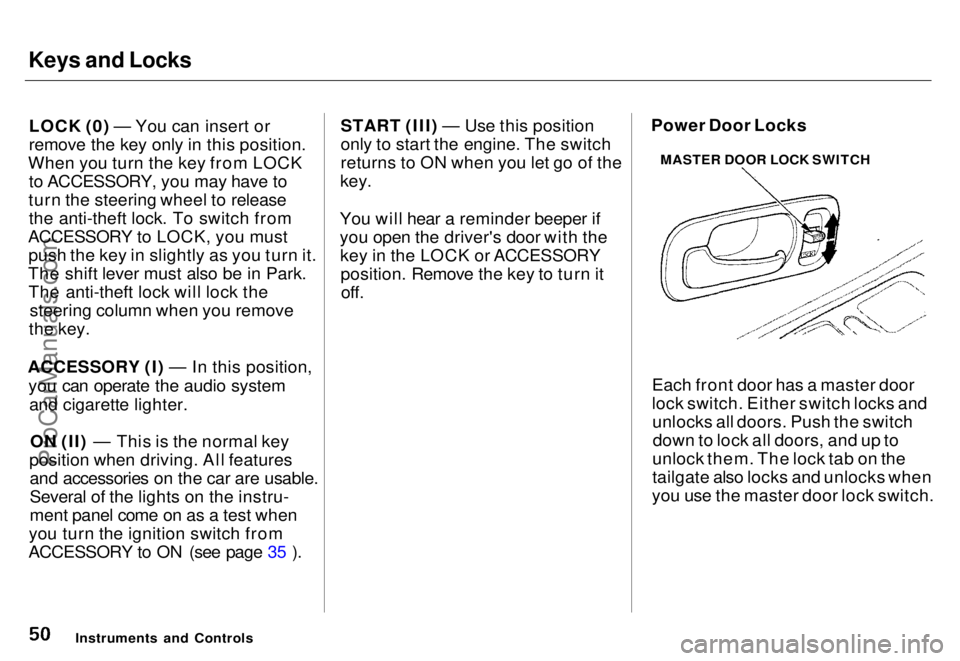
you open the driver's door with the key in the LOCK or ACCESSORYposition. Remove the key to turn itoff. Power Door Locks
Each front door has a master door
lock switch. Either switch locks andunlocks all doors. Push the switchdown to lock all doors, and up to
unlock them. The lock tab on the
tailgate also locks and unlocks when
you use the master door lock switch.
Instruments and Controls MASTER DOOR LOCK SWITCHProCarManuals.comMain Menu s t Table of Contents
Page 53 of 240
Keys and Locks
If you use the unlock feature on the
remote transmitter, and a door or the
tailgate is not opened within 20 seconds, all doors and the tailgate
will automatically lock. The remote transmitter will not work if the key isin the ignition.
This device complies with Part 15 of the
FCC rules. Operation is subject to the
following two conditions: (1) This device
may not cause harmful interference, and
(2) this device must accept any
interference received, including
interference that may cause undesired
operation.
Changes or modifications not expressly
approved by the party responsible for
compliance should void the user's
authority to operate the equipment.
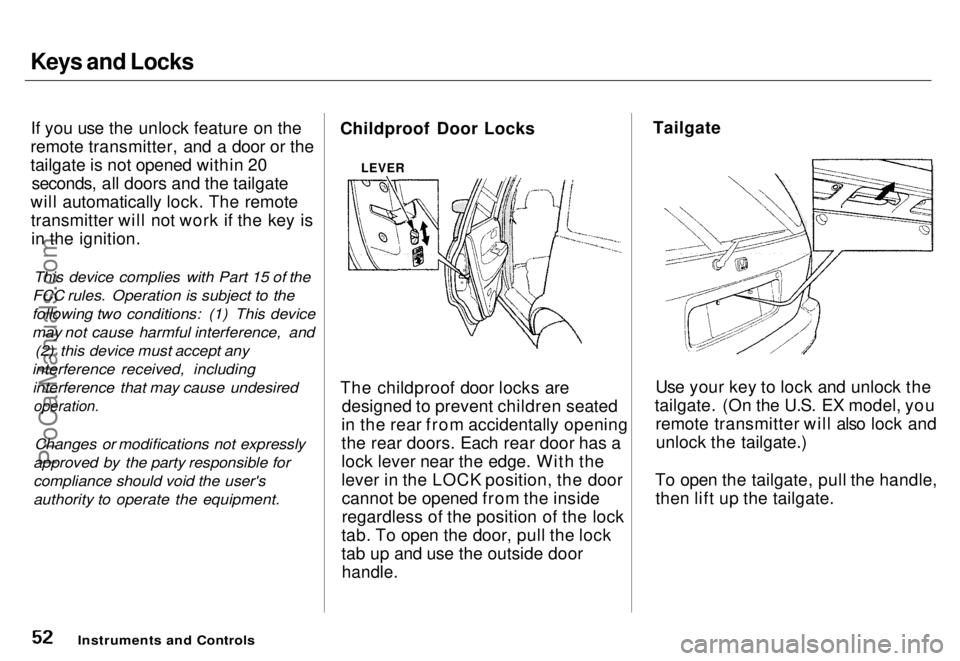
Childproof Door Locks
The childproof door locks are
designed to prevent children seated
in the rear from accidentally opening
the rear doors. Each rear door has a
lock lever near the edge. With the
lever in the LOCK position, the door cannot be opened from the inside
regardless of the position of the lock
tab. To open the door, pull the lock
tab up and use the outside door
handle.
Tailgate
Use your key to lock and unlock the
tailgate. (On the U.S. EX model, you remote transmitter will also lock andunlock the tailgate.)
To open the tailgate, pull the handle, then lift up the tailgate.
Instruments and Controls
LEVERProCarManuals.comMain Menu s t Table of Contents
Page 63 of 240
Power Windows
Your car's windows are electrically- powered. Turn the ignition switch toON (II) to raise or lower any window.
Each door has a switch that controls
its window. To open the window,
push the switch down and hold it. Release the switch when you want
the window to stop. Close the
window by pulling back on the switch and holding it.
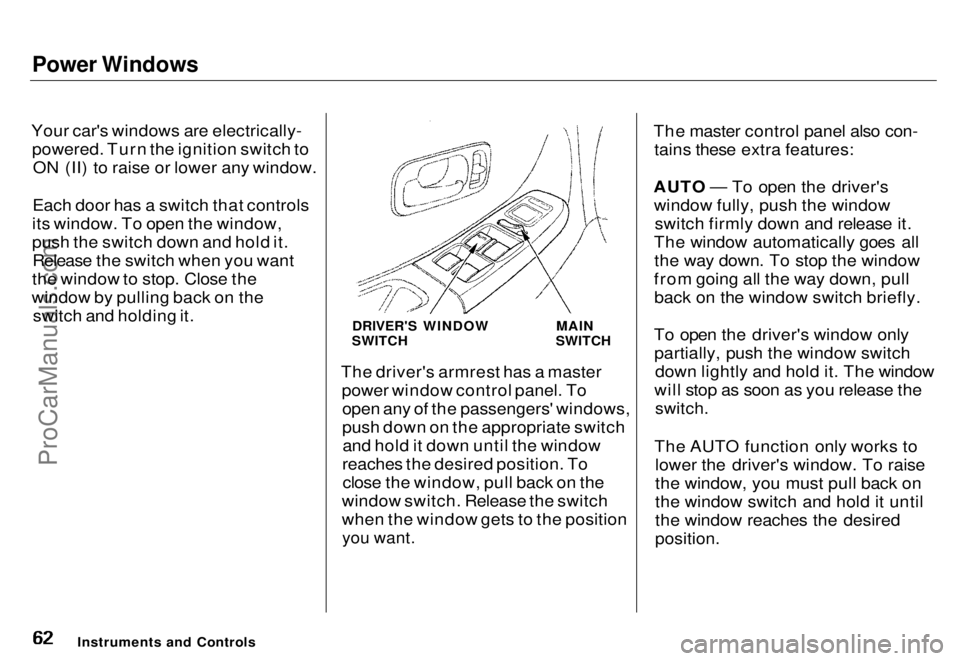
The driver's armrest has a masterpower window control panel. Toopen any of the passengers' windows,
push down on the appropriate switchand hold it down until the window
reaches the desired position. To close the window, pull back on the
window switch. Release the switch
when the window gets to the position
you want.
The master control panel also con-
tains these extra features:
AUTO — To open the driver's window fully, push the window switch firmly down and release it.
The window automatically goes all the way down. To stop the window
from going all the way down, pull back on the window switch briefly.
To open the driver's window only partially, push the window switch down lightly and hold it. The window
will stop as soon as you release the
switch.
The AUTO function only works to lower the driver's window. To raise
the window, you must pull back on
the window switch and hold it until
the window reaches the desired
position.
Instruments and Controls DRIVER'S WINDOW
SWITCH MAIN
SWITCHProCarManuals.comMain Menu s t Table of Contents
Page 64 of 240
Power Windows, Sunroof
The MAIN switch controls power to the passengers' windows. With this
switch off, the passengers' windowscannot be raised or lowered. The
MAIN switch does not affect thedriver's window. Keep the MAIN
switch off when you have children in
the car so they do not injure them- selves by operating the windows
unintentionally.
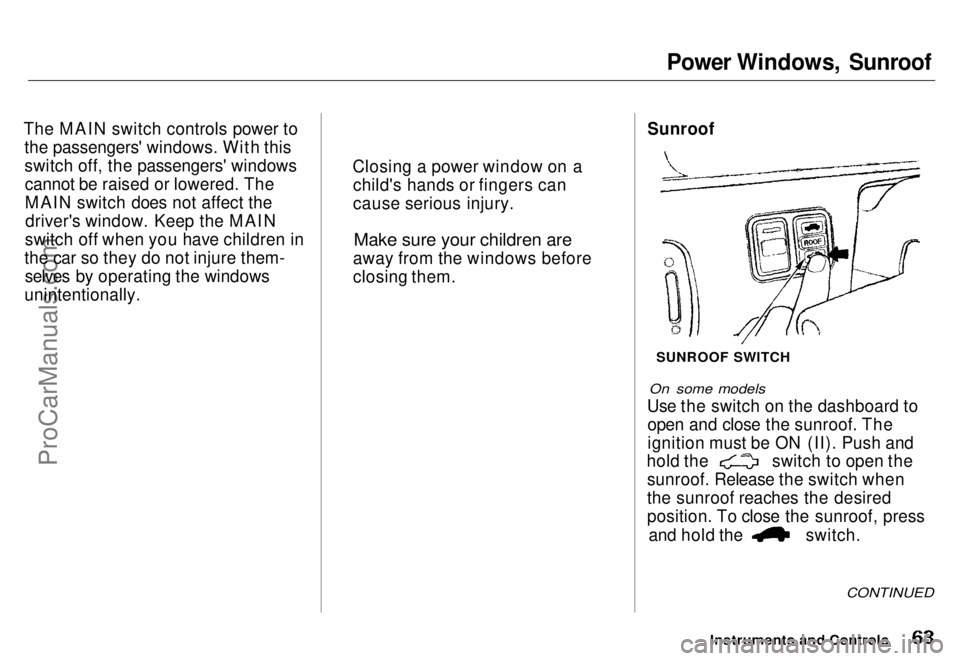
On some models
Use the switch on the dashboard to open and close the sunroof. The
ignition must be ON (II). Push and hold the switch to open the
sunroof. Release the switch when
the sunroof reaches the desired
position. To close the sunroof, press and hold the switch.
CONTINUED
Instruments and Controls
Sunroof
SUNROOF SWITCH
Closing a power window on a
child's hands or fingers can
cause serious injury.
Make sure your children are
away from the windows before
closing them.
ProCarManuals.coms t Main Menu Table of Contents