1996 CHRYSLER VOYAGER clock
[x] Cancel search: clockPage 400 of 1938

INSTALLATION
(1) Place message center in position on top cover.
(2) Install screws to hold message center to instru-
ment panel top cover.
(3) Connect wire connector into back of message
center.
(4) Install instrument panel top cover.
(5) Install A-pillar trim.
OVER STEERING COLUMN BEZEL
REMOVAL
(1) Remove the lower steering column cover.
(2) Remove the screws holding over steering col-
umn bezel to the cluster bezel (Fig. 45).
(3) Remove over steering column bezel from vehi-
cle.
(4) Disconnect the clips holding over column bezel
to the cluster bezel.
(5) If equipped with traction control switch, discon-
nect the wire pigtail connector from the traction con-
trol switch.
(6) Remove the over steering column bezel.
INSTALLATION
(1) Place the over steering column bezel in position
and engage clips to the cluster bezel. If equipped
with traction control switch connect the wire pigtail
before engaging clips.
(2) Install the screws to hold the over steering col-
umn bezel to the cluster bezel.
(3) Install the lower column cover.
POWER MIRROR SWITCH
REMOVAL
(1) Remove instrument cluster bezel (Fig. 46).
(2) Disconnect wire connector from back of power
mirror switch.
(3) Disengage lock tabs above and below the mir-
ror switch.
(4) Pull power mirror switch from headlamp
switch bezel.
(5) Remove power mirror switch.
INSTALLATION
For installation, reverse the above procedures.
POWER MIRROR SWITCH LAMP
REMOVAL
(1) Remove instrument cluster bezel (Fig. 47).
(2) Rotate bulb socket counterclockwise one quar-
ter turn.
(3) Pull bulb socket from back of power mirror
switch.
Fig. 45 Over Steering Column Bezel
Fig. 46 Power Mirror Switch
Fig. 47 Power Mirror Switch Lamp
8E - 28 INSTRUMENT PANEL AND SYSTEMSNS/GS
REMOVAL AND INSTALLATION (Continued)
Page 401 of 1938

INSTALLATION
For installation, reverse the above procedures.
RADIO BEZEL AND HVAC CONTROL
REMOVAL
(1) Remove screw access cover (Fig. 48).
(2) Remove the attaching screws holding bottom of
the bezel to instrument panel.
(3) Remove the attaching screws holding top of the
bezel to the instrument panel.
(4) Remove the bezel from the instrument panel.
(5) Disconnect the wire connector from back of the
rear blower switch, if equipped.
(6) Disconnect the wire connector from the back of
the HVAC Control.
(7) Remove the bezel.
INSTALLATION
(1) Hold the radio bezel up and connect the wire
connector into the back of the HVAC control.
(2) Connect the wire connector into back of the
rear blower switch, if equipped.
(3) Place the radio bezel in position on the instru-
ment panel.
(4) Install screws to hold the top of radio bezel to
instrument panel.
(5) Install screws to the hold bottom of the radio
bezel to the instrument panel.
(6) Install the access cover.
REAR HEATER-A/C SWITCH
REMOVAL
(1)Remove radio bezel and HVAC Control (Fig. 49).
(2) Remove screw holding rear heater-A/C switch
to radio bezel HVAC Control.
(3) Disengage hook holding bottom of switch to
radio bezel HVAC Control.
(4) Remove switch from radio bezel HVAC Control.
INSTALLATION
For instrument, reverse the above procedures.
REAR HEATER-A/C SWITCH LAMP
REMOVAL
(1) Remove radio bezel HVAC Control.
(2) Rotate bulb socket counterclockwise one quar-
ter (Fig. 50).
(3) Pull bulb socket from switch.
INSTALLATION
For installation, reverse the above procedures.
Fig. 48 Radio Bezel and HVAC Control
Fig. 49 Rear Heater ± A/C Switch
Fig. 50 Rear Heater-A/C Switch Lamp Bulb
NS/GSINSTRUMENT PANEL AND SYSTEMS 8E - 29
REMOVAL AND INSTALLATION (Continued)
Page 403 of 1938

AUDIO SYSTEMS
CONTENTS
page page
GENERAL INFORMATION
INTRODUCTION......................... 1
DESCRIPTION AND OPERATION
ANTENNA.............................. 1
CHOKEÐINFINITY SPEAKERS.............. 2
INTERFERENCE ELIMINATION.............. 1
NAME BRAND SPEAKER RELAY............ 3
RADIO IGNITION INTERFERENCE........... 2
RADIOS................................ 1
REMOTE RADIO SWITCHES................ 3
DIAGNOSIS AND TESTING
ANTENNA.............................. 3AUDIO SYSTEM......................... 4
RADIO................................. 4
REMOTE RADIO SWITCHES................ 6
REMOVAL AND INSTALLATION
ANTENNA EXTENSION CABLE.............. 7
ANTENNA MAST AND CABLE LEAD......... 7
D±PILLAR SPEAKER.................... 10
FRONT DOOR SPEAKER................... 9
INSTRUMENT PANEL SPEAKER............. 8
QUARTER PANEL SPEAKER............... 10
RADIO/TAPE/CD PLAYER.................. 8
REMOTE RADIO SWITCHES................ 9
GENERAL INFORMATION
INTRODUCTION
Operating instructions for the factory installed
audio systems can be found in the Owner's Manual
provided with the vehicle.
NS vehicles are equipped with an Ignition Off
Draw (IOD) fuse in the power distribution center
located in the engine compartment. After the IOD
fuse or battery has been disconnected, the radio sta-
tion sets and clock will require resetting.
DESCRIPTION AND OPERATION
ANTENNA
All models use a fixed-length stainless steel rod-
type antenna mast, installed at the right front fender
of the vehicle. The antenna mast is connected to the
center wire of the coaxial antenna cable, and is not
grounded to any part of the vehicle.
To eliminate static, the antenna base must have a
good ground. The coaxial antenna cable shield (the
outer wire mesh of the cable) is grounded to the
antenna base and the radio chassis.
The antenna coaxial cable has an additional dis-
connect, located near the right end of the instrument
panel. This additional disconnect allows the instru-
ment panel assembly to be removed and installed
without removing the radio.
The factory-installed Electronically Tuned Radios
(ETRs) automatically compensate for radio antenna
trim. Therefore, no antenna trimmer adjustment isrequired or possible when replacing the receiver or
the antenna.
INTERFERENCE ELIMINATION
Some components used on the vehicles are
equipped with a capacitor to suppress radio fre-
quency interference/static.
Capacitors are mounted in various locations inter-
nal to the generator, instrument cluster and wind-
shield wiper motor.
To eliminate radio interference, ground straps are
used in different areas of the vehicle. These ground
circuits should be securely tightened to assure good
metal to metal contact. The ground straps conduct
very small high frequency electrical signals to ground
and require clean surface contact area. The radio
ground is supplied from the instrument panel har-
ness and is attached to the rear of the radio. Some
engines have other ground straps to eliminate fur-
ther radio interference:
²Radio chassis to instrument panel structure
²Engine to dash panel
²Engine to chassis
²A/C h valve to dash panel
Radio resistance type spark plug cables in the high
tension circuit of the ignition system complete the
interference suppression. Faulty or deteriorated
spark plug wires should be replaced.
RADIOS
Available factory-installed radio receivers for this
model include an AM/FM/cassette (RAS sales code),
an AM/FM/cassette/5-band graphic equalizer with CD
changer control feature (RBN sales code), an AM/FM/
NSAUDIO SYSTEMS 8F - 1
Page 404 of 1938

CD/3-band graphic equalizer (RBR sales code), or an
AM/FM/CD/cassette/3-band graphic equalizer (RAZ
sales code).
All factory-installed radio receivers are stereo Elec-
tronically Tuned Radios (ETR) and include an elec-
tronic digital clock function.
All factory-installed radio receivers, except the
RAS model, communicate on the Chrysler Collision
Detection (CCD) data bus network through a sepa-
rate two-way wire harness connector. The CCD data
bus network allows the sharing of sensor informa-
tion. This helps to reduce wire harness complexity,
internal controller hardware, and component sensor
current loads. At the same time, this system provides
increased reliability, enhanced diagnostics, and
allows the addition of many new feature capabilities.
In addition, radios connected to the CCD data bus
have several audio system functions that can be diag-
nosed using a DRB scan tool. Refer to the proper
Diagnostic Procedures manual for more information
on DRB testing of the audio systems.
The radio can only be serviced by an authorized
radio repair station. Refer to the latest Warranty Pol-
icies and Procedures manual for a current listing of
authorized radio repair stations.
For more information on radio features, setting
procedures, and control functions refer to the owner's
manual in the vehicle glove box.
RADIO IGNITION INTERFERENCE
If receiving ignition/engine interference noise on
the radio stations, check and clean all engine and
body ground connections. Tighten properly after
cleaning. Example (Fig. 1), (Fig. 2), (Fig. 3) and (Fig.
4).
Ensure all ground connections are without corro-
sion.
CHOKEÐINFINITY SPEAKERS
If the audio system is lacking bass response, check
for continuity across the choke connector. If no conti-
nuity Replace choke. The choke is located on the
Fig. 1 Motor Mount to Frame Rail Ground
Fig. 2 2.4L Engine Block Ground
Fig. 3 3.0L Engine Block Ground
Fig. 4 3.3/3.8L Engine Block Ground
8F - 2 AUDIO SYSTEMSNS
DESCRIPTION AND OPERATION (Continued)
Page 405 of 1938

bracket behind the junction block/body control mod-
ule (Fig. 5).
REMOTE RADIO SWITCHES
A remote radio control switch option is available on
LXI models sold in North America with the AM/FM/
cassette/5-band graphic equalizer with CD changer
control feature (RBN sales code), or the AM/FM/CD/
cassette/3-band graphic equalizer (RAZ sales code)
radio receivers. Two rocker-type switches are
mounted on the back (instrument panel side) of the
steering wheel spokes. The switch on the left spoke is
the seek switch and has seek up, seek down, and pre-
set station advance functions. The switch on the
right spoke is the volume control switch and has vol-
ume up, and volume down functions (Fig. 6).
These switches are resistor multiplexed units that
are hard-wired to the Body Control Module (BCM)
through the clockspring. The BCM sends the propermessages on the Chrysler Collision Detection (CCD)
data bus network to the radio receiver. For diagnosis
of the BCM or the CCD data bus, the use of a DRB
scan tool and the proper Diagnostic Procedures man-
ual are recommended. For more information on the
operation of the remote radio switch controls, refer to
the owner's manual in the vehicle glove box.
NAME BRAND SPEAKER RELAY
Relay is located in the junction block. To test relay
refer to the Audio Diagnostic Test Procedures or use
a known good relay.
DIAGNOSIS AND TESTING
ANTENNA
WARNING: ON VEHICLES EQUIPPED WITH AIR-
BAGS, REFER TO GROUP 8M - PASSIVE
RESTRAINT SYSTEMS BEFORE ATTEMPTING ANY
STEERING WHEEL, STEERING COLUMN, OR
INSTRUMENT PANEL COMPONENT DIAGNOSIS OR
SERVICE. FAILURE TO TAKE THE PROPER PRE-
CAUTIONS COULD RESULT IN ACCIDENTAL AIR-
BAG DEPLOYMENT AND POSSIBLE PERSONAL
INJURY.
The following four tests are used to diagnose the
antenna with an ohmmeter:
²Test 1- Mast to ground test
²Test 2- Tip-of-mast to tip-of-conductor test
²Test 3- Body ground to battery ground test
²Test 4- Body ground to coaxial shield test.
The ohmmeter test lead connections for each test
are shown in Antenna Tests (Fig. 7).
NOTE: This model has a two-piece antenna coaxial
cable. Tests 2 and 4 must be conducted in two
steps to isolate a coaxial cable problem; from the
coaxial cable connection under the right end of the
instrument panel near the right cowl side panel to
the antenna base, and then from the coaxial cable
connection to the radio chassis connection.
TEST 1
Test 1 determines if the antenna mast is insulated
from the base. Proceed as follows:
(1) Unplug the antenna coaxial cable connector
from the radio chassis and isolate.
(2) Connect one ohmmeter test lead to the tip of
the antenna mast. Connect the other test lead to the
antenna base. Check for continuity.
(3) There should be no continuity. If continuity is
found, replace the faulty or damaged antenna base
and cable assembly.
Fig. 5 Choke Location
Fig. 6 Remote Radio Switch Operational View
NSAUDIO SYSTEMS 8F - 3
DESCRIPTION AND OPERATION (Continued)
Page 413 of 1938
HORNS
CONTENTS
page page
DESCRIPTION AND OPERATION
INTRODUCTION......................... 1
DIAGNOSIS AND TESTING
HORN RELAY........................... 1
HORN SYSTEM.......................... 3
HORN SYSTEM TEST..................... 3HORN................................. 1
HORNS SOUND CONTINUOUSLY............ 3
HORNS WILL NOT SOUND................ 2
REMOVAL AND INSTALLATION
HORN SWITCH.......................... 4
HORNS................................ 4
DESCRIPTION AND OPERATION
INTRODUCTION
WARNING: ON VEHICLES EQUIPPED WITH AIR-
BAG, SEE GROUP 8M, RESTRAINT SYSTEMS FOR
SAFETY PRECAUTIONS. DISCONNECT THE NEGA-
TIVE CABLE FROM THE BATTERY BEFORE SER-
VICING COMPONENTS INVOLVING THE AIRBAG
SYSTEM. ACCIDENTAL DEPLOYMENT OF AIRBAG
AND PERSONAL INJURY CAN RESULT.
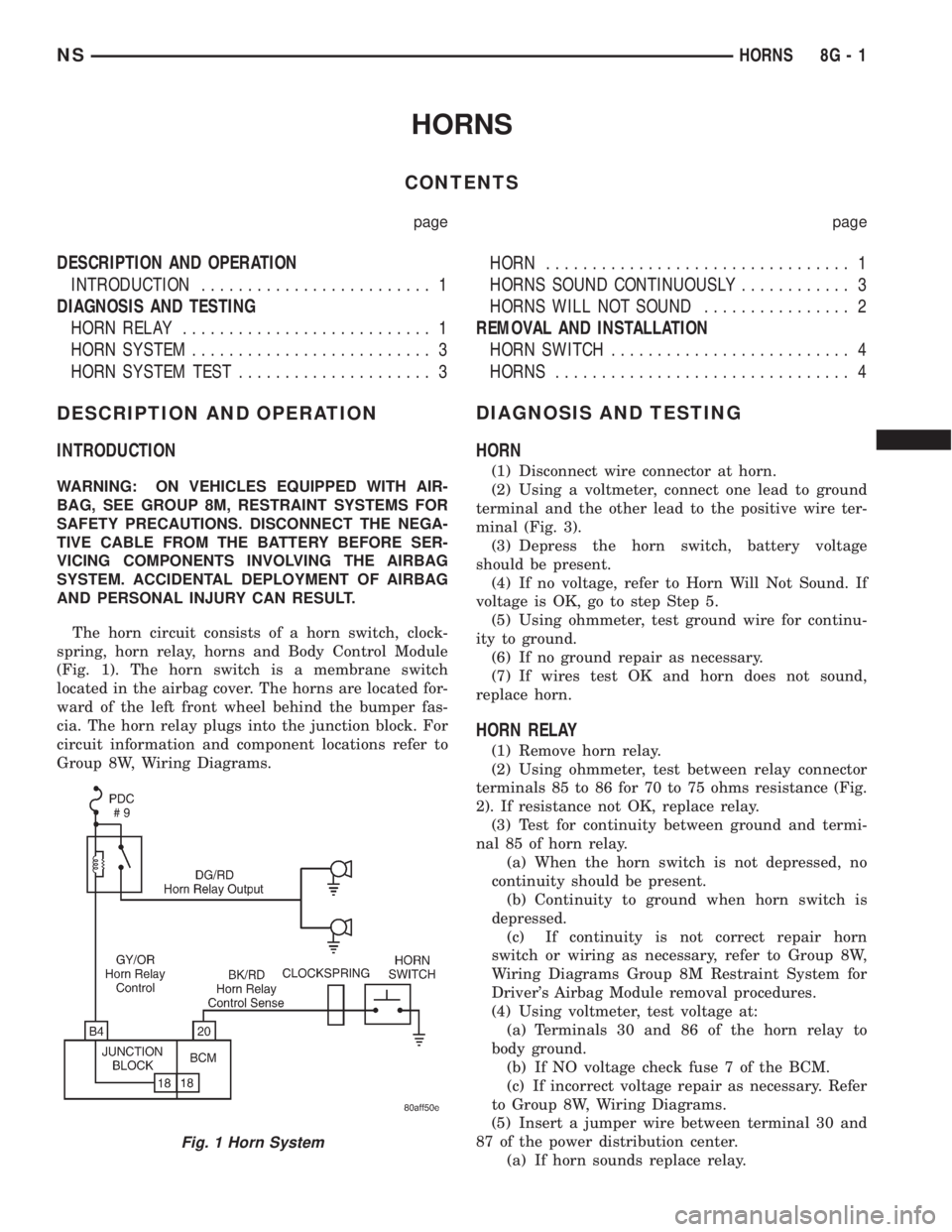
The horn circuit consists of a horn switch, clock-
spring, horn relay, horns and Body Control Module
(Fig. 1). The horn switch is a membrane switch
located in the airbag cover. The horns are located for-
ward of the left front wheel behind the bumper fas-
cia. The horn relay plugs into the junction block. For
circuit information and component locations refer to
Group 8W, Wiring Diagrams.
DIAGNOSIS AND TESTING
HORN
(1) Disconnect wire connector at horn.
(2) Using a voltmeter, connect one lead to ground
terminal and the other lead to the positive wire ter-
minal (Fig. 3).
(3) Depress the horn switch, battery voltage
should be present.
(4) If no voltage, refer to Horn Will Not Sound. If
voltage is OK, go to step Step 5.
(5) Using ohmmeter, test ground wire for continu-
ity to ground.
(6) If no ground repair as necessary.
(7) If wires test OK and horn does not sound,
replace horn.
HORN RELAY
(1) Remove horn relay.
(2) Using ohmmeter, test between relay connector
terminals 85 to 86 for 70 to 75 ohms resistance (Fig.
2). If resistance not OK, replace relay.
(3) Test for continuity between ground and termi-
nal 85 of horn relay.
(a) When the horn switch is not depressed, no
continuity should be present.
(b) Continuity to ground when horn switch is
depressed.
(c) If continuity is not correct repair horn
switch or wiring as necessary, refer to Group 8W,
Wiring Diagrams Group 8M Restraint System for
Driver's Airbag Module removal procedures.
(4) Using voltmeter, test voltage at:
(a) Terminals 30 and 86 of the horn relay to
body ground.
(b) If NO voltage check fuse 7 of the BCM.
(c) If incorrect voltage repair as necessary. Refer
to Group 8W, Wiring Diagrams.
(5) Insert a jumper wire between terminal 30 and
87 of the power distribution center.
(a) If horn sounds replace relay.
Fig. 1 Horn System
NSHORNS 8G - 1
Page 415 of 1938

HORNS SOUND CONTINUOUSLY
CAUTION: Continuous sounding of horns may
cause relay to fail.
The horn switch (membrane) sometimes can be the
cause without the switch being depressing.
(1) Remove the horn relay from the junction block.
(2) Using a continuity tester, test continuity from
the X3 cavity of the horn relay to ground. Refer to
Group 8W, Wiring Diagrams for circuit information.
(a) If continuity is detected, proceed to step Step
3.
(b) If NO continuity, replace the horn relay.
(3) Remove the airbag/horn pad from the steering
wheel and disengage horn connector.
(4) Install horn relay into junction block.
(a) If horn does not sound, replace airbag cover/
horn pad.
(b) If horn sounds, repair grounded X3 circuit
from junction block to clockspring in steering in
steering column. Refer to Group 8W, Wiring Dia-
grams.
HORN SYSTEM
Refer to Horn System Test below. If the horn does
not sound, check horn fuse located in the Power Dis-
tribution Center. If the fuse is blown, replace with
the correct fuse. If the horn fail to sound and the
new fuse blows when depressing the horn switch, a
short circuit in the horn or the horn wiring between
the fuse terminal and the horn is responsible, or a
defective horn switch allowed the horn to burn out is
responsible.
If the fuse is OK, test horn relay refer to Horn
Relay Test.
If the relay is OK, test horn. Refer to Horn System
Test.
CAUTION: Continuous sounding of horn may
cause horn relay to fail.
Should the horn sound continuously:
²Unplug the horn relay from Power Distribution
Center.
²Refer to Horn Relay Test.
Refer to Group 8W, Wiring Diagrams for circuit
and wiring information.
HORN SYSTEM TEST
CONDITION POSSIBLE CAUSE CORRECTION
Horn sounds continuously.
NOTE: Immediately unplug horn
relay in the Power Distribution
Center (PDC)(1) Faulty horn relay.
(2) Horn control circuit to relay
shorted to ground.
(3) Pinched horn switch wire under
Driver Airbag Module.
(4) Defective horn switch(1) Refer to horn relay test.
(2) Check terminal 85 in Junction
Block for continuity to ground. If
continuity to ground indicates:
(a) Steering Wheel horn switch/lead
shorted to ground.
(b) Wiring harness shorted to
ground. Find the short and repair as
necessary.
(3) Replace Driver Airbag Module.
(4) Replace Driver Airbag Module.
Horn sound intermittently as the
steering wheel is turned.(1) Horn relay control circuit X3 is
shorted to ground inside steering
column or wheel.
(2) Pinched horn switch wire under
Driver Airbag Module
(3) Defective horn switch(1) Remove Driver Airbag Module
and/or wheel. Check for rubbing or
loose wire/connector, repair as
necessary.
(2) Replace Driver Airbag Module.
(3) Replace Driver Airbag Module.
Horn does not sound (1) Check fuse 6 in PDC
(2) No Voltage at horn relay
terminals 30 & 86, and fuse is OK.
(3) Open circuit from terminal 85 of
the horn relay to horn switch, X3
circuit.
(4) Defective or damaged horn.
(5) Defective horn switch(1) Replace fuse if blown repair as
necessary.
(2) No voltage, repair the A6 circuit
as necessary.
(3) Repair circuit as necessary.
(4) Voltage at horn when horn switch
is pressed, replace horn.
(5) Replace Driver Airbag Module.
NSHORNS 8G - 3
DIAGNOSIS AND TESTING (Continued)
Page 425 of 1938

INSTALLATION
Transfer speed control cable to replacement speed
control servo. Reverse the preceding operation.
SPEED CONTROL SWITCHES
REMOVAL
(1) Release hood latch and open hood.
(2) Disconnect battery negative cable.
(3) Remove airbag/horn pad from steering wheel,
refer to Group 8M, Restraint Systems for proper pro-
cedures.
(4) Disconnect wire connector from horn switch,
airbag, and speed control switches.
(5) Remove screws holding speed control switch to
airbag/horn pad (Fig. 11).
(6) Separate speed control switch from airbag/horn
pad.
INSTALLATION
Reverse the preceding operation.
STOP LAMP SWITCH
REMOVAL
Remove the switch from the bracket by depressing
the brake pedal and rotating the switch in a counter-
clockwise direction approximately 30 degrees. Pull
the switch rearward and remove from bracket. Dis-
connect wiring harness connector.
INSTALLATION
Before installing the switch, reset the adjustable
switch plunger by pulling on the plunger head until
the plunger reaches the end of its travel. A ratchet-
ing sound will be heard during this procedure.
Connect the wiring harness to the switch. Mount
the switch into the bracket by holding the switch
with the plunger facing forward in car. There is an
index key on the switch that mates with the bracket
slot at the top of the square hole. Align key and push
switch into square hole in bracket while depressing
the brake pedal. Once the switch is seated in the
hole, rotate clockwise approximately 30 degrees to
lock into place. The switch will automatically adjust
when the pedal is released. Pull back on the pedal to
assure correct adjustment.
SPEED CONTROL CABLE
REMOVAL
(1) Release hood latch and open hood.
(2) On vehicles with 3.3/3.8 L engine, remove air
cleaner resonator. Refer to Group 14, Fuel System for
proper procedure.
(3) Disconnect throttle and speed control cable
ends from throttle body (Fig. 8).
(4) Depress lock tabs holding speed control cable
casing to cable mount bracket (Fig. 12).
(5) Remove tie wrap holding vacuum line, throttle
cable, and speed control cable together.
(6) Remove nuts holding speed control cable case
to servo.
(7) Remove cable case from servo.
(8) Remove hairpin clip holding cable end to servo
diaphragm (Fig. 12).
(9) Remove speed control cable.
INSTALLATION
Reverse the preceding operation.
POWERTRAIN CONTROL MODULE
For Removal/Installation refer to Powertrain Con-
trol Module in Group 14, Fuel Injection System.
USE THE DRB SCAN TOOL TO REPROGRAM
THE NEW PCM WITH THE VEHICLES ORIGI-
NAL IDENTIFICATION NUMBER (VIN) AND
THE ORGINAL VEHICLES MILAGE. IF THIS
Fig. 10 Speed Control Servo
Fig. 11 Speed Control Switches
NSVEHICLE SPEED CONTROL SYSTEM 8H - 9
REMOVAL AND INSTALLATION (Continued)