1996 CHRYSLER VOYAGER clock
[x] Cancel search: clockPage 236 of 1938
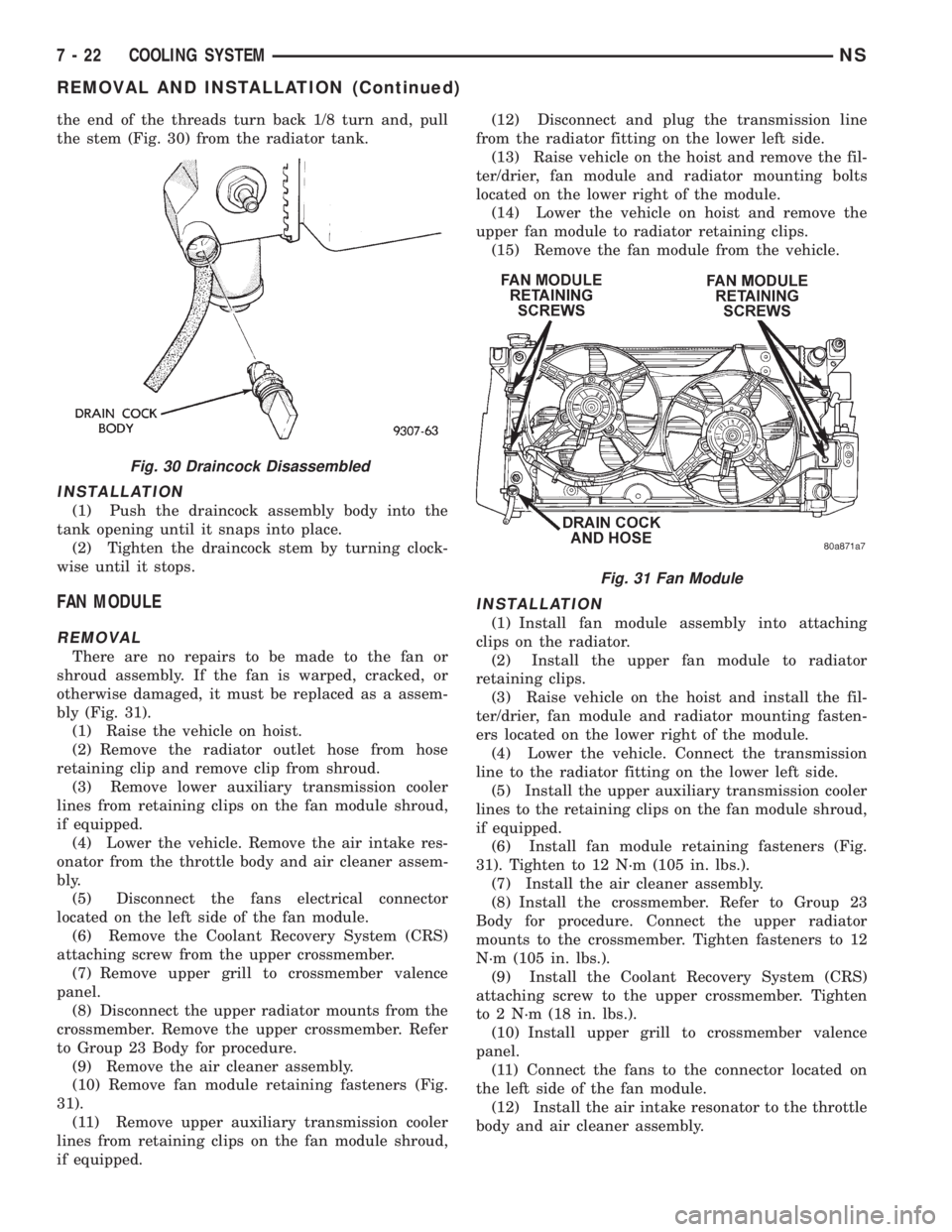
the end of the threads turn back 1/8 turn and, pull
the stem (Fig. 30) from the radiator tank.
INSTALLATION
(1) Push the draincock assembly body into the
tank opening until it snaps into place.
(2) Tighten the draincock stem by turning clock-
wise until it stops.
FAN MODULE
REMOVAL
There are no repairs to be made to the fan or
shroud assembly. If the fan is warped, cracked, or
otherwise damaged, it must be replaced as a assem-
bly (Fig. 31).
(1) Raise the vehicle on hoist.
(2) Remove the radiator outlet hose from hose
retaining clip and remove clip from shroud.
(3) Remove lower auxiliary transmission cooler
lines from retaining clips on the fan module shroud,
if equipped.
(4) Lower the vehicle. Remove the air intake res-
onator from the throttle body and air cleaner assem-
bly.
(5) Disconnect the fans electrical connector
located on the left side of the fan module.
(6) Remove the Coolant Recovery System (CRS)
attaching screw from the upper crossmember.
(7) Remove upper grill to crossmember valence
panel.
(8) Disconnect the upper radiator mounts from the
crossmember. Remove the upper crossmember. Refer
to Group 23 Body for procedure.
(9) Remove the air cleaner assembly.
(10) Remove fan module retaining fasteners (Fig.
31).
(11) Remove upper auxiliary transmission cooler
lines from retaining clips on the fan module shroud,
if equipped.(12) Disconnect and plug the transmission line
from the radiator fitting on the lower left side.
(13) Raise vehicle on the hoist and remove the fil-
ter/drier, fan module and radiator mounting bolts
located on the lower right of the module.
(14) Lower the vehicle on hoist and remove the
upper fan module to radiator retaining clips.
(15) Remove the fan module from the vehicle.
INSTALLATION
(1) Install fan module assembly into attaching
clips on the radiator.
(2) Install the upper fan module to radiator
retaining clips.
(3) Raise vehicle on the hoist and install the fil-
ter/drier, fan module and radiator mounting fasten-
ers located on the lower right of the module.
(4) Lower the vehicle. Connect the transmission
line to the radiator fitting on the lower left side.
(5) Install the upper auxiliary transmission cooler
lines to the retaining clips on the fan module shroud,
if equipped.
(6) Install fan module retaining fasteners (Fig.
31). Tighten to 12 N´m (105 in. lbs.).
(7) Install the air cleaner assembly.
(8) Install the crossmember. Refer to Group 23
Body for procedure. Connect the upper radiator
mounts to the crossmember. Tighten fasteners to 12
N´m (105 in. lbs.).
(9) Install the Coolant Recovery System (CRS)
attaching screw to the upper crossmember. Tighten
to 2 N´m (18 in. lbs.).
(10) Install upper grill to crossmember valence
panel.
(11) Connect the fans to the connector located on
the left side of the fan module.
(12) Install the air intake resonator to the throttle
body and air cleaner assembly.
Fig. 30 Draincock Disassembled
Fig. 31 Fan Module
7 - 22 COOLING SYSTEMNS
REMOVAL AND INSTALLATION (Continued)
Page 238 of 1938

ACCESSORY DRIVE BELTSÐ3.0L
GENERATOR/POWER STEERING PUMP BELT
REMOVAL/INSTALLATION
The Poly-V generator/power steering pump belt is
provided with a dynamic tensioner (Fig. 34) to main-
tain proper belt tension. To remove or install this
belt, apply force in a clockwise direction to the ten-
sioner pulley bolt (Fig. 34).
AIR CONDITIONING BELT
REMOVAL
To remove the air conditioning compressor drive
belt, first loosen the idler pulley lock nut, then turn
the adjusting screw to lower the idler pulley (Fig.
35).
INSTALLATION/ADJUSTMENT
To adjust the air conditioning drive belt,
loosen the idler pulley lock nut (Fig. 35) and adjust
belt tension by tightening adjusting screw. Refer toProper Belt Tension and Belt Tension Chart in this
Section for procedure. Tighten pulley lock nut to 54
N´m (40 ft. lbs.) after adjustment.
ACCESSORY DRIVE BELTÐ3.3/3.8L
REMOVE/INSTALL
GENERATOR, POWER STEERING PUMP, AIR CONDITIONING
COMPRESSOR AND WATER PUMP DRIVE BELT
The Poly-V Drive belt is provided with a dynamic
tensioner (Fig. 36) to maintain proper belt tension.
To remove or install this belt.
(1) Raise vehicle on hoist.
(2) Remove right front splash shield.
(3) Release tension by rotating the tensioner
clockwise (Fig. 36).
(4) Reverse above procedure to install.
CLEANING AND INSPECTION
WATER PUMP
Replace the water pump if it has any of the follow-
ing defects.
(1) Damage or cracks on the pump body.
(2) Coolant leaks; if the seal is leaking, this will be
evident by traces of thick deposits of greenish-brown
dried glycol running down the pump body and com-
ponents below. A thin black stain below pump weep
hole is considered normal operation.
(3) Impeller rubs inside of chain case cover
3.3/3.8L or cylinder block 2.4L engines.
(4) Excessively loose or rough turning bearing.
Fig. 34 Release Belt TensionerÐ3.0L
Fig. 35 Air Conditioning Drive BeltÐ3.0L Engine
Fig. 36 Accessory Drive BeltÐ3.3/3.8L Engines
7 - 24 COOLING SYSTEMNS
REMOVAL AND INSTALLATION (Continued)
Page 250 of 1938

INSTALLATION
(1) Install fan module on radiator.
(2) Install radiator.
(3) Tighten receiver/dryer lower bolt.
(4) Install radiator attaching bolts.
(5) Install lower and upper radiator hoses.
(6) Connect fan module.
(7) Install air cleaner housing and intake hose.
(8) Install radiator closure panel crossmember.
(9) Install power steering reservoir attaching bolts.
(10) Refill cooling system. Refer to Refilling cooling
system in this section for procedure.
(11) Connect battery.
WATER PUMP BELT Ð 2.5L VM DIESEL
REMOVAL
(1) Remove generator/power steering belt. Refer to
procedure in this section.
(2) Raise vehicle on hoist.
(3) Remove right side splash shield (Fig. 22).
(4) Loosen belt tensioner bracket bolts (Fig. 23).(5) Loosen adjuster lock nut.
(6) Loosen adjusting bolt, and remove belt.
INSTALLATION
(1) Install water pump belt.
(2) Turn adjusting bolt clockwise to tighten belt.
(3) Tighten lock nut.
(4) Tighten belt tensioner bracket bolts
(5) Lower vehicle.
(6) Install generator/power steering belt. Refer to
procedure in this section.
GENERATOR/POWER STEERING BELT Ð 2.5L VM
DIESEL
REMOVAL
(1) Loosen generator pivot bolt (Fig. 24).
(2) Loosen adjusting bracket bolt.
(3) Loosen adjusting nut.
(4) Remove generator/power steering belt.
INSTALLATION
(1) Install generator/power steering belt.
(2) Tighten adjusting nut.
(3) Tighten adjusting bracket bolt.
(4) Tighten generator pivot bolt.
CLEANING AND INSPECTION
WATER PUMP
Replace the water pump if it has any of the follow-
ing defects.
(1) Damage or cracks on the pump body.
Fig. 21 Radiator Closure Panel Crossmember
Fig. 22 Right Side Splash Shield
Fig. 23 Water Pump Belt Removal Ð 2.5L VM Diesel
7 - 10 COOLING SYSTEMNS/GS
REMOVAL AND INSTALLATION (Continued)
Page 357 of 1938

HEADLAMP SWITCH LAMP(S)
REMOVAL
(1) Remove instrument cluster bezel.
(2) Disconnect wire connectors.
(3) Remove headlamp switch bezel from instru-
ment cluster bezel.
(4) Rotate bulb socket counterclockwise one quar-
ter turn (Fig. 14).
(5) Pull bulb socket from headlamp switch.
INSTALLATION
For installation, reverse the above procedures.
HVAC CONTROL LAMP
REMOVAL
(1) Remove radio bezel and HVAC Control (Fig.
15).
(2) Remove rear cover from HVAC control.
(3) Rotate bulb socket counterclockwise one quar-
ter turn.
(4) Pull bulb socket from HVAC.
INSTALLATION
For installation, reverse the above procedures.
INSTRUMENT CLUSTER BACK PANEL
REMOVAL
(1) Remove instrument cluster.
(2) Remove screws holding back panel to instru-
ment cluster (Fig. 16).
(3) Remove back panel.
INSTALLATION
For installation, reverse the above procedures.
INSTRUMENT CLUSTER BEZEL
REMOVAL
(1) Remove steering column cover.
(2) Remove over steering column bezel (Fig. 17).
(3) Remove left end cover.
(4) Remove screw at left end of cluster bezel and
headlamp switch.
Fig. 14 Headlamp Switch Lamp
Fig. 15 HVAC Control Lamps
Fig. 16 Instrument Cluster Back Panel
Fig. 17 Instrument Cluster Bezel
NSINSTRUMENT PANEL AND SYSTEMS 8E - 21
REMOVAL AND INSTALLATION (Continued)
Page 368 of 1938

(4) Disengage park brake release cable case from
groove on end of release handle (Fig. 47).
(5) Disengage cable end pivot from slot on release
handle (Fig. 47).
INSTALLATION
For installation, reverse the above procedures,
MECHANICAL TRANSMISSION RANGE INDICATOR
REMOVAL
(1) Remove instrument cluster.
(2) Remove cluster lens.
(3) Remove screws holding mechanical transmis-
sion range indicator to back of cluster lens.
(4) Remove mechanical transmission range indica-
tor from cluster lens.
INSTALLATION
(1) Position transmission range indicator on clus-
ter lens.
(2) Install mechanical range indicator and attach-
ing screws to back of cluster lens.
(3) Install cluster lens.
(4) Install instrument cluster.
MESSAGE CENTER
REMOVAL
(1) Remove A-pillar trim.
(2) Remove instrument panel top cover. Refer to
instrument panel top cover removal procedures.
(3) Disconnect the wire connector from back of
message center.(4) Remove screws holding message center to
instrument panel top cover.
(5) Remove message center from instrument panel
top cover.
INSTALLATION
(1) Place message center in position on top cover.
(2) Install screws to hold message center to instru-
ment panel top cover.
(3) Connect wire connector into back of message
center.
(4) Install instrument panel top cover.
(5) Install A-pillar trim.
MESSAGE CENTER LAMP
REMOVAL
(1) Remove instrument panel top cover. Refer to
Instrument Panel Top Cover Removal procedures.
(2) Locate the lamp in question (Fig. 48).
(3) Remove lamp and check lamp. If lamp is good
test the power supply to the lamp.
INSTALLATION
For installation, reverse the above procedures.
OUTLET (12 VOLT) BASE
REMOVAL
(1) Look inside and note position of the retaining
bosses (Fig. 49).
(2) Using external snap ring pliers with 90 degree
tips. Insert pliers with tips against bosses and
squeeze forcing bosses out of base.
(3) Pull out the base through mounting ring by
gently rocking pliers. A tool can be made to do the
same. Refer to (Fig. 50).
(4) Disconnect the base wires.
(5) Set base aside. Remove light ring and discon-
nect wire.
INSTALLATION
(1) Position mount ring to the instrument panel
and feed the wires through ring. Index the cap and
the mount ring with the index tab at 9 o'clock to the
key in the instrument panel. Install the ring.
(2) Connect wires to base. Orient base alignment
rib at 11 o'clock to mate the groove in mount ring at
the same location
(3) Push base into the bezel till it locks.
(4) Install 12 volt outlet cap and check operation of
outlet or element.
OVER STEERING COLUMN BEZEL
REMOVAL
(1) Remove the lower steering column cover.
Fig. 47 Park Brake Release Handle
8E - 32 INSTRUMENT PANEL AND SYSTEMSNS
REMOVAL AND INSTALLATION (Continued)
Page 370 of 1938

with traction control switch connect the wire pigtail
before engaging clips.
(2) Install the screws to hold the over steering col-
umn bezel to the cluster bezel.
(3) Install the lower column cover.
POWER MIRROR SWITCH
REMOVAL
(1) Remove instrument cluster bezel (Fig. 52).
(2) Disconnect wire connector from back of power
mirror switch.
(3) Disengage lock tabs above and below the mir-
ror switch.
(4) Pull power mirror switch from headlamp
switch bezel.
(5) Remove power mirror switch.
INSTALLATION
For installation, reverse the above procedures.
POWER MIRROR SWITCH LAMP
REMOVAL
(1) Remove instrument cluster bezel (Fig. 53).
(2) Rotate bulb socket counterclockwise one quar-
ter turn.
(3) Pull bulb socket from back of power mirror
switch.
INSTALLATION
For installation, reverse the above procedures.
RADIO BEZEL AND HVAC CONTROL
REMOVAL
(1) Remove convenience bin - cup holder. Refer to
Convenience Bin - Cup Holder Removal and Installa-
tion procedure in this section.(2) Insert the trim stick (special tool #C-4755)
between access cover and radio bezel, above conve-
nience bin - cup holder.
(3) Carefully pry the access cover from the instru-
ment panel (Fig. 54).
(4) Separate the access cover from the vehicle.
(5) Remove convenience bin - cup holder track.
Refer to Convenience Bin - Cup Holder Track
Removal and Installation procedures in this section.
(6) Remove the attaching screws holding bottom of
the bezel to instrument panel (Fig. 55).
(7) Remove the attaching screws holding top of the
bezel to the instrument panel.
(8) Remove the bezel from the instrument panel.
(9) Disconnect the wire connector from back of the
rear blower switch, if equipped.
(10) Disconnect the wire connector from the back
of the HVAC Control.
(11) Remove the bezel.
Fig. 52 Power Mirror Switch
Fig. 53 Power Mirror Switch Lamp
Fig. 54 Convenience Bin Access Cover
8E - 34 INSTRUMENT PANEL AND SYSTEMSNS
REMOVAL AND INSTALLATION (Continued)
Page 371 of 1938

INSTALLATION
(1) Hold the radio bezel up and connect the wire
connector into the back of the HVAC control.
(2) Connect the wire connector into back of the
rear blower switch, if equipped.
(3) Place the radio bezel in position on the instru-
ment panel.
(4) Install screws to hold the top of radio bezel to
instrument panel.
(5) Install screws to the hold bottom of the radio
bezel to the instrument panel.
(6) Install the access cover.
REAR HEATER-A/C SWITCH
REMOVAL
(1) Remove radio bezel and HVAC Control (Fig.
56).
(2) Remove screw holding rear heater-A/C switch
to radio bezel HVAC Control.
(3) Disengage hook holding bottom of switch to
radio bezel HVAC Control.
(4) Remove switch from radio bezel HVAC Control.
INSTALLATION
For instrument, reverse the above procedures.
REAR HEATER-A/C SWITCH LAMP
REMOVAL
(1) Remove radio bezel HVAC Control.(2) Rotate bulb socket counterclockwise one quar-
ter (Fig. 57).
(3) Pull bulb socket from switch.
INSTALLATION
For installation, reverse the above procedures.
TRACTION CONTROL SWITCH
REMOVAL
(1) Remove the over steering column bezel (Fig.
51). Refer to Over Steering Column Bezel Removal
procedure.
(2) Remove the two screws attaching traction con-
trol switch to the bezel.
INSTALLATION
For installation, reverse the above procedure.
Fig. 55 Radio Bezel and HVAC Control
Fig. 56 Rear Heater ± A/C Switch
Fig. 57 Rear Heater-A/C Switch Lamp Bulb
NSINSTRUMENT PANEL AND SYSTEMS 8E - 35
REMOVAL AND INSTALLATION (Continued)
Page 390 of 1938

HEADLAMP SWITCH
REMOVAL
(1) Remove instrument cluster bezel (Fig. 14).
(2) Remove screws holding the headlamp switch
bezel to cluster bezel.
(3) Disconnect the wire connectors from the head-
lamp switch and wire connector from the power mir-
ror switch.
(4) Remove headlamp switch bezel from cluster
bezel.
INSTALLATION
For installation, reverse the above procedures.
HEADLAMP SWITCH LAMP(S)
REMOVAL
(1) Remove instrument cluster bezel.
(2) Disconnect wire connectors.
(3) Remove headlamp switch bezel from instru-
ment cluster bezel.
(4) Rotate bulb socket counterclockwise one quar-
ter turn (Fig. 15).
(5) Pull bulb socket from headlamp switch.
INSTALLATION
For installation, reverse the above procedures.
HVAC CONTROL LAMP
REMOVAL
(1) Remove radio bezel and HVAC Control (Fig.
16).
(2) Remove rear cover from HVAC control.
(3) Rotate bulb socket counterclockwise one quar-
ter turn.
(4) Pull bulb socket from HVAC.
INSTALLATION
For installation, reverse the above procedures.
INSTRUMENT CLUSTER BACK PANEL
REMOVAL
(1) Remove instrument cluster.
(2) Remove screws holding back panel to instru-
ment cluster (Fig. 17).
(3) Remove back panel.
INSTALLATION
For installation, reverse the above procedures.
INSTRUMENT CLUSTER BEZEL
REMOVAL
(1) Remove steering column cover.
(2) Remove over steering column bezel (Fig. 18).
(3) Remove left end cover.
(4) Remove screw at left end of cluster bezel and
headlamp switch.
Fig. 14 Headlamp Switch
Fig. 15 Headlamp Switch Lamp
Fig. 16 HVAC Control Lamps
8E - 18 INSTRUMENT PANEL AND SYSTEMSNS/GS
REMOVAL AND INSTALLATION (Continued)