1996 CHEVROLET CORVETTE radio
[x] Cancel search: radioPage 151 of 386
Downloaded from www.Manualslib.com manuals search engine Ventilation Tips
0
0
0
Keep the hood and front air inlet free of ice, snow or
any other obstruction (such as leaves). The heater
and defroster will work far better, reducing the
chance of fogging the inside of your windows.
When you enter a vehicle in cold weather, adjust the
fan to the highest speed for a few moments before
driving off. This helps clear the intake ducts of snow
and moisture, and reduces the chance of fogging the
inside of your windows.
Keep the air path under the front seats clear
of
objects. This helps air to circulate throughout
your vehicle.
Audio Systems
Your Delco@ audio system has been designed to operate
easily and give years of listening pleasure.
You will get
the most enjoyment out
of it if you acquaint yourself
with it first. Find out what your Delco system can do
and how to operate all its controls, to be sure you’re
getting the most out of the advanced engineering that
went into it.
Setting the Clock
Make sure the radio is off and then press SET. Within
five seconds, press and hold the down arrow until the
correct hour appears. Press and hold the up arrow until
the correct minute appears.
Noise Reduction
Your audio system has automatic Dolby@ B Noise
Reduction.
Dolby Noise Reduction
is manufactured under a license
from Dolby Laboratories Licensing Corporation. Dolby
and the double-D symbol
are trademarks of Dolby
Laboratories Licensing Corporation.
3-10
Page 152 of 386
Downloaded from www.Manualslib.com manuals search engine AM-FM Stereo with Cassette Tape Player
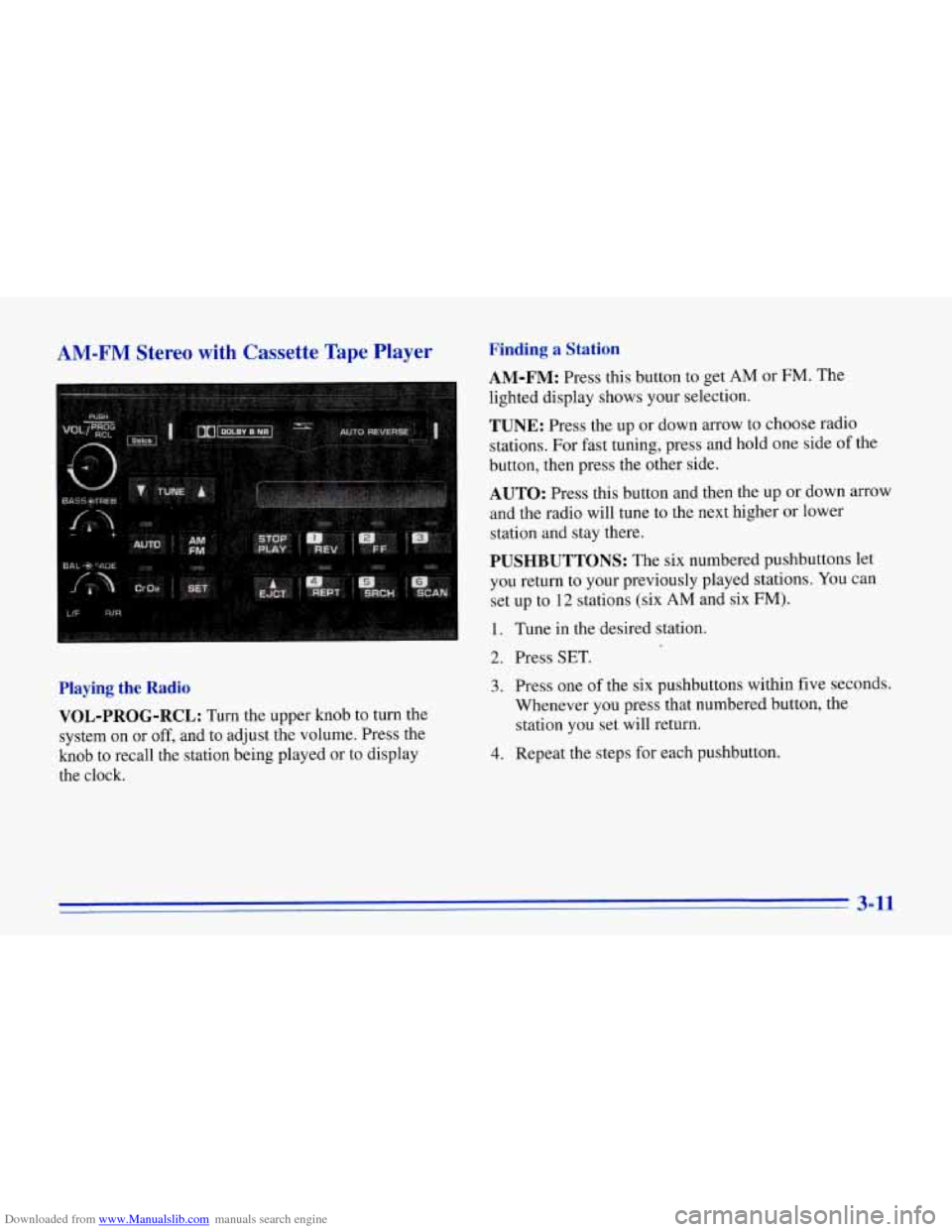
Playing the Radio VOL-PROG-RCL:
Turn the upper knob to turn the
system on
or off, and to adjust the volume. Press the
knob to recall the station being played or to display
the clock.
Finding a Station
AM-FM: Press this button to get AM or FM. The
lighted display shows your selection.
TUNE: Press the up or down arrow to choose radio
stations. For fast tuning, press and hold one side
of the
button, then press the other side.
AUTO: Press this button and then the up or down arrow
and the radio will tune to the next higher
or lower
station and stay there.
PUSHBUTTONS: The six numbered pushbuttons let
you return to your previously played stations.
You can
set up to
12 stations (six AM and six FM).
1. Tune in the desired station.
2. Press SET.
3. Press one of the six pushbuttons within five seconds.
Whenever you press that numbered button, the
station you set will return.
4. Repeat the steps for each pushbutton.
3-11
Page 153 of 386

Downloaded from www.Manualslib.com manuals search engine Setting the Tone
BASS:
Turn this knob to the right to hear more bass.
TREB: Turn this control behind the BASS knob to the
right to hear more treble.
Adjusting the Speakers
BAL:
Turn the control behind the FADE knob to move
the sound between the right and left speakers.
FADE: Turn this knob to move the sound between the
front and rear speakers. Turn it counterclockwise to hear
more sound from the front speakers and clockwise to
hear more sound from the rear speakers. Note that
if you
turn the knob all the way to
F or R, you may still get
some sound from the opposite speakers.
Playing a Cassette Tape
Your tape player is built to work best with tapes that are
30 to 45 minutes long on each side. Tapes longer than
that are
so thin they may not work well in this player.
The longer side with the tape visible goes in first. If you
hear nothing or hear just a garbled sound, it may not
be in squarely. Press EJCT to remove the tape and
start over.
Once the tape
is playing, use the knobs for VOL, FADE
and
BAL, just as you do for the radio.
REV: Press this button to return to a previously played
passage rapidly. Press it again to play the passage. The
radio will play while the tape is rewinding.
FF: Press this button to fast forward or advance the tape
rapidly. Press it again to play. The radio will play while
the tape is advancing.
REPT Press this button to go to the beginning of the
current selection after
10 seconds or more of play. After
five seconds or less of play, the player will return to the
beginning of the previous selection.
SRCH: Press this button to go to the beginning of the
next selection.
SCAN: Press this button to listen to the first eight
seconds of each passage. Press it again to stop scanning.
PROG-RCL: Press the upper knob to change the side
of the tape that
is playing. The lighted arrows show
which
side is currently playing.
E JCT Press this button to remove the tape.
STOP-PLAY: Press this button to listen to the radio
without ejecting the cassette tape. Press it again to go
back to the tape.
Cr02: Press this button when playing high-bias chrome
or metal tapes.
3-12
Page 154 of 386
Downloaded from www.Manualslib.com manuals search engine Delco-Bose' AM-FM Stereo with Cassette
Tape Player
(Option)
Finding a Station
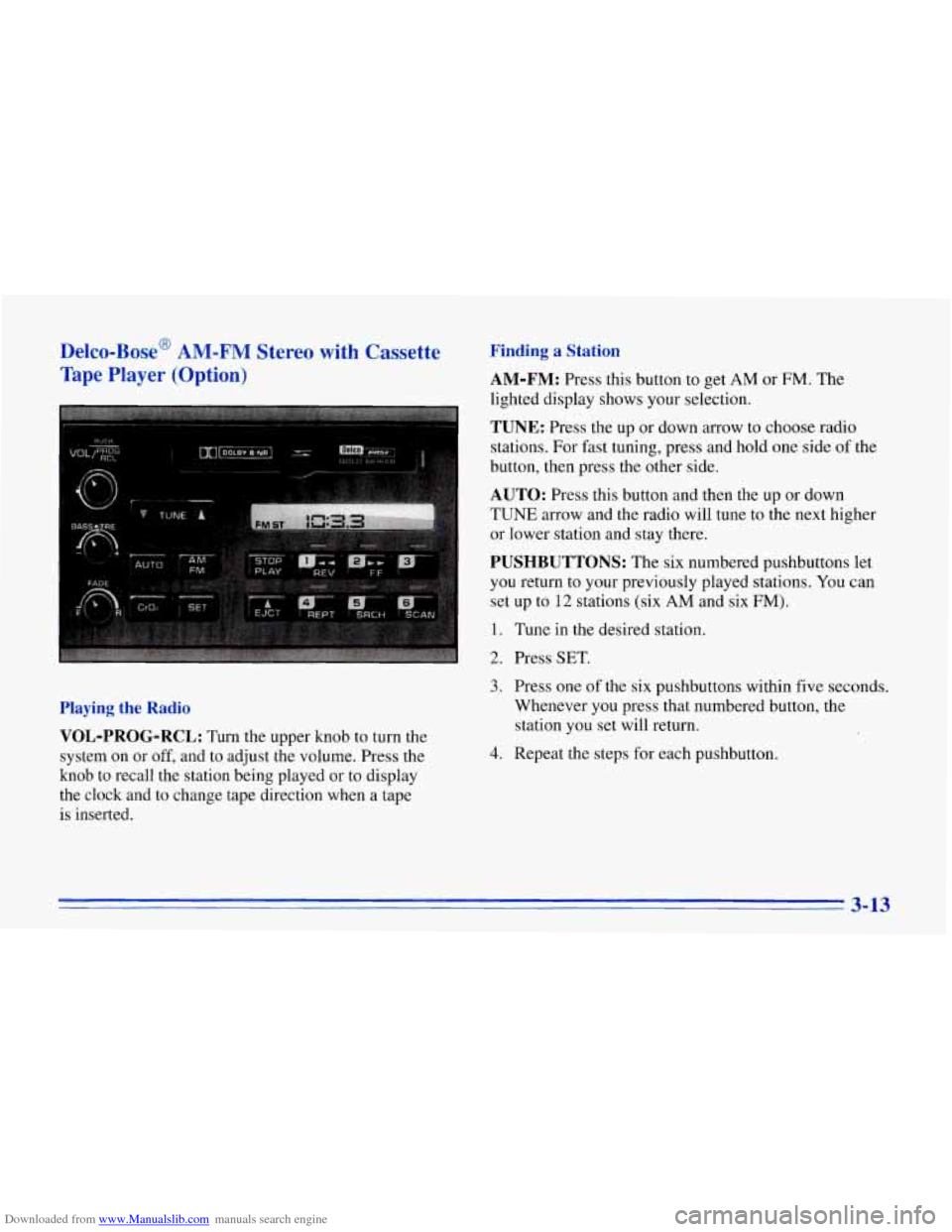
AM-FM:
Press this button to get AM or FM. The
lighted display shows your selection.
TUNE: Press the up or down arrow to choose radio
stations. For fast tuning, press and hold one side of the
button, then press the other side.
AUTO: Press this button and then the up or down
TUNE arrow and the radio will tune to the next higher
or lower station and stay there.
PUSHBUTTONS: The six numbered pushbuttons let
you return to your previously played stations. You can
set up to
12 stations (six AM and six FM).
1. Tune in the desired station.
2. Press SET.
Playing the Radio
VOL-PROG-RCL:
Turn the upper knob to turn the
system on or
off, and to adjust the volume. Press the
knob to recall the station being played or to display
the clock and to change tape direction when a tape
is inserted.
3. Press one of the six pushbuttons within five seconds.
Whenever you press that numbered button, the
station you set will return.
4. Repeat the steps for each pushbutton.
3-13
Page 155 of 386
Downloaded from www.Manualslib.com manuals search engine Setting the Tone
BASS:
Turn this knob to the right to hear more bass.
TREB: Turn this control behind the BASS knob to the
right to hear more treble.
Adjusting the Speakers
BAL:
With the DelcoBose system, your speakers are
electronically balanced.
FADE: Turn this knob to move the sound between the
front and rear speakers. Note that, with the Delco/Bose
system, if you turn the knob all the way to
F or R, you
may still get some sound from the opposite speakers.
Playing a Cassette Tape
Your tape player is built to work best with tapes that are
30 to 45 minutes long on each side. Tapes longer than
that
are so thin they may not work well in this player.
The longer side with the tape visible goes in first. If you
hear nothing or hear just a garbled sound, it may not
be in squarely. Press EJCT to remove the tape and
start over.
Once the tape is playing, use the knobs for
VOL, FADE
and BAL, just as you do for the radio.
REV: Press this button to return to a previously played
passage rapidly. Press it again to play .the passage. The
radio will play while the tape is rewinding.
FF: Press this button to fast forward or advance the tape
rapidly. Press it again to play the passage. The radio will
play while the tape is advancing.
REPT Press this button to go to the beginning of the
current selection after 10 seconds or more of play. After
five seconds or less
of play, the player will return to the
beginning of the previous selection.
SRCH: Press this button to go to the beginning of the
next selection.
SCAN: Press this button to listen to the first eight seconds
of each passage.
Press it again to ,stop scanning.
PROG-RCL: Press the upper knob to change the side
of the tape that is playing. The lighted
arrows show
which side is currently playing.
EJCT Press this button to remove the tape.
STOP-PLAY: Press this button to listen to the radio
without ejecting the cassette tape. Press it again to
go
back to the tape.
CrO2: Press this button when playing high-bias chrome
or metal tapes.
3-14
Page 156 of 386
Downloaded from www.Manualslib.com manuals search engine Delco-Bose AM-FM Stereo with Cassette
Tape
and Compact Disc Players (Option)
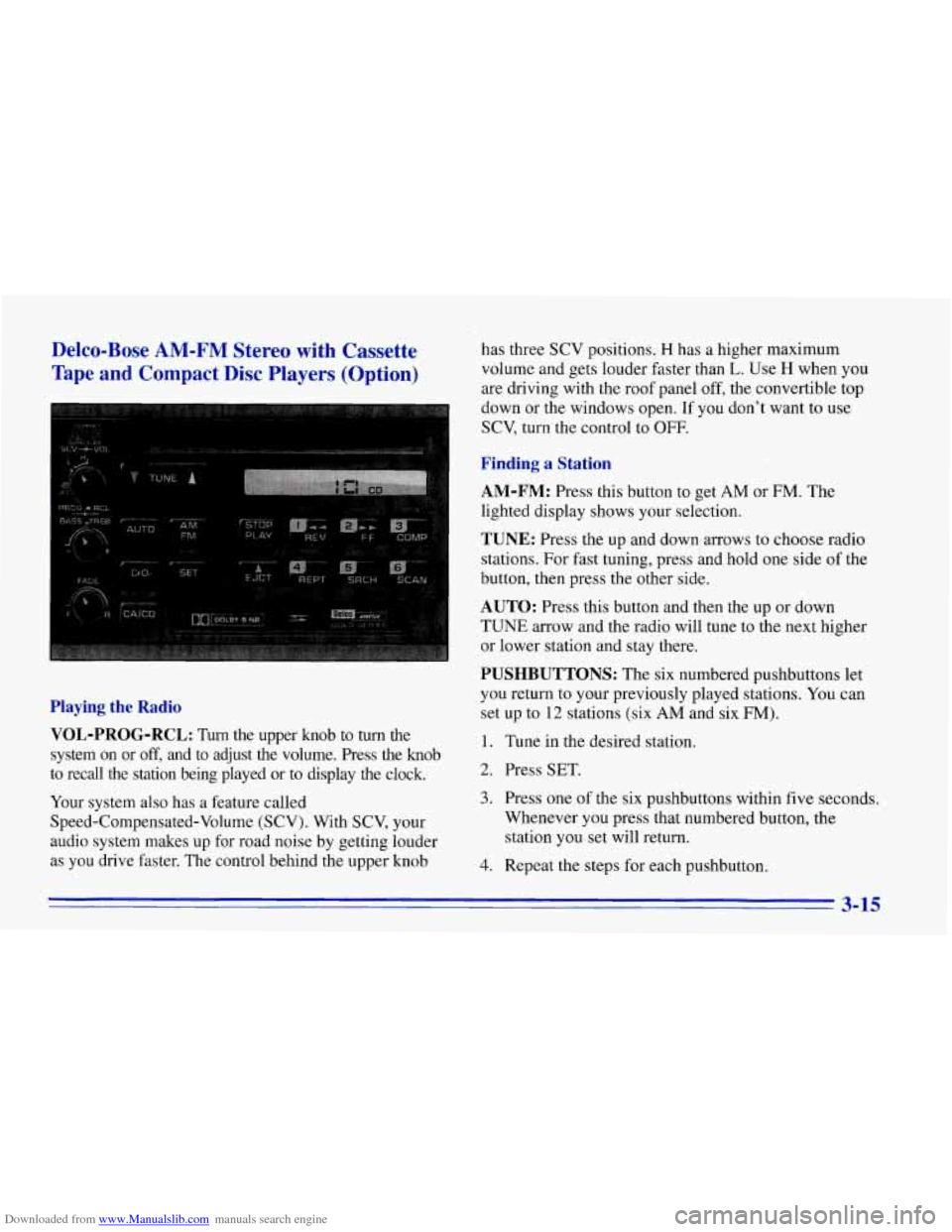
Playing the Radio
VOL-PROG-RCL:
Turn the upper knob to turn the
system on or
off, and to adjust the volume. Press the knob
to recall the station being played or to display the clock.
Your system also has a feature called
Speed-Compensated-Volume (SCV). With SCV, your
audio system makes up for road noise by getting louder
as you drive faster. The control behind the upper knob has three
SCV positions.
H has a higher maximum
volume and gets louder faster than
L. Use H when you
are driving with the roof panel off, the convertible top
down or the windows open. If you don't want to use
SCV, turn the control to OFF.
Finding a Station
AM-FM:
Press this button to get AM or FM. The
lighted display shows your selection.
TUNE: Press the up and down arrows to choose radio
stations. For fast tuning, press and hold one side of the
button, then press the other side.
AUTO: Press this button and then the up or down
TUNE arrow and the radio will tune to the next higher
or lower station and stay there.
PUSHBUTTONS: The six numbered pushbuttons let
you return to your previously played stations.
You can
set up to
12 stations (six AM and six FM).
1. Tune in the desired station.
2. Press SET.
3. Press one of the six pushbuttons within five seconds.
Whenever
you press that numbered button, the
station you
set will return.
4. Repeat the steps for each pushbutton.
3-15
Page 157 of 386
Downloaded from www.Manualslib.com manuals search engine Setting the Tone
BASS:
Turn this knob to the right to hear more bass.
TREB: Turn this control behind the BASS knob to the
right to hear more treble.
Adjusting the Speakers
BAL:
With the DelcoBose system, your speakers are
electronically balanced.
FADE: Turn this knob to move the sound between the
front and rear speakers. Note that if you turn the knob
all the way to
F or R, you may still get some sound from
the opposite speakers.
Playing a Cassette Tape
Your tape player is built to work best with tapes that are
30 to 45 minutes long on each side. Tapes ,longer than
that are
so thin they may not work well in this player.
The longer side with the tape visible goes in first.
If you
hear nothing or hear just a garbled sound, it may not
be in squarely. Press EJCT to remove the tape and
start over.
Once the tape is playing, use the
knobs for VOL, FADE
and BAL, just as you do for the radio.
REV: Press this button to return to a previously played
passage rapidly. Press it again to play the passage. The
radio will play while the tape is rewinding.
FF: Press this button to fast forward or advance the tape
rapidly. Press it again to play. The radio will play while
the tape is advancing.
REPT Press this button to go to the beginning of the
current selection after
10 seconds or more of play. After
five seconds or less
of play, the player will return to the
beginning
of the previous selection.
SRCH: Press this button to go to the beginning of the
next selection.
SCAN: Press this button to listen to the first eight
seconds of each passage. Press it again to stop scanning.
PROG-RCL: Press the upper knob to change the side
of the tape that is playing. The lighted arrows show
which side is currently playing.
EJCT Press this button to remove the tape.
STOP-PLAY: Press this button to listen to the radio
without ejecting the cassette tape. Press it again to
go
back to the tape.
Cr02: Press this button when playing high-bias chrome
or metal tapes.
Page 158 of 386
Downloaded from www.Manualslib.com manuals search engine Playing a Compact Disc
Don’t use the mini-discs (three-inch singles). They
will eject, and they won’t play. Use only full-size
compact discs.
With the audio system on, insert a disc into the slot with
the label side up. CD will appear on the display and
track one will begin to play.
If both a tape and a compact
disc are loaded into the system, press CNCD to select
the one you want.
If the disc comes back
out and ERR appears on the
display, it could be that:
0 The disc is upside down.
0 It is dirty, scratched or wet.
There’s too much moisture in the air. (Wait about an
hour and try again.)
You are driving on a very rough road.
0 The temperature is too hot or too cold.
RCL: Press this button to see what track is playing.
Press it again within five seconds to
see how long it has
been playing, the elapsed time (EL TIME).
REV: Press and hold this button to return to a
previously played passage rapidly. The decreasing
elapsed time will show on the display.
FF: Press and hold this button to fast forward or
advance through passages. The increasing elapsed time
will show on the display.
REPT: Press this button to go to the beginning of the
current track after eight seconds or more of play. After
eight seconds or less of play, the player will return to the
beginning of the previous track.
SRCH: Press this button to go to the beginning of the
next track.
SCAN: Press this button to listen to the first eight
seconds of each track. Press it again to stop scanning.
COMP: Press this button to make loud and soft passages
more nearly equal
in volume. Press it again for normal play.
Stopping the Disc Player
0 Turn the power off or turn the ignition key to off. The
disc stays in the player and will resume playing at the
point where it stopped when the ignition is turned on.
switch to the radio. Press it again to restart the disc at
the point where it stopped.
Press EJCT to eject the disc and switch to the radio.
If the ignition or audio system
is turned off, the
player will pull the disc back in
if you don’t remove
it from the opening within
30 seconds.
0 Press STOP-PLAY to stop playing the disc and
3-17