1996 CADILLAC ELDORADO dead battery
[x] Cancel search: dead batteryPage 118 of 354
Downloaded from www.Manualslib.com manuals search engine If you have trouble programming the universal
transmitter, make sure that you have followed the
directions exactly as described and that the battery in the
hand-held transmitter is not dead. If you still cannot
program it, rotate the hand-held transmitter end over end
and try again. The universal transmitter may not work
with older garage door openers that do not meet current
Federal Consumer Safety Standards. If you cannot
program the transmitter after repeated attempts, consult
your Cadillac dealer.
Be sure to keep the original hand-held transmitter
in case
you need to erase and reprogram the universal transmitter.
Note to Canadian Owners: During programming, the
hand-held transmitter may stop transmitting after one or
two seconds. If you
are programming from one of these
transmitters, you should press and re-press the button on
the hand-held transmitter every two seconds without
ever releasing the button on
the universal transmitter.
Release both buttons when the red light on the universal
transmitter begins to flash rapidly.
Operating the Transmitter
Press and hold the appropriate button on the universal
transmitter. The red light comes on while the signal is
being transmitted.
Note that the effective transmission range of the universal
transmitter may differ from the hand-held transmitter and
from one channel to another. Also note that the universal
transmitter is disabled when the VALET button inside of
the glove box is activated. For more information, see
“Security Override” earlier in this section.
Erasing Channels
To erase all three programmed channels, hold down the
two outside buttons until the red light begins to flash.
Individual channels cannot be erased, but can be
reprogrammed using the procedure for programming the
transmitter explained earlier.
Accessories
Accessories for the universal transmitter are available
from the manufacturer of the unit.
If you would like
additional information please call
1-800-355-35 15.
Page 227 of 354
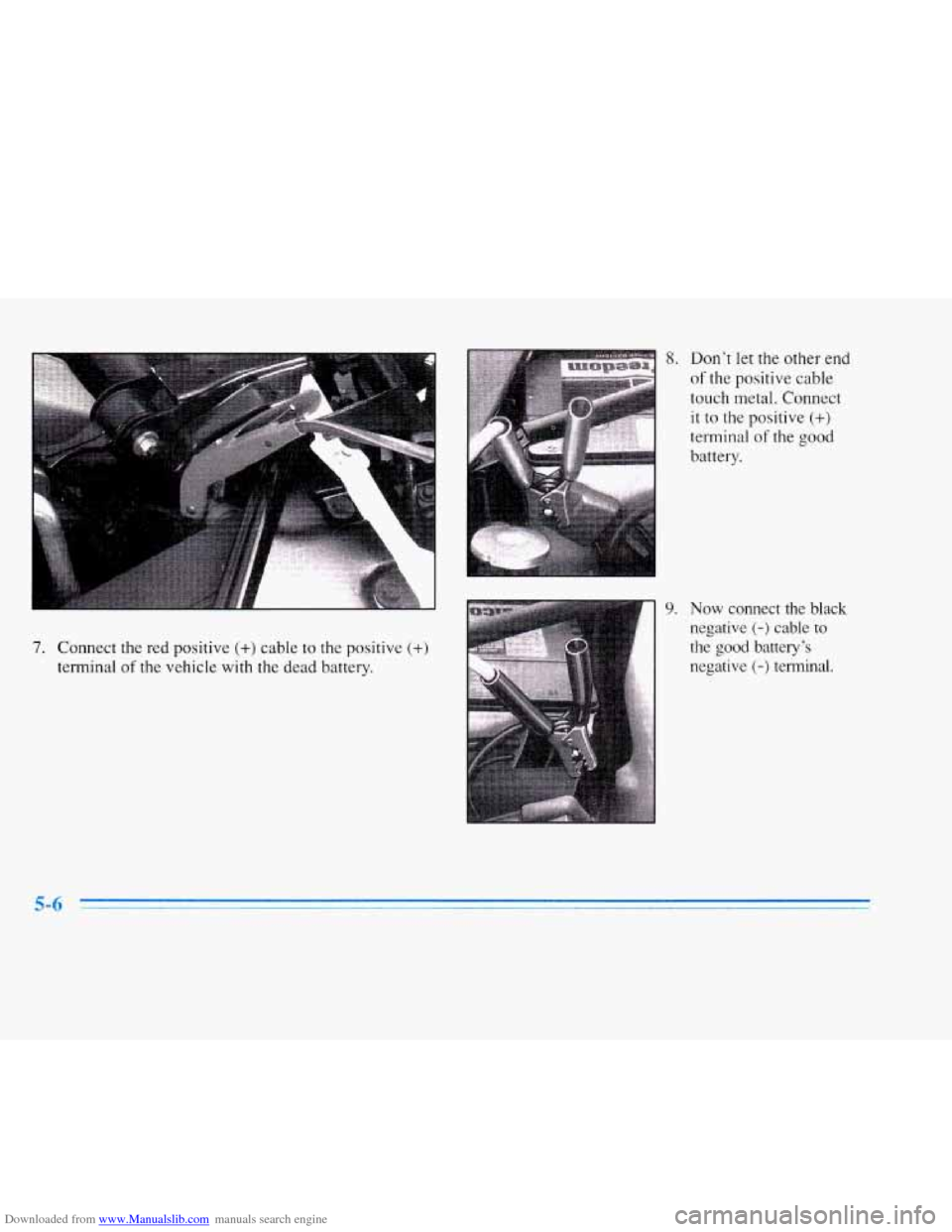
Downloaded from www.Manualslib.com manuals search engine 7. Connect the red positive (+) cable to the positive (+)
terminal of the vehicle with the dead battery.
9.
Don’t let the other end
of the positive cable
touch metal. Connect
it to the positive
(+)
terminal of the good
battery.
Now connect the black
negative
(-) cable to
the good battely’s
negative
(-) terminal.
Page 228 of 354
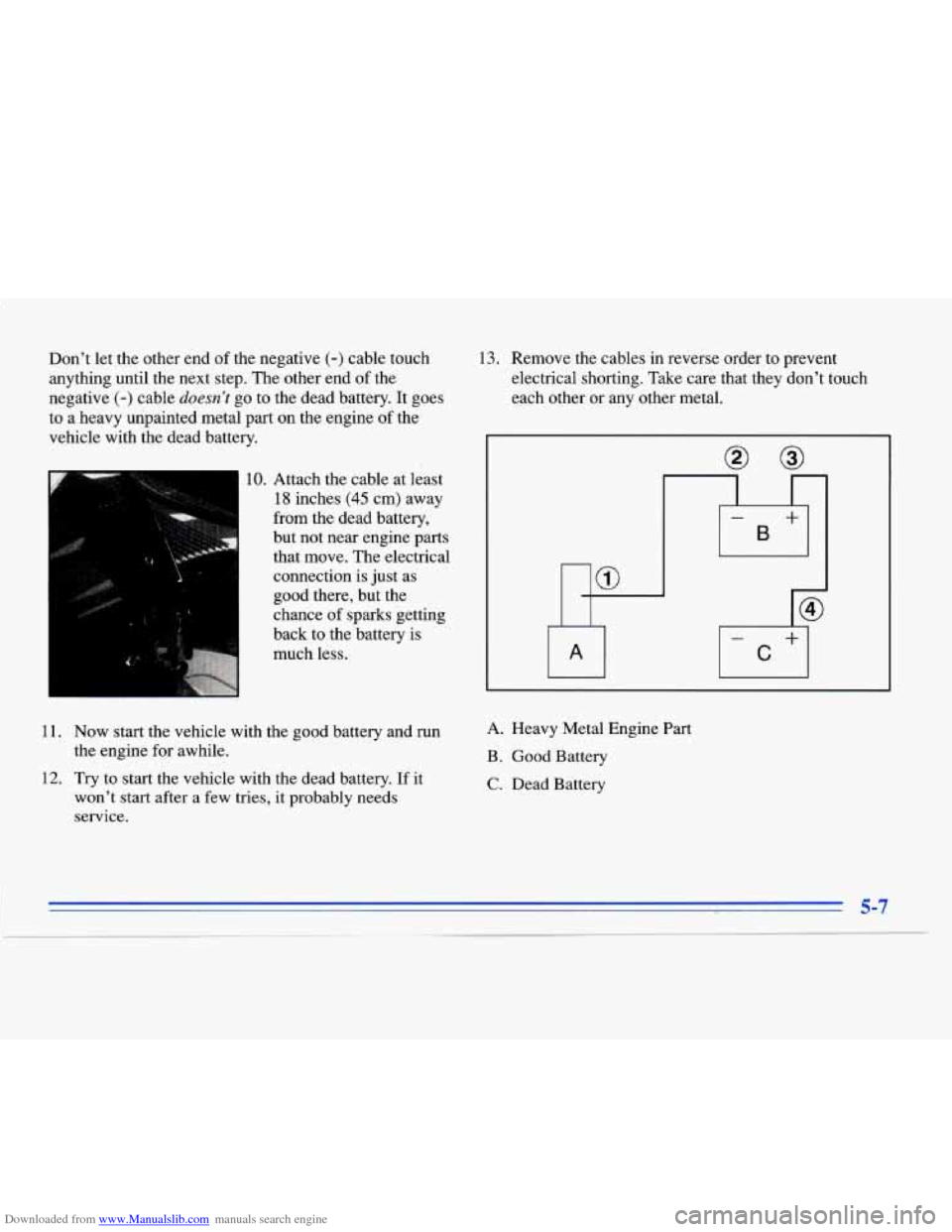
Downloaded from www.Manualslib.com manuals search engine Don’t let the other end of the negative (-) cable touch
anything until the next step. The other end of the
negative
(-) cable doesn’t go to the dead battery. It goes
to a heavy unpainted metal
part on the engine of the
vehicle with the dead battery.
10. Attach the cable at least
18 inches (45 cm) away
from the dead battery,
but not near engine parts that move. The electrical
connection is just as
good there, but the
chance of sparks getting
back to the battery
is
much less.
13. Remove the cables in reverse order to prevent
electrical shorting. Take care that they don’t touch
each other or any other metal.
I
-
B
+
@
- +
C
11. Now start the vehicle with the good battery and run
the engine for awhile.
12. Try to start the vehicle with the dead battery. If it
won’t start after a few tries, it probably needs
service.
A. Heavy Metal Engine Part
B. Good Battery
C. Dead Battery
5-7
Page 344 of 354

Downloaded from www.Manualslib.com manuals search engine Cleaning ...................................... 6-45
Aluminum
or Chrome Wheels ................... 6-50
Fabric
................................. 6.45. 6.46
Glass
....................................... 6-48
Inside of Your Cadillac
........................ 6-45
Instrument Panel
............................. 6-47
Leather
..................................... 6-47
Outside of Your Cadillac
....................... 6-49
Speakercovers
.............................. 6-47
Special Problems
............................. 6-46
Stains
...................................... 6- 46
Tires
....................................... 6-50
Vinyl
....................................... 6-47
Wheels
..................................... 6-50
Windshield and Wiper Blades
................... 6-48
Clock. Setting the
............................... 3- 13
Comfort Controls
................................ 3 . 1
Comfort Controls. Steering Wheel Touch Control
..... 3-13
Compact Disc Care
............................. 3-36
Compact Disc Player
....................... 3-22. 3-29
Compact Disc Player Errors
.................. 3.25. 3.32
Compact Spare Tire
............................. 5-35
Compass. Rearview Mirror with
................... 2-46
Console Storage
................................ 2-5 1
Control of a Vehicle .............................. 4-5
Convenience Net
............................... 2-52
Convex Outside Mirror
.......................... 2-50
Coolant
....................................... 6-19
Heater. Engine
............................... 2- 17
SurgeTank
............................. 5.18. 5.20
Cooling System
................................ 5- 18
Cornering Lamp Bulb Replacement
................ 6-3 1 Cornering Lamps
............................... 2-41
Courtesy Transportation
........................... 7-7
Cruise Control
................................. 2-35
Cruise Engaged Message
......................... 2-80
Cupholders
.................................... 2-51
Customer Assistance for Text Telephone Users
......... 7-3
Customer Assistance Information ................... 7-1
Customer Satisfaction Procedure
.................... 7-1
Damage. Finish
............................... 6-50
Damage. Sheet Metal
............................ 6-50
Daytime Running Lamps
......................... 2-40
Dead Battery
................................... 5-3
Defects. Reporting Safety ................... 7- 10. 7-11
Defensive Driving
............................... 4-1
Defogging
............................ 3.4.3.7. 3.12
Defrosting
............................ 3.4.3.7. 3.12
Dimensions. Vehicle
............................ 6-65
Dolby' B Noise Reduction ............. 3.17.3.21. 3.29
Door Central Unlocking System
....................... 2-3
Storage Compartment
......................... 2-50
Door Open Message
............................. 2-80
Driver Door Open Message
....................... 2-80
Driver Information Center
........................ 2-75
Driver Information Center Messages
................ 2-78
Driver Position
................................. 1 . 13
Driver's Outside Auto-Dimming Rearview Mirror
..... 2-50
Defogger. Rear Window
......................... 3 . 12
DIC
.......................................... 2-75
Locks
....................................... 2-3