1995 JEEP CHEROKEE dash
[x] Cancel search: dashPage 198 of 2198
secondary brakeshoes move the shoes directly into
contact with the drum braking surface. The actuating
levers are interconnected by a system of cables and a
tensioner mechanism. The tensioner mechanism con-
trols parking brake adjustment.
A parking brake switch is used on all models. It is
mounted on the parking brake lever or foot pedal and
is actuated by movement of the lever/pedal. The
switch, which is in circuit with the red warning light
in the dash, will illuminate the warning light when-
ever the parking brakes are applied.
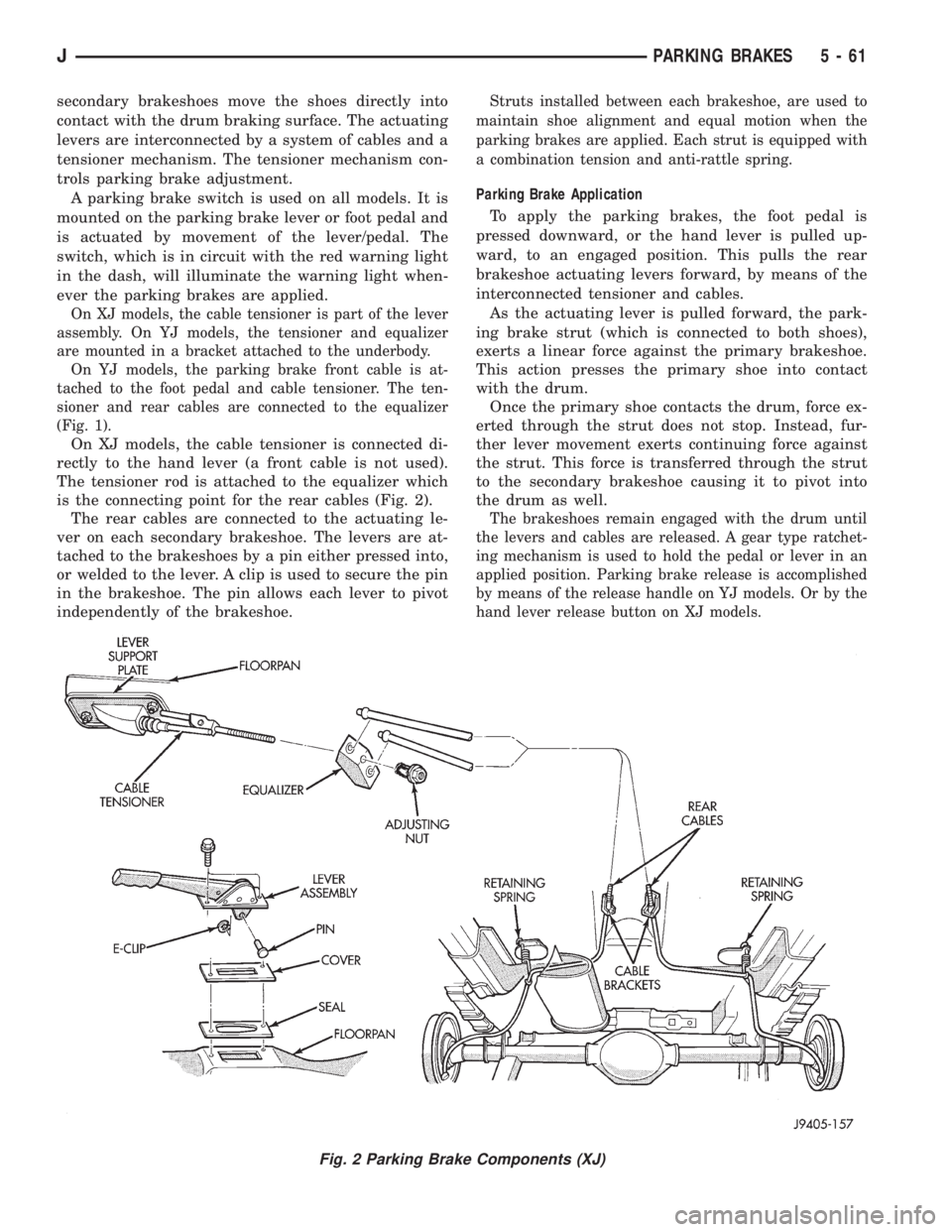
On XJ models, the cable tensioner is part of the lever
assembly. On YJ models, the tensioner and equalizer
are mounted in a bracket attached to the underbody.
On YJ models, the parking brake front cable is at-
tached to the foot pedal and cable tensioner. The ten-
sioner and rear cables are connected to the equalizer
(Fig. 1).
On XJ models, the cable tensioner is connected di-
rectly to the hand lever (a front cable is not used).
The tensioner rod is attached to the equalizer which
is the connecting point for the rear cables (Fig. 2).
The rear cables are connected to the actuating le-
ver on each secondary brakeshoe. The levers are at-
tached to the brakeshoes by a pin either pressed into,
or welded to the lever. A clip is used to secure the pin
in the brakeshoe. The pin allows each lever to pivot
independently of the brakeshoe.
Struts installed between each brakeshoe, are used to
maintain shoe alignment and equal motion when the
parking brakes are applied. Each strut is equipped with
a combination tension and anti-rattle spring.
Parking Brake Application
To apply the parking brakes, the foot pedal is
pressed downward, or the hand lever is pulled up-
ward, to an engaged position. This pulls the rear
brakeshoe actuating levers forward, by means of the
interconnected tensioner and cables.
As the actuating lever is pulled forward, the park-
ing brake strut (which is connected to both shoes),
exerts a linear force against the primary brakeshoe.
This action presses the primary shoe into contact
with the drum.
Once the primary shoe contacts the drum, force ex-
erted through the strut does not stop. Instead, fur-
ther lever movement exerts continuing force against
the strut. This force is transferred through the strut
to the secondary brakeshoe causing it to pivot into
the drum as well.
The brakeshoes remain engaged with the drum until
the levers and cables are released. A gear type ratchet-
ing mechanism is used to hold the pedal or lever in an
applied position. Parking brake release is accomplished
by means of the release handle on YJ models. Or by the
hand lever release button on XJ models.
Fig. 2 Parking Brake Components (XJ)
JPARKING BRAKES 5 - 61
Page 203 of 2198
PARKING BRAKE CABLE TENSIONER
REPLACEMENT (XJ)
(1) Raise vehicle.
(2) Remove adjuster nut from tensioner rod. Secure
equalizer and cables to nearby chassis component
with wire.
(3) Remove nuts attaching lever assembly to sup-
port plate and floorpan.
(4) Lower vehicle.
(5) Remove console components and lever assembly
cover.
(6) Remove lever and tensioner assembly.
(7) Move cover and boot for access to tensioner re-
taining pin.
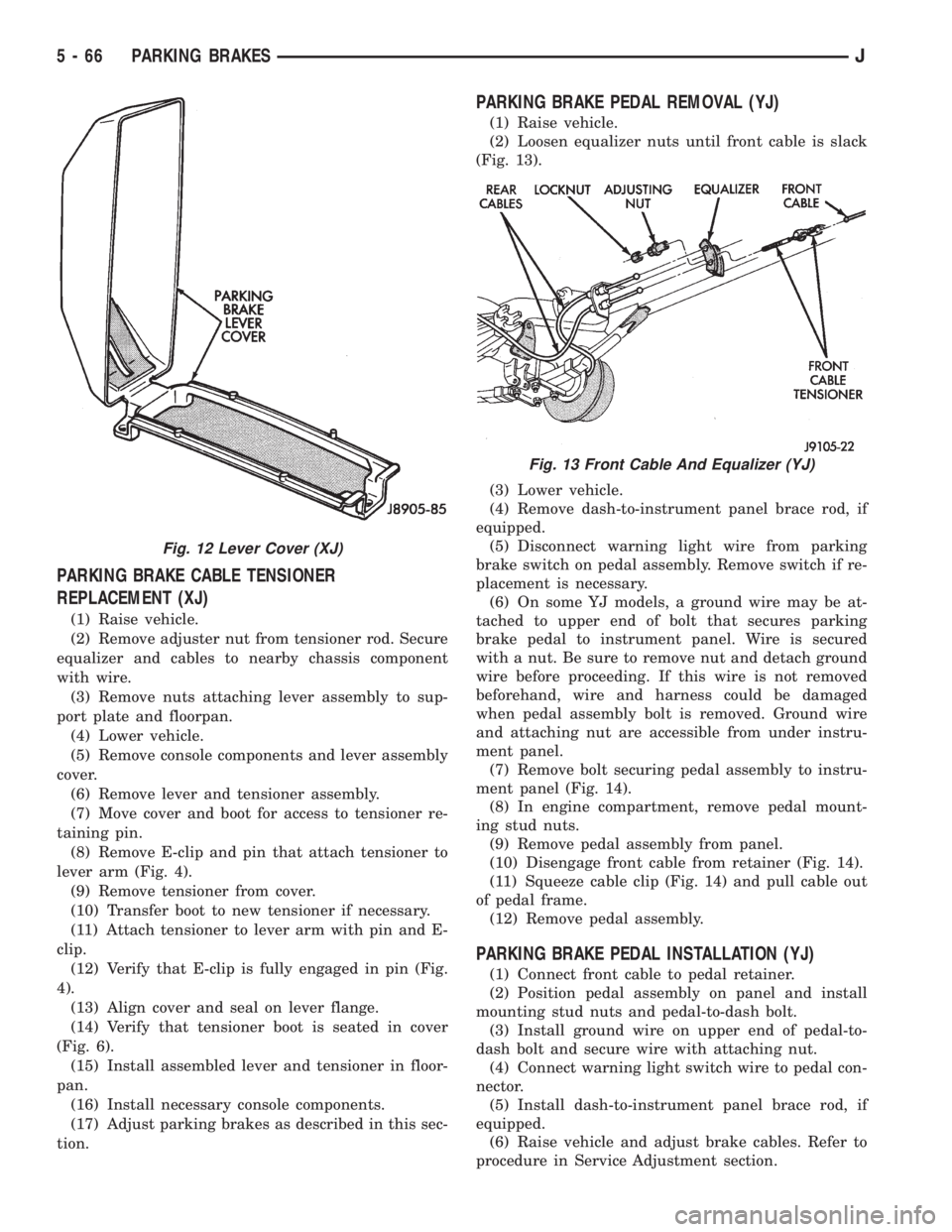
(8) Remove E-clip and pin that attach tensioner to
lever arm (Fig. 4).
(9) Remove tensioner from cover.
(10) Transfer boot to new tensioner if necessary.
(11) Attach tensioner to lever arm with pin and E-
clip.
(12) Verify that E-clip is fully engaged in pin (Fig.
4).
(13) Align cover and seal on lever flange.
(14) Verify that tensioner boot is seated in cover
(Fig. 6).
(15) Install assembled lever and tensioner in floor-
pan.
(16) Install necessary console components.
(17) Adjust parking brakes as described in this sec-
tion.
PARKING BRAKE PEDAL REMOVAL (YJ)
(1) Raise vehicle.
(2) Loosen equalizer nuts until front cable is slack
(Fig. 13).
(3) Lower vehicle.
(4) Remove dash-to-instrument panel brace rod, if
equipped.
(5) Disconnect warning light wire from parking
brake switch on pedal assembly. Remove switch if re-
placement is necessary.
(6) On some YJ models, a ground wire may be at-
tached to upper end of bolt that secures parking
brake pedal to instrument panel. Wire is secured
with a nut. Be sure to remove nut and detach ground
wire before proceeding. If this wire is not removed
beforehand, wire and harness could be damaged
when pedal assembly bolt is removed. Ground wire
and attaching nut are accessible from under instru-
ment panel.
(7) Remove bolt securing pedal assembly to instru-
ment panel (Fig. 14).
(8) In engine compartment, remove pedal mount-
ing stud nuts.
(9) Remove pedal assembly from panel.
(10) Disengage front cable from retainer (Fig. 14).
(11) Squeeze cable clip (Fig. 14) and pull cable out
of pedal frame.
(12) Remove pedal assembly.
PARKING BRAKE PEDAL INSTALLATION (YJ)
(1) Connect front cable to pedal retainer.
(2) Position pedal assembly on panel and install
mounting stud nuts and pedal-to-dash bolt.
(3) Install ground wire on upper end of pedal-to-
dash bolt and secure wire with attaching nut.
(4) Connect warning light switch wire to pedal con-
nector.
(5) Install dash-to-instrument panel brace rod, if
equipped.
(6) Raise vehicle and adjust brake cables. Refer to
procedure in Service Adjustment section.
Fig. 12 Lever Cover (XJ)
Fig. 13 Front Cable And Equalizer (YJ)
5 - 66 PARKING BRAKESJ
Page 208 of 2198
CLUTCH
CONTENTS
page page
CLUTCH DIAGNOSIS...................... 3
CLUTCH SERVICE....................... 10GENERAL INFORMATION.................. 1
GENERAL INFORMATION
INDEX
page page
Clutch Components........................ 1
Clutch Linkage Fluid........................ 1Clutch Operation........................... 2
Hydraulic Linkage Components................ 1
CLUTCH COMPONENTS
The clutch mechanism in XJ/YJ models consists of
a single, dry-type disc and a diaphragm style clutch
cover. A hydraulic linkage is used to operate the
clutch release bearing and fork.
A needle-type pilot bearing supports the transmis-
sion input shaft in the crankshaft. A sleeve type re-
lease bearing is used to engage and disengage the
clutch cover pressure plate.
The release bearing is operated by a release fork in
the clutch housing. The fork pivots on a ball stud
mounted in the housing. The release fork is actuated
by a hydraulic slave cylinder mounted in the hous-
ing. The slave cylinder is operated by a clutch master
cylinder mounted on the dash panel. The cylinder
push rod is connected to the clutch pedal.
The clutch disc has cushion springs in the disc hub.
The clutch disc facing is riveted to the hub. The fac-
ing is made from a non-asbestos material. The clutch
cover pressure plate is a diaphragm type with a one-
piece spring and multiple release fingers. The pres-
sure plate release fingers are preset during
manufacture and are not adjustable.
HYDRAULIC LINKAGE COMPONENTS
The hydraulic linkage consists of a clutch master
cylinder with integral reservoir, a clutch slave cylin-
der and an interconnecting fluid line.The clutch master cylinder push rod is connected to
the clutch pedal. The slave cylinder push rod is con-
nected to the clutch release fork. The master cylinder
is mounted on the driver side of the dash panel ad-
jacent to the brake master cylinder and booster as-
sembly. This positioning is similar for both left and
right hand drive models.
CLUTCH LINKAGE FLUID
The integral clutch master cylinder reservoir, slave
cylinder and fluid lines are prefilled with fluid prior
to assembly operations.
The hydraulic system should not require additional
fluid under normal circumstances. In fact,the reser-
voir fluid level will actually increase as normal
clutch wear occurs. For this reason, it is impor-
tant to avoid overfilling, or removing fluid from
the reservoir. This will cause clutch release
problems.
If inspection or diagnosis indicates additional fluid
may be needed, use Mopar brake fluid, or an equiv-
alent meeting standards SAE J1703 and DOT 3. Do
not use any other type of fluid.
JCLUTCH 6 - 1
Page 221 of 2198
CLUTCH HYDRAULIC LINKAGE INSTALLATION
(1) Be sure reservoir cover on clutch master cylin-
der is tight to avoid spills.
(2) Position clutch linkage components in vehicle.
Work connecting line and slave cylinder downward
past engine and adjacent to clutch housing.
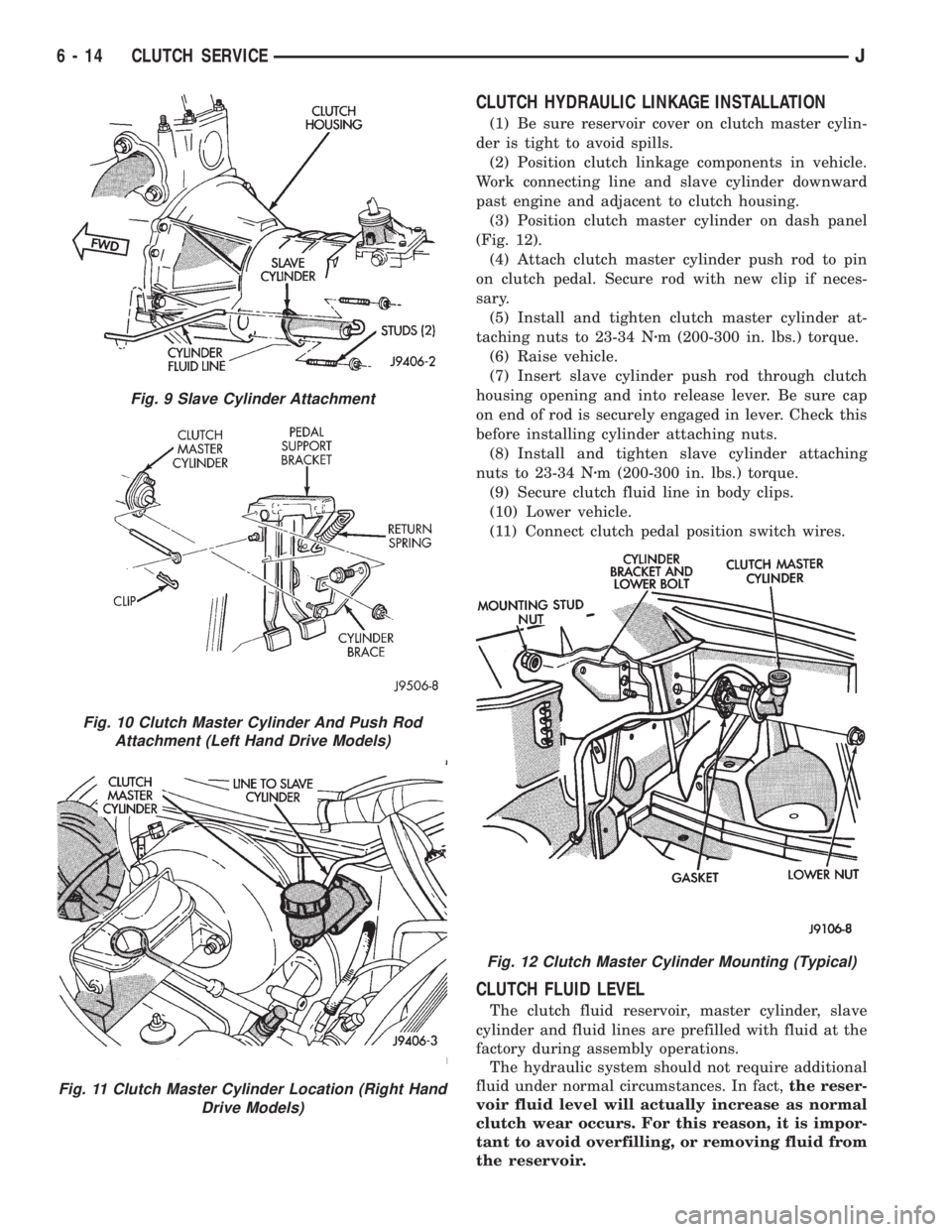
(3) Position clutch master cylinder on dash panel
(Fig. 12).
(4) Attach clutch master cylinder push rod to pin
on clutch pedal. Secure rod with new clip if neces-
sary.
(5) Install and tighten clutch master cylinder at-
taching nuts to 23-34 Nzm (200-300 in. lbs.) torque.
(6) Raise vehicle.
(7) Insert slave cylinder push rod through clutch
housing opening and into release lever. Be sure cap
on end of rod is securely engaged in lever. Check this
before installing cylinder attaching nuts.
(8) Install and tighten slave cylinder attaching
nuts to 23-34 Nzm (200-300 in. lbs.) torque.
(9) Secure clutch fluid line in body clips.
(10) Lower vehicle.
(11) Connect clutch pedal position switch wires.
CLUTCH FLUID LEVEL
The clutch fluid reservoir, master cylinder, slave
cylinder and fluid lines are prefilled with fluid at the
factory during assembly operations.
The hydraulic system should not require additional
fluid under normal circumstances. In fact,the reser-
voir fluid level will actually increase as normal
clutch wear occurs. For this reason, it is impor-
tant to avoid overfilling, or removing fluid from
the reservoir.
Fig. 9 Slave Cylinder Attachment
Fig. 10 Clutch Master Cylinder And Push Rod
Attachment (Left Hand Drive Models)
Fig. 11 Clutch Master Cylinder Location (Right Hand
Drive Models)
Fig. 12 Clutch Master Cylinder Mounting (Typical)
6 - 14 CLUTCH SERVICEJ
Page 358 of 2198
ignition switch to ON. Lamp should light. If OK, go
to next step. If not OK, replace bulb.
(3) Turn ignition switch to OFF. Disconnect battery
negative cable. Unplug cluster connector B. Check for
continuity between cavity 2 (cavity 15 - RHD) of clus-
ter connector B and a good ground. There should be
no continuity. If OK, go to next step. If not OK, re-
pair short circuit to PCM as required.
(4) Check continuity between cavity 2 (cavity 15 -
RHD) of cluster connector B and cavity 32 of PCM
connector. There should be continuity. If not OK, re-
pair open circuit to PCM as required.
SEAT BELT REMINDER LAMP
(1) Refer to Group 8U - Chime/Buzzer Warning
Systems to check chime/buzzer module operation. If
OK, go to next step. If not OK, replace chime/buzzer
module.
(2) Disconnect battery negative cable. Remove in-
strument cluster bezel and cluster assembly. Unplug
cluster (tell-tale) connector B. Check for continuity
between cavity 16 (cavity 1 - RHD) of cluster connec-
tor B and a good ground. There should be continuity.
If OK, plug cluster connector B back into cluster and
go to next step. If not OK, repair open circuit to
ground as required.
(3) Connect battery negative cable. Install a
jumper wire between a 12-volt battery feed and cav-
ity 15 (cavity 2 - RHD) of cluster connector B. Lamp
should light. If OK, go to next step. If not OK, re-
place bulb.
(4) Disconnect battery negative cable. Unplug
chime/buzzer module from fuseblock module (connec-
tor near fuseblock module - RHD). Unplug cluster
connector B. Check for continuity between cavity 15
(cavity 2 - RHD) of cluster connector B and a good
ground. There should be no continuity. If OK, go to
next step. If not OK, repair short circuit to chime/
buzzer module as required.
(5) Check continuity between cavity 15 (cavity 2 -
RHD) of cluster connector B and cavity for terminal
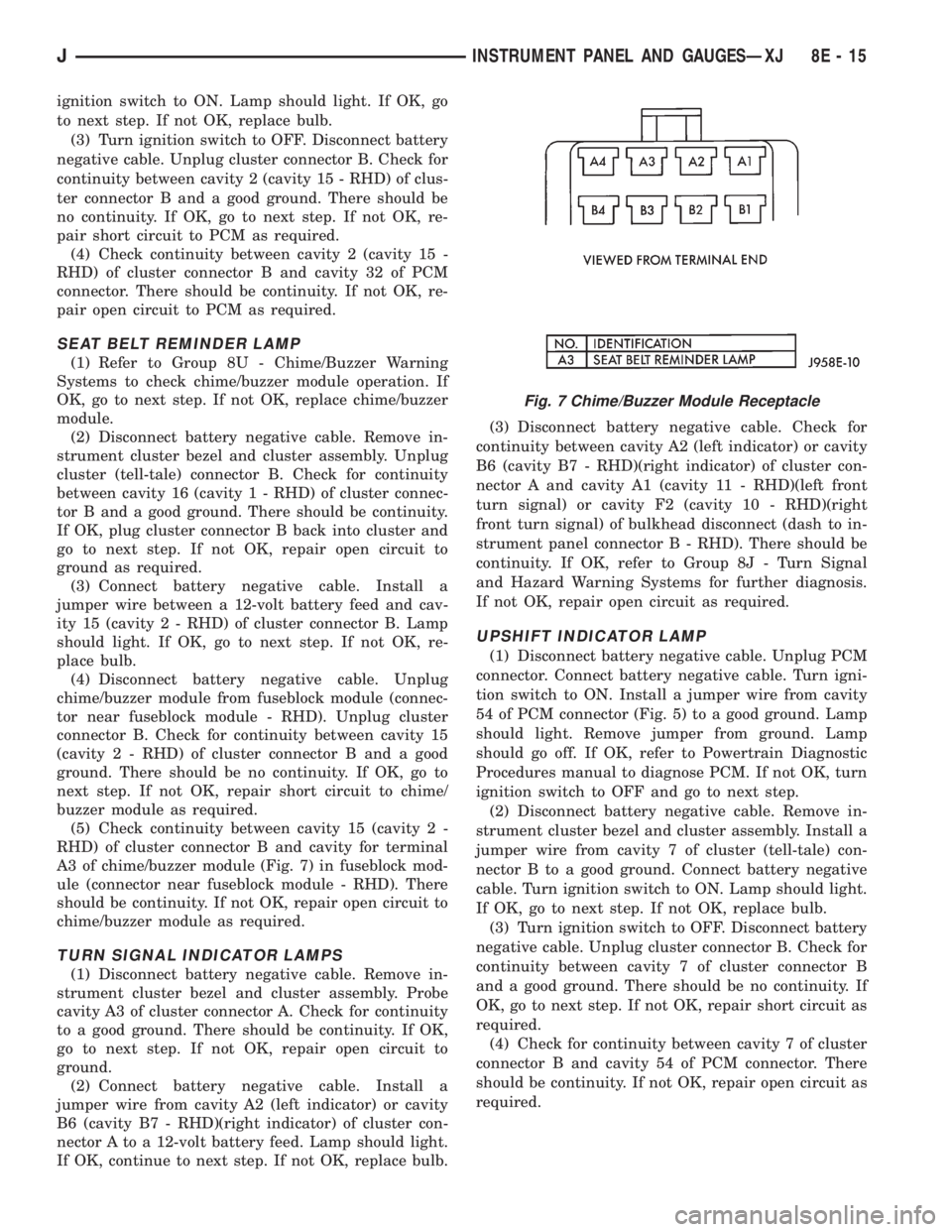
A3 of chime/buzzer module (Fig. 7) in fuseblock mod-
ule (connector near fuseblock module - RHD). There
should be continuity. If not OK, repair open circuit to
chime/buzzer module as required.
TURN SIGNAL INDICATOR LAMPS
(1) Disconnect battery negative cable. Remove in-
strument cluster bezel and cluster assembly. Probe
cavity A3 of cluster connector A. Check for continuity
to a good ground. There should be continuity. If OK,
go to next step. If not OK, repair open circuit to
ground.
(2) Connect battery negative cable. Install a
jumper wire from cavity A2 (left indicator) or cavity
B6 (cavity B7 - RHD)(right indicator) of cluster con-
nector A to a 12-volt battery feed. Lamp should light.
If OK, continue to next step. If not OK, replace bulb.(3) Disconnect battery negative cable. Check for
continuity between cavity A2 (left indicator) or cavity
B6 (cavity B7 - RHD)(right indicator) of cluster con-
nector A and cavity A1 (cavity 11 - RHD)(left front
turn signal) or cavity F2 (cavity 10 - RHD)(right
front turn signal) of bulkhead disconnect (dash to in-
strument panel connector B - RHD). There should be
continuity. If OK, refer to Group 8J - Turn Signal
and Hazard Warning Systems for further diagnosis.
If not OK, repair open circuit as required.
UPSHIFT INDICATOR LAMP
(1) Disconnect battery negative cable. Unplug PCM
connector. Connect battery negative cable. Turn igni-
tion switch to ON. Install a jumper wire from cavity
54 of PCM connector (Fig. 5) to a good ground. Lamp
should light. Remove jumper from ground. Lamp
should go off. If OK, refer to Powertrain Diagnostic
Procedures manual to diagnose PCM. If not OK, turn
ignition switch to OFF and go to next step.
(2) Disconnect battery negative cable. Remove in-
strument cluster bezel and cluster assembly. Install a
jumper wire from cavity 7 of cluster (tell-tale) con-
nector B to a good ground. Connect battery negative
cable. Turn ignition switch to ON. Lamp should light.
If OK, go to next step. If not OK, replace bulb.
(3) Turn ignition switch to OFF. Disconnect battery
negative cable. Unplug cluster connector B. Check for
continuity between cavity 7 of cluster connector B
and a good ground. There should be no continuity. If
OK, go to next step. If not OK, repair short circuit as
required.
(4) Check for continuity between cavity 7 of cluster
connector B and cavity 54 of PCM connector. There
should be continuity. If not OK, repair open circuit as
required.
Fig. 7 Chime/Buzzer Module Receptacle
JINSTRUMENT PANEL AND GAUGESÐXJ 8E - 15
Page 396 of 2198
(9) Apply a rubberized undercoating material to
the splash panel screws.
RADIO REMOVE/INSTALL - YJ
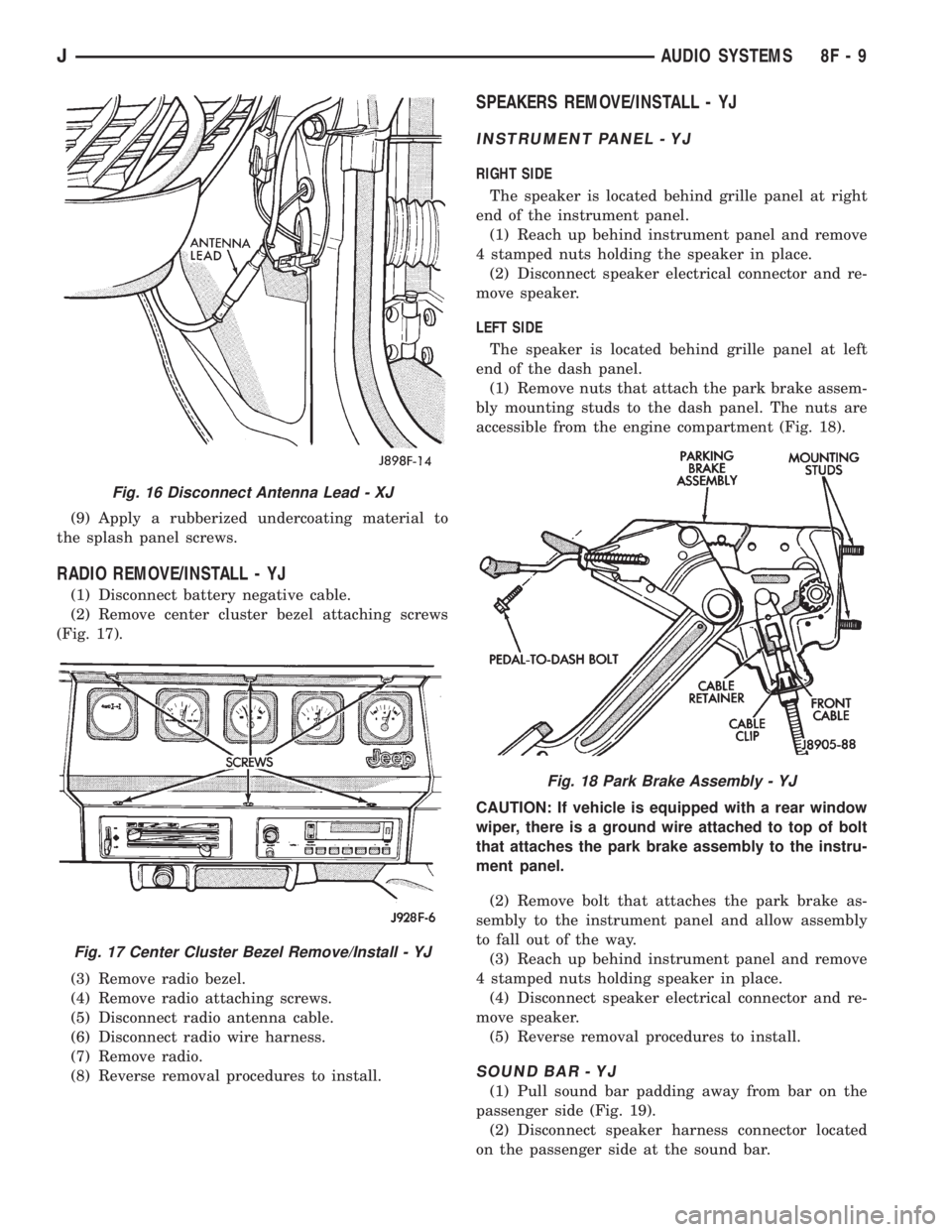
(1) Disconnect battery negative cable.
(2) Remove center cluster bezel attaching screws
(Fig. 17).
(3) Remove radio bezel.
(4) Remove radio attaching screws.
(5) Disconnect radio antenna cable.
(6) Disconnect radio wire harness.
(7) Remove radio.
(8) Reverse removal procedures to install.
SPEAKERS REMOVE/INSTALL - YJ
INSTRUMENT PANEL - YJ
RIGHT SIDE
The speaker is located behind grille panel at right
end of the instrument panel.
(1) Reach up behind instrument panel and remove
4 stamped nuts holding the speaker in place.
(2) Disconnect speaker electrical connector and re-
move speaker.
LEFT SIDE
The speaker is located behind grille panel at left
end of the dash panel.
(1) Remove nuts that attach the park brake assem-
bly mounting studs to the dash panel. The nuts are
accessible from the engine compartment (Fig. 18).
CAUTION: If vehicle is equipped with a rear window
wiper, there is a ground wire attached to top of bolt
that attaches the park brake assembly to the instru-
ment panel.
(2) Remove bolt that attaches the park brake as-
sembly to the instrument panel and allow assembly
to fall out of the way.
(3) Reach up behind instrument panel and remove
4 stamped nuts holding speaker in place.
(4) Disconnect speaker electrical connector and re-
move speaker.
(5) Reverse removal procedures to install.
SOUND BAR - YJ
(1) Pull sound bar padding away from bar on the
passenger side (Fig. 19).
(2) Disconnect speaker harness connector located
on the passenger side at the sound bar.
Fig. 16 Disconnect Antenna Lead - XJ
Fig. 17 Center Cluster Bezel Remove/Install - YJ
Fig. 18 Park Brake Assembly - YJ
JAUDIO SYSTEMS 8F - 9
Page 410 of 2198
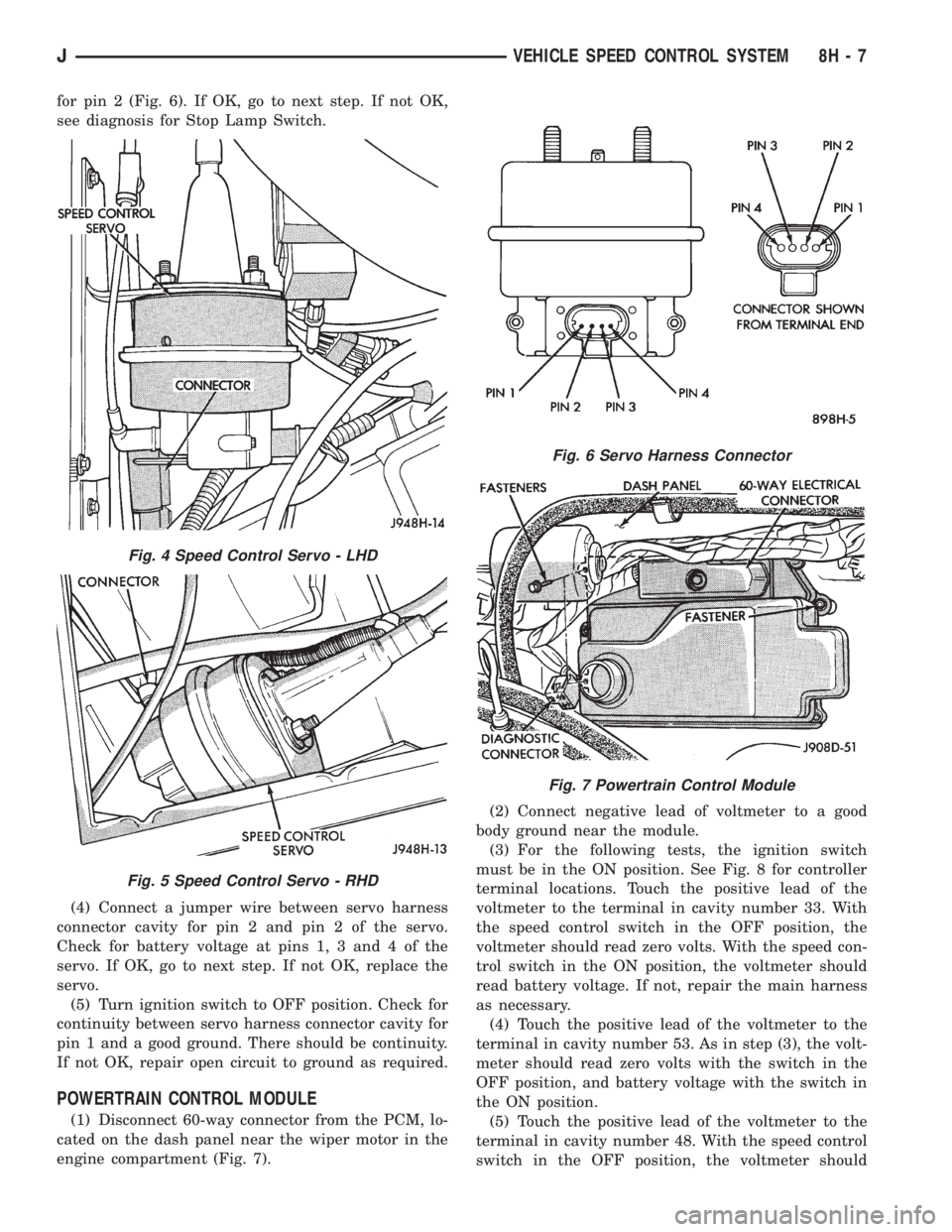
for pin 2 (Fig. 6). If OK, go to next step. If not OK,
see diagnosis for Stop Lamp Switch.
(4) Connect a jumper wire between servo harness
connector cavity for pin 2 and pin 2 of the servo.
Check for battery voltage at pins 1, 3 and 4 of the
servo. If OK, go to next step. If not OK, replace the
servo.
(5) Turn ignition switch to OFF position. Check for
continuity between servo harness connector cavity for
pin 1 and a good ground. There should be continuity.
If not OK, repair open circuit to ground as required.
POWERTRAIN CONTROL MODULE
(1) Disconnect 60-way connector from the PCM, lo-
cated on the dash panel near the wiper motor in the
engine compartment (Fig. 7).(2) Connect negative lead of voltmeter to a good
body ground near the module.
(3) For the following tests, the ignition switch
must be in the ON position. See Fig. 8 for controller
terminal locations. Touch the positive lead of the
voltmeter to the terminal in cavity number 33. With
the speed control switch in the OFF position, the
voltmeter should read zero volts. With the speed con-
trol switch in the ON position, the voltmeter should
read battery voltage. If not, repair the main harness
as necessary.
(4) Touch the positive lead of the voltmeter to the
terminal in cavity number 53. As in step (3), the volt-
meter should read zero volts with the switch in the
OFF position, and battery voltage with the switch in
the ON position.
(5) Touch the positive lead of the voltmeter to the
terminal in cavity number 48. With the speed control
switch in the OFF position, the voltmeter should
Fig. 4 Speed Control Servo - LHD
Fig. 5 Speed Control Servo - RHD
Fig. 6 Servo Harness Connector
Fig. 7 Powertrain Control Module
JVEHICLE SPEED CONTROL SYSTEM 8H - 7
Page 462 of 2198
DAYTIME RUNNING LIGHTS (CANADA ONLY)ÐXJ
SERVICE INFORMATION
The Daytime Running Lights (Headlamps) System
is installed on vehicles manufactured for sale in Can-
ada only. The headlamps are illuminated when the
ignition switch is turned to the ON position. The
DRL module receives a vehicle-moving signal from
the vehicle speed sensor. This provides a constant
headlamps-oncondition as long as the vehicle is
moving. The lamps are illuminated at less than 50
percent of normal intensity.
DRL MODULE REPLACEMENTÐXJ
REMOVAL
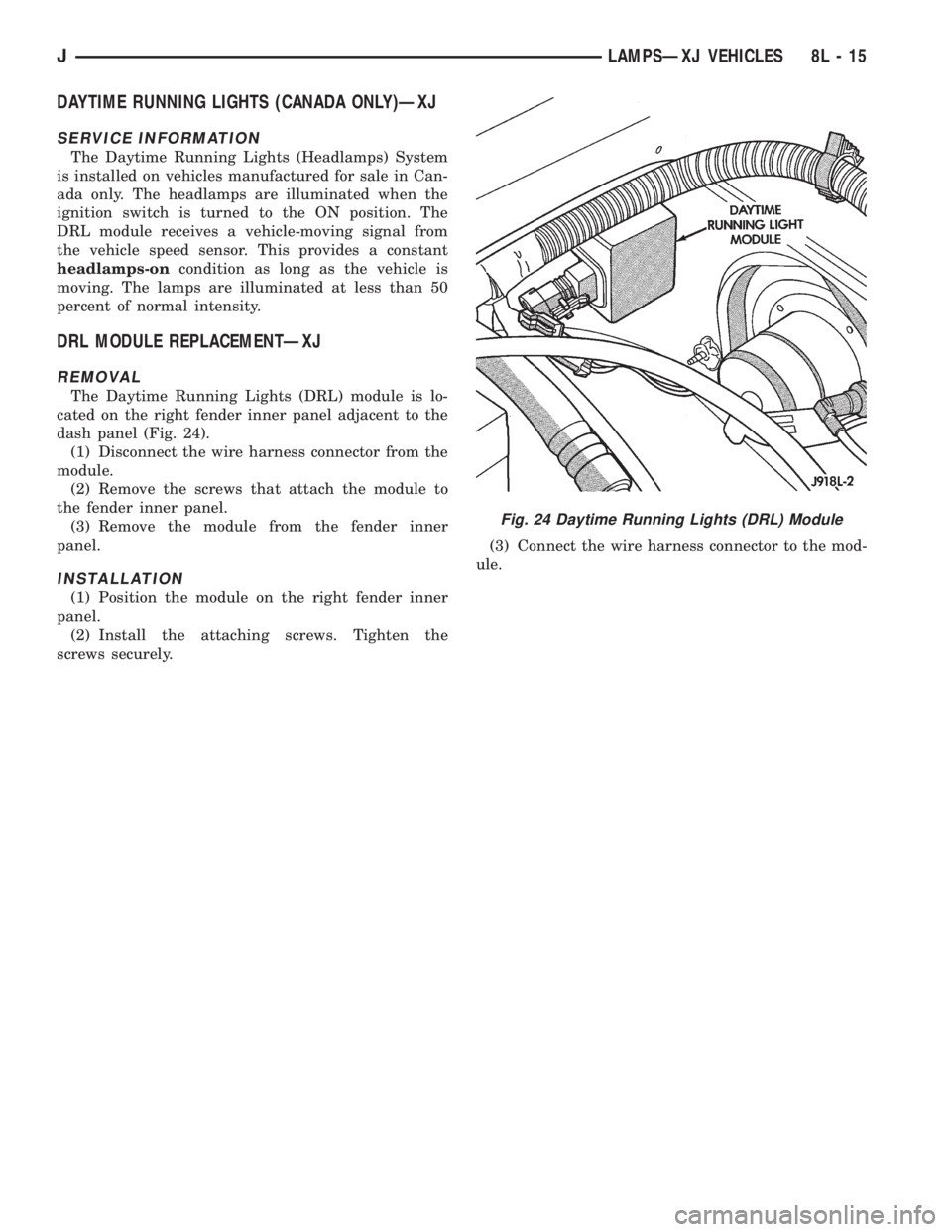
The Daytime Running Lights (DRL) module is lo-
cated on the right fender inner panel adjacent to the
dash panel (Fig. 24).
(1) Disconnect the wire harness connector from the
module.
(2) Remove the screws that attach the module to
the fender inner panel.
(3) Remove the module from the fender inner
panel.
INSTALLATION
(1) Position the module on the right fender inner
panel.
(2) Install the attaching screws. Tighten the
screws securely.(3) Connect the wire harness connector to the mod-
ule.
Fig. 24 Daytime Running Lights (DRL) Module
JLAMPSÐXJ VEHICLES 8L - 15