Page 76 of 240
Heating and Cooling
This system has full heating, venti- lation, and air conditioning capabi-
lities. You can adjust the system
controls to mix these in various
combinations. The air flows into the
interior at three possible levels,
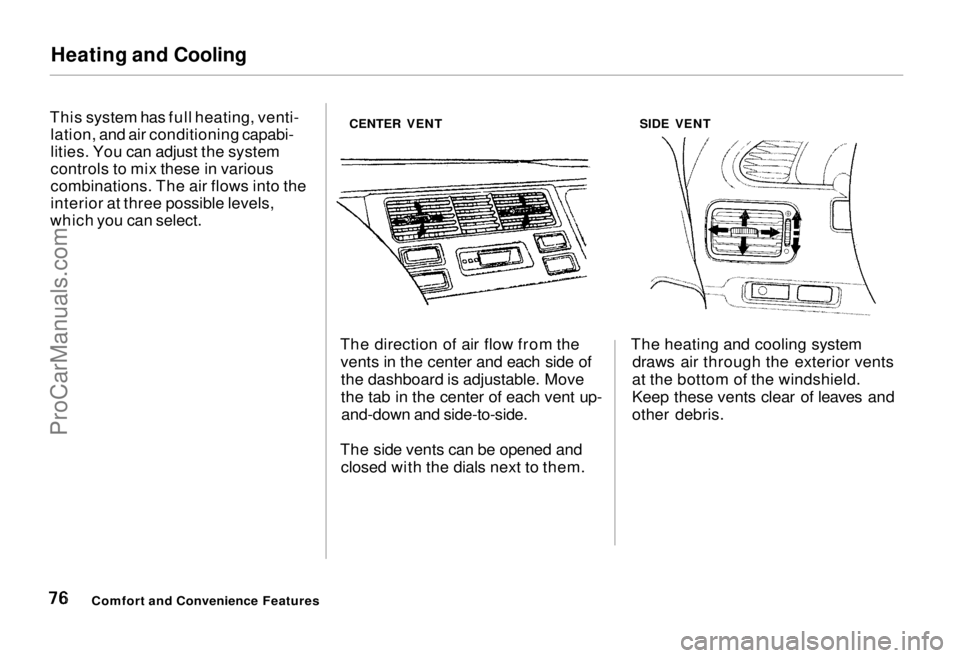
which you can select. CENTER VENT
SIDE VENT
The direction of air flow from the vents in the center and each side ofthe dashboard is adjustable. Move
the tab in the center of each vent up-and-down and side-to-side.
The side vents can be opened and closed with the dials next to them. The heating and cooling system
draws air through the exterior vents
at the bottom of the windshield.
Keep these vents clear of leaves and
other debris.
Comfort and Convenience FeaturesProCarManuals.comMain Menu Table of Contents s t
Page 105 of 240
Caring for the Cassette Player
The cassette drive picks up dirt and oxides whenever you play a tape.
This builds up over time and causes the sound quality to degrade. To
prevent this, you should clean the
cassette drive after every 30 hours of
use. Your dealer has a cleaning kit available for this purpose.
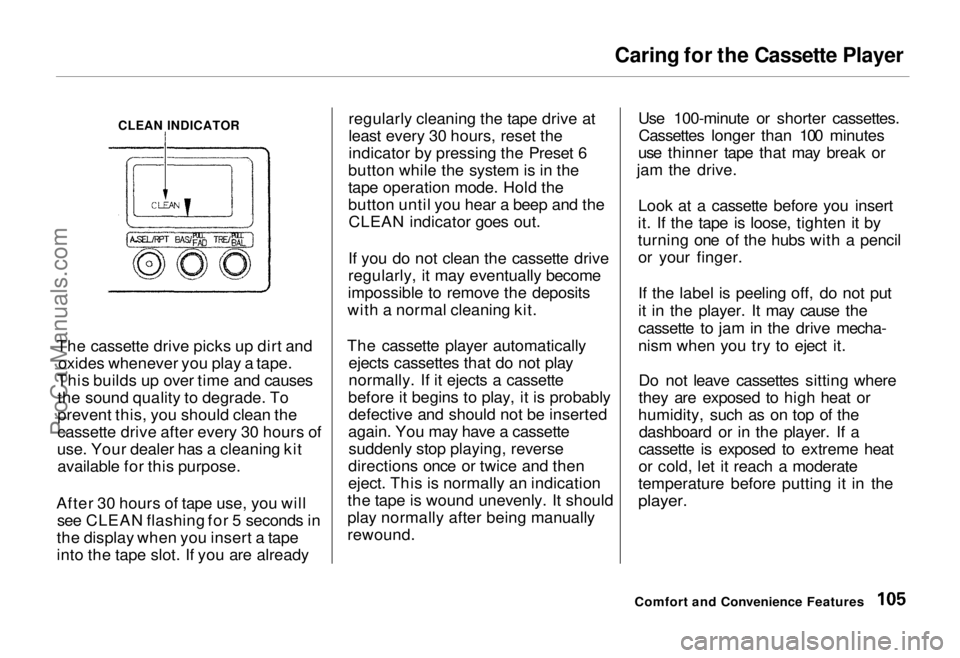
After 30 hours of tape use, you will see CLEAN flashing for 5 seconds in
the display when you insert a tape
into the tape slot. If you are already regularly cleaning the tape drive at
least every 30 hours, reset the
indicator by pressing the Preset 6
button while the system is in the
tape operation mode. Hold the
button until you hear a beep and the CLEAN indicator goes out.
If you do not clean the cassette drive
regularly, it may eventually become
impossible to remove the deposits
with a normal cleaning kit.
The cassette player automatically ejects cassettes that do not play
normally. If it ejects a cassette
before it begins to play, it is probably defective and should not be inserted
again. You may have a cassette suddenly stop playing, reverse
directions once or twice and then
eject. This is normally an indication
the tape is wound unevenly. It should
play normally after being manually
rewound. Use 100-minute or shorter cassettes.
Cassettes longer than 100 minutes
use thinner tape that may break or
jam the drive.
Look at a cassette before you insert
it. If the tape is loose, tighten it by
turning one of the hubs with a pencil or your finger.
If the label is peeling off, do not put
it in the player. It may cause the
cassette to jam in the drive mecha-
nism when you try to eject it.
Do not leave cassettes sitting where
they are exposed to high heat or
humidity, such as on top of the dashboard or in the player. If a
cassette is exposed to extreme heat
or cold, let it reach a moderate
temperature before putting it in the
player.
Comfort and Convenience Features
CLEAN INDICATORProCarManuals.comMain Menu Table of Contents s t
Page 111 of 240
Service Station Procedures
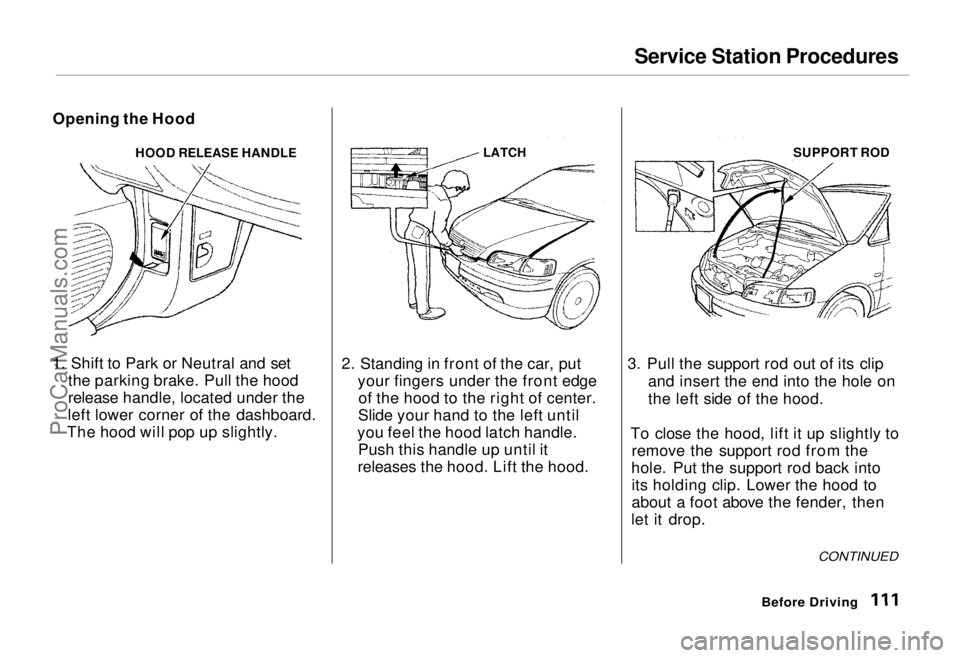
Opening the Hood HOOD RELEASE HANDLE
1. Shift to Park or Neutral and set the parking brake. Pull the hood
release handle, located under the
left lower corner of the dashboard.
The hood will pop up slightly.
LATCH
2. Standing in front of the car, put your fingers under the front edgeof the hood to the right of center.
Slide your hand to the left until
you feel the hood latch handle. Push this handle up until it
releases the hood. Lift the hood. SUPPORT ROD
3. Pull the support rod out of its clip and insert the end into the hole on
the left side of the hood.
To close the hood, lift it up slightly to remove the support rod from the
hole. Put the support rod back into its holding clip. Lower the hood to
about a foot above the fender, then
let it drop.
Before Driving
CONTINUEDProCarManuals.comMain Menu Table of Contents s t
Page 207 of 240
Fuses
All the electrical circuits in your car have fuses to protect them from a short circuit or overload. These
fuses are located in two or three fuse
boxes.
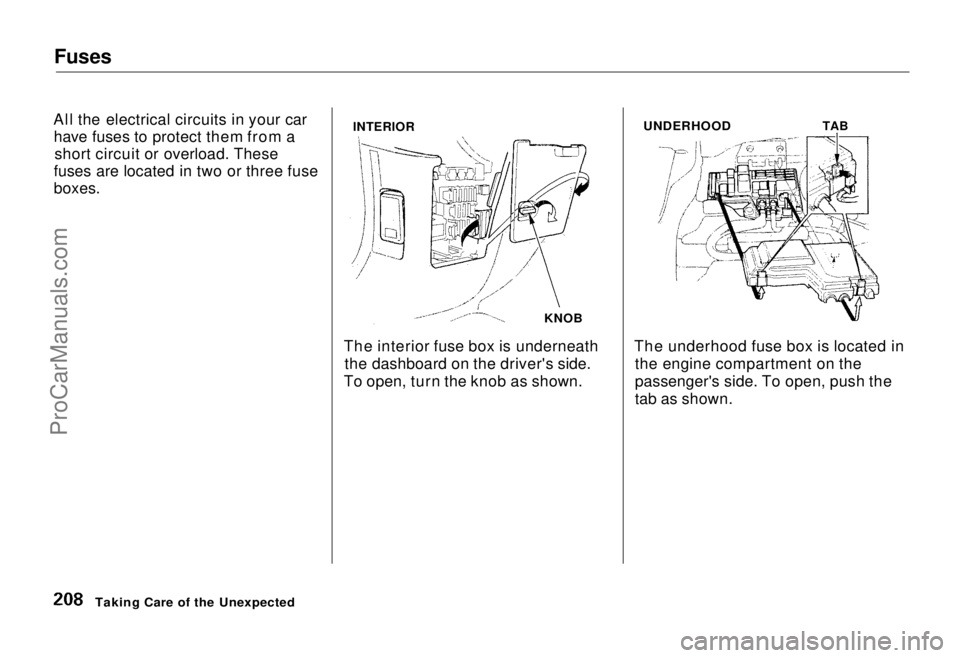
The interior fuse box is underneaththe dashboard on the driver's side.
To open, turn the knob as shown. The underhood fuse box is located in
the engine compartment on the
passenger's side. To open, push the
tab as shown.
Taking Care of the Unexpected
INTERIOR
KNOB
UNDERHOOD
TABProCarManuals.comMain Menu Table of Contents s t
Page 214 of 240
Identification Numbers
Your car has several identifying numbers located in various places.
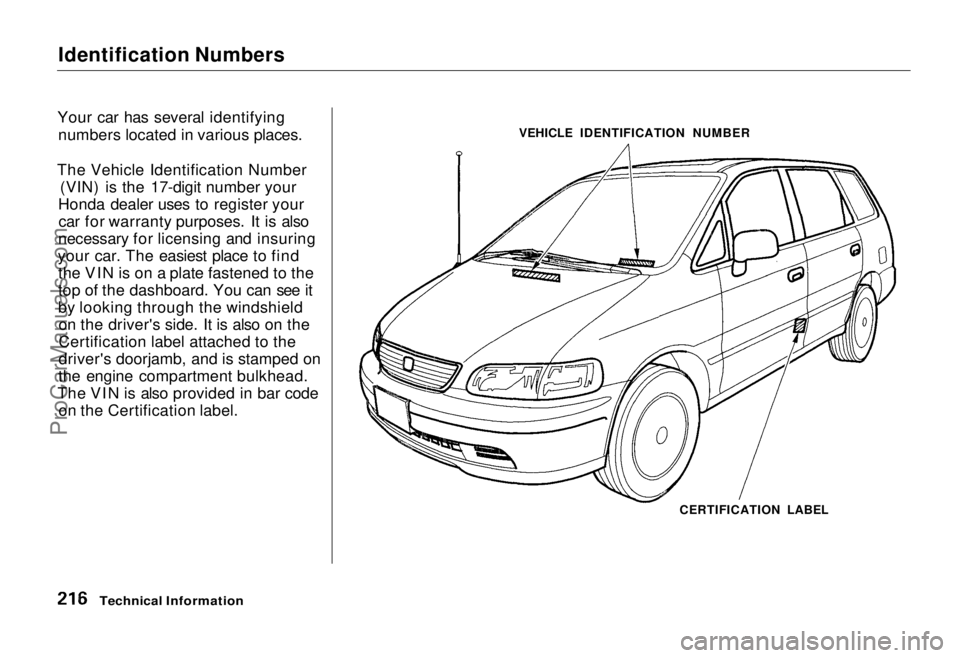
The Vehicle Identification Number (VIN) is the 17-digit number your
Honda dealer uses to register your car for warranty purposes. It is also
necessary for licensing and insuring
your car. The easiest place to find the VIN is on a plate fastened to the
top of the dashboard. You can see it
by looking through the windshieldon the driver's side. It is also on the
Certification label attached to the
driver's doorjamb, and is stamped on
the engine compartment bulkhead.
The VIN is also provided in bar code on the Certification label. VEHICLE IDENTIFICATION NUMBER
CERTIFICATION LABEL
Technical InformationProCarManuals.comMain Menu Table of Contents s t
Page 234 of 240
Index
Customer Relations Office........... 229
DANGER, Explanation of................. ii
Dashboard........................................ 34
Dashboard Compartment............... 70
Daytime Running Lights................. 42
Dead Battery, What to Do............ 216
Defects, Reporting Safety............... 30
Defogger, Rear Window................. 45
Defrosting the Windows................. 82
DEXRON® II Automatic Transmission Fluid.................... 155
Dimensions..................................... 218
Dimming the Headlights ................ 42
Dipstick Automatic Transmission........... 155
Engine Oil................................... 146
Directional Signals........................... 43
Disabled, Towing Your Car If...... 213
Disc Brake Wear Indicators......... 124
Disposal of Used Oil...................... 150
Doors Locking and Unlocking............... 53
Power Door Locks....................... 53 DOT Tire Quality Grading........... 222
Drive Belts...................................... 169
Driving............................................ 117
Economy..................................... 114
In Bad Weather.......................... 126
In Foreign Countries................. 109
Economy, Fuel............................... 114
Emergencies on the Road............. 191 Battery, Jump Starting.............. 200
Changing a Flat Tire................. 193
Charging System Indicator...... 205
Check Engine Light.................. 206 Checking the Fuses................... 209
Low Oil Pressure Indicator...... 204
Malfunction Indicator Lamp .... 206 Manually Closing Sunroof........ 207Overheated Engine................... 202
Emergency Brake............................ 68
Emergency Flashers....................... 43
Emission Controls......................... 224
Engine Belts............................................. 169
Check Light.......................... 37, 206 Coolant Temperature Gauge ..... 40
Malfunction Indicator
Lamp................................ 37, 206
Oil Pressure Indicator......... 36, 204
Oil, What Kind to Use............... 147
Overheating................................ 202
Specifications............................. 219
Ethanol in Gasoline ....................... 109
Evaporative Emission Controls.... 224
Exhaust Fumes................................ 29
Expectant Mothers, Use of Seat Belts by.........................................10
Exterior, Cleaning the................... 184
Fabric, Cleaning............................. 187
Fan, Interior...................................... 78
Features, Comfort and
Convenience................................. 75
Filling the Fuel Tank..................... 110
Filter Air............................................... 158
Oil................................................ 148
First Gear Position......................... 122
CONTINUEDProCarManuals.comMain Menu s t Main Menu s t