1995 CHEVROLET TAHOE theft
[x] Cancel search: theftPage 69 of 486
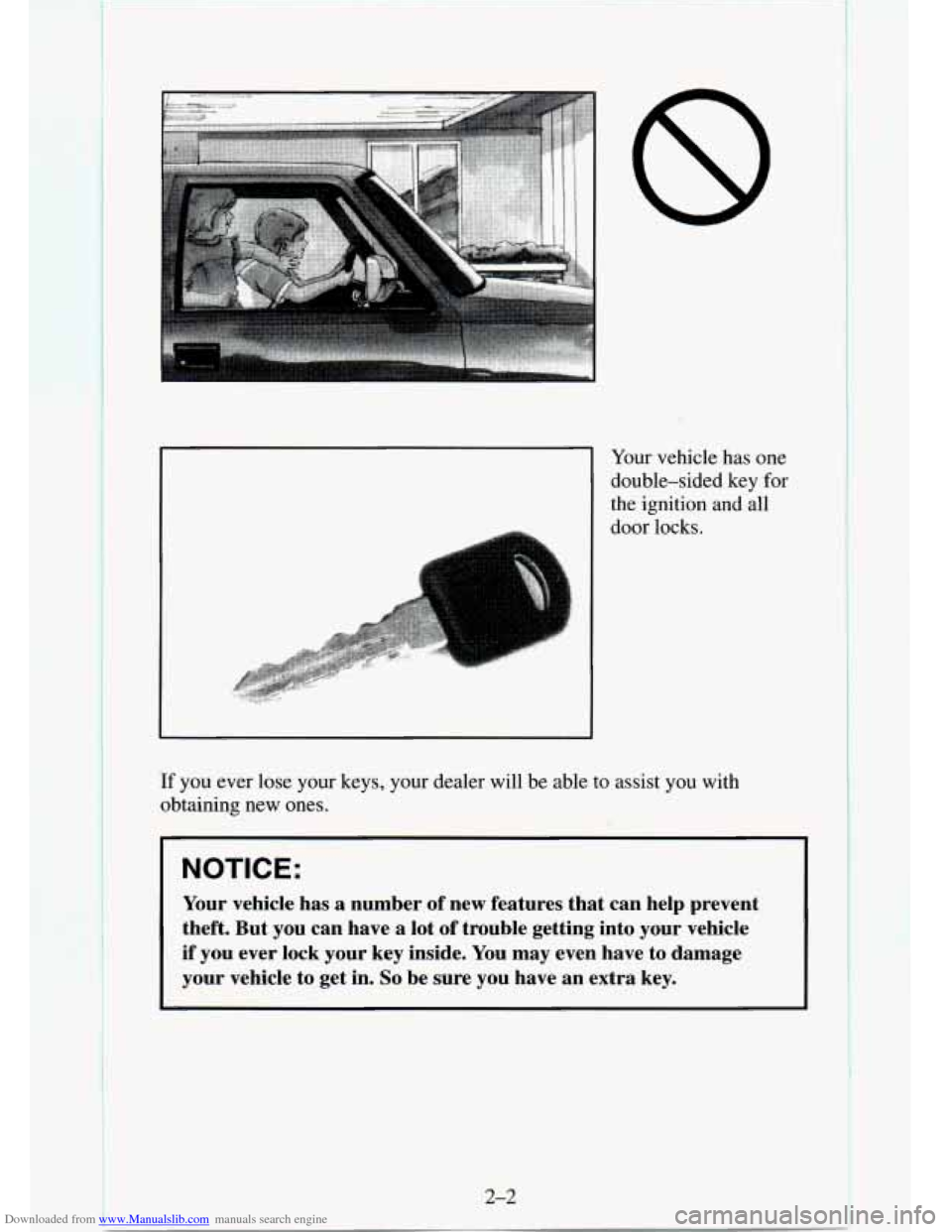
Downloaded from www.Manualslib.com manuals search engine Your vehicle has one
double-sided key for
the ignition and all
door locks.
If you ever lose your keys, your dealer will be able to assist you with
obtaining new ones.
NOTICE:
Your vehicle has a number of new features that can help prevent
theft. But you can have a lot
of trouble getting into your vehicle
if you ever lock your key inside. You may even have to damage
your vehicle to get in.
So be sure you have an extra key.
2-2
Page 77 of 486
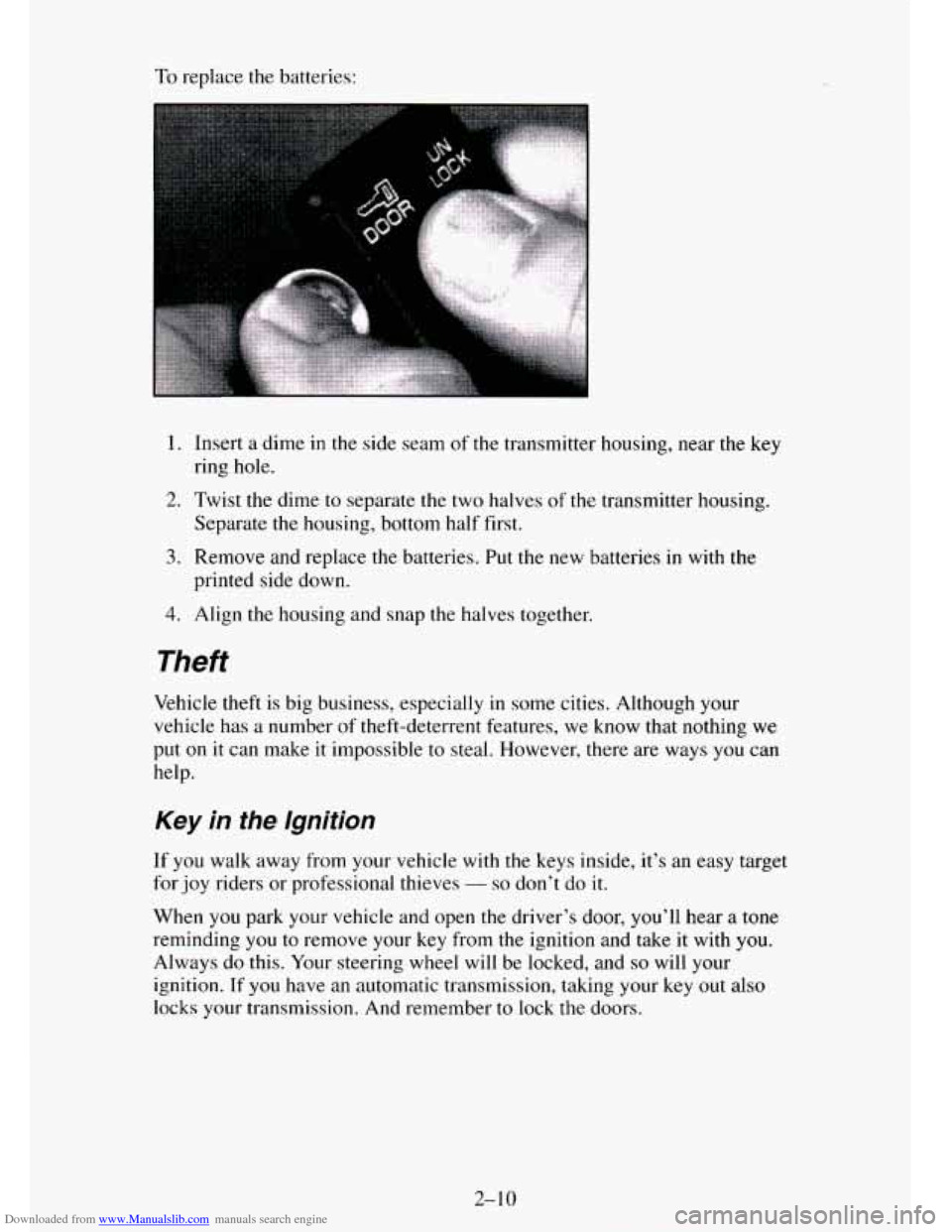
Downloaded from www.Manualslib.com manuals search engine To replace the batteries:
1. Insert a dime in the side seam of the transmitter housing, near the key
ring hole.
2. Twist the dime to separate the two halves of the transmitter housing.
3. Remove and replace the batteries. Put the new batteries in with the
Separate
the housing, bottom half first.
printed side down.
4. Align the housing and snap the halves together.
Theft
Vehicle theft is big business, especially in some cities. Although your
vehicle
has a number of theft-deterrent features, we know that nothing we
put on
it can make it impossible to steal. However, there are ways you can
help.
Key in the Ignition
If you walk away from your vehicle with the keys inside, it’s an easy target
for joy riders or professional thieves
- so don’t do it.
When you park your vehicle and open the driver’s door, you’ll hear a tone
reminding you to remove your key from the ignition and take it with you.
Always do this. Your steering wheel will be locked, and so will your
ignition. If
you have an automatic transmission, taking your key out also
locks your transmission. And remember
to lock the doors.
Page 79 of 486
Downloaded from www.Manualslib.com manuals search engine Ignition Switch
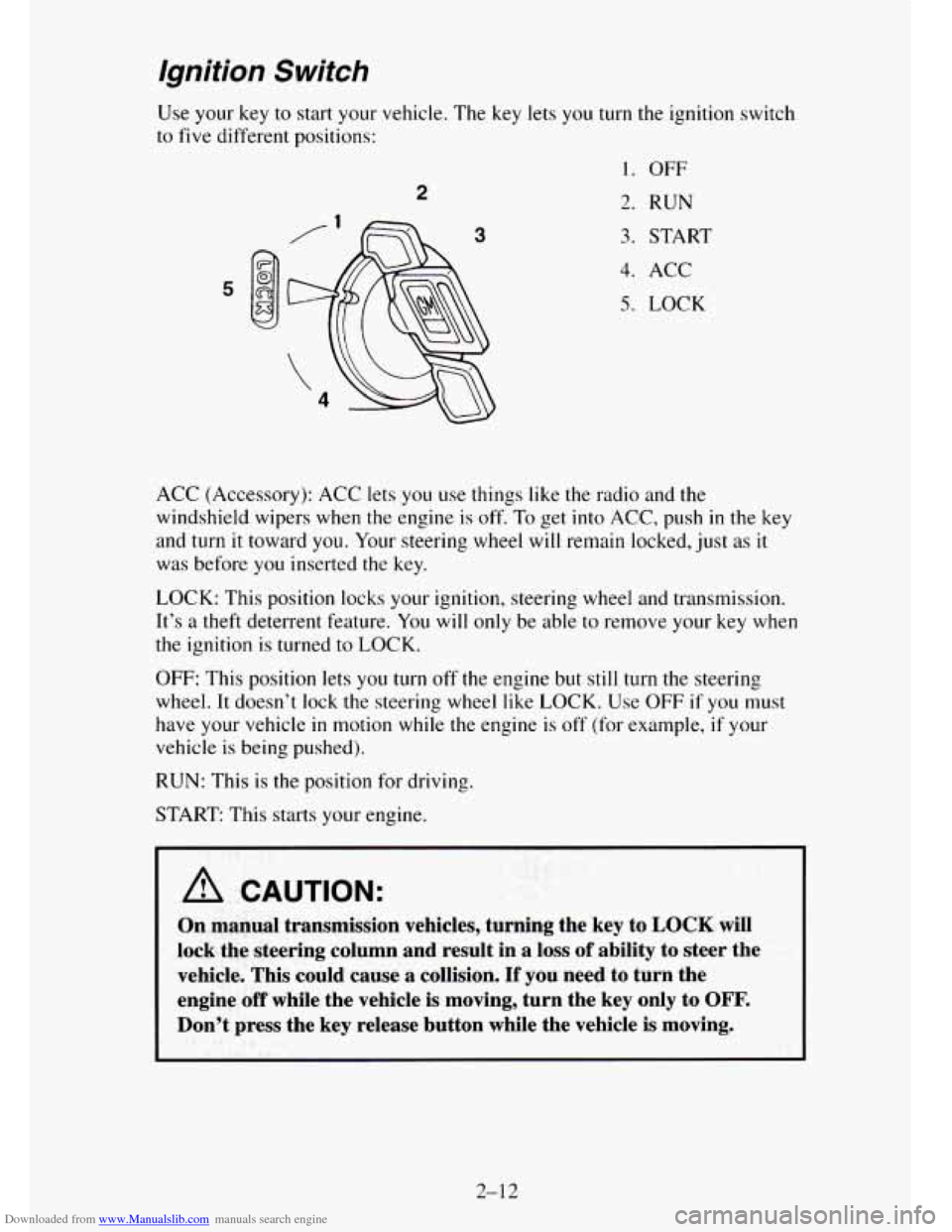
Use your key to start your vehicle. The key lets you turn the ignition switch
to
five different positions:
2
3
1. OFF
2. RUN
3. START
4. ACC
5. LOCK
ACC (Accessory): ACC lets you use things like the radio and the
windshield wipers when the engine is off. To get into ACC, push in the key
and turn it toward you. Your steering wheel will remain locked, just
as it
was before
you inserted the key.
LOCK: This position locks your ignition, steering wheel and transmission.
It’s a theft deterrent feature. You will only be able to remove your key when
the ignition is turned to LOCK.
OFF: This position lets you turn off the engine but still turn the steering
wheel.
It doesn’t lock the steering wheel like LOCK. Use OFF if you must
have your vehicle
in motion while the engine is off’ (for example, if your
vehicle is being pushed).
RUN: This is the position for driving.
START: This starts your engine.
I I
A CAUTION:
On manual transmission vehicles, turning the key to LOCK will
lock the steering column and result in
a loss of ability to steer the
vehicle. This could cause
a collision. If you need to turn the
engine
off while the vehicle is moving, turn the key only to OFF.
Don’t press the key release button while the vehicle is moving.
2-12
Page 172 of 486
Downloaded from www.Manualslib.com manuals search engine PROG (2) - Press PROG to go from one side of the tape to the other.
NEXT
(3) - Press NEXT or SEEK (in the direction that the lighted tape
direction. arrow points) to search for the next selection.
A minimum
three-second blank gap is needed for the player to stop at the beginning of
the selection.
NEXT will appear in the display.
REV
(4)- To rapidly reverse the tape, press REV and the tape will rapidly
reverse to the beginning of the cassette reel or
until you press REV again.
The radio plays the last selected station during REV.
00 (5)- Press 00 to reduce cassette tape noise. The 00 symbol will
appear
in the display while the player is in this mode.
FWD (6)- To rapidly advance the tape, press FWD and the tape will
rapidly advance to the end of the cassette reel or until you press FWD again.
The radio plays the last selected station during FWD.
TAPE AUX- To switch between the player and the radio
when a tape is
playing, press the AM/FM button. To return to the tape player, press
TAPE
AUX. The lighted arrow will appear and show the direction of play when a
tape is active.
EJECT
- To remove the tape press the EJECT button. EJECT can be used
with either the ignition
or radio off. Also, you must press EJECT before
loading a cassette with the radio off to
allow loading.
If a tape is inserted with side “1” (or “A”) up, then the right arrow means
that that side is being played. Likewise, a left arrow would indicate that side
“2” (or “B”) had been selected.
00 Dolby@ Noise Reduction is manufactured under a license from Dolby
Laboratories Licensing Corporation. Dolby@ and
the 00 symbol are
trademarks
of Dolby Laboratories Licensing Corporation.
THEFTLOCK” Theft Deferent Feature
THEFTLOCK” is an anti-theft feature for the cassette player. It can be
used or ignored.
If ignored, the system plays normally. If it is used, your
player won’t be usable if it is ever stolen, because
it will go to LOC mode
any time the battery power is removed. After
a loss of battery power, the
player cannot be turned on unless
an unlock code is entered. When
activated, an indicator will flash
while the ignition is off.
The following instructions tell you how to enter a secret code to activate the
THEFTLOCK system. If your vehicle loses battery power for any reason,
you must unlock the svstem with the secret code before
the radio will turn
on.
3-17
Page 173 of 486
Downloaded from www.Manualslib.com manuals search engine To Lock The System:
1.
2.
3.
4.
5.
6.
7.
8.
9.
Write down any number from 000 to 999 and keep it in a safe place.
Turn the ignition
to ACC or RUN.
Turn the radio off.
Press the
1 and 4 buttons together. Hold them down until “- - -” shows
on the display.
You are now ready to enter your secret code. Don’t wait more than 15
seconds between any of the following steps. If
you do, the radio
automatically returns
to time display and you must start the procedure
over at step
4.
Press MIN and “000” will appear on the display.
Press the MIN button again
to make the last two digits agree with your
code.
Press HR to make the first one or two digits agree with your code.
Press AMEM after
you have confirmed that the code matches the one
you wrote down. rEP appears
in the display, indicating that you need to
repeat steps
5 through 7.
Press AMEM and this time the display will show “SEC”. “SEC”
means the system is secured.
With the ignition off,
the THEFTLOCK indicator will flash.
To Unlock THEFTLOCK After a Power Loss
When battery power is reapplied to a secured radio, the radio won’t turn on
and “LOC” will appear on the display.
Enter your secret code as follows. Pause no more than
15 seconds between
steps.
1.
2.
3.
4.
5.
6.
Turn the ignition on.
Turn the radio
off.
Press MIN and “000’ will appear on the display.
Press the MIN button again
to make the last two digits agree with your
code.
Press
HR to make the first one or two digits agree with your code.
Press AMEM after
you have confirmed that the code matches the one
you wrote down.
SEC appears in the display indicating that the radio is
now operable.
3-1 8
Page 174 of 486
Downloaded from www.Manualslib.com manuals search engine To Disable THEFTLOCK
I. Turn the ignition on.
2. Turn the radio off.
3. With the time showing in the display, press the 1 and 4 buttons
together. Hold them down
until "SEC" shows on the display.
You are now ready
to enter your secret code. Don't wait more than 15
seconds between any of the following steps.
4. Press MIN and "000" will appear on the display.
5. Press the MTN button again to make the last two digits agree with your
6. Press HR to make the first one or two digits agree with your code.
7. Press AMFM after you have confirmed that the code matches the one
code.
you wrote down. ~
system is unsecured (disabled).
66 " will
appear in the display, indicating that the
If the code is incorrect, "SEC" will appear in the display and the system will
still be secured. The radio will still operate
if it is secured or unsecured. If
"SEC" appears and you still want to disable the system, follow the disable
procedure again and enter the correct code.
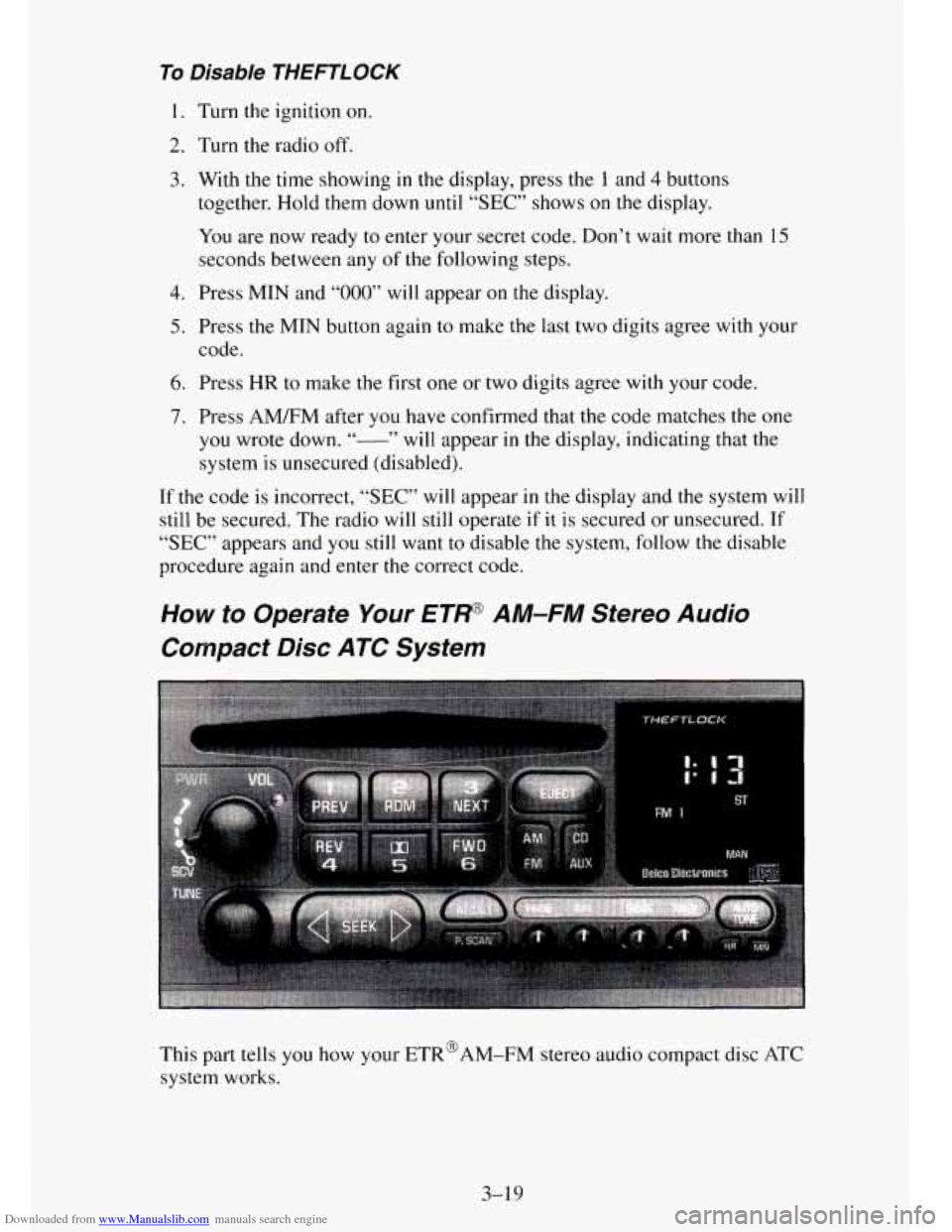
How to Operate Your ETP AM-FM Stereo Audio
Compact Disc ATC System
3-19
Page 178 of 486
Downloaded from www.Manualslib.com manuals search engine When a disc is playing, the letters CD and the CD symbol will appear in the
display.
EJECT
- Press EJECT to eject the disc from the player and play the radio.
When the same or a new disc is inserted,
the disc will start playing on track
1.
00 Dolby’ Noise Reduction is manufactured under a license from Dolby
Laboratories Licensing Corporation. Dolby@ and the
00 symbol are
trademarks of Dolby Laboratories Licensing Corporation.
THEFTLOCK Theft Deterent Feature
THEFTLOCK is an anti-theft feature for the compact disc player. It can be
used
or ignored. If ignored, the system plays normally. If it is used, your
player won’t be usable if it is ever stolen, because it will
go to LOC mode
any time the battery power is removed. After a loss of battery power, the
player cannot be turned on unless an unlock code is entered.
The following instructions tell you how to enter a secret code into
the
system. If your vehicle loses battery power for any reason, you must unlock
the system with the secret code before the radio will turn on.
To Lock The System:
1.
2.
3.
4.
5.
6.
7.
8.
9. Write
down any number from
000 to 999 and keep it in a safe place.
Turn the ignition to ACC or RUN.
Turn the radio
off.
Press the 1 and 4 buttons together. Hold them down until “- - -” shows
on the display.
You are now ready to enter your secret code. Don’t wait more than 15
seconds between any of the following steps. If you do, the radio
automatically returns to time display and you must start the procedure
over
at step 4.
Press MIN and “000” will appear on the display.
Press the MIN
button again to make the last two digits agree with your
code.
Press
HR to make the first one or two digits agree with your code.
Press
AM/FM after you have confirmed that the code matches the one
you wrote down.
rEP appears in the display, indicating that you need to
repeat steps
5 through 7.
Press AM/FM and this time the display will show SEC.
With the ignition off, the THEFTLOCK indicator
will flash.
3-23
Page 179 of 486
Downloaded from www.Manualslib.com manuals search engine To Unlock THEFTLOCK After a Power Loss
When battery power is reapplied to a secured radio, the radio won’t turn on
and “LOC” will appear on the display.
Enter your secret code as follows. Pause
no more than 15 seconds between
steps.
1. Turn the ignition on.
2. Turn the radio off.
3. Press MIN and “000” will appear on the display.
4. Press the MIN button again to make the last two digits agree with your
code.
5. Press HR to make the first one or two digits agree with your code.
6. Press AM/FM after you have confirmed that the code matches the one
you wrote down. SEC appears in the display indicating that the radio is
now operable.
To Disable THEFTLOCK
1. Turn the ignition on.
2. Turn the radio off.
3. With the time showing in the display, press the 1 and 4 buttons
together. Hold them down until
“SEC” shows on the display.
You are now ready to enter your secret code. Don’t wait more than
15
seconds between any of the following steps.
4. Press MIN and “000” will appear on the display.
5. Press the MIN button again to make the last two digits agree with your
code.
6. Press HR to make the first one or two digits agree with your code.
7. Press AMEM after you have confirmed that the code matches the one
you wrote down. “- ” will appear in the display, indicating that the
system is unsecured (disabled).
If the code is incorrect, “SEC” will appear
in the display and the system will
still be secured. The radio will still operate if it is secured or unsecured. If
“SEC” appears and you still want to disable the system, follow the disable
procedure again and enter the correct code.
3-24