1995 CHEVROLET CAMARO Security
[x] Cancel search: SecurityPage 64 of 388
Downloaded from www.Manualslib.com manuals search engine Parking at Night
Park in a lighted spot, close all windows and lock your
vehicle. Remember to keep your valuables
out of sight.
Put
them in a storage area, or take them with you.
Parking Lots
If you park in a lot where someone will be watching
your vehicle, it’s best to lock it up and take your keys. \
But what if you
have to leave your ignition key? What if
you have to leave something valuable in your vehicle?
Put your valuables in a storage area, like your trunk
or glove box.
0 Lock the glove box.
0 Lock all the doors except the driver’s.
0 Then take the door key with you.
. ‘i
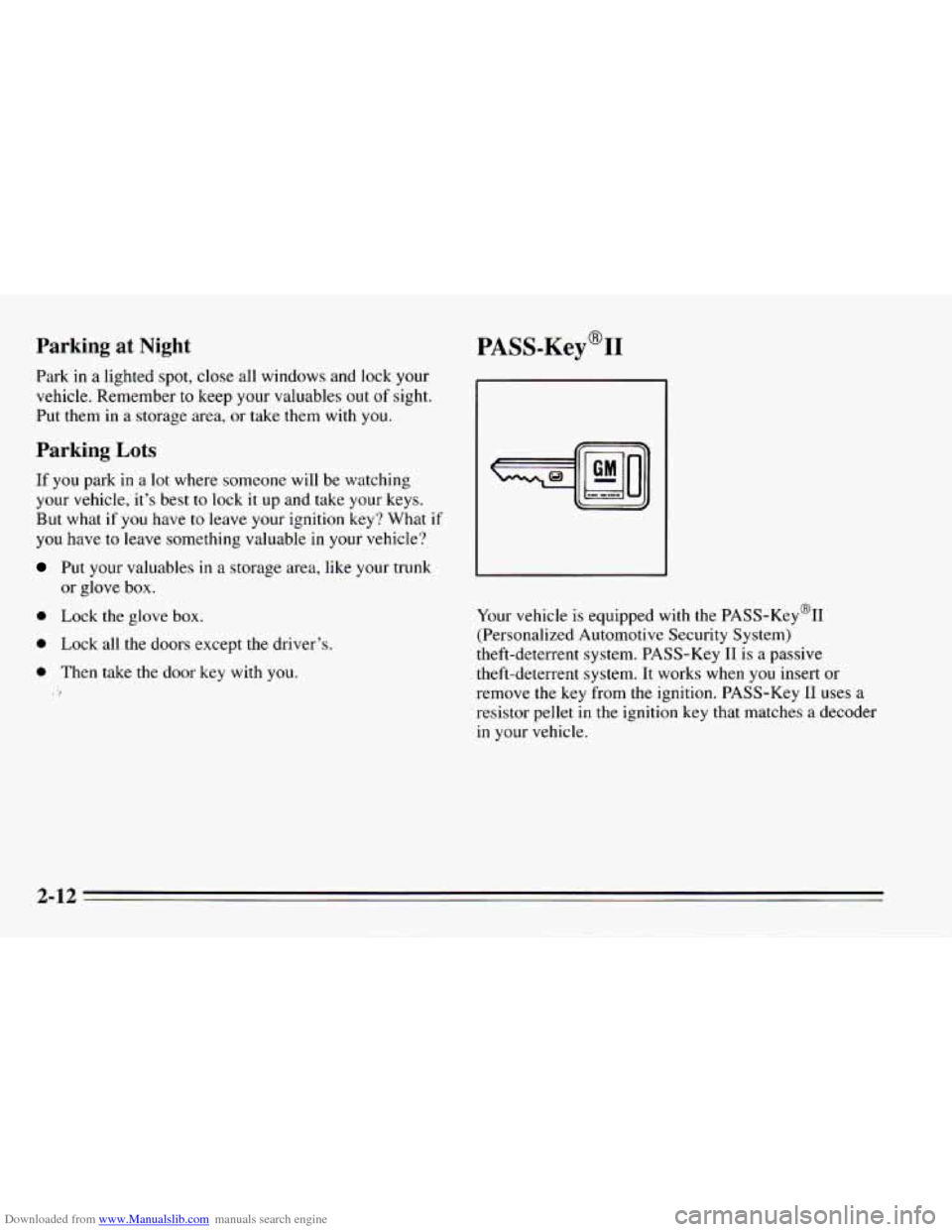
PASS-Key@II
Your vehicle is equipped with the PASS-Key%
(Personalized Automotive Security System)
theft-deterrent system. PASS-Key I1
is a passive
theft-deterrent system. It works when you insert or
remove the key from
the ignition. PASS-Key I1 uses a
resistor pellet
in the ignition key that matches a decoder
in your vehicle.
2-12
Page 65 of 388

Downloaded from www.Manualslib.com manuals search engine When the PASS-Key@II system senses that someone is using the wrong key, it shuts down the vehicle’s starter
and fuel systems. For about three minutes, the starter
won’t work and fuel won’t
go to the engine. If someone
tries to start your vehicle again or uses another key
during this time, the vehicle will not start. This
discourages someone from randomly trying different
keys with different resistor pellets in an attempt to make
a match.
The ignition key must be clean and dry before it’s
inserted in the ignition or the engine may not start. If the
engine does not start and the SECURITY light stays on
when you try to start the vehicle, the key may be dirty or
wet. Turn the ignition
off.
Clean and dry the key. Wait about three minutes and try
again. The security light will remain on during this time.
If the starter still won’t work, and the key appears to be
clean and
dry, wait about three minutes and try another
ignition key.
At this time, you may also want to check
the fuses (see “Fuses and Circuit Breakers” in the
Index).
If the starter won’t work with the other key, your vehicle
needs service.
If your vehicle does start, the first
ignition key may be faulty. See your Chevrolet dealer or
a locksmith who can service the PASS-Key’II.
If you accidentally use
a key that has a damaged or
missing resistor pellet, the starter won’t work and the
security light will flash. But you don’t have to wait three
minutes before trying another ignition key.
See your Chevrolet dealer or a locksmith who can
service the PASS-Key’II to have a new key made.
If you’re ever driving
and the “SECURITY” light comes
on and stays on, you will be able to restart your engine if
you turn it
off. Your PASS-Key@II system, however, is
not working properly and must be serviced by your
Chevrolet dealer. Your vehicle
is not protected by the
PASS-Key@II system.
If you lose or damage a PASS-Key’II ignition key, see
your Chevrolet dealer or a locksmith who can service
PASS-Key’II
to have a new key made. In an
emergency, call the Chevrolet Roadside Assistance
Program at 1-800-CHEV-USA
(1-800-243-8872).
2-13
Page 151 of 388
Downloaded from www.Manualslib.com manuals search engine To Replay the Current Selection
Press PREV to hear a track again.
If you press and hold this button, or press it more than
once, the disc will return to previous tracks.
REV (Reverse): Press and hold REV to rapidly return
to a favorite passage. Release it to play the passage.
FWD (Fast Forward): Press and hold FWD to quickly
advance within
a track. Release it to resume playing.
SCAN Press SCAN to listen to each track for about
10 seconds. Press RDM or SCAN to stop the scanning
COMP (Compression): Press COMP to make loud and
soft passages more nearly equal
in volume.
RDM (Random): Press RDM to hear a random
selection of tracks.
To Stop the Disc Player
Turn the power off or turn the ignition key off. The
disc stays in the player and will resume playing at
the point where it stopped.
Press ST-PL to stop playing the disc and switch to
radio. Press ST-PL to restart the disc at the point
where it stopped.
0 Press EJCT to eject the disc and the radio will play.
The disc will start playing at track
1 when you
reinsert it.
Theft-Deterrent Feature
Delco-Loc I1 is a security feature for the compact disc
player. It can be used or ignored. If ignored, the system
functions normally.
If it is used, your system won’t be
usable
if it’s ever stolen.
3-13
Page 152 of 388
Downloaded from www.Manualslib.com manuals search engine Setting Your Security Code
The instructions below tell you how to enter a security
code into the system. If your vehicle loses battery power
for any reason, you must enter the security code again
before the system will turn on.
1.
2.
3.
4.
5.
6.
7.
Write down any six-digit number and keep it in a
safe place.
Turn the ignition switch to the ACC or RUN
position.
Turn the audio system
off.
Press and hold pushbuttons 1 and 4 together until
You are now ready
to enter your security code. Don’t
wait more than
15 seconds between steps.
Press
SET and “000” will appear on the display.
Press
SCAN and hold it until the first digit of the
code appears.
Press SEEK
4 or SEEK b and hold until the second
and third digits
of your code appears. Release the
button.
‘&---” shows on the display.
8. Press the lower knob and “OOO” will appear. Now you
are ready to enter
the last three digits of your code.
9. Press SCAN and hold until the fourth digit of your
10. Press SEEK 4 or b and hold until the fifth and sixth
code appears.
Release the button.
digits of your code appears. Release the button.
seconds, and then
“000” will appear.
11.
Press
the lower knob. rEP will appear for five
12. For verification, repeat steps 6 through 11. If “SEC”
appears, your audio system is secured. If
“---” shows
on the display, your system is not secured. You must
restart
the entire procedure again from step 4.
Shutting Off the Theft-Deterrent Feature
If your audio system is secured (SEC shows on display)
and you wish to disable
it, enter your security code as
follows, pausing
no more than 15 seconds between steps:
1. Turn the ignition on. Make sure the audio system is
2. Press pushbuttons 1 and 4 together until SEC shows
off. The time
will show
on the display.
on the display.
3-14
Page 153 of 388
Downloaded from www.Manualslib.com manuals search engine 3.
4.
5.
6.
7.
8.
9.
Press SET. “000” will appear on the display.
Press SCAN and hold until the first digit of your
code appears. Release the button.
Press SEEK
4 or b and hold until the second and
third digits of your code appears. Release
the button.
Press the lower knob.
“000” will appear on the
display.
Press SCAN and hold
until the fourth digit of your
code appears. Release the button.
Press SEEK
4 or and hold until the fifth and sixth
digits of your security code appears. Release the
button.
Press the lower knob. If
“---” shows, you have shut
off the theft-deterrent feature. If SEC shows, your
audio system is still secured.
NOTE: If you lose or forget your security code, see
your dealer for assistance.
Unlocking the Audio System after a Power Failure
If power is disrupted to the audio system while in the
SEC mode, the unit will
not work and LOC will show
on the display whenever the ignition is on.
To unlock the
unit:
1.
2.
3.
4.
5.
6.
7.
8.
Turn the ignition switch to the ACC or RUN
position.
Press SET.
“000” will appear on the display.
Press SCAN and hold
until the first digit of your
code appears, then release the button.
Press SEEK
4 or b and hold until the second and
third digits of your code appears. Release the button.
Press the lower knob.
“000’ will appear on the
display.
Press SCAN and hold
until the fourth digit of your
code appears. Release the button.
Press SEEK
4 or and hold until the fifth and sixth
digits of your security code appears. Release the
button.
Press the lower knob. “SEC”
will appear and the unit
will work. If “LOC” shows, the numbers did not
match and the
unit is still locked.
3-15
Page 154 of 388
Downloaded from www.Manualslib.com manuals search engine How to Change Your Security Code
You can change your security code by following these
steps:
1. Using your old code, follow the directions given
under “Shutting Off the Theft-Deterrent Feature.’’
2. Repeat directions of “Setting Your Security Code”
with your new security code.
Understanding Radio Reception
FM Stereo
FM stereo will give you the besr sound. But FM signals
will reach only about
10 to 40 miles (16 to 65 km). And,
tall buildings or hills can interfere with FM signals,
causing the
sound to come and go.
AM
The range for most AM stations is greater than for FM,
especially at night. The longer range, however, can
cause stations to interfere with each other.
AM can pick
up noise from things like storms and power lines. Try
reducing the treble
to reduce this noise if you ever get it.
AM Stereo
This means the Delco@ system can receive C-QUAM@
stereo broadcasts. Many
AM stations around the country
use C-QUAM@ to produce stereo, though some do not.
(C-QUAM@
is a registered trademark of Motorola, Inc.)
If your Delco@ system can get
C-QUAM@, your
STEREO light
will come on when you’re receiving it.
Tips about Your Audio System
Hearing damage from loud noise is almost undetectable
until it is too late. Your hearing can adapt to higher
volumes of sound. Sound that seems normal can be loud
and harmful to your hearing. Take precautions by
adjusting the volume control on your radio to
a safe
sound level before your hearing adapts to it.
To help avoid hearing
loss or damage:
Adjust the volume control to the lowest setting.
0 Increase volume slowly until you hear comfortably
and clearly.
Page 384 of 388

Downloaded from www.Manualslib.com manuals search engine Safety Warnings and Symbols ....................... vi
Scheduled Maintenance Services .................... 7-3
Seat. Manual Four-Way
........................... 1-2
Seat. Power
.................................... 1-3
Seats
.......................................... 1-1
Seats and Restraint Systems ........................ I - I
Seats and Seat Controls ........................... 1 - 1
Seats, Manual Front Seat .......................... 1 - 1
Seats, Reclining Front ............................ 1-3
Seats, Securing a Child Restraint
................... 1-33
Second Gear (2), Automatic Transmission
........... 2-24
Second Gear (2), Manual (Five Speed)
.............. 2-25
Second Gear (2), Manual (Six Speed)
............... 2-26
Security System (PASS-Key
11) .................... 2- I2
Service
........................................ 6-1
Service and Appearance Care
...................... 6- 1
Service and Owner Publications .................... 8-7
Service Bulletins, Ordering
........................ 8-7
Service Engine Soon Light
....................... 2-74
Service Manuals, Orderlng ........................ 8-7
Service Parts Identification Label
.................. 6-67
Service Publications
.............................. 8-7
Service Work, Doing Your Own
.................... 6-2
Servicing
Your Air Bag-Equipped Chevrolet ......... 1-24
Sheet Metal Damage
............................ 6-65
Shift Lever, Automatic Transmission
............... 2-2 1
Shift Speeds, Manual Transmission ................. 2-28
Shifting Five Speed Manual Transmission
........... 2-25
Shifting Into Park (P) ............................ 2-3 1
Shifting Out of Park (P) .......................... 2-33
Shifting Six Speed Manual Transmission
............ 2-26
Shifting, Automatic Transmission
.................. 2-2 1
Signaling Turns ................................ 2-38
Six Speed Manual Transmission ................... 2-26
Six-Way Power Seat
............................. 1-3
Sixth Gear. Manual Transmission (Six Speed)
........ 2-26
Skidding
...................................... 4-15
Skip Shift Light ................................ 2-27
Sound Equipment, Adding
........................ 3-17
Spare Tire. Compact
............................. 5-37
Speedometer
................................... 2-67
Stains. Cleaning
................................ 6-60
Starter Switch .................................. 7-46
Starting Your Engine
5.7Liter
.................................... 2-18
Automatic Transmission
....................... 2-17
Manual Transmission
......................... 2-17
v-6
....................................... 2-17
Steam. If Coming From Your Engine ............... 5-13
Steering
...................................... 4-10
Steering Column Lock .......................... : 7-46
Steering Wheel. Tilt
............................. 2-37
Steering.
In Emergencies ......................... 4-12
Steering. Power
................................ 4-10
Steering. Tips
.................................. 4-11
Storage. Of Your Vehicle
......................... 6-38
Stuck.
If You Are ............................... 5-38
Sunvisors
.................................... 2-62
Sunshades. T-Top
............................... 2-55
Supplemental Inflatable Restraint (SIR)
............. 1-18
Symbols. Vehicle ................................ viii
Storage, Cassette ............................... 2-59
T-~op Sunshades
.............................. 2-55
Tachometer
.................................... 2-67
9-10