1995 CADILLAC SEVILLE climate control
[x] Cancel search: climate controlPage 8 of 410

Downloaded from www.Manualslib.com manuals search engine 1 M
I ./ I
3
stainless steel roof and low profile
tires.
maor- introduced in
1953, was redesigned for 1967 as the
first front wheel drive personal lux-
ury car.
The 472 cu. in. V8 engine
used in all Cadillacs in 1968 and
1969 was enlarged to 500 cu. in. for
all 1970 Eldorados.
An Air Cushion Restraint Sys-
tem (airbag) was available for
1974,
1975 and 1976 Cadillacs.
Analog Electronic Fuel Injec-
tion was available, on 1975 Cadillacs
and was standard on the new inter-
national size
1976 Seville. In 1978,
the Trip Computer option incor-
porated an on-board microprocessor.
For
the 1948 model, Cadillac
introduced the
which set the trend in
styling for nearly two decades. This
was followed
by the 1949 model with
the two door hardtop Coupe DeVille
and the modern overhead valve,
high compression
V8 engine.
Engineering innovations, con-
veniences and styling dominated the
'50s and '60s. Cruise control, auto-
matic climate control,
tilt and
telescoping steering wheels, twilight
sentinel and four door hard tops all
debuted in these years. In
1957 the
Eldorado Brougham featured ad-
vances such as air suspension, mem-
ory seat, automatic electric door
locks, transistor radio, a brushed
-1
Page 160 of 410
Downloaded from www.Manualslib.com manuals search engine .-
reads TIMER 0O:OO:OO. Press the INFORMATION button to exit from
the TIMER function.
AVG MPH (Average Speed) Reset
Press repeatedly the INFORMATION button to display the AVG MPH,
then press and hold the RESET button until
0.0 AVG MPH is displayed.
MPG AVG (Average Fuel Economy) Reset
Press repeatedly the INFORMATION button to display the MPG AVG,
then press and hold the RESET button until
0.0 AVG MPG is displayed.
Another method to reset both AVG MPG is
to press the AVG button on
the Fuel Data Panel until 0.0 AVG MPG is shown in both displays.
Fuel Used Reset
Press repeatedly the INFORMATION button to display the FUEL
USED on the Driver Information Center, then press and hold the
RESET button until
FUEL USED 0.0 is displayed.
Oil Life Left Reset
Press repeatedly the INFORMATION button to display the OIL LIFE
LEFT, then press and hold the RESET button until
0.0 OIL LIFE LEFT
is displayed.
DISPLAY ON/OFF Button
Pressing this button will turn off the Driver Information Center (DIC),
Electronic Climate Control and
Fuel Data Center displays. If you have
the digital cluster, the fuel gage, trip odometer and odometer will also
turn off. While displays are off, pressing the INFORMATION button
will
only turn on the DIC. If any other button is pressed or a driving warning
message needs to be displayed or fuel level falls below four gallons, all the
displays will come back on.
TRIP SET Button
Press and hold this button to set the trip odometer back to zero.
ENG/MET (English/Metric Button)
Press this button to switch from English (miles and Degrees Fahrenheit)
to metric (kilometers and Degrees Celsius).
2-89
Page 161 of 410
Downloaded from www.Manualslib.com manuals search engine Driver Information Center Messages
These messages will appear if there is a problem sensed in one of your
vehicle’s systems. Vehicles that are first sold in Canada will have
a number
after each message. This number helps to identify the message which is
only displayed in English.
APPLY BRAKE TO SHIFT - 46
This message will appear if your vehicle is in PARK (P) for about 15
seconds and the brake is not pressed in. If you do not want this message to
appear, you can cancel it by holding the
OFF and the blue (cooler) button
on the Electronic Climate Control panel for about
five seconds. Hold the
same
two buttons again to have this message displayed again.
A/C OVERHEATED - A/C COMPRESSOR OFF - 15
If the refrigerant system ever reaches an over-pressure condition, this
message will appear to tell
you that the air conditioning compressor has
been turned
off. Air conditioned air will not be delivered to cool your
vehicle. If the pressure returns to a normal operating range, you must
select
AUTO, DEFOG or DEFROST to start the compressor. If this
message continues to appear, have the system repaired as soon
as possible
to avoid compressor damage.
BATTERY NO CHARGE - 07
This message will appear if your battery is not being charged. Have your
electrical system checked by your Cadillac dealership at your earliest
convenience.
BATTERY VOLTS HIGH - 08
This message shows that the electrical charging system is overcharging
(more than
16 volts). To avoid being stranded have the electrical system
checked
by your Cadillac dealership. You can reduce the charging
overload by using the accessories. Turn
on the lamps and radio, set the
climate control on
AUTO and the fan speed on HI, and turn the rear
window defogger on.
You can monitor battery voltage on the Driver
Information Center
by toggling the INFORMATION button. The normal
range is
11.5 to 15.5 volts when the engine is running.
c
2-90
-d
Page 163 of 410
Downloaded from www.Manualslib.com manuals search engine LOW OIL LEVEL - 36
For correct operation of the low oil sensing system, the vehicle should be
on a level surface.
A false LOW OIL LEVEL message may appear if the
vehicle is parked
on grades. The oil level sensing system does not check
for actual oil level
if the engine has been off for a short period of time,
and the
oil level is never sensed while the engine is running. If the LOW
OIL LEVEL message appears, and your vehicle has been parked on level
ground with the engine
off for at least 30 minutes, your oil level should be -
checked by observing the oil dipstick. Prior to checking your oil level be
sure your engine has been
off for five minutes and your vehicle is on a
level surface. Then check
your dipstick and add oil if necessary. See
“Engine Oil”
in the Index.
CHECK WASHER FLUID - 25
This message will appear for a few seconds indicating that you need
washer solvent.
CHANGE OIL SOON - 40
This message will appear when you have used 90% of the engine oil’s
expected life, based on your driving patterns.
CHANGE ENGINE OIL - 82
This means that the life of your engine oil has expired and it should be
changed
within 200 miles. See “Engine Oil” and “Filter
Recommendations” in your maintenance schedule booklet. After an
oil
change the Oil Life Index must be reset. See “Oil Life Indicator” in the
Index on how to reset it.
CRUISE ENGAGED - 43
This message will appear for a few seconds when you select a speed at
which to cruise.
ENGINE COOLANT HOT - 44
This message will appear when your engine coolant temperature is over
248” F (126O C). To avoid added strain on a hot engine turn off your
Climate Control system. Stop and allow your vehicle to idle
until it cools
down or the message is removed.
If it does not cool down, turn off your
engine and have
it serviced before driving it again. Severe engine damage
can result from an overheated engine. See “Engine Overheating”
in the
Index.
Y-
2-92
Page 164 of 410
Downloaded from www.Manualslib.com manuals search engine ENGINE HOT - A/C COMPRESSOR OFF - 16
-_ ..
This message will appear when the Climate Control is in AUTO or
DEFROST and the engine coolant is hotter than the normal operating
temperature. To avoid added strain on a hot engine the air conditioning
compressor is automatically turned off. When that happens, air
conditioned air is not delivered.
If the coolant temperature returns to
normal, you must select AUTO,
DEFOG or DEFROST to return to a
normal A/C compressor operation.
I_ -
FUEL LEVEL VERY LOW - 11
This message serves as a warning that the fuel level in your tank is
critically low. It means you should stop for fuel immediately.
SERVICE A/C SYSTEM A/C COMPRESSOR OFF - 14
- This message appears when the electronic sensors that control the A/C
and heating system are
no longer working. Have your Climate Control
system serviced
if you notice a drop in heating and A/C efficiency.
STARTING DISABLED DUE TO THEFT SYSTEM REMOVE
IGNITION
KEY - 33
This message will a pear when the Personalized Automotive Security
System (PASS-Key
8 11) senses that an improper ignition key is being used
to
try to start the vehicle. Check the ignition key for damage. If it is
damaged,
it may need to be replaced. If you see no damage, clean the
~ pellet contacts with a soft cloth or napkin. Remove the ignition key and
wait for the Driver Information Center
to display WAIT 3 MINUTES.
The Instrument Panel Cluster
will then run a timer and change the
messages to WAIT
2 MINUTES, WAIT 1 MINUTE, and then START
CAR. When the START CAR message is displayed,
try again to start the
engine.
SERVICE NOW - REFER TO OWNERS MANUAL - 02
This message appears if you have a problem with the Powertrain Control
Module (PCM). To correct this problem have your vehicle serviced at
your Cadillac dealership.
---
2-93
Page 166 of 410
Downloaded from www.Manualslib.com manuals search engine TRACTION DISABLED - 88
e-
This message will be displayed if a problem is noted in the Traction
Control System. Have your vehicle serviced as
soon as possible.
TRANS FLUID RESET - 48
With the engine not running and the ignition ON, press and hold the OFF
and REAR DEFOG buttons until the TRANS FLUID RESET message
appears in the Information Center (between five and
20 seconds).
TURN SIGNAL ON - 20
This message is a reminder, after driving about a mile, that you have your
turn signal
on.
TRUNK OPEN - 24
This message indicates that your trunk is open when the ignition is ON.
VERY LOW REFRIGERANT A/C COMPRESSOR OFF - 12
This message means that the Air Conditioning system detects a
refrigerant level that is low enough to cause damage to the A/C
compressor.
To avoid damage, the A/C compressor automatically turns off
and the Electronic Climate Control will automatically switch from AUTO
to ECON and remain there. Have your A/C system serviced if this
message appears.
Speed Sensitive Steering (SSS)
This system varies the amount of steering effort proportionate to your
vehicle speed. Steering
is easier at a lower speed for increased
maneuverability
and parking ease. As your vehicle speed increases, the
steering effort is
also increased proportionately. At highway speeds the
amount
of steering effort is greatly increased to provide a manual-like
steerin.e feel
for maxirnu.m control and enhanced vehicle stability.
2-95
Page 173 of 410
Downloaded from www.Manualslib.com manuals search engine AUTO
With this setting, the air conditioning compressor cycles when needed to
cool the air and it's all automatic. In cold weather when the system senses
the need
for heat, the airflow will be directed out the floor ducts. As the r--T
interior temperature approaches the desired setting, the blower speed will
decrease and the airflow could be directed through the defroster and floor
ducts.
To maintain interior comfort, the airflow may move to the
instrument panel air outlets and floor ducts (Bi-Level).
On bright sunny
days in cold weather, the airflow may come out
of the A/C outlets
(Bi-Level mode) to maintain comfort and prevent stuffiness.
Electronic Climate Control Features
A/C PURGE
If your vehicle is sitting out on a hot day and you have it set on AUTO,
the air will first
flow out the floor air ducts for a few seconds. That is
normal. This is to expel hot air in the air ducts.
As the air is cooled, the
flow will move through the
A/C outlets. If you start your vehicle with the
fan setting on HI it will skip the
A/C Purge.
COLD WEATHER PURGE
-.
On cold days when your system is first turned on, in either the AUTO or
ECON setting, and the fan setting is not on HI, a small amount of air will
flow through the defroster duct while the system is waiting for the engine
coolant to warm up enough to provide heat. This prevents your breath
from fogging your windshield. As the coolant warms up, the blower fan
speed will gradually increase and air will flow from the heater outlets, .. 3
with some airflow to the windshield to prevent fogging under most normal
conditions.
MANUALLY RECIRCULATE INSIDE AIR
There may be times when you want less air from the outside. To
recirculate the air from the inside, in the AUTO setting, just set the
temperature to
60" F (16O C) and adjust your fan speed.
-.
3-4
Page 176 of 410
Downloaded from www.Manualslib.com manuals search engine Electronic Solar Sensor
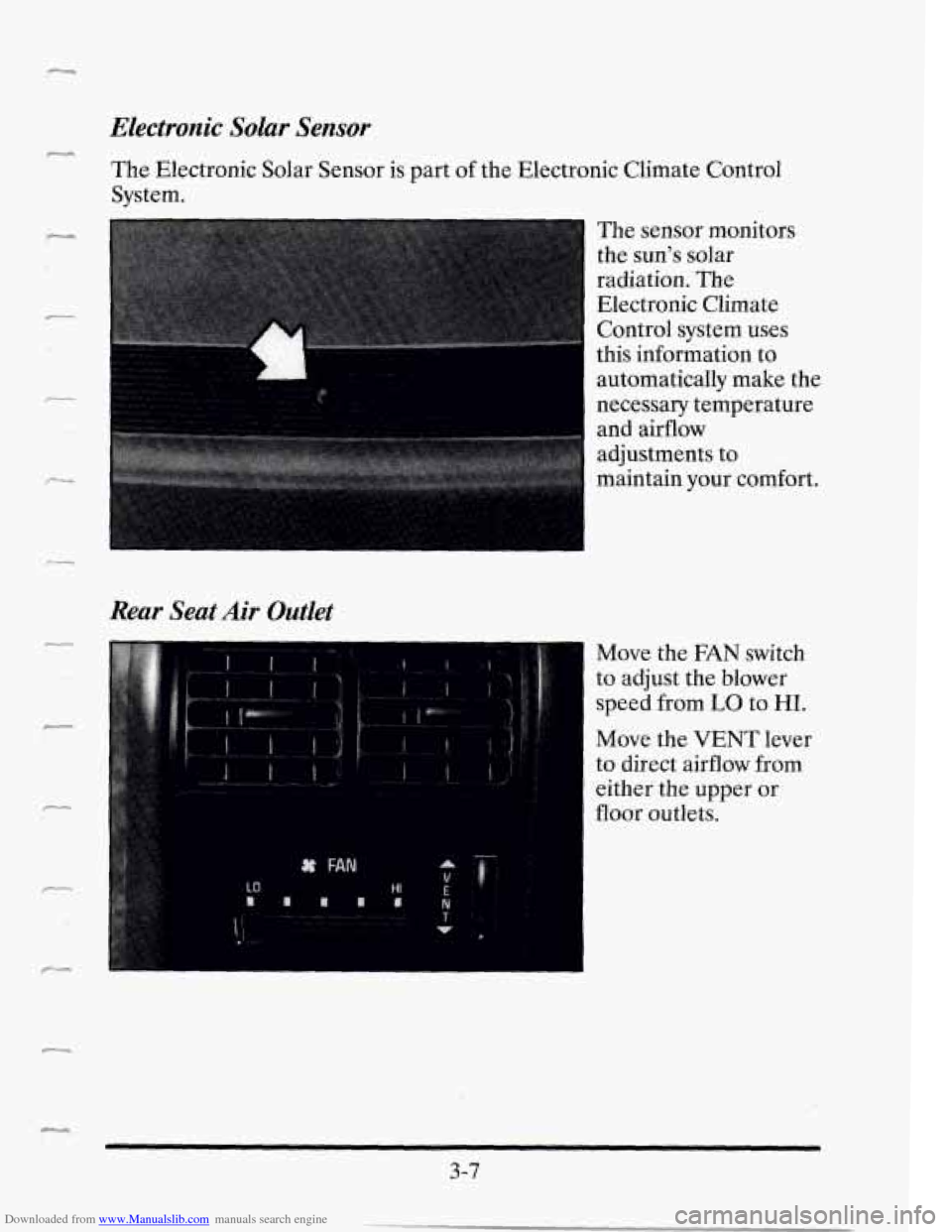
The Electronic Solar Sensor is part of the Electronic Climate Control
System.
-
The sensor monitors
the sun's solar
radiation. The
Electronic Climate
Control system uses
this information to
I automatically make the
necessary temperature
and airflow
adjustments to
maintain your comfort.
f
Rear Seat Air Outlet
F
Move the FAN switch
to adjust the blower
speed from
LO to HI.
Move the VENT lever
to direct airflow from
either the upper or
floor outlets.
Ic.L,
3-7