1995 CADILLAC ELDORADO oil reset
[x] Cancel search: oil resetPage 155 of 395
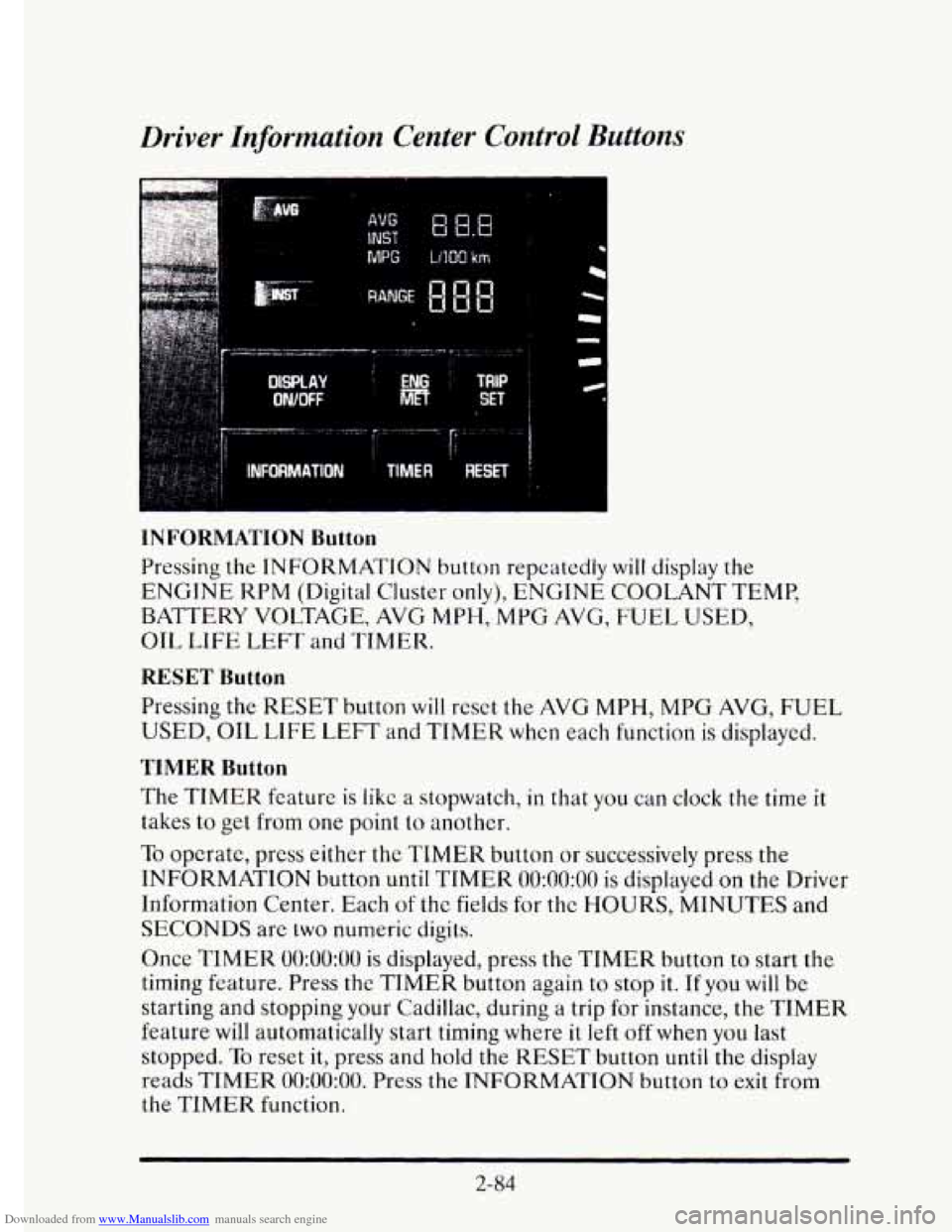
Downloaded from www.Manualslib.com manuals search engine Driver Information Center Control Buttons
MPG LlIQO km
INFORMATION Button
Pressing the INFORMATION button repeatedly will display the
ENGINE KPM (Digital Cluster only), ENGINE COOLANT TEMP,
BATTERY VOLTAGE, AVG
MPH, MPG AVG, FUEL USED,
OIL
LIFE LEFT and TIMER.
RESET Button
Pressing the RESET button will reset the AVG MPH, MPG AVG, FUEL
USED, OIL LIFE LEFT and TIMER when each function is displayed.
TIMER Button
The TIMER feature is like a stopwatch, in that you can clock the time it
takes to get from one point to another.
To opcrate, press either the TIMER button or successively press the
INFORMATION button
until TIMER 0O:OO:OO is displayed on the Driver
Information Center. Each
of the fields for the HOURS, MINUTES and
SECONDS are two numeric digits.
Once
TIMER 0O:OO:OO is displayed, press the TIMER button to start the
timing feature. Press the TIMER button again to stop
it. If you will be
starting and stopping your Cadillac, during a trip for instance, the
TIMER
feature will automatically start timing where it left off when you last
stopped.
To reset it, press and hold the RESET button until the display
reads
TIMER 0O:OO:OO. Press the INFORMATION button to exit from
the TIMER function.
2-84
Page 156 of 395
Downloaded from www.Manualslib.com manuals search engine AVG MPH (Average Speed) Reset
Press repeatedly the INFORMATION button to display the AVG MPH,
then press and hold the RESET button until 0.0 AVG MPH is displayed.
MPG AVG (Average Fuel Economy) Reset
Press repeatedly the INFORMATION button to display the MPG AVG,
then press and hold the
RESET button until 0.0 AVG MPG is displayed.
Another method
to reset both AVG MPG is to press the AVG button on
the Fuel Data Panel until 0.0 AVG MPG is shown in both displays.
Fuel Used Reset
Press repeatedly the INFORMATION button to display the FUEL
USED on the Driver Information Center, then press and hold the
RESET button
until FUEL USED 0.0 is displayed.
Oil Life Left Reset
Press repeatedly the INFORMATION button to display the OIL LIFE
LEFT, then press and hold the RESET button until 0.0 OIL LIFE LEFT
is displayed.
DISPLAY ON/OFF Button
c
Pressing this button will turn off the Driver Information Center (DIC),
Electronic Climate Control and
Fuel Data Center displays. If you have
the digital cluster, the fuel gage, trip odometer and odometer
will also
turn off. While displays are off, pressing the INFORMATION button
will
only turn on the DIC. If any other button is pressed or a driving warning
message needs to be displayed or fuel level falls below four gallons, all the
displays
will come back on.
TRIP SET Button
Press and hold this button to set the trip odometer back to zero.
ENG/MET (English/Metric Button)
Press this button to switch from English (miles and Degrees Fahrenheit)
to metric (kilometers and Degrees Celsius).
2-85
Page 159 of 395
Downloaded from www.Manualslib.com manuals search engine LOW OIL LEVEL - 36
For correct operation of the low oil sensing system, the vehicle should be
on a level surface. A false LOW OIL LEVEL message may appear if the
vehicle is parked
on grades. The oil level sensing system does not check
for actual oil
level if the engine has been off for a short period of time,
and the
oil level is never sensed while the engine is running. If the LOW
OIL LEVEL message appears, and your vehicle has been parked on level
ground with
the engine off for at least 30 minutes, your oil level should be
checked by observing the oil dipstick. Prior to checking your oil level be
sure your engine has
been off for five minutes and your vehicle is on a
level surface. Then check your dipstick and add oil if necessary. See
“Engine
Oil” in the Index.
CHECK WASHER FLUID - 25
This message will appear for a few seconds indicating that you need
washer solvent.
CHANGE OIL SOON - 40
This message will appear when you have used 90% of the engine oil’s
expected life, based on your driving patterns.
CHANGE ENGINE OIL - 82
This means that the life of your engine oil has expired and it should be
changed within 200 miles. See “Engine Oil” and “Filter
Recommendations”
in the Maintenance Schedule. After an oil change the
Oil Life Index must be resct. See “Oil Life Indicator” in the Index on how
to reset it.
CRUISE ENGAGED - 43
This message will appear for a few seconds when you select a speed at
which to cruise.
ENGINE COOLANT HOT - 44
This message will appear when your engine coolant temperature is over
248’ F (126’ C). To avoid added strain on a hot cngine turn off your
Climate Control system. Stop and allow your vehicle
to idle until it cools
down or the message is removed.
If it does not cool down, turn off your
engine and have it serviced before driving
it again. Severe engine damage
can result from an overheated engine. See “Engine Overheating” in the
Index.
2-88
Page 164 of 395
Downloaded from www.Manualslib.com manuals search engine The Oil Life Indicator may say to change the oil sooner than your
Maintenance Schedule. This can happen
if driving conditions, such as
short trips in cold weather, cause shorter oil life. Always keep a written
record
of the mileage and date when you last changed your oil. For more
information on when to change your oil, see the Cadillac Maintenance
Schedule Booklet.
If you see CHANGE
OIL SOON, it means that you have less than 10% of
your oil life left and you should consider changing your engine oil.
If you see CHANGE ENGINE OIL, it means the oil life is gone and
you should change the oil right away (certainly within 200 more miles
E320 km]).
The system should indicate to change the oil between 3,000 miles
(5 000 km) and 7,500 miles (12 500 km), but it may even indicate to
change it before 3,000 miles under very severe conditions. It all depends
on your driving patterns. If it’s been
7,500 miles (12 500 km), it indicates
to change the oil.
There are two things the system doesn’t do:
It can’t sense heavy dust in the places where you drive. If you drive in a
dusty area, you should change your oil
every 3,000 miles (5 000 km) or
three months (whichever comes first) unless the display says
to change
it even sooner than that.
It doesn’t check how much oil you have, so you’ll still have to check for
that. To see how, see “Engine Oil” in the Index.
When You’ve Changed the Oil
When new oil is put in, you’ll need to reset your system. To do this, display
the OIL LIFE INDEX by pressing the INFORMATION button. Then
press and hold the
RESET buttons until the display shows 100 OIL LIFE
LEFT
2-93
Page 239 of 395
Downloaded from www.Manualslib.com manuals search engine ENGINE OKEMEATING
The Driver Information Center will display either ENGINE COOLANT
HOT-IDLE ENGINE or
STOP ENGINE ENGINE OVERHEATING.
In addition you will find the warning light about a hot engine on your
instrument panel on Canadian vehicles.
Overheated Engine Protection Operating Mode
Should a low coolant condition exist and the message STOP ENGINE
ENGINE OVERHEATING is displayed, an overheat protection mode
which alternates firing groups of four cylinders helps prevent engine
damage. This operating
mode allows your vehicle to be driven to a safe
place
in an emergency; you may drive up to 50 miles (80 km). Towing a
trailer in the overheat protection mode should be avoided.
NOTICE:
After driving in the “Overheated Engine Protection Operating
Mode,” to avoid engine damage, allow the engine
to cool before
attempting any repair. The engine oil may be severely degraded.
Change the oil and reset the
oil life indicator. See “Engine Oil,
When
to Change” in the Index.
5-12
Page 274 of 395
Downloaded from www.Manualslib.com manuals search engine Engine Oil Additives
c
Don’t add anything to your oil. Your Cadillac dealer is ready to advise if
you think something should be added.
When to Change Engine Oil
Your Cadillac has an “Oil Life Indicator.” This feature will let you know
when to change your oil and filter
-- usually between 3,000 miles (5 000
km) and 7,500 miles (12 500 km) since your last oil change. Under severe
conditions, the indicator may come
on before 3,000 miles (5 000 km).
Never drive your vehicle more
than 7,500 miles (12 500 km) or 12 months
without an oil change.
The system won’t detect dust in the oil.
So, if you drive in a dusty area, be
sure to change your oil every
3,000 miles (5 000 km) or sooner if the
CHANGE OIL
SOON light comes on. Remember to reset the Oil Life
Indicator when the
oil has been changed. For more information, see “Oil
Life Indicator” in the Index.
How to Reset the Oil Life Indicator
After the oil has been changed, display the OIL LIFE LEFT message by
pressing the INFORMATION button. Then press and hold the
RESET
button until the display shows “loo”. This resets the oil life index. The
message will remain off until the next
oil change is needed. The
percentage
of oil life remaining may be checked at any time by pressing
the INFORMATION button several times until the OIL LIFE LEFT
message appears. For more information on the
Oil Life Index feature, see
“Oil Life Index” in the Index.
Engine Coolant Heater
An engine coolant heater can be a big help if you have to park outside in
very cold weather, 0°F (-18OC) or colder. If your vehicle has this option,
see “Engine Coolant Heater” in the Index.
6- 15
Page 386 of 395
Downloaded from www.Manualslib.com manuals search engine .
.
.
.
.
.
.
.
.
Leaving Your Vehicle with the Engine Running ......... 2-31
Light Sensor. Twilight Sentinel ....................... 2-51
Level Control. Electronic ............................ 2-94
Lights
Air Bag Readiness
.......................... 1.24. 2.74
Anti-Lock Brake System Warning .............. 2.77. 4.6
Battery Charge .................................. 2-75
Brake System Warning ............................. 2-75
Engine Oil Warning .............................. 2-79
Engine Temperature Warning ...................... 2-78
Safety Belt Reminder ......................... 1.7. 2.73
Service Engine Soon ............................. 2-78
Lighter ........................................... 2-68
Loading Your Vehicle ............................... 4-30
Locks
Automatic Door
.................................. 2-5
Door ........................................... 2-3
Power Door ......................................... 2-5
Long Trip, Before Leaving on a ....................... 4-22
Loss of Control .................................... 4-14
Low Maintenance Battery ........................... 6-33
Low Oil Level ..................................... 2-88
Lumbar. Power ..................................... 1-4
Maintenance
Normal Replacement Parts
........................ 6-75
Underbody ..................................... 6-59
When Trailer Towing ............................. 4-39
Malfunction Indicator Lamp
(Service Engine
Soon Light) ........................ 2-78
Mats. Floor ........................................ 2-61
Maxifuse/Relay Center .............................. 6-64
Methanol (In Fuel) ................................... 6.3
Mirrors ........................................... 2-55
Auto-Dimming Rearview ......................... 2-60
Automatic Inside Rearview ........................ 2-55
Break-Away Outside ............................. 2-61
Convex Outside ................................. 2-61
Heated Outside Rearview ......................... 2-60
Power .......................................... 2-61
Vanity ......................................... 2-63
Electrochromic Rearview with Compass ............. 2-57
Mpg Avg Reset. Driver Information Center ............. 2-85
MTBE (In Fuel) .................................... 6-3
.
.
9
Page 387 of 395
Downloaded from www.Manualslib.com manuals search engine Net. Convenience .................................. 2-63
Neutral
(N) Position. Automatic Transaxle .............. 2-24
New Vehicle “Break-In”
............................. 2-18
Night Vision
....................................... 4-16
0
Odometer .........................................
Odometer. Trip ....................................
Off-Road Recovery .................................
Oil
Engine .........................................
Life Indicator ...................................
Life Left Reset. Driver Information Center ..........
Opener. Garage Door ...............................
Ordering. Service Information ......... See Owner Assistance
Outlets. Rear Seat Air
................................ 3-7
Outside Air ........................................ 3-1
Overdrive Position. Automatic Transaxle
............... 2-25
Overheated Engine
................................. 5-12
Overheated Engine Protection Operating Mode
......... 5-12
2-71
2-72
4-12
6-10
2-92
2-85
2-65
Paint Spotting. Chemical
............................ 6-59
Park (P) Position. Automatic Transaxle ................ 2-23
Shifting Into
.................................... 2-28
Shifting Out of .................................. 2-32
AtNight
....................................... 2-14
On Hills While Towing a Trailer .................... 4-39
Over Things That Burn ........................... 2-33
Parking Brake
..................................... 2-27
PASS-Key I1 ....................................... 2-17
Passing
........................................... 4-12
Power Antenna Mast Care
.............................. 3-21
DoorLocks ...................................... 2-5
Folding Mirror .................................. 2-61
Lumbar ......................................... 1-4
Remote Control Mirrors .......................... 2-60
Parking
Lots ........................................... 2-15
10