1995 CADILLAC ELDORADO display
[x] Cancel search: displayPage 181 of 395
Downloaded from www.Manualslib.com manuals search engine Finding a Station
SCAN: When you press this button, the SCAN indicator in the display will
light and the radio
will find the next station and stay there for about five
seconds. Then
it will go to the next station and pause, and keep doing that
until you press either the
SCAN button again or the upper knob.
SEEK This button selects stations, but it doesn’t keep moving as SCAN
does. When you press SEEK the radio will automatically go to the next
station and stay there.
Pushbuttons: You can set the pushbuttons to get up to 10 favorite stations
(five on
FM and five more on AM.)
1. Choose either AM or FM.
2. Tune in a desired station.
3. Press the SET button.
4. Press one of the five pushbuttons within five seconds.
5. Repeat these steps for each of the five pushbuttons.
Setting the Tone
BASS: The slide control increases or decreases the bass response tone.
Moving the control to the right increases bass
while moving it to the left
decreases
it.
TREBLE: The slide control increases or decreases the treble response
tone. Moving the control
to the right increases the treble while moving it
to
the left decreases it.
Your Cassette Tape Player
Your cassette tape player works best with tapes that are 30 to 45 minutes
long on each side. Tapes longer than that are so thin that they may not
work well
in this player.
If you look at the tape, or on its label or box, it should say whether its bias,
or “equalization,” is 70 microseconds (70 p) or 120 microseconds (120 p).
Chrome and metal tapes are 70 p sec and standard iron tapes are
120 p sec. Your tape player will adjust automatically for either type
of cassette tape.
3-16
Page 182 of 395
Downloaded from www.Manualslib.com manuals search engine To Play a Cassette Tape
1. Turn the radio on.
2. Insert the cassette through the tape door. (The TAPE indicator in the
If you hear nothing or hear just a garbled sound, the cassette may
not be
in squarely. Press the EJCT button to remove the tape and start over. The
tape equalization is automatically sensed and set. Inserting the cassette
also activates
DOLBY @ noise reduction.
display
will light.)
DNR@ is the Dynamic Noise Reduction. It helps remove background hiss
noise from
the radio.
*DNR@ is a registered trademark of National Semiconductor
Corporation.
3. Once the tape is playing, use the upper and lower knobs to adjust the
volume and balance, just as you do for the radio. Press the upper knob
to change tape direction. The arrow in the display shows which
direction the tape is being played.
FWD: Press this button to go forward rapidly to another part of the tape.
The radio will play during fast forward. To stop the tape press the same
button and the tape
will start to play.
REK Press this button to reverse the tape. To stop the tape press the same
button lightly or any
of the other buttons. The radio will play during this
reverse function.
PREV Press this button to go back to the beginning of the last selection.
If the player has played less than
10 seconds into the current selection,
pressing the PREV button
will cause the player to find the beginning of
the previous selection and resume play from that point. If the player is
more than 10 seconds into the current selection, pressing the PREV
button will cause the player to
find the beginning of the current selection
and resume play from that point. If
PREV is pressed while the first
selection on the tape
is being played, the player will return to the
beginning of that side of the tape.
NEXT: Press this button to advance to the next selection. If the selection
is at the end of the tape, the tape will reverse directions and begin playing
at a normal speed.
3-17
Page 183 of 395
Downloaded from www.Manualslib.com manuals search engine ST/PL Press this button to switch back to the radio without ejecting the
tape. Press
it a second time to start playing the tape again.
EJCE Press this button to remove the tape.
To Play a Compact Disc
Before you begin, please note: don’t use the mini-discs that are called “singles”
(even with an adapter). They won’t eject.
Use full-size compact discs only.
1. Turn the radio on.
2. Insert a CD (label side up) partway into the slot. The player will puil it
in. Wait a few seconds and the CD will play. Then only the time of day
and CD
will display.
If the CD comes back out, check to see if
The disc is upside down.
The disc is dirty, scratched or wet.
There’s too much moisture in the air. If there is, wait about one hour
and try it again.
ERR: This error message is displayed if you have a condition of either
extreme temperature, moisture
or an incorrect CD. The CD will
automatically be ejected. When conditions are back
to normal the CD
should play again.
RCWPROG: Press this recall/program button once to see what track is
being played. Within five seconds press
it a second time to see how long
the track has been playing. Press
it a third time to see the time of day.
REV: Press and hold the reverse button to return rapidly within a track.
Release it to play the passage. The elapsed time
will be displayed to show
the reverse progress of the CD.
FWD: Press and hold this forward button to advance rapidly within a
track. Release it
to resume playing. Elapsed time will be displayed to show
the forward progress
of the CD.
PRET Press this button to go back to the beginning of the track. Pressing
this button
when in the pause period between tracks will take it back to
the start
of the track preceding the pause.
NEXT: Press this button to advance to the next track.
3-18
Page 184 of 395
Downloaded from www.Manualslib.com manuals search engine 3
ST/PL Press this button and the tape or CD will stop without ejecting and
the radio
will start to play. Press it again and the tape or CD will start to
play again.
EJCR Press this button to remove the tape or CD. If you have both a CD
and a tape in the player, then the other playback media will start to play.
Press it again and the other media
will eject.
COMP: Pressing this button makes soft and loud passages more equal in
volume. For example, classical or jazz music has very quiet and very loud
passages in the same tune. The
COMP display will light as long as COMP
is on.
Tips about Your Audio System
Be aware that hearing damage from loud noise is almost undetectable
until it is too late. Your hearing can adapt to higher volumes
of sound.
Sound that seems normal can
be loud and harmful to your hearing. Take
precautions
by adjusting the volume control on your radio to a safe sound
level before your hearing adapts
to it.
To help avoid hearing loss or damage:
0 Adjust the volume control to the lowest setting.
Increase volume slowly until you hear comfortably and clearly.
NOTICE:
Before you add any sound equipment to your vehicle -- like a
tape player,
CB radio, mobile telephone or two-way radio -- be
sure you can add what you want.
If you can, it’s very important
to do
it properly. Added sound equipment may interfere with the
operation
of your vehicle’s engine, Delco@ radio or other
systems, and even damage them.
And, your vehicle’s systems
may interfere with the operation
of sound equipment that has
been added improperly.
So, before adding sound equipment, check with your dealer and
be sure
to check Federal rules covering mobile radio and
telephone units.
3-19
Page 196 of 395
Downloaded from www.Manualslib.com manuals search engine Traction Control System
Your vehicle has a traction control system that limits wheel spin. This is
especially useful in slippery road conditions.
The system operates only if it
senses that one or both of the front wheels are spinning or beginning to
lose traction. When this happens, the system works the front brakes and
reduces engine power (by shutting off
fuel injectors) to limit wheel spin.
c
The TRACTION ACTIVE message will display on the Driver
Information Center when the traction control system is limiting wheel
spin. See “Driver Information Center Messages”
in the Index. You may
feel
the system working, or you may notice some noise, but this is normal.
If your vehicle is
in cruise control when the traction control system begins
to
limit wheel spin, the cruise control will automatically disengage. When
road conditions allow you to safely use
it again, you may re-engage the
cruise control. (See “Cruise Control”
in the Index.)
The TRACTION DISABLED message
will display on the Driver
Information Center to let
you know if there’s a problem with your traction
control system. See “Driver Information Center Messages”
in the Index.
When this message is displayed, the system will not limit wheel spin.
Adjust your driving accordingly.
Braking in Emergencies
Use your anti-lock braking system when you need to. With anti-lock, you
can steer and brake at the same time. In many emergencies, steering can
help you more than even the very best braking.
4-9
Page 227 of 395
Downloaded from www.Manualslib.com manuals search engine Engine Cooling When Trailering
Your cooling system may temporarily overheat during severe operating
conditions such as:
Climbing gradcs steeper than 4% at ambient temperatures above
90" F (32" C) with a loaded vehicle and trailer.
0 Stopping after high-speed driving.
Idling for long periods in stop and go traffic.
If the
ENGINE HOT-A/C COMPRESSOR OFF message appears on the
Driver Information Center,
do not be alarmed. This is a normal function
designed to reduce the load
on the engine and cooling system. You can
continue to drive your vehicle.
If the ENGINE COOLANT HOT-IDLE ENGINE message appears on
the Driver Information Center, pull off to the side of the road as soon as
it
is safe to do so. When the vehicle is at a complete stop, shift the
transaxle selector
to PARK (P) and allow the engine to idle. Do not turn
off the engine
or increase engine speed above a normal idle. After several
minutes, resume driving at
a reduced speed. Return to normal driving
after
1.0 minutes if the ENGINE COOLANT HOT-IDLE ENGINE
message is not displayed.
4-40
Page 239 of 395
Downloaded from www.Manualslib.com manuals search engine ENGINE OKEMEATING
The Driver Information Center will display either ENGINE COOLANT
HOT-IDLE ENGINE or
STOP ENGINE ENGINE OVERHEATING.
In addition you will find the warning light about a hot engine on your
instrument panel on Canadian vehicles.
Overheated Engine Protection Operating Mode
Should a low coolant condition exist and the message STOP ENGINE
ENGINE OVERHEATING is displayed, an overheat protection mode
which alternates firing groups of four cylinders helps prevent engine
damage. This operating
mode allows your vehicle to be driven to a safe
place
in an emergency; you may drive up to 50 miles (80 km). Towing a
trailer in the overheat protection mode should be avoided.
NOTICE:
After driving in the “Overheated Engine Protection Operating
Mode,” to avoid engine damage, allow the engine
to cool before
attempting any repair. The engine oil may be severely degraded.
Change the oil and reset the
oil life indicator. See “Engine Oil,
When
to Change” in the Index.
5-12
Page 269 of 395
Downloaded from www.Manualslib.com manuals search engine ENGINE OIL
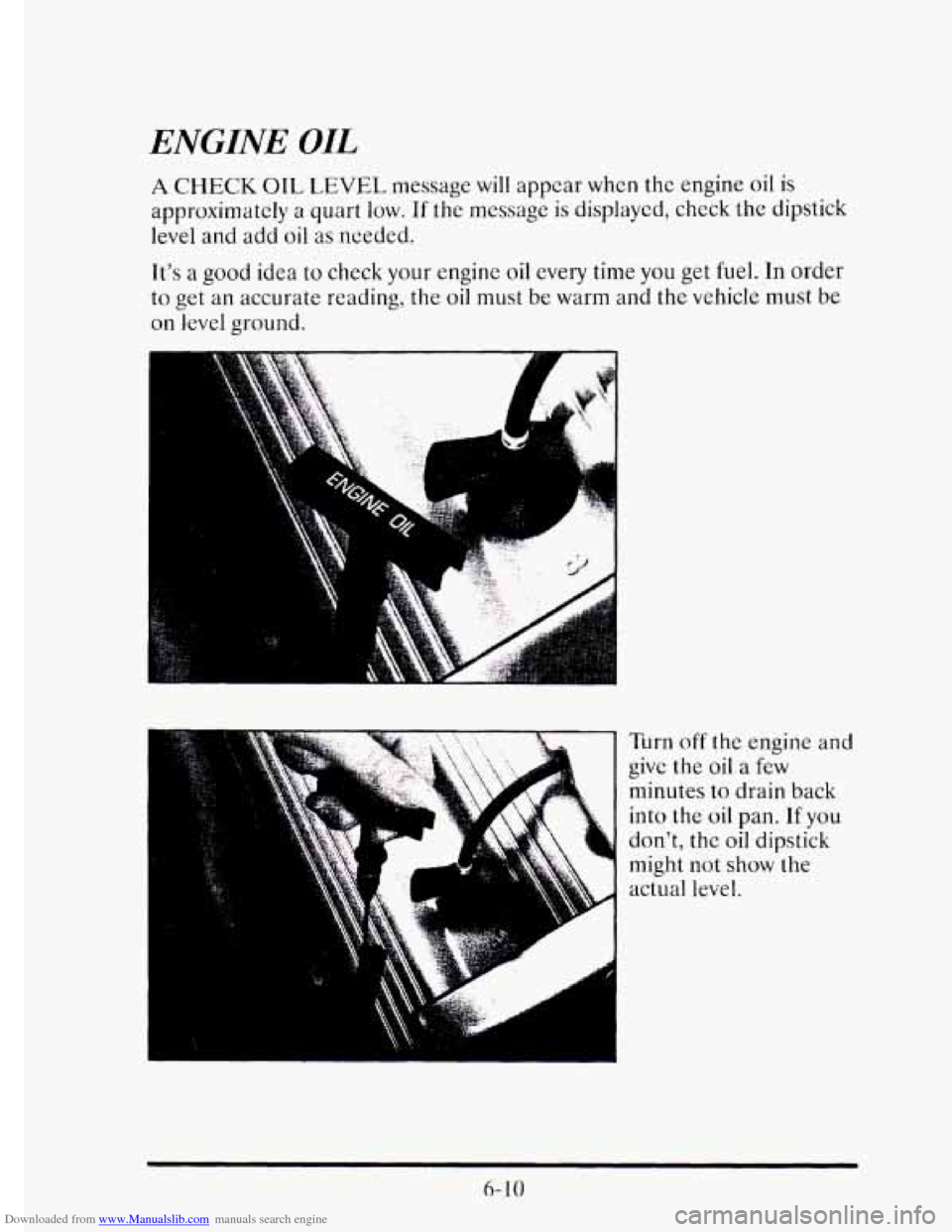
A CHECK OIL LEVEL message will appear whcn the engine oil is
approximately a quart low. If the message is displayed, check the dipstick
level
and add oil as needed.
It's
a good idea to check your engine oil every time you get fuel. In order
to get
an accurate reading, the oil must be warm and the vehicle must be
on level ground.
Turn off the engine and
give the oil a few
minutes to drain back
into the
oil pan. If you
don't, the oil dipstick
might not
show the
actual level.
6- 10