1994 OLDSMOBILE SILHOUETTE ignition
[x] Cancel search: ignitionPage 126 of 276
Comfort Controls di Audio Systems
124
A
F
T
A
s1
fl
P
0
u
1
0
SI
li
P
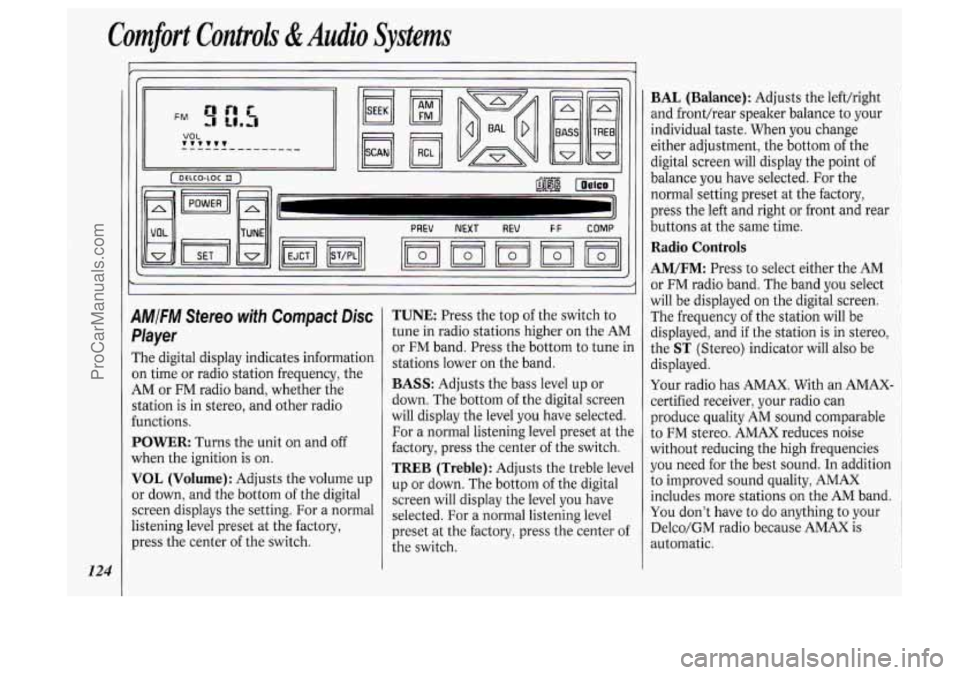
M/FM Stereo with Compact Disc
'layer
'he digital display indicates information
n time or radio station frequency, the
,M or FM radio band, whether the
tation is in stereo, and other radio
mctions.
'OWER: Turns the unit on and off
Then the ignition
is on.
'OL (Volume): Adjusts the volume up
r down, and the bottom of the digital
Ereen displays the setting. For a normal
stening level preset at the factory,
ress the center of the switch.
TUNE: Press the top of the switch to
tune in radio stations higher on the AM
or FM band. Press the bottom to tune in
stations lower on the band.
BASS: Adjusts the bass level up or
down. The bottom of the digital screen
will display the level you have selected.
For a normal listening level preset at the
factory, press the center of the switch.
TREB (Treble): Adjusts the treble level
up or down. The bottom of the digital
screen will display the level you have
selected. For a normal listening level
preset at the factory, press the center of
the switch.
BAL (Balance): Adjusts the left/right
and fronthear speaker balance to your
individual taste. When you change
either adjustment, the bottom
of the
digital screen will display the point
of
balance you have selected. For the
normal setting preset at the factory,
press the left and right or front and rear
buttons
at the same time.
Radio Controls
AM/FM: Press to select either the AM
or FM radio band. The band you select
will be displayed
on the digital screen.
The frequency of the station will be
displayed, and if the station is in stereo,
the
ST (Stereo) indicator will also be
displayed.
Your radio has AMAX. With an AMAX-
certified receiver, your radio can
produce quality AM sound comparable
to
FM stereo. AMAX reduces noise
without reducing the high frequencies
you need for the best sound. In addition
to improved sound quality, AMAX
includes more stations
on the AM band.
You don't have to do anything to your
Delco/GM radio because AMAX is
automatic.
ProCarManuals.com
Page 127 of 276
SEEK: Press SEEK to tune in and stop
on the next station on the
AM or FM
radio band.
SCAN: When you press SCAN, the
radio will go to the next station and
pause there for a few seconds.
SCAN
will display on the digital screen. Press
SCAN again to stop on a station.
RCL (Recall) : When the ignition is off,
press to display the clock. When the
radio is on, press to change between the
clock and the radio station frequency
displayed on the digital screen.
The five pushbuttons in the lower right
corner can be used to preset up to ten
radio stations (five AM and five FM
stations). These buttons have other
uses when you are playing a compact
disc (see
Compact Disc Controls later
in this section).
To Preset Radio Stations:
1. Tune the digital display to the station
you want.
2. Press SET. The SET indicator will
appear on the digital screen for five
seconds.
3. While the SET indicator is displayed,
press one of the five pushbuttons.
4. Repeat steps 1-3 for each of five AM
and five FM stations.
Compact Disc Controls
Many of the controls for the radio also
have functions for the compact disc
player, as explained here.
To Play a Compact Disc:
Don’t use mini-discs that are called
singles. They won’t eject. Use only full-
size compact discs.
1. Press POWER to turn the radio on.
2. Insert a disc part-way into the slot,
with the label side up. The player will
pull it in. In a few seconds, the disc
should play.
If the disc comes back out:
The disc may be upside down.
The disc may be dirty, scratched or
wet.
There may be too much moisture in
the air (wait about one hour and
try
again).
The player may be too hot, or the road
may be too rough for the disc to play.
If the word
HOT appears on the
display, the player is too hot. Press
RCL to remove HOT from the
display. As soon as things get back to
normal, the disc should play.
While a disc is playing, the
CD
indicator is displayed on the digital
screen, as is the clock.
RCL (Recall): Press once to see which
track is playing. Press again within five
seconds to see how long your selection
has been playing. The track number
also will be displayed when the volume
is changed or a new track starts to play.
PREV (Previous): Press to play a track
again. If you hold or keep pressing the
PREV button, the disc will keep
backing up to previous tracks.
NEXT: Press when you want to hear
the next track before the track you are
listening to has finished. If you hold or
keep pressing the
NEXT button, the
disc will keep advancing to other tracks.
REV (Reverse): Press and hold to
rapidly back up to a favorite passage.
Release to resume playing.
FF (Fast Forward): Press and hold to
rapidly advance the disc. Release to
resume playing.
r
125
ProCarManuals.com
Page 128 of 276
Comfort Conboh &Audio Systems
126
COMP (Compression): Press this
button to make soft and loud passages
more equal in volume. Press again to
resume normal play.
When Finished with the Compact
Disc Player:
If you press POWER or turn off the
ignition, the disc will stay in the player
and start again when you turn on the
ignition or power switch. The disc will
begin playing at the point where it had
been stopped.
ST/PL (Stop/Play): Press to stop the
disc player; the radio will play. Press
again to play the disc (the player will
start playing the disc where it was
stopped earlier).
EJCT (Eject): Press to eject the disc;
the radio will play.
CD Player Anti-Theft Feature
Delco LOC 110 is a security feature for
the compact disc player. It can be used
or ignored. If ignored, the system plays
normally. If it is used, your player won’t
be usable if it is ever stolen, because it will go
to LOC mode any time battery
power is removed. Until an
unLOC
code is entered, it will not turn on.
The instructions below tell you how to
enter
a secret code into the system. If
your vehicle loses battery power for any
reason, you must unlock the system
with the secret code before the radio
will turn on.
To Set the Anti-Theft System:
1. Write down any six-digit number and
2. Turn the ignition to the Accessory or
3. Press the POWER button to turn the
4. Press the PREV and FF buttons
keep
it in a safe place.
Run position.
radio off.
together. Hold them down until
“- - -”
shows on the display (at least five
seconds).
You are ready to enter your
secret code.
NOTE: If you allow more than
15
seconds to elapse between any steps,
the radio automatically reverts to time
and you must start the procedure over
at step
4.
5. Press SET and 000 will appear on
6. Press and hold SEEK until the first
7. Press and hold SCAN until the
the
display.
digit
of your code appears.
second and third digits of your code
appear.
8. Press AM/FM and 000 will appear
again. Now you are ready to enter the
last three digits of your code.
9. Repeat steps 6 and 7 for the last three
digits of your code.
IO. Press AM/FM and rEP will appear.
11. Repeat steps 6 through 10. This
time
SEC will appear, indicating
that the radio is secure. If
“- - -”
appears, the steps were not
successful and you must repeat the
entire procedure.
To Unlock the System After a Power
Loss:
When battery power is reapplied to a
secured radio, the radio won’t turn on
and
LOC will appear on the display.
Enter your secret code as follows; pause
no more than
15 seconds between
steps.
ProCarManuals.com
Page 129 of 276
1. Turn the ignition on. (Radio off.)
2. Press the SET button. The display
will show 000.
3. Enter the six digits of the code
following steps
6-9 above. The
display will show the numbers as
entered.
4. Press the AM/FM button and the
time appears, indicating that the
disabling sequence was successful. If
the display indicates
SEC, the
numbers did not match and the unit
is still secured.
Disabling the Anti-Theft System:
1. Press PREV and FF together for five
seconds with the ignition on and
radio power
off. The display will
show
SEC, indicating the unit is in
the secure mode. (If
"- - -" appears on
the display, the anti-theft system has
already been disabled.)
2. Press the SET button. The display
will show
000.
3. Enter the first three digits of the code
following steps
6 and 7 of the
preceding paragraphs. The display will
show the numbers
as entered.
4. Press AM/FM. The radio will display
000.
5. Repeat steps 6 and 7 to enter the
second three digits of the code. The
display will show the numbers as
entered.
6. Press AM/FM. If "- - -" then the time
appears, the disabling sequence was
successful (the numbers matched the
secret code) and the unit
is in the
UNSECURED mode. If the display
shows
SEC, the disabling sequence
was unsuccessful (the numbers did
not match) and the unit will remain
in the
SECURED mode.
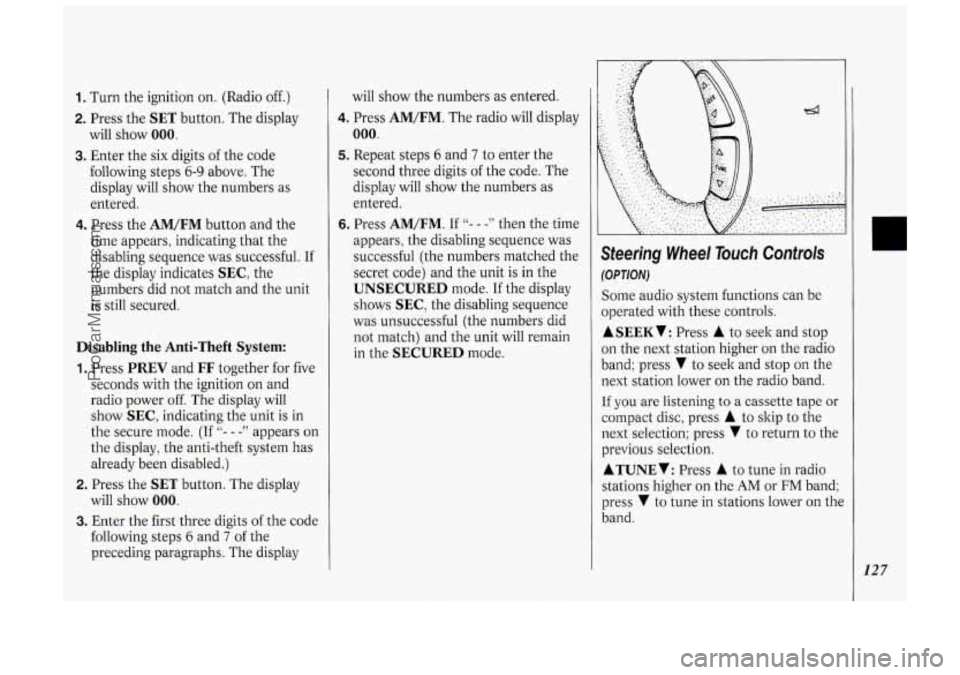
Steering Wheel Touch Controls
(OPTION)
Some audio system functions can be
operated with these controls.
ASEEKV: Press A to seek and stop
on the next station higher on the radio
band; press
V to seek and stop on the
next station lower on the radio band.
If you are listening to a cassette tape or
compact disc, press
A to skip to the
next selection; press
V to return to the
previous selection.
ATUNEV: Press A to tune in radio
stations higher on the
AM or FM band;
press
V to tune in stations lower on the
band.
127
ProCarManuals.com
Page 138 of 276
Your Driving and the Road
* x1000
136
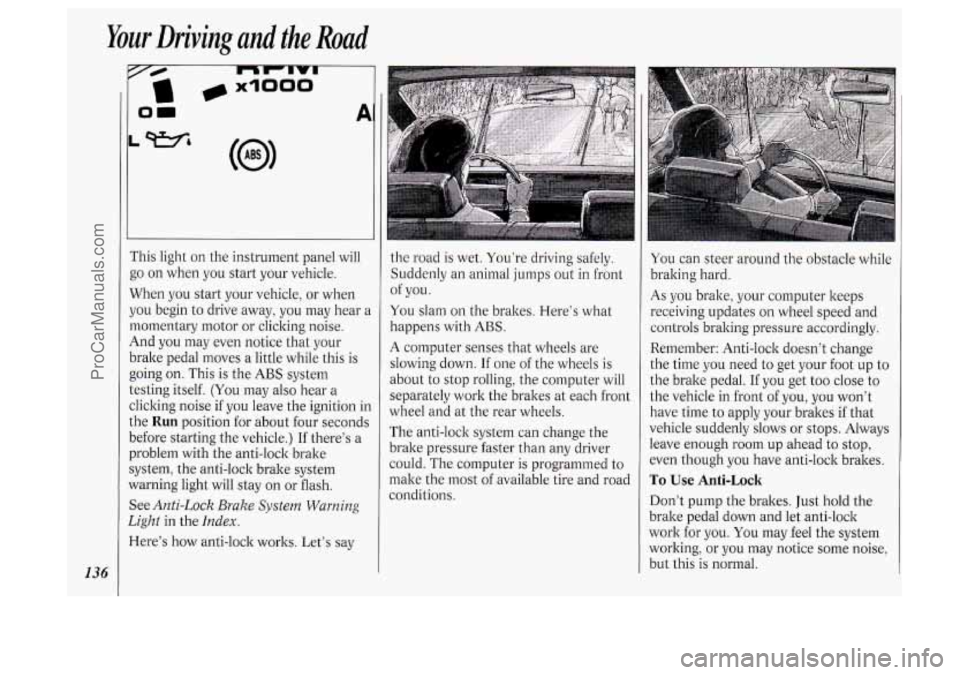
i‘his light on the instrument panel will
go on when you start your vehicle.
When you start your vehicle, or when
jou begin to drive away, you may hear a
nomentary motor or clicking noise.
4nd you may even notice that your
)rake pedal moves
a little while this is
going on. This is the
ABS system
:esting itself.
(You may also hear a
:licking noise if you leave the ignition in
.he
Run position for about four seconds
Iefore starting the vehicle.) If there’s a
Jroblem with the anti-lock brake
iystem, the anti-lock brake system
Yarning light will stay on or flash.
See
Anti-Lock Brake System Warning
2ight
in the Index.
lere’s how anti-lock works. Let’s say
1
the road is wet. You’re driving safely.
Suddenly an animal jumps out
in front
You slam on the brakes. Here’s what
happens with
ABS.
A computer senses that wheels are
slowing down.
If one of the wheels is
about to stop rolling, the computer will
separately work the brakes at each front
wheel and at the rear wheels.
The anti-lock system can change the
brake pressure faster than any driver
could. The computer is programmed to
make the most of available tire and road
conditions. of
you.
You can steer around the obstacle while
braking hard.
As you brake, your computer keeps
receiving updates on wheel speed and
controls braking pressure accordingly.
Remember: Anti-lock doesn’t change
the time you need
to get your foot up to
the brake pedal.
If you get too close to
the vehicle in front of you, you won’t
have time to apply your brakes if that
vehicle suddenly slows or stops. Always
leave enough room up ahead to stop,
even though you have anti-lock brakes.
To Use Anti-Lock
Don’t pump the brakes. Just hold the
brake pedal down and let anti-lock
work for you. You may feel the system
working, or you may notice some noise,
but this is normal.
ProCarManuals.com
Page 160 of 276
Problems on the Road
158
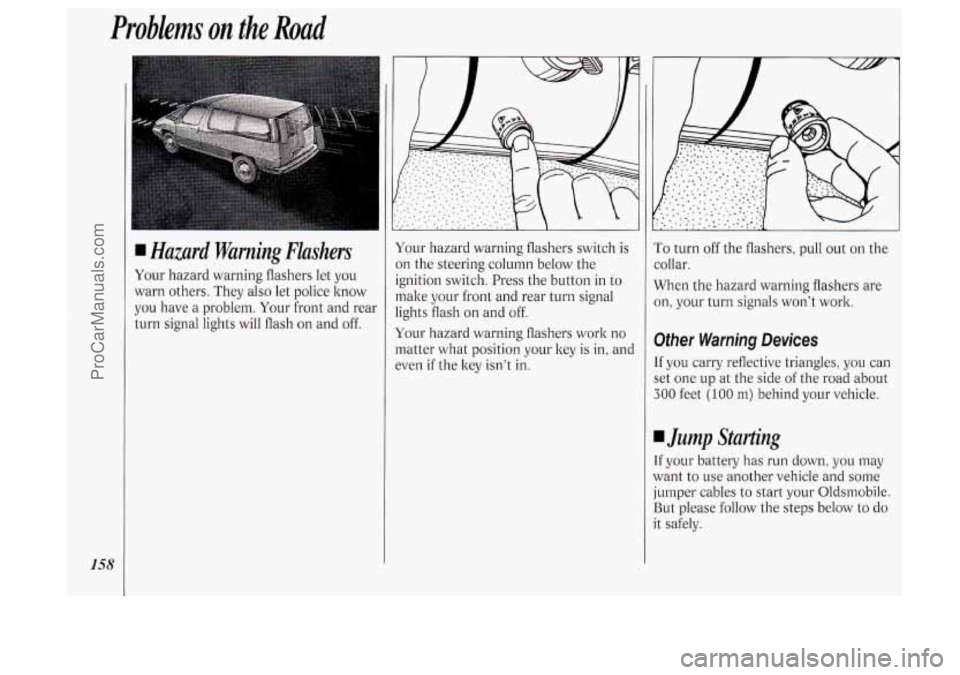
I Hazard Warning Flashers
Your hazard warning flashers let you
warn others. They also let police know
you have a problem. Your front and rear
turn signal lights will flash on and off. Your
hazard warning flashers switch is
on the steering column below the
ignition switch. Press the button in to
make your front and rear turn signal
lights flash on and off.
Your hazard warning flashers work no
matter what position your key
is in, and
even
if the key isn’t in.
To turn off the flashers, pull out on the
collar.
When the hazard warning flashers are
on, your turn signals won’t work.
Other Warning Devices
If you carry reflective triangles, you can
set one up at the side of the road about
300 feet (100 m) behind your vehicle.
I Jump Starting
If your battery has run down, you may
want to use another vehicle and some
jumper cables
to start your Oldsrnobile.
But please follow the steps below to do
it safely.
ProCarManuals.com
Page 161 of 276

NOTICE:
Ignoring these steps could result in
costly damage to your vehicle that
wouldn’t be covered by your
warranty. Trying to start your
Oldsmobile by pushing or pulling it
won’t work, and it could damage
your vehicle.
To Jump Start Your Oldsmobile:
1. Check the other vehicle. It must have
a 12-volt battery with a negative
ground system.
NOTICE:
If the other system isn’t a 12-volt
system with a negative ground,
both vehicles can be damaged.
2. Get the vehicles close enough so the
jumper cables can reach, but be sure
the vehicles aren’t touching each
other. If they are, it could cause a
ground connection
you don’t want.
You wouldn’t be able to start your
Oldsmobile, and the bad grounding
could damage the electrical systems.
You could be injured if the vehicles
roll. Set the parking brake firmly on
each vehicle. Put an automatic
transaxle in
P (Park) or a manual
transaxle in
N (Neutral).
3. Turn off the ignition on both
vehicles. Turn off all lights that aren’t
needed, and radios. This will avoid
sparks and help save both batteries.
And it could save your radio!
NOTICE:
If you leave your radio on, it could
be badly damaged. The repairs
wouldn’t be covered by your
warranty.
4. Open the hoods and locate the
batteries.
Find the positive
(+) and negative (-)
terminals on each battery.
159
ProCarManuals.com
Page 165 of 276
When you call, tell the towing service:
That your vehicle cannot be towed
from the front with sling-type
equipment.
drive.
vehicle.
lever. damaged.
That your vehicle has front-wheel
The make, model, and year of your
Whether you can still move the shift
If there W~S an accident, what was
When the towing service arrives, let the
tow operator know that this manual
contains detailed towing instructions
and illustrations. The operator may
want to see them.
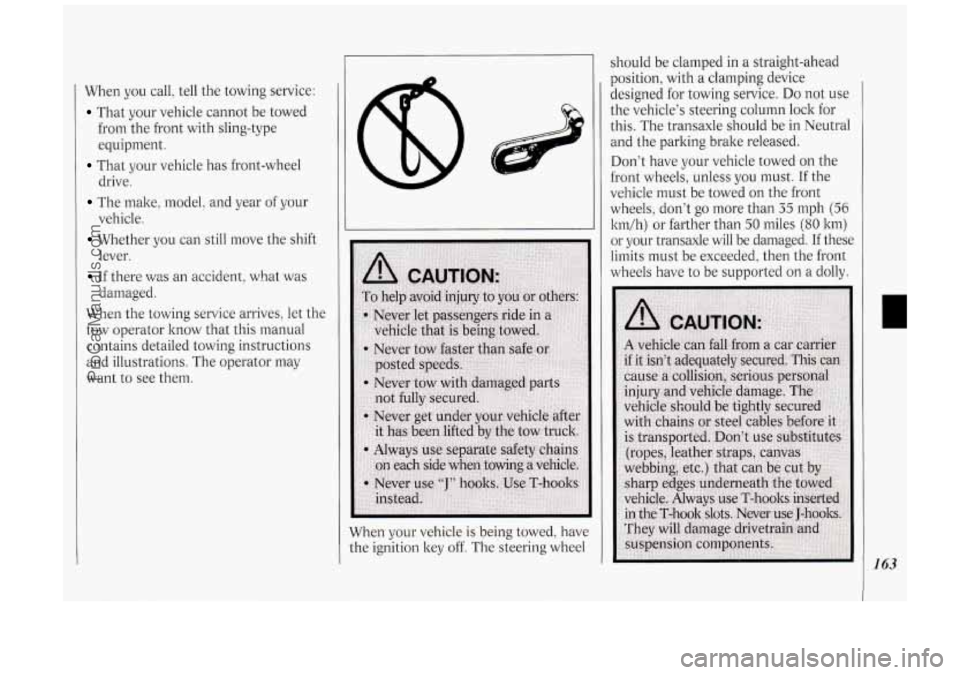
I should be clamped in a straight-ahead
When your vehicle
is being towed, have
the ignition key
off. The steering wheel designed for towing service.
Do not
use
the vehicle’s steering column lock for
this. The transaxle should be in Neutral
and the parking brake released.
Don’t have your vehicle towed on the
front wheels, unless
you must. If the
vehicle must be towed on the front
wheels, don’t go more than
35 mph (56
l
If these
limits must be exceeded, then the front
wheels have to be supported on a dolly.
1 63
ProCarManuals.com