1994 CHEVROLET BLAZER ignition
[x] Cancel search: ignitionPage 143 of 348
Downloaded from www.Manualslib.com manuals search engine PWR (Power)
The PWR button turns your system on and off.
Pushbuttons
The four pushbuttons let you return to favorite stations. To set the
pushbuttons, just:
0 Tune in the station.
Push SET. (SET appears in the VF display for a few seconds.)
0 Within 5 seconds, push one of the four pushbuttons. Whenever you
push that button, the preset station
will return.
NOTE: Up to three additional stations may be preset by pressing two adjoining
buttons at the same time.
Tune in the station.
0 Push SET. (SET appears in the VF display for a few seconds.)
Within 5 seconds, push any two adjoining buttons at the same time.
(The station will return when the same two buttons are pressed again.)
Clock
To set the clock, just:
Push SET.
0 Within 5 seconds, push and hold HRS (time will be displayed) until the
0 Push and hold MINS until the correct minute appears.
correct
hour appears.
To display the clock with the ignition off, push the upper knob. The time
will be displayed for a few seconds.
3-9
Page 144 of 348
Downloaded from www.Manualslib.com manuals search engine How to Operate Your
ETW AM-FM Siereo Audio Sysiem
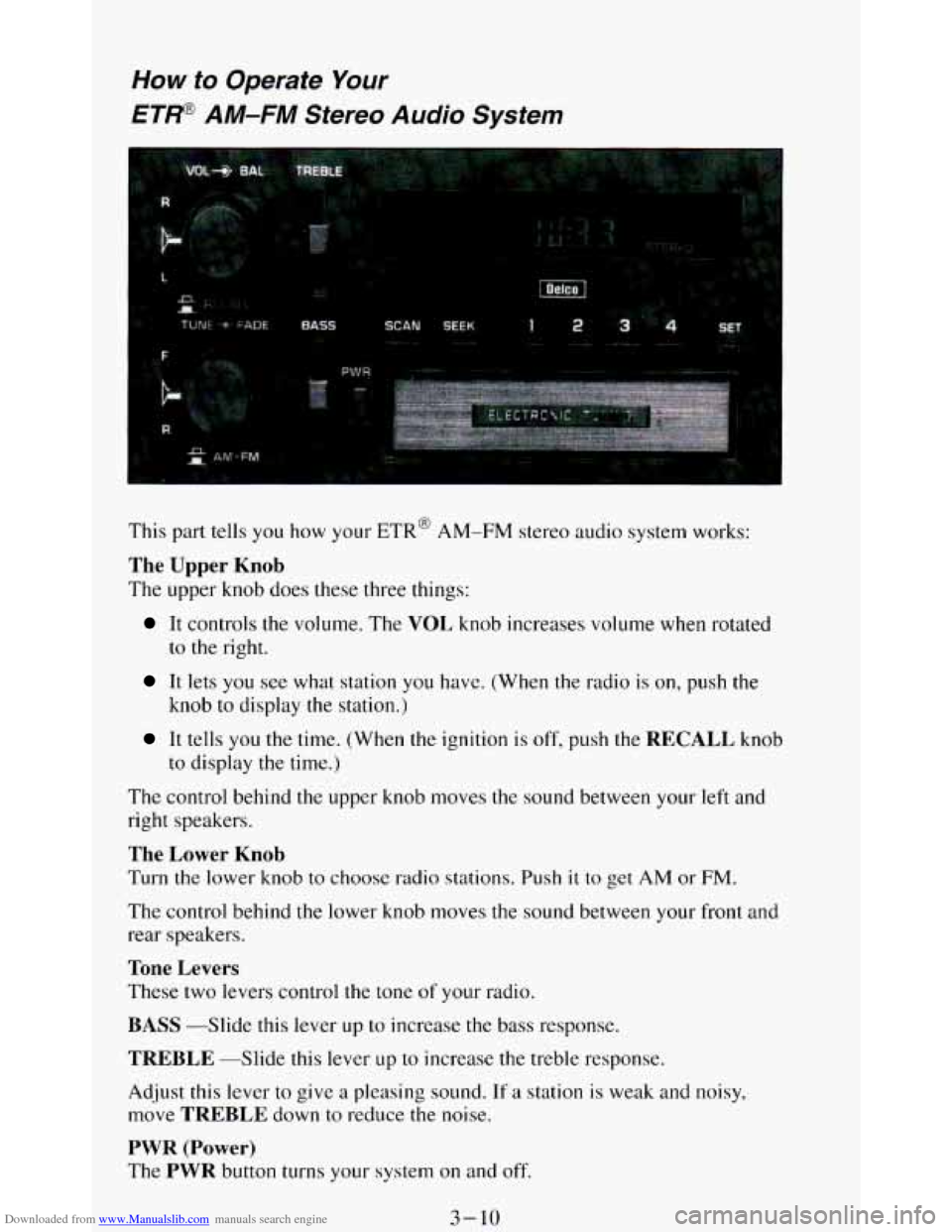
This part tells you how your ETR@ AM-FM stereo audio system works:
The Upper Knob
The upper knob does these three things:
It controls the volume. The VOL knob increases volume when rotated
to
the right.
It lets you see what station you have. (When the radio is on, push the
knob
to display the station.)
It tells you the time. (When the ignition is off, push the RECALL knob
to display
the time.)
The control behind the upper knob moves the sound between your left and
right speakers.
The Lower Knob
Turn the lower knob to choose radio stations. Push it to get AM or FM.
The control behind the lower knob moves the sound between your front and
rear speakers.
Tone Levers
These two levers control the tone of your radio.
BASS -Slide this lever up to increase the bass response.
TREBLE --Slide this lever LIP to increase the treble response.
Adjust this lever to give
a pleasing sound. If a station is weak and noisy,
move
TREBLE down to reduce the noise.
PWR (Power)
The PWR button turns your system on and off.
3-10
Page 145 of 348
Downloaded from www.Manualslib.com manuals search engine Pushbuttons
The four pushbuttons let you return to favorite stations.
You
can set the pushbuttons for up to eight favorite stations (4 AM and 4
FM). Just:
Tune in the station.
0 Push SET. (SET appears in the VF display for a few seconds.)
Within 5 seconds, push one of the four pushbuttons to store the station.
Whenever you push
that button, the preset station will return.
Repeat these steps for each pushbutton.
NOTE:
You can preset 3 more stations on each band by pushing a pair of buttons
next to each other at the same time. Just:
Tune in the station.
0 Push SET. (SET appears in the VF display for a few seconds.)
0 Within 5 seconds, push two buttons next to each other at the same time.
Whenever you push that pair of buttons, the preset station
will return.
Repeat these steps for each pair of buttons.
Scan Button
When you push this, the radio will go to the next station and stay there a
few seconds. Then it
will go to the next station and pause, and keep doing
that. Press
SCAN again to stop scanning.
Seek Button
This chooses station also, but it doesn’t keep moving as SCAN does. When
you push
SEEK the radio goes to the next station and stays there.
Clock
To set the clock, just:
Push SET.
Within 5 seconds, push and hold SCAN until the correct hour appears.
Press and hold SEEK until the correct minute appears.
To display the clock
with the ignition off, push the upper knob. The time
will be displayed for a few seconds.
3-1 1
Page 146 of 348
Downloaded from www.Manualslib.com manuals search engine How to Operate Your
ETP AM-FM Stereo Audio Cassette System
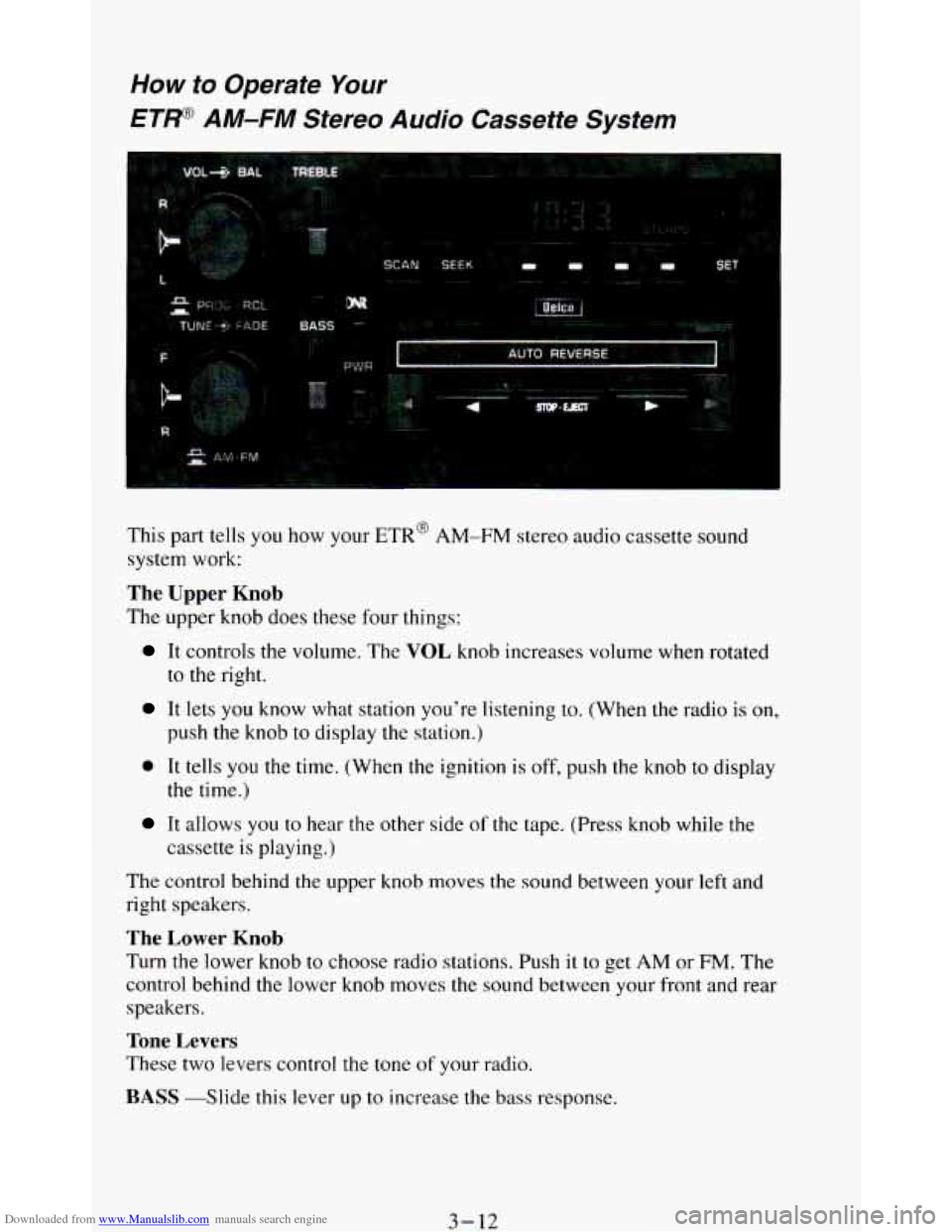
This part tells you how your ETR’ AM-FM stereo audio cassette sound
system work:
The Upper Knob
The upper knob does these four things:
It controls the volume. The VOL knob increases volume when rotated
to the right.
It lets you know what station you’re listening to. (When the radio is on,
push the knob to display the station.)
0 It tells you the time. (When the ignition is off, push the knob to display
It allows you to near the other side of the tape. (Press knob while the
the time.)
cassette
is playing.)
The control behind the upper knob moves
the sound between your left and
right speakers.
The Lower Knob
Turn the lower knob to choose radio stations. Push it to get AM or FM. The
control behind the lower knob moves the sound between your front and rear
speakers.
Tone Levers
These two levers control the tone of your radio.
BASS -Slide this lever up to increase the bass response.
3-12
Page 148 of 348
Downloaded from www.Manualslib.com manuals search engine Clock
To set the clock, just:
Push SET.
Within 5 seconds, push and hold SCAN until the correct hour appears.
Press and hold SEEK until the correct minute appears.
To display the clock with the ignition off, push the upper knob. The time
will be displayed for
a few seconds.
To Way A Cassette
Your tape player is built to work best with tapes that are 30 to 45 minutes
long
on each side. Tapes longer than that are so thin they may not work well
in this player.
To play a cassette tape:
Have the radio on.
Insert the tape squarely through the tape door.
The longer side with the tape visible goes in first. If you hear nothing or
hear just garbled sound, it may not be in squarely. Push STOP-EJECT to
remove the tape and start over.
Once the tape is playing, use the upper and lower knobs for volume and
balance, just as you
do for radio. The arrows show which side of the tape is
playing.
0 To go forward to another part of the tape, push the button with an
arrow pointing toward the lighted arrow. To stop the tape, push the
STOP-E JECT button lightly.
To go backward, push the button with an arrow pointing away from
the lighted arrow. To stop the tape, push the STOP-EJECT button
lightly.
To go from one side of the tape to the other, push in the upper knob on
To remove or stop the tape, push STOP-EJECT.
your radio.
3-14
Page 149 of 348
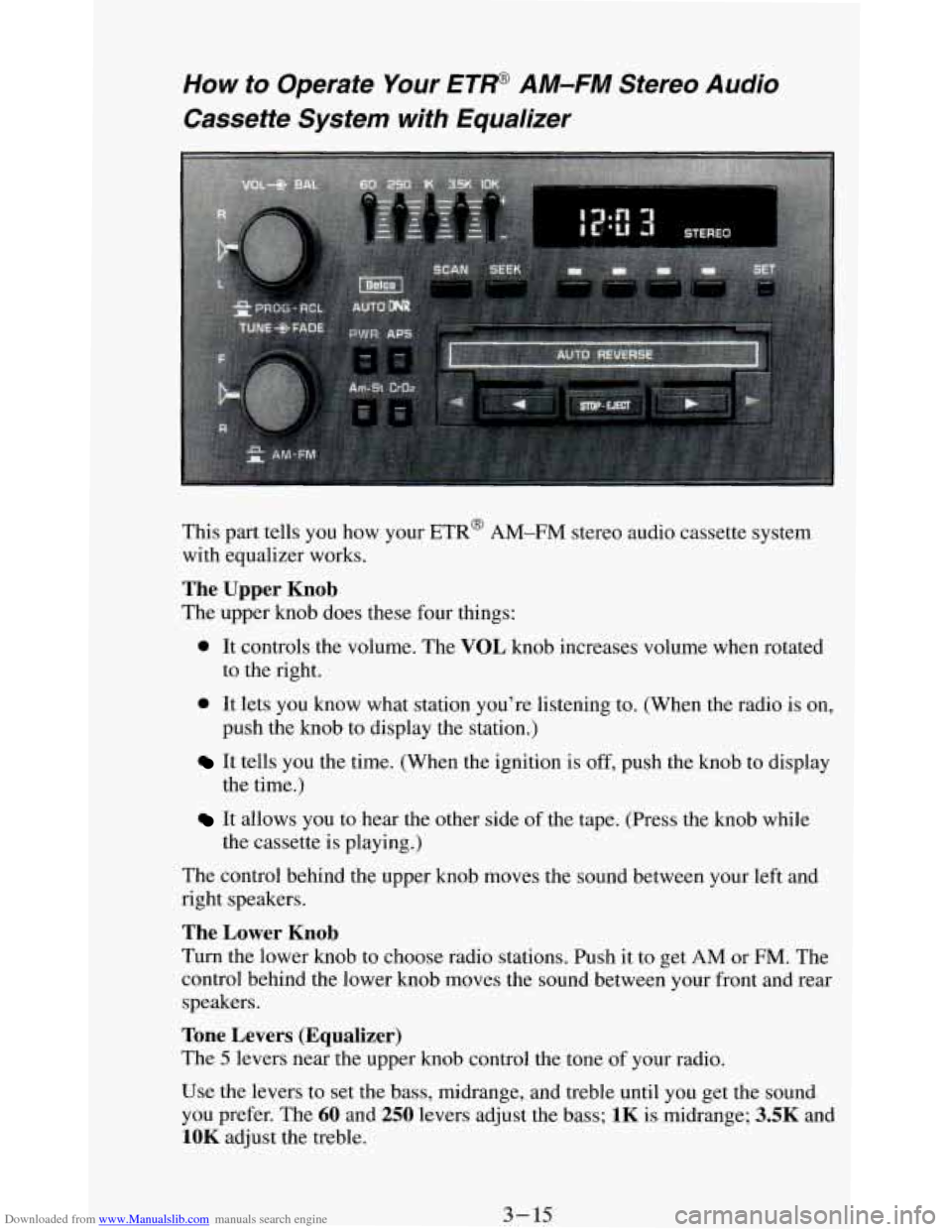
Downloaded from www.Manualslib.com manuals search engine How to Operate Your ET@ AM-FM Stereo Audio
Cassette System with Equalizer
This part tells you how your ETR@ AM-FM stereo audio cassette system
with equalizer works.
The Upper Knob
The upper knob does these four things:
0 It controls the volume. The VOL knob increases volume when rotated
to the right.
push the knob to display the station.)
0 It lets you know what station you’re listening to. (When the radio is on,
It tells you the time. (When the ignition is off, push the knob to display
It allows you to hear the other side of the tape. (Press the knob while
the time.)
the cassette
is playing.)
The control behind the upper knob moves the sound between your left and
right speakers.
The Lower Knob
Turn the lower knob to choose radio stations. Push it to get AM or FM. The
control behind the lower knob moves the sound between your front and rear
speakers.
Tone Levers (Equalizer)
The 5 levers near the upper knob control the tone of your radio.
Use the levers to set the bass, midrange, and treble until you get the sound
you prefer. The
60 and 250 levers adjust the bass; 1K is midrange; 3.5K and
1OK adjust the treble.
3- 15
Page 151 of 348
Downloaded from www.Manualslib.com manuals search engine Clock
To set the clock, just:
Press SET. (SET appears in the VF display for a few seconds.)
Within 5 seconds, push and hold SCAN until the correct hour appears.
Press and hold SEEK until the correct minute appears.
To display the clock with the ignition off, push the upper knob. The time
will be displayed for a few seconds.
To Play A Cassette
Your tape player is built to work best with tapes that are 30 to 45 minutes
long on each side. Tapes longer
than that are so thin they may not work well
in this player.
To play a cassette tape:
Have the radio on.
Insert the tape squarely through the tape door.
The longer side
with the tape visible goes in first. If you hear nothing or
hear just garbled sound,
it may not be in squarely.
Push
STOP-EJECT to remove the tape and start over.
Once the tape is playing, use the upper and lower knobs for volume and
balance, just as
you do for radio. The arrows show which side of the tape is
playing.
0 To go forward to another part of the tape, push b.
0 To go backward, push 4. To stop the tape, push the other button
lightly.
your radio.
To remove or stop the tape, push STOP-EJECT.
0 To go from one side of the tape to the other, push in the upper knob on
APS (Automatic Program Search)
Press this button to activate the automatic program search. When the b
button is pressed, the tape will rapidly advance to the beginning of the next
selection. When
the 4 button is pressed, the tape will rapidly reverse to the
beginning of the current selection.
Press
STOP-E JECT to remove the cassette and start the radio.
3-17
Page 153 of 348
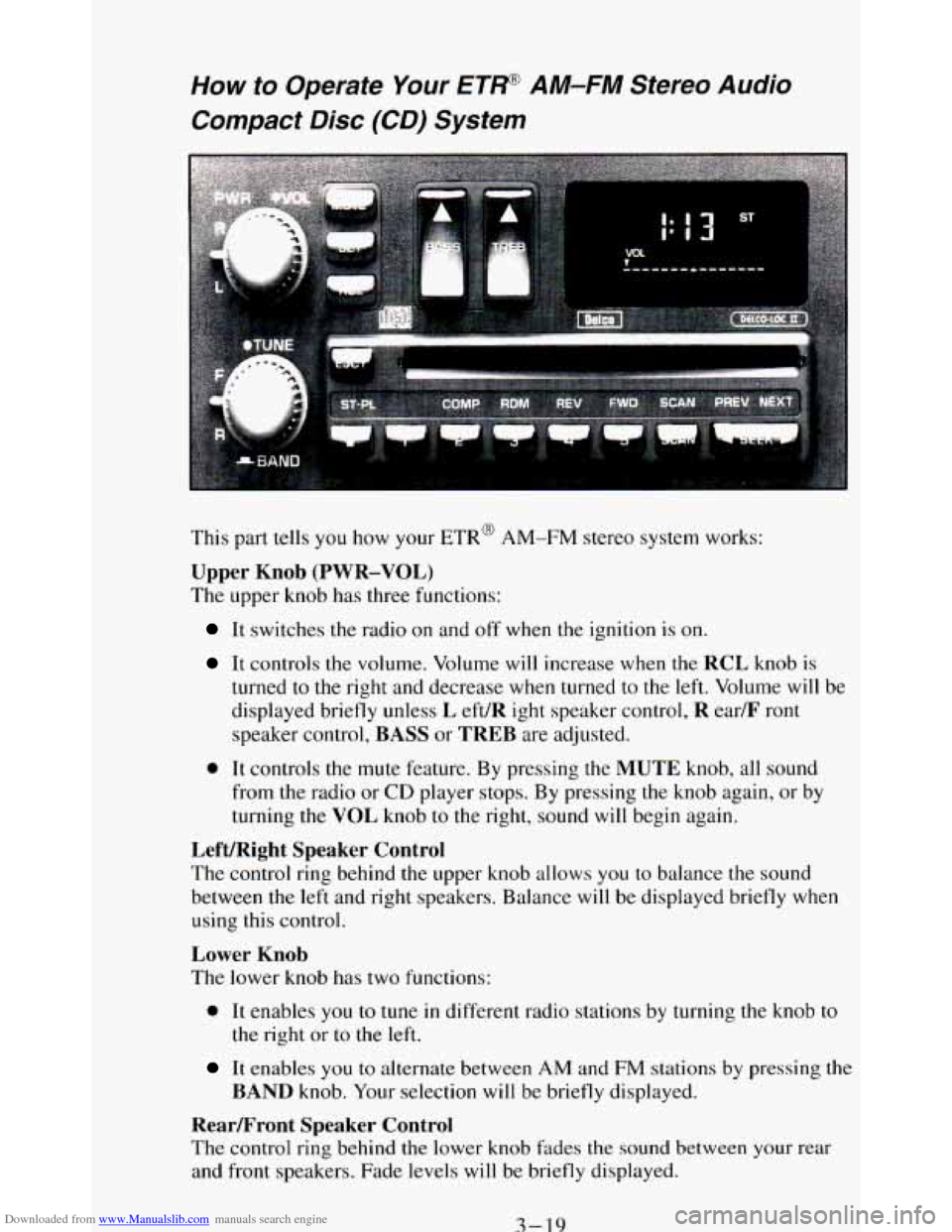
Downloaded from www.Manualslib.com manuals search engine How to Operate Your ETP AM-FM Stereo Audio
Compact Disc (CD) System
i
This part tells you how your ETR@ AM-FM stereo system works:
Upper Knob (PWR-VOL)
The upper knob has three functions:
It switches the radio on and off when the ignition is on.
It controls the volume. Volume will increase when the RCL knob is
turned
to the right and decrease when turned to the left. Volume will be
displayed briefly unless
L eft/R ight speaker control, R ear/F ront
speaker control, BASS or TREB are adjusted.
0 It controls the mute feature. By pressing the MUTE knob, all sound
from the radio or
CD player stops. By pressing the knob again, or by
turning the VOL knob
to the right, sound will begin again.
Left/Right Speaker Control
The control ring behind the upper knob allows you to balance the sound
between the left and right speakers. Balance will be displayed briefly when
using this control.
Lower Knob
The lower knob has two functions:
0 It enables you to tune in different radio stations by turning the knob to
the right or to the left.
It enables you to alternate between AM and FM stations by pressing the
BAND knob. Your selection will be briefly displayed.
RearLFront Speaker Control
The control ring behind the lower knob fades the sound between your rear
and front speakers. Fade levels will be briefly displayed.
3-19