Page 11 of 339
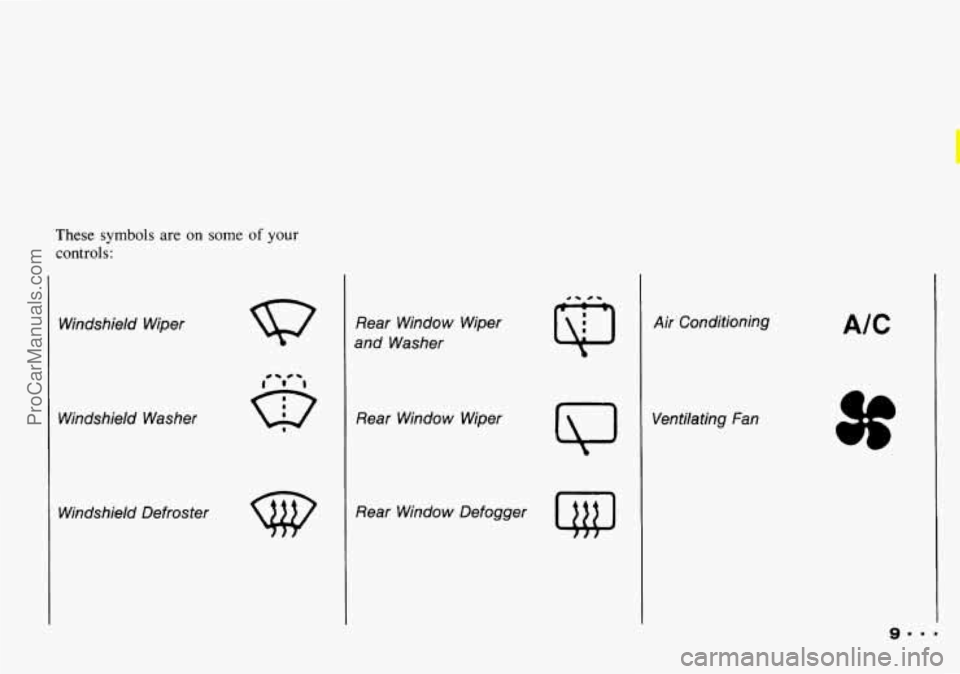
These symbols are on some of your
controls:
Windshield Wiper
Windshield Washer Windshield Defroster
w
Rear Window Wiper
and Washer
Rear Window Wiper
Rear Window Defogger
Q
Air Conditioning
Ventilating
Fan
AIC
ProCarManuals.com
Page 87 of 339

Engine Coolant Temperature Gage
This gage shows the engine coolant
temperature. If the gage pointer moves
to the “H” (red) side, your engine is
too hot! It means that your engine
coolant has overheated and you should
stop your vehicle and turn off the engine
as soon as possible.
HOT
COOLANT CAN BURN YOU
BADLY!
In “Problems on the Road, ” this
manual shows what to do. See “Engine
Overheating’’
in the Index.
-I
I L
Charging System Light
This light will come on briefly when
you turn on
the ignition, but the engine
is not running, as a check to show you it
is working. Then it should go out when
the engine starts. If it stays on, or
comes on while you are driving, you
may
have a problem with the electrical
charging system. It could indicate that
you have a loose generator drive belt, or
another electrical problem. Have
it
checked right away. Driving while this
light
is on could drain your battery.
If you must drive a short distance with
the light
on, be certain to turn off
all your accessories, such as the radio
and air conditioner.
Malfunction Indicator Lamp (Check
Engine Light)
A computer monitors operation of your
fuel, ignition and emission control
systems. The light should come on when
the ignition is on, but the engine is not
running, as a check to show you
it is
working. If
it does not come on at all,
have it fixed right away. If it stays
on,
or comes on while you are driving, the
computer is indicating that you have
a
problem. You should take your vehicle
in for service soon.
85.9.
ProCarManuals.com
Page 103 of 339

In this part you'll find out how to
operate the comfort control
system and audio systems
offered with your Geo
. Be sure to
read about the particular system
supplied with your vehicle
.
Part 3
Comfort Controls &
Audio Systems
Comfort Controls ...............................................
Heater Controls ...............................................
Heating ......................................................
..... 102
..... 102
..... 103
Bi-LevelHeating
................................................... 103
Ventilation
........................................................ 103
Defogging and Defrosting Windows
................................... 104
Air Conditioner Controls
............................................ 104
Cooling
........................................................... 104
Dehumidifying
..................................................... 105
Rearwindow Defogger
............................................. 105
Flow-Through Ventilation System
..................................... 106
Audiosystems
....................................................... 106
Setting the Clock
................................................... 107
AM/FM Stereo
.................................................... 108
AM/FM Stereo with Cassette Tape Player
.............................. 110
Understanding Radio Reception
....................................... 115
Care
of Your Cassette Tape Player .................................... 115
Antenna
.......................................................... 116
101
ProCarManuals.com
Page 104 of 339

Comfort Controls & Audio Systems
urnfort Controls
With this system, you can control the
heating and ventilation in your Geo. If
you have
the air conditioning option,
you can also control cooling,
Your vehicle also has the flow-through
ventilation system described later
in this
section.
Heater Controls
Air Intake Lever
a: Choose this position to recirculate
the inside air through the comfort
control system.
m: Choose this position to circulate
outside air through
the comfort control
system.
Airflow Lever
Use this lever to direct the airflow.
*; : This position directs the airflow
through the instrument panel vents.
\# : This position directs air through do
the instrument panel vents and toward
the floor.
WP : This position directs air toward
the
floor.
-9 : This position directs air toward
the floor, the windshield and side
windows.
till, : This position directs air to the
windshield.
Temperature Control Lever
Slide the lever to change the temperature
of the air flowing from the heating
system. Move
it toward the right for
warmer air and to the
left for cooler air.
The temperature
of the air can not be
less than the temperature of the outside
air.
Fan Control Lever
: Slide this lever to turn the heating
system on or
off. Move the lever toward
to increase
the fan's speed.
ProCarManuals.com
Page 106 of 339

Comfort Controls & Audio Systems
I
1. Slide the air intake lever to =.
2. Slide the airflow lever to Q to
direct air to the windshield vents.
3. Slide the temperature lever toward
4. Slide the fan lever to # .
When the windshield is clear, turn down
the fan speed.
To defog the side windows, slide the
airflow lever to
ZJ. For increased
airflow to the side vents, close the
center vents. the
right.
Air Conditioner Controls
The air conditioning system uses the
same controls as the heating system. The
function of each lever is explained under
“Heater Controls” in this part. The
incoming air is cooled and dehumidified
instead of being heated.
A/C: Push this button to change your
comfort control system from heating
to
air conditioning. A light will come on
when the air conditioning is on. The
A/C button can also control the
humidity in your vehicle.
Cooling
The air conditioner works best if you
keep your windows closed. On very hot
days, open the windows just long
enough for the hot air to escape.
1. Push the A/C button.
2. Move the air intake lever to
for normal cooling. For
faster
cooling move the lever tom.
3. Move the airflow lever to -$ .
4. Move the temperature control lever
5. Move the fan control lever to # .
toward the left.
... 104
ProCarManuals.com
Page 108 of 339

Comfort Controls & Audio Systems
106
rmw-rirmuflh Ventilation System
Your Geo's flow-through ventilation
system supplies outside air into the
vehicle when it is moving. Outside air
will
also enter the car when the heater
or the air conditioning fan is running.
Ventilation Tips
Keep the hood and front air inlet free
of ice, snow, or any other obstruction
(such as leaves). The heater and
defroster will work far better,
reducing the chance of fogging the
inside of your windows.
When you enter a car in cold weather,
move the fan lever toward
# for a
few moments before driving off. This
helps clear the intake ducts of snow
and moisture, and reduces 'the chance
of fogging the inside of your
windows.
Keep the air path under the front seats
clear of objects. This helps air to
circulate throughout your car.
H Audio Systems
Your Delco@ audio system has been
designed to operate easily and give years
of listening pleasure. But you will get
the most enjoyment out of it if you
acquaint yourself with it first. Find out
what your Delco@ audio system can do
and how to operate all its controls, to be
sure you're getting the most out of the
advanced engineering that went into it.
ProCarManuals.com
Page 204 of 339

Problems on the Road
... 202
If No Steam Is Coming from Your
Engine:
If you get the overheat warning but see
or hear no steam,
the problem may not
be too serious. Sometimes the engine
can get a little too hot when you:
Climb a long hill on a hot day.
Stop after high speed driving.
Idle for long periods in traffic.
Tow a trailer. If you
get the overheat warning with no
sign of steam, try this for
a minute or
1. If you have an air conditioner, turn it
2. Turn on your heater to full hot at the
so:
off.
highest fan speed and open
the
window as necessary.
3. If you’re in a traffic jam, shift to
N (Neutral).
If
you no longer have the overheat
warning, you can drive. Just to be safe,
drive slower for about ten minutes. If
the warning doesn’t come back on, you
can drive normally.
If the warning continues, pull over,
stop, and park your vehicle right away.
If there’s still no sign of steam, you can
idle the engine for two
or three minutes
while you’re parked, to see if the
warning stops. But then, if you still have
the warning, TURN OFF THE
ENGINE AND GET EVERYONE OUT
OF THE VEHICLE until it cools down.
You may decide not to lift the hood but
to get service help right away.
ProCarManuals.com
Page 243 of 339
r
Adding only plain water to
b your cooling system can be
dmgemus. Plaia water, or some
other liquid like alcohol, can boil
before the proper coolant mix will.
Your vehicle’s coolant warning
system is set for the proper coolant
mix, With plain water or the
wrong mix, your engine could get
too hot but you wouldn’t get the
overheat warning. Your engine
could catch fire and you or others
could be burned. Use a 50/50 mix
of clean water and a proper
antifreeve or approved recycled
coolant.
I
Some conditions, such as air trapped in
the cooling system, can affect the
coolant level in the radiator. Check the
coolant level when the engine is cold
and follow the steps under ‘‘Adding Coolant” for
the proper way to add
coolant. If you have to add coolant
more than
four time
a year, have your dealer check
your cooling system.
If
you use the proper coolant, you
don’t have to add extra inhibitors
or additivies which claim to
II
241
ProCarManuals.com