1993 CHEVROLET DYNASTY abs
[x] Cancel search: absPage 511 of 2438
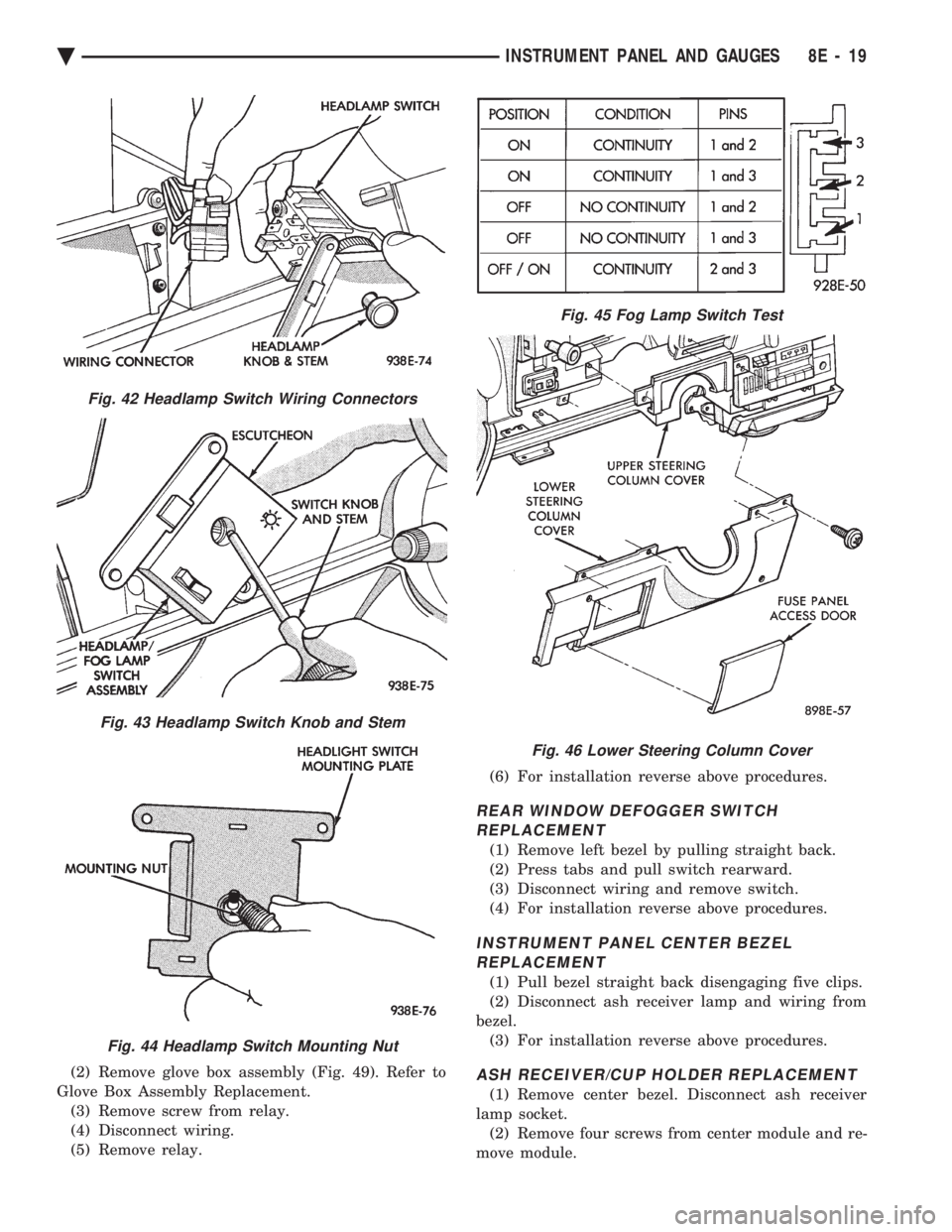
(2) Remove glove box assembly (Fig. 49). Refer to
Glove Box Assembly Replacement. (3) Remove screw from relay.
(4) Disconnect wiring.
(5) Remove relay. (6) For installation reverse above procedures.
REAR WINDOW DEFOGGER SWITCH
REPLACEMENT
(1) Remove left bezel by pulling straight back.
(2) Press tabs and pull switch rearward.
(3) Disconnect wiring and remove switch.
(4) For installation reverse above procedures.
INSTRUMENT PANEL CENTER BEZELREPLACEMENT
(1) Pull bezel straight back disengaging five clips.
(2) Disconnect ash receiver lamp and wiring from
bezel. (3) For installation reverse above procedures.
ASH RECEIVER/CUP HOLDER REPLACEMENT
(1) Remove center bezel. Disconnect ash receiver
lamp socket. (2) Remove four screws from center module and re-
move module.
Fig. 42 Headlamp Switch Wiring Connectors
Fig. 43 Headlamp Switch Knob and Stem
Fig. 44 Headlamp Switch Mounting Nut
Fig. 45 Fog Lamp Switch Test
Fig. 46 Lower Steering Column Cover
Ä INSTRUMENT PANEL AND GAUGES 8E - 19
Page 514 of 2438
DOOR LAMPS
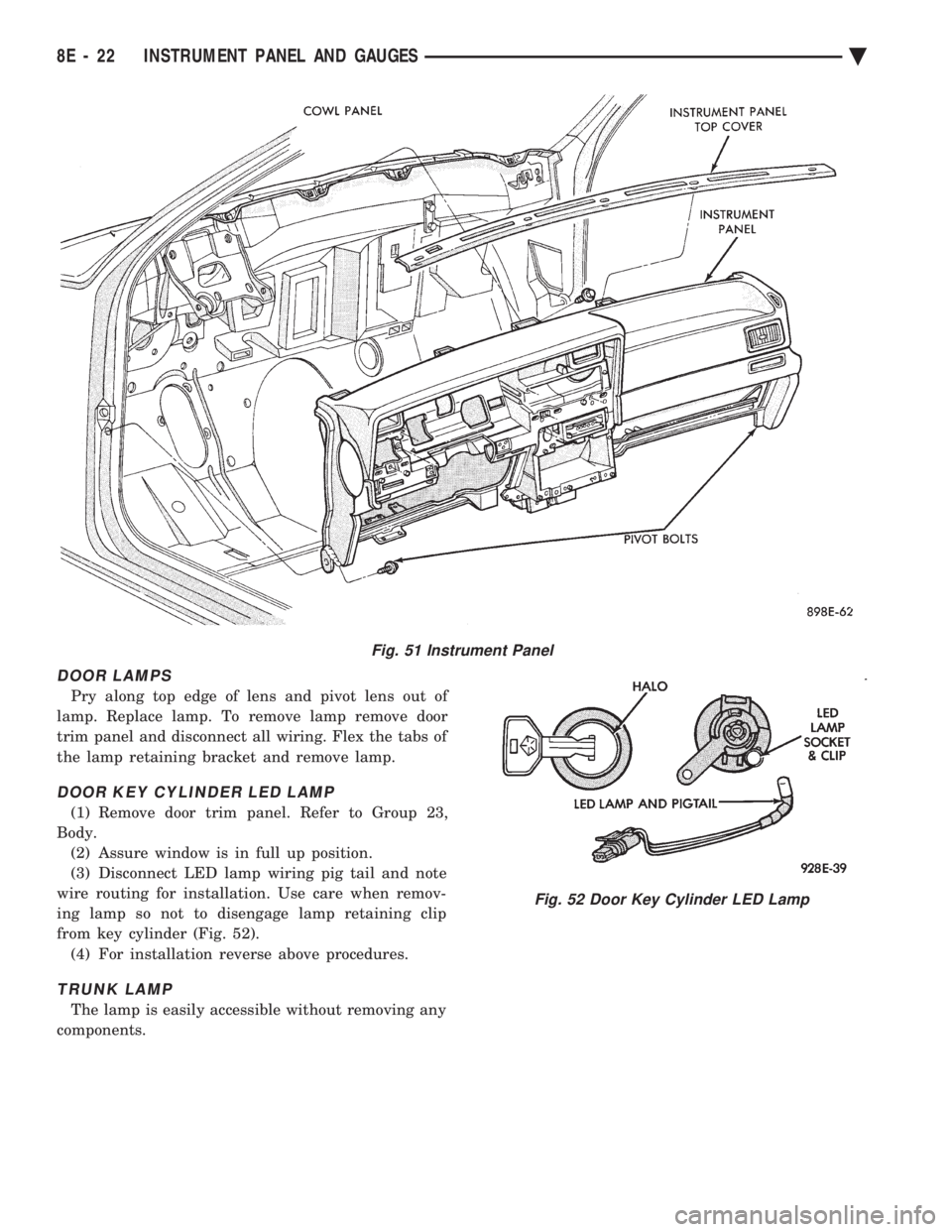
Pry along top edge of lens and pivot lens out of
lamp. Replace lamp. To remove lamp remove door
trim panel and disconnect all wiring. Flex the tabs of
the lamp retaining bracket and remove lamp.
DOOR KEY CYLINDER LED LAMP
(1) Remove door trim panel. Refer to Group 23,
Body. (2) Assure window is in full up position.
(3) Disconnect LED lamp wiring pig tail and note
wire routing for installation. Use care when remov-
ing lamp so not to disengage lamp retaining clip
from key cylinder (Fig. 52). (4) For installation reverse above procedures.
TRUNK LAMP
The lamp is easily accessible without removing any
components.
Fig. 51 Instrument Panel
Fig. 52 Door Key Cylinder LED Lamp
8E - 22 INSTRUMENT PANEL AND GAUGES Ä
Page 515 of 2438

AC AND AY BODIES INDEX
page page
Electronic Cluster ........................ 34
Gauges ................................ 28
General Information ....................... 23
Interior Lamp Replacement ................. 41 Mechanical Cluster and Gauge Service
........ 24
Mechanical/Electronic Cluster Removal ........ 25
Switch and Panel Component Service ......... 37
GENERAL INFORMATION
MECHANICAL CLUSTER
The mechanical cluster includes a fuel, oil pres-
sure, coolant temperature, and voltmeter gauges. All
incorporate magnetic type gauges. When the ignition
switch is in the OFF position, the gauges will show a
reading; however, the readings are only accurate
when the ignition switch is in the ON position. The mechanical cluster also includes an electric
speedometer, driven by pulses from the vehicle speed
sensor (Fig. 1).
ELECTRONIC CLUSTER
The electronic cluster is easily distinguished from
the mechanical cluster by its digital and linear dis-
play. The electronic cluster includes:
² Oil pressure gauge
² Coolant temperature gauge
² Voltmeter
² Fuel gauge
The electronic cluster receives virtually all of its
information to display from the body controller and
powertrain control module via the Chrysler Collision
Detection (CCD) Serial Data Bus. The odometer
memory is no longer retained in the cluster. This is
now retained in the body controller (Fig. 2).
ELECTRONIC CLUSTER DIMMING
The electronic cluster display is dimmed from day-
time to night time intensity when the headlamp
switch is turned on. This intensity can be controlled
using the headlamp switch rheostat. An additional detent on the headlamp switch rheo-
stat will allow daytime intensity while driving with
headlamps on during the daytime.
WARNING LAMPS
The mechanical instrument cluster will have warn-
ing lamps for six systems. These include brake sys-
tem, air bag, seat belt, low fuel, anti-lock for optional
anti-lock brake system, and malfunction indicator
(check engine) lamp. The cluster also includes check
gages indicator which will illuminate in a warning
situation. This will notify driver to check for a prob-
lem in coolant temperature, oil pressure, or electrical
systems. The electronic cluster will have warning indicator
lamps for eight different systems. These include:
² Air Bag
² Low washer fluid
² Door/deck lid ajar
² Malfunction Indicator (Check engine) Lamp
² Brake system
² Seat belt
² Anti-lock (ABS) for optional anti-lock brake sys-
tem
² Check gages, monitors engine coolant, oil pressure
and electrical charging system failures. In addition, ISO symbol will flash to notify the
driver in event of:
² Low fuel
² High temperature
² Low oil pressure
² Charging system failure
Fig. 1 Mechanical Cluster
Fig. 2 Electronic Cluster
Ä INSTRUMENT PANEL AND GAUGES 8E - 23
Page 519 of 2438
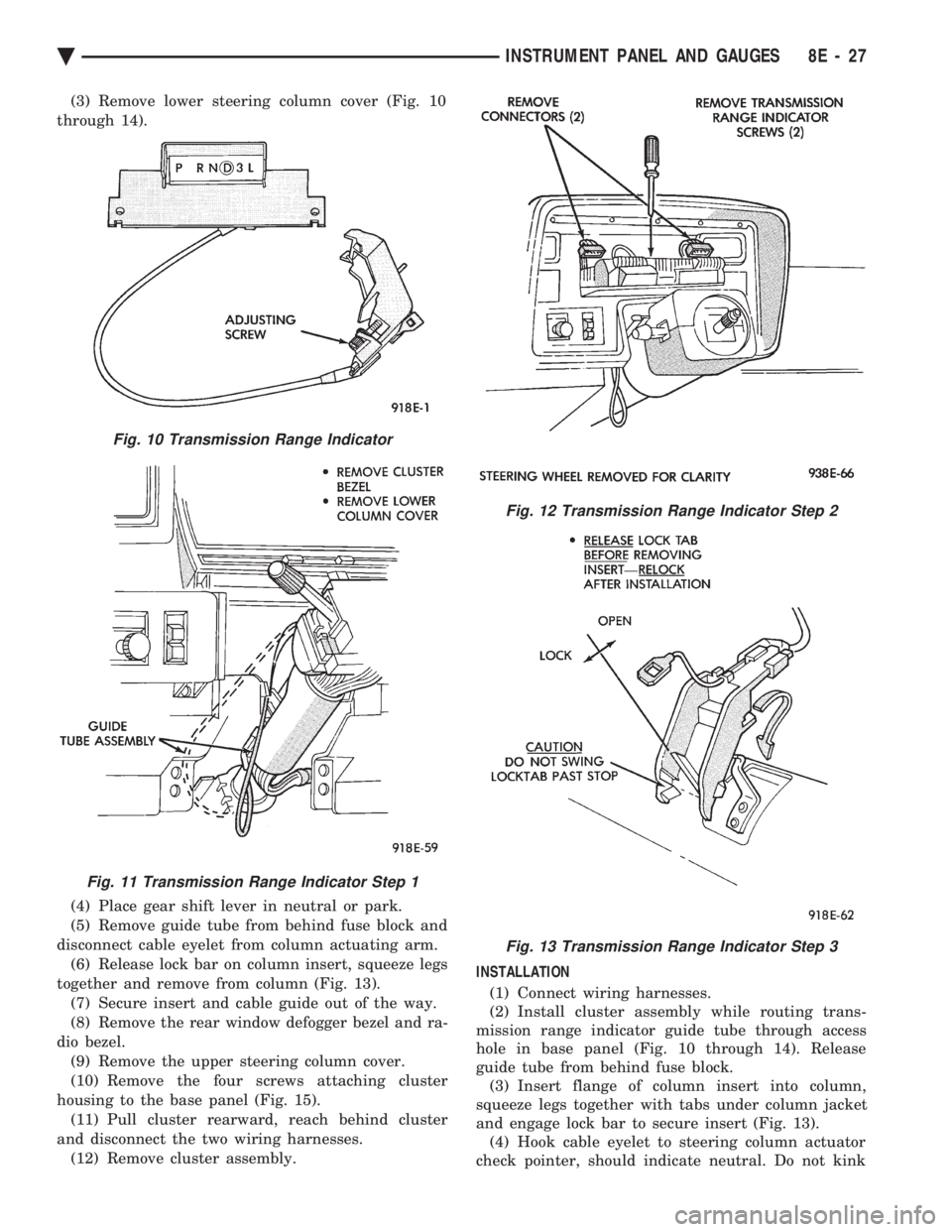
(3) Remove lower steering column cover (Fig. 10
through 14).
(4) Place gear shift lever in neutral or park.
(5) Remove guide tube from behind fuse block and
disconnect cable eyelet from column actuating arm. (6) Release lock bar on column insert, squeeze legs
together and remove from column (Fig. 13). (7) Secure insert and cable guide out of the way.
(8) Remove the rear window defogger bezel and ra-
dio bezel. (9) Remove the upper steering column cover.
(10) Remove the four screws attaching cluster
housing to the base panel (Fig. 15). (11) Pull cluster rearward, reach behind cluster
and disconnect the two wiring harnesses. (12) Remove cluster assembly. INSTALLATION
(1) Connect wiring harnesses.
(2) Install cluster assembly while routing trans-
mission range indicator guide tube through access
hole in base panel (Fig. 10 through 14). Release
guide tube from behind fuse block. (3) Insert flange of column insert into column,
squeeze legs together with tabs under column jacket
and engage lock bar to secure insert (Fig. 13). (4) Hook cable eyelet to steering column actuator
check pointer, should indicate neutral. Do not kink
Fig. 10 Transmission Range Indicator
Fig. 11 Transmission Range Indicator Step 1
Fig. 12 Transmission Range Indicator Step 2
Fig. 13 Transmission Range Indicator Step 3
Ä INSTRUMENT PANEL AND GAUGES 8E - 27
Page 532 of 2438
GLOVE BOX LAMP/SWITCH REPLACEMENT
(1) Disconnect battery negative cable and isolate
or remove fuse #13 prior to removing switch or wires
may short to ground. (2) Open glove box door. The lamp can be removed
without removing switch. (3) Remove switch by squeezing retaining tabs
from behind switch and slide rearward. Disconnect
wiring connectors. (4) Remove lamp/switch.
(5) For installation reverse above procedures.
CIGAR LIGHTER ASSEMBLY REPLACEMENT
(1) Remove four screws from ash receiver.
(2) Pull assembly rearward and disconnect wiring.
(3) Remove ash receiver and cigar lighter.
(4) For installation reverse above procedures.
FLOOR CONSOLE REPLACEMENT
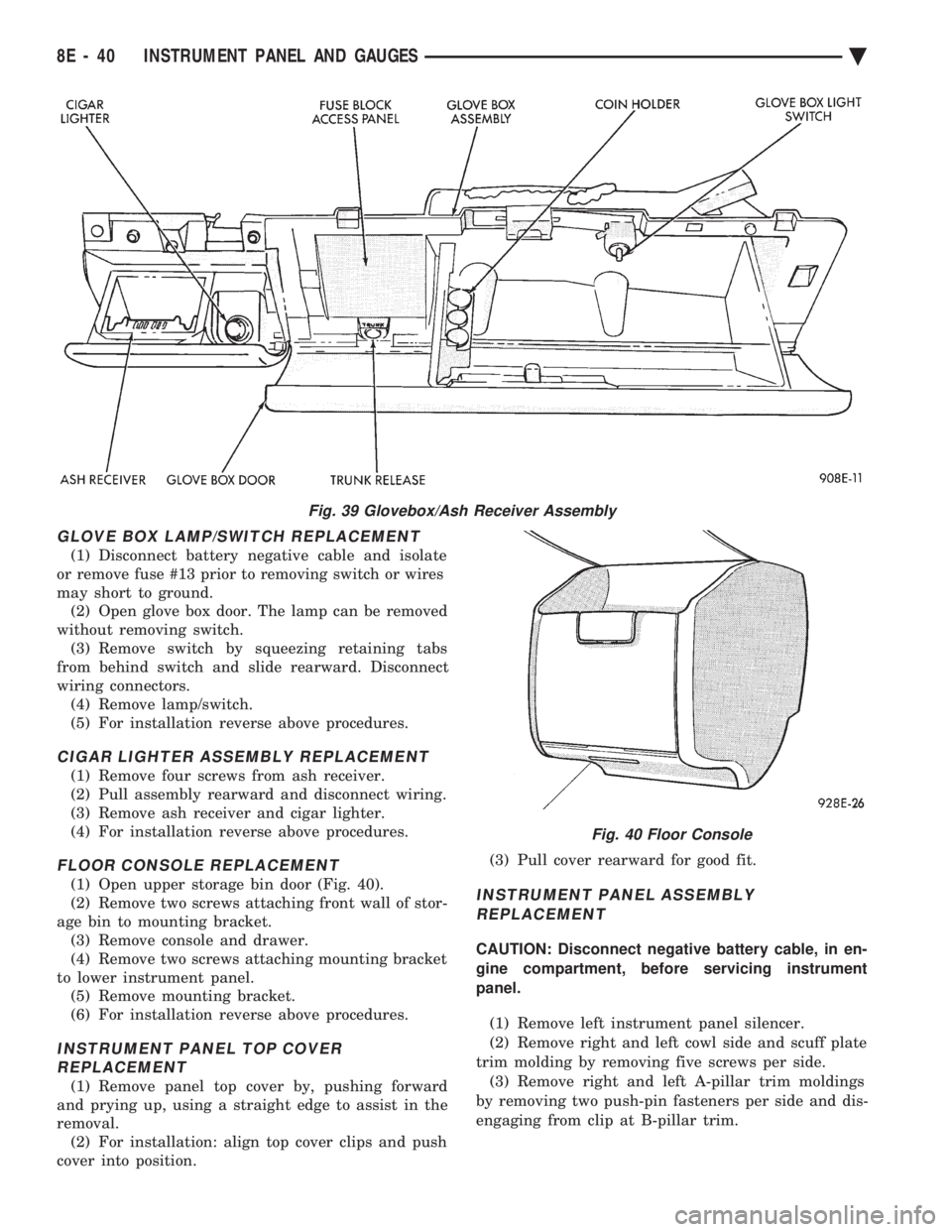
(1) Open upper storage bin door (Fig. 40).
(2) Remove two screws attaching front wall of stor-
age bin to mounting bracket. (3) Remove console and drawer.
(4) Remove two screws attaching mounting bracket
to lower instrument panel. (5) Remove mounting bracket.
(6) For installation reverse above procedures.
INSTRUMENT PANEL TOP COVER REPLACEMENT
(1) Remove panel top cover by, pushing forward
and prying up, using a straight edge to assist in the
removal. (2) For installation: align top cover clips and push
cover into position. (3) Pull cover rearward for good fit.
INSTRUMENT PANEL ASSEMBLY
REPLACEMENT
CAUTION: Disconnect negative battery cable, in en-
gine compartment, before servicing instrument
panel.
(1) Remove left instrument panel silencer.
(2) Remove right and left cowl side and scuff plate
trim molding by removing five screws per side. (3) Remove right and left A-pillar trim moldings
by removing two push-pin fasteners per side and dis-
engaging from clip at B-pillar trim.
Fig. 39 Glovebox/Ash Receiver Assembly
Fig. 40 Floor Console
8E - 40 INSTRUMENT PANEL AND GAUGES Ä
Page 550 of 2438

AP BODY INDEX
page page
Cluster and Gauge Service and Testing ....... 58
Gauges ................................ 61
General Information ....................... 58 Instrument Panel Replacement
.............. 72
Interior Lamp Replacement ................. 73
Switch and Panel Component Service ......... 67
GENERAL INFORMATION
INSTRUMENT CLUSTER
There are two conventional instrument cluster as-
semblies available. The clusters incorporates mag-
netic type gauges and an electronically driven
speedometer and odometer assembly (Fig. 1 and 2).
MAGNETIC GAUGES
All gauges on the AP Body clusters are the mag-
netic type gauges. When the ignition switch is in the
OFF position each gauge, except for the voltmeter
and tachometer will show a reading. However, the
readings are only accurate when the ignition switch
is in the ON position.
TACHOMETER DRIVE MODULE
The tachometer drive module is an electronic mod-
ule used to drive the magnetic tachometer in the
high line cluster. This module is located on top of the instrument
cluster.
ELECTRONIC DIGITAL CLOCK
The electronic digital clock is in the radio. The
clock and radio each use the display panel built into
the radio. A digital readout indicates the time in
hours and minutes whenever the ignition switch is in
the ON or ACC position. When the ignition switch is in the OFF position, or
when the radio frequency is being displayed, time
keeping is accurately maintained. The procedure for setting the clock varies slightly
with each radio. The correct procedure is described
under the individual radio operating instructions re-
fer to the Sound Systems Manual supplied with the
vehicle.
WARNING LAMPS AND INDICATOR LIGHTS
The instrument cluster has warning and indicators
lamps for eight different systems:
² Low oil pressure
² Brake warning
² Seat belt warning
² Malfunction indicator (check engine) lamp
² Air Bag
² High beam indicator
² Right and left turn signals.
² Anti-lock (ABS)
CLUSTER AND GAUGE SERVICE AND TESTING
CAUTION: Disconnect the negative battery cable
before servicing the instrument panel. When power
is required for test purposes, reconnect battery ca-
ble for test only. Disconnect the negative battery
cable after test and before continuing service pro-
cedures.
SENDING UNIT TEST
Check for a defective sending unit or wiring, when
a problem occurs with a cluster gauge. Do this before
disassembling the cluster. (1) Sending units and wiring can be checked by
grounding the connector leads, at the sending unit,
in the vehicle. (2) With the ignition in the ON position, a
grounded input will cause the fuel or temperature
gauge to read at or above maximum.
Fig. 1 Instrument Cluster With Tachometer
Fig. 2 Instrument Cluster Without Tachometer
8E - 58 INSTRUMENT PANEL AND GAUGES Ä
Page 561 of 2438
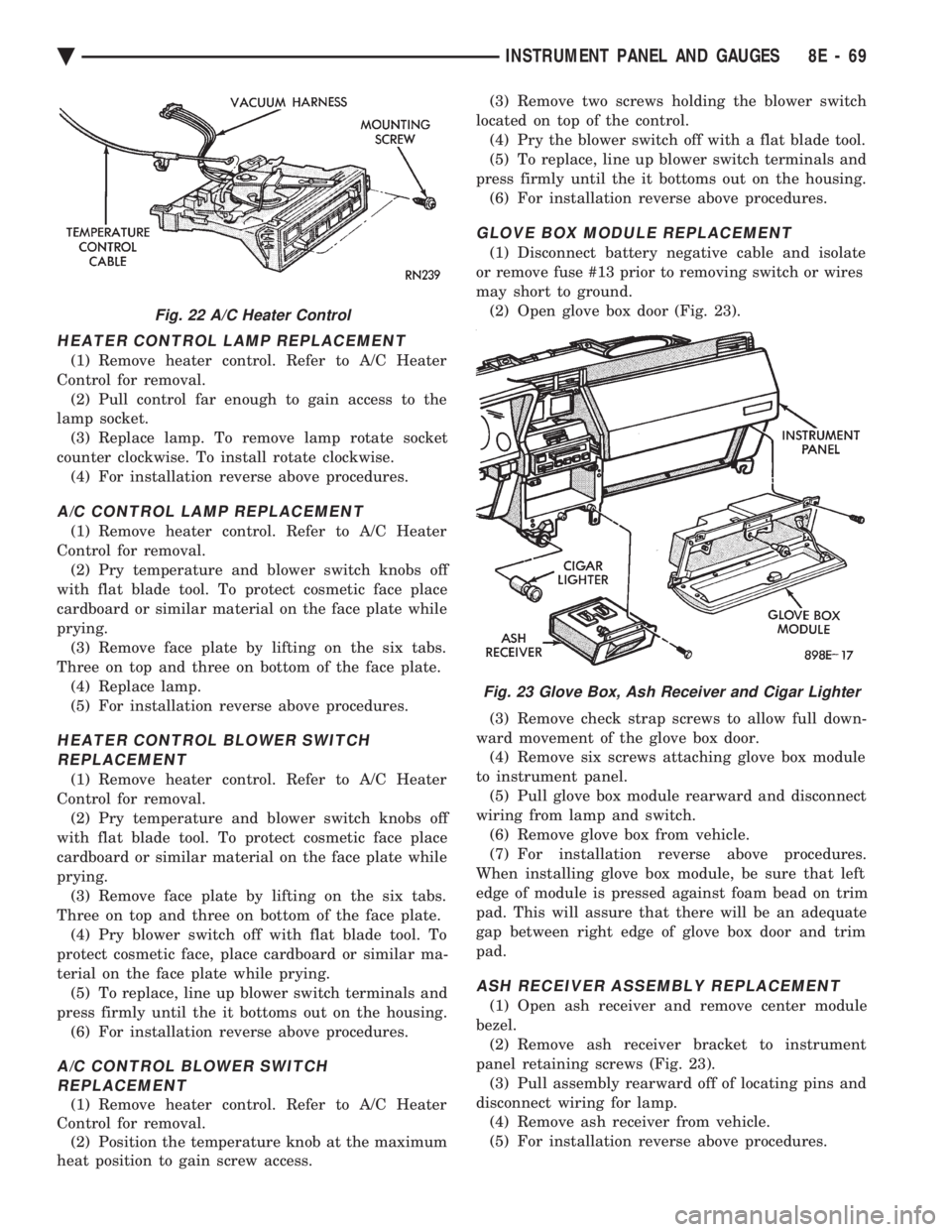
HEATER CONTROL LAMP REPLACEMENT
(1) Remove heater control. Refer to A/C Heater
Control for removal. (2) Pull control far enough to gain access to the
lamp socket. (3) Replace lamp. To remove lamp rotate socket
counter clockwise. To install rotate clockwise. (4) For installation reverse above procedures.
A/C CONTROL LAMP REPLACEMENT
(1) Remove heater control. Refer to A/C Heater
Control for removal. (2) Pry temperature and blower switch knobs off
with flat blade tool. To protect cosmetic face place
cardboard or similar material on the face plate while
prying. (3) Remove face plate by lifting on the six tabs.
Three on top and three on bottom of the face plate. (4) Replace lamp.
(5) For installation reverse above procedures.
HEATER CONTROL BLOWER SWITCHREPLACEMENT
(1) Remove heater control. Refer to A/C Heater
Control for removal. (2) Pry temperature and blower switch knobs off
with flat blade tool. To protect cosmetic face place
cardboard or similar material on the face plate while
prying. (3) Remove face plate by lifting on the six tabs.
Three on top and three on bottom of the face plate. (4) Pry blower switch off with flat blade tool. To
protect cosmetic face, place cardboard or similar ma-
terial on the face plate while prying. (5) To replace, line up blower switch terminals and
press firmly until the it bottoms out on the housing. (6) For installation reverse above procedures.
A/C CONTROL BLOWER SWITCHREPLACEMENT
(1) Remove heater control. Refer to A/C Heater
Control for removal. (2) Position the temperature knob at the maximum
heat position to gain screw access. (3) Remove two screws holding the blower switch
located on top of the control. (4) Pry the blower switch off with a flat blade tool.
(5) To replace, line up blower switch terminals and
press firmly until the it bottoms out on the housing. (6) For installation reverse above procedures.
GLOVE BOX MODULE REPLACEMENT
(1) Disconnect battery negative cable and isolate
or remove fuse #13 prior to removing switch or wires
may short to ground. (2) Open glove box door (Fig. 23).
(3) Remove check strap screws to allow full down-
ward movement of the glove box door. (4) Remove six screws attaching glove box module
to instrument panel. (5) Pull glove box module rearward and disconnect
wiring from lamp and switch. (6) Remove glove box from vehicle.
(7) For installation reverse above procedures.
When installing glove box module, be sure that left
edge of module is pressed against foam bead on trim
pad. This will assure that there will be an adequate
gap between right edge of glove box door and trim
pad.
ASH RECEIVER ASSEMBLY REPLACEMENT
(1) Open ash receiver and remove center module
bezel. (2) Remove ash receiver bracket to instrument
panel retaining screws (Fig. 23). (3) Pull assembly rearward off of locating pins and
disconnect wiring for lamp. (4) Remove ash receiver from vehicle.
(5) For installation reverse above procedures.
Fig. 22 A/C Heater Control
Fig. 23 Glove Box, Ash Receiver and Cigar Lighter
Ä INSTRUMENT PANEL AND GAUGES 8E - 69
Page 656 of 2438
EXTERIOR LAMPSÐAG BODY INDEX
page page
Back-Up Lamps .......................... 15
Center High Mounted Stop Lamp Bulb ........ 15
Fog Lamp or Bulb ........................ 14
Headlamp Diagnosis ...................... 14
Headlamp Housing and Bulb ................ 14 License Plate Lamp or Bulb
................ 15
Park and Turn Signal Lamp or Bulb .......... 14
Tail, Stop, Turn Signal, Side Marker, Back-Up Lamp ................................ 15
HEADLAMP DIAGNOSIS
For headlamp diagnosis, refer to the Headlamp Di-
agnosis at the beginning of this Group. Refer to Wir-
ing Diagrams manual for circuit and component
locations.
HEADLAMP HOUSING AND BULB
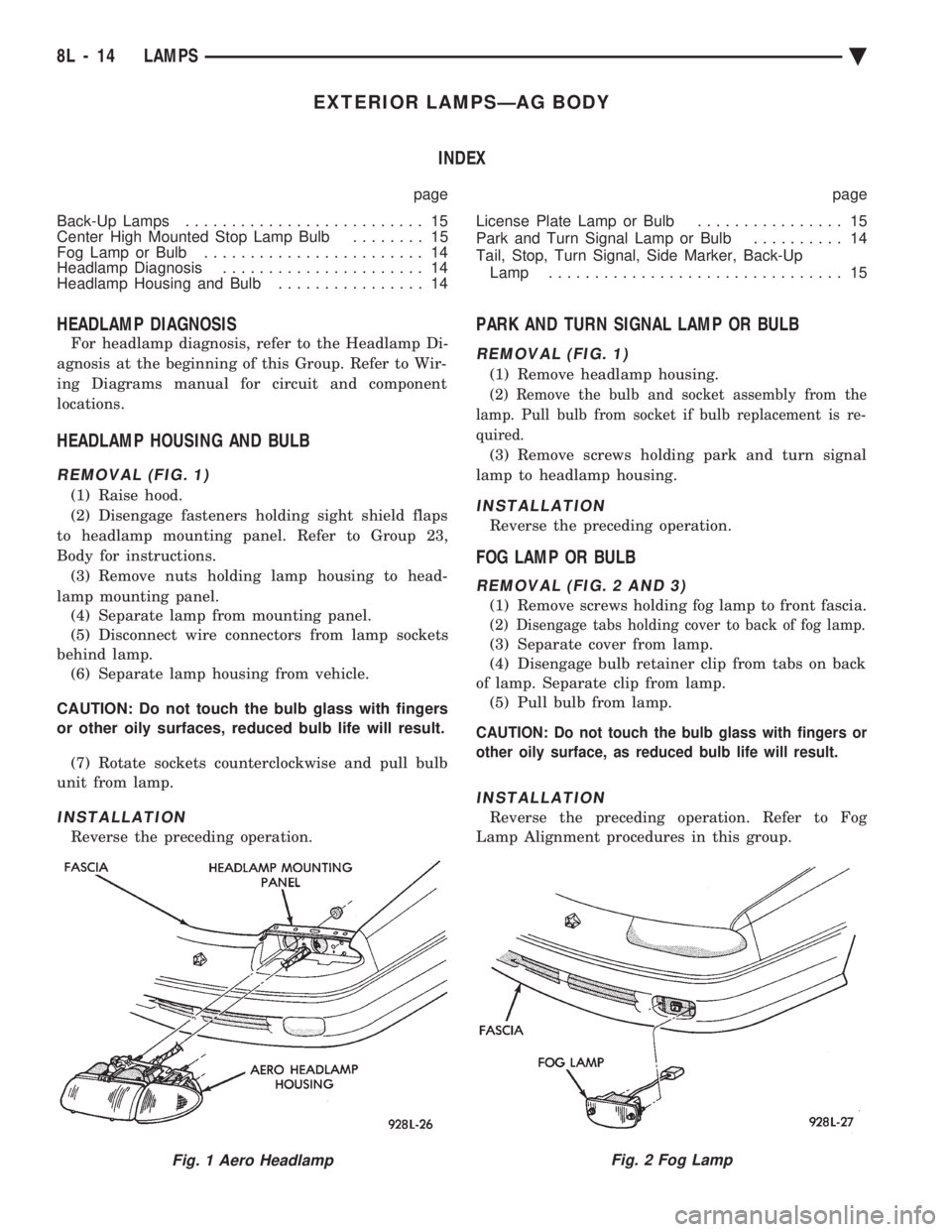
REMOVAL (FIG. 1)
(1) Raise hood.
(2) Disengage fasteners holding sight shield flaps
to headlamp mounting panel. Refer to Group 23,
Body for instructions. (3) Remove nuts holding lamp housing to head-
lamp mounting panel. (4) Separate lamp from mounting panel.
(5) Disconnect wire connectors from lamp sockets
behind lamp. (6) Separate lamp housing from vehicle.
CAUTION: Do not touch the bulb glass with fingers
or other oily surfaces, reduced bulb life will result. (7) Rotate sockets counterclockwise and pull bulb
unit from lamp.
INSTALLATION
Reverse the preceding operation.
PARK AND TURN SIGNAL LAMP OR BULB
REMOVAL (FIG. 1)
(1) Remove headlamp housing.
(2) Remove the bulb and socket assembly from the
lamp. Pull bulb from socket if bulb replacement is re-
quired.
(3) Remove screws holding park and turn signal
lamp to headlamp housing.
INSTALLATION
Reverse the preceding operation.
FOG LAMP OR BULB
REMOVAL (FIG. 2 AND 3)
(1) Remove screws holding fog lamp to front fascia.
(2) Disengage tabs holding cover to back of fog lamp.
(3) Separate cover from lamp.
(4) Disengage bulb retainer clip from tabs on back
of lamp. Separate clip from lamp. (5) Pull bulb from lamp.
CAUTION: Do not touch the bulb glass with fingers or
other oily surface, as reduced bulb life will result.
INSTALLATION
Reverse the preceding operation. Refer to Fog
Lamp Alignment procedures in this group.
Fig. 1 Aero HeadlampFig. 2 Fog Lamp
8L - 14 LAMPS Ä