1993 CHEVROLET CAVALIER audio
[x] Cancel search: audioPage 114 of 308
Downloaded from www.Manualslib.com manuals search engine ...
Comfort Controls & Audio Systems
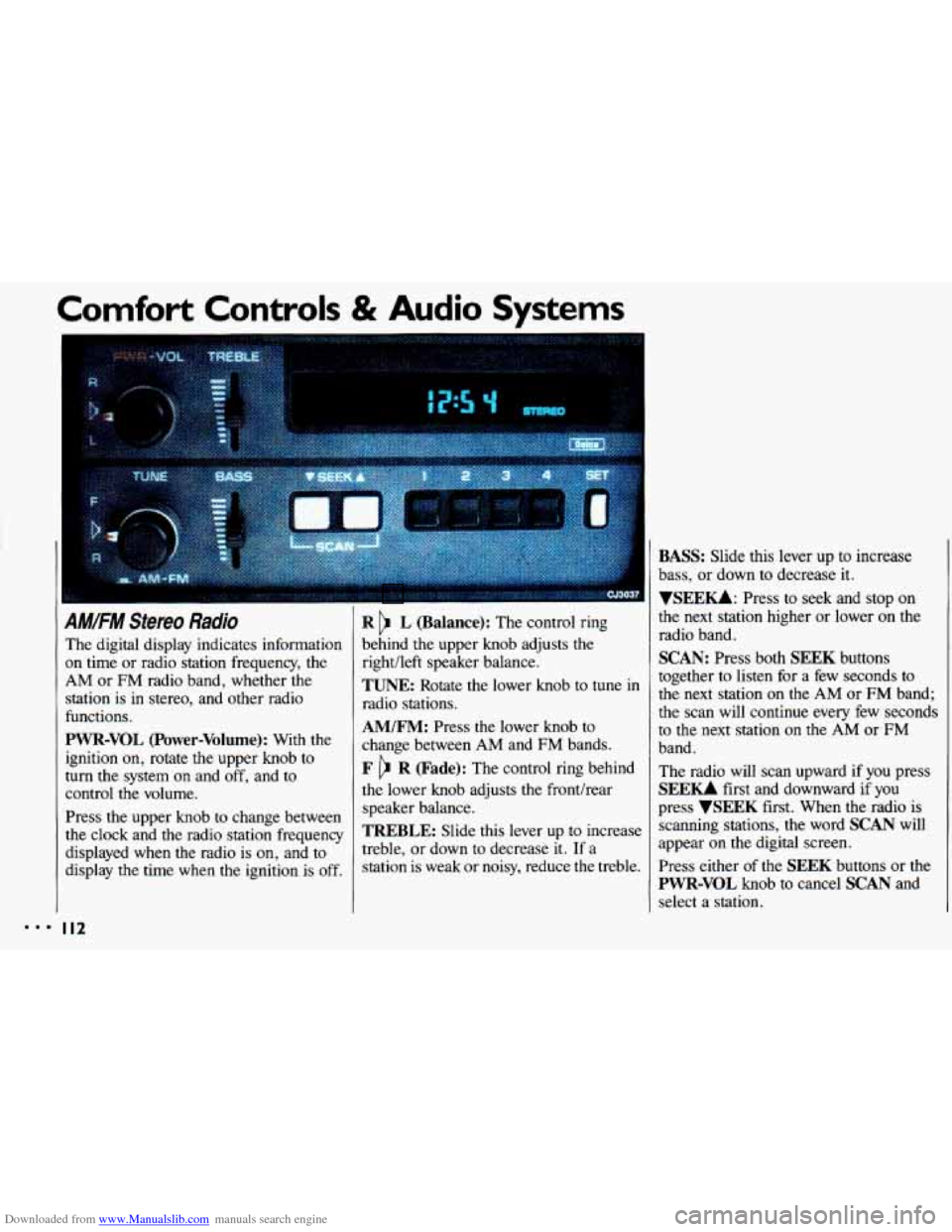
AM/FM Stereo Radio
The digital display indicates information
on time or radio station frequency, the
AM or FM radio band, whether the
station is
in stereo, and other radio
functions.
PWR-VOL (Power-Volume): With the
ignition on, rotate the upper knob to
turn the system
on and off, and to
control the volume.
Press the upper knob to change between
the clock and the radio station frequency
displayed when the radio is
on, and to
display
the time when the ignition is off.
I I2
R L (Balance): The control ring
behind the upper knob adjusts the
right/left speaker balance,
TUNE: Rotate the lower knob to tune in
radio stations.
AM/FM: Press the lower knob to
change between AM and FM bands.
F R (Fade): The control ring behind
the lower knob adjusts the fronthear
speaker balance.
TREBLE: Slide this lever up to increase
treble, or down
to decrease it. If a
station is weak or noisy, reduce the treble.
BASS: Slide this lever up to increase
bass, or down to decrease it.
YSEEKk Press to seek and stop on
the next station higher
or lower on the
radio band.
SCAN: Press both SEEK buttons
together to listen for a few seconds to
the next station
on the AM or FM band;
the scan will continue every few seconds
to the next station
on the AM or FM
band.
The radio will scan upward if you press
SEEU first and downward if you
press
VSEEK first. When the radio is
scanning stations,
the word SCAN will
appear on the digital screen.
Press either of the
SEEK buttons or the
PWR-VOL knob to cancel SCAN and
select a station.
Page 116 of 308
Downloaded from www.Manualslib.com manuals search engine Comfort Controls & Audio Systems
AM/FM Stereo Radio with
Cassette Tape PIayer (CONT.)
TREBLE: Slide this lever up to
ikrease treble, or down to decrease it.
If a station is weak or noisy, reduce the
treble.
BASS: Slide this lever up to increase
bass, or down to decrease it.
VSEEKk Press to seek and stop on
the next station higher or lower on the
radio band.
SCAN: Press both SEEK buttons
together to listen for a few seconds to
the next station
on the AM or FM band;
the scan will continue every few seconds
to the next station on the
AM or FM
band. The radio will scan upward if
you press
SEEU first and downward if
you
press
VSEEK first. When the radio is
scanning stations, the word
SCAN will
appear on the digital screen.
Press either
of the SEEK buttons or the
PWR-VOL knob to cancel SCAN and
select a station.
To Preset Radio Stations:
The four pushbuttons under the digital
display can be used to preset up to
14
radio stations (seven AM and seven FM
stations).
1. Tune in the desired station.
2. Press SET. The word SET will
appear on the digital screen for five
seconds.
3. While SET is displayed, press one of
the four pushbuttons. Whenever you
press these buttons again, the preset station will be tuned in.
and four
FM stations.
4. Repeat steps 1-3 for each of four AM
Page 120 of 308
Downloaded from www.Manualslib.com manuals search engine Comfort Controls & Audio Systems
I
AM.FM Stereo Radio with
Compact Disc Player (CONT.)
If the disc comes back out and/or Err
appears on the display:
The disc may be upside down.
The disc may be dirty, scratched or
wet.
There may be too much moisture in
the air (wait about one hour and try
again).
The player may be too hot, or the road
may be too rough for the disc to play.
As soon as things get back to normal,
the disc should play.
While a disc is playing, the
CD
indicator is displayed on the digital
screen, as is
the clock.
I I8
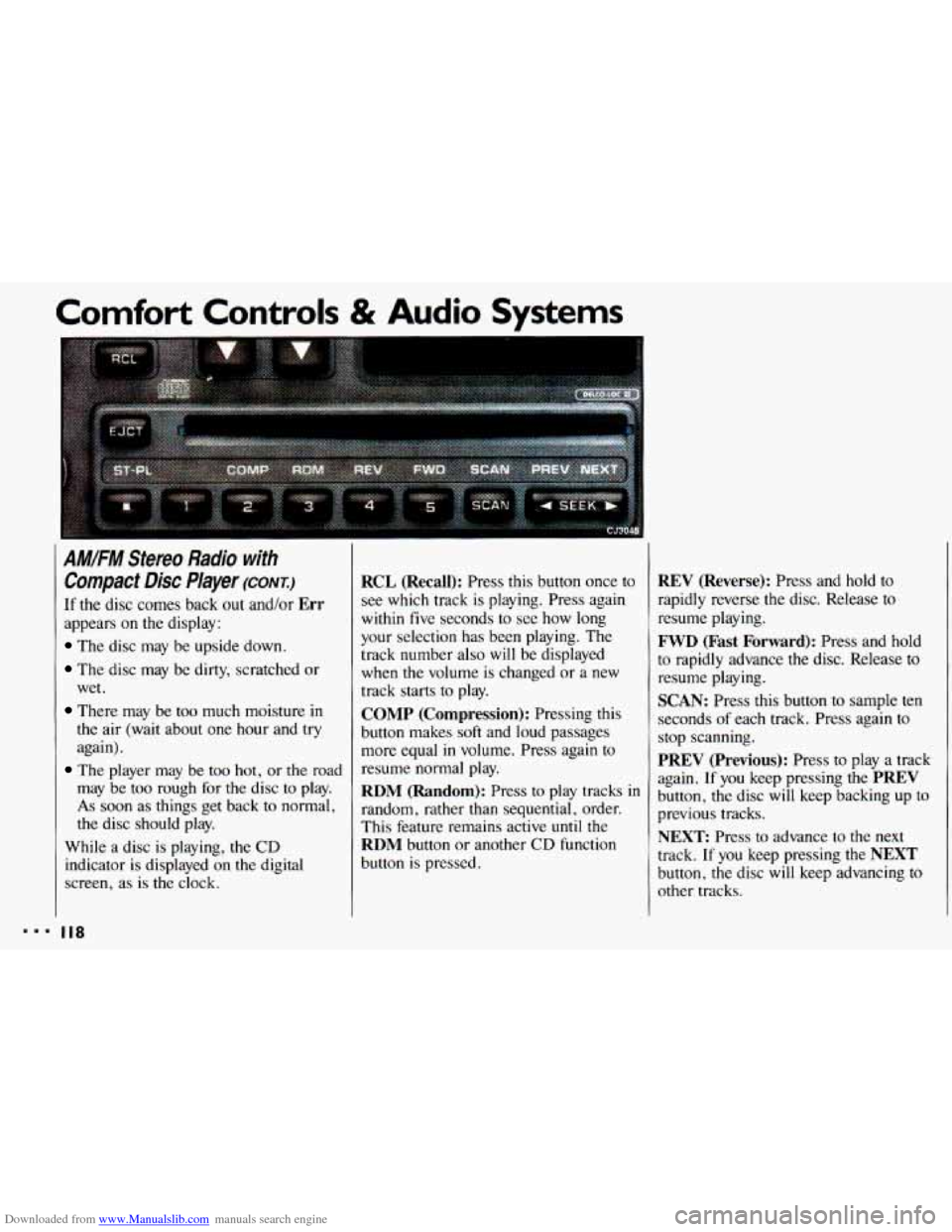
RCL (Recall): Press this button once to
see which track is playing. Press again
within five seconds to see how long
your selection has been playing. The
track number also
will be displayed
when
the volume is changed or a new
track starts to play.
COMP (Compression): Pressing this
button makes
soft and loud passages
more equal
in volume. Press again to
resume normal play.
RDM (Random): Press to play tracks in
random, rather than sequential, order.
This feature remains active
until the
RDM button or another CD function
button is pressed.
REV (Reverse): Press and hold to
rapidly reverse the disc. Release
to
resume playing.
FWD (Fast Forward): Press and hold
to rapidly advance
the disc. Release to
resume playing.
SCAN: Press this button to sample ten
seconds
of each track. Press again to
stop scanning.
PREV (Previous): Press to play a track
again.
If you keep pressing the PREV
button, the disc will keep backing up to
previous tracks.
NEXT: Press to advance to the next
track.
If you keep pressing the NEXT
button, the disc will keep advancing to
other tracks.
Page 121 of 308
Downloaded from www.Manualslib.com manuals search engine When Finished with the Compact Disc Player:
If you turn the radio off, or turn off the
ignition, the disc
will stay in the player
and
start again when you turn on the
ignition or the
PWR-VOL button. The
disc will begin playing at the point
where it had been stopped.
ST-PL (Stop-Play): Press to stop the
disc player; the radio will play. Press
again
to play the disc (the player will
start playing the disc where it had
stopped earlier).
EJCT(Eject): Press to eject the disc;
the radio
will play. The disc will start at
track
1 when you reinsert it. EJCT
works even when the radio or the
ignition is off.
CD Player Anti-Theit Feature
Delco LOC IP is a security feature that
can be used or ignored. If you ignore
it,
the radio will play normally. If you use
it, your radio cannot be turned
on if it is
stolen. These instructions will tell you
how
to enter a secret code into the radio.
If battery power is lost for any reason,
the secret code must be entered again
before your audio system can be turned
on.
To Set the Anti-Theft System:
1. Write down any six-digit number and
keep
it in a safe place. This is your
secret code.
2. Turn the ignition on.
3. Rotate the PWR knob to turn the
radio
off.
4. Press station preset buttons 1 and 4 at
the same time and hold
until "---"
shows on the display.
You now have only
15 seconds
between each
of the following steps.
5. Press SET, and 000 will appear on
the display.
6. Press SCAN until the first digit of
your code appears.
7. Press SEEK until the second and
third digits of your code appear.
8. Press the TUNE knob (000 will
appear on the display).
9. Press SCAN until the fourth digit of
your code appears.
10. Press SEEK until the fifth and sixth
digits of your code appear.
11. Press the TUNE knob (rEP will
appear for five seconds, then
000).
12. Repeat steps 6 through 10. Then
press the
TUNE knob again. SEC
will appear, indicating that Delco
LOC II@ is set, and your radio is
secure.
If "- - -" appears, the steps
were not successful and you must
repeat the entire procedure.
r
888 I I9
Page 122 of 308
Downloaded from www.Manualslib.com manuals search engine Comfort Controls & Audio Systems
CD Player Anti-Theft kature
(CONT.)
To Disable the Anti-Theft System:
Enter your secret code by following
these steps
(you will have only 15
seconds between each step).
1. Turn the ignition on and the radio
off, then press station preset buttons
1 and 4. SEC will appear, showing
the radio is secure.
2. Press SET and 000 will appear on
the display.
3. Press SCAN until the first digit of
your secret code appears.
4. Press SEEK until the second and
third digits of your code appear.
5. Press the TUNE knob (000 will
appear
on the display).
I20
6. Press SCAN until the fourth digit of
your code appears.
7. Press SEEK until the fifth and sixth
digits
of your code appear.
8. Press the TUNE knob. If the display
shows
"- - -;' the radio is unsecured
and will play again. If the display
shows
SEC, the steps were not
successful and the numbers did not
match
the secret code.
If
you lose or forget your code, see your
dealer. If you
lose battery power, when
the
battery is reconnected the radio will not
turn on and LOC will appear. Follow
steps
1-8 for disabling your system, and
the time will appear if you are
successful.
If SEC appears, the numbers
did not match and your unit is still
locked.
Page 124 of 308
Downloaded from www.Manualslib.com manuals search engine Comfort Controls & Audio Systems
Care of Your Cassette Tape
Player
(CONT.)
Clean your tape player with a wiping-
action, non-abrasive cleaning cassette,
and follgw the directions provided with it.
Cassettes are subject to wear and the
sound quality may degrade over time.
Always make sure that the cassette tape is
in good condition before you have
your tape player serviced.
I22
X3074 m
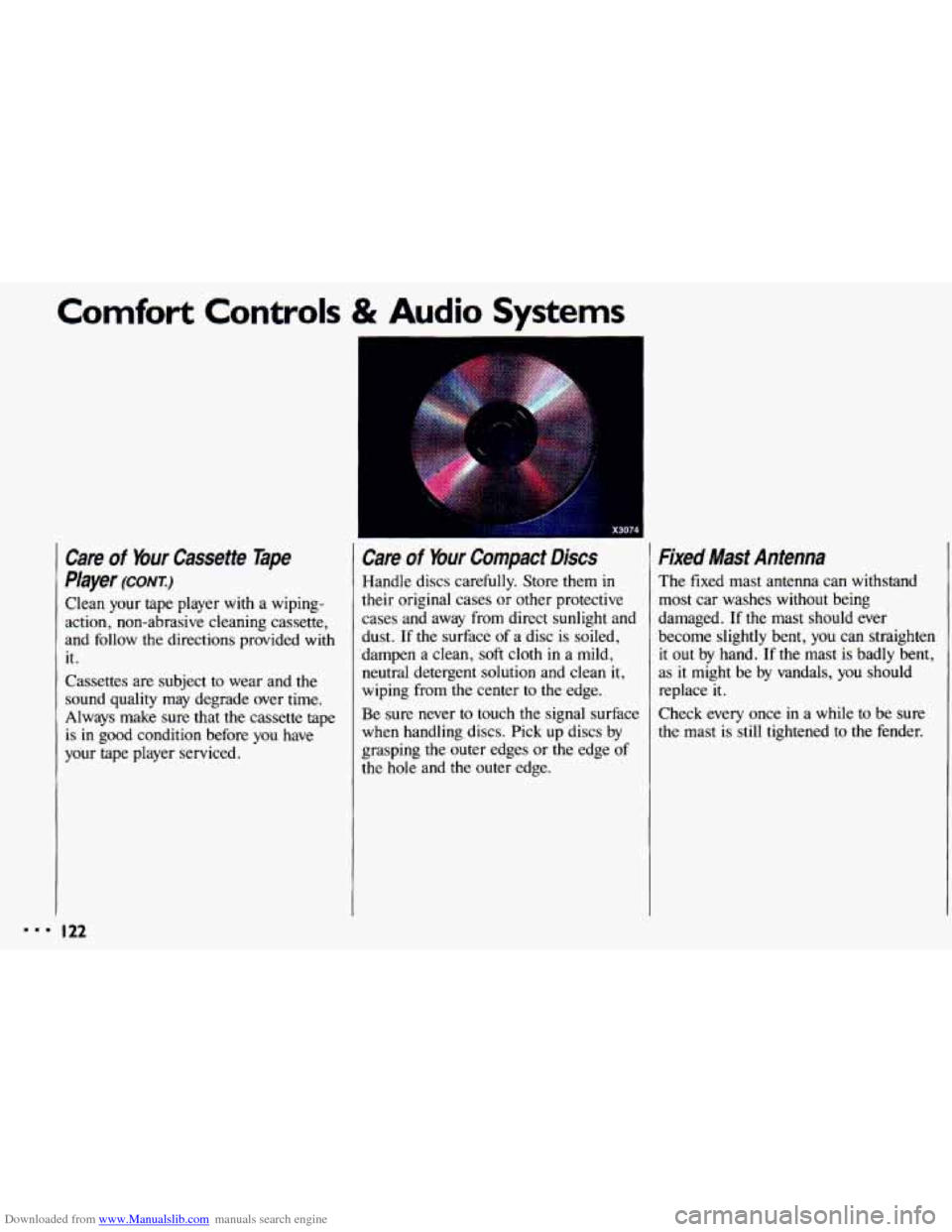
Care of Your Compact Discs
Handle discs carefully. Store them in
their original cases or other protective
cases and away from direct sunlight and
dust. If the surface
of a disc is soiled,
dampen a clean,
soft cloth in a mild,
neutral detergent solution and clean
it,
wiping from the center to the edge.
Be sure never to touch the signal surface
when handling discs. Pick up discs by
grasping the outer edges or the edge
of
the hole and the outer edge.
Fixed Mast Antenna
The fixed mast antenna can withstand
most car washes without being
damaged.
If the mast should ever
become slightly bent, you can straighten it out by hand.
If the mast is badly bent,
as
it might be by vandals, you should
replace it.
Check every once in a while to be sure
the mast is still tightened
to the fender.
Page 297 of 308
Downloaded from www.Manualslib.com manuals search engine Index
Adding Brake Fluid
............ .222. 252
Electrical Equipment
.......... 247
Engine Coolant
...... .217. 250. 252
Engine Oil
......... .206. 250. 252
Hydraulic Clutch Fluid
.... .2l5. 252
Power Steering Fluid
. .220. 251. 252
Transaxle Fluid Autornatic
........ .213. 250. 252
Manual
.......... .2l5. 250. 252
Windshield Washer Fluid
....... 220
Air Cleaner Filter
......... .209. 256
Air Conditioner
................ 107
Alcohol. Driving Under the Influence of
.................. 129
Alcohol in Gasoline
............. 198
Aluminum Wheels
Cleaning
.................... 243
Removing
................... 186
Antenna
...................... 122
Antifreeze
............ .216. 250. 252
Anti-Lock Brake System
......... 134
Warning Light
................ 101
Appearance Care
............... 236
Ashtrays and Lighter
............. 87
Audio Systems .................. 111
AM/FM Stereo Radio
.......... 112
AM/FM Stereo Radio with
Cassette Player
.............. 113
AM/FM Stereo Radio with Compact
Disc Player
................. 116
Care
of Audio Systems ......... 121
Radio Reception. Understanding
. . 121
Setting the Clock
.............. 111
Automatic Door Locks
........... 50
Automatic Lap-Shoulder Belt
(see
Safety Belts)
Automatic Transaxle
Adding Fluid
........ .213, 250, 252
Brake-Transaxle Shift Interlock
... 61
Checking Fluid
............... 211
Shifting
...................... 60
Starting the Engine ............. 56
Battery ...................... 223
Jump Starting
................ 164
Battery Warning
........... .167. 223
Battery Warning Light
........... 100 Blizzard. Caught
In a
............ 159
Block Heater. Engine
........ .59. 208
Blowout. Tire
.................. 184
Brake Adjustment
.................. 137
Fluid
.................. .221. 252
Master Cylinder
.............. 221
Parking
...................... 66
Pedal Travel
................. 136
Rear
....................... -136
Warning Light ................ 100
Wear Indicators-Front Brakes ... 135
Brake System Warning Light
...... 100
Brake-Transaxle Shift
Interlock
..................... 61
Brakes. Anti-Lock
.............. 134
Braking
....................... 132
Braking In Emergencies
.......... 137
Braking Technique
.............. 132
Break-In. New Vehicle
Normal Driving ............... 54
Buckling Up (see
Safety Belts)
Bulb Replacement
Headlight
.............. .224. 253
Taillight
............... .225. 253
295
Page 298 of 308
Downloaded from www.Manualslib.com manuals search engine Capacities & Specifications ...... 250
Carbon Monoxide in
Cassette Tape Player
Center Console Ashtray
........... 87
Center Passenger Position
......... 32
Chains. Tire
.............. .192. 236
Exhaust
.............. .70.
71. 159
(see
Audio Systems)
Changing a Flat Tire ............ 184
Charging System Warning Light
... -100
“Check Engine” Light
........... 102
“Check Gages” Light
............ 103
Checking Brake Fluid
.................. 221
Engine
Oil Level ............. 205
Hydraulic Clutch
.............. 215
Safety Belt Systems
............ 45
Transaxle Fluid
Automatic
................. 211
Manual
................... 213
Chemical Paint Spotting
......... 245
Child Restraints
................. 35
Children and Safety Belts
..... .33. 43
196
Engine Coolant ............... 217
Power Steering Fluid
........... 219
Checking Things Under the
Hood ... 201 Cigarette Lighter
................ 87
Circuit Breakers
8z Fuses ........ 247
Cleaner. Air
............. .209. 256
Cleaning Aluminum Wheels
............ 243
Antenna
.................... 122
Bumpers
.................... 242
Cassette Player
............... 121
Compact Discs
............... 122
Fabric
...................... 238
Glass
....................... 241
Inside of Your Chevrolet
....... 237
Instrument Panel
............. 240
Leather and Vinyl
............ 240
Outside
of Your Chevrolet ...... 241
Safety Belts
................. 240
ScotchgardTMFabric Protection
. . 239
Special Problems
............. 239
Textured-Surhce Bumper Coven
. . 242
Underbody Maintenance
....... 245
Warnings
.. .236. 237. 238. 240. 243
Waxing
..................... 243
Weatherstrips
................ 244
White Sidewall Tires
.......... 243
Windshield
.................. 241
City
Driving
.................. 149 Clock.
Setting the
............... 111
Clutch. Hydraulic
Adding Fluid
........... .215. 252
Checking Fluid
.............. -215
Air Conditioning System
....... 107
Climate Control System
........ 106
Ventilation
................... 110
Compact Disc Player
(see
Audio Systems)
Compact Spare Tire ............. 191
Control of a Vehicle
............. 131
Convenience Net
................ 54
Convex Outside Mirror ........... 85
Coolant ....................... 216
Checking
& Adding .. .217. 250. 252
Low Coolant Warning Light ..... 97
Proper Mixture to Use
......... 216
Safety Warnings About
... .174. 176. 177. 1781 179. 217. 218. 219
Temperature Gage
............. 97
Cruise Control .................. 74
Cup Holder
.................... 87
Curves. Driving on
............. 138
Customer Assistance Information
... 281
Comfort Controls