Page 712 of 4087
INSPECTION PROCEDURE
1Position Sensor Check.
C
Hint
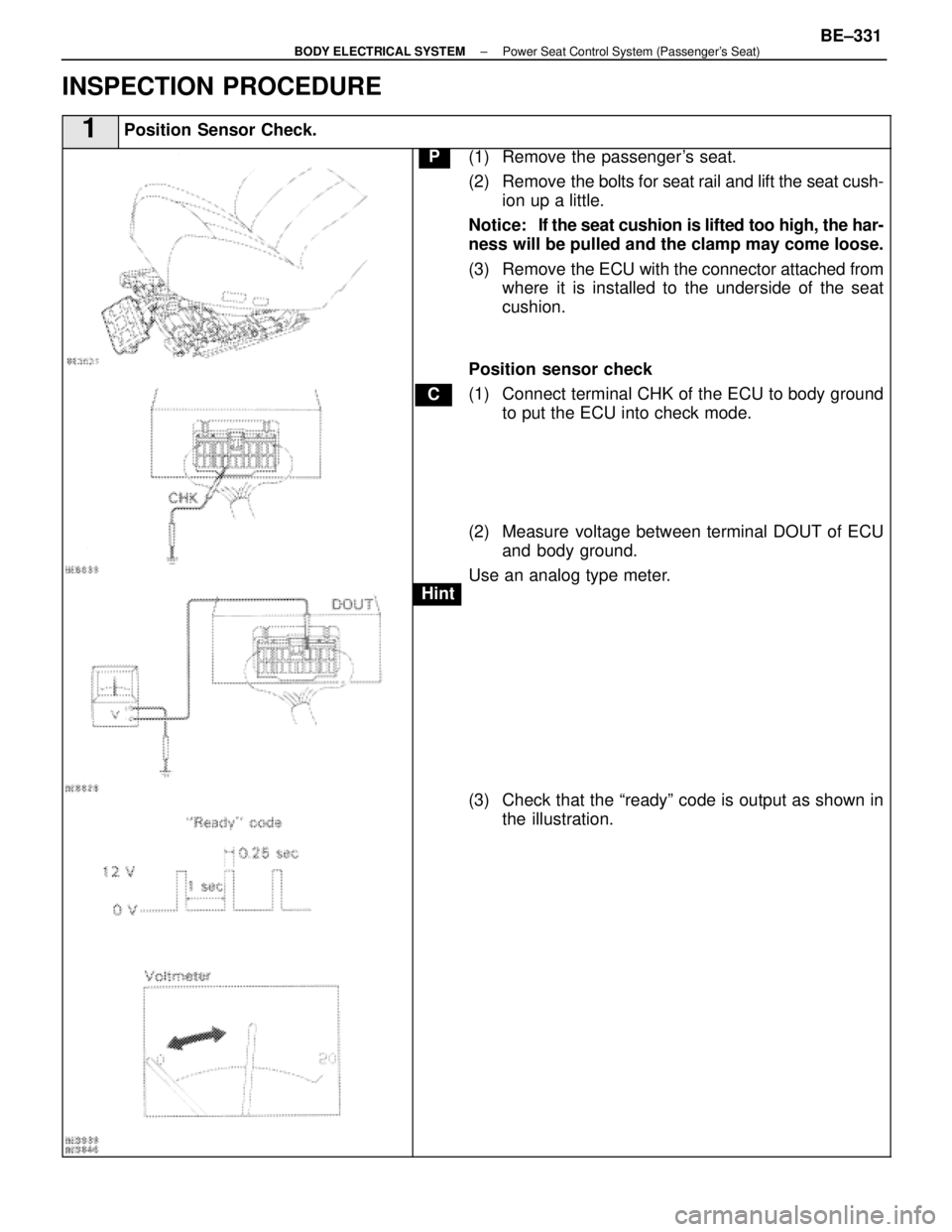
P(1) Remove the passenger's seat.
(2) Remove the bolts for seat rail and lift the seat cush-ion up a little.
Notice: If the seat cushion is lifted too high, the har-
ness will be pulled and the clamp may come loose.
(3) Remove the ECU with the connector attached from where it is installed to the underside of the seat
cushion.
Position sensor check
(1) Connect terminal CHK of the ECU to body ground to put the ECU into check mode.
(2) Measure voltage between terminal DOUT of ECU and body ground.
Use an analog type meter.
(3) Check that the ªreadyº code is output as shown in the illustration.
±
BODY ELECTRICAL SYSTEM Power Seat Control System (Passenger's Seat)BE±331
WhereEverybodyKnowsYourName
Page 713 of 4087
NGOK
1Position sensor check (Cont'd).
OK
Hint
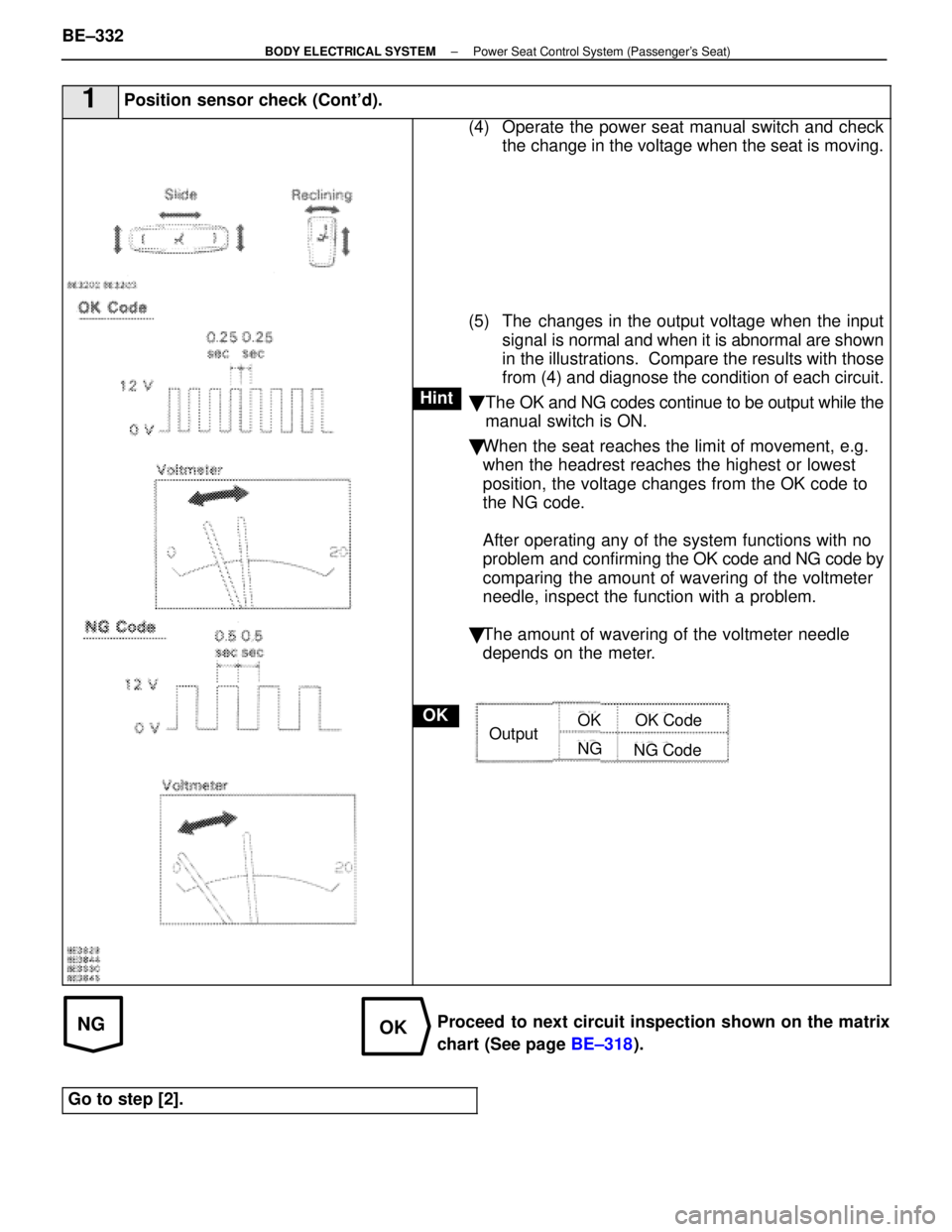
(4) Operate the power seat manual switch and checkthe change in the voltage when the seat is moving.
(5) The changes in the output voltage when the input signal is normal and when it is abnormal are shown
in the illustrations. Compare the results with those
from (4) and diagnose the condition of each circuit.
� The OK and NG codes continue to be output while the
manual switch is ON.
� When the seat reaches the limit of movement, e.g.
when the headrest reaches the highest or lowest
position, the voltage changes from the OK code to
the NG code.
After operating any of the system functions with no
problem and confirming the OK code and NG code by
comparing the amount of wavering of the voltmeter
needle, inspect the function with a problem.
� The amount of wavering of the voltmeter needle
depends on the meter.
OutputOK
NG
OK Code
NG Code
Proceed to next circuit inspection shown on the matrix
chart (See page BE±318).
Go to step [2].
BE±332±
BODY ELECTRICAL SYSTEM Power Seat Control System (Passenger's Seat)
WhereEverybodyKnowsYourName
Page 763 of 4087
DESCRIPTION
The wireless door lock control system is to lock and unlock all the doors a\
t a distance, transmitting a weak radio
wave from a transmitter contained in the master ignition key.
The weak radio wave (coded differently for each key) is sent to the receiver via the rear window defo\
gger wiring.
For the function of the component parts of this system, refer to the circui\
t description in circuit inspection.
PARTS LOCATION
BE±440±
BODY ELECTRICAL SYSTEM Wireless Door Lock Control System
WhereEverybodyKnowsYourName
Page 764 of 4087
DESCRIPTION
The wireless door lock control system is to lock and unlock all the door\
s at a distance, transmitting a weak radio
wave from a transmitter contained in the master ignition key.
The weak radio wave (coded differently for each key) is sent to the receiver via the rear window defo\
gger wiring.
For the function of the component parts of this system, refer to the circui\
t description in circuit inspection.
PARTS LOCATION
BE±440±
BODY ELECTRICAL SYSTEM Wireless Door Lock Control System
WhereEverybodyKnowsYourName
Page 770 of 4087
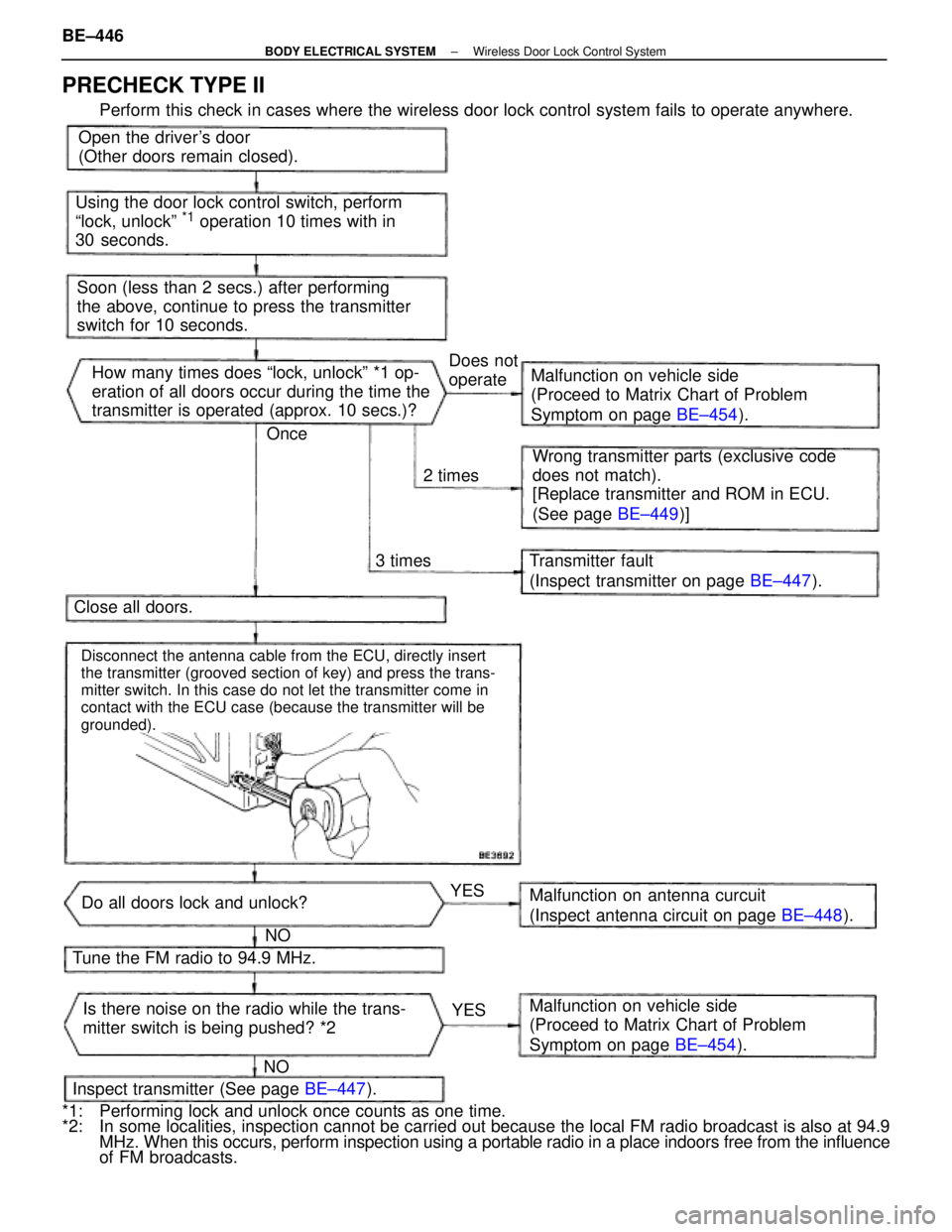
Open the driver's door
(Other doors remain closed).
Using the door lock control switch, perform
ªlock, unlockº
*1 operation 10 times with in
30 seconds.
Soon (less than 2 secs.) after performing
the above, continue to press the transmitter
switch for 10 seconds. How many times does ªlock, unlockº *1 op-
eration of all doors occur during the time the
transmitter is operated (approx. 10 secs.)? Malfunction on vehicle side
(Proceed to Matrix Chart of Problem
Symptom on page
BE±454).
Wrong transmitter parts (exclusive code
does not match).
[Replace transmitter and ROM in ECU.
(See page BE±449)]
Transmitter fault
(Inspect transmitter on page BE±447).
Close all doors.
Tune the FM radio to 94.9 MHz.
Inspect transmitter (See page BE±447).
Do all doors lock and unlock?
Is there noise on the radio while the trans-
mitter switch is being pushed? *2 Malfunction on antenna curcuit
(Inspect antenna circuit on page
BE±448).
Malfunction on vehicle side
(Proceed to Matrix Chart of Problem
Symptom on page BE±454).
3 times
2 timesDoes not
operate
YESYES
NO
NO Once
Disconnect the antenna cable from the ECU, directly insert
the transmitter (grooved section of key) and press the trans-
mitter switch. In this case do not let the transmitter come in
contact with the ECU case (because the transmitter will be
grounded).
PRECHECK TYPE II
Perform this check in cases where the wireless door lock control system fails t\
o operate anywhere.
*1: Performing lock and unlock once counts as one time.
*2: In some localities, inspection cannot be carried out because the local FM \
radio broadcast is also at 94.9 MHz. When this occurs, perform inspection using a portable radio in a place \
indoors free from the influence
of FM broadcasts.
BE±446
±
BODY ELECTRICAL SYSTEM Wireless Door Lock Control System
WhereEverybodyKnowsYourName
Page 798 of 4087
GENERAL INFORMATION
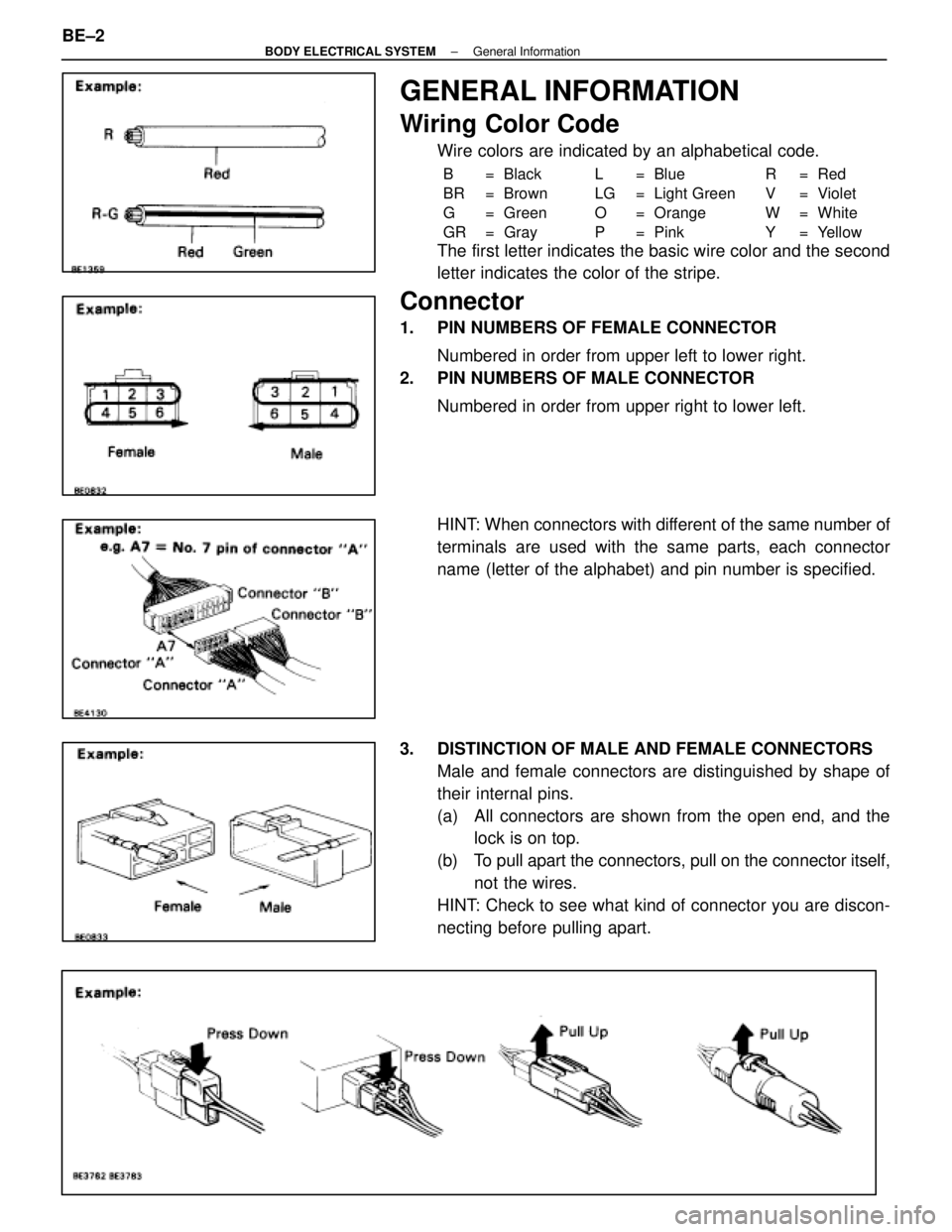
Wiring Color Code
Wire colors are indicated by an alphabetical code.
B = Black L = Blue R = Red
BR = Brown LG = Light Green V = Violet
G = Green O = Orange W = White
GR = Gray P = Pink Y = Yellow
The first letter indicates the basic wire color and the second
letter indicates the color of the stripe.
Connector
1. PIN NUMBERS OF FEMALE CONNECTORNumbered in order from upper left to lower right.
2. PIN NUMBERS OF MALE CONNECTOR
Numbered in order from upper right to lower left.
HINT: When connectors with different of the same number of
terminals are used with the same parts, each connector
name (letter of the alphabet) and pin number is specified.
3. DISTINCTION OF MALE AND FEMALE CONNECTORS Male and female connectors are distinguished by shape of
their internal pins.
(a) All connectors are shown from the open end, and thelock is on top.
(b) To pull apart the connectors, pull on the connector itself, not the wires.
HINT: Check to see what kind of connector you are discon-
necting before pulling apart.
BE±2
±
BODY ELECTRICAL SYSTEM General Information
WhereEverybodyKnowsYourName
Page 912 of 4087

TROUBLESHOOTING
How to proceed with troubleshooting
Perform troubleshooting in accordance with the procedure on the followin\
g page.
� CUSTOMER PROBLEM ANALYSIS
Using the customer problem analysis check sheet for reference, ask the c\
ustomer in as much detail as
possible about the problem.
CHECK AND CLEAR THE DIAGNOSTIC TROUBLE CODES (PRECHECK)
If the TRAC indicator light lights up, and the TRAC control does not ope\
rate, the ECU stores diagnostic
trouble codes corresponding to the problem in memory.
Before confirming the trouble, first check the diagnostic trouble code for any\
malfunction codes stored in
memory. When there are malfunction codes, make a note of them, then clear them and proceed to ª �
Problem Symptom Confirmationº.
� PROBLEM SYMPTOM CONFIRMATION, � SYMPTOM SIMULATION
Confirm the problem symptoms. If the problem does not reoccur, simulate the problem by initially checking
the circuits indicated by the diagnostic trouble code in step , using ªProblem simulation methodº.
� DIAGNOSTIC TROUBLE CODE CHECK
Check the diagnostic trouble codes. If a malfunction code is output, proceed \
to ª � Diagnostic Trouble
Code Chartº.
If the normal code is output, proceed to ª � Problem Symptoms Chartº.
Be sure to proceed to ª � diagnostic Trouble Code Chartº after steps and � are completed.
If troubleshooting is attempted only by following the malfunction code sto\
red in the memory, errors could
be made in the diagnosis.
� DIAGNOSTIC TROUBLE CODE CHART
If a malfunction code is confirmed in the diagnostic trouble code check,\
proceed to the inspection proce-
dure indicated by the matrix chart for each diagnostic trouble code.
� PROBLEM SYMPTOMS CHART
If the normal code is confirmed in the diagnostic trouble code check, perf\
orm inspection in accordance with
the inspection order in the problem symptoms chart.
� CIRCUIT INSPECTION
Proceed with diagnosis of each circuit in accordance with the inspection\
order confirmed in � and �.
Determine whether the cause of the problem is in the sensor, actuators, wire harness and connectors or
the ECU.
\b SENSOR CHECK
Use the ABS warning light to check if each of the signals from speed sensors is \
being input correctly to
the ECU. Instructions for this check are given in the circuit inspection\
.
[10] REPAIRS After the cause of the problem is located, perform repairs by following the i\
nspection and replacement pro-
cedures in this manual.
[11] CONFIRMATION TEST
After completing repairs, confirm not only that the malfunction is eliminated\
, but also conduct a test drive
to make sure the entire TRAC system is operating correctly. And also check the ABS is operating correctly.
BR±166
±
BRAKE SYSTEM TRACTION CONTROL SYSTEM (TRAC)
WhereEverybodyKnowsYourName
Page 916 of 4087

DIAGNOSIS SYSTEM
INDICATOR CHECK
When the ignition switch is turned on, check that the TRAC
indicator light goes on for 3 seconds.
HINT: If the indicator check result is not normal, proceed to
troubleshooting for the TRAC indicator light circuit (see page
BR±225 ).
DIAGNOSTIC TROUBLE CODE CHECK
1. Turn the ignition switch ON.
2. Using SST, connect terminals Tc and E1 of DLC2 or DLC 1.
SST 09843±18020
3. Read the diagnostic trouble code from the TRAC indicator light on the combination meter.
HINT: If no code appears, inspect the diagnostic circuit or
TRAC indicator light circuit ( BR±226 orBR±225 ).
As an example, the blinking patterns for normal code and
codes 11 and 21 are shown on the left.
4. Codes are explained in the code table on the next page.
5. After completing the check, disconnect terminals Tc and
E1, and turn off the display.
If two or more malfunctions are indicated at the same time,
the lowest numbered diagnostic trouble code will be dis-
played 1st.
ECU DATA MONITOR USING LEXUS
HAND±HELD TESTER
1. Hook up the LEXUS hand±held tester to the DLC2.
2. Monitor the ECU data by following the prompts on thetester screen.
HINT: LEXUS hand±held tester has a ªSnapshotº function
which records the monitored data.
Please refer to the LEXUS hand±held tester operator's
manual for further details.
BR±170
±
BRAKE SYSTEM TRACTION CONTROL SYSTEM (TRAC)
WhereEverybodyKnowsYourName