1991 FORD FESTIVA ignition
[x] Cancel search: ignitionPage 288 of 454
If you see more than one hump it is because of a distorted pintle or seat. This faulty condition is known as "pintle float".
It is important to realize that it takes a good digital storage oscilloscope or analog lab scope to see this pintle hump clearly. Unfortunately, it
cannot always be seen.
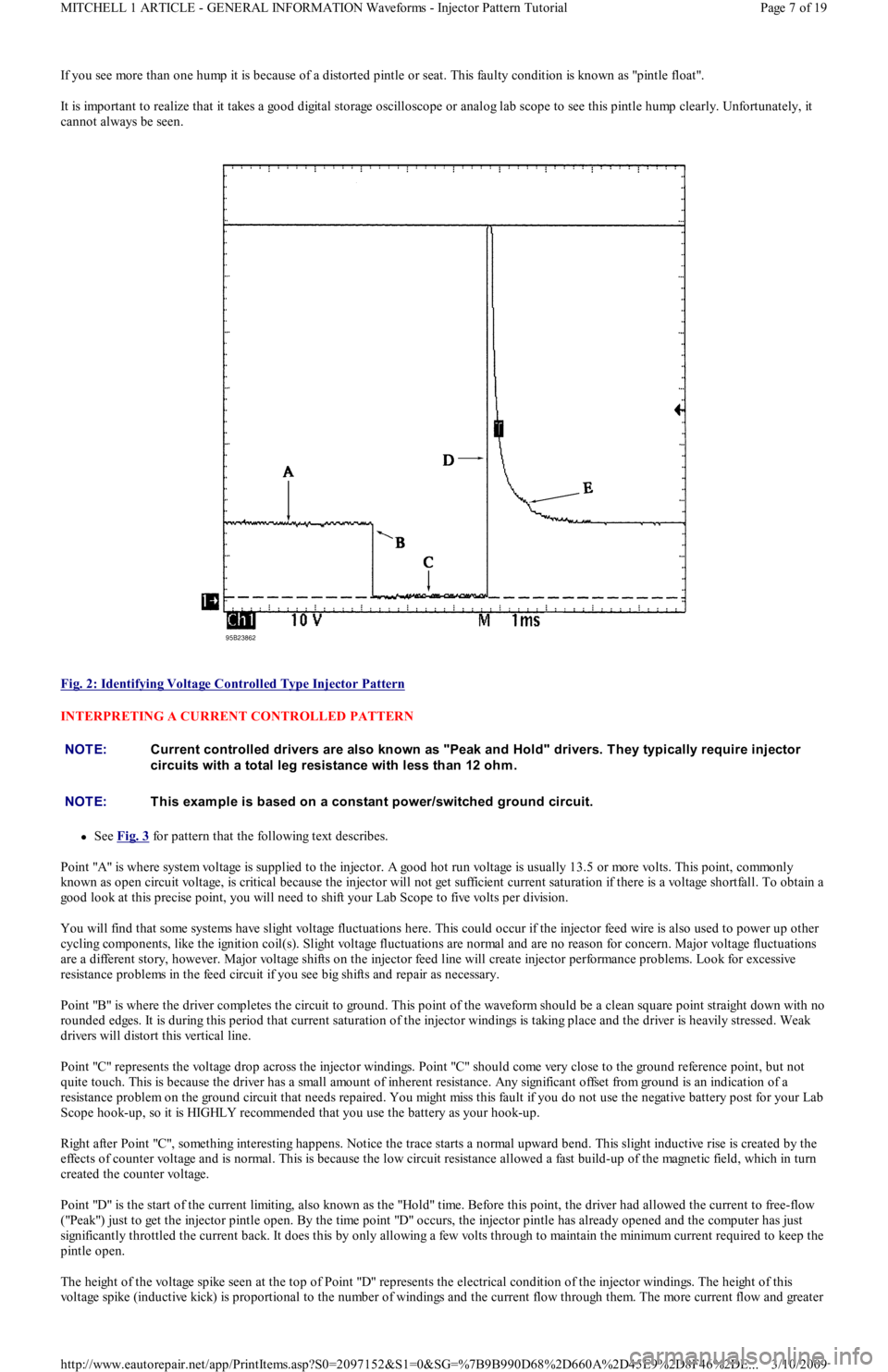
Fig. 2: Identifying Voltage Controlled Type Injector Pattern
INTERPRETING A CURRENT CONTROLLED PATTERN
See Fig. 3 for pattern that the following text describes.
Point "A" is where system voltage is supplied to the injector. A good hot run voltage is usually 13.5 or more volts. This point, commonly
known as open circuit voltage, is critical because the injector will not get sufficient current saturation if there is a voltage shortfall. To obtain a
good look at this precise point, you will need to shift your Lab Scope to five volts per division.
You will find that some systems have slight voltage fluctuations here. This could occur if the injector feed wire is also used to power up other
cycling components, like the ignition coil(s). Slight voltage fluctuations are normal and are no reason for concern. Major voltage fluctuations
are a different story, however. Major voltage shifts on the injector feed line will create injector performance problems. Look for excessive
resistance problems in the feed circuit if you see big shifts and repair as necessary.
Point "B" is where the driver completes the circuit to ground. This point of the waveform should be a clean square point straight down with no
rounded edges. It is during this period that current saturation of the injector windings is taking place and the driver is heavily stressed. Weak
drivers will distort this vertical line.
Point "C" represents the voltage drop across the injector windings. Point "C" should come very close to the ground reference point, but not
quite touch. This is because the driver has a small amount of inherent resistance. Any significant offset from ground is an indication of a
resistance problem on the ground circuit that needs repaired. You might miss this fault if you do not use the negative battery post for your Lab
Scope hook-up, so it is HIGHLY recommended that you use the battery as your hook-up.
Right after Point "C", something interesting happens. Notice the trace starts a normal upward bend. This slight inductive rise is created by the
effects of counter voltage and is normal. This is because the low circuit resistance allowed a fast build-up of the magnetic field, which in turn
created the counter voltage.
Point "D" is the start of the current limiting, also known as the "Hold" time. Before this point, the driver had allowed the curren t t o free-fl o w
("Peak") just to get the injector pintle open. By the time point "D" occurs, the injector pintle has already opened and the computer has just
significantly throttled the current back. It does this by only allowing a few volts through to maintain the minimum current required to keep the
pintle open.
The height of the voltage spike seen at the top of Point "D" represents the electrical condition of the injector windings. The height of this
voltage spike (inductive kick) is proportional to the number of windings and the current flow through them. The more current flow and greater
NOTE:Current controlled drivers are also known as "Peak and Hold" drivers. T hey typically require injector
circuits with a total leg resistance with less than 12 ohm .
NOTE:T his exam ple is based on a constant power/switched ground circuit.
Page 7 of 19 MITCHELL 1 ARTICLE - GENERAL INFORMATION Waveforms - Injector Pattern Tutorial
3/10/2009 http://www.eautorepair.net/app/PrintItems.asp?S0=2097152&S1=0&SG=%7B9B990D68%2D660A%2D45E9%2D8F46%2DE
...
Page 345 of 454
Back To Article
HEAT ER SYST EM
1990-92 HEAT ER SYST EMS Ford Motor Co.
DESCRIPTION
The heater system consists of control panel, blower case, heater case, air control doors and ducts. The control panel incorporates 3 control
levers and a 3-speed fan switch. The control panel is located in the center of the instrument panel. All air control doors are cable operated
from the control panel.
The blower case is mounted on the bulkhead, behind the instrument panel on passenger's side of vehicle. The blower case houses a blower
motor, blower motor resistor and the fresh/recirculation air door. The heater case contains mode select door, temperature air mix door and
heater core.
OPERATION
Three control levers, temperature mix, fresh/recirculation and mode select, mechanically operate their associated cables and doors. The
temperature control lever adjusts the mix of fresh or recirculated air with heated air. In full heat position, all airflow goes through the heater
core.
In full cool position, the mix air door closes, allowing airflow to by-pass the heater core. The mode select lever, directs airflow to selected
vents. The fresh/recirculation control lever allows selection of fresh (outside) air or recirculated compartment air.
AJUSTMENT
FRESH/RECIRCULATION CONTROL CABLE
Remove the glove box. Remove fresh/recirculation cable retaining clip. Move control lever to RECIRCULATION position, while holding the
lever door in RECIRCULATION position. Ensure control lever does not move. Install fresh/recirculation cable retaining clip.
MODE SELECT CABLE
Remove mode select cable retaining clip. Move mode select lever to VENT position. Hold mode select lever downward against its stop.
Ensure that mode select lever does not move. Install mode select cable retaining clip.
TEMPERATURE CONTROL CABLE
Set temperature control lever to maximum cold position. Remove temperature cable retaining clip. Hold temperature control lever upward and
against its stop. Ensure that temperature lever does not move. Install temperature cable retaining clip.
TROUBLE SHOOTING
BLOWER MOTOR INOPERATIVE
Check blown motor fuse. Check for defective blower motor and/or blower motor resistor. Check blower motor switch. Check for open in
ground wire. Check for loose electrical connectors or poor connections. See WIRING DIAGRAMS
in this article.
BLOWER DOES NOT CHANGE SPEED
Check for defective blower motor. Check blower motor wiring harness. Check blower motor resistor. Check for blower motor fan switch. See
WIRING DIAGRAMS
in this article.
BLOWER RUNS CONSTANTLY
Check for defective blower motor resistor. Check for short in blower switch or wiring. See WIRING DIAGRAMS
in this article.
HEATER TEMPERATURE INSUFFICIENT
Check for proper coolant level. Check water pump for noise, leaks or wear. Check heater hoses for leaks or restrictions. Check heater core for
leaks, plugs or restrictions. Check inlet and outlet heater hoses for hot water flow. Check thermostat condition and operation. Check air mix
door position and adjust cable if necessary.
IMPROPER WARM AIR DISTRIBUTION
Check air mix door position. Adjust cable as necessary. Check function control door position. Adjust cable as necessary. Check for restriction
in ventilation air duct assembly. Repair as necessary.
TESTING BLOWER MOTOR & RESISTOR
1. Ensure 15-amp blower motor fuse is okay. Using voltmeter, check for battery voltage at blower motor Blue/Yellow terminal. If battery
voltage is present, go to next step. If battery voltage is not present, repair open in Blue/Yellow wire between blower motor and fuse box.
2. Disconnect blower motor connector. Using a jumper wire, apply battery voltage to Blue/Yellow terminal and ground the Blue/Red
terminal. If blower motor does not run, replace blower motor. If blower motor runs, go to next step.
3. Reconnect blower motor connector. Turn ignition on. Turn blower motor off. Disconnect the blower motor resistor connector. Using a
voltmeter, measure voltage at Blue/Red terminal of resistor connector. If battery voltage is not present, repair open in Blue/Red wire
between resistor and blower motor. If voltage is present, go to next step.
4. Using a jumper wire, ground Blue/Black, Blue/Yellow and Blue/White terminals of the blower fan switch one at a time. If the motor
runs at 3 different speeds, go to next step. If not, repair open in wire that failed to operate blower motor.
Page 1 of 4 MITCHELL 1 ARTICLE - HEATER SYSTEM 1990-92 HEATER SYSTEMS Ford Motor Co.
3/10/2009 http://www.eautorepair.net/app/PrintItems.asp?S0=2097152&S1=0&SG=%7B9B990D68%2D660A%2D45E9%2D8F46%2DE
...
Page 369 of 454
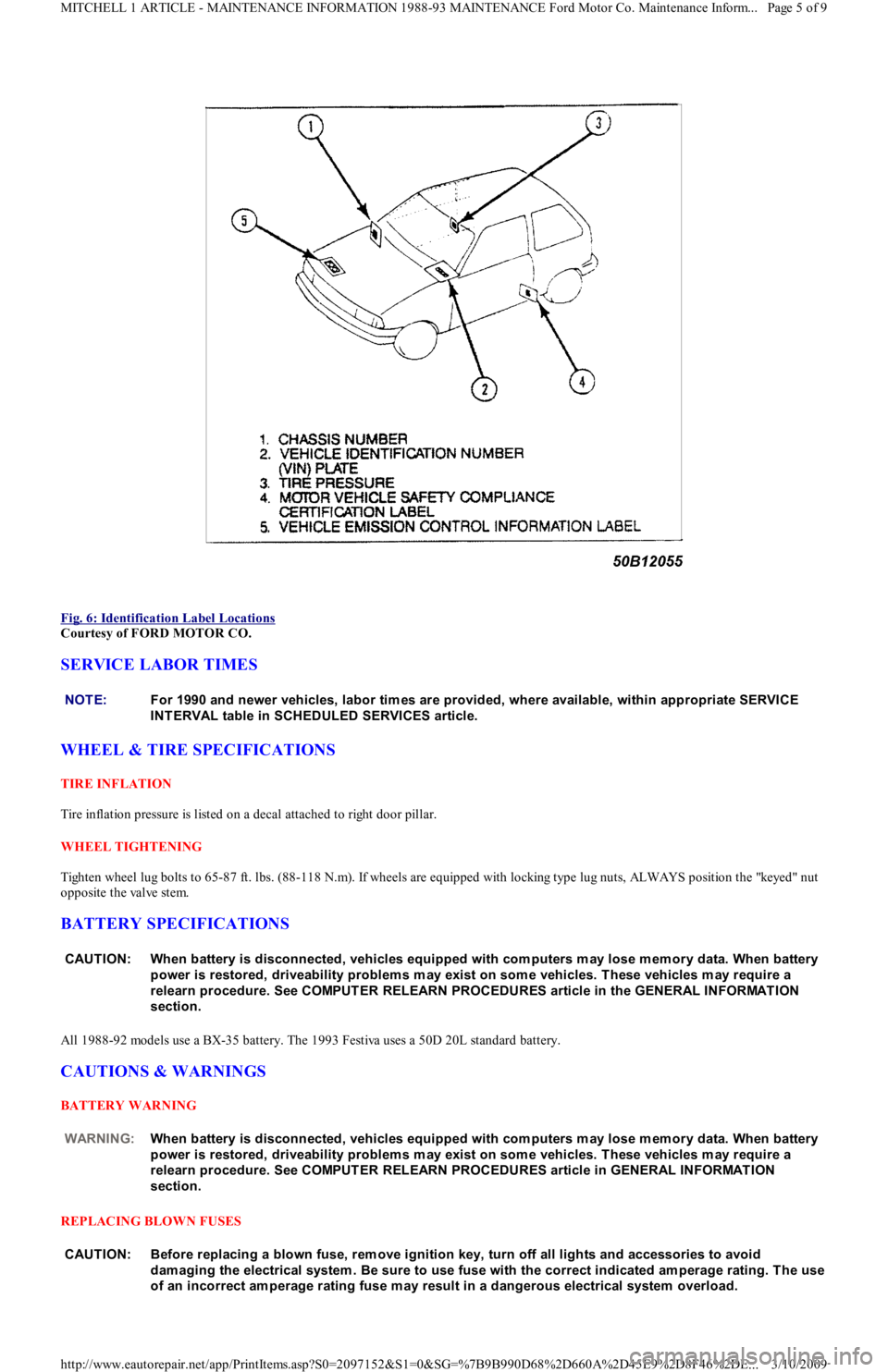
Fig. 6: Identification Label Locations
Courtesy of FORD MOTOR CO.
SERVICE LABOR TIMES
WHEEL & TIRE SPECIFICATIONS
TIRE INFLATION
Tire inflation pressure is listed on a decal attached to right door pillar.
WHEEL TIGHTENING
Tighten wheel lug bolts to 65-87 ft. lbs. (88-118 N.m). If wheels are equipped with locking type lug nuts, ALWAYS position the "keyed" nut
opposite the valve stem.
BATTERY SPECIFICATIONS
All 1988-92 models use a BX-35 battery. The 1993 Festiva uses a 50D 20L standard battery.
CAUTIONS & WARNINGS
BATTERY WARNING
REPLACING BLOWN FUSES
NOTE:For 1990 and newer vehicles, labor tim es are provided, where available, within appropriate SERVICE
INT ERVAL table in SCHEDULED SERVICES article.
CAUT ION: When battery is disconnected, vehicles equipped with com puters m ay lose m em ory data. When battery
power is restored, driveability problem s m ay exist on som e vehicles. T hese vehicles m ay require a
relearn procedure. See COMPUT ER RELEARN PROCEDURES article in the GENERAL INFORMAT ION
section.
WARNING:When battery is disconnected, vehicles equipped with com puters m ay lose m em ory data. When battery
power is restored, driveability problem s m ay exist on som e vehicles. T hese vehicles m ay require a
relearn procedure. See COMPUT ER RELEARN PROCEDURES article in GENERAL INFORMAT ION
section.
CAUT ION: Before replacing a blown fuse, rem ove ignition key, turn off all lights and accessories to avoid
dam aging the electrical system . Be sure to use fuse with the correct indicated am perage rating. T he use
of an incorrect am perage rating fuse m ay result in a dangerous electrical system overload.
Page 5 of 9 MITCHELL 1 ARTICLE - MAINTENANCE INFORMATION 1988-93 MAINTENANCE Ford Motor Co. Maintenance Inform...
3/10/2009 http://www.eautorepair.net/app/PrintItems.asp?S0=2097152&S1=0&SG=%7B9B990D68%2D660A%2D45E9%2D8F46%2DE
...
Page 370 of 454
BRAKE PAD WEAR INDICATOR
CATALYTIC CONVERTER
COOLANT (PROPYLENE-GLYCOL FORMULATIONS)
ELECTROSTATIC DISCHARGE SENSITIVE (ESD) PARTS
ENGINE OIL
FUEL PUMP SHUTOFF SWITCH
This switch stops flow of fuel to engine after a collision. The impact does not have to be great for switch to be triggered. Switch must be reset
after collision. Switch is located under left rear speaker in luggage compartment. Press button to reset switch.
FUEL SYSTEM SERVICE
HALOGEN BULBS
PASSIVE RESTRAINTS
RADIATOR CAP
RADIATOR FAN
WARRANTY INFORMATION
BASIC NEW CAR LIMITED WARRANTY
All parts of the vehicle, except tires, are covered against defects in factory-supplied materials and workmanship for 12 months or 12,000 miles, CAUT ION: Indicator will cause a squealing or scraping noise, warning that brake pads need replacem ent.
CAUT ION: Continued operation of vehicle with a severe m alfunction could cause converter to overheat, resulting
in possible dam age to converter and vehicle.
CAUT ION: T o avoid possible dam age to vehicle use only ethylene-glycol based coolants with a m ixture ratio from
44-68% anti-freeze. DO NOT use 100% anti-freeze as it will cause the form ation of cooling system
deposits. T his results in coolant tem peratures of over 300° F (149°C) which can m elt plastics. 100% anti-
freeze has a freeze point of only -8° F (-22°C).
CAUT ION: Propylene-Glycol Mixtures has a sm aller tem perature range than Ethylene-Glycol. T he tem perature
range (freeze-boil) of a 50/50 Anti-Freeze/Water Mix is as follows: Propylene-Glycol -26° F (-32°C) - 257° F
(125°C) Ethylene-Glycol -35° F (-37°C) - 263° F (128°C)
CAUT ION: Propylene-Glycol/Ethylene-Glycol Mixtures can cause the destabilization of various corrosion inhibitors.
Also Propylene-Glycol/Ethylene-Glycol has a different specific gravity than Ethylene-Glycol coolant,
which will result in inaccurate freeze point calculations.
WARNING:Many solid state electrical com ponents can be dam aged by static electricity (ESD). Som e will display a
warning label, but m any will not. Discharge personal static electricity by touching a m etal ground point
on the vehicle prior to servicing any ESD sensitive com ponent.
CAUT ION: Never use non-detergent or straight m ineral oil.
WARNING:Relieve fuel system pressure prior to servicing any fuel system com ponent (fuel injection m odels).
WARNING:Halogen bulbs contain pressurized gas which m ay explode if overheated. DO NOT touch glass portion
of bulb with bare hands. Eye protection should be worn when handling or working around halogen
bulbs.
CAUT ION: Before operating vehicle, securely fasten passive shoulder restraints to the em ergency release buckles.
T he buckle fits in only one way. Ensure to position it properly.
CAUT ION: Always disconnect the fan m otor when working near the radiator fan. T he fan is tem perature controlled
and could start at any tim e even when the ignition key is in the OFF position. DO NOT loosen or rem ove
radiator cap when cooling system is hot.
WARNING:Keep hands away from radiator fan. Fan is controlled by a therm ostatic switch which m ay com e on or
run for up to 15 m inutes even after engine is turned off.
CAUT ION: Due to the different warranties offered in various regions and the variety of after-m arket extended
warranties available, please refer to the warranty package that cam e with the vehicle to verify all
warranty options.
Page 6 of 9 MITCHELL 1 ARTICLE - MAINTENANCE INFORMATION 1988-93 MAINTENANCE Ford Motor Co. Maintenance Inform...
3/10/2009 http://www.eautorepair.net/app/PrintItems.asp?S0=2097152&S1=0&SG=%7B9B990D68%2D660A%2D45E9%2D8F46%2DE
...
Page 372 of 454
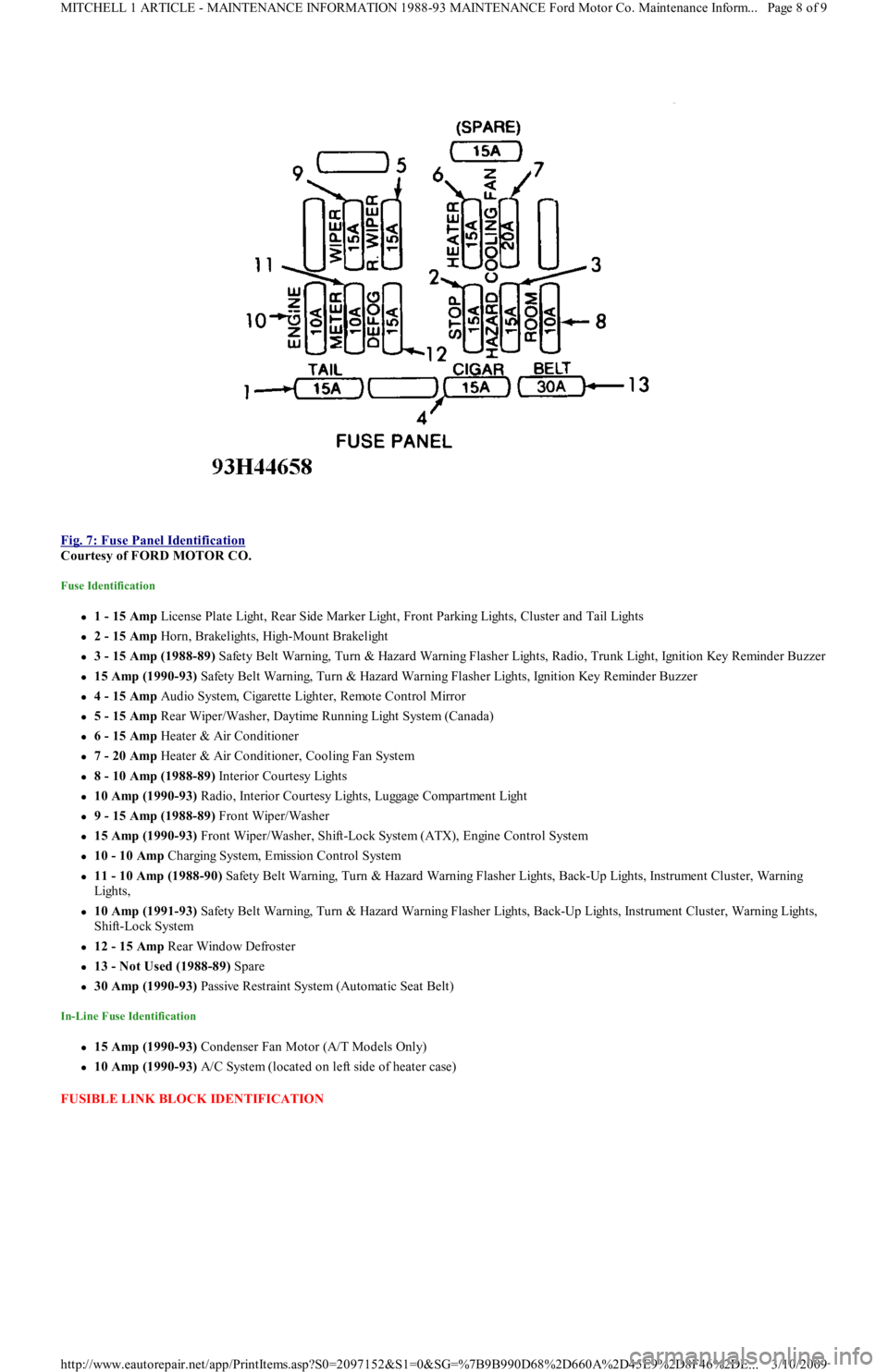
Fig. 7: Fuse Panel Identification
Courtesy of FORD MOTOR CO.
Fuse Identification
1 - 15 Amp License Plate Light, Rear Side Marker Light, Front Parking Lights, Cluster and Tail Lights
2 - 15 Amp Horn, Brakelights, High-Mount Brakelight
3 - 15 Amp (1988-89) Safety Belt Warning, Turn & Hazard Warning Flasher Lights, Radio, Trunk Light, Ignition Key Reminder Buzzer
15 Amp (1990-93) Safety Belt Warning, Turn & Hazard Warning Flasher Lights, Ignition Key Reminder Buzzer
4 - 15 Amp Audio System, Cigarette Lighter, Remote Control Mirror
5 - 15 Amp Rear Wiper/Washer, Daytime Running Light System (Canada)
6 - 15 Amp Heater & Air Conditioner
7 - 20 Amp Heater & Air Conditioner, Cooling Fan System
8 - 10 Amp (1988-89) Interior Courtesy Lights
10 Amp (1990-93) R a d io , In t e r io r C o u r t e sy Ligh t s, Lu gga ge C o mp a r t me n t Ligh t
9 - 15 Amp (1988-89) Front Wiper/Washer
15 Amp (1990-93) Front Wiper/Washer, Shift-Lock System (ATX), Engine Control System
10 - 10 Amp Charging System, Emission Control System
11 - 10 Amp (1988-90) Safety Belt Warning, Turn & Hazard Warning Flasher Lights, Back-Up Lights, Instrument Cluster, Warning
Lights,
10 Amp (1991-93) Safety Belt Warning, Turn & Hazard Warning Flasher Lights, Back-Up Lights, Instrument Cluster, Warning Lights,
Shift-Lock System
12 - 15 Amp Rear Window Defroster
13 - Not Used (1988-89) Spare
30 Amp (1990-93) Passive Restraint System (Automatic Seat Belt)
In-Line Fuse Identification
15 Amp (1990-93) Condenser Fan Motor (A/T Models Only)
10 Amp (1990-93) A/C System (located on left side of heater case)
FUSIBLE LINK BLOCK IDENTIFICATION
Page 8 of 9 MITCHELL 1 ARTICLE - MAINTENANCE INFORMATION 1988-93 MAINTENANCE Ford Motor Co. Maintenance Inform...
3/10/2009 http://www.eautorepair.net/app/PrintItems.asp?S0=2097152&S1=0&SG=%7B9B990D68%2D660A%2D45E9%2D8F46%2DE
...
Page 373 of 454
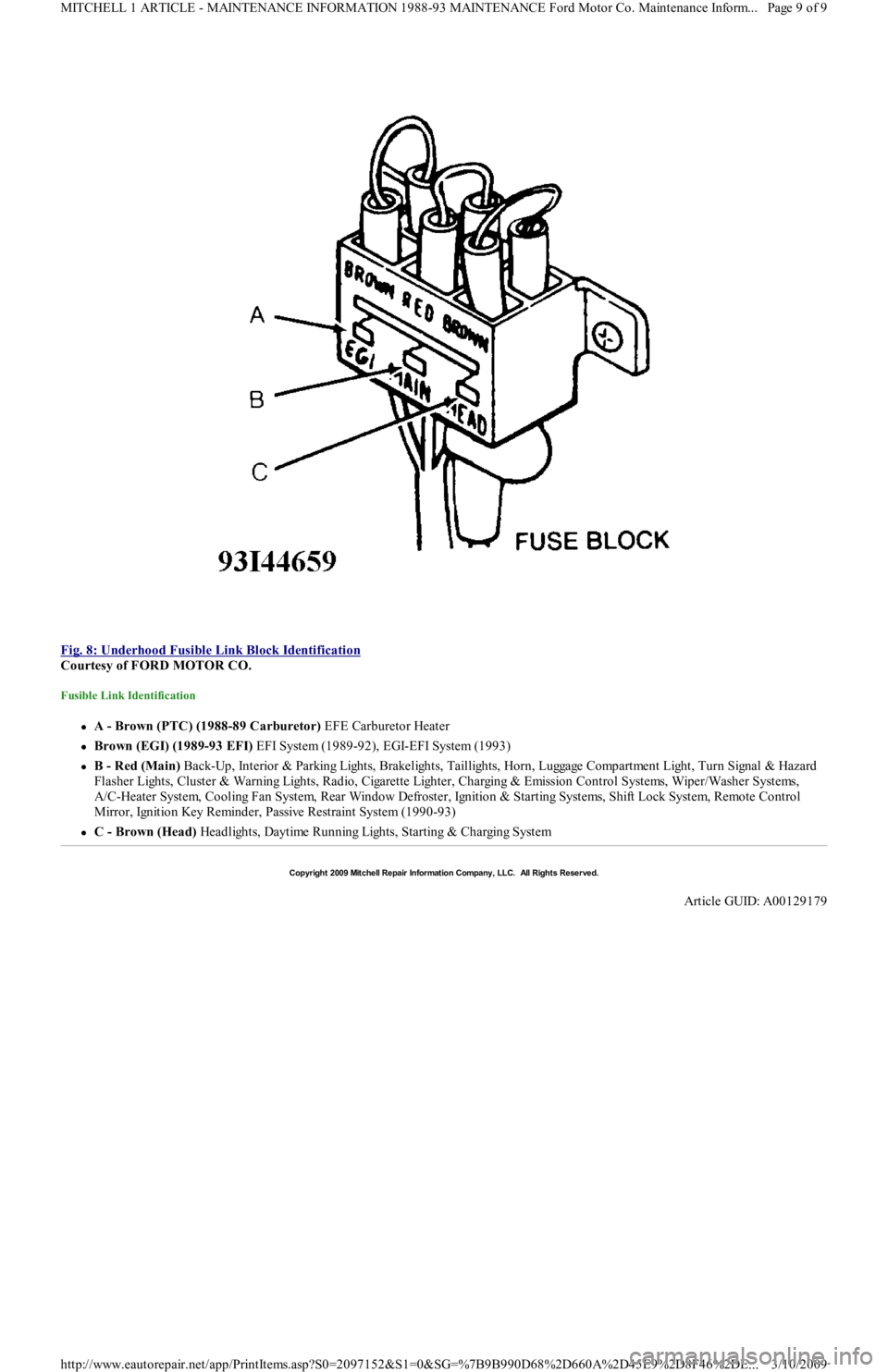
Fig. 8: Underhood Fusible Link Block Identification
Courtesy of FORD MOTOR CO.
Fusible Link Identification
A - Brown (PTC) (1988-89 Carburetor) EFE Carburetor Heater
Brown (EGI) (1989-93 EFI) EFI System (1989-92), EGI-EFI System (1993)
B - Red (Main) Back-Up, Interior & Parking Lights, Brakelights, Taillights, Horn, Luggage Compartment Light, Turn Signal & Hazard
F l a sh e r Ligh t s, C l u st e r & Wa r n in g Ligh t s, R a d io , C iga r e t t e Ligh t e r , C h a r gin g & E missio n C o n t r o l S yst e ms, Wip e r / Wa sh e r S yst e ms,
A/C-Heater System, Cooling Fan System, Rear Window Defroster, Ignition & Starting Systems, Shift Lock System, Remote Control
Mirror, Ignition Key Reminder, Passive Restraint System (1990-93)
C - Brown (Head) Headlights, Daytime Running Lights, Starting & Charging System
Copyr ight 2009 Mitchell Repair Information Company, LLC. All Rights Reserved.
Article GUID: A00129179
Page 9 of 9 MITCHELL 1 ARTICLE - MAINTENANCE INFORMATION 1988-93 MAINTENANCE Ford Motor Co. Maintenance Inform...
3/10/2009 http://www.eautorepair.net/app/PrintItems.asp?S0=2097152&S1=0&SG=%7B9B990D68%2D660A%2D45E9%2D8F46%2DE
...
Page 374 of 454
Back To Article
SERVICE INDICATOR & WARNING LIGHTS
1988-92 MAINT ENANCE Ford Motor Co. Service Indicator & Warning Lights
SERVICE INDICATOR & WARNING LIGHTS
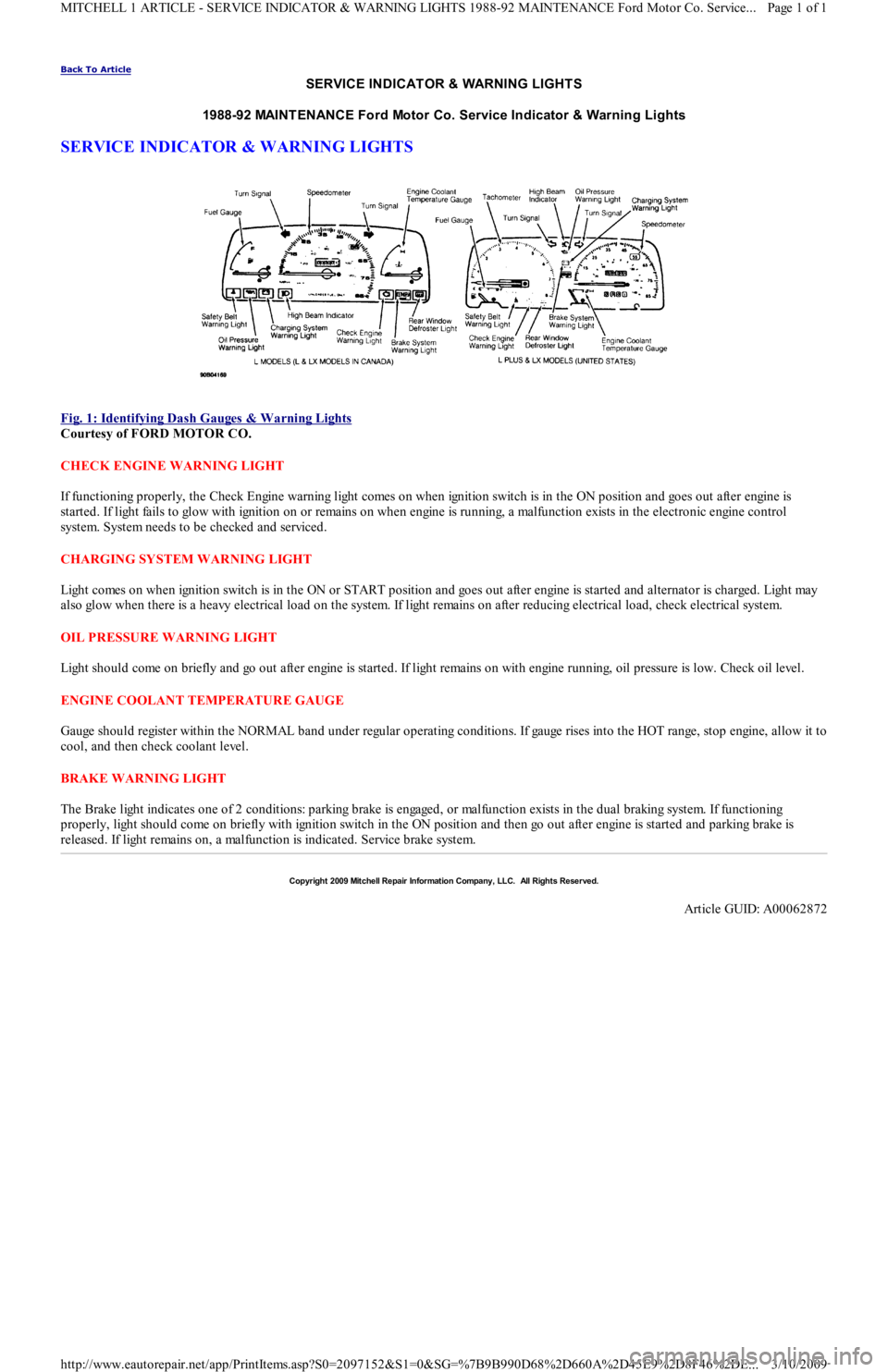
Fig. 1: Identifying Dash Gauges & W arning Lights
Courtesy of FORD MOTOR CO.
CHECK ENGINE WARNING LIGHT
If functioning properly, the Check Engine warning light comes on when ignition switch is in the ON position and goes out after engine is
started. If light fails to glow with ignition on or remains on when engine is running, a malfunction exists in the electronic engine control
system. System needs to be checked and serviced.
CHARGING SYSTEM WARNING LIGHT
Light comes on when ignition switch is in the ON or START position and goes out after engine is started and alternator is charged. Light may
also glow when there is a heavy electrical load on the system. If light remains on after reducing electrical load, check electrical system.
OIL PRESSURE WARNING LIGHT
Light should come on briefly and go out after engine is started. If light remains on with engine running, oil pressure is low. Check oil level.
ENGINE COOLANT TEMPERATURE GAUGE
Gauge should register within the NORMAL band under regular operating conditions. If gauge rises into the HOT range, stop engine, allow it to
cool, and then check coolant level.
BRAKE WARNING LIGHT
The Brake light indicates one of 2 conditions: parking brake is engaged, or malfunction exists in the dual braking system. If functioning
properly, light should come on briefly with ignition switch in the ON position and then go out after engine is started and parking brake is
released. If light remains on, a malfunction is indicated. Service brake system.
Copyr ight 2009 Mitchell Repair Information Company, LLC. All Rights Reserved.
Article GUID: A00062872
Page 1 of 1 MITCHELL 1 ARTICLE - SERVICE INDICATOR & WARNING LIGHTS 1988-92 MAINTENANCE Ford Motor Co. Service
...
3/10/2009 http://www.eautorepair.net/app/PrintItems.asp?S0=2097152&S1=0&SG=%7B9B990D68%2D660A%2D45E9%2D8F46%2DE
...
Page 378 of 454
Back To Article
ST EERING SYST EM - POWER
1991-92 ST EERING Ford Motor Co. - Steering - Power Rack & Pinion
DESCRIPTION & OPERATION
Power steering system consists of a rack and pinion steering gear, valve body, power steering pump, fluid reservoir and interconnecting
hydraulic lines. Pressure and return lines from pump are connected to valve body. A vane-type power steering pump draws fluid from the
steering reservoir. Fluid is compressed by rotor and vanes inside steering pump and sent to steering gear. Pressure is monitored and controlled
by a pressure switch and a control valve located inside of steering pump.
TROUBLE SHOOTING
Refer to TROUBLE SHOOTING - BASIC PROCEDURES article in the GENERAL TROUBLE SHOOTING section.
LUBRICATION
CAPACITY
Information is not available.
FLUID TYPE
Use Dexron-II ATF type fluid.
FLUID LEVEL CHECK
Check fluid level before engine is started, while fluid is still cool. Remove reservoir cap fluid indicator on steering pump. Check fluid level.
Fluid should be between the "L" and "H" marks on the level gauge dipstick. If fluid is needed, fill to the "L" mark on dipstick. Run engine until
warm and turn steering wheel fully in both directions about 10 times. Return steering to straight-ahead position and shut engine off. Ensure
fluid level is between "L" and "H" marks. Add fluid if necessary.
HYDRAULIC FLUID BLEEDING
1. Raise and support front of vehicle. Ensure pump reservoir is filled to specified level. With ignition coil wire disconnected, crank engine
and add fluid to steering pump until fluid level remains constant. While cranking engine, rotate steering from stop to stop. Recheck and
add fluid as necessary.
2. Start engine and allow to idle for several minutes. Turn steering wheel completely lock-to-lock several times. Check fluid level. Add
fluid as necessary. Continue this procedure until there is no bubbling or decrease in fluid level.
ADJUSTMENTS
BELT TENSION
On Festiva, remove air duct and air cleaner. On all models, loosen steering pump mounting pivot bolt and the adjusting bolt lock nut. Using
Belt Tension Gauge (021-0028A), fit gauge to longest available belt span for testing. Adjust belt to specification. See BELT TENSION
SPECIFICATIONS . Tighten adjuster lock nut to 32-45 ft. lbs. (43-61 N.m) on Capri or 27-38 ft. lbs. (37-52 N.m) on Festiva.
BELT TENSION SPECIFICATIONS
REMOVAL & INSTALLATION
STEERING GEAR
Removal
1. Disconnect negative battery cable. On Capri, mark and loosen intermediate lower U-joint. On Festiva, mark and remove steering gear
intermediate shaft connecting steering gear to column shaft. On all models, disconnect high pressure and return lines and plug them.
Loosen front wheel lug nuts.
2. Raise vehicle. Remove front wheels. Remove tie rod end cotter pins and nuts. Separate tie rod ends from steering knuckles using Tie
Rod Remover (T85M-3395-A). Remove tie rod end splash shields. Remove right fender splash shield. Remove front catalytic converter
nuts and separate converter from inlet pipe.
3. Place reference marks on tie rod end and tie rod for reassembly reference. Loosen tie rod jam nut and remove right tie rod end. Remove
steering gear mounting bolts and washers. Slide steering gear to the left and pull right tie rod through fender opening. Remove steering
gear by sliding it to the right.
Installation
Application
(1) Deflection: In.
(mm)Gauge Tension:
Lbs. (kg)
New Belt
Capri & Festiva.31-.35 (8-9)110-132 (50-60)
Used Belt
Capri.31-.35 (8-9)110-132 (50-60)
Festiva.35-.39 (9-10)95-110 (43-50)
(1)Apply approximately 22 lbs. (9.9 kg) of pressure.
Page 1 of 9 MITCHELL 1 ARTICLE - STEERING SYSTEM - POWER 1991-92 STEERING Ford Motor Co. - Steering - Power Rack & Pi
...
3/10/2009 http://www.eautorepair.net/app/PrintItems.asp?S0=2097152&S1=0&SG=%7B9B990D68%2D660A%2D45E9%2D8F46%2DE
...