Page 1 of 116
ELECTRICAL SYSTEM
I
SECTION EL
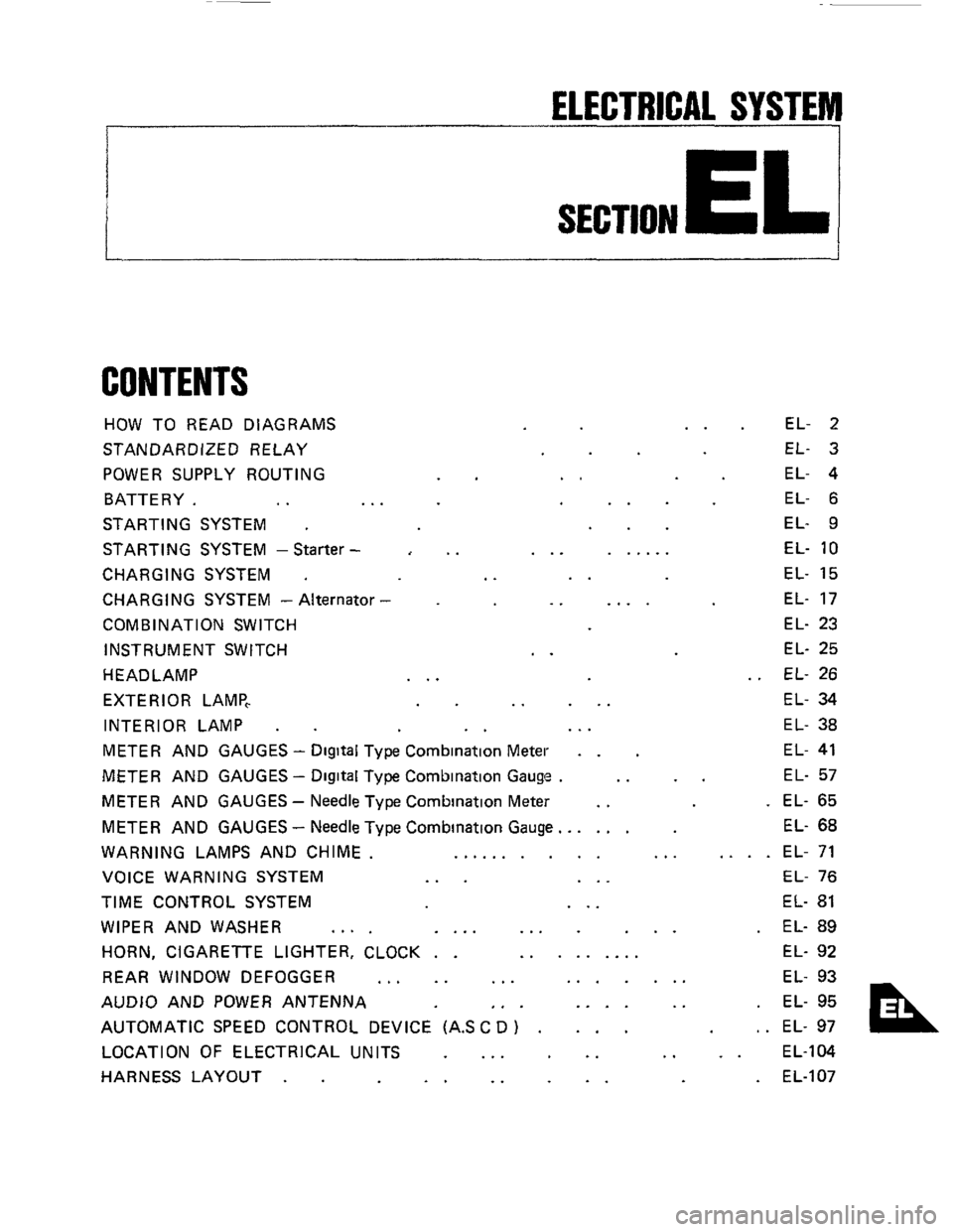
CONTENTS
HOW TO READ DIAGRAMS
STANDARDIZED RELAY
POWER SUPPLY ROUTING
BATTERY.
.. ..
STARTING SYSTEM .
STARTING SYSTEM -Starter -
CHARGING SYSTEM .
CHARGING SYSTEM - Alternator
COMB IN AT1 ON SWITCH
INSTRUMENT SWITCH
HEADLAMP
EXTERIOR LAMP,
INTERIOR LAMP
.
..
..
..
..
..
... ......
..
.. ....
..
.. ...
EL- 2
EL- 3
EL- 4
EL- 6
EL- 9
EL-
10
EL- 15
EL- 17
EL- 23
EL- 25
EL- 26
EL- 34
EL- 38
METER AND GAUGES - Digital Type Combination Meter . . EL- 41
METER AND GAUGES - Digital Type Combination Gauge . .. .. EL- 57
METER AND GAUGES - Needle Type Combination Meter .. . EL- 65
METER AND GAUGES
- Needle Type Combination Gauge.. .... EL- 68
WARNING LAMPS AND CHIME. .......... ... .... EL- 71
VOICE WARNING SYSTEM
... ... EL- 76
TIME CONTROL SYSTEM ... EL- 81
WIPER AND WASHER .... .... ... ... . EL- 89
HORN, CIGARETTE LIGHTER, CLOCK . . ......... EL- 92
REAR WINDOW DEFOGGER
... .. ... ....... EL- 93
AUDIO AND POWER ANTENNA
,. . .... .. . EL- 95
AUTOMATIC SPEED CONTROL DEVICE (AS
C D ) . ... , . EL- 97
LOCATION OF ELECTRICAL UNITS
... .. .. .. EL-104
HARNESS LAYOUT
. . .. .. .. . EL-107
Page 2 of 116
HOW TO READ DIAGRAMS
I
POWER SUPPLY ROUTING
This diagram is helpful in identifying specific prob-
lems
in the power supply portion of the electrical
circuits. For example, let's say
a vehicle has an in-
operative
rear window defogger A quick check
proves that meter and
gauges in the vehicle are
operative The power supply diagram shows that
there cannot be
a problem between the battery,
ignition relay, ignition switch or fuse since the
power supply circuit for the
rear window defogger
Example
BRANCH M/T model
AlT model
n
@ M/Tmodel
@ AITmodel
t
ABBREVIATIONS
is common with the meter and gauges. Therefore,
the cause of this specific problem must
lie past the
fuse, such
as in the wiring, rear window defogger,
or ground.
WIRING DIAGRAM
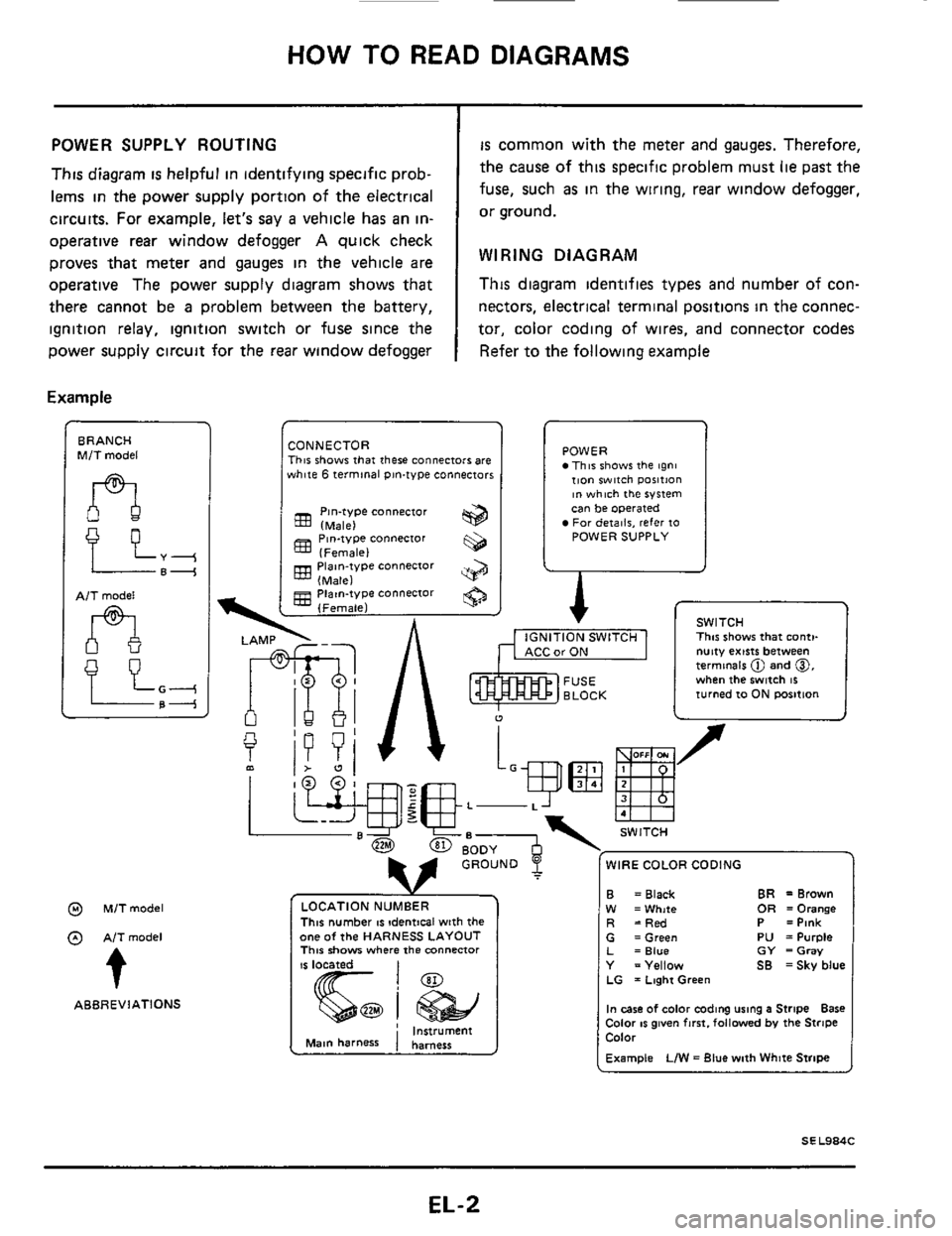
This diagram identifies types and number of con-
nectors, electrical
terminal positions in the connec-
tor, color coding of wires, and connector codes
Refer to the following example
CONNECTOR This shows that there connectors are white 6 terminal pin-type connectors
Pin-type connector (Male)
(Female)
(Male)
(Female)
833 Piaan-type connector
gg Piatn-type connector
POWER This shows the tgni tion witch ~osition ~n which the system can be operated For deiailr, refer 10 POWER SUPPLY
A r
I
1 v SWITCH ., , ,-,. -..,m I This shows that conti-
u
f
L-
WIRE COLOR CODING
This number IS !dentical with the one of the HARNESS LAYOUT This show where the mnnenor
CarON I nutty exists between termmels @ and 0, when the switch 16 turned 10 ON rmition
B W R
BR =Brown = Black OR =Orange =White =Red P =Pink G =Green PU =Purple L =Blue GY =Gray Y =Yellow SB =Sky blue LG = Laghi Green
In case of color coding using a Stripe Bare Color IS given fmt. followed by the Stripe Color
Example LIW = Blue with White Stripe
EL-2
Page 6 of 116
BATTERY
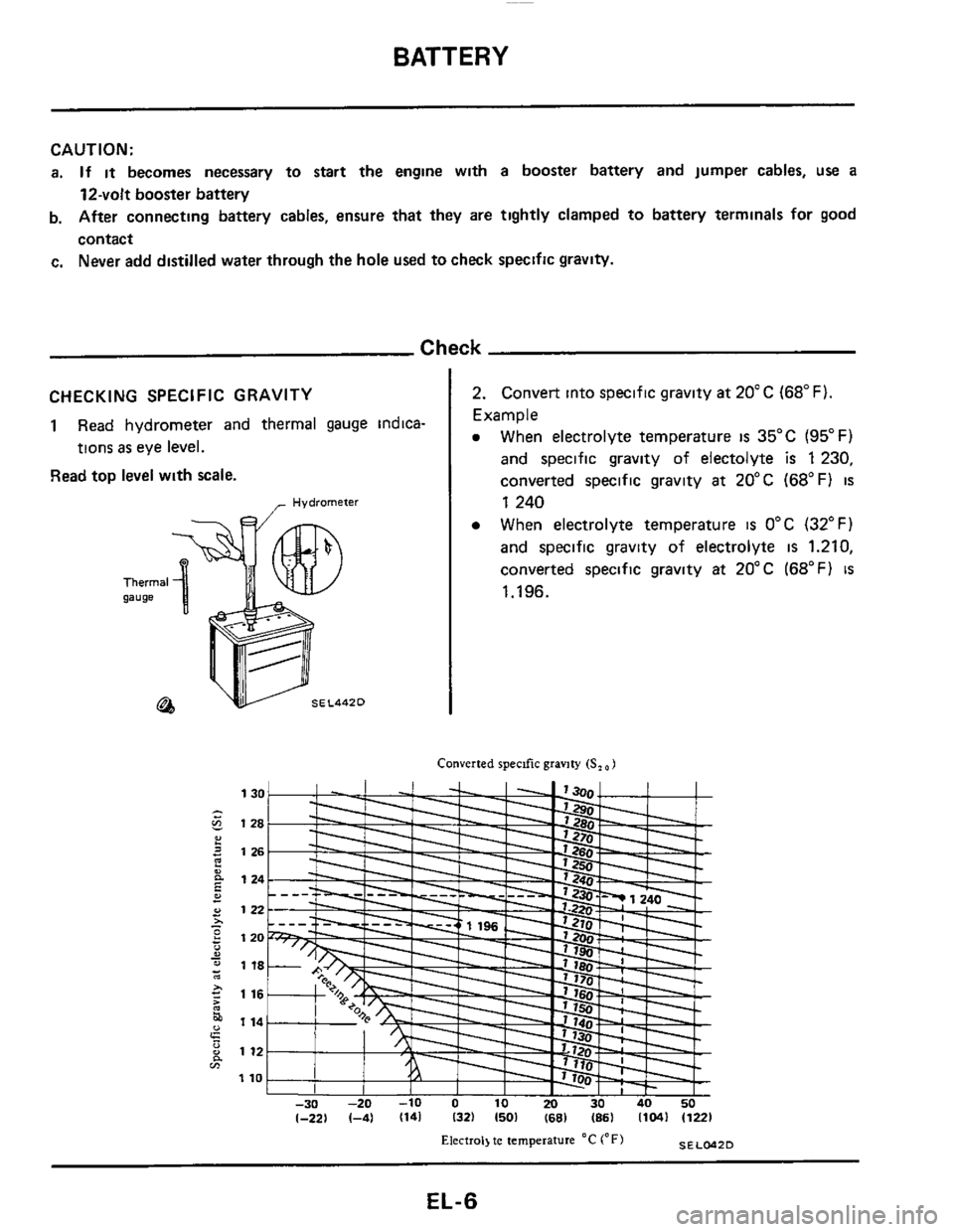
CHECKING SPECIFIC GRAVITY
1 Read hydrometer and thermal gauge indica-
tions
as eye level.
Read top level with scale.
CAUTION:
a. If it becomes necessary to start the engine with a booster battery and jumper cables, use a
12-volt booster battery
b. After connecting battery cables, ensure that they are tightly clamped to battery terminals for good
contact
c. Never add distilled water through the hole used to check specific gravity.
2. Convert into specific gravity at 20°C (68°F)
Example
e When electrolyte temperature is 35°C (95°F)
and specific gravity of electolyte is 1230,
converted specific gravity
at 20°C (68°F) is
Check
- Hydrometer 1 240
When electrolyte temperature
is 0°C (32°F)
and specific gravity of electrolyte
is 1.210,
converted specific gravity
at 20°C (68°F) is
1.196.
Converted specific gravity (S, 1
1
1 , I I I I I 1- I -30 -20 -10 0 10 20 30 40 50 1-221 1-41 1141 132) 1501 1681 (86) (104) (1221
SELCdZD Electrol) te temperature "C ('F)
EL-6
Page 7 of 116
BATTERY
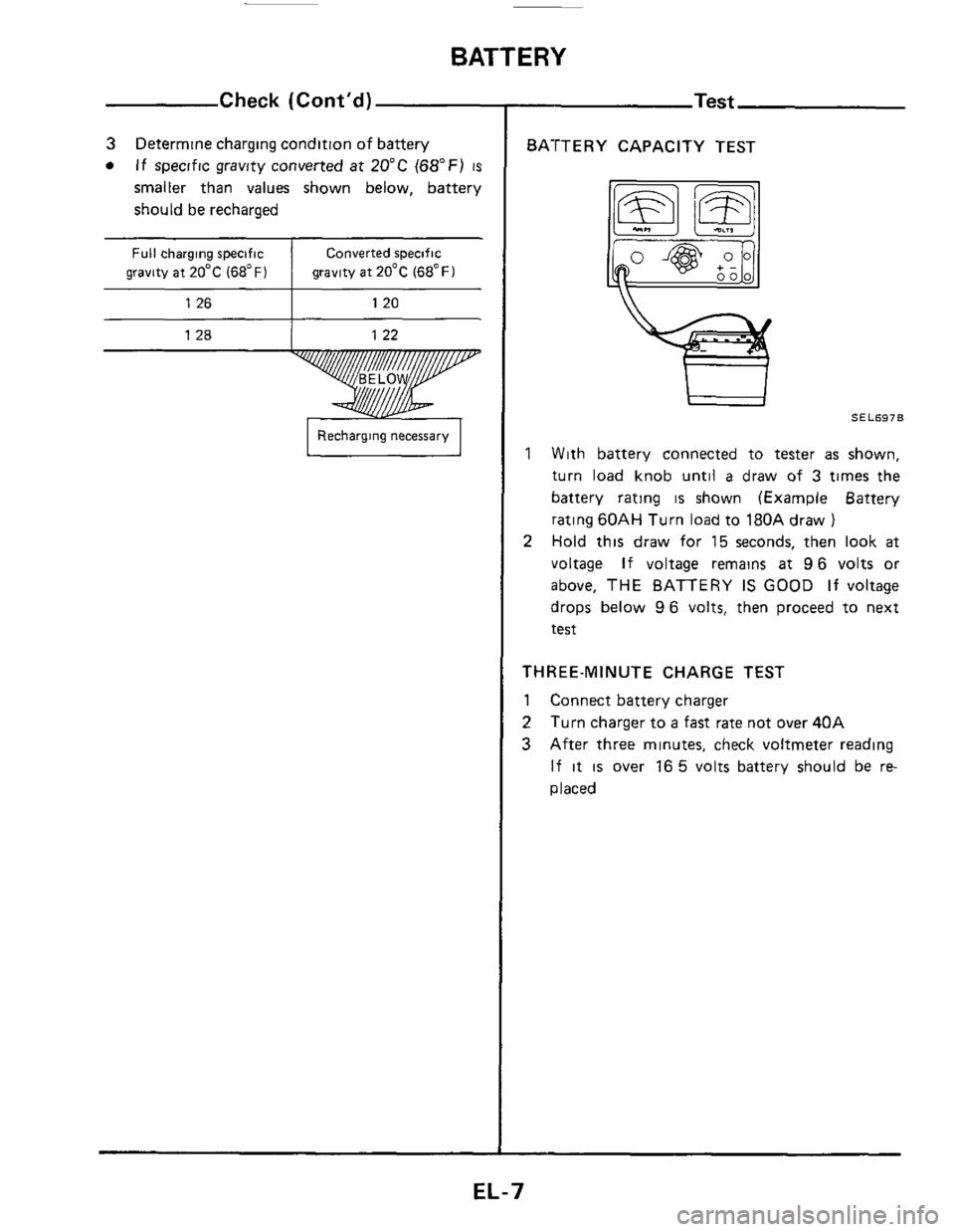
Full charging specific
gravity at 20°C
(68°F)
Check (Cont’d)
Converted specific
gravity at 20°C
(68°F)
1 26 I 120
I Recharging necessary I
BATTERY CAPACITY TEST
1 With battery connected to tester as shown,
turn load knob until
a draw of 3 times the
battery rating
is shown (Example Battery
rating
60AH Turn load to 180A draw )
Hold this draw for 15 seconds, then look at
voltage If voltage remains at 96 volts or
above,
THE BATTERY IS GOOD If voltage
drops below
96 volts, then proceed to next
test
2
THREE-MINUTE CHARGE TEST
1 Connect battery charger
2
3
Turn charger to a fast rate not over 40A
After three minutes, check voltmeter reading
If it is over 16 5 volts battery should be re-
placed
EL-7
Page 12 of 116
STARTING SYSTEM -Starter-
Brush Check
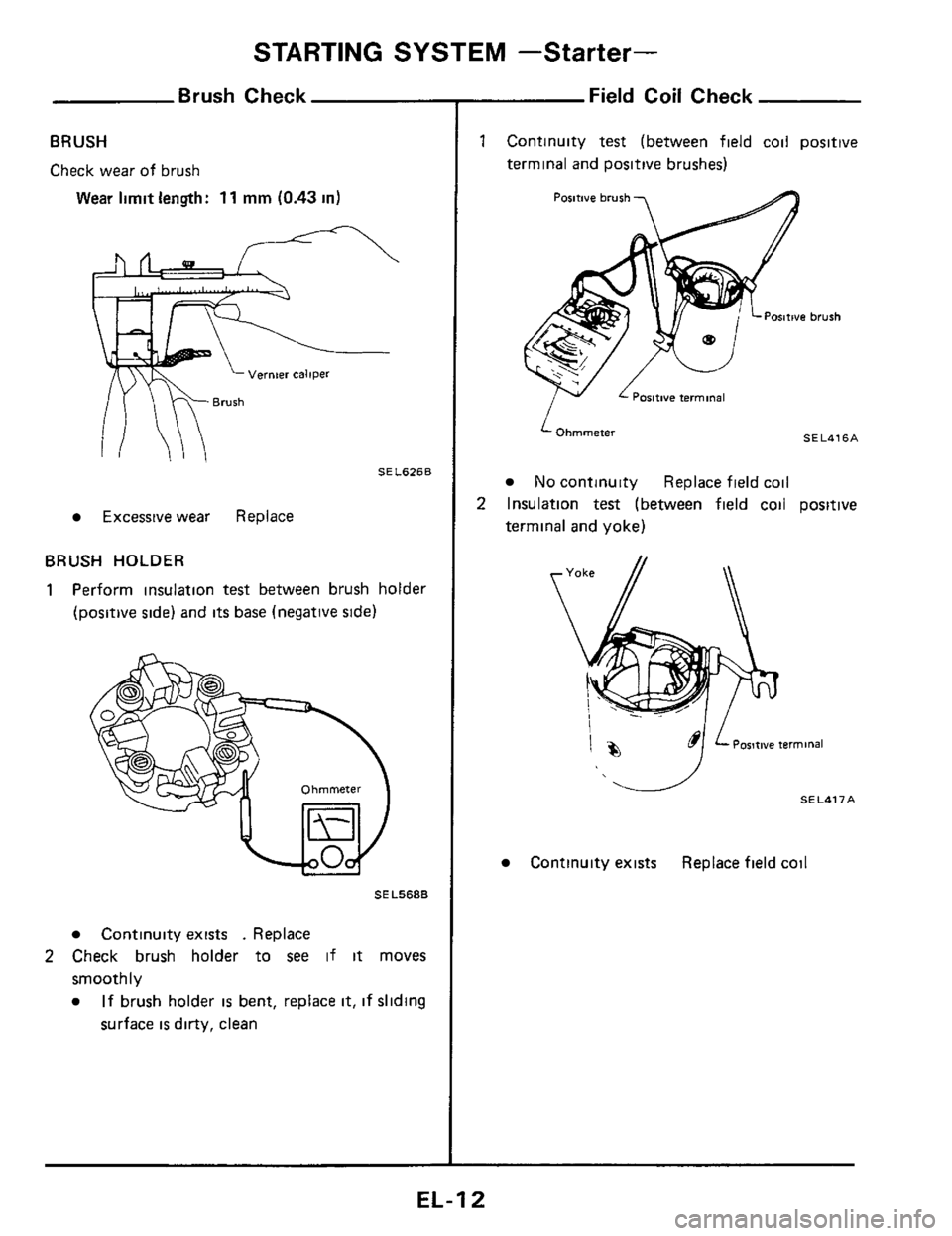
BRUSH
Check wear of brush
Wear limit length: 11 mm (0.43 in)
Vernier caliper
SEL626B
Excessive wear Replace
BRUSH HOLDER
1 Perform insulation test between brush holder
(positive side) and its base (negative side)
SE L568B
Continuity exists . Replace
smoothly
2 Check brush holder to see if it moves
If brush holder is bent, replace it, if sliding
surface
is dirty, clean
Field Coil Check
Continuity test (between field coil positive
terminal and positive brushes)
ositive terminal
‘Ohmmeter
No continuity Replace fielk ~
SELUq6A
:oil
Insulation test (between field coil positive
terminal
and yoke)
Postwe terminal
I
1%
Continuity exists Replace field coil
EL-I 2
Page 13 of 116
STARTING SYSTEM -Starter-
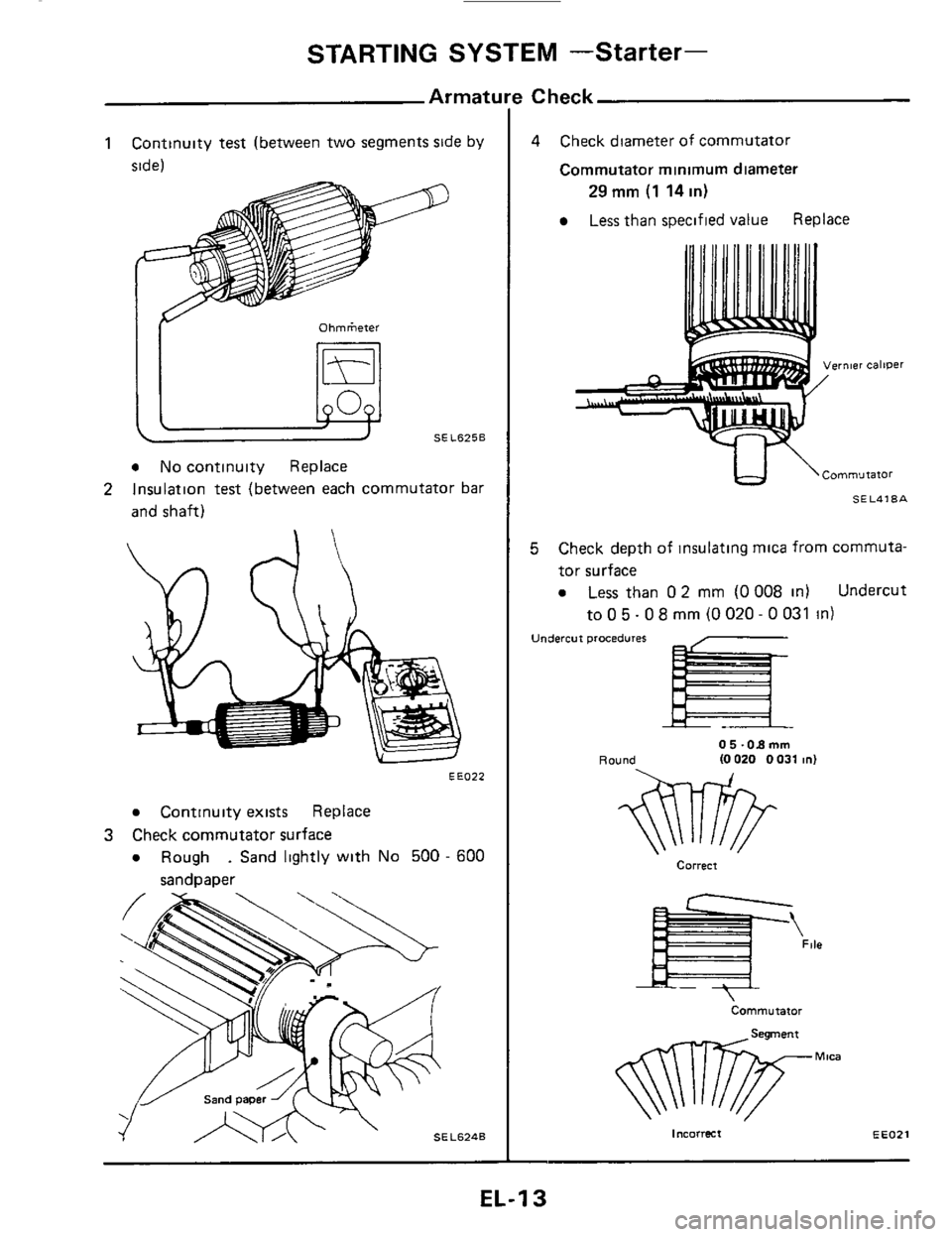
1 Continuity test (between two segments side by
side)
IY Ohrnketer
a No continuity Replace
Insulation
test (between each commutator bar
and shaft) 2
EE022
a Continuity exists Replace
a Rough . Sand lightly with No 500 - 600
3 Check commutator surface
sandpaper
! Check
4 Check diameter of commutator
Commutator minimum diameter
Less than specified value Replace
29 mm (1 14 in)
vernier caliper
tJ \Cornmurator
SEL418A
5 Check depth of insulating mica from commuta-
tor surface
a Less than 0 2 mm (0 008 in) Undercut
to 0 5.0 8 mrn (0 020 - 0 031 in)
Undercut procedures
Round 0 5 -08 mm (0 020 0 031 in)
Correct
Commutator
incorrect EEOZI
EL-1 3
Page 14 of 116
STARTING SYSTEM -Starter-
Minimum length of brush mm (In)
Reassembly
11 10431
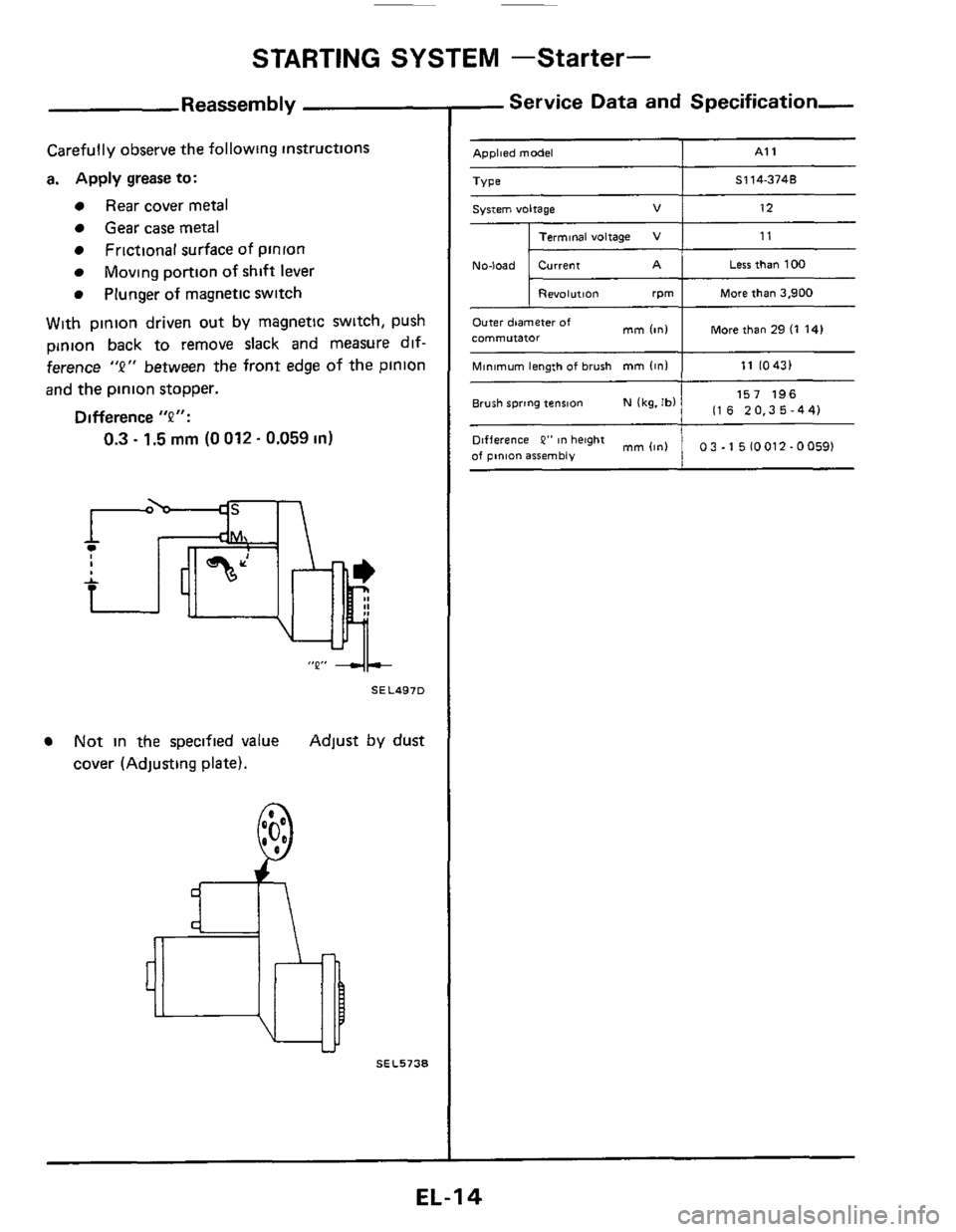
Carefully observe the following instructions
a. Apply grease
to:
Rear cover metal
Gear case metal
Frictional surface of pinion
Plunger of magnetic switch
Moving portion of shift lever
With pinion driven out by magnetic switch, push
pinion back to remove slack and measure dif-
ference
"2" between the front edge of the pinion
and the pinion stopper.
Difference "P":
0.3 - 1.5 mm (0 012. 0.059 in)
"Q" 4+
SEL497D
Not in the specified value Adjust by dust
cover (Adjusting plate).
SEL5738
- Service Data and Specification-
- Applied model I A1 1
Less than 100 -
I Revolution rpm I Mare than 3.900
I More than 29 (1 141 Outer diameter of commutator mm (in1
157 196
1 116 20.35-44) Brush spring tension N (kg. Ibl
mm(in1 1 03-1510012-00591 Difference P" in height
of pinion assembly
EL-I 4
Page 16 of 116
CHARGING SYSTEM
Make sure "S ' termmal 8s con- IC-RG IC regulator
When reaching "Damaged
A C G.", remove
0 K. IC-alternator 16 In good condltlon nected COrreCtly
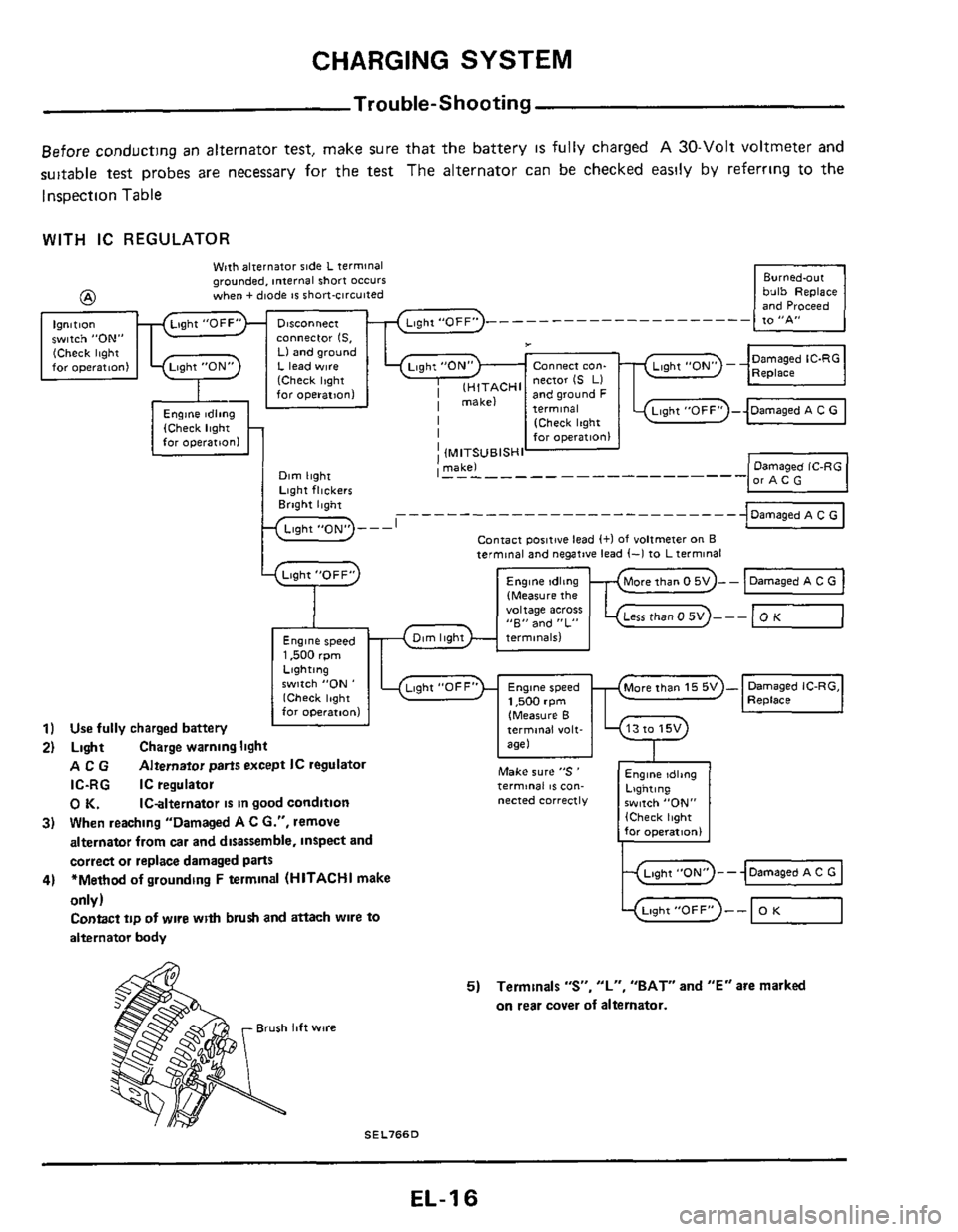
Trouble-Shooting
Before conducting an alternator test, make sure that the battery IS fully charged A 30-Volt voltmeter and
suitable test probes are necessary for the test The alternator can
be checked easily by referrmg to the
Inspection Table
Engine tdltng Lighting $witch "ON,, (Check light for operatlonl
WITH IC REGULATOR
bulb Replace and Proceed -
Wpth alternator side L terminal grounded, internal short occurs when + diode IS short-circuited @
Ignition witch "ON" cOnneCtor IS. (Check light Ll and ground for operatton1 L lead w~re Connect con-
I lH,TACHl nector IS LI far operation1 and ground F
I [Check Itght I for operation1
I (MITSUBISHI ' makel I - - - - - - - - - - - - -------- -
J
..........................
Contact poiitwe lead (+I of voltmeter on B
Lqht "OFF"
9
Engine speed 1,500 rpm
terminal and negative lead (-1 to L terminal
(Measure the "oltage acres "E" and "L"
only)
Contact tip of wlre with brush and attach wire to
alternator body -0 Light"0FF" -- OK
5) Terminals "S", "L", "BAT" and "E" are marked
on rear cover
of alternator.
Brush lift wire
SEL766D
EL-1 6