Page 166 of 875
GM – CAMARO 1982-1992 – Repair Guide (Checked by WxMax) 166
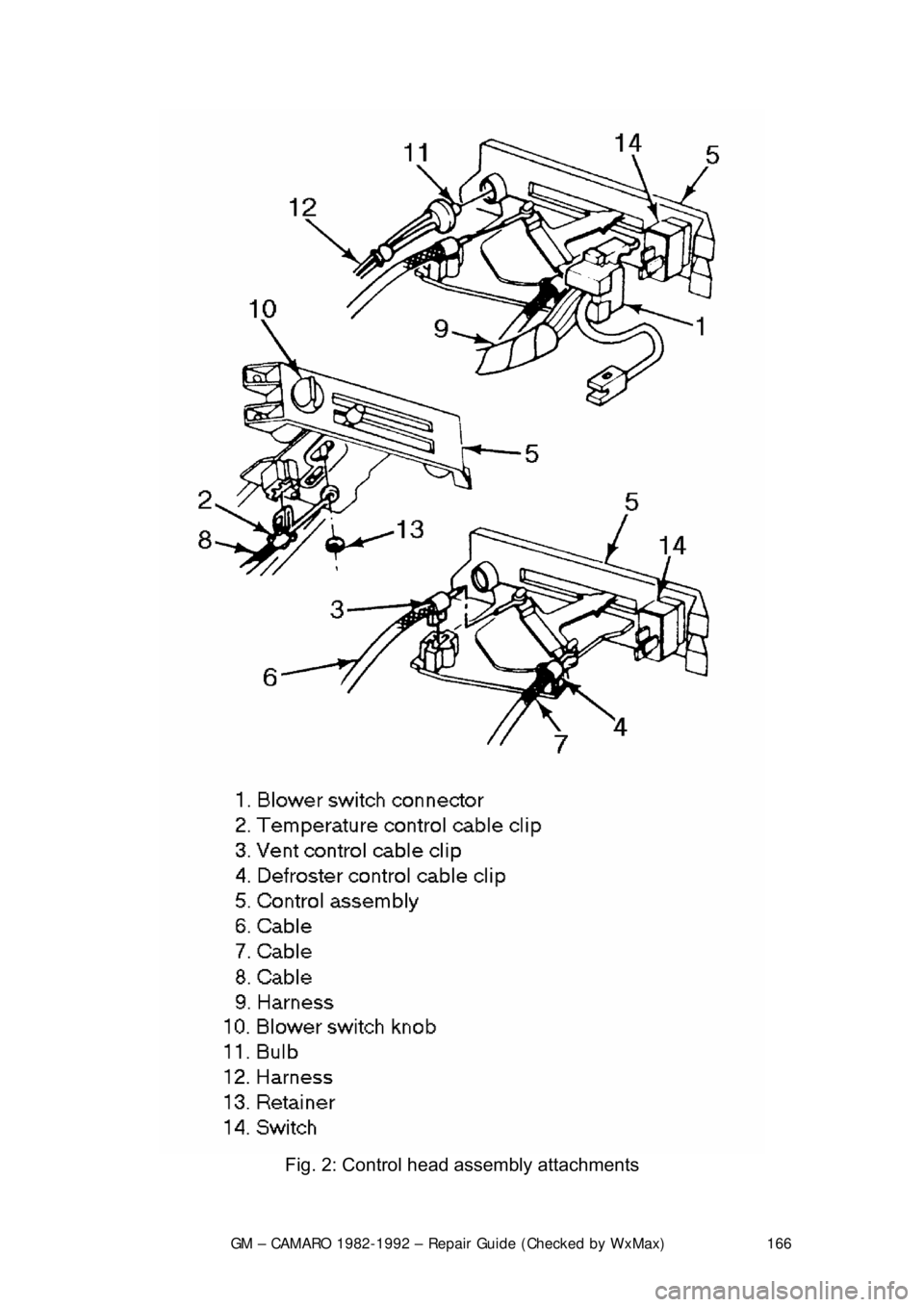
Fig. 2: Control head assembly attachments
Page 167 of 875

GM – CAMARO 1982-1992 – Repair Guide (Checked by WxMax) 167
BLOWER SWITCH
With the control head removed from t
he vehicle, the blower switch may be
removed by pulling the blower switch knob off and removing the retaining clip or
retaining screws.
VACUUM MOTORS
OPERATION
Used on certain heating and air condition ing systems, the vacuum actuators
operate the air doors determining the differ ent modes. The actuator consists of
a spring loaded diaphragm connec ted to a lever. When vacuum is applied to the
diaphragm, the lever moves t he control door to its appropriate position. When
the lever on the control panel is moved to another position, vacuum is cut off
and the spring returns the actuator lever to its normal position.
TESTING 1. Disconnect the vacuum line from the actuator.
2. Attach a hand held vacuum pump to the actuator.
3. Apply vacuum to the actuator.
4. The actuator lever should move to its engaged position and remain there
while vacuum is applied.
5. When vacuum is released it should move back to its normal position.
6. The lever should operat e smoothly and not bind.
REMOVAL & INSTALLATION 1. Remove the vacuum li nes from the actuator.
2. Disconnect the linkage from the actuator.
3. Remove the hardware attaching the actuator.
4. Remove the actuator.
To install: 5. Install the actuator and attaching hardware.
6. Connect the linkage to the actuator.
7. Connect the vacuum lines to the actuator.
8. Test system to confirm proper functioning of the actuator.
Page 182 of 875

GM – CAMARO 1982-1992 – Repair Guide (Checked by WxMax) 182
ANTENNA
REMOVAL & INSTALLATION
Placement of tape on the right inner door edge will help prevent scratches
during the antenna removal an
d installation procedure.
1. Disconnect the negative battery terminal.
2. Remove the right side lower in strument panel sound insulator and
disconnect the antenna connection from the radio.
3. Raise and safely support the vehicle.
4. Disconnect the instrument panel harness from the radio.
5. Disconnect the power antenna lead, if equipped.
6. Disconnect the power antenna wire from the relay, if equipped.
7. Remove the right fender wheelhouse.
8. Loosen the fender-to-body attaching bolts and block the fender out.
9. Remove the antenna bezel and nut.
10. Remove the antenna assembly mounting screws.
11. Remove the grommet from the bul khead and pull the harness from the
vehicle interior.
12. Remove the antenna assembly from the vehicle.
In some cases, if the vehicle is equipped with a power antenna, it may be
repaired. Seek a profe ssional radio shop for pr oper repair of the antenna
assembly.
To install: 13. Install the antenna assembly into the vehicle.
14. Install the grommet and the harne ss into the vehicle interior.
15. Install the antenna assembly mounting screws.
16. Install the antenna bezel and nut.
17. Remove the fender block, tighten the fender-to-body attaching bolts.
Ensure any shims for the fender are reinstalled.
18. Install the right fender wheelhouse.
19. Lower the vehicle.
20. Connect the power antenna wire to the relay, if equipped.
21. Connect the power ant enna lead, if equipped.
22. Connect the instrument panel harness to the radio.
23. Connect the antenna connection to the r adio. Install the right side lower
instrument panel sound insulator
24. Connect the negative battery cable.
Page 199 of 875

GM – CAMARO 1982-1992 – Repair Guide (Checked by WxMax) 199
Federal law requires that the
odometer in any replacement
speedometer/odometer must r egister the same mileage as that registered on
the removed speedometer/odometer. Service replacement
speedometer/odometers and odometer modul es with the mileage preset to
actual vehicle mileage are available through the dealer. In nearly all cases, the
mileage continues to accumu late in the odometer memory even if the odometer
does not display mileage. Th is mileage can usually be verified by the dealer.
Contact the dealer for instructi ons to receive a replacement
speedometer/odometer with pres et mileage. If the actual vehicle mileage cannot
be verified, the dealer will supply a spe edometer/odometer with a display set to
zero miles. In addition, an odometer mileage sticker is supplied with the
replacement odometer. The sticker must display the estimated vehicle mileage
and is to be affixed to the driver's door.
REMOVAL & INSTALLATION 1. The gauges can be removed from the cluster assembly by: a. Removing the cluster lens.
b. Removing the printed circuit board from the back of the cluster.
c. Removing the gauge attaching screws.
2. Installation is the reverse of removal.
SPEEDOMETER CABLE
REMOVAL & INSTALLATION 1. Disconnect the negative batte ry cable at the battery.
2. On models without cruise control, disconnect the speedometer cable
strap at the power brake booster. On models with cruise control,
disconnect the speedometer cable at the cruise control transducer.
3. Remove the instrument cluster trim plate.
4. Remove the instrument cluster a ttaching screws and pull the cluster out
far enough to gain access to the r ear of the speedometer head.
5. Reach beneath the c able connection at the speedometer head, push in
on the cable retaining spring, and disconnect the cable from the
speedometer.
6. Slide the old cable ou t of the speedometer cable casing. If the cable is
broken, remove the cable from both ends of the casing. Using a short
piece of the old cable to fit t he speedometer connection, turn the
speedometer to increase the speed i ndicated on the dial and check for
any binding during rotation. If binding is noted, the speedometer must be
removed for repair or replacement. Check the entire cable casing for
extreme bends, chafing, breaks, et c., and replace if necessary.
To install: 7. Wipe the cable clean us ing a lint free cloth.
8. If the old casing is to be reused, flush the casing with petroleum spirits
and blow dry with compressed air.
Page 200 of 875

GM – CAMARO 1982-1992 – Repair Guide (Checked by WxMax) 200
9. Lubricate the speedometer cable
with an appropriate lubricant, being
sure to cover the lower thirds of the cable.
10. Insert the cable into the casi ng, then connect the cable and casing
assembly to the speedometer.
11. Install the instrument cluster, then install the cluster attaching screws.
12. Install the instrument cluster trim plate.
13. On models without cruise control, connect the speedometer cable strap
at the power brake booste r. On models with cruise control, connect the
speedometer cable at the cr uise control transducer.
14. Connect the negative battery cable at the battery.
WIPER SWITCH
REMOVAL & INSTALLATION
The wiper switch is part of the multi-function lever, located on the steering
wheel column.
1. Disconnect the electrical connector of the multi-function lever, located
under the instrument panel.
2. Remove the protective cover from the wire.
3. Grasp the lever firmly, twist and pull (the tang on the lever must align
with the socket) the lever straight out.
4. Pull the wire through the steering column.
To install: 5. Slide a music wire tool through the steering column and connect the
lever wire to the tool wire; pull t he wire through the steering column.
6. Push the control lever into the sp ring loaded socket (be sure to align the
tang).
7. Install the protective cover to the wire.
8. Connect the electrical connector of the multi-function lever.
HEADLIGHT SWITCH
REMOVAL & INSTALLATION 1. Disconnect the negative batte ry cable at the battery.
2. Remove the four screws from insi de the defroster duct (instrument panel
pad securing screws).
3. Remove the screws which are under the lip of the instrument panel pad.
4. Remove the instrument panel pad.
5. On models equipped with air condition ing, remove the instrument panel
cluster bezel and the cluster.
6. Remove the radio speaker bracket.
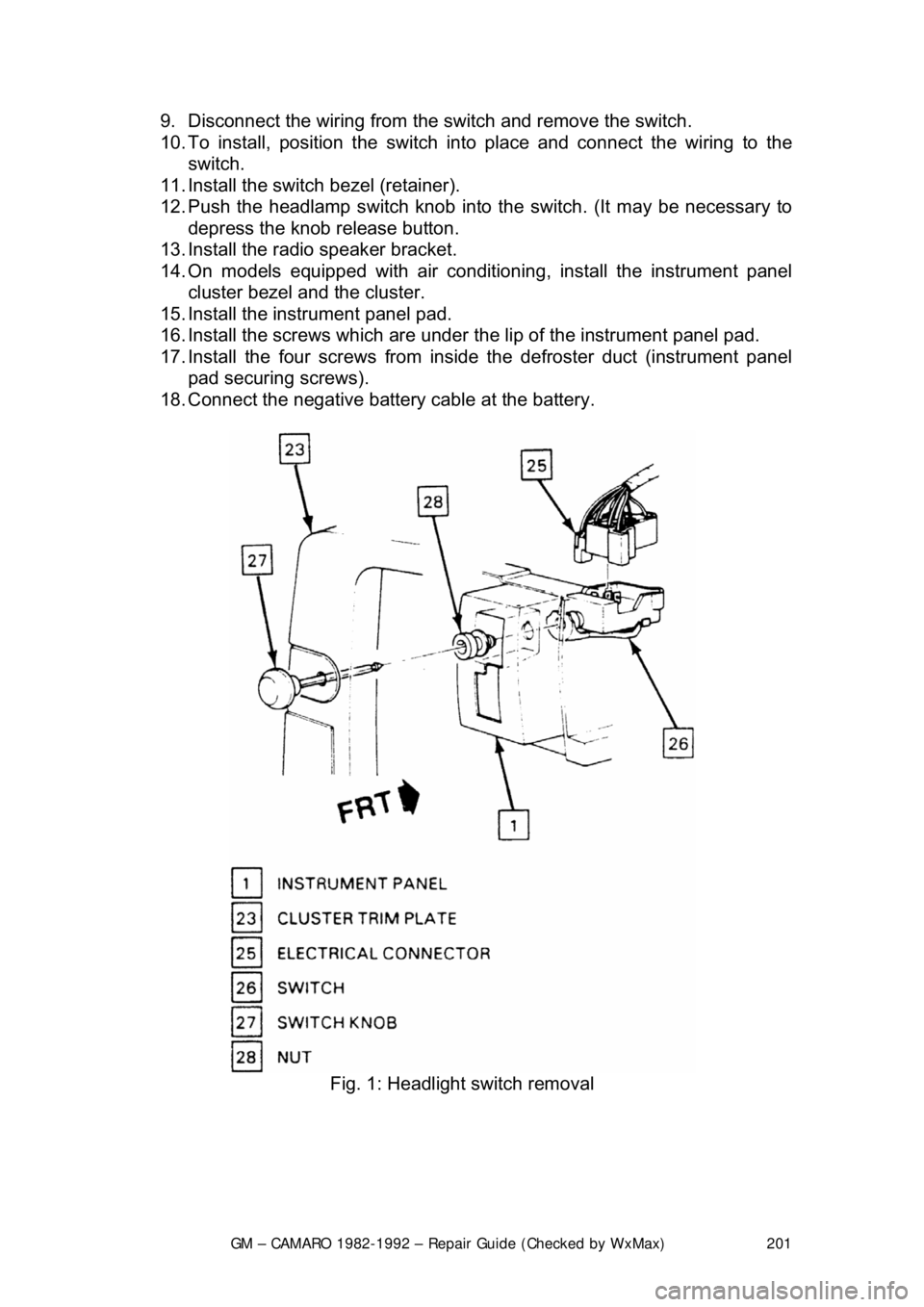
7. Pull the headlamp switch knob to the ON position, depress the locking
button for the knob and shaft (locat ed on the switch), and remove the
knob and shaft.
8. Remove the switch bezel (retainer).
Page 201 of 875
GM – CAMARO 1982-1992 – Repair Guide (Checked by WxMax) 201
9. Disconnect the wiring from the
switch and remove the switch.
10. To install, position t he switch into place and connect the wiring to the
switch.
11. Install the switch bezel (retainer).
12. Push the headlamp switch knob into the switch. (It may be necessary to
depress the knob release button.
13. Install the radio speaker bracket.
14. On models equipped with air conditioni ng, install the instrument panel
cluster bezel and the cluster.
15. Install the inst rument panel pad.
16. Install the screws which are under t he lip of the instrument panel pad.
17. Install the four screw s from inside the defroster duct (instrument panel
pad securing screws).
18. Connect the negative battery cable at the battery.
Fig. 1: Headlight switch removal
Page 203 of 875
GM – CAMARO 1982-1992 – Repair Guide (Checked by WxMax) 203
LIGHTING
HEADLIGHTS
REMOVAL & INSTALLATION
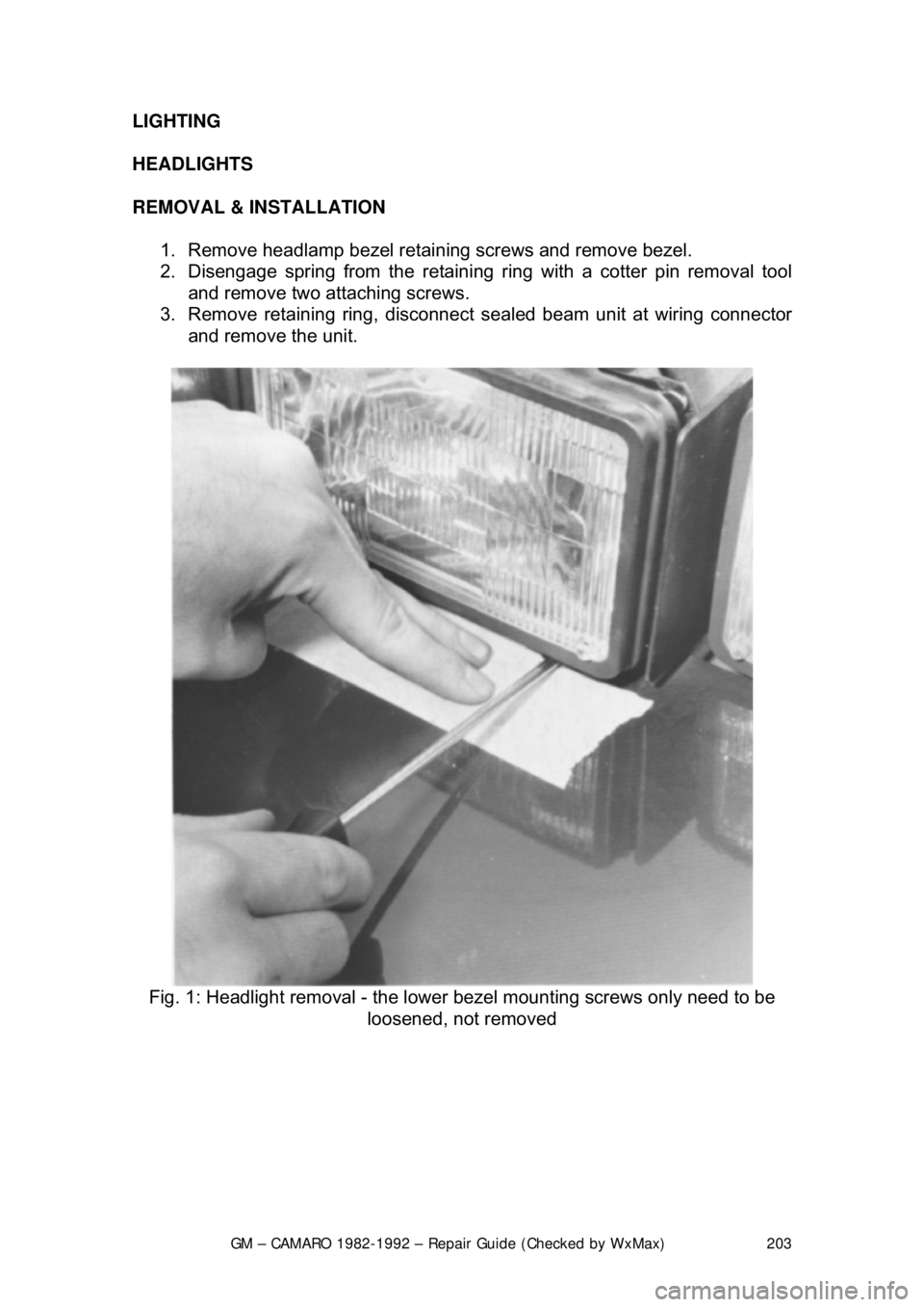
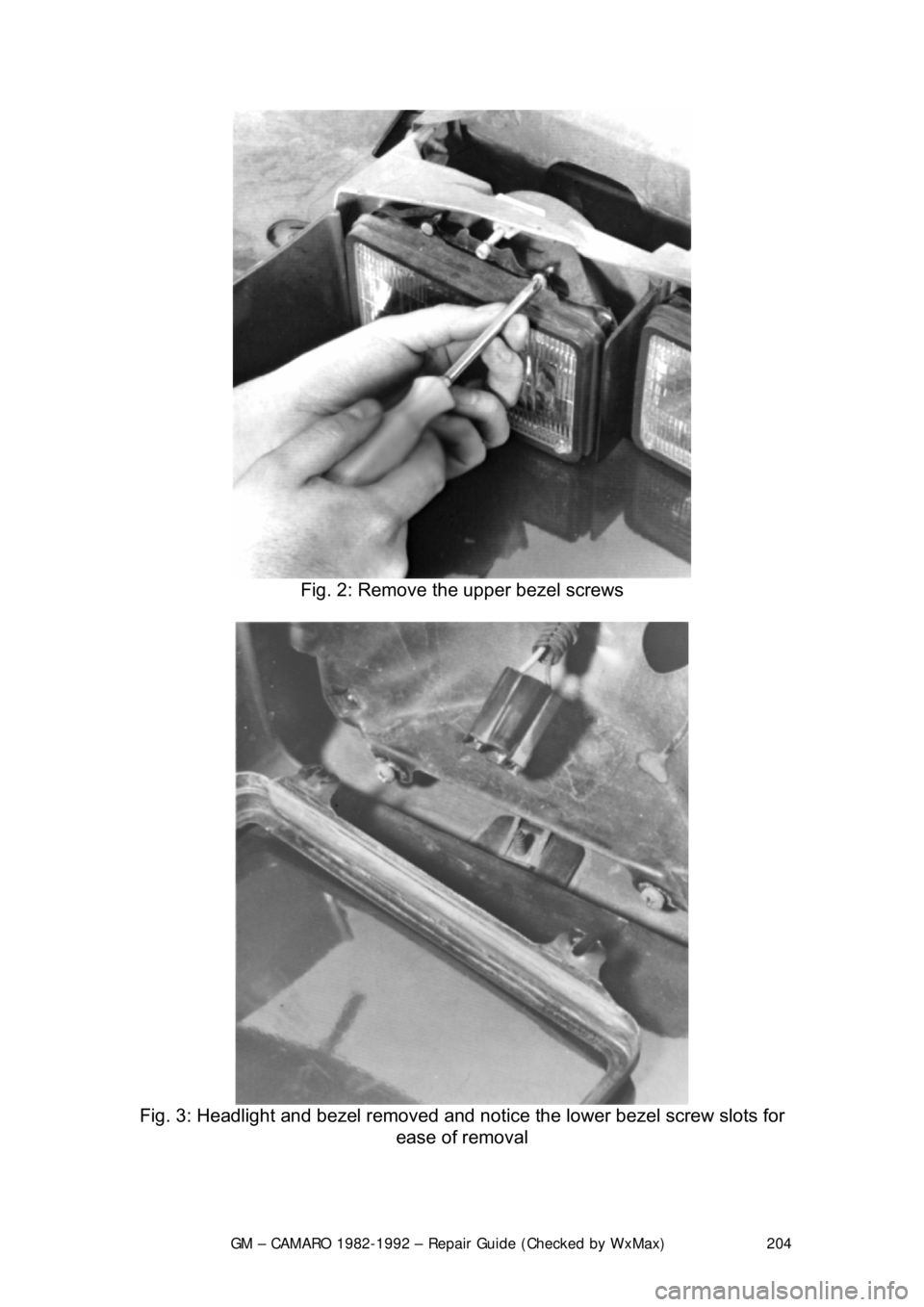
1. Remove headlamp bezel retain ing screws and remove bezel.
2. Disengage spring from the retaini ng ring with a cotter pin removal tool
and remove two attaching screws.
3. Remove retaining ring, disconnect sealed beam unit at wiring connector
and remove the unit.
Fig. 1: Headlight removal - the lowe r bezel mounting screws only need to be
loosened, not removed
Page 204 of 875
GM – CAMARO 1982-1992 – Repair Guide (Checked by WxMax) 204
Fig. 2: Remove the upper bezel screws
Fig. 3: Headlight and bezel removed and no tice the lower bezel screw slots for
ease of removal