1974 FORD CAPRI clutch
[x] Cancel search: clutchPage 99 of 205
Chapter 5 Clutch
?
4 7
/ ,
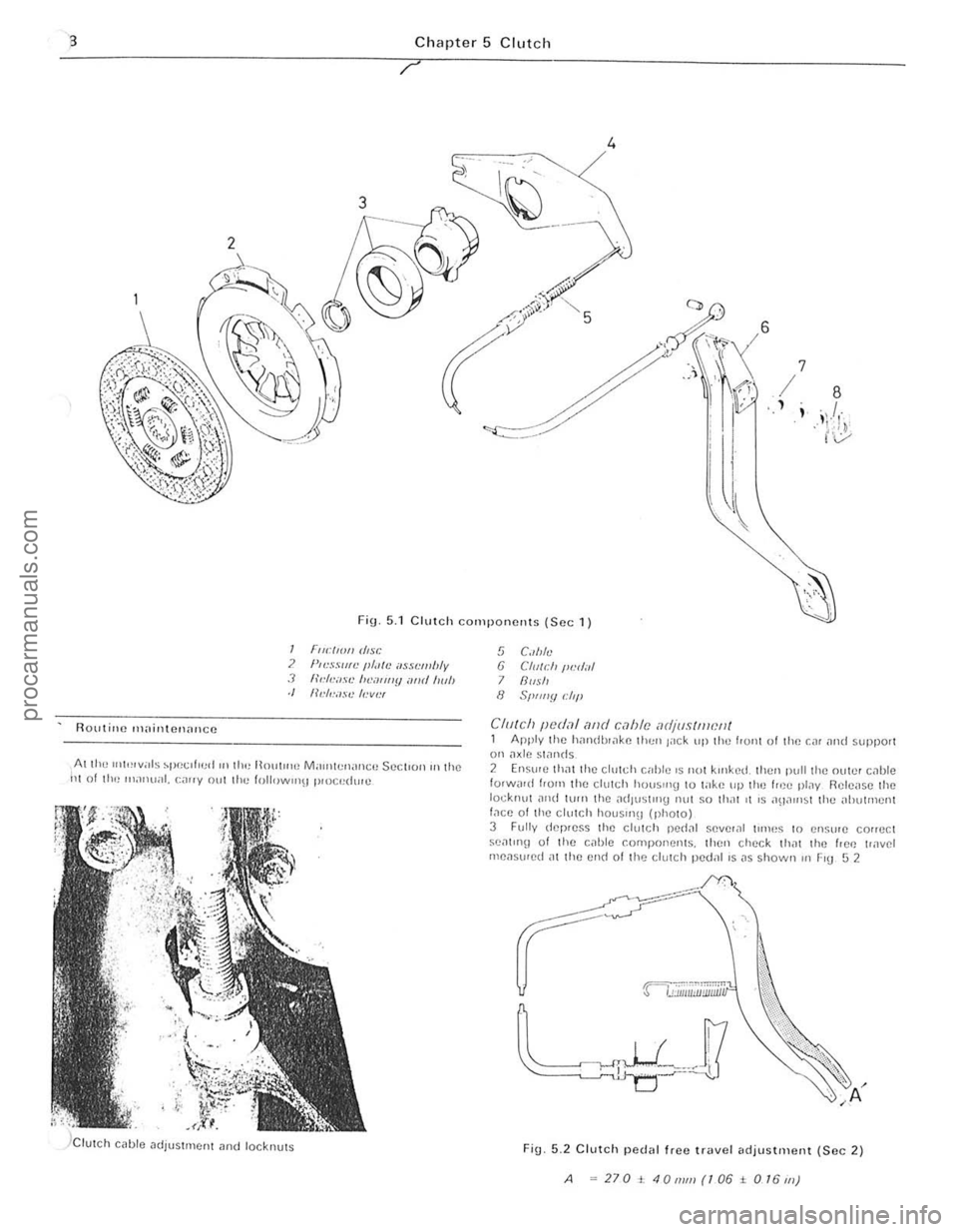
Fig 5.1 Clutch components (Sec 1)
Ruutine 1\1,lintC!1aIlCC
I FrwllO" d,sc ? }"".HIlfL' II/"'e ilHL'wlJly J "''''I.·o'R' /II .'''''''fJ oml 1001, ./ 11"',.""se /,."w"
AI tl1" U(itHv;lls spec(hud ((1 lh" llolll((1(J M ,((ntcnanCI! SeCI(OIlIll Ihe 111 of 11((1 Inilnu;!l. callY (Jut Ihe follow,,,\) pI<)c"dUlu
5 C"Ma 6 CI(I((:/' /1I:d,d 7 Rllsh 8 SI>tJlly dil'
CII/teh pUdo1l and c,1hle adjustment 1 Apply the handlH,lke til(:" J'lck lip the h01l1 ulthe Cill iII ld support 011 ilxle sl,lnds 2 Ensure thilt the c illtd, c;Jble 'S not klilked. Ihell pull the nllwr cilbt e 10lWilid hum the ch,tch houslI1g to lake up the f rec pl,lY Release the locknut ,1ud lurn the a(illlstln9 Ilut ~o thilt 11 IS an,lulst thc "i>utl1lenl f,Ke of the clutch houslnU (photo) 3 Fu lly dcp,e~s Ihe clutch pedill seve'ill ulnes 10 en~u'e correct seat ln\! of Ihe cable components. then check thilt the hOI! t(<
A .. 270t40mm(106± O/6J1l)
procarmanuals.com
Page 100 of 205
Chapter 5 Clutch 99
--.;,:;.~.--.
. '
3 I V,,'W 01 Ihe clutch wIth the Ue,IIbox r~movcd
1 If IH,<:~SS;lIy. ill'" Ihe
I Remove the ~Jenrbox .. 5 described in Chapter G (photo). 2 Ma,k Ihe chltd, cove,
II", ~1'''I'·r ""!I Uoar (photo).
1 Cili lch assemhly -inspectioll
Ex;"nIlIO IllI] 1", :lio n dISC lor we,ll ollhe In<:lIon 1ll'lIe"al. for bwkell .j ,;pllilUS. (ilSlull rOll of the rilll "ml we;lr all the splmos Unless the
. 1I:h plate IS In ve'y \Jood condlliull II is ;I false "cono"'y not 10 hi J
II""" ono ? The I"ctron d,sc should he ren ewed as as "ssemhly II IS adviscd Ih.ll th,s co\m;r~ IS prelelahle to lIymB 10 1'1 .. IIew I"ctlon IIIHIlU· :3 Chec k tho tnJchlned Iilces 01 Ihe flywheel "nd p'essure plate . lithe Ilywheells scoled. II should he relllove<1 "lid m~ch",cd Illhe preSSIJle pl.lIe IS scored.
cluic h nnd II si9nS 01 le"ks "re found. rec t,ly Ihe le"ks be/Ole hlling Ihe
clutch.
5 E x nmlllC Ihe diapl""9fll sprinu lor wear ,lIld <1
., Ch eck Ihe comt.tion ollhe dolCh spigol be .. ring in Ihe end 01 Ihe o""kshillt. Further inlorlllillion on this is given in Ch;lpICr 1.
5 Clu tc h assembly _ relitting
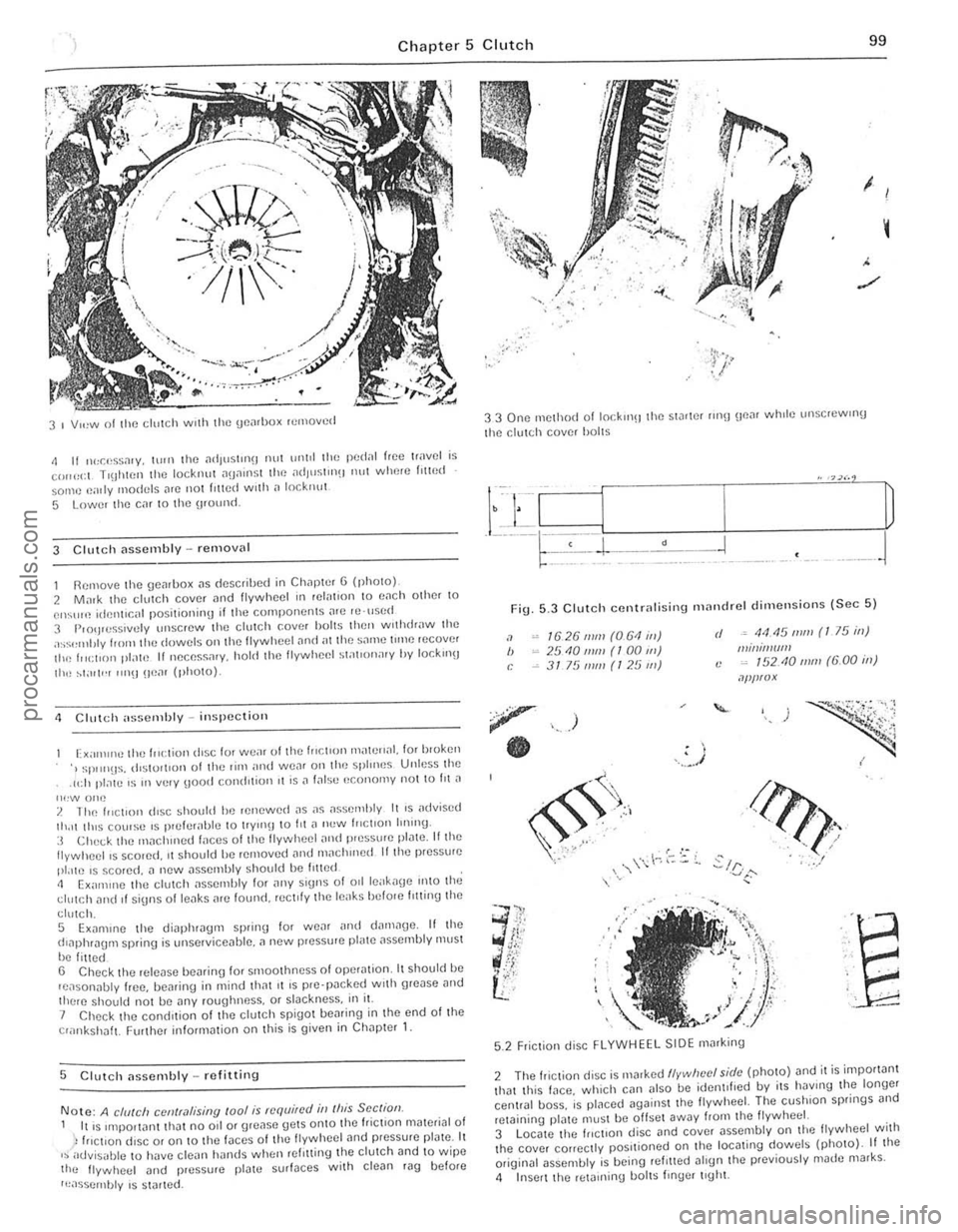
Note: A chI/eli CCII(r,l/ising roo/ is required in (his See (ion. I IllS IInpOllanllhal no od or gre.lse gelS onlO th(l friction mated,,1 01 h,c t,on diSC 01 on 10 the laces of Ihe lIywheel find pressure plalc. It ,~advisi,llle to have clean hands when rel'lIing the dolCh and 10 w ipe lho lIywheel ;lIld pressure [lla\\! surfaces wilh clean rag belore
I~assernhly IS s1
.... , ... "
'.
33 One method 01 10cklllH the Slarter lin!) \lo"r wlHle \II1SCleWll1U
the clulCh cover hailS
•
Fig . 5.3 Clulc h centr" lising nHllldrel dimellsio ns ISec 5 )
"
" ,
1626 111111 (061 ill) 25101ll11! (100 1ft) 3175 mill (125 1ft)
)
.. , . I .. ~ .
rI .• 44.15 mm (I 75 ill) IIImil!l(IfII (: ~ 15210111111 (6.00 ill)
.l/lf!f(!X
./J?f1. ' ,
.?!<'. , , ..... /
~/ r .... :./ .:..1('":'
'''r' ....... , .
. )i";; , i ,
. . ~:.. • j • ,
/'" , , -..
··E
"
.. . -
5.2 Friction disc FLYWHEEL SIDE marking
2 The friClion disc is Il,arkcd flvwlwcl shit· (photo) and il i$ impol1anl Ihal th is face . which can 11150 be idenl,lled by ils haVing the longe, cenllal boss. ;s plnced againSI Ihe lIywheel. The cushion springs and reJaining pl"te muSI b(l ollsel away hom lhe Ilywheei. 3 Loca te the Inctlon disc "nd cover "ssembly on t he lIywheel with the cover cOlleclly positioned on J he loc .. ting dowels (phOto) . If lhe oliginal assembly is being , efllled .. lIgn Ihe previously made marks .
<1 Insell Ihe reta,ning boilS I"'ger Ilghl.
,
I
I
I
I,
procarmanuals.com
Page 101 of 205
"00 Chapter 5 Clutch
53 Locmlll\J the (flCllon disc on the
f lywheel 5 .6 Cent,.,l ising the friction disc 5.7 TI\)htIJnlll!) 111" ,: 1,,[, h cover holls
6.4 The plilSllC wlls which .cWin the fclcJSC hcnrinl] in the lever (""owed) G 5 nt:lcas(l levor IOC,11;01) 011 the 1"1101 stud
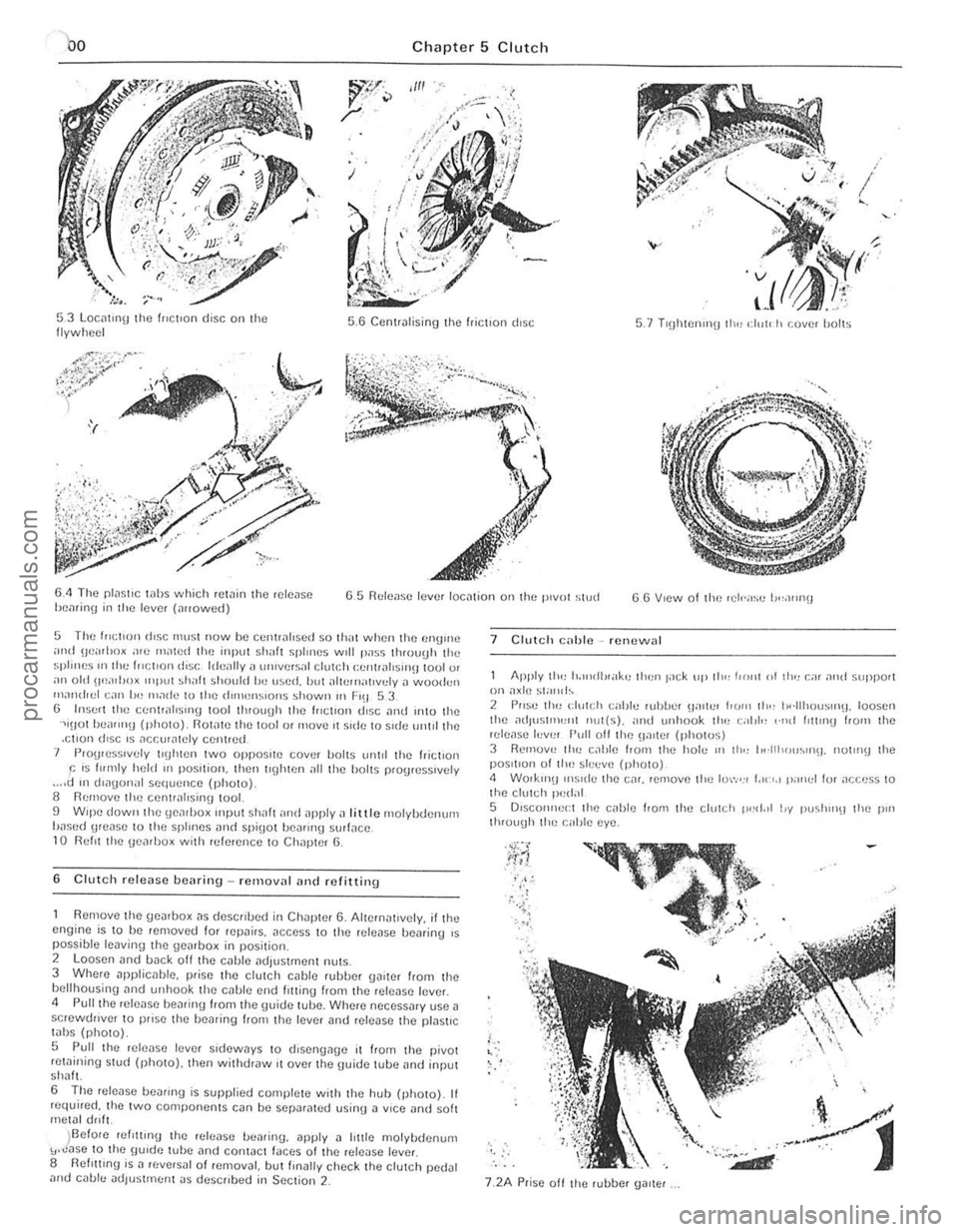
5 The f"~lI()n rt.!;c must now be Cclltrilloscd SO Ihill when the (IllUme imd !Jci"loo~ .1<0 milled Ihe input shall splmes Will pass 1I110uUll the splines III Ihe )HCIIO!) diSC Id(!,lIly a wlille.s;,' dUh;h (;C!l!r
Remove thc gcarbox "s dcscflbed in Chaptcr 6. Alternal,vely. illhe cngi ne is to bc removed for repairs. acccss 10 the rclcilse bcminy ,s possible leaving lhe gearbox in position. 2 loosen and back oil the cable adjustmcnl milS. 3 Whcre npplicable. plisc lhe ciulCh cnble fuhhel gaitcr flOm the bell housing nnd unhook thc cahle end lotting from the release fevel. <1 Puilihe release I)ealing hom the \Juide tube. Whcre necessary use a scrcwdrlver to pflse the f)Caring flom the Icvcr and lelease the pfas\lC
tabs (photo).
5 Pull t he rclease IiNCI sldcways to d,sengage it from t he pivot retaining stud (photo). thcn withdraw ,t ovcr thc IJuide tube ,1nd input shah
6 The rele ase beann\) is supplied completc w ith lhe huh (photo). If fC(luired. thc two componenlS can be scparated usinU a VICC and soh metal drill.
)Before relltllng (hc releasc bcariny. apply a lillie molybdcnum "."ase 10 the \llude tubc and contact laces of the release lever 8 flefl!1lng is a ((,versal of remov~l. butllnally chcck the clutch pedal and cable ndlUsllllenl JS descflbed in Seclion 2_
7 Clutch c;lllic -Icnewnl
Apply tlol) Io.",dl!<"k" llien lilCk "I' lilt: j'onl of 11"1 Gil o1l1d suppor( on ax il! ~!and~ 2 PIIS" th" dUlch callie whlJel (jilll'" horn lh" h'·lIhou~u'(j. lousel! the ati,US111l'JllI nul(s). ;IIHI unhook the c;,I,I" ,·nrl IlIllllB hOIll lhe release h,v,,, Pull off the !Jalter (phOlUS) 3 Ikmuv" ti,,) c,lhle frorn lhe hole II) lh., 1,,·lIh"u~"l\J. nUlo)\) lhe posltlun of lhe slccve (phOIO) <1 WOlkln\l illS Ide (hC Cilf. remove the luw,,, I,,,",,, pallel lor
j'., ;. . , , , .;{
'-,
7.2A Prisc all the rubber Ualtef
.. ~
d
procarmanuals.com
Page 102 of 205
![FORD CAPRI 1974 Workshop Manual Chapter 5 Clutch
7 2B .. and unhuok Ih" Illller C<lhlr:
6 Wu,k,n\) rn 1111] <:n\)1I1O Gornp"ln",nl pull Ihe ,;alJle Ihouu!)h Ihe
h,Jlkhea d ,n
1l1 Icmuve II trom Ihe Gil 7 Fit the new cahle 1](/manual-img/11/56932/w960_56932-101.png "FORD CAPRI 1974 Workshop Manual Chapter 5 Clutch
7 2B .. and unhuok Ih\" Illller C<lhlr:
6 Wu,k,n\) rn 1111] <:n\)1I1O Gornp\"ln\",nl pull Ihe ,;alJle Ihouu!)h Ihe
h,Jlkhea d ,n
1l1 Icmuve II trom Ihe Gil 7 Fit the new cahle 1")
Chapter 5 Clutch
7 2B .. and unhuok Ih" Illller C
h,Jlkhea d ,n
1l1 Icmuve II trom Ihe Gil' 7 Fit the new cahle 1I;;lnu " levels,, 1 of Ihe lemoval p,ucr.:du,e. Ihen adlust the ped
stcerinu colunlfl 2 Bemove the h:lt hand sp"n\J clip
d'SCOIHleCi Ihr.: cal,l"
B"!1luvlJ ti,,, <:Iuld, pell,,1 plvull"'Sh. E~;,,""'e Ih" 1',,(1;,1 ,Hld hush lu' w,-,ar ,!Ild r! necess
!) Fault dia\)llusis -clutch
Sympto m
Juddcr when laklnu up drive
ClulCh slq)S
Noise when dep,cs$UI\J clutch ped,,1
)
NOIse when ",I"as"'u clutch ped,,1
7 3 R~llII)Vln~J the ~ ,'hh, IrOIll Ihc h"tlhllu ~.n\J
FiU . 5. 4 Removinn lir e "hnch pe{!;!1 (Sec 8)
l1easun(s)
L,u,,,,, '" wr:r,n ""\1"'" ""JUnt'n~l$ (l"ld, d, sc ,;ool,I",,,,. \I'·d w,th 0'1. or 10" ··gs WOlll
Ciu1t: h c"I,l u ~1,~k""J ()I tr"ytd I'"ul ly ple~,>ure pl,He .1,>~e",IJI\'
Clu tc h d,sc stIC~"'\J Oil "'put slr,,1t spl ,o':>
Clul, ·" cirl,I"
I!'o~,," F
WOIII or (lly rul~as,) "~''''"U F
Fau lly Il,u s,>ure pl.lle n,>,>uonbly H,oku", clulCh (j'St; Cl,,>",O,,,og ~PllIlU~
101
,
! '
. , .,
, , I
,
procarmanuals.com
Page 106 of 205
) Chnpter 6 Manual gearbox ililel
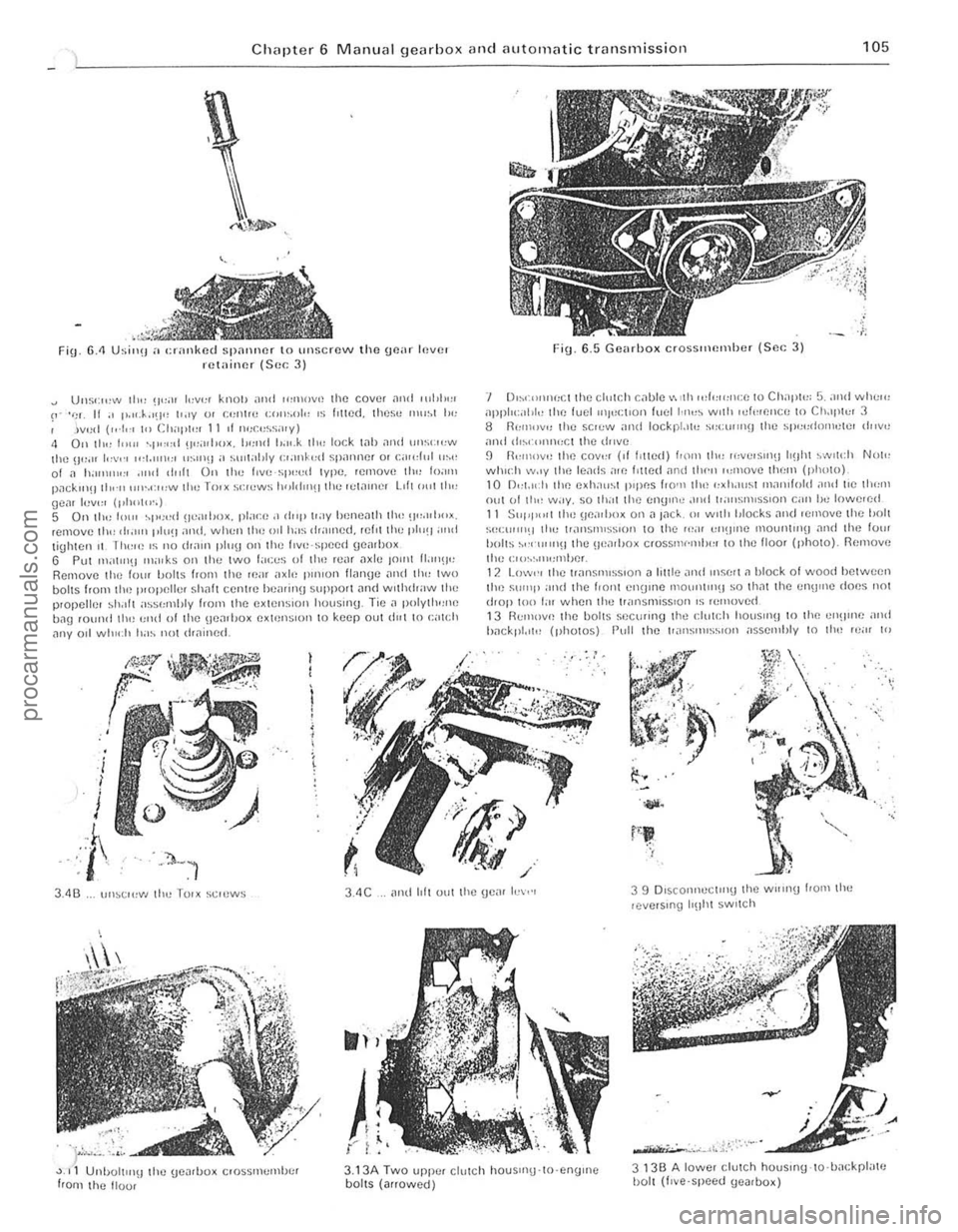
Fin. 6.<1 Usi",! a cranked spalliler to unscrew the goar Inver retainer (Sec 3)
Uus';",,,, 111" !I";)' '"'1''' knOiJ and ",lllOv,! 1he COVlJt
Fig. 6_5 Gearhox erossltH!lllhcr {Sc. ; 3)
'I 0,,,(I)I)I
:C1 the cl,,[r,h c
hn ekpl.,,!! (photos) Pull the ['.lI1SIlHS",OIl ;,sselllhly I() Ihn 'c;" 10
.,..
3.4C
).,
{" ; ",
3.13A Two upp.:. cllllCh houSIIlU-lO·engrne boilS (arrowed)
3 13B A lowe, clutch houslflg-lo·hackpl"te I)olt (I,ve'speed (JeJrbox)
procarmanuals.com
Page 107 of 205

·06 Chapter 6 Manual gearbox and automatic transmiss io n
disengilge the gearbox inpu t Shill! hom ,ho clutch p,Iot bearing ,111(1 clu tc h friction disc. I, is imporlanllhal,hc engine and transmi ssion <'lre kept in lino while this is being done. 14 When the gearbox shaft is cleDr of the clutch, remove th e
tran smissio n assembly from bCn(!illh the car.
15 When refiuing, ensure 1il1 the clut ch pilot h earing in the end althe tfilnksha h is ill plilce Jncl is scrviceDble. Tic the clutch lever 10 the clutch housing, 1 0 pr(!venllhe release le.rertrolll slipping out while the ,Wnsmission assembly is being lined. 16 Smear some molybdenum-based grease OntO the end and splines 0' the gearbox input s!mh lind refit the gearbox by reversing the fcmovili p.ocedure. 17 II is impO.IMll when offering up the {jOMOO)(. th,lt il is e~
slightly until the splines enter Do not iluempltO lo.ce the tfilllsmisslOn
ontO thO enlJlnO ThiS Illay (i
'8 Ahe •• el,uinn has been completed. chuck the 011 level Ifl t he .r
Romoye the lou. bolts hom the 1011 cove. 01 the t.ansm.sslon c~t()"sion housin!J ilnd f.om the lri"'snHs~ir)Ol eo'S<' Ilcmovflthc \:oye. s.
t.1king c
R emoYo the .eyerse idle , shah by sc.ewing a suitable bolt into Ihe end of Iho shah and then leye.ing the Sh;'lit Out uSing Iw o open ·ended spanne.s. Fi\)
.
6.6 Removing the seleclor 10lk rolillins (Sec 4)
A CIfC/'11
Fin. 6 .7 Revorso gear interlock nnd light swil c h (Sec 11)
A Ravelse liyh, switch 8 Swing C Plf/ngcr
o h!/ellocl< ball E Sc,ew IJlug
Rct.1ininy bolt F
5 M
thud gear lotwald lly lel/erinu the,n gently wrth a p
their condition. Smear all Pi/ItS wilh tr3nsmission 011 befo.e fitting .
9 Reassemble the synchroniser sleeve and hub so that the nlafks on thorn align . Inse.t the sliding keys and 1IIIhe shdrn\) key sp"ngs so Ihat Ihei. open ends afe stagge.ed re lat ive 10 each other
procarmanuals.com
Page 112 of 205
Chapter 6 Manual gearbox and automatic transmiss ion 111
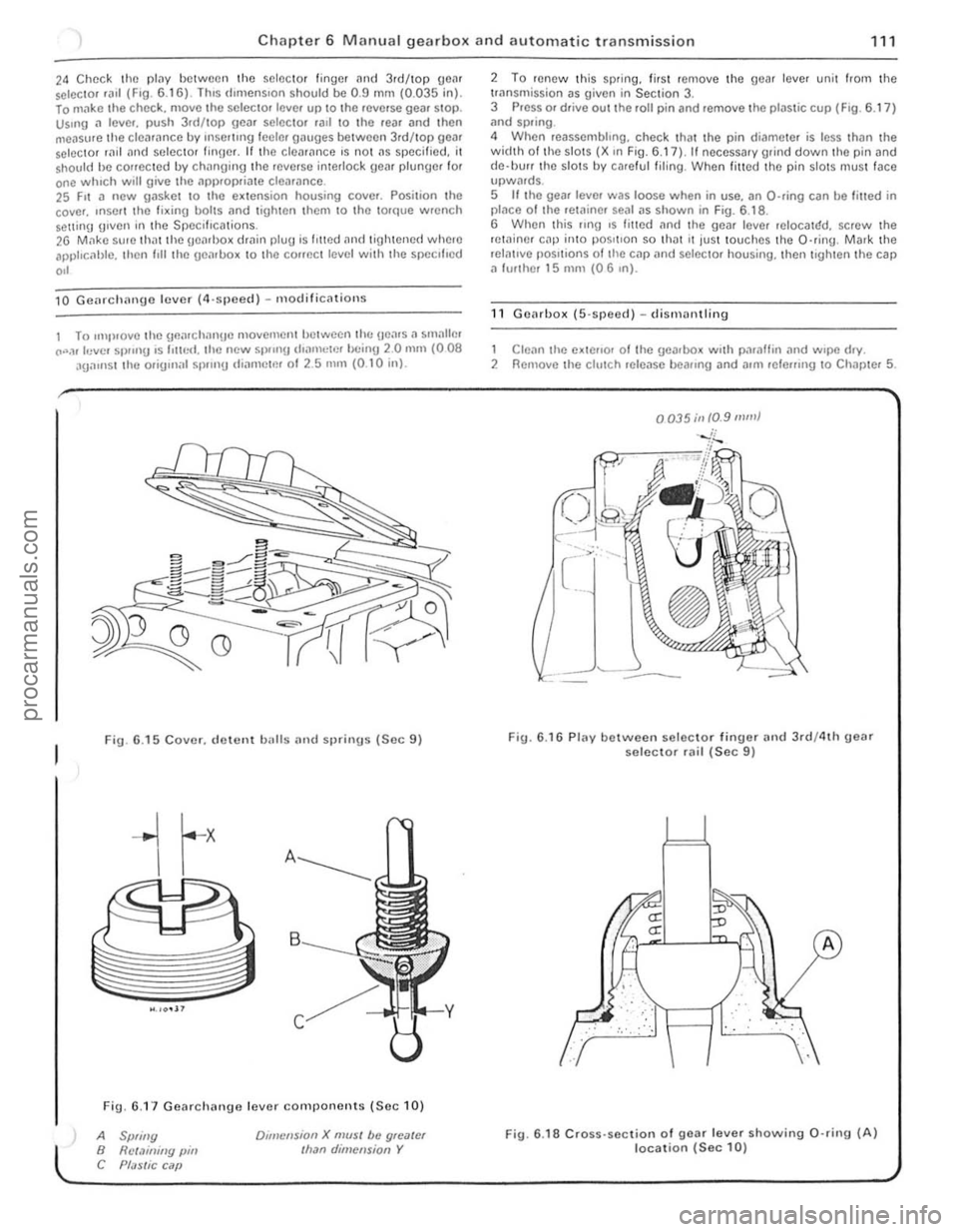
24 Chec k the plilY between the selector finger and 3.d/top geM selC{;lOr .a,1 (F,O. 6 .1 6) . lh,s d,mens,on shou ld be 0.9 mm (0.035 in). lo m"ke t he chec k. move the selec to. leve. up to the .everse gea. SlOp. Us.ng a lever. push 3.d/top gear selector .all \0 the rear and then
measure th e clea .ance by rnsel1lng leeler gauges betwee n 3rd/top gear selector rild "nd seleClOr finger. If th e cleM,mce 's no t ns specified. it shou ld he conecled by chnnging lhe .everse interlock geM plunger for one whIch will give the ,'PI).opria te clearance. 25 F,t a new gasket 10 the e~lension housing cover. Posilion the
cove •. ,nSOI I the fi~ing bolts nnd lighten Ihem 10 Ihe torque wrench Solt1inlJ g,ven in the Specifications. 26 M,1kc su, e th atthe geMl>o~ dmin plug is I,tted and tigh tened where apphc, 1hlc. then I,ll the uenlbo~ 10 the COffect level with the specl l'ed
,,'
10 Gcnrchnnge lever (4,sjleccl ) - m odificnlions
1 To ,mp,ovelhe \]flnr ch nngc movemcntlJctwecn lh(: Hea.s. , smallm CO".,r levcl Sl)!"'g ,s 1'lIr,<:I. the new 51)/,nU d,amclr'!' bc inU 20 mill (008 aga,nst the orig,n;r l sp.,n!) IIiarllctm 01 2.5 nUll (0 .1 0 inl.
Fig. 6 .15 Cover. d ewnt balls and sprinus (Sec 9)
Fig. 6.1 7 Gearchange lever components (Se c 10)
A Spliny B Rct.1illiny pin C Pf;JSlic C ilP
Dlillcnsion X mUSI be gloater Ilran dimension Y
2 To renew Ihis sp.ing. lir sl remove the gear lever unit from the trnnsmission as given in Section 3. 3 Press or drive out the roll pin and remove the plastic cup (F ig . 6.17 ) ;rnd spring .
4 When reassembhng. check that the pin di('!meter is less thiln the width 01 th e slots (X ,n Fig. 6.17), II necessary grind down the pin and
d e·llUrr the slots by ca.e ful filing . When filled the pin slotS mus t face upwMds. 5 If the gear leve. was loose when in use. an O-ring can be filled in placo o f Ihe retainer sOill as shown in Fig. 6.1 8 .
6 When this flng ,s fmed an(I the gear leve. reIOCalr:!d. screw the retainer cap inlO pos,tlon so th ilt It jus t touches th e O·ring . Mark the relntlve pOSitions of tile cap
1 Clean the e~tello. 01 Ihe gearbox w.th paraffin .,nd w.pe d.y. 2 Remove the clutch release beallng and allli lele",ng 10 Chapter 5.
0035;11 10.9 mill}
Fig. 6.16 Plav between selec to r finuer and 3rd/4th geM selector rail (Sec 9)
.. : . :,'. :", .
fLJ
··· ..
A
Fig. 6 .18 Cross· section of gear lever showing 0 ·rin9 (A) location (Sec 10)
i
i
procarmanuals.com
Page 113 of 205

Chapter 6 Manual gearbox and automatic transmission
3 Unscr(lw .1ml remove Ihe reversrnu IrUtli SWilch (rhOIO). 4 UnbO lt the clulch bellhousrrl\J f,om the /,onl of the ge~rbox. Removo Iho gaske t 5 Unscrew tllo bolts .111<1 w,thdr
7 Inve,1 the UflilrllO x
I I Select revct~e !Ica,
12 Unholl and removc Iho extension housing Irom the ,ea, of Ihe
!)en,box . t1 nece5snrv lilP tho housing wrth a soft·/aced mallet to releilse ,I t,om 1he dowels. Removo tho gnske ! {photo}.
13 P"se Ihe cove, from th e ex 1ension housing Dnd withcfrnw the speedome1e, d"vc\Jenr (photo). 14 Selec i neut,
)
r
I
~~ . '
~~~,.,::
11.3 Revc,sm!t lilmp switch 1 1.5 Clutch rdense 1.K.'111"'!1 gu,dc sl(:cve 11.6 Tal) cover and tPske
I
( j • , .
'r" i'
I ,,J'" , i
I I
Ji;:;:~"'-'--·ft ; . -. '" . I
•
.-~:~'':''-'',:.-.,
I .-. " J
11 85th \)e;II lockrrlU plilte 1 1.9A 5th eil' lock"' SP""!t 11.9B 51h !)C
11 1 1 B Ilemovong scle<:tor shaft connector
c
procarmanuals.com