2024 MAZDA CX90 parts
[x] Cancel search: partsPage 283 of 687

Smart Brake Support (SBS) forward
drive detection
NOTE
When driving on roads with few
vehicles ahead, a message may
temporarily be displayed on the
screen indicating that the front radar
sensor is dirty.
When the vehicle is driven on roads
in which there is an elevated road on
one side, the front radar sensor
function may be restricted
temporarily.
If the lead-acid battery power is
weak, the front radar sensor
detection function may decrease and
each system may not operate
normally.
When any of the following
conditions is met, the front radar
sensor may not be able to detect
vehicles ahead or obstructions
correctly.
During inclement weather.Front visibility is reduced.The vehicle is driven near facilities
or objects emitting strong radio
waves.
The rear surface of a vehicle ahead
does not reflect radio waveseffectively.
A vehicle ahead has limited areas
that can reflect radio waves.
Your vehicle is tilted.Foreign matter is adhering to parts
near the front radar sensor.
When any of the following
conditions is met, the front radar
sensor may detect vehicles in the
adjacent lane or surrounding
obstructions, or it may not be able to
detect vehicles ahead or
obstructions.
The vehicle is entering or exiting a
curve.
The vehicle is driven on a
continuously curving road.
The vehicle is driven on roads with
repeated up and downslopes.
The vehicle is driven on roads with
narrow lanes.
The vehicle is driven on poor roads
or unpaved roads.
The vehicle ahead enters the front
radar sensor’s blind spot.
The distance to the vehicle ahead
is extremely close.
The vehicle ahead is being driven
in an unstable condition.
A vehicle suddenly comes close
such as by cutting into your lane.
Front side radar sensors
The following system utilizes front side
radar sensors.
Front Cross Traffic Alert (FCTA)Smart Brake Support (SBS) Front
Crossing
NOTE
When any of the following
conditions is met, the front side
radar sensors may not be able to
detect target objects.
During inclement weather.The vehicle is driven on a sharp
curve or on bumpy roads.
Radar sensor from an adjacent
vehicle causes radio wave
interference.
The detection range of a front side
radar sensor is obstructed by an
adjacent wall or vehicle, or the
radar is reflected.
A vehicle suddenly enters the
detection range from the front or
side of your vehicle.
Driving
Radar Sensors
5-132
CX-90_8KG7-EA-22L_Edition1_new 2022-11-17 16:05:04
Page 286 of 687
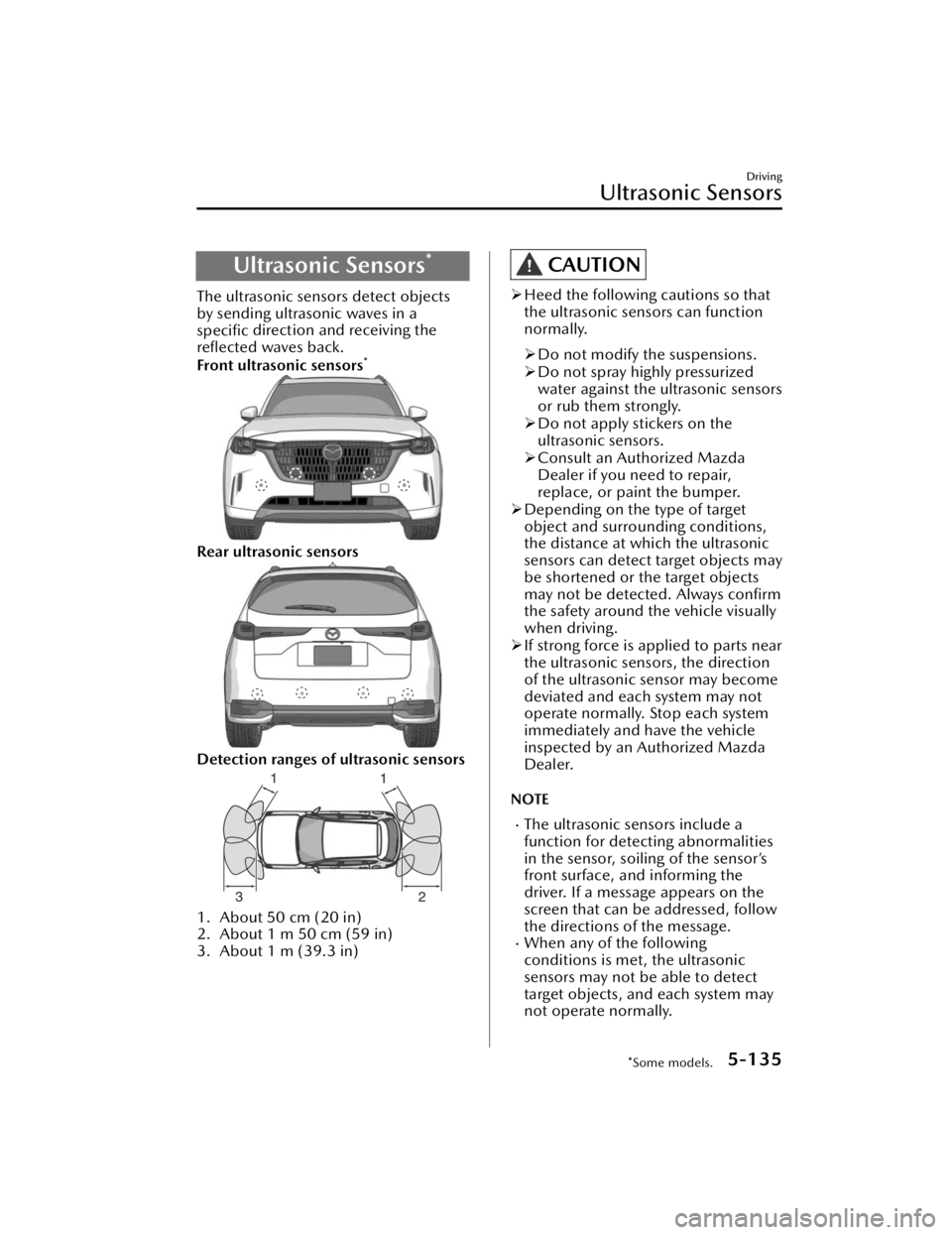
Ultrasonic Sensors*
The ultrasonic sensors detect objects
by sending ultrasonic waves in a
specific direction and receiving the
reflected waves back.
Front ultrasonic sensors
*
Rear ultrasonic sensors
Detection ranges of ultrasonic sensors
1. About 50 cm (20 in)
2. About 1 m 50 cm (59 in)
3. About 1 m (39.3 in)
CAUTION
Heed the following cautions so that
the ultrasonic sensors can function
normally.
Do not modify the suspensions.
Do not spray highly pressurized
water against the ultrasonic sensors
or rub them strongly.
Do not apply stickers on the
ultrasonic sensors.
Consult an Authorized Mazda
Dealer if you need to repair,
replace, or paint the bumper.
Depending on the type of target
object and surrounding conditions,
the distance at which the ultrasonic
sensors can detect target objects may
be shortened or the target objects
may not be detected. Always confirm
the safety around the vehicle visually
when driving.
If strong force is applied to parts near
the ultrasonic sensors, the direction
of the ultrasonic sensor may become
deviated and each system may not
operate normally. Stop each system
immediately and have the vehicle
inspected by an Authorized Mazda
Dealer.
NOTE
The ultrasonic sensors include a
function for detecting abnormalities
in the sensor, soiling of the sensor’s
front surface, and informing the
driver. If a message appears on the
screen that can be addressed, follow
the directions of the message.
When any of the following
conditions is met, the ultrasonic
sensors may not be able to detect
target objects, and each system may
not operate normally.
Driving
Ultrasonic Sensors
*Some models.5-135
CX-90_8KG7-EA-22L_Edition1_new 2022-11-17 16:05:04
Page 288 of 687

Cameras*
The cameras shoot images of the area
surrounding the vehicle.
1. Side cameras*
2. Front camera*
3. Rear camera
CAUTION
Do not disassemble, modify, or
remove a camera.
Consult an Authorized Mazda Dealer
if you need to repair, replace, or
paint parts near the cameras.
If strong force is applied to a camera,
the camera position and the
installation angle may shift. Have
your vehicle inspected by an
Authorized Mazda Dealer.
Heed the following cautions so that
the cameras can function normally.
Do not modify the suspensions.
Always use wheels of the specified
size for the front and rear wheels.
Consult an Authorized Mazda
Dealer for tire replacement.
Do not apply oil film remover,
organic solvents, wax or coating
agents, because the camera cover is
made of hard plastic. If any such
agent is applied, wipe it off using a
soft cloth immediately.
Do not rub a camera cover forcefully
with an abrasive or hard brush. The
camera cover or lens might be
scratched which might affect the
images.
If the lens of the camera is badly
damaged by flying gravel, replace the
camera. For the camera
replacement, consult an Authorized
Mazda Dealer.
Depending on the type of target
object and surrounding conditions,
the distance at which the camera can
detect target objects may be
shortened or the target objects may
not be detected. Always
confirm the
safety around the vehicle visually
when driving.
NOTE
Do not apply stickers and do not
install accessories or illuminated
number/character license plates to
the area around a camera.
Otherwise, the camera may not
correctly display the surrounding
conditions.
If a camera is affected by excessive
changes in temperature such as
pouring hot water on the camera
during cold weather, the camera may
not operate normally.
Driving
Cameras
*Some models.5-137
CX-90_8KG7-EA-22L_Edition1_new 2022-11-17 16:05:04
Page 420 of 687

Seat Ventilation*
The seat ventilation uses the fans
installed on the seats to draw air
around the seat surface and ventilate
them.
Warnings and cautionsFor Using the Seat Ventilation
CAUTION
Do not use organic solvents to clean
the seat. It may damage the seat
surface and the seat ventilation
parts.
Do not place heavy objects with
sharp projections on the seat, or
insert needles or pins into it.
Equipment to Make Cabin More Comfortable
Seat Ventilation
*Some models.6-27
CX-90_8KG7-EA-22L_Edition1_new 2022-11-17 16:05:04
Page 478 of 687

Do not use the AC power outlet if it
is damaged. If part replacement or
repair is required, consult an
Authorized Mazda Dealer.
Do not charge the vehicle from the
AC power outlet.
Do not use electrical appliances that
emit steam with the windows closed.
Otherwise, steam could negatively
affect the vehicle’s electrical
accessories.
Close the hood while using the AC
power outlet.
When using the AC power outlet, the
cooling fan in the engine compartment
could operate automatically resulting
in an accident.
CAUTION
Always close the cover when it is not
in use. If foreign matter or liquid
penetrates the AC power outlet, it
may cause a problem.
Insert electrical appliance plugs into
the AC power outlet securely. If the
plug is not inserted securely, it may
heat excessively and blow a fuse.
Do not connect multiple electrical
appliances to the AC power outlet.
Otherwise, it could cause smoking or
combustion.
Do not use electrical appliances that
exceed the prescribed power
capacity. Otherwise, it could cause a
malfunction.
Do not refuel while the AC Power
Outlet is in use.
Do not use heat appliances such as a
stove in the cabin. Otherwise, the
interior parts may melt or burn due
to heat.
How to Use the AC
Power Outlet (120 V/ 1,500 W)
Before using the electrical appliance,
always follow the precautions
indicated in the instruction manual for
the electrical appliance to be used.
Connecting
1. Press the power switch 2 timeswithout depressing the brake pedal.
2.
The indicator light flashes and turns
on when it is ready to be used.
NOTE
If the indicator light turns off after
flashing , there may be a problem
with the system. Contact an
Authorized Mazda Dealer.
3.
Open the lid and connect the
electrical appliance to be used.
Disconnecting
Press the switch again to turn off the
indicator light. Then disconnect the
electrical appliance.
Other Equipment
Accessory Sockets
7-51
CX-90_8KG7-EA-22L_Edition1_new 2022-11-17 16:05:04
Page 488 of 687

Do not connect a hydraulic
trailer-brake system to your vehicle's
brake system:
Connecting a hydraulic trailer-brake
system directly to the vehicle brake
system is dangerous and will result in
inadequate braking and possible injury.
Always use lower gears to reduce
speed:
Holding the brake pedal down too
long or too frequently is dangerous as
it could cause the brakes to overheat
and lose power, resulting in loss of
control and a serious accident. Use
lower gears to help reduce speed. Pull
off the road and allow brakes to cool
down whenever braking performance
feels reduced.
CAUTION
Do not tow a trailer during the first
1,000 km (600 miles) of your new
Mazda. If you do, you may damage
the engine, transmission, differential,
wheel bearings, and other
power-train components.
Be aware of the towing load weight
differences when towing at high
altitudes. For altitudes exceeding
1,000 meter (3,280 ft 10 in), always
reduce the towing load by 10 % for
every 1,000 meter (3,280 ft 10 in)
increase in altitude from the load
indicated under the maximum
GCWR heading in the trailer
towing-load table. If the determined
maximum total towing load weight is
exceeded, the engine and other
power-train parts may be damaged.
The total trailer weight and tongue
load can be determined by weighing
the trailer on platform scales at a
highway weight station or a trucking
company.
Make all hitch adjustments with
actual loads. Do not load and
unload vehicle while adjusting hitch.
This action will change the vehicle
height.
Do not use an axle-mounted hitch.
This may damage the axle and
related parts.
If the vehicle exceeds 100 km/h (62
mph) with a trailer in tow, the
vehicle could be damaged.
Do not connect a trailer lighting
system directly to the lighting system
of your Mazda. This may damage
your vehicle's electrical system and
lighting systems. Have a recreational
vehicle dealer or trailer rental agency
connect the system, and inspect the
brake lights and turn signals yourself
before each trip.
Other Equipment
Towing (U.S.A. and Canada)
7-61
CX-90_8KG7-EA-22L_Edition1_new 2022-11-17 16:05:04
Page 489 of 687

How to Use the Towing
NOTE
The three main causes of vehicle-trailer accidents are driver error, excessive speed,
and improper trailer loading.
Trailer towing causes higher fuel consumption.The extra weight of the trailer may strain the engine on hot days and on long or
steep upgrades. If the temperature gauge indicates overheating, turn off the air
conditioner, drive safely to the side of the road, park off the right-of-way and wait
for engine to cool.
Verify that your Mazda maintains a near-normal attitude when a loaded or
unloaded trailer is connected. Do not drive if it has an abnormal front-up or
front-down position. Inspect for incorrec t tongue load, worn suspension parts,
and trailer overloading.
Make sure the trailer is properly loaded and the cargo is secure to prevent it from
shifting.
Make sure the mirrors conform to all govern ment regulations. If they do not, install
required rear view mirrors appropriate for towing purposes.
Trailer towing-load table
Because vehicle weights vary, adjustments must be made to meet the requirements
in this table.
(U.S.A.)
Limitation items Limit values
19 inch wheel ve- hicle 21 inch wheel ve-
hicle
MAX. TTW
1,588 kg (3,500 lb)
MAX. GCWR
4,150 kg (9,148 lb)
MAX. GAWR
Front 1,320 kg (2,910 lb) 1,313 kg (2,895 lb)
Rear 1,855 kg (4,090 lb) 1,797 kg (3,962 lb)
MAX. GVWR
3,109 kg (6,854 lb)
Other Equipment
Towing (U.S.A. and Canada)
7-62
CX-90_8KG7-EA-22L_Edition1_new 2022-11-17 16:05:04
Page 503 of 687

Jack
To r e m o v e t h e j a c k
1. Remove the luggage board.
2. Remove the cargosub-compartment.
3. Turn the wing bolt and jack screwcounterclockwise.
1. Wing bolt
2. Jack screw
To s e c u r e t h e j a c k
1. Insert the wing bolt into the jack
with the jack screw pointing to the
right side and turn the wing bolt
clockwise to temporarily tighten it.
2. Tighten the jack screw clockwise.
1. Wing bolt
2. Jack screw
3. Turn the wing bolt completely to secure the jack.
Maintenance
Always keep the jack clean.Make sure the moving parts are kept
free from dirt or rust.
Make sure the screw thread is
adequately lubricated.
Other Equipment
Spare Tire and Tool Storage
7-76
CX-90_8KG7-EA-22L_Edition1_new 2022-11-17 16:05:04