2024 MAZDA CX90 inter
[x] Cancel search: interPage 226 of 687

If dirt or ice is adheres to the top of
the rain sensor on the windshield
and the windshield wipers cannot
remove the dirt or ice even after the
wipers operate several times, the
auto wipers will stop operating. If
the auto wipers stopped, remove the
dirt and ice from the windshield.
The auto wipers could operate from
the effect of strong light sources,
electromagnetic waves, or infrared
light because the rain sensor uses an
optical sensor. It is recommended
that the auto-wiper lever be
switched to the OFF position other
than when driving the vehicle under
rainy conditions.
Changing sensitivity of auto wipers
The rain sensitivity level can be
adjusted by rotating the switch.
1. Higher sensitivity
2. Normal
3. Less sensitivity
Using the Intermittent Wiper
*
The wipers operate intermittently.
Changing the intermittent operation
time
The intermittent operation time can be
adjusted by turning the switch.
1. Fast
2. Normal
3. Slow
Using the Windshield Wipers
Using continuously
Set the lever to the LO or HI position.
In the LO position, the windshield
wipers operate at low speed. In the HI
position, the wipers operate at high
speed.
Driving
Windshield Wiper/Washer Switch
*Some models.5-75
CX-90_8KG7-EA-22L_Edition1_new 2022-11-17 16:05:04
Page 228 of 687

How to Use the Rear
Wiper/Washer Switch
Using the Rear Wiper
Using intermittent operation
The wiper operates at regular intervals.
Using continuous operation
The wiper operates continuously.
Stopping the Rear Wiper
The rear wiper stops.
Using the Rear Washer
While the switch is in the position,
the washer fluid is sprayed and the
wiper operates.
NOTE
When the windshield washer fluid is
being sprayed, the rear washer fluid
will not be sprayed even if the switch is
operated.
Driving
Windshield Wiper/Washer Switch
5-77
CX-90_8KG7-EA-22L_Edition1_new 2022-11-17 16:05:04
Page 253 of 687

How to Use the Tire
Pressure Monitoring System (TPMS)
Check the tire pressure
The current tire pressure can be
checked on the center display.
Refer to the Vehicle Status Monitor
section in the Mazda Connect
Owner's Manual.
Low tire pressure warning
When a tire pressure of the specified
air pressure or lower is detected, the
TPMS warning light
turns on and a
warning indication is displayed in the
instrument cluster.
1. Message is displayed.
Action
1. Adjust the tire pressure to the appropriate pressure.
Refer to the Tires on page 10-71.
CAUTION
If the tire pressure is adjusted when
the tire is warm, the tire pressure
may lower below the specified
pressure after cooling and the
warning light may turn on. Adjust
the air pressure of the tires when
they are cold.
2. Make sure that the TPMS warning
light
is turned off.
3. If the TPMS warning light does
not turn off, drive the vehicle for 3
minutes or longer at a speed of 25
km/h (16 mph) or faster.
4. Make sure that the TPMS warning
light
is turned off.
If the TPMS warning light remains on
even after adjusting the tire pressure,
there is a possibility that the tire is flat.
CAUTION
When inspecting/adjusting the tire
pressures, do not apply excessive force
to the air valve of the tire pressure
sensor. Otherwise, the tire pressure
sensor could be damaged.
When changing tires and wheels
When changing the tires or wheels
(such as installing winter tires), it will
be necessary to register the ID signal
code of the tire pressure sensor to the
TPMS.
Have an Authorized Mazda Dealer do
the registration or register the ID signal
codes of the tire pressure sensors using
the following procedure.
NOTE
The tire pressure sensors on each
wheel have a unique ID signal code.
For the TPMS to operate correctly, the
ID signal codes of the tire pressure
sensors need to be registered to the
system.
1. Wait more than 19 minutes after changing a tire or wheel.
2. After more than 19 minutes have passed, drive the vehicle at a speed
of 25 km/h (16 mph) or faster for 3
minutes or longer. While driving,
the ID signal codes of the tire
pressure sensors are automatically
registered.
Driving
Tire Pressure Monitoring System (TPMS)
5-102
CX-90_8KG7-EA-22L_Edition1_new 2022-11-17 16:05:04
Page 270 of 687
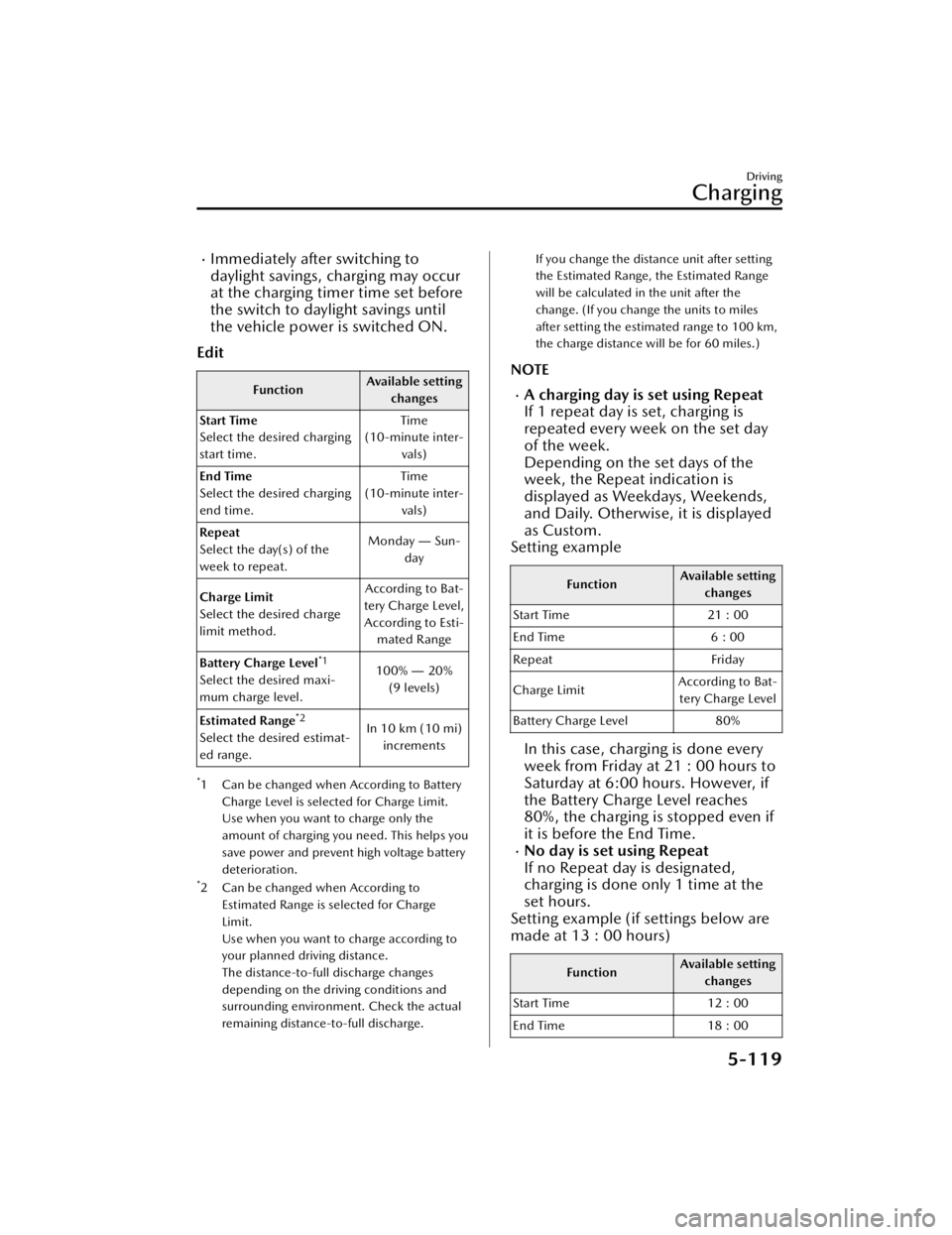
Immediately after switching to
daylight savings, charging may occur
at the charging timer time set before
the switch to daylight savings until
the vehicle power is switched ON.
Edit
Function Available setting
changes
Start Time
Select the desired charging
start time. Time
(10-minute inter- vals)
End Time
Select the desired charging
end time. Time
(10-minute inter- vals)
Repeat
Select the day(s) of the
week to repeat. Monday
― Sun-
day
Charge Limit
Select the desired charge
limit method. According to Bat-
tery Charge Level, According to Esti- mated Range
Battery Charge Level
*1
Select the desired maxi-
mum charge level. 100%
― 20%
(9 levels)
Estimated Range
*2
Select the desired estimat-
ed range. In 10 km (10 mi)
increments
*1 Can be changed when According to Battery
Charge Level is selected for Charge Limit.
Use when you want to charge only the
amount of charging you need. This helps you
save power and prevent high voltage battery
deterioration.
*2 Can be changed when According toEstimated Range is selected for Charge
Limit.
Use when you want to charge according to
your planned driving distance.
The distance-to-full discharge changes
depending on the driving conditions and
surrounding environment. Check the actual
remaining distance-to-full discharge.
If you change the distance unit after setting
the Estimated Range, the Estimated Range
will be calculated in the unit after the
change. (If you change the units to miles
after setting the estimated range to 100 km,
the charge distance will be for 60 miles.)
NOTE
A charging day is set using Repeat
If 1 repeat day is set, charging is
repeated every week on the set day
of the week.
Depending on the set days of the
week, the Repeat indication is
displayed as Weekdays, Weekends,
and Daily. Otherwise, it is displayed
as Custom.
Setting example
Function Available setting
changes
Start Time 21 : 00
End Time 6 : 00
Repeat Friday
Charge Limit According to Bat-
tery Charge Level
Battery Charge Level 80%
In this case, charging is done every
week from Friday at 21 : 00 hours to
Saturday at 6:00 hours. However, if
the Battery Charge Level reaches
80%, the charging is stopped even if
it is before the End Time.
No day is set using Repeat
If no Repeat day is designated,
charging is done only 1 time at the
set hours.
Setting example (if settings below are
made at 13 : 00 hours)
Function Available setting
changes
Start Time 12 : 00
End Time 18 : 00
Driving
Charging
5-119
CX-90_8KG7-EA-22L_Edition1_new 2022-11-17 16:05:04
Page 274 of 687

Active Safety Technology
Active safety technology supports
driver's safe driving and helps to
prevent accidents from occurring.
Active safety technology includes
driver awareness support systems and
driving support systems.
Driver Awareness Support Systems
Driver awareness support systems
assist in the recognition of roads, signs,
vehicle surroundings, and driver
fatigue.
Driver awareness support systems
include the following systems.
Nighttime visibility
High Beam Control System
(HBC).............................. page 5-140
Left/right side and rear detection
Lane Departure Warning System
(LDWS)............................ page 5-144
Blind Spot Monitoring (BSM)...............
........................................ page 5-146
Road sign recognition
Traffic Sign Recognition System
(TSR)................................ page 5-150
Inter-vehicle distance recognition
Distance & Speed Alert (DSA) .............
........................................ page 5-153
Forward obstruction detection when
accelerating at an intersection
Front Cross Traffic Alert (FCTA) ............
........................................ page 5-160
Rear obstruction detection when
leaving a parking space
Rear Cross Traffic Alert (RCTA) .............
........................................ page 5-163
Full-surround recognition
360° View Monitor........... page 5-206
Driver fatigue detection
Driver Attention Alert (DAA) ...............
........................................ page 5-155
Driver Monitoring (DM).... page 5-157
Driver Support Systems
Driver support systems assist in
acceleration, deceleration, and
steering operations while driving.
Driver support systems include the
following systems.
Inter-vehicle distance
Mazda Radar Cruise Control
(MRCC)........................... page 5-165
Inter-vehicle distance and lane
keeping
Cruising & Traffic Support (CTS)...........
........................................ page 5-175
Lane departure
Lane Keep Assist System (LAS) .............
........................................ page 5-188
Lane keeping
Emergency Lane Keeping (ELK) ............
........................................ page 5-191
Driving
i-ACTIVSENSE
5-123
CX-90_8KG7-EA-22L_Edition1_new 2022-11-17 16:05:04
Page 279 of 687

Do not apply accessories, stickers, or
film to the windshield near the
Forward Sensing Camera (FSC). If the
area in front of the Forward Sensing
Camera (FSC) lens is obstructed, it
will cause the system to not operate
correctly even if it is transparent.
Always keep the windshield glass
around the Forward Sensing Camera
(FSC) clean by removing dirt or
fogging. If the windshield is fogged,
press the windshield defroster
switch.
The Forward Sensing Camera (FSC)
includes a function for detecting a
soiled windshield and informing the
driver, however, depending on the
conditions, it may not detect plastic
shopping bags, water or snow on the
windshield. In such cases, the system
cannot accurately determine a
vehicle or obstruction in front and
may not be able to operate normally.
Always drive carefully and pay
attention to the road ahead.
When cleaning the windshield, do
not allow glass cleaners or similar
cleaning fluids to get on the Forward
Sensing Camera (FSC) lens. In
addition, do not touch the Forward
Sensing Camera (FSC) lens.
Consult an Authorized Mazda Dealer
regarding cleaning the interior side of
the windshield around the Forward
Sensing Camera (FSC).
If there are cracks or damage caused
by flying gravel or debris on the
windshield, always have the
windshield replaced. Consult an
Authorized Mazda Dealer before
replacing the windshield.
Consult an Authorized Mazda Dealer
before doing repairs around the
Forward Sensing Camera (FSC).When doing repairs around the
rearview mirror, consult an
Authorized Mazda Dealer.
Always use tires of the specified size
and the same manufacturer, brand,
and tread pattern on all 4 wheels. In
addition, do not use tires with
significantly different wear patterns
or tire pressures on the same vehicle
(including temporary spare tire).
NOTE
If the Forward Sensing Camera (FSC)
does not function normally due to
fog or the vehicle being driven
towards the sun, the functions
related to the Forward Sensing
Camera (FSC) are temporarily
stopped. In this case, the following
warning indications turn on.
However, this does not indicate a
problem.
HBC warning indicationi-ACTIVSENSE warning indicationSBS OFF indicationIf the Forward Sensing Camera (FSC)
does not function normally due to
high temperatures, the functions
related to the Forward Sensing
Camera (FSC) are temporarily
stopped. In this case, the following
warning indications turn on.
However, this does not indicate a
problem. Cool down the area
around the Forward Sensing Camera
(FSC) such as by turning on the air
conditioner.
HBC warning indicationi-ACTIVSENSE warning indicationSBS OFF indication
Driving
Forward Sensing Camera (FSC)
5-128
CX-90_8KG7-EA-22L_Edition1_new 2022-11-17 16:05:04
Page 283 of 687

Smart Brake Support (SBS) forward
drive detection
NOTE
When driving on roads with few
vehicles ahead, a message may
temporarily be displayed on the
screen indicating that the front radar
sensor is dirty.
When the vehicle is driven on roads
in which there is an elevated road on
one side, the front radar sensor
function may be restricted
temporarily.
If the lead-acid battery power is
weak, the front radar sensor
detection function may decrease and
each system may not operate
normally.
When any of the following
conditions is met, the front radar
sensor may not be able to detect
vehicles ahead or obstructions
correctly.
During inclement weather.Front visibility is reduced.The vehicle is driven near facilities
or objects emitting strong radio
waves.
The rear surface of a vehicle ahead
does not reflect radio waveseffectively.
A vehicle ahead has limited areas
that can reflect radio waves.
Your vehicle is tilted.Foreign matter is adhering to parts
near the front radar sensor.
When any of the following
conditions is met, the front radar
sensor may detect vehicles in the
adjacent lane or surrounding
obstructions, or it may not be able to
detect vehicles ahead or
obstructions.
The vehicle is entering or exiting a
curve.
The vehicle is driven on a
continuously curving road.
The vehicle is driven on roads with
repeated up and downslopes.
The vehicle is driven on roads with
narrow lanes.
The vehicle is driven on poor roads
or unpaved roads.
The vehicle ahead enters the front
radar sensor’s blind spot.
The distance to the vehicle ahead
is extremely close.
The vehicle ahead is being driven
in an unstable condition.
A vehicle suddenly comes close
such as by cutting into your lane.
Front side radar sensors
The following system utilizes front side
radar sensors.
Front Cross Traffic Alert (FCTA)Smart Brake Support (SBS) Front
Crossing
NOTE
When any of the following
conditions is met, the front side
radar sensors may not be able to
detect target objects.
During inclement weather.The vehicle is driven on a sharp
curve or on bumpy roads.
Radar sensor from an adjacent
vehicle causes radio wave
interference.
The detection range of a front side
radar sensor is obstructed by an
adjacent wall or vehicle, or the
radar is reflected.
A vehicle suddenly enters the
detection range from the front or
side of your vehicle.
Driving
Radar Sensors
5-132
CX-90_8KG7-EA-22L_Edition1_new 2022-11-17 16:05:04
Page 284 of 687

The target object is extremely
small.
The target object is extremely low/
high.
A vehicle approaches while
turning.
A vehicle that has stopped
suddenly starts to move.
Multiple objects move at the same
time.
The bumper around a front side
radar sensor is deformed.
Foreign matter is adhering to the
bumper around a front side radar
sensor.
The temperature near a front side
radar sensor is extremely hot.
The front side radar sensors may not
detect the following target objects.
Animals.Pedestrians.Bicycles and small motorcycles
moving at a low speed.
Shopping carts.Stationary objects on the road or
roadside.
Vehicles with shapes that may not
reflect radar waves.
Rear side radar sensors
The following systems utilize rear side
radar sensors.
Blind Spot Monitoring (BSM)Blind Spot Monitoring (BSM) Vehicle
Exit Warning
Rear Cross Traffic Alert (RCTA)Smart Brake Support (SBS) Rear
Crossing
Emergency Lane Keeping (ELK) Blind
Spot Assist
NOTE
When any of the following
conditions is met, the rear side radar
sensors may not be able to detect
target objects.
During inclement weather.The vehicle is driven on a sharp
curve or on bumpy roads.
Radar sensor from an adjacent
vehicle causes radio wave
interference.
The detection range of a front side
radar sensor is obstructed by an
adjacent wall or vehicle, or the
radar is reflected.
A vehicle suddenly enters the
detection range from the front or
side of your vehicle.
The target object is extremely
small.
The target object is extremely low/
high.
A vehicle approaches while
turning.
A vehicle that has stopped
suddenly starts to move.
Multiple objects move at the same
time.
The bumper around a rear side
radar sensor is deformed.
Foreign matter is adhering to the
bumper around a rear side radar
sensor.
The temperature near a rear side
radar sensor is extremely hot.
When towing a trailer.The rear side radar sensors may not
detect the following target objects.
Animals.Pe de st r ia ns .Bicycles and small motorcycles
moving at a low speed.
Shopping carts.Stationary objects on the road or
roadside.
Driving
Radar Sensors
5-133
CX-90_8KG7-EA-22L_Edition1_new 2022-11-17 16:05:04