2024 MAZDA CX90 warning
[x] Cancel search: warningPage 350 of 687
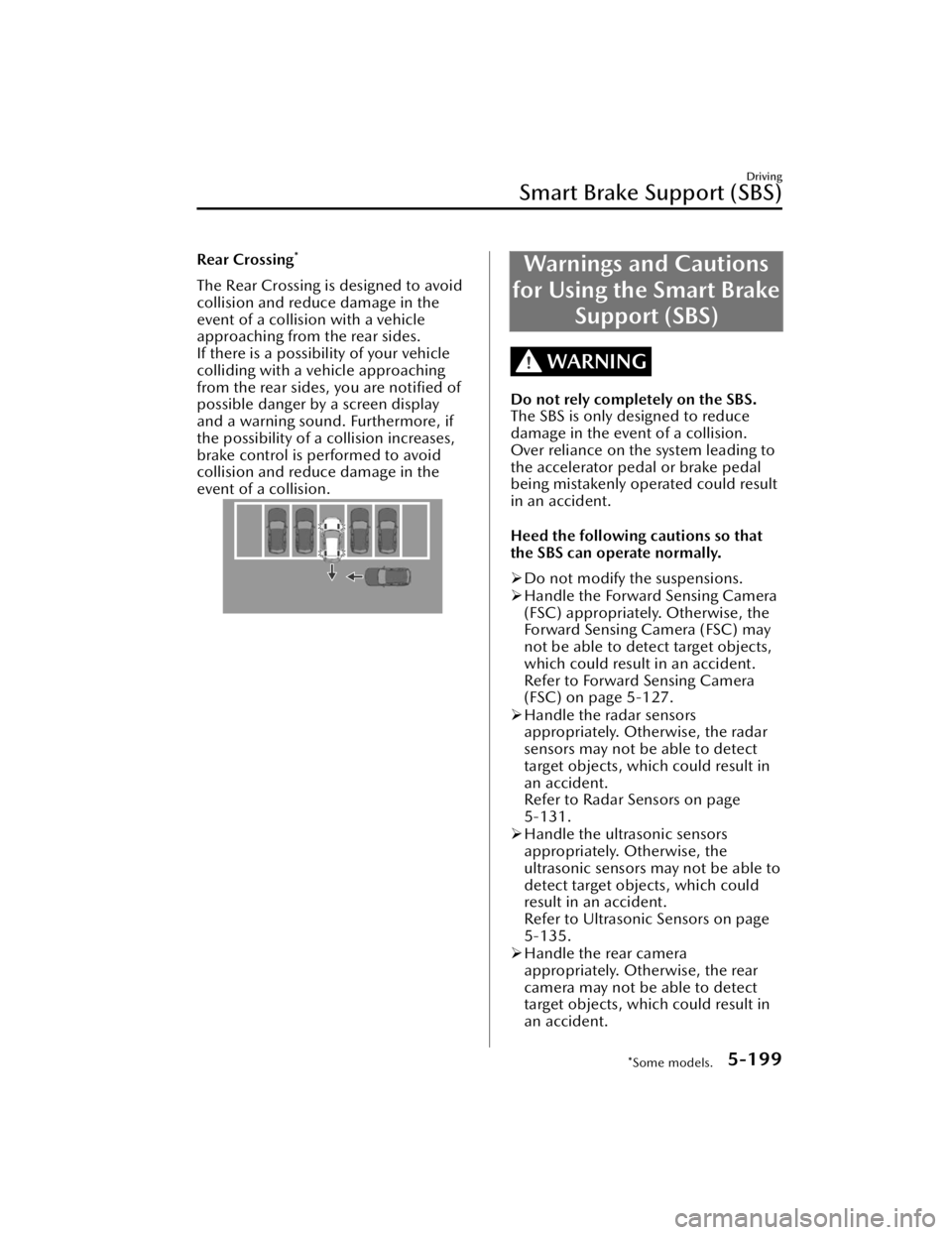
Rear Crossing*
The Rear Crossing is designed to avoid
collision and reduce damage in the
event of a collision with a vehicle
approaching from the rear sides.
If there is a possibility of your vehicle
colliding with a vehicle approaching
from the rear sides, you are notified of
possible danger by a screen display
and a warning sound. Furthermore, if
the possibility of a collision increases,
brake control is performed to avoid
collision and reduce damage in the
event of a collision.
Warnings and Cautions
for Using the Smart Brake Support (SBS)
WARNING
Do not rely completely on the SBS.
The SBS is only designed to reduce
damage in the event of a collision.
Over reliance on the system leading to
the accelerator pedal or brake pedal
being mistakenly operated could result
in an accident.
Heed the following cautions so that
the SBS can operate normally.
Do not modify the suspensions.
Handle the Forward Sensing Camera
(FSC) appropriately. Otherwise, the
Forward Sensing Camera (FSC) may
not be able to detect target objects,
which could result in an accident.
Refer to Forward Sensing Camera
(FSC) on page 5-127.
Handle the radar sensors
appropriately. Otherwise, the radar
sensors may not be able to detect
target objects, which could result in
an accident.
Refer to Radar Sensors on page
5-131.
Handle the ultrasonic sensors
appropriately. Otherwise, the
ultrasonic sensors may not be able to
detect target objects, which could
result in an accident.
Refer to Ultrasonic Sensors on page
5-135.
Handle the rear camera
appropriately. Otherwise, the rear
camera may not be able to detect
target objects, which could result in
an accident.
Driving
Smart Brake Support (SBS)
*Some models.5-199
CX-90_8KG7-EA-22L_Edition1_new 2022-11-17 16:05:04
Page 351 of 687

Refer to Cameras on page 5-137.
Always check the surrounding area
visually.
The operation of the SBS has certain
limitations. Always confirm the safety
around the vehicle visually when
driving.
CAUTION
If any of the following conditions is
met, turn the SBS
off to prevent a
mis-operation.
A trailer is pulled or an accessory
such as a bicycle carrier is installed
to the rear of the vehicle.
The vehicle is driven on rough
roads such as in areas where there
is grass and foliage or off-road.
Always use tires of the specified size
and the same manufacturer, brand,
and tread pattern on all 4 wheels. In
addition, do not use tires with
significantly different wear patterns
on the same vehicle. If such
improper tires are used, the SBS may
not operate normally.
How to Use the Smart
Brake Support (SBS)
NOTE
During the SBS brake control, the
brake pedal may move rearward or
become stiff. The brakes are operating,
but continue to depress the brake
pedal.
When the forward detection function
operates*
The forward detection function
operates when all of the following
conditions are met.
(If an object is a vehicle ahead)
The vehicle speed is about 4 km/h
(3 mph) or faster.
(If an object is a bicycle/pedestrian)
The vehicle speed is about 10
km/h to 80 km/h (6.3 mph to 49
mph).
The DSC does not operate.The system determines that there is a
possibility of a collision with an
object ahead.
When the forward detection function
operates, the driver is notified of the
danger by the screen display and
warning sound. Furthermore, if the
possibility of a collision increases,
brake control is performed.
Instrument cluster
Driving
Smart Brake Support (SBS)
5-200*Some models.
CX-90_8KG7-EA-22L_Edition1_new 2022-11-17 16:05:04
Page 352 of 687

1. “BRAKE!”
Active driving display
1. “BRAKE!”
NOTE
If any of the following conditions is
met, the forward detection function
may not operate normally.
The Forward Sensing Camera (FSC)
cannot detect target objects.
Refer to Forward Sensing Camera
(FSC) on page 5-127.
The front radar sensor cannot
detect target objects.
Refer to Radar Sensors on page
5-131.
When there is the possibility of a
partial contact with a target object.
The driver deliberately performs
driving operations (accelerator pedal
operation, steering wheel operation,
selector lever operation, and turn
signal lever operation).
If any of the follo wing conditions is
met, the forward detection function
may operate.
An animal or object on the road is
detected.
Passing an approaching vehicle
while rounding a curve.
Vehicle is passing through a narrow
gate or a gate with a low ceiling.
There is a metal object, bump, or a
protruding object on the road.
(Vehicles with Driver Monitoring
(DM))
If the system determines that the
driver is not paying attention to the
road, it activates the collision
warning earlier than normal.
If the forward detection function
performs brake control and the
vehicle is stopped, the system will
continue to hold the brakes for a
brief time unless there is an
operation performed by the driver.
The operation distance and volume
of the collision warning can be
changed.
Refer to the Settings section in the
Mazda Connect Owner's Manual.
The Turn-Across Tra ffi c operation
conditions*
The Turn-Across
Tra ffi c operates when
all of the following conditions are met.
The vehicle speed is about 4 km/h
to 20 km/h (3 mph to 12 mph).
The left turn signal light is turned on
and the vehicle is turning left.
A lane line between your vehicle and
the vehicle approaching in the
opposite direction is detected.
The system determines that there is a
possibility of collision with an object
ahead.
When the Turn-Across Tra ffi c operates,
the driver is notified of the danger by
the screen display and warning sound.
Furthermore, if the possibility of a
collision increases, brake control is
performed.
Instrument cluster
Driving
Smart Brake Support (SBS)
*Some models.5-201
CX-90_8KG7-EA-22L_Edition1_new 2022-11-17 16:05:04
Page 354 of 687

The accelerator pedal or brake
pedal is being operated.
The steering wheel is being
operated.
The turn signal lever is being
operated.
If Front Crossing performs brake
control and the vehicle is stopped,
the vehicle is held stopped until the
estimated passing time of the target
vehicle has elapsed.
When the intersection accident
avoidance assist function operates*
The intersection accident avoidance
assist function operates when all of the
following conditions are met.
The vehicle speed is about 8 km/h
to 20 km/h (5 mph to 12 mph).
The DSC is not operating.The system determines that there is a
possibility of a collision with an
object ahead.
If the intersection accident avoidance
assist function operates, a screen
display and warning sound the driver
notify the driver of the danger.
Furthermore, if the possibility of a
collision increases, brake control is
performed.
Instrument cluster
1. “BRAKE!”
Active driving display
1. “BRAKE!”
NOTE
If the Forward Sensing Camera (FSC)
cannot detect objects, the
intersection accident avoidance
assist function may not operate
normally.
Refer to Forward Sensing Camera
(FSC) on page 5-127.
If the intersection accident
avoidance assist function performs
brake control and the vehicle is
stopped, the system will continue to
hold the brakes for a brief time
unless there is an operation
performed by the driver.
When the rearward detection
function operates*
The rearward detection function
operates when all of the following
conditions are met.
The vehicle speed is about 2 km/h
to 15 km/h (2 mph to 9.3 mph).
The system determines that there is a
possibility of collision with an object
at the rear.
When the rearward detection function
operates, the screen display and
warning sound notify the driver of the
danger. Furthermore, if the possibility
of a collision increases, brake control is
performed.
Instrument cluster
Driving
Smart Brake Support (SBS)
*Some models.5-203
CX-90_8KG7-EA-22L_Edition1_new 2022-11-17 16:05:04
Page 355 of 687

1. “BRAKE!”
Active driving display
1. “BRAKE!”
NOTE
If any of the following conditions is
met, the rearward detection function
may not operate normally.
The rear ultrasonic sensors cannot
detect an object.
Refer to Ultrasonic Sensors on
page 5-135.
The rear camera cannot detect an
object.
Refer to Cameras on page 5-137.
If any of the following conditions is
met, the rearward detection function
may operate.
There is a hanging curtain.Vehicle is passing through a narrow
gate or a gate with a low ceiling.
There is a metal object, bump, or a
protruding object on the road.
If the rearward detection function
performs brake control and the
vehicle is stopped, the system will
continue to hold the brakes for a
brief time unless there is an
operation performed by the driver.
When the Rear Crossing is operating
*
The Rear Crossing operates when all of
the following cond itions are met.
The vehicle speed is about 15 km/h
(9.3 mph) or slower.
The system determines that there is a
possibility of a collision with a
vehicle approaching from a rear side.
When the Rear Crossing operates, the
screen display and warning sound
notify the driver is notified of the
danger. Furthermore, if the possibility
of a collision increases, brake control is
performed.
Instrument cluster
1. “BRAKE!”
Active driving display
1. “BRAKE!”
NOTE
If any of the following conditions is
met, the Rear Crossing may not
operate normally.
The rear side radar sensors cannot
detect an object.
Refer to Radar Sensors on page
5-131.
A vehicle is approaching directly
from the rear of your vehicle.
A vehicle is approaching at an
angle from the rear of your vehicle.
A vehicle is approaching from a
direction at an acute angle.
If any of the following conditions is
met, the Rear Crossing may operate.
There is a hanging curtain.Vehicle is passing through a narrow
gate or a gate with a low ceiling.
Driving
Smart Brake Support (SBS)
5-204*Some models.
CX-90_8KG7-EA-22L_Edition1_new 2022-11-17 16:05:04
Page 361 of 687

Warnings and Cautions for Using the 360° View
Monitor
WARNING
Always confirm the safety of the area around the vehicle visually when driving.
The 360° View Monitor is an auxiliary device which assists the driver in checking the
safety of the area around the vehicle.
Do not rely completely on the 360° View Monitor.
The shooting range of the cameras and detection range of the sensors are limited.
For example, the following locations displayed on the screen may be blind spots
and target objects may not be visible.
Areas in black on screen
Seams where each of camera images merge
See-Through View may not be able to accurately display obstructions near the
seams of the image.
Vehicle width extension lines and projected vehicle paths are only estimates.
Images displayed on the display may differ from the actual conditions.
Driving
360° View Monitor
5-210
CX-90_8KG7-EA-22L_Edition1_new 2022-11-17 16:05:04
Page 374 of 687

Secondary CollisionReduction
*
The Secondary Collision Reduction
reduces secondary damage by
decelerating the vehicle when it is
damaged in a collision to the extent
that the airbags are deployed while
driving.
If a collision occurs to the extent that
the airbags are deployed while driving,
the hazard warning lights flash to alert
surrounding vehicles and the brakes
are controlled to reduce damage in the
event of a collision with an obstruction
or other object.
Warnings and Cautions
for Using the Secondary Collision Reduction
WARNING
Do not rely completely on the
Secondary Collision Reduction.
The Secondary Collision Reduction
may not operate normally depending
on various conditions such as the
accident condition, component part
damage condition, target object
condition, weather conditions, or
traffic conditions. Do not rely
completely on the system and make
it your responsibility as a driver to
drive the vehicle.
The functions of the Secondary
Collision Reduction have limitations.
If you neglect to operate the brake
and accelerator pedals correctly, it
could result in serious injury.
Driving
Secondary Collision Reduction
*Some models.5-223
CX-90_8KG7-EA-22L_Edition1_new 2022-11-17 16:05:04
Page 375 of 687

How to Use the
Secondary Collision Reduction
When the Secondary Collision
Reduction operates
The Secondary Collision Reduction
operates if the vehicle is damaged in a
collision to the extent that the airbags
are deployed while driving.
When the Secondary Collision
Reduction operates, the system
controls and applies the brakes until
the vehicle stops. In addition, the
hazard warning lights continue to flash.
After the vehicle stops, the parking
brake is applied by the Electric Parking
Brake (EPB).
NOTE
The brake lights turn on while the
brakes are operating by the system
control.
If there is a malfunction with the
electric parking brake (EPB), the
brakes are released by the system
control after the vehicle is stopped.
The settings for the Secondary
Collision Reduction system differ
depending on the grade/specification-separate equipment.
Secondary Collision Reduction is
disabled
If any of the following conditions is
met, the Second ary Collision
Reduction is canceled.
A certain period of time has passed
since the system operated.
After stopping the vehicle, the
accelerator pedal is strongly
depressed 3 times.
The parking brake is released after
the Electric Parking Brake (EPB)
operates.
NOTE
If the driver's brake pedal depression
force is stronger than the system's
brake control, the driver's brake
operation takes priority.
Flashing of the hazard warning lights
by the system control is canceled
when any of the following operations
is performed.
Hazard warning light switch is
pressed.
Vehicle power is switched OFF.
Driving
Secondary Collision Reduction
5-224
CX-90_8KG7-EA-22L_Edition1_new 2022-11-17 16:05:04