2024 MAZDA CX90 Main battery
[x] Cancel search: Main batteryPage 248 of 687

(SPORT Mode)
(NORMAL Mode)
(EV Mode)
(OFF-ROAD Mode)
NOTE
TOWING mode can be selected only
when electrically connected to the
trailer using a Mazda genuine trailer
hitch. In addition, it may take some
time until the connection is detected
and TOWING mode is displayed.
Consult an Authorized Mazda Dealer
for details.
Depending on driving conditions
when selecting TOWING mode/
SPORT mode/OFF-ROAD mode, the
vehicle may perform shift-down or
accelerate slightly.
When SPORT mode/OFF-ROAD
mode is selected, driving the vehicle
at higher engine speeds increases
and fuel economy may worsen.
Canceling SPORT mode/OFF-ROAD
mode during normal driving is
recommended.
When setting the Mazda Radar
Cruise Control (MRCC) while driving
in SPORT mode, the mode is
switched to NORMAL mode. In
addition, while the MRCC is being
used, the mode cannot be switched
to SPORT mode.
Switching to EV mode may not be
possible depending on the driving
operations, driving conditions, and
high voltage battery condition.
When the system determines that
the engine needs to be started while
the vehicle is being driven in EV
mode, the mode is switched to
NORMAL mode.
The remaining distance-to-full
discharge for EV mode may
decrease, even when the vehicle is
being driven in a mode other than
EV mode.
The maximum speed in EV mode is
140 km/h (86 mph).
The drive mode cannot be switched
in the following cases.
The Antilock Brake System (ABS) is
operating.
The Traction Control System (TCS)
is operating.
The Dynamic Stability Control
(DSC) is operating.
The steering wheel is being
operated abruptly.
The driving mode in which the
display in the instrument cluster is
grayed out cannot be selected.
When the vehicle power is switched
OFF, the mode returns to NORMAL
mode. However, TOWING mode
before switching the vehicle power
OFF is maintained only when the
trailer is connected in TOWING
mode.
Driving
Mazda intelligent Drive Select (Mi-Drive)
5-97
CX-90_8KG7-EA-22L_Edition1_new2022-11-17 16:05:04
Page 268 of 687

Charge indicator
The illumination/flash pattern of the
charge indicator can be checked using
the labels on the charge lid.
Charge indicator
illumination/flash pattern Content
— OFF Charging is possible.
(White) ON
Turns on when waiting for
starting to charge.
(White) Flashes
slowly The brightness changes
when the charging timer is
set.
(Green)
Flashes
slowly The brightness changes
during charging.
(Green)
ONTu r n s o n w h e n c h a rg i n g i s
completed.
Turns off after a certain pe-
riod of time has passed
since charging was com-
pleted.
(Amber)
FlashesFlashes when the charging
connector is connected and
the selector lever is in a po-
sition other than P.
Shift the selector lever to
the P position.
Charge indicator
illumination/
flash pattern Content
(Amber)
ONTurns on if there is a prob-
lem with the charging sys-
tem when the charging
connector is connected.
Wait a few minutes then re-
connect the charging con-
nector.
(Red)
ONTurns on if there is a prob-
lem with the charging sys-
tem and the charging port
lid is opened or the charg-
ing connector is connected.
Have your vehicle inspect-
ed by an Authorized Mazda
Dealer.
Charge status screen
When the driver's door is opened
while the charge connector is
connected, the charging status is
displayed in the instrument cluster.
1. Charge status icon
2. Message
3. Remaining power of the high
voltage battery (Displayed only
when vehicle power is switched
OFF)
4. Time to complete charging
5. EV maximum driving distance (Displayed only when vehicle
power is switched OFF)
Driving
Charging
5-117
CX-90_8KG7-EA-22L_Edition1_new 2022-11-17 16:05:04
Page 270 of 687
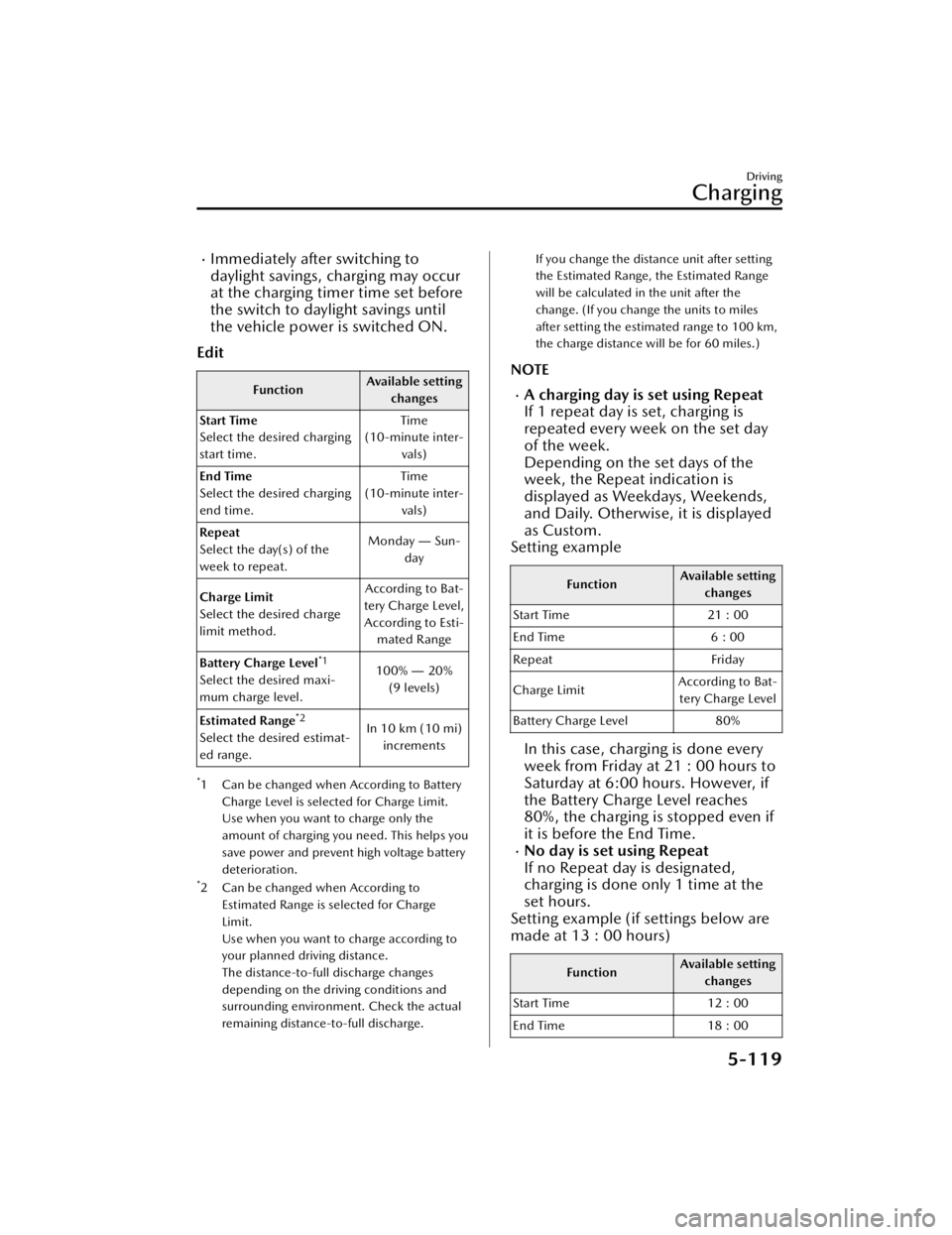
Immediately after switching to
daylight savings, charging may occur
at the charging timer time set before
the switch to daylight savings until
the vehicle power is switched ON.
Edit
Function Available setting
changes
Start Time
Select the desired charging
start time. Time
(10-minute inter- vals)
End Time
Select the desired charging
end time. Time
(10-minute inter- vals)
Repeat
Select the day(s) of the
week to repeat. Monday
― Sun-
day
Charge Limit
Select the desired charge
limit method. According to Bat-
tery Charge Level, According to Esti- mated Range
Battery Charge Level
*1
Select the desired maxi-
mum charge level. 100%
― 20%
(9 levels)
Estimated Range
*2
Select the desired estimat-
ed range. In 10 km (10 mi)
increments
*1 Can be changed when According to Battery
Charge Level is selected for Charge Limit.
Use when you want to charge only the
amount of charging you need. This helps you
save power and prevent high voltage battery
deterioration.
*2 Can be changed when According toEstimated Range is selected for Charge
Limit.
Use when you want to charge according to
your planned driving distance.
The distance-to-full discharge changes
depending on the driving conditions and
surrounding environment. Check the actual
remaining distance-to-full discharge.
If you change the distance unit after setting
the Estimated Range, the Estimated Range
will be calculated in the unit after the
change. (If you change the units to miles
after setting the estimated range to 100 km,
the charge distance will be for 60 miles.)
NOTE
A charging day is set using Repeat
If 1 repeat day is set, charging is
repeated every week on the set day
of the week.
Depending on the set days of the
week, the Repeat indication is
displayed as Weekdays, Weekends,
and Daily. Otherwise, it is displayed
as Custom.
Setting example
Function Available setting
changes
Start Time 21 : 00
End Time 6 : 00
Repeat Friday
Charge Limit According to Bat-
tery Charge Level
Battery Charge Level 80%
In this case, charging is done every
week from Friday at 21 : 00 hours to
Saturday at 6:00 hours. However, if
the Battery Charge Level reaches
80%, the charging is stopped even if
it is before the End Time.
No day is set using Repeat
If no Repeat day is designated,
charging is done only 1 time at the
set hours.
Setting example (if settings below are
made at 13 : 00 hours)
Function Available setting
changes
Start Time 12 : 00
End Time 18 : 00
Driving
Charging
5-119
CX-90_8KG7-EA-22L_Edition1_new 2022-11-17 16:05:04
Page 272 of 687

Climate control timer
The climate control timer is a function
which operates the cooling or heating
system automatically according to a
preset time. The power consumption
of the air conditioner after starting to
drive the vehicle is reduced by
operating the air conditioner and
providing a comfortable temperature
in the cabin before driving.
Refer to Convenient Ways to Use the
Fully Automatic Air-Conditioning on
page 6-12.
Charge Connector Lock
The charge connector lock is a function
which locks the charge connector con-
nected to the vehicle so that it cannot
be pulled out. You can also select the
lock conditions for the charge connec-
tor according to locations and situa-
tions.
1. Select Settings from the homescreen on Mazda Connect.
2. Select EV Settings from the setting screen.
3. Select Charge Connector Lock from the selection screen.
4. Set the lock condition from the se- lection screen.
Available setting changes
Locked When Charging
Unlocks connector when charging is complete
or vehicle is unlocked.
Locked When Connected
Unlocks connector only when vehicle is un-
locked.
Available setting changes
Off
Charge connector remains unlocked at all
times.
Functions using a Smartphone
You can check the remaining high
voltage battery power, operate the
charging, and operate the air
conditioner remotely by a Smartphone
remote control operation using the
Connected Service. For details, consult
an Authorized Mazda Dealer.
Driving
Charging
5-121
CX-90_8KG7-EA-22L_Edition1_new 2022-11-17 16:05:04
Page 433 of 687

How to Use the Mazda Connect
Information
Drive Efficiency Monitor:
Monitor vehicle efficiency history and system status in real time.
High Voltage Battery Monitor
:
View high voltage battery charge level, charging schedule, and more.
SiriusXM Travel Link
*:
Access traffic information, weather, pa rking information and sports scores.
Vehicle Status Monitor
:
View important vehicle maintenance messages, information, and intervals.
Entertainment
FM
AM
SiriusXM
*
Pa n d o ra*
Bluetooth
USB1 Audio/USB2 Audio
USB1 Video/USB2 Video
Phone Connectivity/Apple CarPlay/Android Auto
Audio Off
Notifications
Displays text messages received by the mobile device paired to Mazda Connect and
notifications from the vehicle.
Communication
By connecting your mobile device, such as a Smartphone, to Mazda Connect via
Bluetooth®, you can use the hands-free call and short message functions.
Other Equipment
Mazda Connect
7-6*Some models.
CX-90_8KG7-EA-22L_Edition1_new 2022-11-17 16:05:04
Page 496 of 687

How to Use the
HomeLink Wireless Control System
Programming the HomeLink System
The HomeLink system provides 3
buttons which can be individually
selected and programmed using the
transmitters for current, on-market
devices as follows:
1. Verify that there is a remote control transmitter available for the device
you would like to program.
NOTE
It is recommended that a new
battery be placed in the hand-held
transmitter of the device being
programmed to HomeLink for
quicker training and accurate
transmission of the radio-frequency
signal.
2. Press and release the HomeLink button you would like to program.
The indicator light flashes slowly in
amber when the button is pressed.
1. Indicator light
2. HomeLink button
3. Hold the hand-held transmitter 3 to 7 cm (1.2 to 2.7 in) away from the
HomeLink button you would like to
program while keeping the
indicator light in view.
NOTE
Depending on the hand-held
transmitter, it may be easier to do
the programming by holding it
about 20 cm (7.9 in) away from the
HomeLink button.
4. Press the hand-held transmitter button continuously until the
indicator light changes from amber
(flashing) to green (on/flashing).
NOTE
Some gate operators and garage
door openers may require you to
replace this Programming Step 4
with procedures noted in the “Gate
Operator/Canadian Programming”
section.
5. Press the HomeLink button again to check if the programming has been
completed.
If the indicator light remains on in
green, the programming is
complete and the device becomes
operational.
If the indicator light flashes rapidly
in green, firmly press and hold the
Homelink button and release it
after two seconds have passed.
Repeat this process up to three
times to complete the
programming. The device becomes
operational and programming is
complete. If the device does not
operate, go to the next step.
6. At the garage door opener receiver (motor-head unit) in the garage,
locate the “learn” or “smart” button.
This can usually be found where the
hanging antenna wire is attached to
the motor-head unit.
7. Firmly press and release the “learn” or “smart” button. (The name and
color of the button may vary by
manufacturer.)
Other Equipment
HomeLink Wireless Control System
7-69
CX-90_8KG7-EA-22L_Edition1_new 2022-11-17 16:05:04
Page 507 of 687

Windshield Wipers Operate at High
Speed.................................... 8-34Have the Vehicle Inspected ..........
.......................................... 8-34
Washer Fluid Does Not Spray ...........
............................................ 8-35 Inspecting Washer Fluid
Level................................... 8-35
Active Driving Display Does Not
Operate................................. 8-36 Active Driving Display Does Not
Operate.............................. 8-36
Warning/Indicator Light Turns
On........................................ 8-37 Warning Lights..................... 8-37
Brake System Warning
Light................................... 8-37
Lead-Acid Battery Charging
System Warning Light........... 8-38
Hybrid System Warning
Light................................... 8-39
Remaining High Voltage Battery
Power Warning Light............ 8-39
Charging System Warning
Light................................... 8-40
Output Restriction Warning
Light................................... 8-40
Engine Oil Warning Light...... 8-41
High Engine Coolant Temperature
Warning Light...................... 8-41
Electric Power Steering Warning
Light................................... 8-42
Shift System Warning Light ...........
.......................................... 8-42
ABS Warning Light................8-43
Master Warning Light........... 8-43Brake Control System Warning
Light................................... 8-44
Electric Parking Brake (EPB)
Indicator Light..................... 8-44
Check Engine Warning
Light................................... 8-45
Automatic Transmission Warning
Light................................... 8-45
AWD Warning Light............. 8-46
Tire Pressure Monitoring System
(TPMS) Warning Light
(Flashing)............................ 8-46
TCS/DSC Indicator Light (Turns
on)..................................... 8-47
Air Bag/Seat Belt Pretensioner
System Warning Light........... 8-47
KEY Warning Light (Red)....... 8-48
Security Indicator Light......... 8-48
High Beam Control System (HBC)
Warning Light (Amber)
*........ 8-49
i-ACTIVSENSE Warning
Light................................... 8-49
Exterior Lights Warning
Light................................... 8-50
Low Fuel Warning Light.........8-50
Check Fuel Cap Warning
Light................................... 8-51
Engine Oil Level Warning
Light................................... 8-51
Seat Belt Warning Light (Front
Seat)................................... 8-52
Seat Belt Warning Light (Rear
Seat) (Red).......................... 8-52
Rear Seat Alert Warning Light
*......
.......................................... 8-53
Low Washer Fluid Amount
Warning Light
*..................... 8-53
Door-ajar Warning Light/Liftgate-
open Warning Light/Hood-open
Warning Light...................... 8-54
8-2*Some models.
CX-90_8KG7-EA-22L_Edition1_new 2022-11-17 16:05:04
Page 543 of 687

If the brake system warning light and
the ABS warning light
turn on at
the same time, stop the vehicle in a
safe place immediately and contact an
Authorized Mazda Dealer.
The rear wheels could lock more
quickly in an emergency stop than
under normal circ umstances which
could result in an accident.
CAUTION
In addition, the effectiveness of the
braking may diminish so you may
need to depress the brake pedal
more strongly than normal to stop
the vehicle.
The brake warning light may turn on
when the hybrid system is started. In
this case, park the vehicle in a safe
location and release the brake pedal.
If the brake warning light remains
illuminated, have the vehicle
inspected by an Authorized Mazda
Dealer.
Lead-Acid Battery
Charging System Warning Light
The light turns on if the charging
system has a problem.
Park the vehicle in a safe place
immediately and contact an
Authorized Mazda Dealer.
WARNING
Do not continue driving with the
charging system warning light turned
on:
Otherwise, the hybrid system may
stop, which could result in an accident.
What to Do in Case of Emergency
Warning/Indicator Light Turns On
8-38
CX-90_8KG7-EA-22L_Edition1_new 2022-11-17 16:05:04