2024 FORD E SERIES lock
[x] Cancel search: lockPage 224 of 303

3.Full-size dissimilar spare withoutlabel on wheel
When driving with the full-size dissimilarspare wheel and tire assembly:
•Do not exceed 70 mph (113 km/h).
•Do not use more than one dissimilarspare wheel and tire assembly at atime.
•Do not use commercial car washingequipment.
•Do not use snow chains on the end ofthe vehicle with the dissimilar sparewheel and tire assembly.
Using a dissimilar spare wheel and tireassembly can compromise theeffectiveness of the following :
•Handling, stability and brakingperformance.
•Comfort and noise.
•Ground clearance and parking at curbs.
•Winter weather driving capability.
•Wet weather driving capability.
•All-wheel driving capability.
When driving with the full-size dissimilarspare wheel and tire assembly additionalcaution should be given to:
•Towing a trailer.
•Driving vehicles equipped with acamper body.
•Driving vehicles with a load on thecargo rack.
Drive cautiously when using a full-sizedissimilar spare wheel and tire assemblyand seek service as soon as possible.
Tire Change Procedure (If Equipped)
WARNING: The jack supplied withthis vehicle is only intended for changinga flat tire in an emergency. Do notattempt to do any other work on yourvehicle when it is supported by the jack,as your vehicle could slip off the jack.Failure to follow this instruction couldresult in personal injury or death.
WARNING: To help prevent yourvehicle from moving when changing awheel, shift the transmission into park(P), set the parking brake and use anappropriate block or wheel chock tosecure the wheel diagonally opposite tothe wheel being changed. For example,when changing the front left wheel,place an appropriate block or wheelchock on the right rear wheel.
WARNING: Do not attempt tochange a tire on the side of the vehicleclose to moving traffic. Pull far enoughoff the road to not obstruct the flow oftraffic and avoid the danger of being hitwhen operating the jack or changing thewheel.
WARNING: Only use the jackprovided as original equipment with yourvehicle.
WARNING: The jack supplied withthis vehicle is only intended for changinga flat tire in an emergency. Do notattempt to do any other work on yourvehicle when it is supported by the jack,as your vehicle could slip off the jack.Failure to follow this instruction couldresult in personal injury or death.
WARNING: Only use the jackprovided as original equipment with yourvehicle.
220
2024 E-Series (TE4) Canada/United States of America, enUSA, Edition date: 202210, First-PrintingWheels and Tires
Page 225 of 303

WARNING: Never place anythingbetween the vehicle jack and yourvehicle.
WARNING: Never place anythingbetween the vehicle jack and the ground.
WARNING: Only use the specifiedjacking points. If you use any otherlocations you could damage vehiclecomponents, such as brake lines.
WARNING: Failure to follow theseguidelines could result in an increasedrisk of loss of vehicle control, injury ordeath.
WARNING: Only use the sparewheel carrier to stow wheels providedwith your vehicle.
Note:Passengers should not remain in yourvehicle when the vehicle is being jacked.
Note:Do not use impact tools or powertools operating at over 200 RPM on thespare wheel carrier winch, which may causeit to malfunction and prevent a secure fit.Override the winch at least three times(there is an audible click each time) to makesure the wheel and tire fit securely.
Note:No maintenance or additionallubrication of your jack is required over theservice life of your vehicle.
1.Park the vehicle on a level firm groundand activate the hazard flashers.
2.Apply the parking brake, place thetransmission in park (P), turn theengine off.
3.Block the wheel diagonally oppositethe flat tire. For example, if the leftfront tire is flat, block the right rearwheel.
Removing the Spare Tire
1.To access the spare tire it must belowered from its stowed position.Remove the thumb screw andanti-theft bracket as required. Use thewheel nut wrench tip to loosen it.
2.Guide the wheel nut wrench or jackhandle through the hole and into thetube.
3.Turn the wrench or handlecounterclockwise until the cable hasslack and the tire can be slid rearward.
4.Remove the retainer from the spare tireand remove the spare tire.
221
2024 E-Series (TE4) Canada/United States of America, enUSA, Edition date: 202210, First-PrintingWheels and TiresE166722 E175447
Page 226 of 303
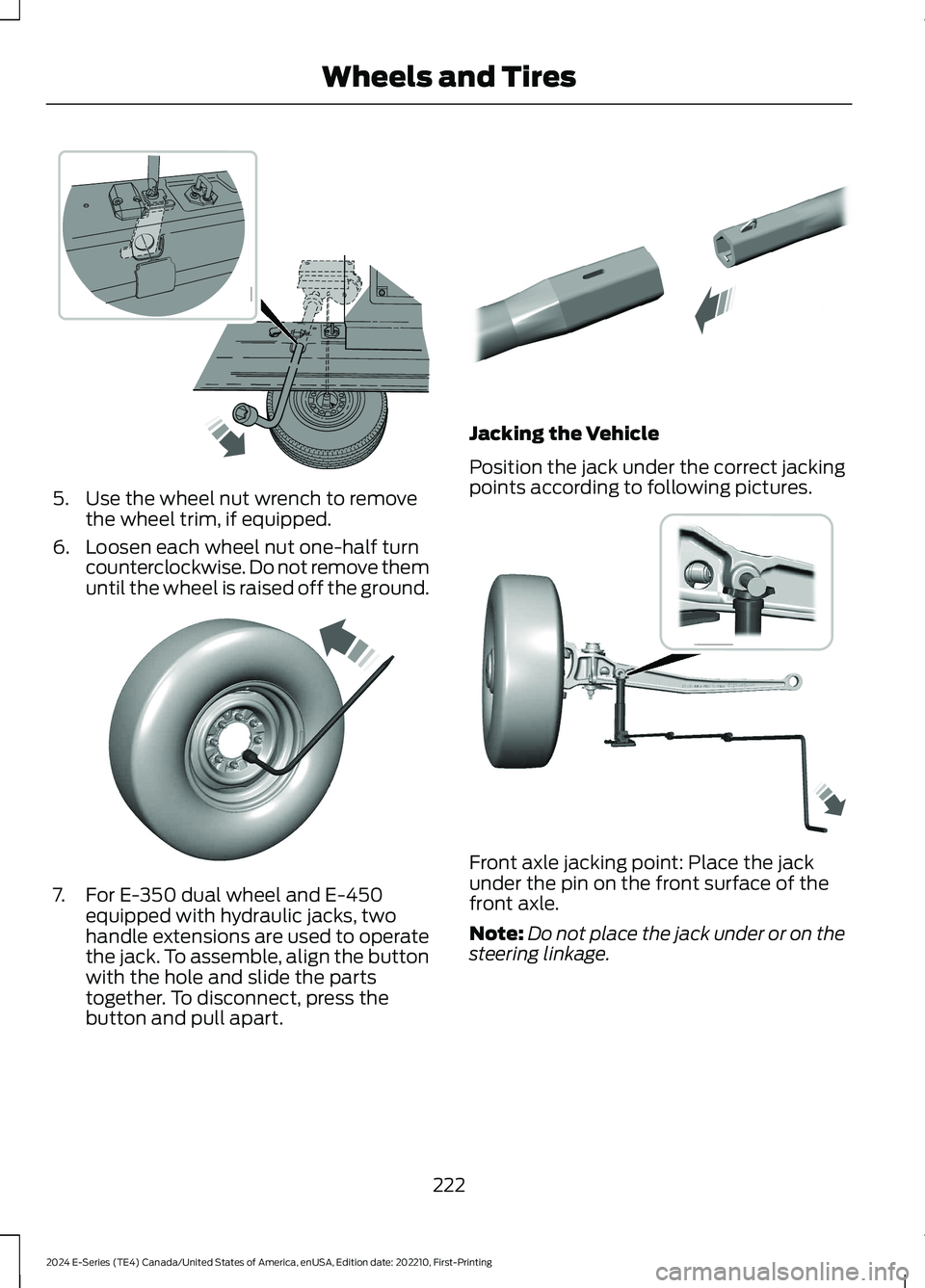
5.Use the wheel nut wrench to removethe wheel trim, if equipped.
6.Loosen each wheel nut one-half turncounterclockwise. Do not remove themuntil the wheel is raised off the ground.
7.For E-350 dual wheel and E-450equipped with hydraulic jacks, twohandle extensions are used to operatethe jack. To assemble, align the buttonwith the hole and slide the partstogether. To disconnect, press thebutton and pull apart.
Jacking the Vehicle
Position the jack under the correct jackingpoints according to following pictures.
Front axle jacking point: Place the jackunder the pin on the front surface of thefront axle.
Note:Do not place the jack under or on thesteering linkage.
222
2024 E-Series (TE4) Canada/United States of America, enUSA, Edition date: 202210, First-PrintingWheels and Tires E366770 E366771 E308882 E366985
Page 227 of 303
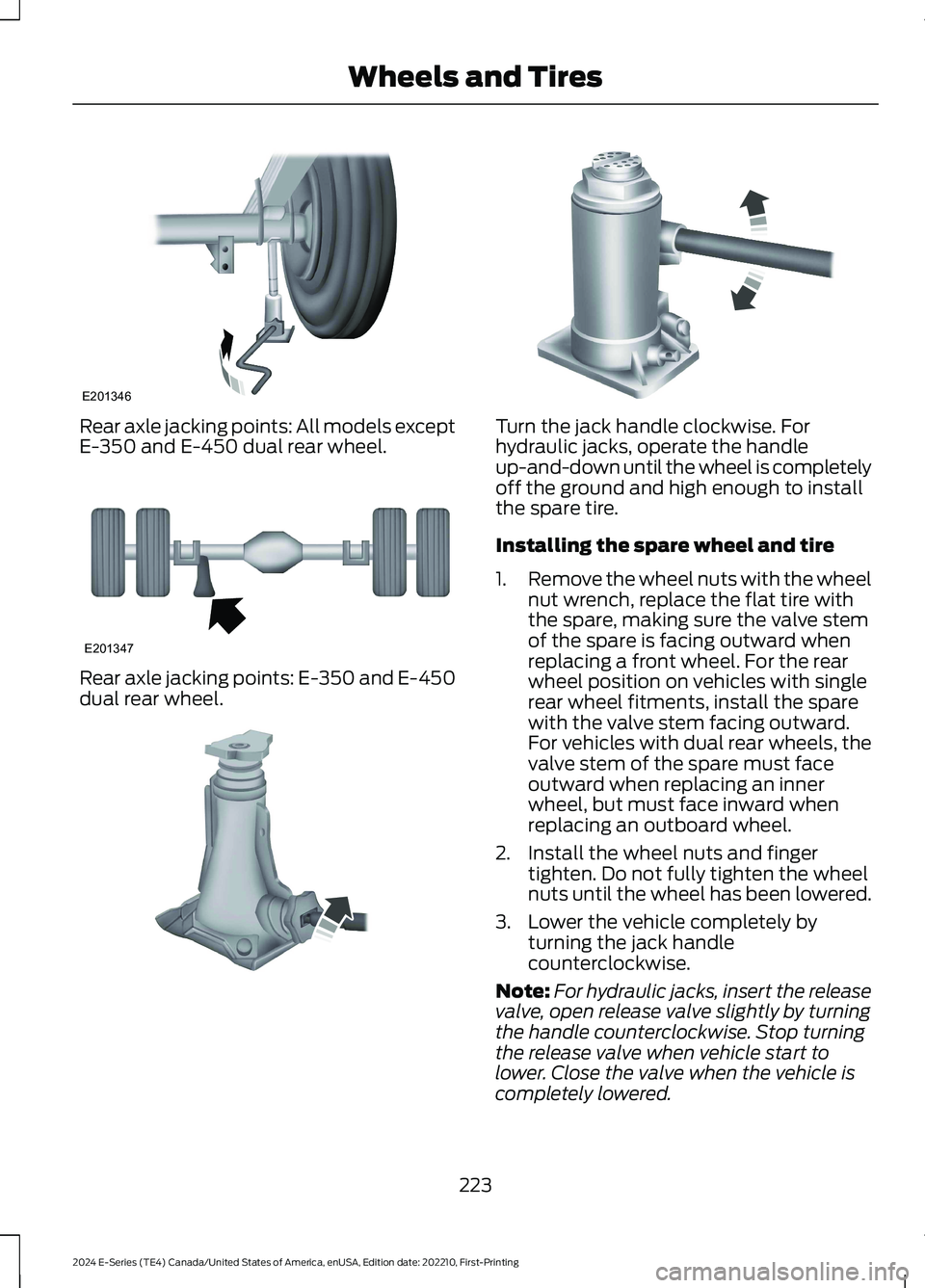
Rear axle jacking points: All models exceptE-350 and E-450 dual rear wheel.
Rear axle jacking points: E-350 and E-450dual rear wheel.
Turn the jack handle clockwise. Forhydraulic jacks, operate the handleup-and-down until the wheel is completelyoff the ground and high enough to installthe spare tire.
Installing the spare wheel and tire
1.Remove the wheel nuts with the wheelnut wrench, replace the flat tire withthe spare, making sure the valve stemof the spare is facing outward whenreplacing a front wheel. For the rearwheel position on vehicles with singlerear wheel fitments, install the sparewith the valve stem facing outward.For vehicles with dual rear wheels, thevalve stem of the spare must faceoutward when replacing an innerwheel, but must face inward whenreplacing an outboard wheel.
2.Install the wheel nuts and fingertighten. Do not fully tighten the wheelnuts until the wheel has been lowered.
3.Lower the vehicle completely byturning the jack handlecounterclockwise.
Note:For hydraulic jacks, insert the releasevalve, open release valve slightly by turningthe handle counterclockwise. Stop turningthe release valve when vehicle start tolower. Close the valve when the vehicle iscompletely lowered.
223
2024 E-Series (TE4) Canada/United States of America, enUSA, Edition date: 202210, First-PrintingWheels and TiresE201346 E201347 E162811 E162819
Page 228 of 303

4.Install the wheel nuts in the sequenceshown.
5.Remove the jack and fully tighten thewheel nuts in the sequence shown. SeeTechnical Specifications (page 225).
6.Install any wheel covers or hubcaps.Make sure they snap into place.
Note:When installing the wheel centerornaments, make sure that the ornamentretention towers on the back side of theornament are aligned with the studs andwheel nuts and retain to the flange on thewheel nuts.
Stowing the Flat tire or Spare tire
1.Place the tire on end with the valvestem facing toward the front of thevehicle. Lay the tire on the ground, nearthe rear of the vehicle, with the valvestem side facing up.
2.Slide the wheel partially under thevehicle and install the retainer throughthe wheel center. If equipped, you mayhave to remove the wheel center capprior to pushing the retainer throughthe center of the wheel. To remove thecenter cap, press it off with the wheelnut wrench tip from the inner side ofthe wheel. Pull on the cable to align thecomponents at the end of the cable.
3.Turn the wheel nut wrench clockwiseuntil the tire is raised to its stowedposition underneath the vehicle. Thewrench becomes harder to turn andthe spare tire winch ratchets or slipswhen the tire is raised to its maximumtightness. A clicking sound is heardfrom the winch indicating that the tireis properly stowed. Check that the tirelies flat against the frame and isproperly tightened.
4.Unblock the wheel.
224
2024 E-Series (TE4) Canada/United States of America, enUSA, Edition date: 202210, First-PrintingWheels and Tires13427658E161441 12345678910E169375 E162800
Page 249 of 303

AUXILIARY SWITCHES (IF
EQUIPPED)
For maximum vehicle performance, keepthe following information in mind whenadding accessories or equipment to yourvehicle:
•When adding accessories, equipment,passengers and luggage to yourvehicle, do not exceed the total weightcapacity of the vehicle or of the frontor rear axle (GVWR or GAWR asindicated on the Safety ComplianceCertification label). Ask an authorizeddealer for specific weight information.
•The Federal CommunicationsCommission (FCC) and CanadianRadio TelecommunicationsCommission (CRTC) regulate the useof mobile communications systemsequipped with radio transmitters, forexample, two-way radios, telephonesand theft alarms. Any such equipmentinstalled in your vehicle should complywith Federal CommunicationsCommission (FCC) and CanadianRadio TelecommunicationsCommission (CRTC) regulations, andshould be installed by an authorizeddealer.
•An authorized dealer needs to installmobile communications systems.Improper installation may harm theoperation of your vehicle, particularlyif the manufacturer did not design themobile communication systemspecifically for automotive use.
•If you or an authorized Ford dealer addany non-Ford electrical or electronicaccessories or components to yourvehicle, you may adversely affectbattery performance and durability. Inaddition, you may also adversely affectthe performance of other electricalsystems in the vehicle.
The auxiliary switch option packageprovides four switches, mounted in thecenter of the instrument panel. Theseswitches operate when the vehicle isrunning or from battery power, dependingon the switchable PDB fuse locations #82and #83. Ford recommends, however, thatthe engine remain running to maintainbattery charge when using the auxiliaryswitches for extended periods of time orhigher current draws.
When switched on, the auxiliary switchesprovide 20 amps or 40 amps of electricalbattery power for a variety of personal orcommercial uses.
The switches include the fuse and relay kit.This kit contains the required fuses andrelays that an authorized technician needsto install into the power distribution box,located under the hood. Refer to theinstruction sketch included in the kit.Contact an authorized dealer for service.
Each switch includes a power lead (ablunt-cut and sealed wire) located in theunderhood cowl shield above the engineblock powertrain control module.
The power leads are coded as follows:
245
2024 E-Series (TE4) Canada/United States of America, enUSA, Edition date: 202210, First-PrintingAccessoriesE163431
Page 251 of 303

PROTECT YOURSELF FROM THE RISINGCOST OF VEHICLE REPAIRS WITH A FORDPROTECT EXTENDED SERVICE PLAN.
Ford Protect Extended ServicePlans (U.S. Only)
Ford Protect extended service plan meanspeace of mind. It is the extended serviceplan backed by Ford Motor Company, andprovides more protection beyond the NewVehicle Limited Warranty coverage. Whenyou visit your Ford Dealer, Insist on FordProtect extended service plans!
Ford Protect Can Quickly Pay for Itself
One trip to the Service Center could easilyexceed the price of your Ford Protectextended service plan. With Ford Protectextended service plan you minimize yourrisk for unexpected repair bills and risingrepair costs.
Up to 1,000+ Covered VehicleComponents
There are four mechanical Ford Protectextended service plans with different levelsof coverage. Ask your authorized dealer fordetails.
1.PremiumCARE - Our mostcomprehensive coverage. With over1,000 covered components, this planis so complete it is probably easier tolist what is not covered.
2.ExtraCARE - Covers 113 components,and includes many high-tech items.
3.BaseCARE - Covers 84 components.
4.PowertrainCARE - Covers 29 criticalcomponents.
Ford Protect extended service plans arehonored by all authorized Ford dealers inthe U.S., Canada and Mexico.
That means you get:
•Reliable, quality service at any Ford orLincoln dealership.
•Repairs performed by factory trainedtechnicians, using genuine parts.
Rental Car Reimbursement
1st day Rental Benefit
If you bring your car into your dealer forservice, we’ll give you a loaner to use forthe day.
Extended Rental Benefits
If your vehicle is kept overnight for coveredrepairs, you are eligible for rental carcoverage, including warranty repairs, andField Service Actions.
Roadside Assistance
Exclusive 24/7 roadside assistance,including:
•Towing, flat-tire change and batteryjump starts.
•Out of fuel and lock-out assistance.
•Travel expense reimbursement forlodging, meals and rental car.
•Assistance for taxi, shuttle, rental carcoverage or other transportation.
Transferable Coverage
If you sell your vehicle before your FordProtect extended service plan coverageexpires, you can transfer any remainingcoverage to the new owner. Which shouldgive you and your potential buyer a littlemore peace of mind.
247
2024 E-Series (TE4) Canada/United States of America, enUSA, Edition date: 202210, First-PrintingFord Protect
Page 255 of 303

Check every six months
Battery connections. Clean if necessary.
Body and door drain holes for obstructions. Clean if necessary.
Cooling system fluid level and coolant strength.
Door weatherstrips for wear. Lubricate if necessary.
Hinges, latches and outside locks for proper operation. Lubricate if necessary.
Parking brake for proper operation.
Seatbelts and seat latches for wear and function.
Safety warning lamps (brake, ABS, airbag and seatbelt) for operation.
Washer spray and wiper operation. Clean or replace blades as necessary.
Multi-point Inspection
In order to keep your vehicle running right,it is important to have the systems on yourvehicle checked regularly. This can helpidentify potential issues and prevent majorproblems. We recommend having thefollowing multi-point inspection performedat every scheduled maintenance intervalto help make sure your vehicle keepsrunning great.
Multi-point inspection
Horn operationAccessory drive belt(s)
Radiator, cooler, heater and A/C hosesBattery performance
Suspension component for leaks ordamageEngine air filter
Steering and linkageExhaust system
Tires (including spare) for wear and proper
pressure**Exterior lamps and hazard warning systemoperation
251
2024 E-Series (TE4) Canada/United States of America, enUSA, Edition date: 202210, First-PrintingScheduled Maintenance