2024 CHEVROLET SILVERADO ad blue
[x] Cancel search: ad bluePage 245 of 433
Chevrolet Silverado 2500 HD/3500 HD Owner Manual (GMNA-Localizing-U.
S./Canada/Mexico-16908339) - 2024 - CRC - 12/12/22
Driving and Operating 243
Warning (Continued)
The vehicle can move. When ACC is
holding the vehicle at a stop, always be
prepared to manually apply the brakes.
{Warning
Leaving the vehicle without placing it in
P (Park) can be dangerous. Do not leave
the vehicle while it is being held at a
stop by ACC. Always place the vehicle in
P (Park) and turn off the ignition before
leaving the vehicle.
ACC Override
If using the accelerator pedal while ACC is
active, the ACC indicator turns blue on the
instrument cluster and in the HUD,
if equipped, to indicate that automatic
braking will not occur. ACC will resume
operation when the accelerator pedal is not
being pressed.
{Warning
The ACC will not automatically apply the
brakes if your foot is resting on the
accelerator pedal. You could crash into a
vehicle ahead of you.
Curves in the Road
{Warning
On curves, ACC may not detect a vehicle
ahead in your lane. You could be startled
if the vehicle accelerates up to the set
speed, especially when following a vehicle
exiting or entering exit ramps. You could
lose control of the vehicle or crash. Do
not use ACC while driving on an entrance
or exit ramp. Always be ready to use the
brakes if necessary.
{Warning
On curves, ACC may respond to a vehicle
in another lane, or may not have time to
react to a vehicle in your lane. You could
crash into a vehicle ahead of you, or lose
control of your vehicle. Give extra (Continued)
Warning (Continued)
attention in curves and be ready to use
the brakes if necessary. Select an
appropriate speed while driving in curves.
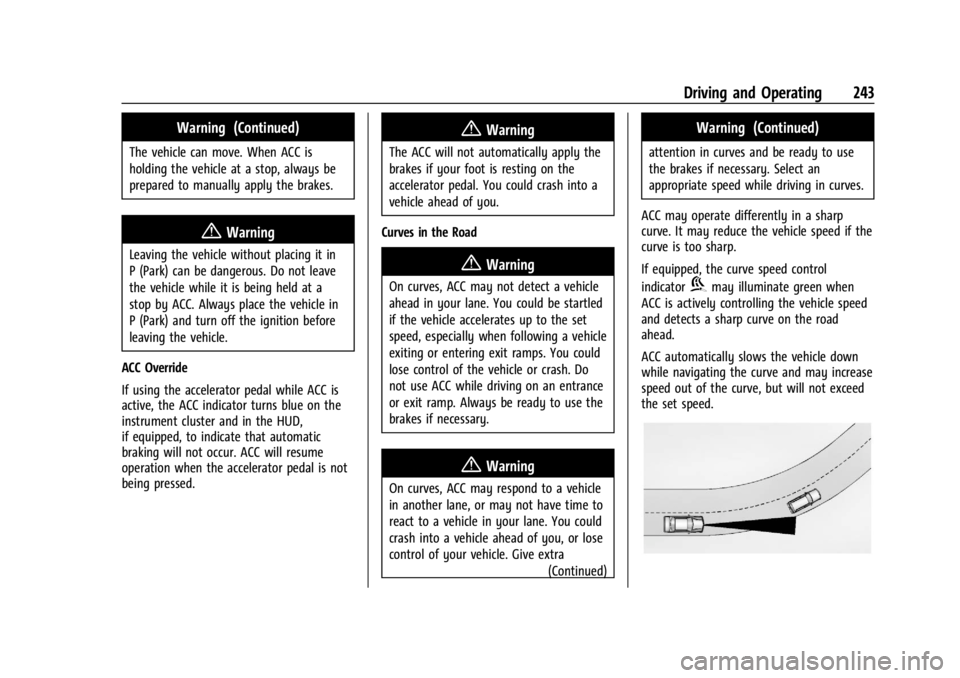
ACC may operate differently in a sharp
curve. It may reduce the vehicle speed if the
curve is too sharp.
If equipped, the curve speed control
indicator
bmay illuminate green when
ACC is actively controlling the vehicle speed
and detects a sharp curve on the road
ahead.
ACC automatically slows the vehicle down
while navigating the curve and may increase
speed out of the curve, but will not exceed
the set speed.
Page 252 of 433

Chevrolet Silverado 2500 HD/3500 HD Owner Manual (GMNA-Localizing-U.
S./Canada/Mexico-16908339) - 2024 - CRC - 12/12/22
250 Driving and Operating
2. Front/Rear Top-Down View
Displays a front or rear overhead view
of the vehicle. To view, select Front/
Rear Top-Down View on the
infotainment display when the camera
app is active.
3. Front/Rear side View
Displays a view that shows objects
next to the front or rear sides of the
vehicle. To select, touch Front/Rear
Side View on the infotainment display
when a camera view is active. Touch
the button to toggle between front
and rear camera views. Park Assist and
RCTA overlays are not available when
Front/Rear Side View is active.
4. Hitch View
Displays a zoomed-in view of the hitch
area to assist with aligning the
vehicle’s hitch ball with the trailer
coupler and monitoring the trailer
connection. To view, select Hitch View
on the infotainment display when the
Camera App is active. To access this
view when in a forward gear above
12 km/h (8 mph), select CAMERA on
the infotainment display and select
Hitch View. The view will close after
eight seconds and can be closed earlyby selecting X, Home or Back. Shifting
into P (Park) while in this view will
automatically engage the Electric
Parking Brake (EPB).
5. Surround View
Displays an image of the area
surrounding the vehicle. Surround
View is displayed alongside the
currently selected view when below
12 km/h (8 mph). Surround View is
disabled when above 12 km/h (8 mph).
6. Camera App Guidance Lines
The Camera App supports three
possible guidance modes: No
Guidance, Vehicle Guidance and
Trailering Guidance. To change
guidance mode, select the appropriate
guidance icon. Depending on the
guidance mode and view selected,
different guidance lines may appear.
A grayed-out icon indicates that
guidance lines are not available.
Certain views do not support Guidance
lines.
.Standard Guidance Lines are
available in Front/Rear Standard
Views, Front/Rear Top-Down Views
and Surround View when the
vehicle guidance mode is selected.
Standard Guidance Lines show
current and intended vehicle path.
.Hitch Guidance Line is available in
Rear Standard View or Cargo Bed
View when the Trailering Guidance
mode is selected. Hitch Guidance
displays a single centered guidance
line on the infotainment display to
assist with aligning the vehicle’s
hitch with a trailer coupler. Align
the Hitch Guidance Line with the
trailer coupler by continuously
steering the vehicle to keep the
guidance line centered on the
coupler when backing. Park Assist
overlays will not display when the
Hitch Guidance Line is active.
.Rear Trailer Guidance Lines are
available in the Rear Trailer View
when the Trailering Guidance
mode is selected and the rear
trailer camera calibration has been
successfully completed. Rear Trailer
Guidance Lines show the intended
path (yellow) and the current path
(blue) of the trailer. The current
path guidance lines will converge
with the intended path guidance
lines.
Page 284 of 433
Chevrolet Silverado 2500 HD/3500 HD Owner Manual (GMNA-Localizing-U.
S./Canada/Mexico-16908339) - 2024 - CRC - 12/12/22
282 Driving and Operating
to the attaching points on the bumper;
otherwise, safety chains should be attached
to holes on the trailer hitch.
Cross the safety chains under the tongue of
the trailer to help prevent the tongue from
contacting the road if it becomes separated
from the hitch. Always leave enough slack in
the safety chains to allow the combination
to turn. Never allow safety chains to drag
on the ground.
Trailer Brakes
Loaded trailers over 900 kg (2,000 lb) must
be equipped with brake systems and with
brakes for each axle. Trailer braking
equipment conforming to Canadian
Standards Association (CSA) requirement
CAN3-D313, or its equivalent, is
recommended.
State or local regulations may require
trailers to have their own braking system if
the loaded weight of the trailer exceeds
certain minimums that can vary from state
to state. Read and follow the instructions for
the trailer brakes so they are installed,
adjusted, and maintained properly. Never
attempt to tap into your vehicle's hydraulicbrake system. If you do, both the vehicle
antilock brakes and the trailer brakes may
not function, which could result in a crash.
Auxiliary Battery
If equipped, the vehicle's auxiliary battery
can be used to supply electrical power to
additional equipment that may be added,
such as a slide-in camper.
Locate the auxiliary battery connector under
the hood on the driver side of the vehicle,
next to the engine compartment fuse block.
Follow the proper installation instructions
included with any electrical equipment that
is installed.
Caution
To prevent draining the auxiliary battery,
always turn off electrical equipment
when not in use and do not use any
equipment that may exceed the
maximum amperage rating of 30 amps.
Trailer Wiring Harness
Basic Trailer Wiring
If the vehicle is not equipped with a trailer
connector on the rear bumper, a seven-wire
trailering harness is tied to the vehiclesframe. The harness requires the installation
of a trailer connector, which is available
through your dealer.
Use only a round, seven-wire connector with
flat blade terminals meeting SAE J2863
specifications for proper electrical
connectivity.
The seven-wire harness contains the
following trailer circuits:
Stop/Turn
Signal Left Yellow/Blue
Stop/Turn Signal
Right Green/Violet
Tail/Parking Lamps Gray/Brown
Reverse Lamps White/Green
Battery Feed Red/Green
Ground White
Electric Trailer Brake Blue
Heavy-Duty Trailer Wiring Harness Package
If equipped, the trailer wiring harness, with
a seven-pin connector and a four-pin
connector, is mounted on the vehicle's rear
bumper.
Page 286 of 433
Chevrolet Silverado 2500 HD/3500 HD Owner Manual (GMNA-Localizing-U.
S./Canada/Mexico-16908339) - 2024 - CRC - 12/12/22
284 Driving and Operating
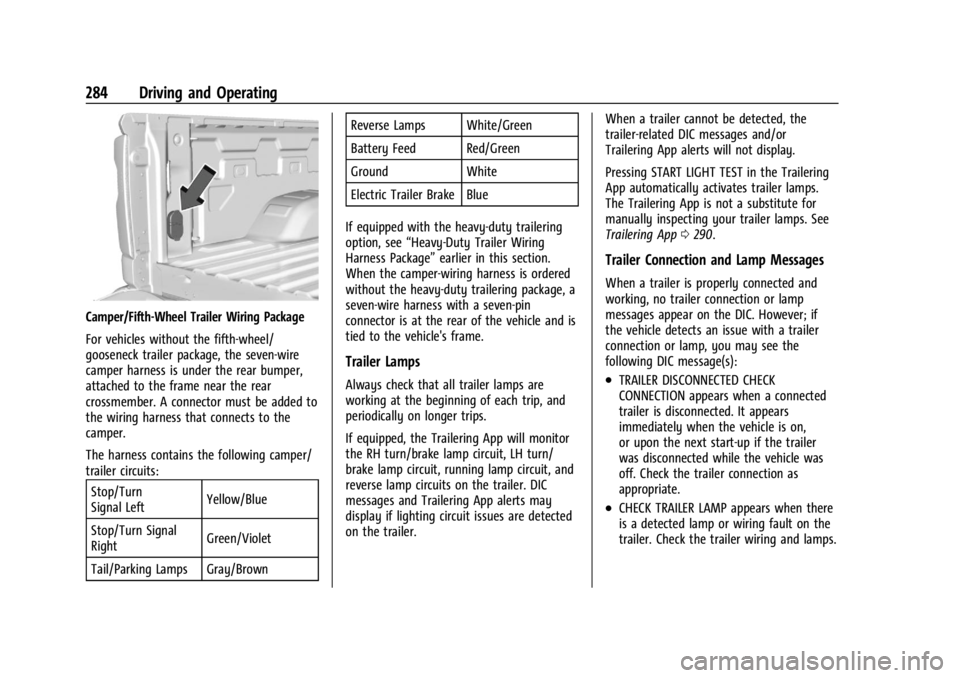
Camper/Fifth-Wheel Trailer Wiring Package
For vehicles without the fifth-wheel/
gooseneck trailer package, the seven-wire
camper harness is under the rear bumper,
attached to the frame near the rear
crossmember. A connector must be added to
the wiring harness that connects to the
camper.
The harness contains the following camper/
trailer circuits:Stop/Turn
Signal Left Yellow/Blue
Stop/Turn Signal
Right Green/Violet
Tail/Parking Lamps Gray/Brown Reverse Lamps White/Green
Battery Feed Red/Green
Ground White
Electric Trailer Brake Blue
If equipped with the heavy-duty trailering
option, see “Heavy-Duty Trailer Wiring
Harness Package” earlier in this section.
When the camper-wiring harness is ordered
without the heavy-duty trailering package, a
seven-wire harness with a seven-pin
connector is at the rear of the vehicle and is
tied to the vehicle's frame.
Trailer Lamps
Always check that all trailer lamps are
working at the beginning of each trip, and
periodically on longer trips.
If equipped, the Trailering App will monitor
the RH turn/brake lamp circuit, LH turn/
brake lamp circuit, running lamp circuit, and
reverse lamp circuits on the trailer. DIC
messages and Trailering App alerts may
display if lighting circuit issues are detected
on the trailer. When a trailer cannot be detected, the
trailer-related DIC messages and/or
Trailering App alerts will not display.
Pressing START LIGHT TEST in the Trailering
App automatically activates trailer lamps.
The Trailering App is not a substitute for
manually inspecting your trailer lamps. See
Trailering App
0290.
Trailer Connection and Lamp Messages
When a trailer is properly connected and
working, no trailer connection or lamp
messages appear on the DIC. However; if
the vehicle detects an issue with a trailer
connection or lamp, you may see the
following DIC message(s):
.TRAILER DISCONNECTED CHECK
CONNECTION appears when a connected
trailer is disconnected. It appears
immediately when the vehicle is on,
or upon the next start-up if the trailer
was disconnected while the vehicle was
off. Check the trailer connection as
appropriate.
.CHECK TRAILER LAMP appears when there
is a detected lamp or wiring fault on the
trailer. Check the trailer wiring and lamps.
Page 410 of 433
Chevrolet Silverado 2500 HD/3500 HD Owner Manual (GMNA-Localizing-U.
S./Canada/Mexico-16908339) - 2024 - CRC - 12/5/22
408 Customer Information
and notify General Motors of Canada
Company. Call Transport Canada at
1-800-333-0510; go to:
www.tc.gc.ca/recalls (English)
www.tc.gc.ca/rappels (French)
or write to:
Transport Canada
Motor Vehicle Safety Directorate
Defect Investigations and Recalls
Division
80 Noel Street
Gatineau
,QC J8Z 0A1
Reporting Safety Defects to
General Motors
In addition to notifying NHTSA (or Transport
Canada) in a situation like this, notify
General Motors.
In the U.S., call 1-800-222-1020, or write:
Chevrolet Motor Division
Chevrolet Customer Assistance Center
P.O. Box 33170
Detroit, MI 48232-5170
In Canada, call 1-800-263-3777 (English) or
1-800-263-7854 (French), or write:Customer Care Centre
General Motors of Canada Company
500 Wentworth Street W
Oshawa, ON L1J 0C5
In Mexico, call 800-466-0811 or
800-508-0000.
In other Central America and Caribbean
Countries, call 52-555-901-2369.
Vehicle Data Recording and
Privacy
The vehicle has a number of computers that
record information about the vehicle’s
performance and how it is driven or used.
For example, the vehicle uses computer
modules to monitor and control engine and
transmission performance, to monitor the
conditions for airbag deployment and
deploy them in a crash, and, if equipped, to
provide antilock braking to help the driver
control the vehicle. These modules may
store data to help the dealer technician
service the vehicle or to help GM improve
safety or features. Some modules may also
store data about how the vehicle is
operated, such as rate of fuel consumption
or average speed. These modules may retain
personal preferences, such as radio presets,
seat positions, and temperature settings.
Cybersecurity
GM collects information about the use of
your vehicle including operational and safety
related information. We collect this
information to provide, evaluate, improve,
and troubleshoot our products and services
and to develop new products and services.
The protection of vehicle electronics systems
and customer data from unauthorized
outside electronic access or control is
important to GM. GM maintains appropriate
security standards, practices, guidelines and
controls aimed at defending the vehicle and
the vehicle service ecosystem against
unauthorized electronic access, detecting
possible malicious activity in related
networks, and responding to suspected
cybersecurity incidents in a timely,
coordinated and effective manner. Security
incidents could impact your safety or
compromise your private data. To minimize
security risks, please do not connect your
vehicle electronic systems to unauthorized
devices or connect your vehicle to any
unknown or untrusted networks (such as
Bluetooth, WIFI or similar technology). In
Page 412 of 433

Chevrolet Silverado 2500 HD/3500 HD Owner Manual (GMNA-Localizing-U.
S./Canada/Mexico-16908339) - 2024 - CRC - 12/5/22
410 OnStar
OnStar
OnStar Overview
OnStar Overview . . . . . . . . . . . . . . . . . . . . . . 410
OnStar Services
Emergency . . . . . . . . . . . . . . . . . . . . . . . . . . . . . 411
Security . . . . . . . . . . . . . . . . . . . . . . . . . . . . . . . . 411
OnStar Additional Information
OnStar Additional Information . . . . . . . . . 412
OnStar Overview
=Voice Command Button
QBlue OnStar Button
>Red Emergency Button
This vehicle may be equipped with a
comprehensive, in-vehicle system that can
connect to an OnStar Advisor for Emergency,
Security, Navigation, Connections, and
Diagnostics Services. OnStar services may
require a paid service plan and data plan.
OnStar requires the vehicle battery and
electrical system, cellular service, and GPS
satellite signals to be available and
operating. OnStar acts as a link to existing
emergency service providers. OnStar may
collect information about you and your
vehicle, including location information. See
OnStar User Terms, Privacy Statement, and
Software Terms for more details including
system limitations at www.onstar.com (U.S.)
or www.onstar.ca (Canada). The OnStar system status light is next to
the OnStar buttons. If the status light is:
.Solid Green: System is ready.
.Flashing Green: On a call.
.Red: Indicates a problem.
.Off: System is off. PressQtwice to
speak with an OnStar Advisor.
Press
Qor call 1-888-4ONSTAR
(1-888-466-7827) to speak to an Advisor.
Functionality of the Voice Command button
may vary by vehicle and region.
Press
=to:
.Open the OnStar app on the infotainment
display. If equipped, the infotainment
system has OnStar controls in the
embedded OnStar app on the Home Page.
Most OnStar functions that can be
performed with the buttons can be done
using the app. To open the app, touch the
OnStar icon on the Home Page. App
updates require a corresponding service
plan. Features vary by region and model.
Features are subject to change. For more
information, see my.chevrolet.com/learn
or press
Q.
Page 421 of 433

Chevrolet Silverado 2500 HD/3500 HD Owner Manual (GMNA-Localizing-U.
S./Canada/Mexico-16908339) - 2024 - CRC - 12/5/22
Index 419
Assistance Program, Roadside . . . . . . . . . . . . 402
Assistance SystemsAdvanced . . . . . . . . . . . . . . . . . . . . . . . . . . . . . . 246
Automatic EmergencyBraking (AEB) . . . . . . . . . . . . . . . . . . . . . . . . 259
Driving . . . . . . . . . . . . . . . . . . . . . . . . . . . . . . . . 257
Forward Collision Alert (FCA) System . . . . . . . . . . . . . . . . . . . . . . . . . . . . . . 257
Front Pedestrian Braking (FPB) . . . . . . . . . 260
Lane Change Alert (LCA) . . . . . . . . . . . . . . . 262
Lane Departure Warning (LDW) . . . . . . . . 264
Parking . . . . . . . . . . . . . . . . . . . . . . . . . . . . . . . . 256
Parking and Backing . . . . . . . . . . . . . . . . . . . 247
Rear Cross Traffic Alert (RCTA) . . . . . . . . . 257
Rear Vision Camera (RVC) . . . . . . . . . . . . . . 247
Surround Vision System . . . . . . . . . . . . . . . 248
Audio Bluetooth . . . . . . . . . . . . . . . . . . . . . . . . . . 158, 159
Automatic Dimming Mirrors . . . . . . . . . . . . . . . . . . . . . . . 34
Door Locks . . . . . . . . . . . . . . . . . . . . . . . . . . . . . . 20
Emergency Braking (AEB) DisabledLight . . . . . . . . . . . . . . . . . . . . . . . . . . . . . . . . . . 121
Headlamp System . . . . . . . . . . . . . . . . . . . . . 140
Transmission . . . . . . . . . . . . . . . . . . . . . . . . . . . 218
Transmission Fluid . . . . . . . . . . . . . . . . . . . . . . 311
Transmission Shift Lock Control Function Check . . . . . . . . . . . . . . . . . . . . . . . 324 Automatic Transmission
Manual Mode . . . . . . . . . . . . . . . . . . . . . . . . . 220
Auxiliary Roof Mounted Lamp . . . . . . . . . . . . . . . . . . . 143
Avoiding Untrusted Media Devices . . . . . . . .158
Axle Front . . . . . . . . . . . . . . . . . . . . . . . . . . . . . . . . . . 323
Rear . . . . . . . . . . . . . . . . . . . . . . . . . . . . . . . . . . . 323
B
BatteryExterior Lighting Battery Saver . . . . . . . . 147
Load Management . . . . . . . . . . . . . . . . . . . . . 146
Power Protection . . . . . . . . . . . . . . . . . . . . . . 147
Battery - North America . . . . . . . . . . . . . 321, 370
Blade Replacement, Wiper . . . . . . . . . . . . . . . 325
Blind Spot Mirrors . . . . . . . . . . . . . . . . . . . . . . . . 34
Bluetooth Audio . . . . . . . . . . . . . . . . . . . . . . . . . . . . . . 158, 159
Overview . . . . . . . . . . . . . . . . . . . . . . . . . 165, 169
Brake
Fluid . . . . . . . . . . . . . . . . . . . . . . . . . . . . . . . . . . . 320
Pad Life System . . . . . . . . . . . . . . . . . . . . . . . 319
System Warning Light . . . . . . . . . . . . . . . . . . 119
Brake Pad Life System . . . . . . . . . . . . . . . . . . . 319
Brakes . . . . . . . . . . . . . . . . . . . . . . . . . . . . . . . . . . . 319 Antilock . . . . . . . . . . . . . . . . . . . . . . . . . . . . . . . . 227
Brake Assist . . . . . . . . . . . . . . . . . . . . . . . . . . . 229 Brakes (cont'd)
Electric Parking Brake . . . . . . . . . . . . . . . . . . 228
Braking . . . . . . . . . . . . . . . . . . . . . . . . . . . . . . . . . . 194 Automatic Emergency (AEB) . . . . . . . . . . . 259
Front Pedestrian (FPB) System . . . . . . . . . 260
Break-In, New Vehicle . . . . . . . . . . . . . . . . . . . . 210
Buckle To Drive . . . . . . . . . . . . . . . . . . . . . . . . . . . 54
Bulb Replacement . . . . . . . . . . . . . . . . . . . . . . . . 327 Center High-Mounted Stoplamp(CHMSL) and Cargo Lamp . . . . . . . . . . . . 329
Halogen Bulbs . . . . . . . . . . . . . . . . . . . . . . . . . 327
Headlamp Aiming . . . . . . . . . . . . . . . . . . . . . . 327
Headlamps, Front Turn Signal, Sidemarker, and Parking Lamps . . . . . . 327
License Plate Lamps . . . . . . . . . . . . . . . . . . . 330
Taillamps, Turn Signal, Stoplamps, and Back-up Lamps . . . . . . . . . . . . . . . . . . 328
Buying New Tires . . . . . . . . . . . . . . . . . . . . . . . . 354
C
Calibration Compass . . . . . . . . . . . . . . . . . . . . . . . . . . . . . . . 102
California Perchlorate MaterialsRequirements . . . . . . . . . . . . . . . . . . . . . . . . 304
California Proposition 65 Warning . . . . . 1, 370
Camera
Rear Vision (RVC) . . . . . . . . . . . . . . . . . . . . . . 247
Page 428 of 433

Chevrolet Silverado 2500 HD/3500 HD Owner Manual (GMNA-Localizing-U.
S./Canada/Mexico-16908339) - 2024 - CRC - 12/5/22
426 Index
PassengerAirbag Status Indicator . . . . . . . . . . . . . . . . . 116
Compartment Air Filter . . . . . . . . . . . . . . . . 190
Sensing System . . . . . . . . . . . . . . . . . . . . . . . . . 65
Pedestrian Ahead Indicator . . . . . . . . . . . . . . . 121
Perchlorate Materials Requirements, California . . . . . . . . . . . . . . . . . . . . . . . . . . . . . . 304
Phone Apple CarPlay andAndroid Auto . . . . . . . . . . . . . . . . . . . . 172, 174
Bluetooth . . . . . . . . . . . . . . . . . . . . . . . . . 165, 169
Pickup Conversion to Chassis Cab . . . . . . . . 302
Port USB . . . . . . . . . . . . . . . . . . . . . . . . . . . . . . . . . . . . 158
Positioning Vehicle . . . . . . . . . . . . . . . . . . . . . . . . . . . . . . . . 162
Power Assist Steps . . . . . . . . . . . . . . . . . . . . . . . . . . . . . 28
Door Locks . . . . . . . . . . . . . . . . . . . . . . . . . . . . . . 20
Mirrors . . . . . . . . . . . . . . . . . . . . . . . . . . . . . . . . . 32
Outlets . . . . . . . . . . . . . . . . . . . . . . . . . . . . . . . . 102
Protection, Battery . . . . . . . . . . . . . . . . . . . . . 147
Retained Accessory (RAP) . . . . . . . . . . . . . . 214
Seat Adjustment . . . . . . . . . . . . . . . . . . . . . . . . 46
Steering Fluid . . . . . . . . . . . . . . . . . . . . . . . . . . . 317
Windows . . . . . . . . . . . . . . . . . . . . . . . . . . . . . . . 39
Pregnancy, Using Seat Belts . . . . . . . . . . . . . . 59 Privacy
Vehicle Data Recording . . . . . . . . . . . . . . . . 408
Problems with Route Guidance . . . . . . . . . . 163
Program Courtesy Transportation . . . . . . . . . . . . . . . 404
Prohibited Fuels . . . . . . . . . . . . . . . . . . . . . . . . . 266
Proposition 65 Warning California . . . . . . . . . . . . . . . . . . . . . . . . . . . . . . . . . 1
Proposition 65 Warning, California . . . . . . . 370
Publication Ordering Information . . . . . . . . 406
R
Radiator . . . . . . . . . . . . . . . . . . . . . . . . . . . . . . . . . . 313
Radio AM-FM Radio . . . . . . . . . . . . . . . . . . . . . . 154, 156
Frequency Statement . . . . . . . . . . . . . . . . . . 407
Reception . . . . . . . . . . . . . . . . . . . . . . . . . . . . . . . 157
Satellite . . . . . . . . . . . . . . . . . . . . . . . . . . . . . . . . . 157
Reading Lamps . . . . . . . . . . . . . . . . . . . . . . . . . . .145
Rear Axle . . . . . . . . . . . . . . . . . . . . . . . . . . . . . . . . . . . 323
Camera Mirror . . . . . . . . . . . . . . . . . . . . . . . . . . 35
Heated Seats . . . . . . . . . . . . . . . . . . . . . . . . . . . 52
Locking Axle . . . . . . . . . . . . . . . . . . . . . . . . . . . 233
Seats . . . . . . . . . . . . . . . . . . . . . . . . . . . . . . . . . . . . 51
Storage . . . . . . . . . . . . . . . . . . . . . . . . . . . . . . . . . 95
Windows . . . . . . . . . . . . . . . . . . . . . . . . . . . . . . . 41 Rearview Mirror
Truck Bed Camera . . . . . . . . . . . . . . . . . . . . . . 38
Rearview Mirrors . . . . . . . . . . . . . . . . . . . . . . . . . .35 Automatic Dimming . . . . . . . . . . . . . . . . . . . . 35
Reclining Seatbacks . . . . . . . . . . . . . . . . . . . . . . . 46
Recognition Voice . . . . . . . . . . . . . . . . . . . . . . . . . . . . . . . . . . 163
Recommended Fuel . . . . . . . . . . . . . . . . . . . . . . . . . . . . . . . . . . . . 266
Recommended Fluids and Lubricants . . . . . 392
Records Maintenance . . . . . . . . . . . . . . . . . . . . . . . . . . . 394
Recreational Vehicle Towing . . . . . . . . . . . . . 374
Reimbursement Program, GM Mobility . . . . . . . . . . . . . . . . . . . . . . . . . . . . . . . 402
Remote
Key . . . . . . . . . . . . . . . . . . . . . . . . . . . . . . . . . . . . . . 12
Key Operation . . . . . . . . . . . . . . . . . . . . . . . . . . . 12
Vehicle Start . . . . . . . . . . . . . . . . . . . . . . . . . . . . 18
Replacement Glass . . . . . . . . . . . . . . . . . . . . . . . . . . . . . . . . . . 325
Replacement Parts Airbags . . . . . . . . . . . . . . . . . . . . . . . . . . . . . . . . . 70
Maintenance . . . . . . . . . . . . . . . . . . . . . . . . . . . 393
Replacing
Airbag System . . . . . . . . . . . . . . . . . . . . . . . . . . 70
LATCH System Parts After a Crash . . . . . . 87