2024 CHEVROLET CORVETTE instrument cluster
[x] Cancel search: instrument clusterPage 202 of 362
Chevrolet Corvette Owner Manual (GMNA-Localizing-U.S./Canada/Mexico-
17272984) - 2024 - CRC - 2/20/23
Driving and Operating 201
{Warning
When exiting Stealth mode, allow
sufficient time for the vehicle to
automatically start the engine and
develop full system propulsion power
before merging into traffic. Attempting to
merge into traffic before the engine has
reached full power could cause a crash
resulting in vehicle damage, personal
injury, or death. It is best to exit Stealth
mode first and allow the engine to reach
full capacity before engaging in traffic.
Shuttle Mode : Use to propel the vehicle
using only electric power. Shuttle mode is
not intended for public roads. The typical
range in Shuttle mode is about four to
five miles depending on the starting SOC,
vehicle speed, terrain, and other driving
conditions. While the vehicle is in Shuttle
mode, the instrument cluster only displays
the vehicle speed, battery gauge, and a
electric power indicator gauge. The infotainment screen will only show the
date and time. If equipped, the HUD system
will not be functional.
Shuttle mode automatically deactivates if
the following occurs:
.The vehicle speed exceeds 24 km/h
(15 mph).
.The outside temperature is lower than
–
10°C (14°F).
.The high voltage battery SOC is 0%.
To deactivate Shuttle mode, put the vehicle
in P (Park) and turn off the vehicle. Then,
start the vehicle normally.
Shuttle mode will automatically start to
reduce propulsion power as the SOC reaches
0%. The message Start Engine to Charge
Battery will display on the instrument
cluster when the SOC reaches 5%.
If the engine is not started, propulsion
power reduces automatically and the vehicle
comes to a stop. The only way to charge your battery is to
start and run the vehicle from Normal mode.
See
“Normal Mode” later on in this section.
Do not store the hybrid battery with a low
SOC for an extended period of time. It is
best to store the battery in the white
eAWD zone.
Normal Mode : Use to have a normal
engine start when going through the EV
drive mode selection process.
Starting and running the vehicle from
Normal mode allows the engine and front
electric motor to regenerate power to
charge the hybrid battery.
Page 204 of 362
Chevrolet Corvette Owner Manual (GMNA-Localizing-U.S./Canada/Mexico-
17272984) - 2024 - CRC - 2/20/23
Driving and Operating 203
Cluster Display
For more information on the display themes
of the Drive modes on the instrument
cluster, seeInstrument Cluster 081 >
Options > Display themes.
Throttle Progression
Adjusts throttle sensitivity by selecting how
quickly or slowly the throttle reacts to
input.
Throttle Progression is a preset of
Powertrain and cannot be modified or
changed independently.
Transmission Shift Operation
Basic:
.Transmission upshifts and downshifts are
selected based on vehicle speed and
accelerator position to optimize comfort
and fuel economy during mild driving
conditions.
Driver Influenced Gear Selection:
.Aggressive driving will influence both the
upshift and downshift points in all modes.
When engaged, the Performance
Transmission Active light displays. See
Performance Transmission Active 093.
When Performance Transmission is
activated from a standstill, by selecting PTM Race 1 or Race 2, the transmission
shift map is in the most aggressive state
where upshifts are only achieved at high
revolutions per minute (rpm), downshifts
happen early, and the lowest gear is
selected for cornering. Transmission
behavior will transition to a level
appropriate to the current driving
behavior after a short period of time.
If PTM Race 1 or Race 2 are not selected,
the Performance Transmission Active
behavior still activates automatically after
a sustained period of performance driving
is detected. See
“Performance Traction
Management (PTM)” later on in this
section.
.Criteria which have influence are: driving
mode, accelerator, brakes, lateral, and
longitudinal loading.
.Changes in gear selection behavior due to
aggressive driving can include:
‐ Downshifting early with higher rpm’s
during aggressive braking (i.e. entering
a corner)
‐ Altering upshifts while experiencing
lateral acceleration
‐ Not upshifting when the accelerator is
released to avoid unnecessary shifts if
the accelerator is re-applied ‐
Recognizing sporty driving and
anticipating upcoming corners with the
appropriate gear selection entering and
exiting
.Driver Modes
‐Driver influenced changes are effective
in all driving modes, however the
aggressiveness of the transmission
response will increase between Tour,
Sport, and Track modes respectively.
Active Fuel Management (Engine Cylinder
Shuts Off)
If equipped with Active Fuel Management
(AFM), the engine uses driver demand to
deactivate cylinders to improve fuel
performance. When accelerating, V8 mode is
prevalent. For lighter throttle applications,
the system may disable cylinders to run in
4-cylinder mode to save fuel.
Active Fuel Management is a preset of
Powertrain and cannot be modified or
changed independently.
Page 211 of 362
Chevrolet Corvette Owner Manual (GMNA-Localizing-U.S./Canada/Mexico-
17272984) - 2024 - CRC - 2/20/23
210 Driving and Operating
The Launch Control feature initially limits
engine speed as the driver rapidly applies
the accelerator pedal to wide open throttle.
Allow the engine RPMs to stabilize.
A smooth, quick release of the brake pedal,
while maintaining the fully pressed
accelerator pedal, will manage tire slip and
transmissions clutch. After the vehicle is
launched, the system continues in
Competitive Driving mode or PTM.
Custom Launch Control
If equipped, Custom Launch Control allows
the following parameters for Launch Control
to be modified:
.Launch RPM
.Slip Target (5%–15%)
Adjusting the Launch RPM will also change
the behavior of the transmission during the
start of the launch. The higher the Launch
RPM, the faster the clutch will be applied
resulting in greater acceleration. This
parameter can be used to match the launch
behavior to the available tire traction. If the
driving wheels spin excessively during the
launch, reduce the Launch RPM. To adjust the Launch RPM, all of these
conditions must be met:
.Competitive Driving mode or any of the
PTM modes are selected (if equipped). See
Driver Mode Control
0196.
.The steering wheel must be straight.
.The driver door must be closed.
.The vehicle must be in D (Drive) or
M (Manual mode).
.The parking brake must not be engaged.
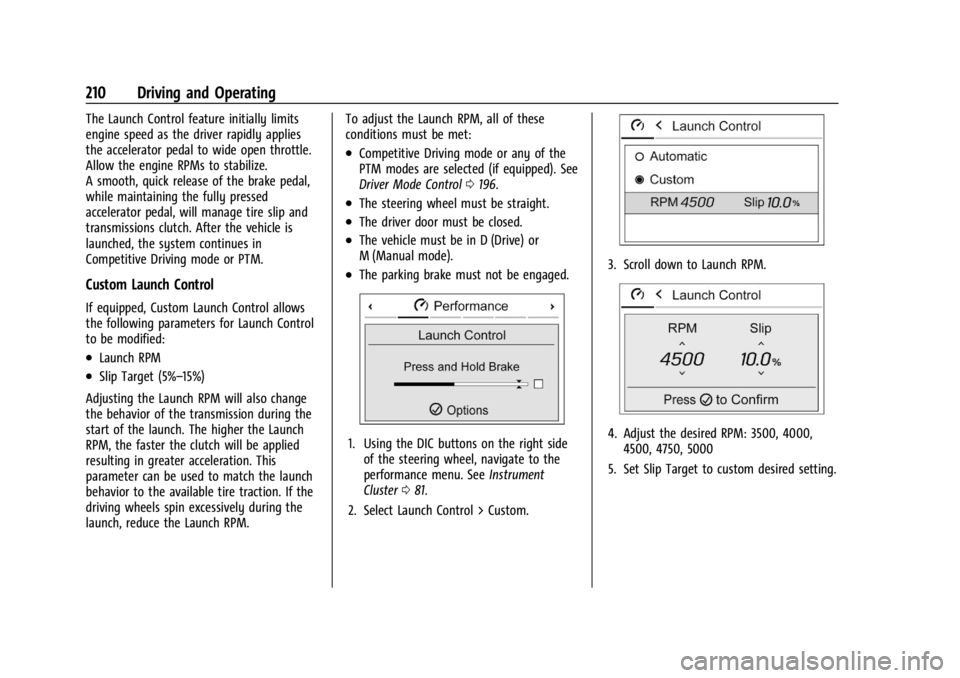
1. Using the DIC buttons on the right side
of the steering wheel, navigate to the
performance menu. See Instrument
Cluster 081.
2. Select Launch Control > Custom.
3. Scroll down to Launch RPM.
4. Adjust the desired RPM: 3500, 4000, 4500, 4750, 5000
5. Set Slip Target to custom desired setting.
Page 213 of 362
Chevrolet Corvette Owner Manual (GMNA-Localizing-U.S./Canada/Mexico-
17272984) - 2024 - CRC - 2/20/23
212 Driving and Operating
Cruise Control
Cruise control allows the vehicle to maintain
a constant speed without keeping your foot
on the accelerator pedal at speeds of about
40 km/h (25 mph) or above. Cruise control
does not work at speeds below about
40 km/h (25 mph).
{Warning
Cruise control can be dangerous where
you cannot drive safely at a steady
speed. Do not use cruise control on
winding roads or in heavy traffic.
Cruise control can be dangerous on
slippery roads. On such roads, fast
changes in tire traction can cause
excessive wheel slip, and you could lose
control. Do not use cruise control on
slippery roads.
Cruise control will disengage if:
.The Traction Control System (TCS) or
StabiliTrak/Electronic Stability Control
(ESC) system activates to limit wheel spin.
See Traction Control/Electronic Stability
Control 0194.
.TCS or StabiliTrak/ESC is turned off.
.The brakes are applied.
When road conditions allow you to safely
use it again, cruise control can be turned
back on.
For E-Ray models, cruise control is not
available in Shuttle Mode or Stealth Mode.
See Driver Mode Control 0196.
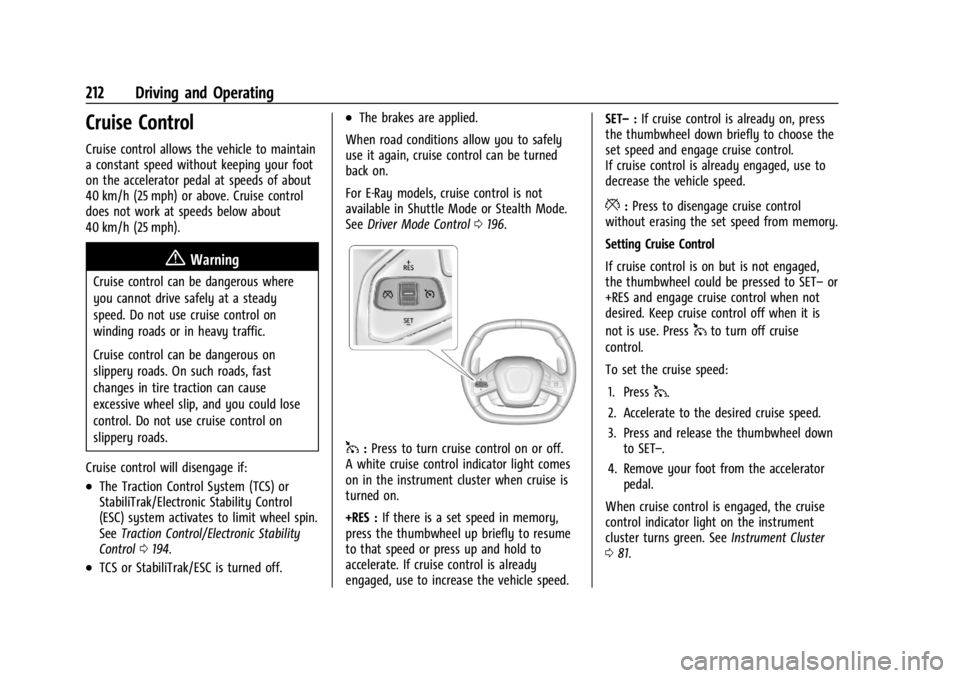
1:Press to turn cruise control on or off.
A white cruise control indicator light comes
on in the instrument cluster when cruise is
turned on.
+RES : If there is a set speed in memory,
press the thumbwheel up briefly to resume
to that speed or press up and hold to
accelerate. If cruise control is already
engaged, use to increase the vehicle speed. SET–
:If cruise control is already on, press
the thumbwheel down briefly to choose the
set speed and engage cruise control.
If cruise control is already engaged, use to
decrease the vehicle speed.
*: Press to disengage cruise control
without erasing the set speed from memory.
Setting Cruise Control
If cruise control is on but is not engaged,
the thumbwheel could be pressed to SET– or
+RES and engage cruise control when not
desired. Keep cruise control off when it is
not is use. Press
1to turn off cruise
control.
To set the cruise speed:
1. Press
1.
2. Accelerate to the desired cruise speed.
3. Press and release the thumbwheel down to SET–.
4. Remove your foot from the accelerator pedal.
When cruise control is engaged, the cruise
control indicator light on the instrument
cluster turns green. See Instrument Cluster
0 81.
Page 219 of 362
Chevrolet Corvette Owner Manual (GMNA-Localizing-U.S./Canada/Mexico-
17272984) - 2024 - CRC - 2/20/23
218 Driving and Operating
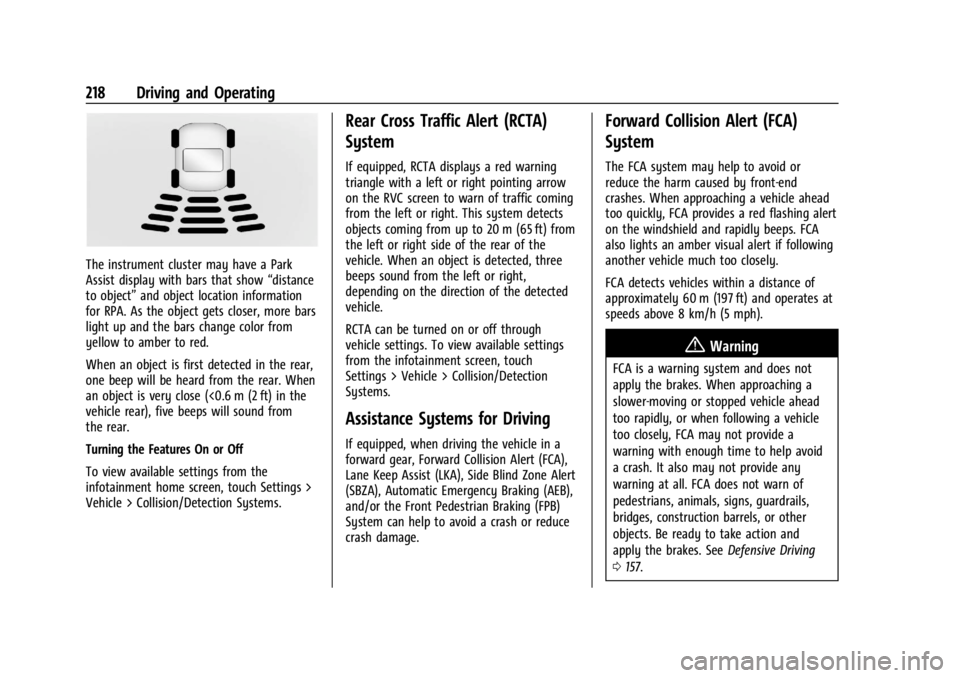
The instrument cluster may have a Park
Assist display with bars that show“distance
to object” and object location information
for RPA. As the object gets closer, more bars
light up and the bars change color from
yellow to amber to red.
When an object is first detected in the rear,
one beep will be heard from the rear. When
an object is very close (<0.6 m (2 ft) in the
vehicle rear), five beeps will sound from
the rear.
Turning the Features On or Off
To view available settings from the
infotainment home screen, touch Settings >
Vehicle > Collision/Detection Systems.
Rear Cross Traffic Alert (RCTA)
System
If equipped, RCTA displays a red warning
triangle with a left or right pointing arrow
on the RVC screen to warn of traffic coming
from the left or right. This system detects
objects coming from up to 20 m (65 ft) from
the left or right side of the rear of the
vehicle. When an object is detected, three
beeps sound from the left or right,
depending on the direction of the detected
vehicle.
RCTA can be turned on or off through
vehicle settings. To view available settings
from the infotainment screen, touch
Settings > Vehicle > Collision/Detection
Systems.
Assistance Systems for Driving
If equipped, when driving the vehicle in a
forward gear, Forward Collision Alert (FCA),
Lane Keep Assist (LKA), Side Blind Zone Alert
(SBZA), Automatic Emergency Braking (AEB),
and/or the Front Pedestrian Braking (FPB)
System can help to avoid a crash or reduce
crash damage.
Forward Collision Alert (FCA)
System
The FCA system may help to avoid or
reduce the harm caused by front-end
crashes. When approaching a vehicle ahead
too quickly, FCA provides a red flashing alert
on the windshield and rapidly beeps. FCA
also lights an amber visual alert if following
another vehicle much too closely.
FCA detects vehicles within a distance of
approximately 60 m (197 ft) and operates at
speeds above 8 km/h (5 mph).
{Warning
FCA is a warning system and does not
apply the brakes. When approaching a
slower-moving or stopped vehicle ahead
too rapidly, or when following a vehicle
too closely, FCA may not provide a
warning with enough time to help avoid
a crash. It also may not provide any
warning at all. FCA does not warn of
pedestrians, animals, signs, guardrails,
bridges, construction barrels, or other
objects. Be ready to take action and
apply the brakes. See Defensive Driving
0 157.
Page 262 of 362
Chevrolet Corvette Owner Manual (GMNA-Localizing-U.S./Canada/Mexico-
17272984) - 2024 - CRC - 2/20/23
Vehicle Care 261
by your dealer. The high voltage cooling
system reservoirs have tamper- resistant
pressure caps. The coolant should only be
serviced by a qualified technician.
Engine Overheating
The vehicle has several indicators to warn of
engine overheating.
There is an engine coolant temperature
gauge on the instrument cluster. SeeEngine
Coolant Temperature Gauge 087. The
vehicle may also display a message on the
Driver Information Center (DIC).
If the decision is made not to lift the hatch
but to get service help right away, see
Roadside Assistance Program 0332.
If the decision is made to lift the hatch,
make sure the vehicle is parked on a level
surface.
Then check to see if the engine cooling fans
are running. There are two cooling fans
located in the front (one at each corner) and
two cooling fans in the rear (one on each
side of the engine). If the engine is
overheating, the fans should be running.
If they are not, do not continue to run the
engine, and have the vehicle serviced.
Caution
Do not run the engine if there is a leak
in the engine cooling system. This can
cause a loss of all coolant and can
damage the system and vehicle. Have
any leaks fixed right away.
If Steam Is Coming from the Engine
{Warning
Steam and scalding liquids from a hot
cooling system are under pressure.
Turning the pressure cap, even a little,
can cause them to come out at high
speed and you could be burned. Never
turn the cap when the cooling system,
including the pressure cap, is hot. Wait
for the cooling system and pressure cap
to cool.
If Steam Is Coming from the Engine
Compartment with no Overheat Warning
Water from rain and car washes could enter
the engine compartment and contact hot
surfaces. If steam is coming from the engine
compartment with no accompanying
overheat warning, no service is needed.
If No Steam Is Coming from the Engine
If an engine overheat warning is displayed
but no steam can be seen or heard, the
problem may not be too serious. Sometimes
the engine can get a little too hot when the
vehicle:
.Climbs a long hill on a hot day.
.Stops after high-speed driving.
.Idles for long periods in traffic.
If the overheat warning is displayed with no
sign of steam: 1. Turn the air conditioning off.
2. Turn the heater on to the highest temperature and to the highest fan
speed. Open the windows as necessary.
3. When it is safe to do so, pull off the road, shift to P (Park) or N (Neutral), and
let the engine idle.
If the engine coolant temperature gauge is
no longer in the shaded area or an overheat
warning no longer displays, the vehicle can
be driven. Continue to drive the vehicle
slowly for about 10 minutes. Keep a safe
vehicle distance from the vehicle in front.
If the warning does not come back on,
Page 268 of 362
Chevrolet Corvette Owner Manual (GMNA-Localizing-U.S./Canada/Mexico-
17272984) - 2024 - CRC - 2/20/23
Vehicle Care 267
12-Volt Lithium-Ion Battery (E-Ray)
{Warning
WARNING:Battery posts, terminals and
related accessories can expose you to
chemicals including lead and lead
compounds, which are known to the
State of California to cause cancer and
birth defects or other reproductive harm.
Wash hands after handling. For more
information go to
www.P65Warnings.ca.gov.
See California Proposition 65 Warning 01.
Charging the 12-volt Lithium-ion battery
The 12-volt lithium-ion battery can be
charged using a GM approved charger
designed for lithium-Ion batteries. Follow the
instructions that come with the GM
approved charger.
{Warning
Use only GM approved jump start boxes
and charging tools. Use of unapproved
jump start boxes, charging tools, a loose
battery, or battery charger may cause
personal injury, death, or damage to the (Continued)
Warning (Continued)
vehicle. For GM approved jump start
boxes or charging tools, see
https://gmdesolutions.com.
Use the Battery Voltage info tile to
determine if your battery is low and needs
to be charged. See Instrument Cluster081
under the “Info Tiles” section for more
information.
GM recommends charging your 12-volt
lithium-ion battery when storing your
vehicle for long periods of time. See “Vehicle
Storage” later on in this section.
If the vehicle isn’t starting and the 12-volt
lithium-ion battery has run down, charging
the 12-volt lithium-ion battery may solve the
issue. See Jump Starting - North America
0 299.
High Voltage Battery (E-Ray)
Only a trained service technician should
inspect, test, or replace the high voltage
battery. The dealer has information on
how to recycle the high voltage battery.
There is also information available at
https://www.recyclemybattery.com.
{Warning
Damage to the high voltage battery or
high voltage system can create a risk of
electric shock, overheating, or fire.
If the vehicle is damaged from a
moderate to severe crash, flood, fire,
or other event, the vehicle should be
inspected as soon as possible. Until the
vehicle has been inspected, store it
outside at least 15 m (50 ft) from any
structure or anything that can burn.
Ventilate the vehicle by opening a
window or a door.
Contact Customer Assistance as soon as
possible to determine whether an
inspection is needed. See Customer
Assistance Offices 0331.
If the vehicle is in a crash, the sensing
system may shut down the high voltage
system. When this occurs, the high voltage
battery is disconnected and the vehicle will
not start. The SERVICE VEHICLE SOON
message in the Driver Information Center
(DIC) will display. Before the vehicle can
Page 278 of 362
Chevrolet Corvette Owner Manual (GMNA-Localizing-U.S./Canada/Mexico-
17272984) - 2024 - CRC - 2/20/23
Vehicle Care 277
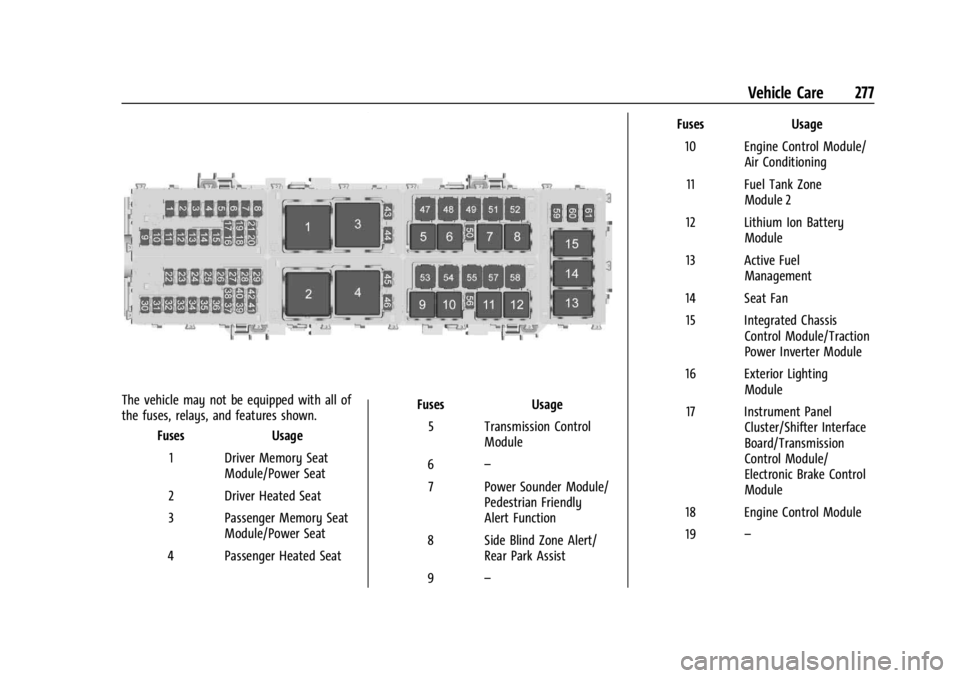
The vehicle may not be equipped with all of
the fuses, relays, and features shown.Fuses Usage
1 Driver Memory Seat Module/Power Seat
2 Driver Heated Seat
3 Passenger Memory Seat Module/Power Seat
4 Passenger Heated Seat Fuses
Usage
5 Transmission Control Module
6 –
7 Power Sounder Module/ Pedestrian Friendly
Alert Function
8 Side Blind Zone Alert/ Rear Park Assist
9 – Fuses
Usage
10 Engine Control Module/ Air Conditioning
11 Fuel Tank Zone Module 2
12 Lithium Ion Battery Module
13 Active Fuel Management
14 Seat Fan 15 Integrated Chassis Control Module/Traction
Power Inverter Module
16 Exterior Lighting Module
17 Instrument Panel Cluster/Shifter Interface
Board/Transmission
Control Module/
Electronic Brake Control
Module
18 Engine Control Module
19 –