2024 CHEVROLET CORVETTE fuel
[x] Cancel search: fuelPage 178 of 362
Chevrolet Corvette Owner Manual (GMNA-Localizing-U.S./Canada/Mexico-
17272984) - 2024 - CRC - 2/20/23
Driving and Operating 177
Starting and Operating
New Vehicle Break-In
Follow these recommended guidelines
during the first 2 414 km (1,500 mi) of driving
this vehicle. Parts have a break-in period and
performance will be better in the long run.
During the first 800 km (500 mi), engine
torque will be limited in low gears.
To remove the engine torque limitation after
the initial 500-mile break-in period, turn the
vehicle off, and open and close the driver
door. Ensure all doors are closed for
15 minutes.
For the first 322 km (200 mi):
.To break in new tires, drive at moderate
speeds and avoid hard cornering.
.New brake linings also need a break-in
period. Avoid making hard stops. This is
recommended every time brake linings
are replaced.
For the first 800 km (500 mi):
.Avoid full throttle starts and abrupt stops.
.Do not exceed 4000 rpm.
.Avoid driving at any one constant speed,
fast or slow, including the use of cruise
control.
.Avoid downshifting to brake or slow the
vehicle when the engine speed will
exceed 4000 rpm.
.Do not let the engine labor. Never lug the
engine. This rule applies at all times, not
just during the break-in period.
For the first 2 414 km (1,500 mi):
.Do not participate in track events, sport
driving schools, or similar activities.
.Check engine oil with every refueling and
add if necessary. Oil and fuel
consumption may be higher than normal.
Front Air Dam (and Splitter)
If equipped, the front air dam and splitter
have minimal ground clearance.
Under normal operation, the components
will occasionally contact some road surfaces
(speed bumps, driveway ramps, etc.). This
can be heard inside the vehicle as a scraping
noise. This is normal and does not indicate a
problem.
Use care when approaching bumps or
objects on road surfaces and avoid them
when possible.
If equipped, the Front Lift System may be
used to increase front air dam or splitter
clearance. See Front Lift System 0205.
Composite Materials
This vehicle may be equipped with parts
containing carbon fiber, sheet-molding
compound, or other composite materials.
Dealer-installed accessories may also contain
composite materials. These parts and
accessories may include the splitter or rocker
extensions.
{Warning
Exposed edges of parts containing carbon
fiber and other composite materials can
be sharp. Contact with these parts could
result in injury. Use caution to avoid
contacting these parts, including when
washing the vehicle. If the parts are
damaged, replace the parts promptly
with replacements from your dealer.
{Warning
Rocker extensions may break under
pressure, resulting in property damage or
injury. Do not stand on the rocker
extension or use it as a step.
Page 181 of 362
Chevrolet Corvette Owner Manual (GMNA-Localizing-U.S./Canada/Mexico-
17272984) - 2024 - CRC - 2/20/23
180 Driving and Operating
4. If the engine does not start and no DICmessage is displayed, wait 15 seconds
before trying again to let the cranking
motor cool down.
If the engine does not start after five to
10 seconds, especially in very cold
weather (below −18 °C or 0 °F), it could
be flooded with too much gasoline. Try
pushing the accelerator pedal all the way
to the floor while cranking for up to
15 seconds maximum. Wait at least
15 seconds between each try, to allow
the cranking motor to cool down. When
the engine starts, let go of the
accelerator. If the vehicle starts briefly
but then stops again, repeat these steps.
This clears the extra gasoline from the
engine.
Caution
Cranking the engine for long periods of
time, by pressing ENGINE START/STOP
immediately after cranking has ended,
can overheat and damage the cranking
motor, and drain the battery. Wait at
least 15 seconds between each try, to let
the cranking motor cool down.
Stopping the Engine
Shift to P (Park) and press and hold ENGINE
START/STOP on the instrument panel, until
the engine shuts off. If the transmission is
not in P (Park), the engine shuts off and the
vehicle goes into the accessory mode. The
DIC displays SHIFT TO PARK. When shifted to
P (Park) the vehicle turns off.
If the remote key is not detected inside the
vehicle when it is turned off, the DIC
displays a message.
Stop/Start System
If equipped and enabled, the Stop/Start
system shuts off the engine to help
conserve fuel. The system is designed to
manage the increased number of starts.
{Warning
The automatic engine Stop/Start feature
causes the engine to shut off while the
vehicle is still on. Do not exit the vehicle
before shifting to P (Park). The vehicle
may restart and move unexpectedly.
Always shift to P (Park), and then turn
the ignition off before exiting the vehicle. Auto Engine Stop/Start
When the brakes are applied and the vehicle
is at a complete stop, the engine may turn
off. When stopped,
hwill illuminate below
the tachometer. When the brake pedal is
released or the accelerator pedal is pressed,
the engine will restart.
To maintain vehicle performance, other
conditions may cause the engine to
automatically restart before the brake pedal
is released.
Auto Stops may not occur and/or Auto
Starts may occur because:
.The climate control settings require the
engine to be running to cool or heat the
vehicle interior.
.The vehicle battery needs to charge.
.The vehicle battery has recently been
disconnected.
.Minimum vehicle speed has not been
reached since the last Auto Stop.
.The accelerator pedal is pressed.
.The engine or transmission is not at the
required operating temperature.
.The outside temperature is not in the
required operating range.
Page 183 of 362
Chevrolet Corvette Owner Manual (GMNA-Localizing-U.S./Canada/Mexico-
17272984) - 2024 - CRC - 2/20/23
182 Driving and Operating
release when the EPB switch is used. The
EPB should automatically release when the
vehicle is shifted out of P (Park).
Leaving the Vehicle with the Engine
Running
{Warning
It can be dangerous to leave the vehicle
with the engine running. It could
overheat and catch fire.
It is dangerous to get out of the vehicle
if the vehicle is not in P (Park) with the
parking brake firmly set. The vehicle
can roll.
Do not leave the vehicle when the engine
is running. If you have left the engine
running, the vehicle can move suddenly.
You or others could be injured. To be
sure the vehicle will not move, even
when you are on fairly level ground,
always set the parking brake and shift to
P (Park).
If you have to leave the vehicle with the
engine running, be sure the vehicle is in
P (Park) and the parking brake is set before
you leave it.
Shifting out of Park
This vehicle is equipped with an
electronically controlled transmission.
If the vehicle has a battery with low
voltage, try charging or jump starting the
battery. See Jump Starting - North America
0 299.
To shift out of P (Park): 1. Ensure the engine is running.
2. Apply the brake pedal.
3. Press or pull the desired switch on the center console. For N (Neutral) press and
hold the N (Neutral) switch until the N
indicator illuminates red.
The P indicator will turn white and the gear
indicator on the shift switch will turn red
when the vehicle is no longer in P (Park).
If equipped, the Buckle to Drive feature may
prevent shifting from P (Park). See Buckle To
Drive 046.
If the vehicle cannot shift from P (Park), a
Driver Information Center (DIC) message will
display. See your dealer for service.
Parking over Things That Burn
{Warning
Things that can burn could touch hot
exhaust parts under the vehicle and
ignite. Do not park over papers, leaves,
dry grass, or other things that can burn.
Active Fuel Management
If equipped with Active Fuel Management,
the engine may operate on either all or half
of its cylinders, depending on driving
conditions.
When less power is required, such as
cruising at a constant vehicle speed, the
system will operate in the half cylinder
mode, allowing the vehicle to achieve better
fuel economy. When greater power
demands are required, such as accelerating
from a stop, passing, or merging onto a
highway, the system will maintain
full-cylinder operation.
E-Ray models will use electric power to
supplement engine power to extend Active
Fuel Management operation and improve
fuel economy.
Page 184 of 362
Chevrolet Corvette Owner Manual (GMNA-Localizing-U.S./Canada/Mexico-
17272984) - 2024 - CRC - 2/20/23
Driving and Operating 183
If the vehicle has an Active Fuel
Management indicator, seeInstrument
Cluster 081 for more information on using
this display.
Extended Parking
It is best not to park with the vehicle
running. If the vehicle is left running, be
sure it will not move and there is adequate
ventilation.
See Shifting Into Park 0181 and
Engine Exhaust 0183.
If the vehicle is left parked and running with
the remote key outside the vehicle, it will
continue to run for up to 15 minutes.
If the vehicle is left parked and running with
the remote key inside the vehicle, it will
continue to run for up to 30 minutes.
The vehicle could turn off sooner if it is
parked on a hill, due to lack of
available fuel.
The timer will reset if the vehicle is taken
out of P (Park) while it is running.
Engine Exhaust
{
Warning
Engine exhaust contains carbon monoxide
(CO), which cannot be seen or smelled.
Exposure to CO can cause
unconsciousness and even death.
Exhaust may enter the vehicle if:
.The vehicle idles in areas with poor
ventilation (parking garages, tunnels,
deep snow that may block underbody
airflow or tail pipes).
.The exhaust smells or sounds strange
or different.
.The exhaust system leaks due to
corrosion or damage.
.The vehicle exhaust system has been
modified, damaged, or improperly
repaired.
.There are holes or openings in the
vehicle body from damage or
aftermarket modifications that are not
completely sealed. (Continued)
Warning (Continued)
If unusual fumes are detected or if it is
suspected that exhaust is coming into the
vehicle:
.Drive it only with the windows
completely down.
.Have the vehicle repaired immediately.
Never park the vehicle with the engine
running in an enclosed area such as a
garage or a building that has no fresh air
ventilation.
{Warning
To prevent exhaust gases from entering
the vehicle and heat from damaging the
vehicle, the engine cover and all fluid fill
plugs must be secured before closing the
tonneau cover (convertible only) and
operating the vehicle. Make sure all bolts
are torqued to GM specifications.
Page 200 of 362
Chevrolet Corvette Owner Manual (GMNA-Localizing-U.S./Canada/Mexico-
17272984) - 2024 - CRC - 2/20/23
Driving and Operating 199
Through the center display, the driver can
customize multiple settings. The following
vehicle subsystems may be available for
customization in this mode:
Engine Sound:Stealth, Tour, Sport, Track
Steering: Tour, Sport, Track
Suspension: Tour, Sport, Track
Engine/Shift: Weather, Tour, Sport, Track
Brake Feel: Tour, Sport, Track
PTM: Off, Wet, Dry, Sport, Race 1, Race 2
For a more detailed description on how each
driver system is changed, see “Drive Mode
Customization,” later in this section. For
more information on PTM, see “Performance
Traction Management,” later in this section.
Additionally, the cluster theme can be set
up using the display menu in the cluster.
E-Ray Only
Hybrid Battery Charging (Charge+)
The Charge+ feature is used to quickly
charge the high voltage battery to near
maximum State of Charge (SOC). This
feature is useful to prepare for maximum
effort at a racetrack or Stealth mode use. By
activating the Charge+ feature, it rapidly
increases the hybrid battery SOC status into the blue 100% full zone. See
Power Indicator
Gauge 087. When the Charge+ feature is
enabled, the battery SOC may still deplete
during aggressive driving.
The Charge+ feature can be used in
conjunction with any drive mode except
Stealth or Shuttle mode.
On a racetrack, using the Charge+ feature
optimizes the high voltage battery discharge
rate for sustaining continuous lapping or to
set your fastest lap. When the Charge+
feature is enabled, a strategic discharge rate
is activated, which is the best for continuous
lapping on the racetrack. When the Charge+
feature is off, a maximum discharge rate
occurs, which is best for setting the fastest
lap time. For additional details on vehicle
track preparation, see Chevrolet.com >
Corvette Experience > Guides > Track Prep
Guide.
Do not leave the Charge+ feature on longer
than needed since extra fuel may be
consumed due to aggressive charging.
Charge+ draws on engine power to help
recharge the battery quickly, rather than
charging efficiently through brake or coast
regen. When the high voltage battery is full,
no additional regen energy of any type can
be captured. When the Charge+ feature is turned off, the
high voltage propulsion system efficiently
uses battery energy to improve fuel
economy or performance. This allows room
in the high voltage battery for the next
regen charging opportunity. The high
voltage battery automatically seeks its
nominal SOC in the white zone of the
Hybrid Battery Gauge, between 50-80%. The
SOC status is displayed in the HYBRID
BATTERY info tile, and is shown in the blue
Hybrid Battery state. See
“Info Tiles”in
Instrument Cluster 081.
The Charge+ feature is only effective when
the car is being driven. Optimal high voltage
battery charging occurs when the vehicle
speed exceeds 56 km/h (35 mph).
Page 203 of 362
Chevrolet Corvette Owner Manual (GMNA-Localizing-U.S./Canada/Mexico-
17272984) - 2024 - CRC - 2/20/23
202 Driving and Operating
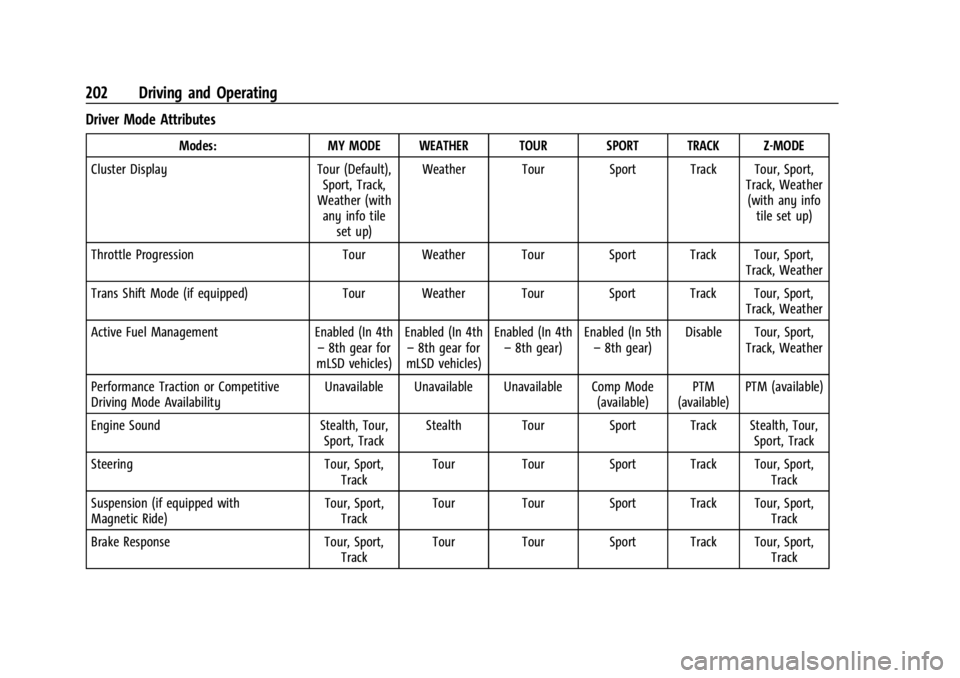
Driver Mode Attributes
Modes:MY MODE WEATHER TOUR SPORT TRACK Z-MODE
Cluster Display Tour (Default),
Sport, Track,
Weather (with any info tile
set up) Weather Tour Sport Track Tour, Sport,
Track, Weather(with any info tile set up)
Throttle Progression Tour Weather Tour Sport Track Tour, Sport,
Track, Weather
Trans Shift Mode (if equipped) Tour Weather Tour Sport Track Tour, Sport,
Track, Weather
Active Fuel Management Enabled (In 4th
– 8th gear for
mLSD vehicles) Enabled (In 4th
– 8th gear for
mLSD vehicles) Enabled (In 4th
– 8th gear) Enabled (In 5th
– 8th gear) Disable Tour, Sport,
Track, Weather
Performance Traction or Competitive
Driving Mode Availability Unavailable Unavailable Unavailable Comp Mode
(available)PTM
(available) PTM (available)
Engine Sound Stealth, Tour,
Sport, Track Stealth Tour Sport Track Stealth, Tour,
Sport, Track
Steering Tour, Sport,
Track Tour Tour Sport Track Tour, Sport,
Track
Suspension (if equipped with
Magnetic Ride) Tour, Sport,
Track Tour Tour Sport Track Tour, Sport,
Track
Brake Response Tour, Sport,
Track Tour Tour Sport Track Tour, Sport,
Track
Page 204 of 362
Chevrolet Corvette Owner Manual (GMNA-Localizing-U.S./Canada/Mexico-
17272984) - 2024 - CRC - 2/20/23
Driving and Operating 203
Cluster Display
For more information on the display themes
of the Drive modes on the instrument
cluster, seeInstrument Cluster 081 >
Options > Display themes.
Throttle Progression
Adjusts throttle sensitivity by selecting how
quickly or slowly the throttle reacts to
input.
Throttle Progression is a preset of
Powertrain and cannot be modified or
changed independently.
Transmission Shift Operation
Basic:
.Transmission upshifts and downshifts are
selected based on vehicle speed and
accelerator position to optimize comfort
and fuel economy during mild driving
conditions.
Driver Influenced Gear Selection:
.Aggressive driving will influence both the
upshift and downshift points in all modes.
When engaged, the Performance
Transmission Active light displays. See
Performance Transmission Active 093.
When Performance Transmission is
activated from a standstill, by selecting PTM Race 1 or Race 2, the transmission
shift map is in the most aggressive state
where upshifts are only achieved at high
revolutions per minute (rpm), downshifts
happen early, and the lowest gear is
selected for cornering. Transmission
behavior will transition to a level
appropriate to the current driving
behavior after a short period of time.
If PTM Race 1 or Race 2 are not selected,
the Performance Transmission Active
behavior still activates automatically after
a sustained period of performance driving
is detected. See
“Performance Traction
Management (PTM)” later on in this
section.
.Criteria which have influence are: driving
mode, accelerator, brakes, lateral, and
longitudinal loading.
.Changes in gear selection behavior due to
aggressive driving can include:
‐ Downshifting early with higher rpm’s
during aggressive braking (i.e. entering
a corner)
‐ Altering upshifts while experiencing
lateral acceleration
‐ Not upshifting when the accelerator is
released to avoid unnecessary shifts if
the accelerator is re-applied ‐
Recognizing sporty driving and
anticipating upcoming corners with the
appropriate gear selection entering and
exiting
.Driver Modes
‐Driver influenced changes are effective
in all driving modes, however the
aggressiveness of the transmission
response will increase between Tour,
Sport, and Track modes respectively.
Active Fuel Management (Engine Cylinder
Shuts Off)
If equipped with Active Fuel Management
(AFM), the engine uses driver demand to
deactivate cylinders to improve fuel
performance. When accelerating, V8 mode is
prevalent. For lighter throttle applications,
the system may disable cylinders to run in
4-cylinder mode to save fuel.
Active Fuel Management is a preset of
Powertrain and cannot be modified or
changed independently.
Page 208 of 362
Chevrolet Corvette Owner Manual (GMNA-Localizing-U.S./Canada/Mexico-
17272984) - 2024 - CRC - 2/20/23
Driving and Operating 207
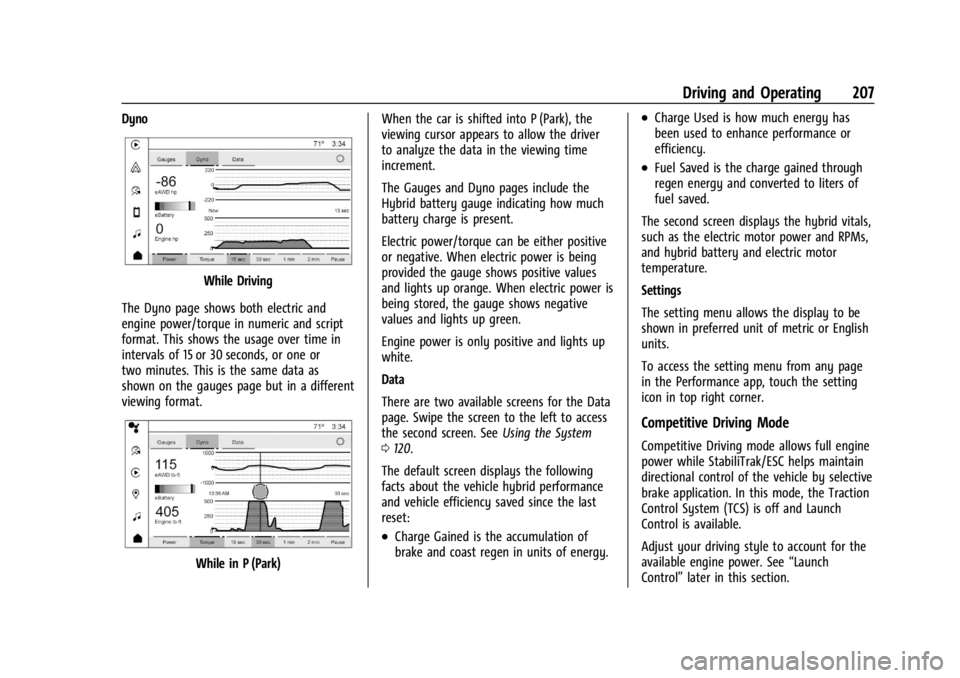
Dyno
While Driving
The Dyno page shows both electric and
engine power/torque in numeric and script
format. This shows the usage over time in
intervals of 15 or 30 seconds, or one or
two minutes. This is the same data as
shown on the gauges page but in a different
viewing format.
While in P (Park) When the car is shifted into P (Park), the
viewing cursor appears to allow the driver
to analyze the data in the viewing time
increment.
The Gauges and Dyno pages include the
Hybrid battery gauge indicating how much
battery charge is present.
Electric power/torque can be either positive
or negative. When electric power is being
provided the gauge shows positive values
and lights up orange. When electric power is
being stored, the gauge shows negative
values and lights up green.
Engine power is only positive and lights up
white.
Data
There are two available screens for the Data
page. Swipe the screen to the left to access
the second screen. See
Using the System
0 120.
The default screen displays the following
facts about the vehicle hybrid performance
and vehicle efficiency saved since the last
reset:
.Charge Gained is the accumulation of
brake and coast regen in units of energy.
.Charge Used is how much energy has
been used to enhance performance or
efficiency.
.Fuel Saved is the charge gained through
regen energy and converted to liters of
fuel saved.
The second screen displays the hybrid vitals,
such as the electric motor power and RPMs,
and hybrid battery and electric motor
temperature.
Settings
The setting menu allows the display to be
shown in preferred unit of metric or English
units.
To access the setting menu from any page
in the Performance app, touch the setting
icon in top right corner.
Competitive Driving Mode
Competitive Driving mode allows full engine
power while StabiliTrak/ESC helps maintain
directional control of the vehicle by selective
brake application. In this mode, the Traction
Control System (TCS) is off and Launch
Control is available.
Adjust your driving style to account for the
available engine power. See “Launch
Control” later in this section.