2024 CADILLAC XT4 Green
[x] Cancel search: GreenPage 196 of 373

Cadillac XT4 Owner Manual (GMNA-Localizing-U.S./Canada/Mexico-
17180837) - 2024 - CRC - 2/28/23
Driving and Operating 195
SET−:Move the thumbwheel down to
choose the set speed, to decrease the set
speed (Manual mode), or to decrease the
offset (Auto mode).
*: Press to disengage Speed Limiter while
keeping the last set speed in memory.
Automatic Speed Limiter
Automatic Speed Limiter uses an on-board
camera and navigation data to identify
speed limit road signs and propose a new
set speed based on that data.
In Auto mode, you can adjust the set speed
with an offset above or below the identified
speed limit using the steering wheel
controls. See "Turning Speed Limiter On and
Off" later in this section.
{Warning
In Auto mode, Speed Limiter may not
prompt for set speed changes when
encountering conditional speed limit
signs, for example time frames or when
construction workers are present. To
avoid a crash, personal injury, or death,
always pay attention to posted signs and
follow applicable traffic laws. Manual Speed Limiter
Speed Limiter can also be used in Manual
mode. In Manual mode, all changes to the
set speed are controlled by the driver.
Selecting the Speed Limiter Mode
To enable Speed Limiter, select a Speed
Limiter mode. From the infotainment home
screen touch Controls > Drive (Drive & Park)
> Speed Limiter. The following options are
available:
.Off
.Manual
.Auto
When a Speed Limiter mode is selected,
s
will be lit white in the instrument cluster.
Setting Speed Limiter
Press the thumbwheel down to SET− to
activate Speed Limiter and use the current
vehicle speed as the set speed. When Speed
Limiter is active,
swill be lit green in the
instrument cluster. Increasing the Set Speed
While Speed Limiter is active, move the
thumbwheel up to RES+ to increase the set
speed (Manual mode), or to increase the
offset from the area speed limit
(Auto mode).
.Briefly move the thumbwheel up to RES+
and release it. For each press, the set
speed increases by 1 km/h (1 mph).
.Press and hold the thumbwheel up to
RES+ to increase the set speed by 5 km/h
(5 mph). Release the thumbwheel when
the desired set speed is displayed in the
instrument cluster.
When using Speed Limiter in Auto mode,
there is a predefined maximum allowed
value of offset beyond which the set speed
cannot be increased.
Decreasing the Set Speed
While Speed Limiter is active, move the
thumbwheel down to SET− to decrease the
set speed (Manual mode), or to decrease the
offset from the area speed limit
(Auto mode).
.Briefly move the thumbwheel down to
SET− and release it. For each press, the
set speed decreases by 1 km/h (1 mph).
Page 199 of 373

Cadillac XT4 Owner Manual (GMNA-Localizing-U.S./Canada/Mexico-
17180837) - 2024 - CRC - 2/28/23
198 Driving and Operating
J:Press to turn the system on or off. The
indicator turns white on the instrument
cluster when ACC is turned on.
RES+ : Press briefly to resume the previous
set speed or to increase vehicle speed if ACC
is already activated. To increase speed by
1 km/h (1 mph), press RES+ to the first
detent. To increase speed to the next
5 km/h (5 mph) mark on the speedometer,
press RES+ to the second detent.
SET– :Press briefly to set the speed and
activate ACC or to decrease vehicle speed if
ACC is already activated. To decrease speed
by 1 km/h (1 mph), press SET− to the first
detent. To decrease speed to the next
5 km/h (5 mph) mark on the speedometer,
press SET− to the second detent.
*:Press to disengage ACC without erasing
the selected set speed.
[: Press to select a following gap time
(or distance) setting for ACC of Far, Medium,
or Near.
Switching Between ACC and Regular Cruise
Control
To switch between ACC and regular cruise
control, press and hold
*. A Driver
Information Display (DIC) message displays.
See Vehicle Messages 0118.
ACC IndicatorRegular Cruise Control
Indicator
When ACC is engaged, a green
\
indicator will be lit on the instrument cluster
and the following gap will be displayed.
When the regular cruise control is engaged,
a green
Jindicator will be lit on the
instrument cluster; the following gap will
not display. It is recommended to switch from ACC to
regular Cruise Control when there are no
vehicles ahead of your vehicle.
When the vehicle is turned on, the cruise
control mode will be set to the last mode
used before the vehicle was turned off.
{Warning
Always check the cruise control indicator
on the instrument cluster to determine
which mode cruise control is in before
using the feature. If ACC is not active, the
vehicle will not automatically brake for
other vehicles, which could cause a crash
if the brakes are not applied manually.
You and others could be seriously injured
or killed.
Setting Adaptive Cruise Control
If
Jis on when not in use, it could get
pressed and go into cruise when not desired.
Keep
Joff when cruise is not being used.
Select the set speed desired for cruise. This
is the vehicle speed when no vehicle is
detected in its path.
Page 200 of 373

Cadillac XT4 Owner Manual (GMNA-Localizing-U.S./Canada/Mexico-
17180837) - 2024 - CRC - 2/28/23
Driving and Operating 199
ACC will not set at a speed less than
25 km/h (15 mph), although it can be
resumed when driving at lower speeds. The
minimum allowable set speed is 25 km/h
(15 mph).
To set ACC while moving:1. Press
J.
2. Get up to the desired speed.
3. Press and release SET–.
4. Remove your foot from the accelerator.
After ACC is set, it may immediately apply
the brakes if a vehicle ahead is detected
closer than the selected following gap.
ACC can also be set while the vehicle is
stopped if ACC is on and the brake pedal is
applied.
The ACC indicator displays on the
instrument cluster and Head-Up Display
(HUD), if equipped. When ACC is turned on,
the indicator will be lit white. When ACC is
engaged, the indicator will turn green. Be mindful of speed limits, surrounding
traffic speeds, and weather conditions when
selecting the set speed.
Resuming a Set Speed
If the ACC is set at a desired speed and then
the brakes are applied, ACC is disengaged
without erasing the set speed from memory.
To begin using ACC again, press RES+ up
briefly.
.If the vehicle is moving more than 5 km/h
(3 mph), it returns to the previous set
speed.
.If the vehicle is stopped with the brake
pedal applied, press RES+ and release the
brake pedal. ACC will hold the vehicle
until RES+ or the accelerator pedal is
pressed.
A green ACC indicator and the set speed
display on the instrument cluster. The
vehicle ahead indicator may be flashing if a
vehicle ahead was present and moved. See
“Approaching and Following a Vehicle” later
in this section.
Once ACC has resumed, if there is no vehicle
ahead, if the vehicle ahead is beyond the
selected following gap, or if the vehicle has
exited a sharp curve, then the vehicle speed
will increase to the set speed. Increasing Speed While ACC is at a Set Speed
If ACC is already activated, do one of the
following:
.Use the accelerator to get to the higher
speed. Briefly press and release SET–
and
release the accelerator pedal. The vehicle
will now cruise at the higher speed.
When the accelerator pedal is pressed,
ACC will not brake because it is
overridden. While overridden, the ACC
indicator will turn blue on the instrument
cluster and heads up display, if equipped.
.Press and hold RES+ until the desired set
speed is displayed, then release it.
.To increase speed in small increments,
press RES+ to the first detent. For each
press, the vehicle goes 1 km/h (1 mph)
faster.
.To increase speed in larger increments,
press RES+ to the second detent. For each
press, the vehicle speed increases to the
next 5 km/h (5 mph) mark on the
speedometer.
The set speed can also be increased while
the vehicle is stopped.
.If stopped with the brake applied, press
RES+ until the desired set speed is
displayed.
Page 210 of 373

Cadillac XT4 Owner Manual (GMNA-Localizing-U.S./Canada/Mexico-
17180837) - 2024 - CRC - 2/28/23
Driving and Operating 209
.The Driver Attention System (DAS) detects
the driver's head and eyes are directed
toward the road.
.The lane markings are clearly visible and
able to be detected by the system.
Super Cruise may be unavailable if Super
Cruise detects the outside air temperature is
very cold.
Poor Conditions
Poor Conditions Using Super Cruise
{Warning
Super Cruise may not begin steering
immediately, even when Super Cruise is
available and
Zhas been pressed. To
prevent serious injury or death, only
remove your hands from the steering
wheel if the steering wheel light bar, the
Super Cruise light
Z, and the Adaptive
Cruise Control (ACC) light
\are green.
To engage:
.Press5to turn on ACC. Make sure the
white
\indicator displays in the
instrument cluster. See Adaptive Cruise
Control (Advanced) 0196.
.When Super Cruise is available, the white
Super Cruise light
Zwill display in the
instrument cluster.
.PressZ. ACC will set the speed at the
current vehicle speed. If ACC has a
previously set speed, it may resume at
that speed.
If Auto Set Speed is enabled and a speed
limit sign is detected, ACC will set the speed
to the road speed limit (+/- the selected
offset). For Auto Set Speed customization,
see Adaptive Cruise Control (Advanced)
0 196.
{Warning
Always monitor the vehicle speed and
make sure that you are following the
speed limit, regardless of the Auto Set
Speed status.
Page 211 of 373

Cadillac XT4 Owner Manual (GMNA-Localizing-U.S./Canada/Mexico-
17180837) - 2024 - CRC - 2/28/23
210 Driving and Operating
When engaged and not steering the vehicle,
the steering wheel light bar flashes blue,
and the Super Cruise light
Zwill display
blue. The driver is in control of steering and
Super Cruise is not steering the vehicle.
When the vehicle is positioned in the center
of the lane, the steering wheel light bar
and the Super Cruise light
Zwill display
green, indicating Super Cruise is steering the
vehicle.
When Super Cruise controls the steering,
traffic and other conditions and laws permit,
and it is safe to do so, your hands can be
taken off the steering wheel.
Always pay attention to the road and the
operation of the vehicle. Always monitor
and be attentive of surrounding traffic,
including vehicles that may cross the road in
front of your vehicle.
Super Cruise steering can be overridden with
manual steering at any time. When Super
Cruise is engaged, always be prepared to
take immediate action —including steering,
accelerating, and braking quickly,
if necessary.
Super Cruise, when engaged, will enable
Forward Collision System to Alert and Brake. Steering Manually and Changing Lanes
The vehicle can always be manually steered,
even with Super Cruise engaged; for
example, when changing lanes.
When the steering wheel is moved
manually, the steering wheel light bar
pulses blue and the Super Cruise lightZ
on the instrument cluster turns blue to
indicate that Super Cruise is not steering the
vehicle.
When ready to allow Super Cruise to
resume steering again, position the vehicle
in the center of the lane, hold the steering
wheel until the steering wheel light bar
turns green, and then release the steering
wheel when it is safe to do so.
{Warning
To help prevent crashes before making a
lane change:
.Always check mirrors.
.Glance over your shoulder.
.Use the turn signals.
Super Cruise Lane Change
On Demand Lane Changes
Super Cruise can steer to perform a single
lane change under certain conditions when
requested by the driver or initiated by the
Super Cruise System.
To request a lane change:
1. Verify the lane next to your vehicle is clear and conditions are safe to make a
lane change.
2. Use the turn signal lever to activate the turn signal in the direction of the desired
lane change.
3. Return the turn signal lever to the neutral position after the lane change.
See Turn and Lane-Change Signals 0127.
4. To cancel a lane change, return the turn signal lever to the neutral position, move
the lever in the opposite direction of the
lane change, or steer manually at
any time.
Automatic Lane Changes
If equipped, Super Cruise may initiate a
single lane change when enabled through
vehicle settings under the following
conditions:
Page 215 of 373
Cadillac XT4 Owner Manual (GMNA-Localizing-U.S./Canada/Mexico-
17180837) - 2024 - CRC - 2/28/23
214 Driving and Operating
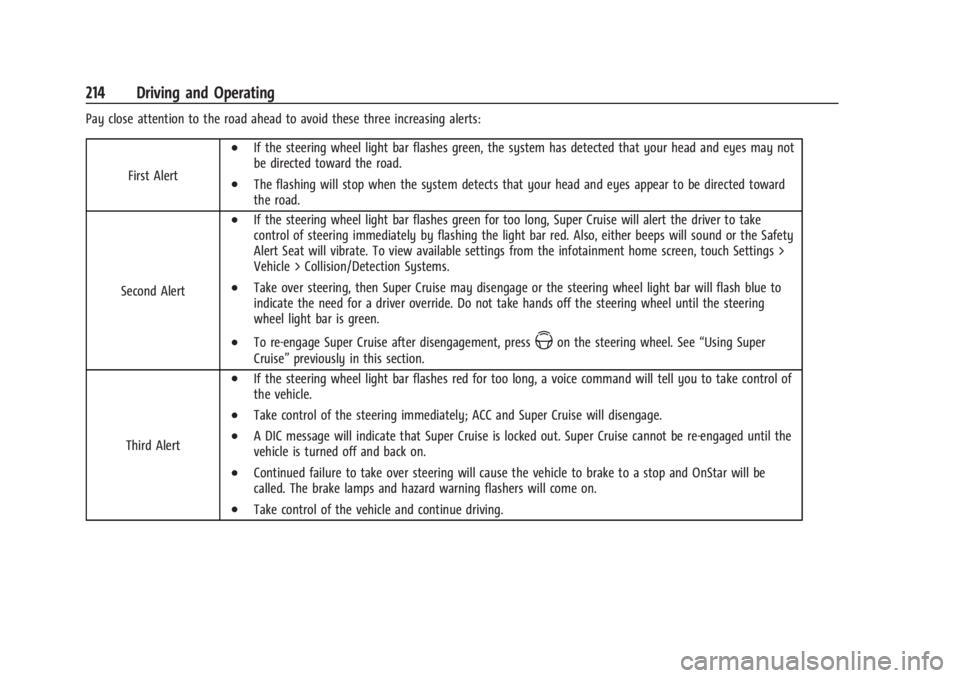
Pay close attention to the road ahead to avoid these three increasing alerts:First Alert
.If the steering wheel light bar flashes green, the system has detected that your head and eyes may not
be directed toward the road.
.The flashing will stop when the system detects that your head and eyes appear to be directed toward
the road.
Second Alert
.If the steering wheel light bar flashes green for too long, Super Cruise will alert the driver to take
control of steering immediately by flashing the light bar red. Also, either beeps will sound or the Safety
Alert Seat will vibrate. To view available settings from the infotainment home screen, touch Settings >
Vehicle > Collision/Detection Systems.
.Take over steering, then Super Cruise may disengage or the steering wheel light bar will flash blue to
indicate the need for a driver override. Do not take hands off the steering wheel until the steering
wheel light bar is green.
.To re-engage Super Cruise after disengagement, pressZon the steering wheel. See “Using Super
Cruise” previously in this section.
Third Alert
.If the steering wheel light bar flashes red for too long, a voice command will tell you to take control of
the vehicle.
.Take control of the steering immediately; ACC and Super Cruise will disengage.
.A DIC message will indicate that Super Cruise is locked out. Super Cruise cannot be re-engaged until the
vehicle is turned off and back on.
.Continued failure to take over steering will cause the vehicle to brake to a stop and OnStar will be
called. The brake lamps and hazard warning flashers will come on.
.Take control of the vehicle and continue driving.
Page 218 of 373

Cadillac XT4 Owner Manual (GMNA-Localizing-U.S./Canada/Mexico-
17180837) - 2024 - CRC - 2/28/23
Driving and Operating 217
Steering Wheel Light Bar Instrument Cluster LightSuper Cruise Description
Off OffSuper Cruise is off. There is no automatic steering. Operate the vehicle
manually.
Off WhiteSuper Cruise is available and can be engaged.
Solid Green Solid GreenSuper Cruise is steering. Pay attention to the road and vehicle
operation.
Pulsing Blue Solid BlueSuper Cruise is not steering. Operate the vehicle manually. See
“Steering Manually and Changing Lanes”
previously in this section.
Flashing Green Solid GreenSuper Cruise has detected you are not paying sufficiently close
attention to the road. Pay attention to the road. See
“Attention to the
Road” previously in this section.
Flashing Amber Solid AmberTake over steering. Super Cruise may disengage. See
“Take Over Alert”
previously in this section.
Flashing Red Solid RedTake over steering immediately. Super Cruise will disengage. See
“Take
Over Alert” previously in this section.
Page 234 of 373

Cadillac XT4 Owner Manual (GMNA-Localizing-U.S./Canada/Mexico-
17180837) - 2024 - CRC - 2/28/23
Driving and Operating 233
Rear Cross Traffic Braking (RCTB)
If equipped, RCTB displays a red warning
triangle with a left or right pointing arrow
on the infotainment screen to warn of
traffic coming from the left or right. The
system detects objects coming from up to
20 m (65 ft) from the left or right side of
the vehicle. When an object is detected,
three beeps sounds from the left or right,
depending on the direction of the detected
vehicle. RCTB will bring the vehicle to a full
stop if a collision is imminent.
Driving With a Trailer
Use caution while backing up when towing
a trailer. RCTA and RCTB are automatically
disabled when a trailer is attached to the
vehicle.
Turning the Feature On or Off
To view available settings from the
infotainment screen, touch Settings >
Vehicle > Collision/Detection Systems.
Assistance Systems for Driving
If equipped, when driving the vehicle in a
forward gear, Forward Collision Alert (FCA),
Lane Keep Assist (LKA), Side Blind Zone Alert
(SBZA), Lane Change Alert (LCA), AutomaticEmergency Braking (AEB), and/or the Front
Pedestrian Braking (FPB) System can help to
avoid a crash or reduce crash damage.
Forward Collision Alert (FCA)
System
If equipped, the FCA system may help to
avoid or reduce the harm caused by
front-end crashes. When approaching a
vehicle ahead too quickly, FCA provides a
red flashing alert on the windshield and
rapidly beeps or pulses the driver seat. FCA
also lights an amber visual alert if following
another vehicle much too closely.
FCA can detect vehicles to distances of
approximately 110 m (360 ft) and operates at
all speeds.
{Warning
FCA is a warning system and does not
apply the brakes. When approaching a
slower-moving or stopped vehicle ahead
too rapidly, or when following a vehicle
too closely, FCA may not provide a
warning with enough time to help avoid
a crash. It also may not provide any
warning at all. FCA does not warn of
(Continued)
Warning (Continued)
pedestrians, animals, signs, guardrails,
bridges, construction barrels, or other
objects. Be ready to take action and
apply the brakes. SeeDefensive Driving
0 164.
FCA can be disabled. To view available
settings from the infotainment screen, touch
Settings > Vehicle > Collision/Detection
Systems.
Detecting the Vehicle Ahead
FCA warnings will not occur unless the FCA
system detects a vehicle ahead. When a
vehicle is detected, the vehicle ahead
indicator will display green. Vehicles may
not be detected on curves, highway exit
ramps, or hills, due to poor visibility; or if a
vehicle ahead is partially blocked by