Page 518 of 766
uuAcuraWatchTMuAdaptive Cruise Control (ACC) with Low Speed Follow*
516
Driving
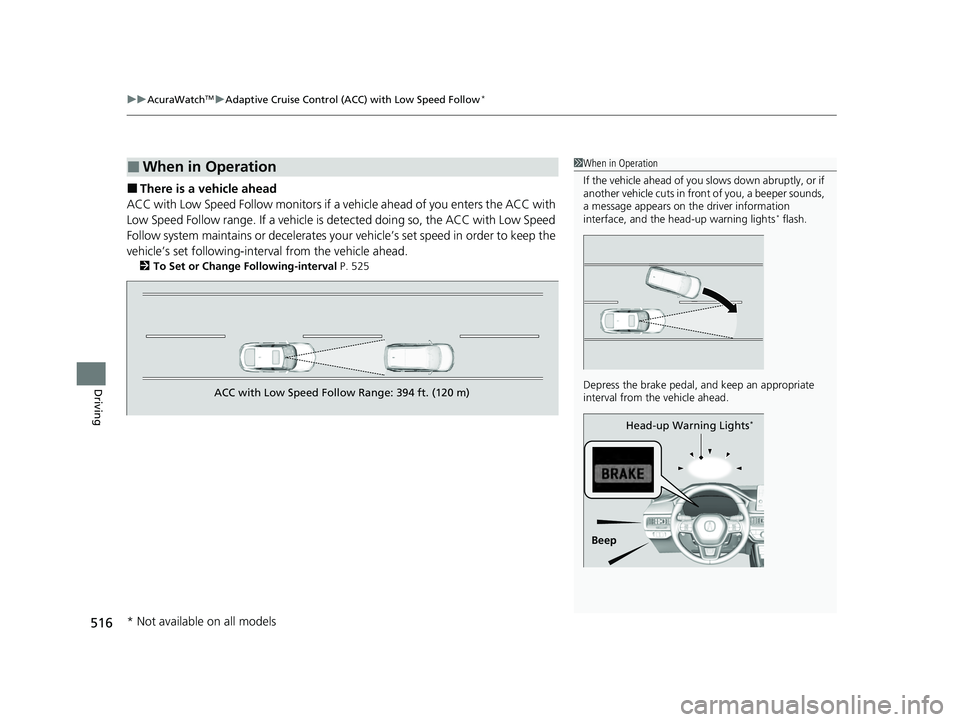
■There is a vehicle ahead
ACC with Low Speed Follow monitors if a ve hicle ahead of you enters the ACC with
Low Speed Follow range. If a vehicle is detected doing so, the ACC with Low Speed
Follow system maintains or decelerates your vehicle’s set speed in order to keep the
vehicle’s set followi ng-interval from the vehicle ahead.
2To Set or Change Following-interval P. 525
■When in Operation1When in Operation
If the vehicle ahead of you slows down abruptly, or if
another vehicle cuts in front of you, a beeper sounds,
a message appears on th e driver information
interface, and the he ad-up warning lights
* flash.
Depress the brake pedal, and keep an appropriate
interval from the vehicle ahead.
Beep Head-up Warning Lights
*
ACC with Low Speed Follow Range: 394 ft. (120 m)
* Not available on all models
24 ACURA INTEGRA-313S56100.book 516 ページ 2023年2月13日 月曜日 午後2時41分
Page 521 of 766

Continued519
uuAcuraWatchTMuAdaptive Cruise Control (ACC) with Low Speed Follow*
Driving
■A vehicle detected ahead is within ACC with Low Speed Follow range and
slows to a stop Your vehicle also stops, automatically. The
Stopped message appears on the gauge.
When the vehicle ahead of you starts again, if
you press the RES/+ /SET/− switch up or
down, or depress the accelerator pedal, ACC
with Low Speed Follow operates again within
the prior set speed.
If no vehicle is ahead of you before you
resume driving, depress the accelerator pedal
and ACC with Low Speed Follow will operate
again within the prior set speed.1 When in Operation
3WARNING
Exiting a vehicle that has been stopped
while the ACC with Low Speed Follow
system is operating can result in the vehicle
moving without operator control.
A vehicle that moves without operator
control can cause a crash, resulting in
serious injury or death.
Never exit a vehicle when the vehicle is
stopped by ACC with Low Speed Follow. (green)
(green)
24 ACURA INTEGRA-313S56100.book 519 ページ 2023年2月13日 月曜日 午後2時41分
Page 535 of 766

533
uuAcuraWatchTMuAdaptive Cruise Control (ACC)*
Continued
Driving
Adaptive Cruise Control (ACC)*
Helps maintain a constant vehicle speed a nd a set following-interval behind a vehicle
detected ahead of yours, without you having to keep your foot on the brake or the
accelerator.
When ACC slows your vehicle by applying the brakes, your vehicle’s brake lights will
illuminate.1 Adaptive Cruise Control (ACC)*
Important Reminder
As with any system, there are limits to ACC. Use the
brake pedal whenever necessary, and always keep a
safe interval betw een your vehicle and other vehicles.
3WARNING
Improper use of ACC can lead to a crash.
Use ACC only when driving on expressways
or freeways and in go od road and weather
conditions.
3WARNING
ACC has limited braking capability.
When your vehicle speed drops below 22
mph (35 km/h), ACC will automatically
cancel and no longer will apply your
vehicle’s brakes.
Always be prepared to apply the brake
pedal when conditions require.
When to use
■Vehicle speed for adaptive cruise control: Desired speed in a range above
roughly 25 mph (40 km/h).
■Shift position for ACC: In ( 2 or higher position.
A front wide view camera is located
behind the rearview mirror.
* Not available on all models
24 ACURA INTEGRA-313S56100.book 533 ページ 2023年2月13日 月曜日 午後2時41分
Page 539 of 766
Continued537
uuAcuraWatchTMuAdaptive Cruise Control (ACC)*
Driving
■There is a vehicle ahead
ACC monitors if a vehicle ahead of you ente rs the ACC range. If a vehicle is detected
doing so, the ACC system maintains or decele rates your vehicle’s set speed in order
to keep the vehicle’s set followi ng-interval from the vehicle ahead.
2To Set or Change Following-interval P. 545
■When in Operation1When in Operation
If the vehicle ahead of you slows down abruptly, or if
another vehicle cuts in front of you, a beeper sounds,
a message appears on th e driver information
interface, and the head- up warning lights flash.
Depress the brake pedal, and keep an appropriate
interval from the vehicle ahead.
Beep Head-up Warning Lights
ACC Range: 394 ft. (120 m)
24 ACURA INTEGRA-313S56100.book 537 ページ 2023年2月13日 月曜日 午後2時41分
Page 555 of 766

553
uuAcuraWatchTMuLane Keeping Assist System (LKAS)
Continued
Driving
Lane Keeping Assist System (LKAS)
Provides steering input to help keep the vehicle in the middle of a detected lane and
provides tactile and visual al erts if the vehicle is detected drifting out of its lane.1Lane Keeping Assist System (LKAS)
Important Safety Reminders
The LKAS is for your convenience only. It is not an
autonomous driving system and always requires
driver attention and control. The system does not
work if you take your hands off the steering wheel or
fail to steer the vehicle.
The LKAS is convenient when it is used on
expressways or freeways.
Do not place objects on the instrument panel.
Objects may reflect on th e windshield and prevent
correct detection of the traffic lanes.
The LKAS only alerts you when lane drift is detected
without a turn signal in use. The LKAS may not detect
all lane markings or lane departures; accuracy will
vary based on weather, speed, and lane marker
condition.
It is always your responsibility to safely operate the
vehicle and avoid collisions.
The LKAS may not work properly or may work
improperly under the certain conditions: 2 LKAS Conditions and Limitations P. 561
You can read about handling information for the
camera equipped with this system. 2 Front Wide View Camera P. 590
When you operate the turn signals to chan ge lanes, the system is suspended, and
resumes after the signals are off.
If you make a lane change without operating the turn signals, the LKAS alerts
activate, and torque is applied to the steering.
■Front Wide
View Camera
Monitors the
lane lines■Tactile and visual alerts
Rapid vibrations on the steering wheel
and a warning display alert you that
the vehicle is drifting out of a detected
lane.
■Steering input assist
The system applies torque to the steering to keep the vehicle between the left
and right lane lines. The applied torque becomes stronger as the vehicle gets
closer to either of the lane lines.
24 ACURA INTEGRA-313S56100.book 553 ページ 2023年2月13日 月曜日 午後2時41分
Page 557 of 766
555
uuAcuraWatchTMuLane Keeping Assist System (LKAS)
Continued
Driving
When the vehicle enters the warning area, the LKAS alerts you with slight steering
wheel vibration as well as a warning display.
■Lane Departure Warning Function
LKAS Indicator (green)
Amber Line Warning Area
Warning Area
24 ACURA INTEGRA-313S56100.book 555 ページ 2023年2月13日 月曜日 午後2時41分
Page 568 of 766
566
uuAcuraWatchTMuTraffic Jam Assist*
Driving
When the vehicle enters the warning area, Traffic Jam Assist alerts you with an
audible alert as well as a warning displayM
■Lane Departure Warning Function
LKAS Indicator (green)
Amber Line Warning Area
Warning Area
24 ACURA INTEGRA-313S56100.book 566 ページ 2023年2月13日 月曜日 午後2時41分
Page 570 of 766

uuAcuraWatchTMuTraffic Jam Assist*
568
Driving
Keep your vehicle near the center of the lane
while driving.
u The LKAS indicator changes from white
to green, and white lines change to
green once the system starts operating
after detecting the left and right lane
markings.
■How Traffic Jam Assist Works1How Traffic Jam Assist Works
If your vehicle veers too far to the right or the left of
the white (or yellow) traffic lane lines while Traffic
Jam Assist is active, deactivate Traffic Jam Assist and
have your vehicle ch ecked by a dealer.
In some cases the system cannot properly detect the
traffic lane lines and, as a result, will not provide
steering assistance.
2 Traffic Jam Assist Conditions and
Limitations P. 570
If the driver takes their hands off the steering wheel
or does not adequately main tain control of steering,
the warning below will appear.
If the driver does not grip the steering wheel after the
warning above has repeatedly appeared, a warning
buzzer will sound and Traffi c Jam Assist will be
canceled.
Green Lines
LKAS Indicator (green)
24 ACURA INTEGRA-313S56100.book 568 ページ 2023年2月13日 月曜日 午後2時41分