Page 240 of 766

238
uuAudio System uAudio Remote Controls
Features
Audio Remote Controls
Allow you to operate the audio system while driving. The information is shown on
the driver information interface.
VOL
(+/VOL(- (Volume) Switch
Press Up: To increase the volume.
Press Down: To decrease the volume.
/ (Seek/Skip) Buttons
• When listening to the radio
Press : To select the next preset radio station.
Press : To select the previous preset radio station.
Press and hold : To select the next strong station.
Press and hold : To select the previous strong station.
• When listening to an iPod, USB flash drive, Bluetooth® Audio, or Smartphone
Connection
Press : To skip to the next song.
Press : To go back to the beginning of the current or previous song.
• When listening to a USB flash drive or Bluetooth® Audio
Press and hold : To skip to the next folder/group.
Press and hold : To go back to the previous folder/group.
1Audio Remote Controls
Some modes appear only when an appropriate
device or medium is used.
Depending on the Bluetooth® device you connect,
some functions may not be available.Models with 7-in. Color Touchscreen
/ (Seek/Skip) Buttons
Left
Selector
Wheel
VOL(+/VOL(- (Volume) Switch
24 ACURA INTEGRA-313S56100.book 238 ページ 2023年2月13日 月曜日 午後2時41分
Page 241 of 766
239
uuAudio System uAudio Remote Controls
Continued
Features
Left Selector Wheel
Roll up or down:
FM
AM
To cycle through the modes, roll up or down and
then press the left selector wheel:
Bluetooth
USB
Apps
(Apple CarPlay/Android Auto)
Phone
Back
Customize display
24 ACURA INTEGRA-313S56100.book 239 ページ 2023年2月13日 月曜日 午後2時41分
Page 242 of 766

240
uuAudio System uAudio Remote Controls
Features
Allow you to operate the audio system while driving. The information is shown on
the driver information interface.
VOL
(+/VOL(- (Volume) Switch
Press Up: To increase the volume.
Press Down: To decrease the volume.
/ (Seek/Skip) Buttons
• When listening to the radio
Press : To select the next preset radio station.
Press : To select the previous preset radio station.
Press and hold : To select the next strong station.
Press and hold : To select the previous strong station.
• When listening to an iPod, USB flash drive, Bluetooth® Audio, or Smartphone
Connection
Press : To skip to the next song.
Press : To go back to the beginning of the current or previous song.
• When listening to a USB flash drive
Press and hold : To skip to the next folder.
Press and hold : To go back to the previous folder.
Models with 9-in. Color Touchscreen
/ (Seek/Skip) Buttons
Left Selector
WheelVOL(+/VOL(-
(Volume) Switch
24 ACURA INTEGRA-313S56100.book 240 ページ 2023年2月13日 月曜日 午後2時41分
Page 243 of 766
241
uuAudio System uAudio Remote Controls
Features
Left Selector Wheel
Roll up or down:
Back
Phone
FM
AM
SXM
To cycle through the modes, roll up or down and
then press the left selector wheel:
Customize display
Bluetooth
USB
Apps
(Apple CarPlay/Android Auto)
Alexa*
* Not available on all models
24 ACURA INTEGRA-313S56100.book 241 ページ 2023年2月13日 月曜日 午後2時41分
Page 249 of 766
247
uuAudio System Basic Operation uPlaying an iPod
Continued
Features
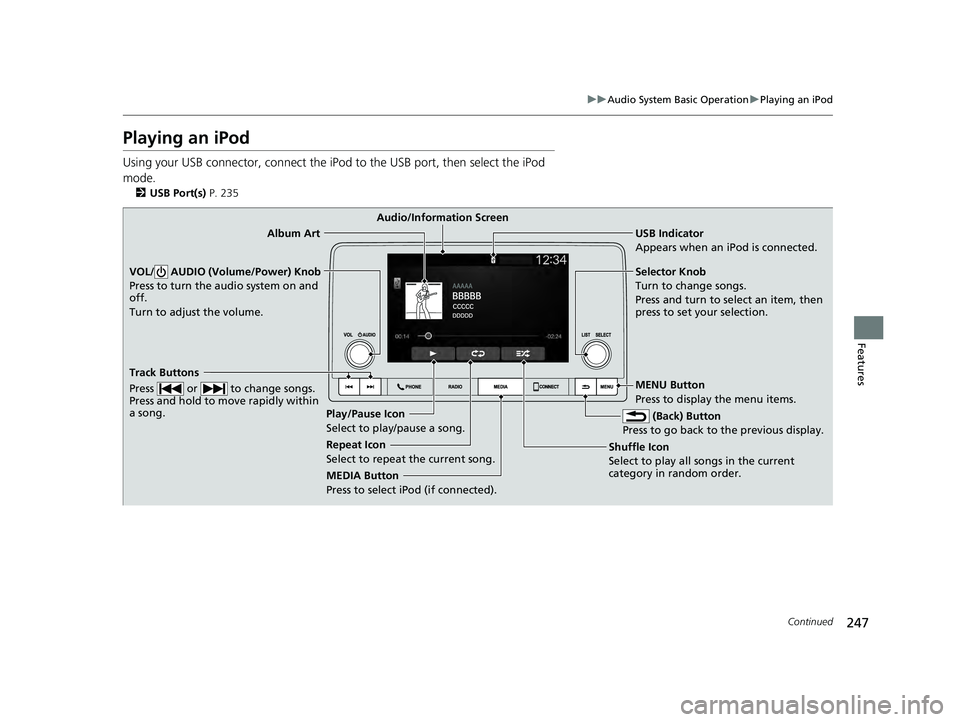
Playing an iPod
Using your USB connector, connect the iPod to the USB port, then select the iPod
mode.
2 USB Port(s) P. 235
USB Indicator
Appears when an iPod is connected.
MEDIA Button
Press to select iPod (if connected). (Back) Button
Press to go back to the previous display.
Track Buttons
Press or to change songs.
Press and hold to move rapidly within
a song.
VOL/ AUDIO (Volume/Power) Knob
Press to turn the audio system on and
off.
Turn to adjust the volume.Selector Knob
Turn to change songs.
Press and turn to select an item, then
press to set your selection.
MENU Button
Press to display the menu items.
Audio/Information Screen
Album Art
Shuffle Ic
on
Selec t to
play all songs in the current
category in random order.
Play/Pause Icon
Select to play/pause a song.
Repeat Icon
Select to repeat the current song.
24 ACURA INTEGRA-313S56100.book 247 ページ 2023年2月13日 月曜日 午後2時41分
Page 250 of 766
uuAudio System Basic Operation uPlaying an iPod
248
Features
1. Press to display the iPod music list.
2. Select a category.
3. Select an item.
u Select an item repeatedly until a desired
item you want to listen is displayed.
■How to Select a Song from the iPod Music List1Playing an iPod
Available operating functi ons vary on models or
versions. Some functions ma y not be available on the
vehicle’s audio system.
If there is a problem, you may see an error message
on the audio/information screen. 2 iPod/USB Flash Drive P. 339
Item
Selection Category
Selection
24 ACURA INTEGRA-313S56100.book 248 ページ 2023年2月13日 月曜日 午後2時41分
Page 252 of 766

250
uuAudio System Basic Operation uPlaying a USB Flash Drive
Features
Playing a USB Flash Drive
Your audio system reads and plays sound fi les on a USB flash drive in either MP3,
WMA, AAC*1, FLAC, or WAV format.
Connect your USB flash drive to the USB port, then press the MEDIA button.
2USB Port(s) P. 235
*1:Only AAC format files recorded with iTunes are playable on this unit.
USB Indicator
Appears when a USB
flash drive is connected.
MEDIA Button
Press to select USB flash drive (if connected). (Back) Button
Press to go back to the previous display.
Track Buttons
Press or to change files.
Press and hold to move rapidly
within a track.
VOL/ AUDIO (Volume/Power) Knob
Press to turn the audio system on and
off.
Turn to adjust the volume.Selector Knob
Turn to change files.
Press and turn to select an item,
then press to set your selection.
MENU Button
Press to display the menu items.
Audio/Information Screen
Play Icon
Select to play a file .
Ran
dom Icons
Select to play all files in the current category in
random order.
Pause Icon
Select to pause a file.
Repeat Icons
Select to repeat the current file.
24 ACURA INTEGRA-313S56100.book 250 ページ 2023年2月13日 月曜日 午後2時41分
Page 253 of 766
Continued251
uuAudio System Basic Operation uPlaying a USB Flash Drive
Features
1. Press to display a folder list.
2. Select a folder.
3. Select a file.
■How to Select a File from a Folder1Playing a USB Flash Drive
Use the recommended USB flash drives.
2 General Information on the Audio System
P. 341
Files in WMA format prot ected by digital rights
management (DRM) cannot be played.
The audio system displays Unplayable File, and then
skips to the next file.
If there is a problem, you may see an error message
on the audio/information screen.
2 iPod/USB Flash Drive P. 339
Track
Selection Folder
Selection
24 ACURA INTEGRA-313S56100.book 251 ページ 2023年2月13日 月曜日 午後2時41分