Page 566 of 766
564
uuAcuraWatchTMuLane Keeping Assist System (LKAS)
Driving
■Vehicle conditions
• When lighting is weak due to dirt covering the headlight lenses, or there is poor
visibility in a dark place due to th e headlights being improperly adjusted.
• The front of the camera is covered by dirt, fog, rain, mud, wet snow, seals,
accessories, stickers, or film on the windshield.
• Driving at night or in a dark place (e .g., a tunnel) with the headlights off.
• There is residue on the windshie ld from the windshield wipers.
• An abnormal tire or wheel condition (incor rect sizes, varied sizes or construction,
improperly inflated, compact spare tire
*, etc.).
• The vehicle is tilted due to a heavy load in the cargo area or rear seats.
• The suspension ha s been modified.
• Tire chains
* are installed.
* Not available on all models
24 ACURA INTEGRA-313S56100.book 564 ページ 2023年2月13日 月曜日 午後2時41分
Page 569 of 766

Continued567
uuAcuraWatchTMuTraffic Jam Assist*
Driving
Traffic Jam Assist is activated when all of the following conditions exist:
• LKAS is activated.
• The lane in which you are driving has detectable lane markers on both sides, and
your vehicle is in the center of the lane.
• The vehicle is traveling between about 0 and 45mph (0 and 72km/h).
• You are driving on a straight or slightly curved road.
• The driver is grippi ng the steering wheel.
• The shift position is in
(D or (S.
Do not use Traffic Jam Assist in any of the following situations:
• You are traveling on a ro ad with sharp curves.
u The system may not allow your vehicle to respond in a manner best suited for
the road conditions.
• You are entering a toll booth, inte rchange, service area, or parking area.
• You are driving in adverse weat her (rain, fog, snow, etc.).
• The surface of the road is slippery; for example, it is icy or covered with snow.
u The tires may slip, causing you to lose control of the vehicle.
■Traffic Jam Assist Activation1Traffic Jam Assist Activation
Refer to the following pa ge for proper handling of
the Lane Keeping Assist System (LKAS):
2 Lane Keeping Assist System (LKAS) P. 553
Refer to the following page for steering buttons and
displays: 2 Operation Switches for the Adaptive
Cruise Control (ACC) with Low Speed
Follow
*/Adaptive Cruise Control (ACC)*/
Lane Keeping Assist System (LKAS)/Traffic
Jam Assist
* P. 487
* Not available on all models
24 ACURA INTEGRA-313S56100.book 567 ページ 2023年2月13日 月曜日 午後2時41分
Page 572 of 766

570
uuAcuraWatchTMuTraffic Jam Assist*
Driving
The system may not detect lane markings and therefore may not keep the vehicle in
the middle of the lane under certain conditions, including the followingY
■Environmental conditions
• There is little contrast between la ne lines and the roadway surface.
• Driving in bad weather (rain, fog, snow, etc.).
• Driving on a snowy or wet roadway.
• Driving into low sunlight (e.g., at dawn or dusk).
• Shadows of adjacent objects (trees, build ings, guard rails, vehicles, etc.) are
parallel to white (or yellow) lines.
• Sudden changes between light and dark, such as the entrance or exit of a tunnel
or the shadows of trees, buildings, etc.
• Driving at night or in a dark place such as a tunnel (due to low-light conditions,
lane lines or the road surface may not be illuminated).
• When the lane lines or road surface are not visible, such as when the distance to
the vehicle in front of you is extremely short or when at an intersection.
• Strong light is reflected onto the roadway.
■Traffic Jam Assist Conditions and Limitations
24 ACURA INTEGRA-313S56100.book 570 ページ 2023年2月13日 月曜日 午後2時41分
Page 575 of 766
573
uuAcuraWatchTMuTraffic Jam Assist*
Driving
■Vehicle conditions
• When lighting is weak due to dirt coveri ng the headlight lenses, or there is poor
visibility in a dark place due to the headlights being improperly adjusted.
• The front of the camera is covered by dirt, fog, rain, mud, wet snow, seals,
accessories, stickers, or film on the windshield.
• Driving at night or in a dark place (e.g., a tunnel) with the headlights off.
• There is residue on the windshie ld from the windshield wipers.
• An abnormal tire or wheel condition (inco rrect sizes, varied sizes or construction,
improperly inflated, co mpact spare tire, etc.).
• The vehicle is tilted due to a heavy load in the cargo area or rear seats.
• The suspension has been modified.
• Tire chains are installed.
24 ACURA INTEGRA-313S56100.book 573 ページ 2023年2月13日 月曜日 午後2時41分
Page 579 of 766
Continued577
uuAcuraWatchTMuRoad Departure Mitigation System
Driving
The system activates when all of the following conditions are met:
• The vehicle is traveling between about 45 and 90 mph (72 and 145 km/h).
• The vehicle is on a straight or slightly curved road.
• The turn signals are off.
• The system makes a determination that th e driver is not actively accelerating,
braking, or steering.
■How the System Activates1 How the System Activates
The Road Departure Mi tigation system may
automatically shut off and the safety support
indicator (amber) co mes and stays on.
2 Indicators P. 86
The Road Departure Mitiga tion system function can
be impacted when the vehicle is:
•Driven on the inside edge of a curve, or outside of
a lane.
•Driven in a narrow lane.
24 ACURA INTEGRA-313S56100.book 577 ページ 2023年2月13日 月曜日 午後2時41分
Page 581 of 766

579
uuAcuraWatchTMuRoad Departure Mitigation System
Continued
Driving
The system may not properly detect lane ma rkings (in white or yellow), the outer
edge of the pavement (into grass or grav el border) or an oncoming vehicle under
certain conditions. Some ex amples of these conditions are listed below.
■Environmental conditions
• There is little contrast between lane lines and the roadway surface.
• Driving in bad weather (rain, fog, snow, etc.).
• Driving on a snowy or wet roadway.
• Driving into low sunlight (e.g., at dawn or dusk).
• Shadows of adjacent object s (trees, buildings, guard rails, vehicles, etc.) are
parallel to white (or yellow) lines.
• Sudden changes between light and dark, such as the entrance or exit of a tunnel
or the shadows of trees, buildings, etc.
• Strong light is reflec ted onto the roadway.
• Driving at night or in a dark place such as a tunnel (due to low-light conditions,
lane lines, the road surface, or onco ming vehicles may not be illuminated).
• The distance between your vehicle and the vehicle ahead of you is too short, and
lane lines and the road surface are not visible.
• The outer edge of the road is bordered by objects, materials, etc. other than grass
or gravel.
■Road Departure Mitigation syst em Conditions and Limitations
24 ACURA INTEGRA-313S56100.book 579 ページ 2023年2月13日 月曜日 午後2時41分
Page 583 of 766

581
uuAcuraWatchTMuRoad Departure Mitigation System
Continued
Driving
■Vehicle conditions
• When lighting is weak due to dirt coveri ng the headlight lenses, or there is poor
visibility in a dark place due to the headlights being improperly adjusted.
• The front of the camera is covered by dirt, fog, rain, mud, wet snow, seals,
accessories, stickers, or film on the windshield.
• Driving at night or in a dark place (e.g., a tunnel) with the headlights off.
• When the driver operates the brake pedal and steering wheel.
• There is residue on the windshie ld from the windshield wipers.
• An abnormal tire or wheel condition (inco rrect sizes, varied sizes or construction,
improperly inflated, compact spare tire
*, etc.).
• The vehicle is tilted due to heavy load in the cargo area or rear seats.
• Tire chains
* are installed.
• The suspension has been modified.
■Examples of limitations on detectio n due to the condition of oncoming
vehicles
• The oncoming vehicle or vehicle ahead of you is sideways.
• The oncoming vehicle jumps out in front of you.
• When the oncoming vehicle blends in with the background, preventing the
system from recognizing it.
• The headlights of an oncoming vehicle are lit on one side or not lit on either side
in a dark place.
• The distance between your vehicle an d the oncoming vehicle is too short.
• Part of the oncoming vehicle is not visi ble due to the vehicle ahead of you.
• There are multiple oncoming lanes or turning lanes.
• The vehicle in the adjacent lane is parked or moving at an extremely slow speed.
* Not available on all models
24 ACURA INTEGRA-313S56100.book 581 ページ 2023年2月13日 月曜日 午後2時41分
Page 588 of 766
uuAcuraWatchTMuTraffic Sign Recognition System
586
Driving
The Traffic Sign Recognition system may incorrectly recognize, be slow to identify,
or fail to recognize the traffi c sign in the following cases.
■Environmental conditions
• Driving into low sunlight (e.g., at dawn or dusk).
• Strong light is reflected onto the roadway.
• Driving at night, in dark areas such as long tunnels.
• Driving in bad weather (rain, fog, snow, etc.).
• Sudden changes between light and dark, such as the entrance or exit of a tunnel
or the shadows of trees, buildings, etc.
• Water is sprayed by or snow blown from a vehicle ahead.
■Roadway conditions
• Your vehicle is strongly shaken on uneven road surfaces.
■Vehicle conditions
• When lighting is weak due to dirt covering the headlight lenses, or there is poor
visibility in a dark place due to th e headlights being improperly adjusted.
• The front of the camera is covered by dirt, fog, rain, mud, wet snow, seals,
accessories, stickers, or film on the windshield.
• There is residue on the windshie ld from the windshield wipers.
• An abnormal tire or wheel condition (incor rect sizes, varied sizes or construction,
improperly inflated, compact spare tire
*, etc.).
• The vehicle is tilted due to heavy lo ad in the cargo area or rear seats.
• The suspension ha s been modified.
• Tire chains
* are installed.
• Driving at night or in a dark place (e .g., a tunnel) with the headlights off.
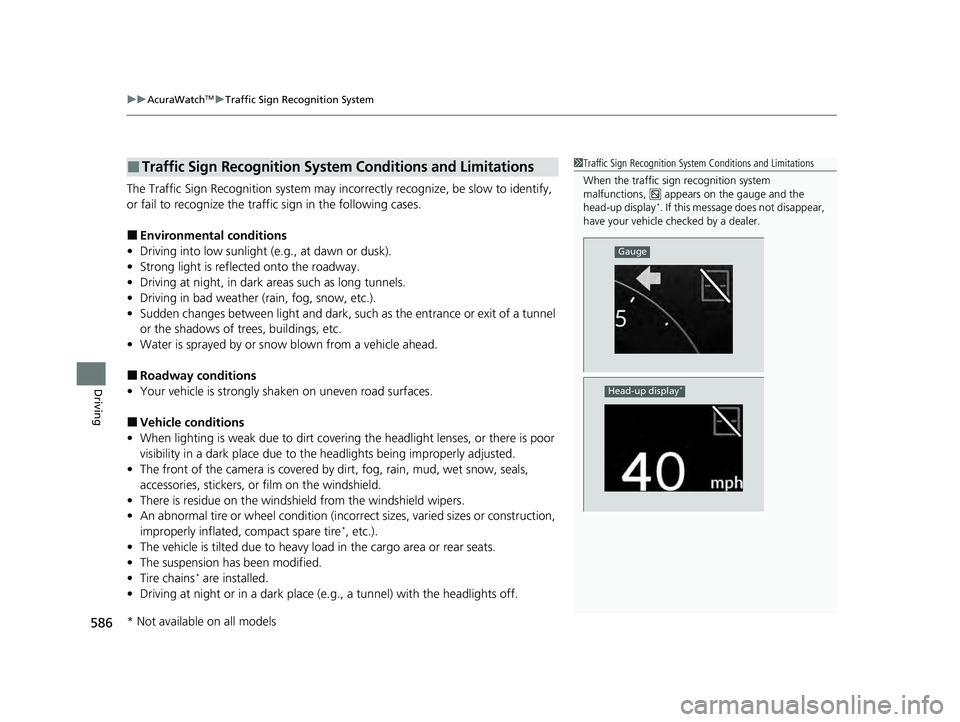
■Traffic Sign Recognition System Conditions and Limitations1Traffic Sign Recognition System Conditions and Limitations
When the traffic sign recognition system
malfunctions, appears on the gauge and the
head-up display
*. If this message does not disappear,
have your vehicle ch ecked by a dealer.
Gauge
Head-up display*
* Not available on all models
24 ACURA INTEGRA-313S56100.book 586 ページ 2023年2月13日 月曜日 午後2時41分


