2023 TOYOTA SUPRA mirror controls
[x] Cancel search: mirror controlsPage 2 of 372

2TABLE OF CONTENTS
1-1. NOTESInformation .............................. 4
2-1. QUICK REFERENCE Entering ................................. 18
Set-up and use ...................... 24
In transit ................................ 27
3-1. CONTROLS Cockpit .................................. 38
Sensors of the vehicle ........... 42
Operating state of the vehicle ............................................ 45
Toyota Supra Command ....... 49
General settings .................... 63
Personal settings .................. 66
Connections .......................... 71
Opening and closing ............. 80
Seats, mirrors, and steering wheel................................... 99
Transporting children safely ......................................... 113
Driving ................................ 119
Displays ............................. 138
Lights ................................. 156
Safety ................................. 163
Driving stability control systems ......................................... 199
Driver assistance systems . 203
Driving comfort ................... 231
Climate control ................... 232
Interior equipment .............. 241
Storage compartments ....... 251Cargo area .........................
253
4-1. DRIVING TIPS Things to remember when driv-ing .................................... 258
Saving fuel ......................... 263
5-1. MOBILITY Refueling ............................ 268
Wheels and tires ................ 270
Engine compartment .......... 297
Operating materials............ 300
Maintenance ...................... 308
Replacing components ...... 311
Breakdown assistance ....... 320
Care ................................... 330
6-1. REFERENCE Technical data .................... 340
Certification ........................ 343
Alphabetical Index.............. 360
1NOTES
2QUICK REFERENCE
3CONTROLS
4DRIVING TIPS
5MOBILITY
6REFERENCE
Index
Page 37 of 372

37
3
3
CONTROLS
CONTROLS
.3-1. CONTROLSCockpit ........................... 38
Sensors of the vehicle.... 42
Operating state of the vehi- cle................................. 45
Toyota Supra Command ..................................... 49
General settings ............. 63
Personal settings ........... 66
Connections ................... 71
Opening and closing ...... 80
Seats, mirrors, and steering wheel ............................ 99
Transporting children safely .................................. 113
Driving ......................... 119
Displays ...................... 138
Lights .......................... 156
Safety .......................... 163
Driving stabilit y control sys-
tems .......................... 199
Driver assistance systems .................................. 203
Driving comfort ............ 231
Climate control ............ 232
Interior equipment ....... 241
Storage compartments .................................. 251
Cargo area .................. 253
Page 38 of 372

383-1. CONTROLS
3-1.CONTROLS
This chapter describes all stan-
dard, country-specific and
optional features offered with
the series. It also describes fea-
tures and functions that are not
necessarily available in your
vehicle, e.g., due to the selected options or country versions. This
also applies to safety-related
functions and systems. When
using these functions and sys-
tems, the applicable laws and
regulations must be observed.
1 Central locking system
Unlock P.88
Lock P.88
2 Power windows P.97
3 Exterior mirror operation
P.108 4
Lights
Lights off P.156
Daytime running lights P.159
Parking lights P.158
Automatic headlight
control P.157
Cockpit
Vehicle features and options
In the vicinity of the steering wheel
Page 42 of 372
423-1. CONTROLS
This chapter describes all stan-
dard, country-specific and
optional features offered with
the series. It also describes fea-
tures and functions that are not
necessarily available in your
vehicle, e.g., due to the selected
options or country versions. This
also applies to safety-related
functions and systems. When
using these functions and sys-
tems, the applicable laws and
regulations must be observed.
Depending on the equipment,
the following cameras and sen-
sors are installed in the vehicle:
• Cameras behind the wind-shield.
• Rearview camera.
• Front radar sensor.
• Radar sensors, side, rear.
• Ultrasound sensors in the bumpers.
Keep the vehicle cameras and
sensors, as well as surrounding
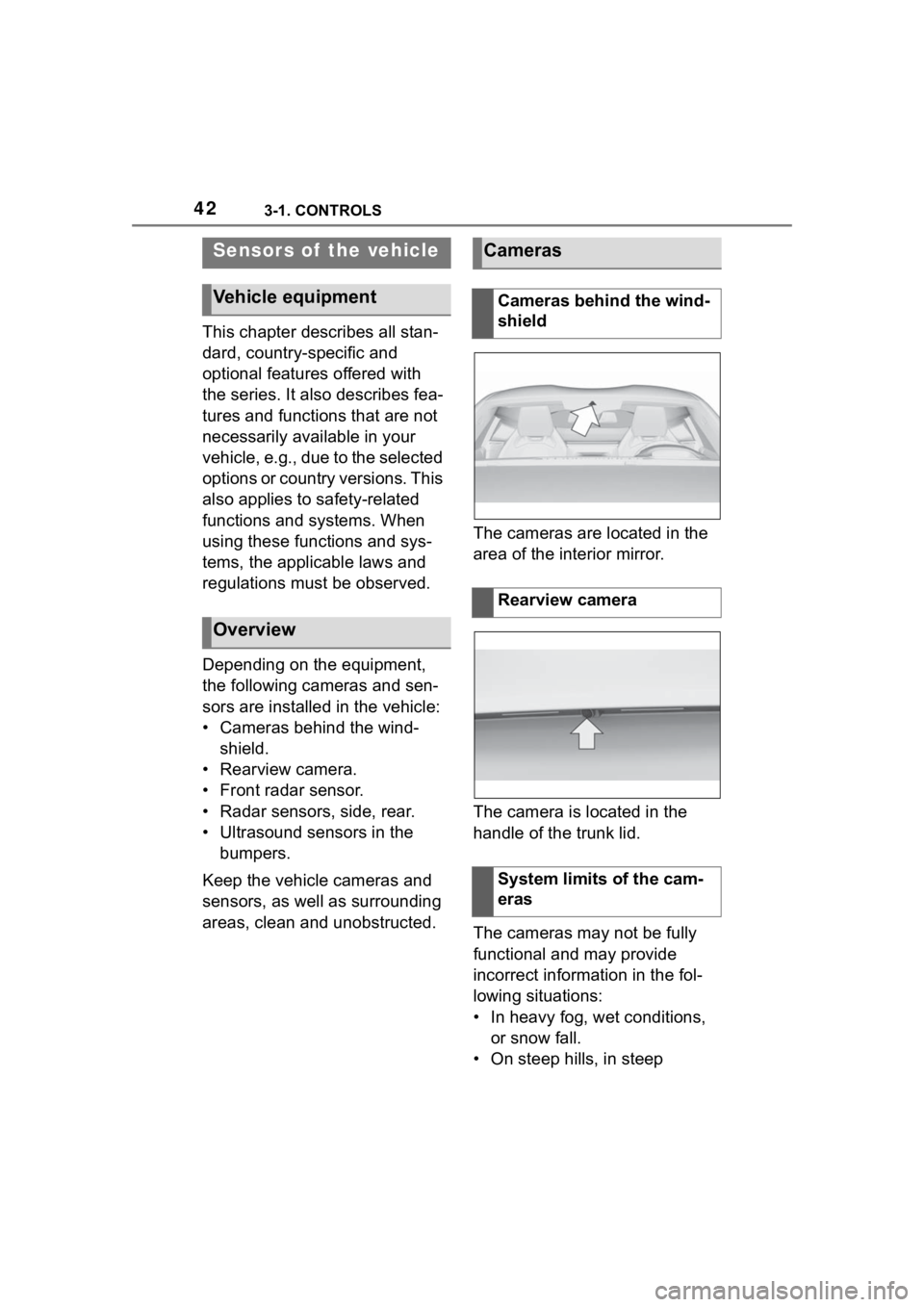
areas, clean and unobstructed. The cameras are located in the
area of the interior mirror.
The camera is located in the
handle of the trunk lid.
The cameras may not be fully
functional and may provide
incorrect information in the fol-
lowing situations:
• In heavy fog, wet conditions,
or snow fall.
• On steep hills, in steep
Sensors of the vehicle
Vehicle equipment
Overview
Cameras
Cameras behind the wind-
shield
Rearview camera
System limits of the cam-
eras
Page 60 of 372

603-1. CONTROLS
Most menu items on the Control
Display can be voiced as com-
mands.
Commands from other menus
can also be spoken.
You may select list entries such
as phone list entries via voice
activation. Read these list
entries out loud exactly as they
are shown in the respective list.
The following is displayed in the
top area of the Control Display:
• Some possible commands for the current menu.
• Some possible commands from other menus.
• Status of the voice recogni- tion.
• Encrypted connection is not available.
• To have the available spoken instructions read out loud:
›Voice commands‹.
• To have information on the operating principle of the
voice activation system read
out loud: ›General information on voice control‹.
• To have help for the current menu read out loud: ›Help‹.
Do not use the voice activation
system to initiate an Emergency
Request. In stressful situations,
the voice and vocal pitch can
change. This can unnecessarily
delay the establishment of a
phone connection.
Instead, use the SOS button,
refer to page 323, close to the
interior mirror.
You can set the system to use
standard dialog or a short ver-
sion.
The short version of the voice
dialog plays back short mes-
sages in abbreviated form.
Via Toyota Supra Command:
1 "My Vehicle"
2 "System settings"
3 "Language"
4 "Speech mode:"
5 Select the desired setting.
Possible commands
General information
Displaying possible com-
mands
Help on the voice activation
systemInformation for Emergency
Requests
Adjusting
Setting the voice dialog
Page 68 of 372

683-1. CONTROLS
is currently in use.
There is an additional guest pro-
file available that is not assigned
to any vehicle key. It can be
used to apply settings in the
vehicle without changing the
personal driver profiles.
For the system to be able to
identify the driver profile associ-
ated to a particular driver, the
detected remote control must be
clearly allocated to the driver.
This is the case when:
• The driver is only carrying his or her own remote control.
• The driver unlocks the vehi- cle.
• The driver gets into the vehi- cle through the driver's door.
After switching on the Control
Display, the name of the active
driver profile is displayed.
Select driver profile, refer to
page 69.
As soon as the engine is started
or any key is pressed, the last
selected display is shown on the
Control Display.
To exit the welcome screen via
Toyota Supra Command: "OK" The settings for the following
systems and functions are
stored in the active driver profile.
The scope of storable settings
depends on country and equip-
ment.
• Unlocking and locking.
•Lights.
• Climate control.
• Radio.
• Instrument cluster.
• Programmable memory but-
tons.
• Volumes, tone.
• Control Display.
•TV.
• Parking Sensors.
• Rearview camera.
• Head-up Display.
• Sport mode switch.
• Seat position, exterior mirror position.
Both the positions saved via the
seat memory and th e last position
set are saved.
• Toyota Supra Safety.
Regardless of the remote con-
trol in use, a different driver pro-
file may be activated. This
allows you to call up personal
vehicle settings, even if you did
not unlock the vehicle with your
own remote control.
Functional requirements
Active driver profile
Adjusting
Profile management
Selecting a driver profile
Page 71 of 372

713-1. CONTROLS
3
CONTROLS
This chapter describes all stan-
dard, country-specific and
optional features offered with
the series. It also describes fea-
tures that are not necessarily
available in your vehicle, for
instance, due to the selected
options or country versions. This
also applies to safety-related
functions and systems. When
using these functions and sys-
tems, the applicable laws and
regulations must be observed.
Various connection types are
available for using mobile
devices in the vehicle. The con-
nection type to select depends
on the mobile device and the
desired function.
The following overview shows
possible functions and the suit-
able connection types for them.
The scope of functions depends
on the mobile device.The following connection types
require one-time pairing with the
Connections
Vehicle features and
options
Concept
General information
FunctionConnection type
Making calls via the
hands-free system.
Using phone func-
tions via Toyota
Supra Command.
Using the smart-
phone Office func-
tions.
Bluetooth.
Playing music from
the smartphone or
the audio player.Bluetooth or
USB.
Using compatible
apps via Toyota
Supra Command.Bluetooth or
USB.
USB storage device:
Exporting and
importing driver pro-
files.
Exporting and
importing stored
trips.
Playing music.
USB.
Playing videos from
the smartphone or
the USB storage
device.
USB.
Use Apple CarPlay
apps via Toyota
Supra Command and
voice operation.
Bluetooth
and Wi-Fi.
Screen Mirroring:
Showing the smart-
phone display on the
Control Display.
Wi-Fi
Page 72 of 372

723-1. CONTROLS
vehicle:
• Bluetooth.
• Apple CarPlay.
• Screen Mirroring.
Paired devices are automatically
recognized later on and con-
nected to the vehicle.
• Compatible device with Blue-tooth interface.
• The remote control is in the vehicle.
• The device is ready for opera- tion.
• Bluetooth is switched on in the vehicle, refer to page 73,
and on the device.
• Bluetooth presetting, such as visibility, may be required on
the device; refer to the
owner's manual of the device. Via Toyota Supra Command:
1
"My Vehicle"
2 "System settings"
3 "Mobile devices"
4 "Settings"
5 "Bluetooth
®"
To use all supported functions of
a mobile phone, the following
functions must be activated prior
to pairing the mobile phone with
the vehicle.
Via Toyota Supra Command:
1 "My Vehicle"
2 "System settings"
3 "Mobile devices"
4 "Settings"
5 Select desired setting:
• "Office"
Activate function t o transmit short
messages, e-mails, calendars,
tasks, notes, and reminders to the
vehicle. Costs can be incurred by
transmitting all data to the vehicle.
• "Contact images"
Activate function to show the con-
tact pictures.
6 Move the Controller to the
left.
Safety information
WARNING
Operating the integrated informa-
tion systems and communication
devices while driving can distract
from traffic. It is possible to lose
control of the vehicle. There is a
risk of an accident. Only use the
systems or devices when the traf-
fic situation allows. As warranted,
stop and use the systems and
devices while the vehicle is sta-
tionary.
Bluetooth connection
Functional requirements
Switching on Bluetooth
Activating/deactivating
telephone functions