2023 TOYOTA SUPRA battery
[x] Cancel search: batteryPage 242 of 372
2423-1. CONTROLS
desired functions. The
hand-held transmitter for the
particular system is required in
order to program the remote
control.
Before selling the vehicle, delete
the stored functions for the sake
of security.
If possible, do not install the
antenna of the remote-con-
trolled system, e.g. the garage
door drive, near metal objects to
ensure the best possible opera-
tion.Additional questions are
answered by:
Your Toyota dealer.
www.homelink.com on the
Internet.
HomeLink is a registered trade-
mark of Gentex Corporation.
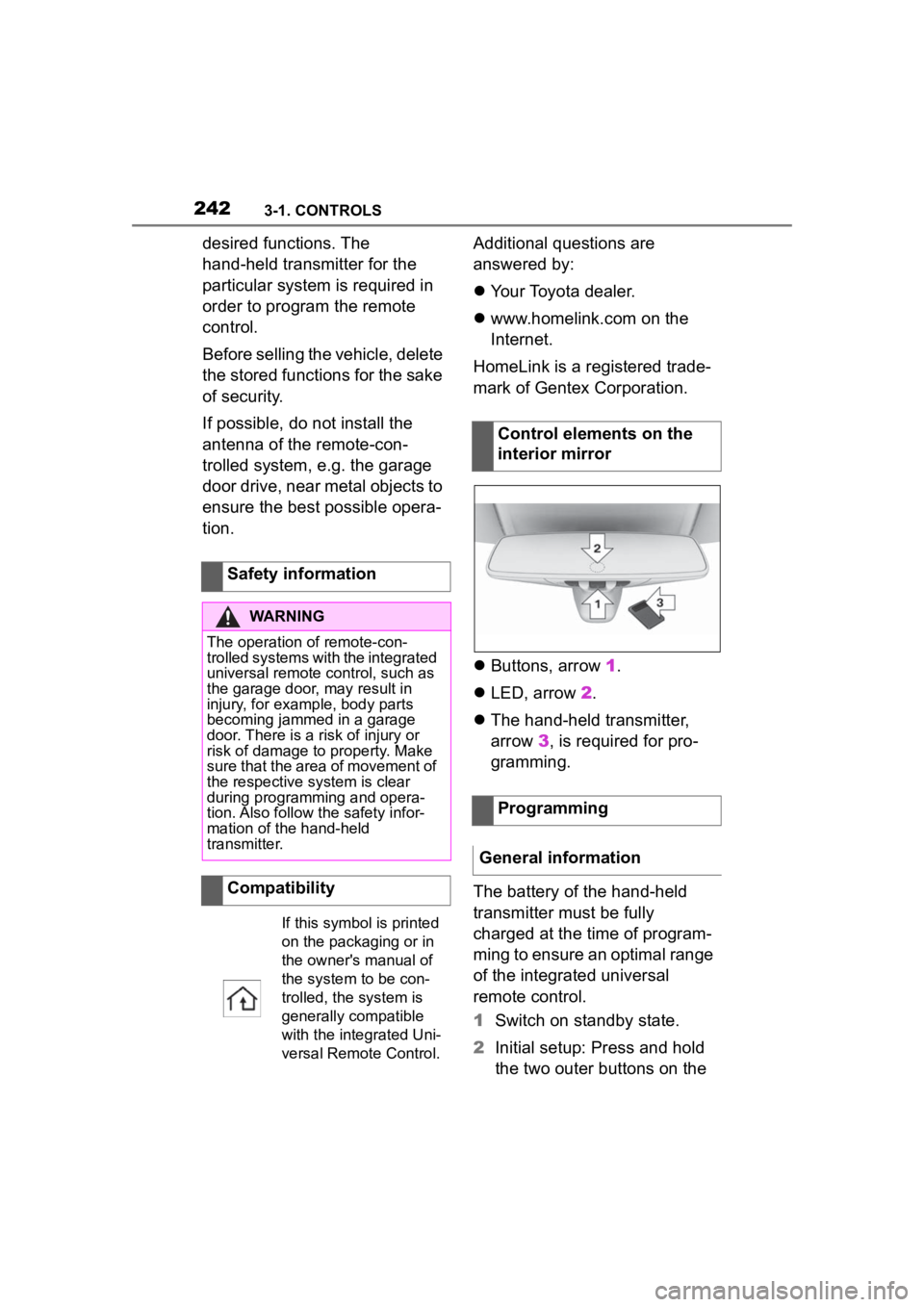
Buttons, arrow 1.
LED, arrow 2.
The hand-held transmitter,
arrow 3, is required for pro-
gramming.
The battery of the hand-held
transmitter must be fully
charged at the time of program-
ming to ensure an optimal range
of the integrated universal
remote control.
1 Switch on standby state.
2 Initial setup: Press and hold
the two outer buttons on the
Safety information
WARNING
The operation of remote-con-
trolled systems with the integrated
universal remote c
ontrol, such as
the garage door, may result in
injury, for example, body parts
becoming jammed in a garage
door. There is a risk of injury or
risk of damage to property. Make
sure that the area of movement of
the respective system is clear
during programming and opera-
tion. Also follow the safety infor-
mation of the hand-held
transmitter.
Compatibility
If this symbol is printed
on the packaging or in
the owner's manual of
the system to be con-
trolled, the system is
generally compatible
with the integrated Uni-
versal Remote Control.
Control elements on the
interior mirror
Programming
General information
Page 246 of 372

2463-1. CONTROLS
Pull off the cover.
*: if equipped
Open the cover.
Follow the information regarding
the connection of mobile
devices to the USB port in the
section on USB connections,
refer to page 75.
The USB port is located on the
center console.
Properties:
USB port Type A.
For charging external
Safety information
WARNING
Devices and cables in the unfold-
ing area of the airbags, such as
portable navigation devices, can
hinder the unfoldin
g of the airbag
or be thrown around in the car's
interior during unfolding. There is
a risk of injury . Make sure that
devices and cables are not in the
airbag's area of unfolding.
NOTICE
Battery chargers for the vehicle
battery can work with high volt-
ages and currents, which means
that the 12 volt on-board network
can be overloaded or damaged.
There is a risk of damage to prop-
erty. Only connect battery char-
gers for the vehi cle battery to the
starting aid terminals in the
engine compartment.
NOTICE
If metal objects fall into the
socket, they can cause a short cir-
cuit. There is a risk of damage to
property. Replace the socket
cover again after using the
socket.
Center console
Cargo area*
USB port
General information
In the center console
Page 298 of 372

2985-1. MOBILITY
1Filler neck for washer fluid
2 Jump-starting, negative battery terminal
3 Jump-starting, positive battery terminal
4 Oil filler neck
5 Coolant reservoir, auxiliary cooling
6 Coolant reservoir, engine
7 Vehicle identification number
Overview
Hood
Safety information
WARNING
Improperly executed work in the
engine compartment can damage
vehicle components and impair
vehicle functions. There is a risk
of an accident and damage to
property. Have work in the engine
compartment performed by your
Toyota dealer.
WARNING
The engine compartment accom-
modates moving components.
Certain components in the engine
compartment can also move with
the vehicle switched off, for
instance the radiator fan. There is
a risk of injury. Do not reach into
the area of moving parts. Keep
articles of clothing and hair away
from moving parts.
Page 309 of 372

3095-1. MOBILITY
5
MOBILITY
Condition Based Service CBS
determines the maintenance
recommendation using sensors
and special algorithms that take
into account the driving condi-
tions of the vehicle.
The system makes it possible to
adapt the amount of mainte-
nance corresponding to your
user profile.
Information on service notifica-
tions, refer to page 147, can be
displayed on the Control Dis-
play.
Storage periods during which
the vehicle battery was discon-
nected are not taken into
account.
If this occurs, have a Toyota
dealer update the time-depen-
dent maintenance procedures,
such as checking brake fluid
and, if necessary, changing the
engine oil and the microfil-
ter/activated-charcoal filter.Please consult “Owner's War-
ranty Information Booklet” or
“Owner's Manual Supplement”
for additional information on ser-
vice and maintenance work.
The manufacturer of your vehi-
cle recommends that mainte-
nance and repair be performed
by a Toyota dealer. Records of
regular maintenance and repair
work should be retained.
Scheduled maintenance should
be performed at specified inter-
vals according to the mainte-
nance schedule.
For details about maintenance
items and schedules, refer to
the "Scheduled Maintenance
Guide" or "Owner's Manual Sup-
plement".
Devices connected to the OBD
socket trigger the alarm system
when the vehicle is locked.
Remove any devices con-
nected at the OBD socket
Condition Based Service
CBS
Concept
General information
Storage periods
"Owner's Warranty Infor-
mation Booklet" or
"Owner's Manual Supple-
ment"
Scheduled maintenance
Socket for OBD Onboard
Diagnosis
General information
Page 313 of 372
3135-1. MOBILITY
5
MOBILITY
The battery is maintenance-free.
More information regarding the
battery can be requested from
your Toyota dealer.
The manufacturer of your vehi-
cle recommends that you have
your Toyota dealer register the
vehicle battery to the vehicle
after the battery has been
replaced. Once the battery has
been registered again, all com-
fort features will be available
without restriction and any vehi-
cle messages displayed which
relate to comfort features will
disappear.
The installed battery is designed
specifically for this vehicle. If an
inappropriate battery is used,
operation of the Auto Start Stop
function may be restricted in
order to protect the battery.
Also, the battery may deterio-
rate faster than normal and the engine may not be able to be
restarted. Contact your Toyota
dealer for details.
Make sure that the battery is
always sufficiently charged to
guarantee that the battery
remains usable for its full ser-
vice life.
Charge the battery when accel-
eration is insufficient.
The following circumstances
can have a negative effect on
the performance of the battery:
Frequent short-distance
drives.
The vehicle is not used for
more than a month.
WARNING
Intensive brightness can irritate or
damage the retina of the eye.
There is a risk of injury. Do not
look directly into the headlights or
other light sources. Do not
remove the LED covers.
Vehicle battery
General information
When replacing the bat-
tery
Safety information
WARNING
Vehicle batteries that are not com-
patible can damage vehicle sys-
tems and impair vehicle functions.
There is a risk of personal and
property damage. Only vehicle
batteries that are compatible with
your vehicle type should be
installed in your vehicle. Informa-
tion on compatible vehicle batter-
ies is available at your Toyota
dealer.
Charging the battery
General information
A discharged battery is
indicated by a red indi-
cator light.
Page 314 of 372
3145-1. MOBILITY
Charge the battery only when
the engine is off and via the
starting aid terminals, refer to
page 325, in the engine com-
partment.
After a power loss, some equip-
ment needs to be newly initial-
ized or individual settings
updated, for example:
Memory function: store the
positions again.
Time: update.
Date: update.
Maintain the battery in an
upright position for transport and storage. Secure the battery so
that it does not tip over during
transport.
The fuses are located at differ-
ent places in the vehicle.
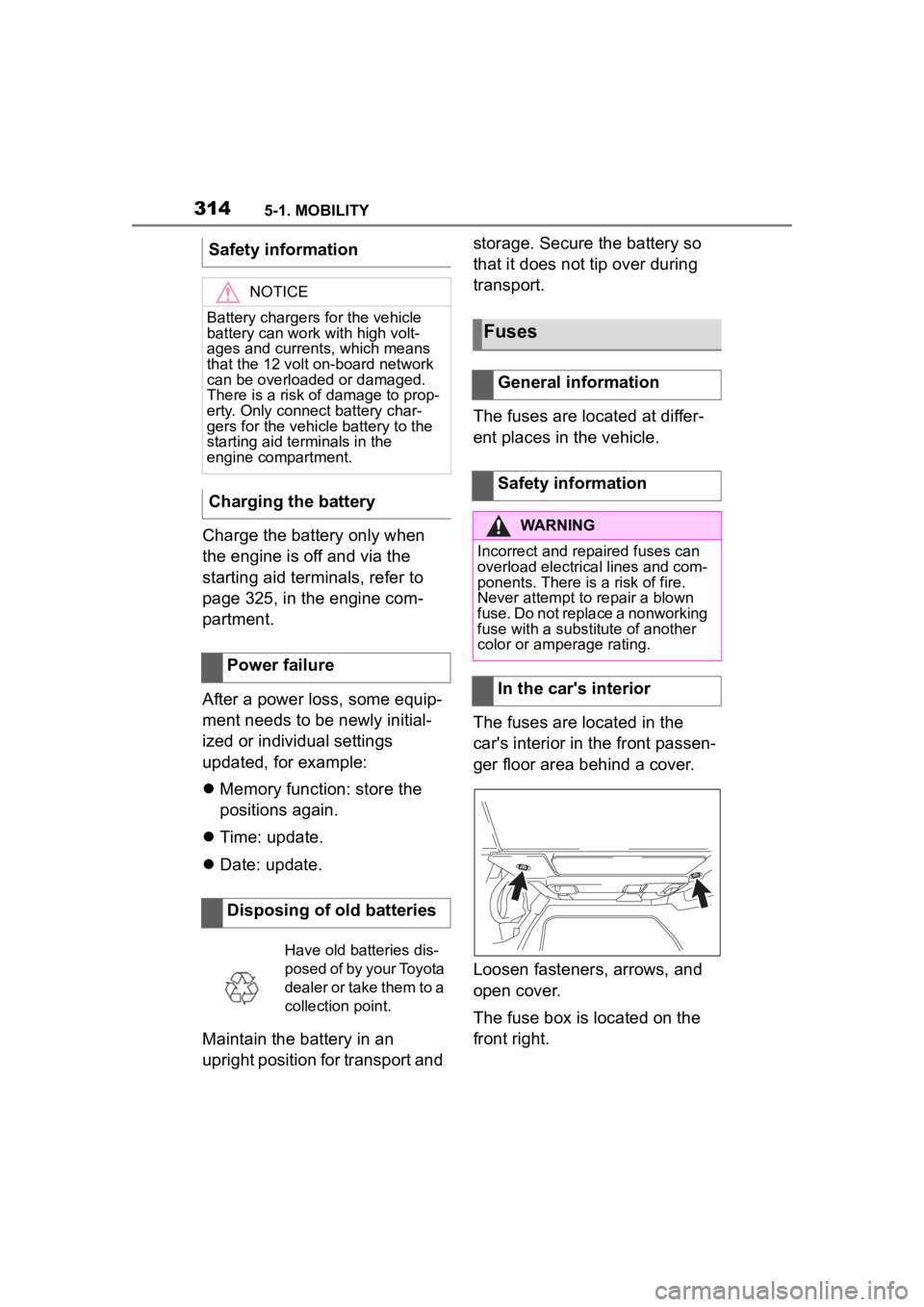
The fuses are located in the
car's interior in the front passen-
ger floor area behind a cover.
Loosen fasteners, arrows, and
open cover.
The fuse box is located on the
front right.
Safety information
NOTICE
Battery chargers for the vehicle
battery can work with high volt-
ages and currents, which means
that the 12 volt on-board network
can be overloaded or damaged.
There is a risk of damage to prop-
erty. Only connect battery char-
gers for the vehi
cle battery to the
starting aid terminals in the
engine compartment.
Charging the battery
Power failure
Disposing of old batteries
Have old batteries dis-
posed of by your Toyota
dealer or take them to a
collection point.
Fuses
General information
Safety information
WARNING
Incorrect and repaired fuses can
overload electrical lines and com-
ponents. There is a risk of fire.
Never attempt to repair a blown
fuse. Do not replace a nonworking
fuse with a substitute of another
color or amperage rating.
In the car's interior
Page 319 of 372

3195-1. MOBILITY
5
MOBILITY
Seat heating
Seat setting
Crash-security module
Switching center column,
Light switch element,
steering Operating panel
Audio
HiFi amplifier, Video mod-
ule TV
Rear-view mirror
Overhead function cen-
ter, Exterior door handle
electronics
Instrument cluster
Additional battery: Dual
Accumulator System
(DSS)
Fuel pump control elec-
tronics, Natural Vacuum
Leak Detection, Gas gen-
erator for battery safety
terminal, Remote control
receiver
Electric window opener
Heating and air-condi-
tioning system
Vehicle's diagnostic port
(interface)
SymbolMeaning
Interior lights in the boot
Vertical Dynamic platform
Vertical Dynamic platform
Vertical Dynamic platform
Mono Camera (Kafas)
Head Unit
Active Sound Design
USB Hub
Body Domain Controller
Controller (Toyota Supra
Command)
Electric fan (air cooler),
Controlled differential
lock
12 V socket, Cigarette
lighter
Interior lights in the boot
Door lock, Exterior door
handle electronics,
Telematic Communica-
tion Box
Electronic gear box con-
trol
SymbolMeaning
Page 325 of 372

3255-1. MOBILITY
5
MOBILITY
gency Call Center may still be able
to hear the occupants of the vehi-
cle.
The Toyota Emergency Call
Center ends the Emergency
call.
If the battery is discharged, the
engine can be started using the
battery of another vehicle and
two jumper cables. Only use
jumper cables with fully insu-
lated clamp handles. 1
Check whether the battery of
the other vehicle has a volt-
age of 12 volts. The voltage
information can be found on
the battery.
2 Switch off the engine of the
assisting vehicle.
3 Switch off any electronic sys-
tems/power consumers in
both vehicles.
The starting aid terminal in the
engine compartment acts as the
positive battery terminal.
A special connection on the
body in the engine compartment
acts as the negative battery ter-
minal.
Additional information:
Overview of engine compart-
ment, refer topage 298.
Open the cover of the positive
battery terminal.
Before you begin, switch off all
unnecessary electronic sys-
tems/power consumers, such as
the radio, on the assisting and
receiving vehicle.
1 Open the cover of the starting
aid terminal.
Jump-starting
General information
Safety information
WARNING
Contact with live components can
lead to an electric shock. There is
a risk of injuries or danger to life.
Do not touch any components
that are under voltage.
WARNING
If the jumper cables are con-
nected in the incorrect order,
sparking may occur. There is a
risk of injury. Pay attention to the
correct order during connection.
NOTICE
In the case of body contact
between the two vehicles, a short
circuit can occur during
jump-starting. There is a risk of
damage to property. Make sure
that no body contact occurs.
Preparation
Starting aid terminals
Connecting the cables