2023 TOYOTA RAV4 PRIME brake light
[x] Cancel search: brake lightPage 315 of 662
3175-2. Driving procedures
5
Driving
■Parking brake indicator light
and Parking brake switch indi-
cator
●Depending on the power switch
mode the parking brake indicator
light and the parking brake switch
indicator will turn on and stay on
as described below:
ON: Comes on until the parking
brake is released.
Not in ON: Stays on for approxi-
mately 15 seconds.
●When the power switch is turned
off with the parking brake set, the
parking brake indicator light and
the parking brake switch indicator
will stay on for about 15 seconds.
This does not indicate a malfunc-
tion.
■When the parking brake switch
malfunctions
Automatic mode (automatic brake
setting and releas ing) will be turned
on automatically.
■Parking the vehicle
P.282
■Parking brake engaged warning
buzzer
A buzzer will sound if the vehicle is
driven with the parking brake
engaged. “Parking Brake ON” is dis-
played on the multi-information dis-
play (with the vehicle reaching a
speed of 3 mph [5 km/h]).
■If the brake system warning
light comes on
P.541
■Usage in winter time
P.414
WARNING
■When parking the vehicle
Do not leave a child in the vehicle
alone. The parking brake may be
released unintentionally by a child
and there is the danger of the
vehicle moving that may lead to
an accident resulting in death or
serious injury.
■Parking brake switch
Do not set any objects near the
parking brake switch. Objects
may interfere with the switch and
may lead the parking brake to
unexpectedly operate.
■Parking brake automatic lock
function
Never use the automatic parking
brake engagement function in
place of normal parking brake
operation. This function is
designed to reduce the risk of a
collision due to the driver forget-
ting to engage the parking brake.
Over-reliance on this function to
park the vehicle safely may lead
to an accident resulting in death
or serious injury. ( P.316)
NOTICE
■When parking the vehicle
Before you leave the vehicle, shift
the shift lever to P, set the parking
brake and make s ure that the
vehicle does not move.
■When the system malfunc-
tions
Stop the vehicle in a safe place
and check the warning messages.
■When the vehicle 12-volt bat-
tery is discharged
The parking brake system cannot
be activated. ( P.569)
Page 317 of 662
3195-2. Driving procedures
5
Driving
●The parking brake is engaged.
If any of the conditions above are
detected when the brake hold sys-
tem is enabled, the system will turn
off and the brake hold standby indi-
cator light will go off. In addition, if
any of the conditions are detected
while the system is holding the
brake, a warning buzzer will sound
and a message will be shown on the
multi-information display. The park-
ing brake will then be set automati-
cally.
■Brake hold function
●If the brake pedal is left released
for a period of about 3 minutes
after the system has started hold-
ing the brake, the parking brake
will be set automatically. In this
case, a warning buzzer sounds
and a message is shown on the
multi-informat ion display.
●To turn the system off while the
system is holding the brake, firmly
depress the brake pedal and
press the button again.
●The brake hold function may not
hold the vehicle when the vehicle
is on a steep inclin e. In this situa-
tion, it may be necessary for the
driver to apply the brakes. A warn-
ing buzzer will sound and the
multi-informatio n display will
inform the driver of this situation. If
a warning message is shown on
the multi-information display, read
the message and follow the
instructions.
■When the parking brake is set
automatically while the system
is holding the brakes
Perform any of the following opera-
tions to release the parking brake.
●Depress the accelerator pedal.
(The parking brake will not be
released automatic ally if the seat
belt is not fastened.)
●Operate the parking brake switch
with the brake pedal depressed.
Make sure that the parking brake indicator light goes off. (
P.314)
■When an inspection at your
Toyota dealer is necessary
When the brake hold standby indi-
cator (green) does not illuminate
even when the brake hold switch is
pressed with the brake hold system
operating conditions met, the sys-
tem may be malf unctioning. Have
the vehicle inspected at your Toyota
dealer.
■If “Brake Hold Malfunction
Press Brake to Deactivate Visit
Your Dealer” or “Brake Hold
Malfunction Visit Your Dealer”
is displayed on the multi-infor-
mation display
The system may be malfunctioning.
Have the vehicle inspected by your
Toyota dealer.
■Warning messages and buzzers
Warning messages and buzzers are
used to indicate a system malfunc-
tion or to inform the driver of the
need for caution. If a warning mes-
sage is shown on the multi-informa-
tion display, read the message and
follow the instructions.
■If the brake hold operated indi-
cator flashes
P.546
WARNING
■When the vehicle is on a
steep incline
Take care when using the brake
hold system on a steep incline,
exercise caution. The brake hold
function may not hold brakes in
such situations.
Also, the system may not activate
depending on the angle of the
slope.
Page 320 of 662
3225-3. Operating the lights and wipers
parking lights and illuminate
brighter than the parking lights.
●To make your vehicle more visible
to other drivers during daytime
driving, the daytime running lights
turn on automatically when all of
the following conditions are met.
(The daytime running lights are
not designed for use at night.)
• The hybrid system is operating
• The parking brake is released
• The headlight s witch is in the
or position
• The surroundings are bright
The daytime running lights remain
on after they illumi nate, even if the
parking brake is set again.
●For the U.S.A.: Daytime running
lights can be turned off by operat-
ing the switch.
●Compared to turning on the head-
lights, the daytime running light
system offers gre ater durability
and consumes less electricity, so
it can help improve fuel economy.
■LED accessory lights (if
equipped)
To make your vehicle more visible
to other drivers during daytime driv-
ing, the LED accessory lights turn
on automatically when the parking
brake is released while the hybrid
system is operating.
When the parking lights are turned
on, the LED accessory lights dim.
■Headlight control sensor (if
equipped)
The sensor may not function prop-
erly if an object is placed on the sen-
sor, or anything that blocks the
sensor is affixed to the windshield.
Doing so interfere s with the sensor
detecting the level of ambient light
and may cause the automatic head-
light system to malfunction.
■Automatic light off system
●When the headlights are on: The
lights turn off 30 s econds after the
power switch is turned to ACC or
OFF and a door is opened and
closed. (The lights turn off imme-
diately if on the key is
pressed after all the doors are
closed.)
●When only the tail lights are on:
The tail lights turn off automati-
cally if the power switch is turned
to ACC or OFF and the driver’s
door is opened.
To turn the lights on again, turn the
power switch to ON, or turn the light
switch to the or position
once and then back to or
position.
■Light reminder buzzer
A buzzer sounds when the power
switch is turned to ACC or OFF and
the driver’s door is opened while the
lights are turned on.
■Windshield wiper linked head-
light illumination (if equipped)
When driving during daytime with
the headlight switch turned to , if
the windshield wipers are used, the
headlights will turn o n automatically
after several se conds to help
enhance the visibility of your vehi-
cle.
Page 343 of 662
3455-5. Using the driving support systems
5
Driving
●Pre-collision warning
While the pre-collision warning function is operating, if the steering wheel is
operated heavily or suddenly, the pre -collision warning may be cancelled.
●Pre-collision brake assist
●Pre-collision braking
If either of the following occur while the pre-collision braking function is oper-
ating, it will be canceled:
• The accelerator pedal is depressed strongly.
• The steering wheel is turned sharply or abruptly.
●Emergency steering assist
When the turn signal lights are flashing, emergency steering as sist will not
operate in case of an emergency.
Detectable objectsVehicle speedRelative speed between
your vehicle and object
Preceding and stopped vehiclesApprox. 7 to 110 mph (10 to 180 km/h)Approx. 7 to 110 mph (10 to 180 km/h)
Oncoming vehiclesApprox. 7 to 110 mph (10 to 180 km/h)Approx. 13 to 110 mph (20 to 180 km/h)
Bicyclists and pedestri- ansApprox. 7 to 50 mph (10 to 80 km/h)Approx. 7 to 50 mph (10 to 80 km/h)
Detectable objectsVehicle speedRelative speed between your vehicle and object
Preceding and stopped vehiclesApprox. 20 to 110 mph (30 to 180 km/h)Approx. 20 to 110 mph (30 to 180 km/h)
Bicyclists and pedestri- ansApprox. 20 to 50 mph (30 to 80 km/h)Approx. 20 to 50 mph (30 to 80 km/h)
Detectable objectsVehicle speedRelative speed between your vehicle and object
Preceding and stopped vehiclesApprox. 7 to 110 mph (10 to 180 km/h)Approx. 7 to 110 mph (10 to 180 km/h)
Oncoming vehiclesApprox. 7 to 110 mph (10 to 180 km/h)Approx. 13 to 110 mph (20 to 180 km/h)
Bicyclists and pedestri- ansApprox. 7 to 50 mph (10 to 80 km/h)Approx. 7 to 50 mph (10 to 80 km/h)
Page 344 of 662
3465-5. Using the driving support systems
If any of the following occur while the emergency steering assi st function is
operating, it will be canceled:
• The accelerator pedal is depressed strongly.
• The steering wheel is turned sharply or abruptly.
• The brake pedal is depressed.
●Intersection right/left turn assistance (pre-collision warning)
When the turn signal lights are not flashing, support for turning left or right at
an intersection which targets on coming vehicles does not work.
●Intersection right/left turn assistance (pre-collision braking)
When the turn signal lights are not flashing, support for turning left or right at
an intersection which targets on coming vehicles does not work.
■Object detection function
The system detects objects based
on their size, profile, motion, etc.
However, an object may not be
detected depending on the sur- rounding brightness and the motion,
posture, and angle of the detected
object, preventing the system from
operating properly. (
P.348)
The illustration shows an image of
Detectable objectsVehicle speedRelative speed between
your vehicle and object
Preceding and stopped vehicles, bicyclists and pedestriansApprox. 25 to 50 mph (40 to 80 km/h)Approx. 25 to 50 mph (40 to 80 km/h)
Detectable objectsVehicle speedOncoming vehicle speedRelative speed between your
vehicle and object
Oncoming vehi- clesApprox. 7 to 15 mph (10 to 25 km/h)Approx. 20 to 35 mph (30 to 55 km/h)Approx. 25 to 50 mph (40 to 80 km/h)
Pedestrians
Approx. 7 to 15 mph (10 to 25 km/h)
Approx. 7 to 15 mph (10 to 25 km/h)
Detectable objectsVehicle speedOncoming vehicle speedRelative speed between your
vehicle and object
Oncoming vehi- clesApprox. 10 to 15 mph (15 to 25 km/h)Approx. 20 to 28 mph (30 to 45 km/h)Approx. 28 to 43 mph (45 to 70 km/h)
Pedestrians
Approx. 7 to 15 mph (10 to 25 km/h)
Approx. 7 to 15 mph (10 to 25 km/h)
Page 348 of 662

3505-5. Using the driving support systems
started the vehicle has not been
driven for a certain amount of time
• While making a left/right turn and
for a few seconds after making a
left/right turn
• While driving on a curve and for a
few seconds after driving on a
curve
• If your vehicle is skidding
• If the front of the vehicle is raised
or lowered
• If the wheels are misaligned
• If a wiper blade is blocking the front camera
• The vehicle is being driven at extremely high speeds
• When driving on a hill
• If the radar sensor or front camera
is misaligned
• When driving in a traffic lane sep-
arated by more t han one lane
where oncoming vehicles are driv-
ing while making a right/left turn
• When largely out of place with the opposite facing targeted oncom-
ing vehicle during a right/left turn
• While making a right/left turn, when a pedestrian approaches
from behind or side of your vehicle
●In addition to the above, in some
situations, such as the following,
the emergency steering assist
may not operate.
• When the white (yellow) lane lines are difficult to see, such as when
they are faint, diverging/merging,
or a shadow is cast upon them
• When the lane is wider or nar-
rower than normal
• When there is a light and dark pat- tern on the road surface, such as
due to road repairs
• When the target is too close
• When there is insufficient safe or unobstructed space for the vehicle
to be steered into
• If oncoming vehicle is present
• If VSC function is operating
●In some situations such as the fol-
lowing, sufficient braking force or
steering force may not be
obtained, preventing the system
from performing properly:
• If the braking functions cannot operate to their full extent, such as
when the brake parts are
extremely cold, ext remely hot, or
wet
• If the vehicle is not properly main- tained (brakes or tires are exces-
sively worn, imprope r tire inflation
pressure, etc.)
• When the vehicle is being driven on a gravel road or other slippery
surface
• When the road surface has deep wheel tracks
• When driving on a hill road
• When driving on a road that has inclines to the left or right
■If VSC is disabled
●If VSC is disabled ( P.408), the
Page 349 of 662
3515-5. Using the driving support systems
5
Driving
pre-collision brake assist and pre-
collision braking functions are also
disabled.
●The PCS warning light will turn on
and “VSC Turned Off Pre-Colli-
sion Brake System Unavailable”
will be displayed on the multi-
information display.
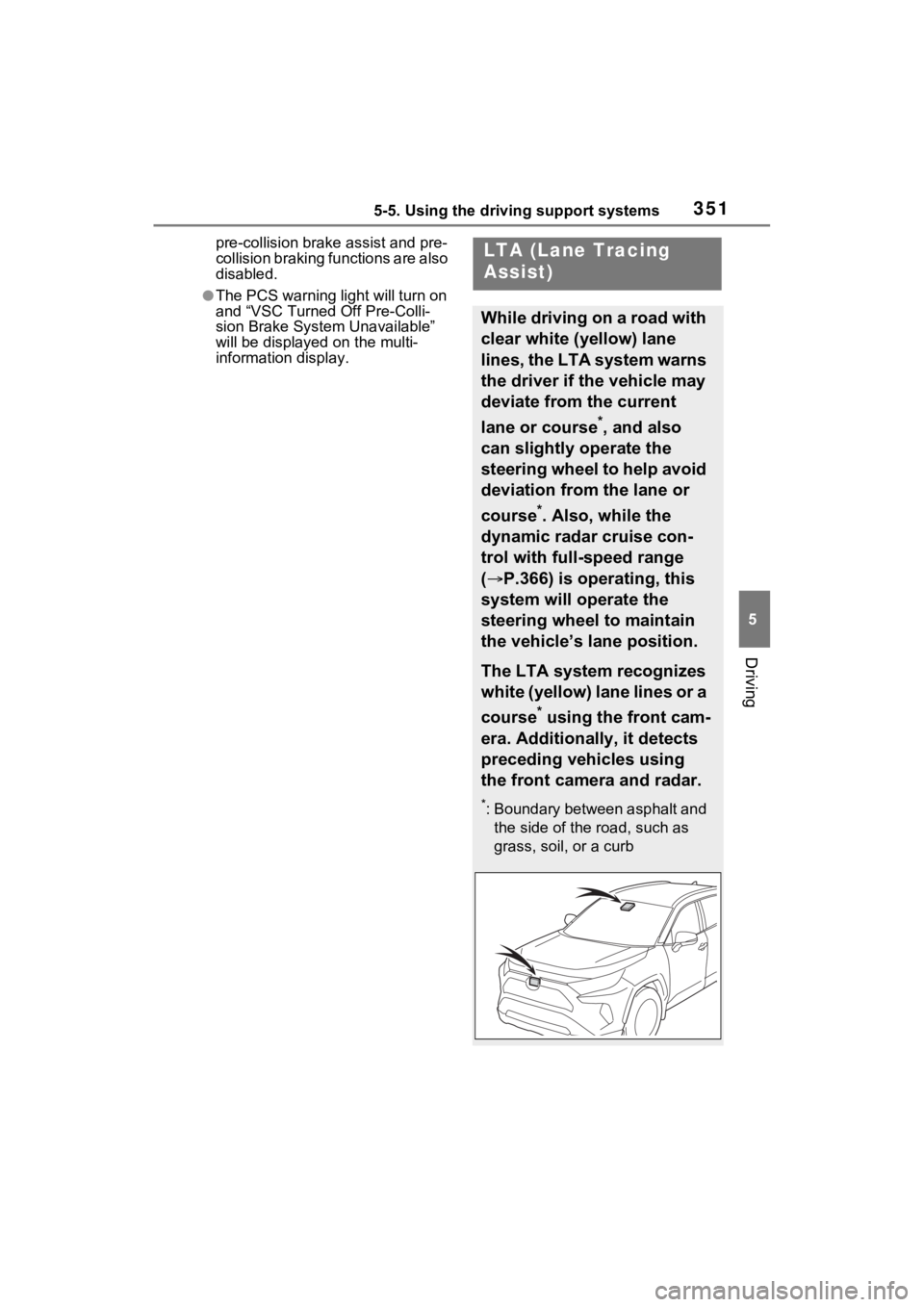
LTA (Lane Tracing
Assist)
While driving on a road with
clear white (yellow) lane
lines, the LTA system warns
the driver if the vehicle may
deviate from the current
lane or course
*, and also
can slightly operate the
steering wheel to help avoid
deviation from the lane or
course
*. Also, while the
dynamic radar cruise con-
trol with full-speed range
( P.366) is operating, this
system will operate the
steering wheel to maintain
the vehicle’s lane position.
The LTA system recognizes
white (yellow) lane lines or a
course
* using the front cam-
era. Additionally, it detects
preceding vehicles using
the front camera and radar.
*: Boundary between asphalt and the side of the road, such as
grass, soil, or a curb
Page 367 of 662

3695-5. Using the driving support systems
5
Driving
This mode employs a radar to detect the presence of vehicles up to
approximately 328 ft. (100 m) ahead, determines the current vehicle-
to-vehicle following distance, and operates to maintain a suitable fol-
lowing distance from the vehicle ahead. The desired vehicle-to- vehi-
cle distance can also be set by operating the vehicle-to-vehicl e
distance switch.
When driving on downhill slopes, t he vehicle-to-vehicle distance may
become shorter.
Example of constant speed cruising
When there are no vehicles ahead
The vehicle travels at the speed set by the driver.
Example of deceleration crui sing and follow-up cruising
When a preceding vehicle driving slower than the set speed
appears
When a vehicle is detected runni ng ahead of you, the system automatically
decelerates your vehicle. When a greater reduction in vehicle s peed is nec-
essary, the system applies the brakes (the stop lights will come on at this
time). The system will respond to changes i n the speed of the vehicle
ahead in order to maintain the ve hicle-to-vehicle distance set by the driver.
Approach warning warns you when the system cannot decelerate suffi-
ciently to prevent your vehicle from closing in on the vehicle ahead.
When the vehicle ahead of you st ops, your vehicle will also stop (vehicle is
stopped by system control). Afte r the vehicle ahead starts off, pressing the
“+RES” switch or depressing the accelerator pedal (start-off operation) will
resume follow-up cruising. If the start-off operation is not performed, system
Driving in vehicle-to-vehicle distance control mode
A
B