6049-2. Customization
*1: For details about each function: P.203
*2: The default setting varies according to country.
*3: The on/off operation of the widget can be changed.
*4: The setting may not be changed depending on currently selected meter
type.
*5: This can only be set if GPS ca libration of clock is turned off in the multi-
media system settings.
■Head-up display*1 ( P.208)
Drive informatio n items (first
item)Distance
Average speed
–O–
Total time
Drive information items (sec-
ond item)Total time
Average speed
–O–
Distance
Trip A itemsDistance
Average speed
–O–
Total time
Trip B itemsAverage speedDistance–O–Total time
Pop-up displayOnOff–O–
Calendar*5–––O–
Convenience Services (Sug-
gestion function)On
On (when the vehicle is stopped)
O–O
Off
Function*2Default settingCustomized setting
Head-up displayOnOff–O–
Gauge informationHybrid Sys-
tem IndicatorTachometer–O–No content
Function*1Default settingCustomized settingABC
ABC
6069-2. Customization
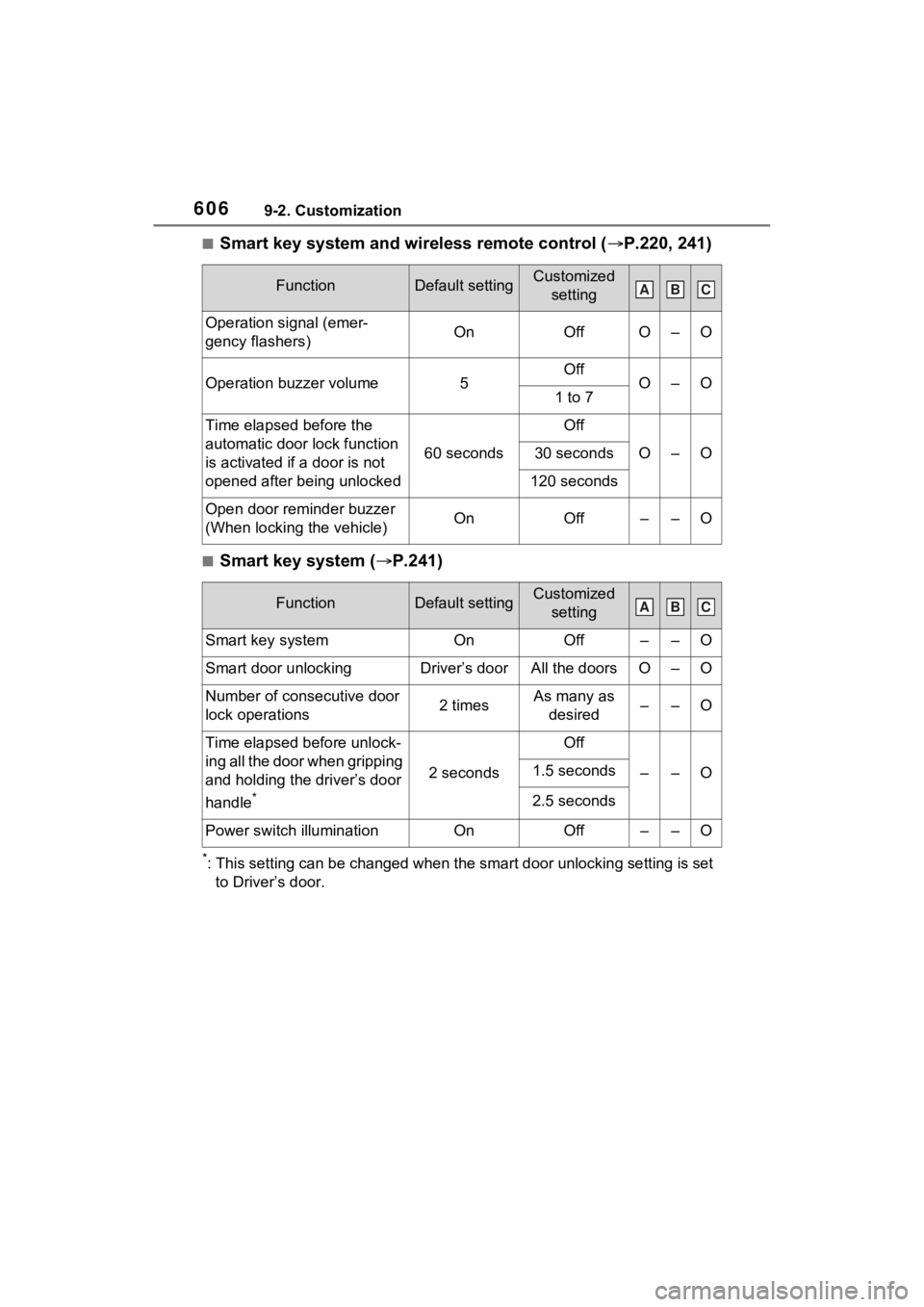
■Smart key system and wireless remote control (P.220, 241)
■Smart key system ( P.241)
*: This setting can be changed when the smart door unlocking sett ing is set
to Driver’s door.
FunctionDefault settingCustomized setting
Operation signal (emer-
gency flashers)OnOffO–O
Operation buzzer volume5OffO–O1 to 7
Time elapsed before the
automatic door lock function
is activated if a door is not
opened after being unlocked
60 seconds
Off
O–O30 seconds
120 seconds
Open door reminder buzzer
(When locking the vehicle)OnOff––O
FunctionDefault settingCustomized setting
Smart key systemOnOff––O
Smart door unlockingDriver’s doorAll the doorsO–O
Number of consecutive door
lock operations2 timesAs many as desired––O
Time elapsed before unlock-
ing all the door when gripping
and holding the driver’s door
handle
*
2 seconds
Off
––O1.5 seconds
2.5 seconds
Power switch illuminationOnOff––O
ABC
ABC