2023 TOYOTA RAV4 PLUG-IN HYBRID key battery
[x] Cancel search: key batteryPage 3 of 718

RAV4 Plug-in Hybrid_OM_OM9A587E_(EE)
1
6
5
4
3
2
8
7
9
Pictorial indexSearch by illustration
For safety
and security
Make sure to read through them
(Main topics: Child seat, theft deterrent system)
Plug-in hybrid
system
Plug-in hybrid system features, charging method, etc.
(Main topics: Driving tips, charging methods)
Vehicle status
information and
indicators
Reading driving-related information
(Main topics: Meters, multi-information display)
Before driving
Opening and closing the doors and windows,
adjustment before driving
(Main topics: Keys, doors, seats, power windows)
Driving
Operations and advice which are necessary for
driving
(Main topics: Starting hybrid system, refueling)
Interior featuresUsage of the interior features
(Main topics: Air conditioner, storage features)
Maintenance
and care
Caring for your vehicle and maintenance procedures
(Main topics: Interior and exterior, light bulbs)
When trouble
arises
What to do in case of malfunction and emergency
(Main topics: 12-volt battery discharge, flat tire)
Vehicle
specifications
Vehicle specifications, customizable features
(Main topics: Fuel, oil, tire inflation pressure)
IndexSearch by symptom
Search alphabetically
Page 6 of 718

4TABLE OF CONTENTS
GPF (Gasoline Particulate Fil-
ter) system ........................ 414
Driving assist systems ........ 415
5-6. Driving tips
Winter driving tips ............... 422
Utility vehicle precautions ... 425
6-1. Using the air conditioning
system and defogger
Automatic air conditioning sys-
tem .................................... 430
Remote Air Conditioning Sys-
tem .................................... 438
Heated steering wheel/Front
seat heaters/Front seat heat-
ers and ventilators/Rear seat
heaters.............................. 440
6-2. Using the interior lights
Interior lights list .................. 443
6-3. Using the storage features
List of storage features ....... 445
Luggage compartment features
.......................................... 449
6-4. Using the other interior fea-
tures
Other interior features ......... 453
7-1. Maintenance and care
Cleaning and protecting the
vehicle exterior ................. 466
Cleaning and protecting the
vehicle interior .................. 469
7-2. Maintenance
Maintenance requirements . 472
7-3. Do-it-yourself maintenance
Do-it-yourself service precau-
tions .................................. 474
Hood ................................... 476
Positioning a floor jack ........ 477
Engine compartment........... 479
12-volt battery ..................... 484
Tires .................................... 487
Tire inflation pressure ......... 498
Wheels ................................ 499
Air conditioning filter ........... 500
Cleaning the DC/DC Converter
air intake vent and filter .... 504
Wiper insert replacement .... 508
Electronic key battery ......... 511
Checking and replacing fuses
.......................................... 513
Light bulbs .......................... 516
8-1. Essential information
Emergency flashers ............ 526
If your vehicle has to be stopped
in an emergency ............... 526
If the vehicle is submerged or
water on the road is rising 527
8-2. Steps to take in an emergency
If your vehicle needs to be
towed ................................ 529
If you think something is wrong
.......................................... 532
If a warning light turns on or a
warning buzzer sounds..... 534
6Interior features
7Maintenance and care
8When trouble arises
Page 7 of 718

5TABLE OF CONTENTS
1
6
5
4
3
2
8
7
9
If a warning message is dis-
played ............................... 544
If you have a flat tire (vehicles
without spare tire) ............. 548
If you have a flat tire (vehicles
with spare tire) .................. 559
If the hybrid system will not start
.......................................... 568
If you lose your keys ........... 570
If the fuel filler door cannot be
opened.............................. 570
If the electronic key does not
operate properly ............... 571
If the 12-volt battery is dis-
charged............................. 573
If your vehicle overheats ..... 578
If the vehicle becomes stuck
.......................................... 582
9-1. Specifications
Maintenance data (fuel, oil level,
etc.)................................... 584
Fuel information .................. 592
9-2. Customization
Customizable features ........ 594
9-3. Initialization
Items to initialize ................. 609
What to do if... (Troubleshoot-
ing) ................................... 612
Alphabetical Index ............. 615
9Vehicle specifications
Index
Page 82 of 718

801-4. Theft deterrent system
●The doors are unlocked using the
mechanical key.
●A person inside the vehicle opens a
door or hood, or unlocks the vehicle using an inside lock button.
●The 12-volt battery is recharged or replaced when the vehicle is locked. ( P.573)
■Alarm-operated door lock
In the following cases, depending on the
situation, the door may automatically lock to prevent improper entry into the vehicle:
●When a person remaining in the vehi-cle unlocks the door and the alarm is
activated.
●While the alarm is activated, a person
remaining in the vehicle unlocks the door.
●When recharging or replacing the 12-volt battery.
■Customization (if equipped)
The alarm can be set to deactivate when the mechanical key is used to unlock.(Customizable features: P.596)
■The intrusion sensor and tilt
sensor detection
The intrusion sensor detects
intruders or movement in the
vehicle.
The tilt sensor detects changes
in vehicle inclination, such as
when the vehicle is towed away.
This system is designed to deter
and prevent vehicle theft but does
not guarantee absolute security
against all intrusions.
■Setting the intrusion sensor
and tilt sensor
The intrusion sensor and tilt sensor
will be set automatically when the
alarm is set. ( P.79)
■Canceling the intrusion sensor
and tilt sensor
If you are leaving pets or other
moving things inside the vehicle,
make sure to disable the intrusion
sensor and tilt sensor before setting
NOTICE
■To ensure the system operates correctly
Do not modify or remove the system.
If modified or removed, the proper operation of the system cannot be guaranteed.
Intrusion sensor and tilt
sensor
Page 123 of 718
121
2 2-2. Charging
Plug-in hybrid system
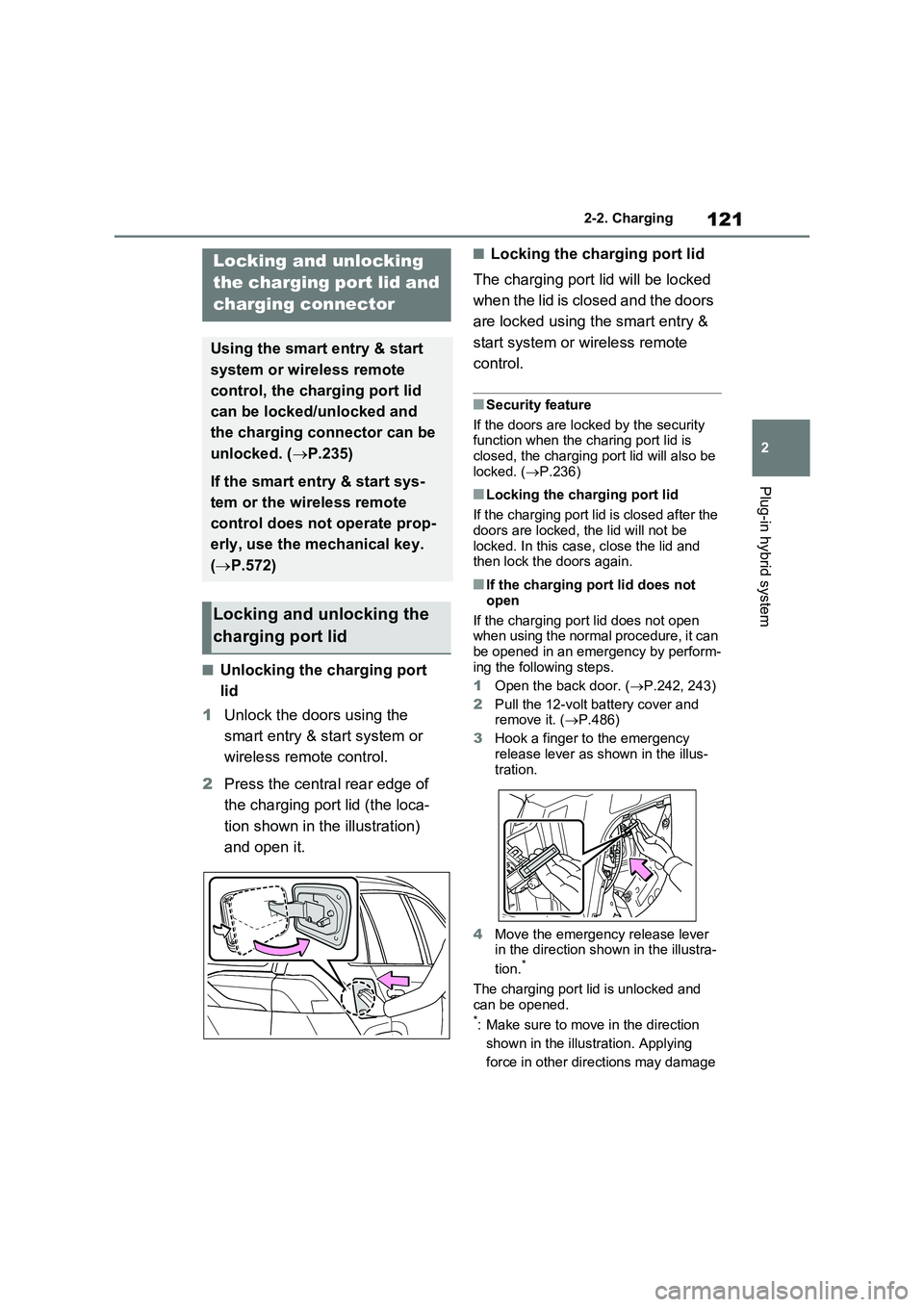
■Unlocking the charging port
lid
1Unlock the doors using the
smart entry & start system or
wireless remote control.
2Press the central rear edge of
the charging port lid (the loca-
tion shown in the illustration)
and open it.
■Locking the charging port lid
The charging port lid will be locked
when the lid is closed and the doors
are locked using the smart entry &
start system or wireless remote
control.
■Security feature
If the doors are locked by the security
function when the charing port lid is
closed, the charging port lid will also be
locked. (P.236)
■Locking the charging port lid
If the charging port lid is closed after the
doors are locked, the lid will not be
locked. In this case, close the lid and
then lock the doors again.
■If the charging port lid does not
open
If the charging port lid does not open
when using the normal procedure, it can
be opened in an emergency by perform-
ing the following steps.
1Open the back door. (P.242, 243)
2Pull the 12-volt battery cover and
remove it. (P.486)
3Hook a finger to the emergency
release lever as shown in the illus-
tration.
4Move the emergency release lever
in the direction shown in the illustra-
tion.
*
The charging port lid is unlocked and
can be opened.
*: Make sure to move in the direction
shown in the illustration. Applying
force in other directions may damage
Locking and unlocking
the charging port lid and
charging connector
Using the smart entry & start
system or wireless remote
control, the charging port lid
can be locked/unlocked and
the charging connector can be
unlocked. (P.235)
If the smart entry & start sys-
tem or the wireless remote
control does not operate prop-
erly, use the mechanical key.
(P.572)
Locking and unlocking the
charging port lid
Page 234 of 718

2324-1. Key information
4-1.Key info rmation
The following keys are provided
with the vehicle.
Electronic keys
• Operating the smart entry & start sys-
tem ( P.253)
• Operating the wireless remote control
function ( P.233)
• Operating the Remote Air Condition-
ing System ( P.438)
Mechanical keys
Key number plate
■When riding in an aircraft
When bringing an electronic key onto an aircraft, make sure you do not press any
buttons on the electronic key while inside the aircraft cabin. If you are carry-ing an electronic key in your bag etc.,
ensure that the buttons are not likely to be pressed accidentally. Pressing a but-ton may cause the electronic key to emit
radio waves that could interfere with the operation of the aircraft.
■Electronic key battery depletion
●The standard battery life is 1 to 2 years.
●If the battery becomes low, an alarm will sound in the cabin and a message will be displayed on the multi-informa-
tion display when the hybrid system
stops.
●To reduce key battery depletion when
the electronic key is to not be used for long periods of time, set the electronic key to the battery-saving mode.
( P.254)
●As the electronic key always receives
radio waves, the battery will become depleted even if the electronic key is not used. The following symptoms
indicate that the electronic key battery may be depleted. Replace the battery when necessary.
• The smart entry & start system or the wireless remote control does not oper-ate.
• The detection area becomes smaller. • The LED indicator on the key surface does not turn on.
You can replace the battery by yourself
( P.511). However, as there is a dan-
ger that the electronic key may be dam-
aged, it is recommended that
replacement is carried out by any autho-
rized Toyota retailer or Toyota autho-
rized repairer, or any reliable repairer.
●To avoid serious deterioration, do not leave the electronic key within 1 m (3
ft.) of the following electrical appli- ances that produce a magnetic field:•TVs
• Personal computers • Cellular phones, cordless phones and battery chargers
•Table lamps • Induction cookers
●If the electronic key is near the vehicle for longer than necessary, even if the smart entry & start system is not oper-
ated, the key battery may become depleted faster than normal.
■If a message regarding the state of the electronic key or power switch
mode, etc. is shown
To prevent trapping the electronic key inside the vehicle, leaving the vehicle
carrying the electronic key on your per- son without turning the power switch to
Keys
Key types
A
B
C
Page 235 of 718

233
4
4-1. Key information
Before driving
OFF or other passengers from uninten-
tionally taking the key out of the vehicle, etc., a message that prompts the user to confirm the state of the electronic key or
power switch mode may be shown on the multi-information display. In those cases, follow the instructions on the dis-
play immediately.
■If “Key Battery Low Replace Key Battery” is displayed on the multi-information display
The electronic key has a low battery. Replace the electronic key battery. ( P.511)
■Replacing the battery
P.511
■Confirmation of the registered key number
The number of keys already registered
to the vehicle can be confirmed. Ask any authorized Toyota retailer or Toyota authorized repairer, or any reliable
repairer for details.
■If “New Key Registered Contact Your Dealer if You Did Not Register a New Key” or “A New Key has
been Registered Contact Your Dealer for Details” is displayed on the multi-information display
This message will be displayed each time the driver’s door is opened when the doors are unlocked from the outside
for approximately 10 days after a new electronic key has been registered. If this message is displayed but you
have not had a new electronic key regis- tered, ask any authorized Toyota retailer or Toyota authorized repairer, or any
reliable repairer to check if an unknown electronic key (other than those in your possession) has been registered.
The electronic keys are equipped
with the following wireless remote
NOTICE
■To prevent key damage
●Do not drop the keys, subject them to strong shocks or bend them.
●Do not expose the keys to high temperatures for long periods of time.
●Do not get the keys wet or wash them in an ultrasonic washer, etc.
●Do not attach metallic or magnetic materials to the keys or place the
keys close to such materials.
●Do not disassemble the keys.
●Do not attach a sticker or anything else to the surface of the electronic
key.
●Do not place the keys near objects
that produce magnetic fields, such as TVs, audio systems and induc-tion cookers.
●Do not place the keys near medical electrical equipment such as low-
frequency therapy equipment or microwave therapy equipment, and do not receive medical attention
with the keys on your person.
■Carrying the electronic key on
your person
Carry the electronic key 10 cm (3.9 in.) or more away from electric appli-
ances that are turned on. Radio waves emitted from electric appli-ances within 10 cm (3.9 in.) of the
electronic key may interfere with the key, causing the key to not function properly.
■In case of a smart entry & start system malfunction or other key-
related problems
P.571
■When an electronic key is lost
P.570
Wireless remote control
Page 236 of 718

2344-1. Key information
control:
Locks all the doors ( P.235)
Closes the side windows*1 and
the panoramic moon roof*1, 2
( P.235)
Unlocks all the doors ( P.235)
Opens the side windows*1 and
the panoramic moon roof*1, 2
( P.235)
Opens and closes the power
back door*2 ( P.243)
Operates Remote Air Condition-
ing System ( P.438)
*1: These settings must be customized
at any authorized Toyota retailer or
Toyota authorized repairer, or any
reliable repairer.
*2: If equipped
To take out the mechanical key,
slide the release lever and take
the key out.
The mechanical key can only be
inserted in one direction, as the key
only has grooves on one side. If the key
cannot be inserted in a lock cylinder,
turn it over and re-attempt to insert it.
After using the mechanical key, store it
in the electronic key. Carry the
mechanical key together with the elec-
tronic key. If the electronic key battery
is depleted or the entry function does
not operate properly, you will need the
mechanical key. ( P.571)
■When required to leave the vehi- cle’s key with a parking attendant
Lock the glove box as circumstances
demand. ( P.446) Remove the mechanical key for your own use and provide the attendant with
the electronic key only.
■If you lose your mechanical keys
P.570
■If a wrong key is used
The key cylinder rotates freely to isolate
inside mechanism.
Using the mechanical key
A
B
C
D
E
F
A