2023 TOYOTA RAV4 lights
[x] Cancel search: lightsPage 314 of 574

3144-5. Using the driving support systems
• Mud & Sand mode
Mud & Sand mode indicator, VSC
OFF indicator (P.80) and PCS
warning light ( P.78) illuminate.
•Rock & Dirt mode
Rock & Dirt mode indicator illumi-
nates.
•Normal mode
The indicators and/or warning lights
above turn off.
■Multi-terrain Select
●Multi-terrain Sele ct is intended for
use when driving on rough roads.
Drive in Normal mode during nor-
mal driving.
●The Mud & Sand and Rock & Dirt
modes control the vehicle so that
it can maximize the drive force
and improve the drive force on
rough roads. As a result, fuel effi-
ciency may diminish when com-
pared to driving in Normal mode.
■When Multi-terrain Select brake
control is operating
The slip indicator flashes when
Multi-terrain Selec t brake control is
operating.
■AWD control for Mud & Sand
and Rock & Dirt modes
If the vehicle s peed exceeds the
speeds listed below, the same level
of AWD control for Normal mode is
performed, even if Mud & Sand or
Rock & Dirt mode is selected.
●Mud & Sand mode: Vehicle speed
is approximately 25 mph (40
km/h) or more
●Rock & Dirt mode: Vehicle speed
is approximately 16 mph (25
km/h) or more
If the vehicle speed drops below the
above speeds, the system automati-
cally returns to the AWD control for
each mode.
■When “Traction Control Turned
OFF” is displaye d on the multi-
information display
Multi-terrain Select brake control is
temporarily stopped due to overheat
of the brakes.
Stop the vehicle in a safe location
as soon as possible and wait until
the message disappears from the
multi-informat ion display.
■When the system switches to
Normal mode automatically
In the following situ ations, the sys-
tem switches to N ormal mode auto-
matically:
●When the driving mode is
changed ( P.310)
●When the engine switch is turned
off
■Sounds and vibrations when
driving in Mud & Sand or Rock
& Dirt mode
Any of the following conditions may
occur when Multi-terrain Select is
operating. None of these indicates
that a malfunction has occurred:
●Vibrations may be felt throughout
the vehicle or steering wheel
●Sounds may be heard from the
engine compartment
■When the slip indicator illumi-
nates
The system may be malfunctioning.
Have the vehicle inspected by your
Toyota dealer immediately.
■When the indicator for each
mode does no t illuminate
The system may be malfunctioning
if the indicator does not illuminate
when selecting the mode other than
Normal mode. Have the vehicle
inspected by your Toyota dealer
immediately.
Page 316 of 574

3164-5. Using the driving support systems
When the switch is pressed again,
the snow mode indicator turns off.
■When changing to snow mode
The background of the multi-infor-
mation display changes.
■Canceling the snow mode
Snow mode is automatically can-
celed when the engine switch is
turned off or Mud & Sand or Rock &
Dirt mode is selec ted for Multi-ter-
rain Select.
*: If equipped
Press the “DAC” switch
The downhill assist control system
indicator will come on and the sys-
tem will operate. When the system
is in operation, the slip indicator
light will flash, and the stop
lights/high mounted stop lights will
be lit. A sound may also occur
during the operati on. This does not
indicate a malfunction.
Downhill assist con-
trol system*
The downhill assist control
system helps to prevent
excessive speed on steep
downhill slopes.
The system will operate
when the vehicle is traveling
under 15 mph (25 km/h) with
the accelerator and brake
pedals released.
WARNING
■When using downhill assist
control system
Do not rely overmuch on the
downhill assist control system.
This function does not extend the
vehicle’s performance limitations.
Always thoroughly check the road
conditions, and drive safely.
System operation
Page 320 of 574

3204-5. Using the driving support systems
detects a collision and the sys-
tem operates, the brakes and
brake lights are automatically
controlled to reduce the vehicle
speed and help reduce the pos-
sibility of further damage due to
a secondary collision.
■When the TRAC/VSC/Multi-ter-
rain Select/Trailer Sway Con-
trol systems are operating
The slip indicator light will flash
while the TRAC/VSC/Multi-terrain
Select/Trailer Sway Control systems
are operating.
■Disabling the TRAC system
If the vehicle gets stuck in mud, dirt
or snow, the TRAC system may
reduce power from the engine to the
wheels.
Pressing to turn the system off
may make it easier for you to rock
the vehicle in order to free it.
To turn the TRAC system off,
quickly press and release .
The “Traction Control Turned OFF”
will be shown on the multi-informa-
tion display. Press again to turn the system
back on.
■Turning off the
TRAC/VSC/Trailer Sway Con-
trol systems
To turn the TRAC/VSC/Trailer Sway
Control systems of f, press and hold
for more than 3 seconds while
the vehicle is stopped.
The VSC OFF indicator light will
come on and the “Traction Control
Turned OFF” will be shown on the
multi-informat ion display.
*
Press again to turn the systems
back on.
*: PCS (Pre-Collision System) will
also be disabled (only pre-collision
warning is available). The PCS
warning light will come on and a
message will be disp layed on the
multi-information display.
( P.249)
■When the message is dis-
played on the multi-information
display showing that TRAC has
been disabled even if has
not been pressed
TRAC is temporary deactivated. If
the information continues to show,
contact your Toyota dealer.
■Operating conditions of hill-
start assist control
When all of the fo llowing conditions
are met, the hill-star t assist control
will operate:
●The shift lever is in a position
other than P or N (when starting
off forward/backward on an
upward incline)
●The vehicle is stopped
●The accelerator pedal is not
depressed
Page 326 of 574

3264-6. Driving tips
Perform the following according
to the driving conditions:
Do not try to forcibly open a
window or move a wiper that
is frozen. Pour warm water
over the frozen area to melt
the ice. Wipe away the water
immediately to prevent it from
freezing.
To ensure proper operation of
the climate control system
fan, remove any snow that
has accumulated on the air
inlet vents in front of the wind-
shield.
Check for and remove any
excess ice or snow that may
have accumulated on the
exterior lights, outside rear
view mirrors, windows, vehi-
cle’s roof, chassis, around the
tires or on the brakes.
Remove any snow or mud
from the bottom of your shoes
before getting in the vehicle.
Accelerate the vehicle slowly,
keep a safe distance between
you and the vehicle ahead, and
drive at a reduced speed suit-
able to road conditions.
Turn automatic mode of the parking brake off. Otherwise,
the parking brake may freeze
and not be able to be
released automatically.
Also, avoid using the following as
the parking brake may operate
automatically, even if automatic
mode is off.
• Brake hold system
Park the vehicle and shift the
shift lever to P without setting
the parking brake. The park-
ing brake may freeze up, pre-
venting it from being released.
If the vehicle is parked without
setting the parking brake,
make sure to block the
wheels. Failure to do so may
be dangerous because it may
cause the vehicle to move
unexpectedly, possibly lead-
ing to an accident.
When the parking brake is in
automatic mode, release the
parking brake after shifting
the shift lever to P. ( P.215)
If the vehicle is parked without
setting the parking brake,
confirm that the shift lever
cannot be moved out of P.
If the vehicle is left parked
with the brakes damp in cold
temperatures, there is a pos-
sibility of the brakes freezing.
Before driving the vehicle
When driving the vehicle
When parking the vehicle
Page 331 of 574

331
5
5
Interior features
Interior features
5-1. Using the air conditioning system and defogger
Manual air conditioning sys- tem ............................ 332
Automatic air conditioning system ....................... 338
Heated steering wheel/seat heaters/seat ventilators.................................. 345
5-2. Using the interior lights Interior lights list .......... 348
5-3. Using the storage features List of storage features 350
Luggage compartment fea- tures .......................... 354
5-4. Using the other interior features
Other interior features . 359
Garage door opener.... 370
Page 347 of 574
3475-2. Using the interior lights
5
Interior features
5-2.Using the interior lights
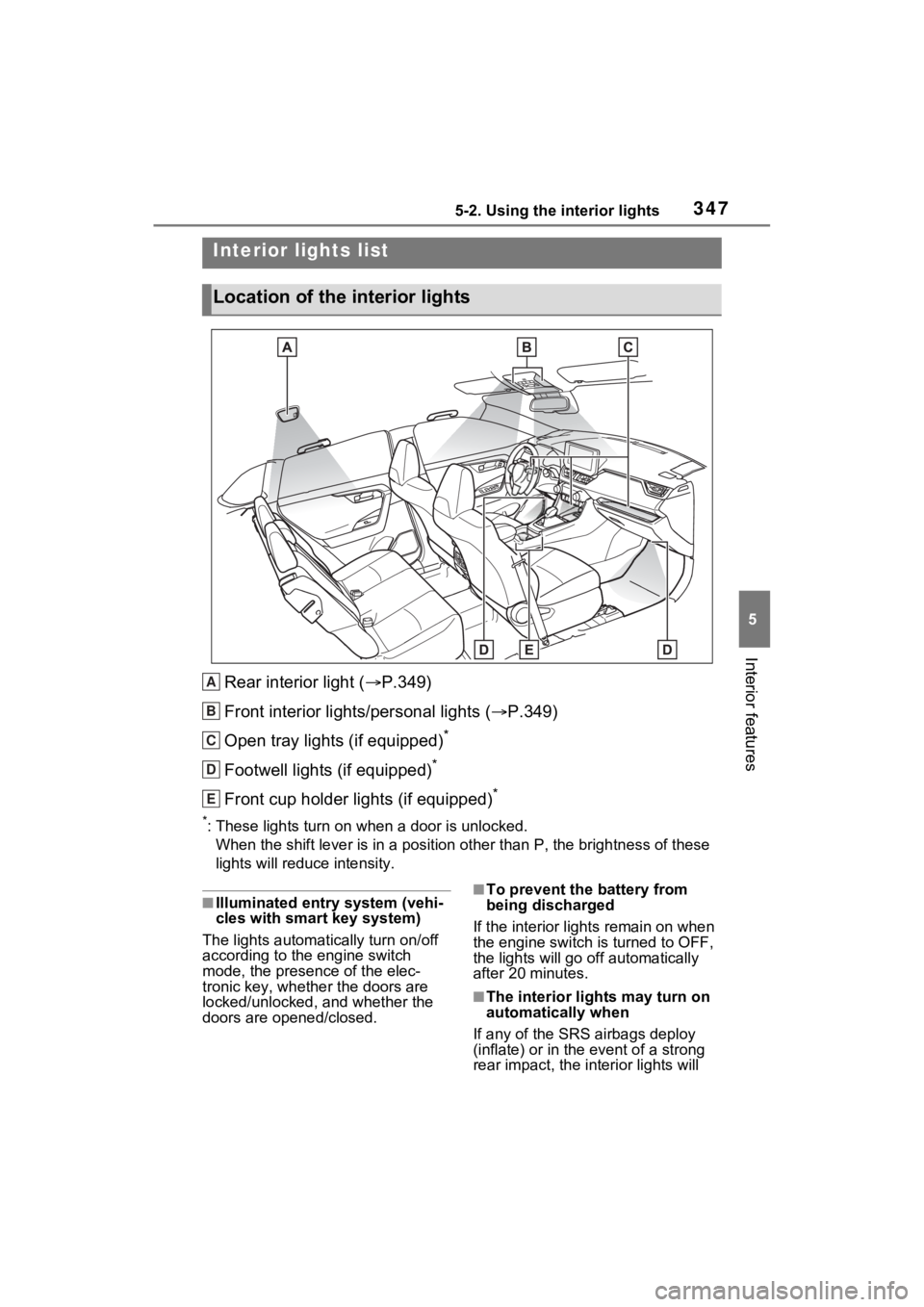
Rear interior light (P.349)
Front interior lights/personal lights ( P.349)
Open tray lights (if equipped)
*
Footwell lights (if equipped)*
Front cup holder lights (if equipped)*
*: These lights turn on when a door is unlocked.
When the shift lever is in a pos ition other than P, the brightness of these
lights will reduce intensity.
■Illuminated entry system (vehi-
cles with smart key system)
The lights automati cally turn on/off
according to the engine switch
mode, the presence of the elec-
tronic key, whether the doors are
locked/unlocked, and whether the
doors are opened/closed.■To prevent the battery from
being discharged
If the interior light s remain on when
the engine switch is turned to OFF,
the lights will go off automatically
after 20 minutes.
■The interior li ghts may turn on
automatically when
If any of the SRS airbags deploy
(inflate) or in the event of a strong
rear impact, the in terior lights will
Interior lights list
Location of the interior lights
A
B
C
D
E
Page 348 of 574
3485-2. Using the interior lights
turn on automatically.
The interior lights will turn off auto-
matically after approximately 20
minutes.
The interior lights can be turned off
manually. However, in order to help
prevent further collisions, it is rec-
ommended that they be left on until
safety can be ensured.
(The interior lights may not turn on
automatically depending on the
force of the impact and conditions of
the collision.)
■Customization
Setting (e.g. the time elapsed before
the lights turn off) can be changed.
(Customizable features: P.521)
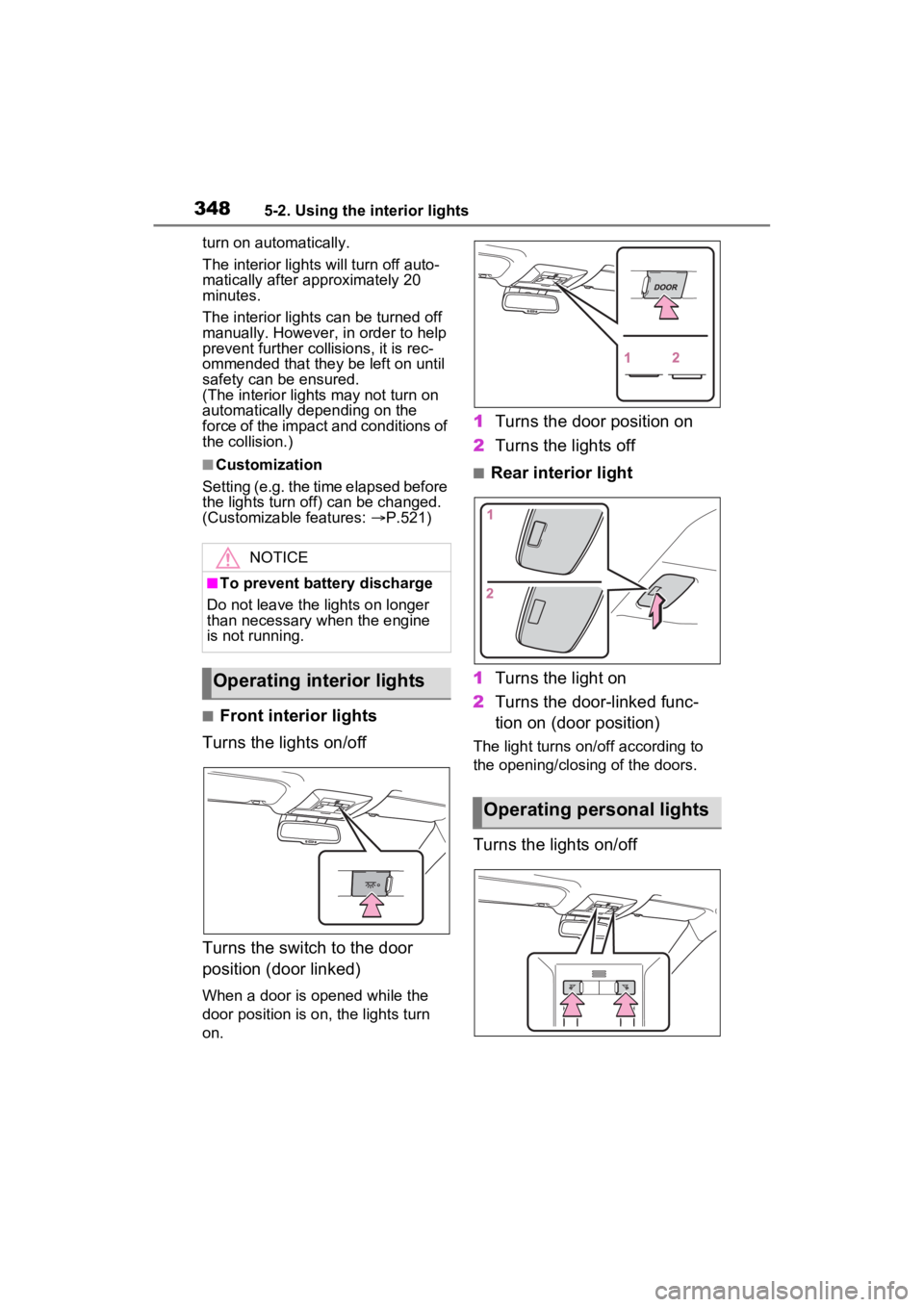
■Front interior lights
Turns the lights on/off
Turns the switch to the door
position (door linked)
When a door is opened while the
door position is on, the lights turn
on.
1 Turns the door position on
2 Turns the lights off
■Rear interior light
1 Turns the light on
2 Turns the door-linked func-
tion on (door position)
The light turns on/off according to
the opening/closing of the doors.
Turns the lights on/off
NOTICE
■To prevent battery discharge
Do not leave the lights on longer
than necessary when the engine
is not running.
Operating interior lights
Operating personal lights
Page 358 of 574

3585-4. Using the other interior features
5-4.Using the other interior features
1To set the visor in the forward
position, flip it down.
2 To set the visor in the side
position, flip down, unhook,
and swing it to the side.
3 To use the side extender (if
equipped), place the visor in
the side position, then slide it
backward.
Slide the cover to open.
The light turns on when the cover is
opened.
■Automatic light off to prevent
battery discharge
If the vanity light s remain on when the engine switch is turned to OFF,
the lights will go off automatically
after 20 minutes.
The power outlet can be used
for the following components:
12 V: Accessories that run on
less than 10 A.
120 VAC: Accessories that use
less than 100 W.
■12 V
Front
Open the lid.
Rear (if equipped)
Open the lid.
Other interior features
Sun visors
Vanity mirrors
NOTICE
■To prevent battery discharge
Do not leave the vanity lights on
for extended periods while the
engine is off.
Power outlet