2023 TOYOTA RAV4 display
[x] Cancel search: displayPage 286 of 574

2864-5. Using the driving support systems
■Detection range of the sen-
sorsApproximately 3.3 ft. (100
cm)
Approximately 4.9 ft. (150
cm)
Approximately 2.1 ft. (63 cm)
The diagram shows the detection
range of the sensors. Note that the
sensors cannot detect objects that
are extremely clos
e to the vehicle.
The range of the sensors may
change depending on the shape of
the object, etc.
■Distance display
When an object is detected by a sensor, the approximate distance to
the object will be displayed on the multi-information display o r Multi-
media Display. (As the distance to the object becomes short, th e dis-
tance segments may blink.)
The images may differ from that shown in the illustrations.
Approximate distance to object
• Front center sensor: 3.3 ft . (100 cm) to 2.1 ft. (63 cm)
• Rear center sensor : 4.9 ft. (150 cm) to 2.1 ft. (63 cm)
*1: Vehicles with 7-inch mu lti-information display
*2: Vehicles with 12.3-inch m ulti-information display
Sensor detection display,
object distanceA
B
C
Multi-information displayMultimedia Display
*1*2
Page 287 of 574

2874-5. Using the driving support systems
4
Driving
Approximate distance to object: 2.1 ft. (63 cm) to 1.6 ft. (48 cm)
*1: Vehicles with 7-inch multi-information display
*2: Vehicles with 12.3-inch m ulti-information display
Approximate distance to object: 1.6 ft. (48 cm) to 1.1 ft. (34 cm)
*1: Vehicles with 7-inch multi-information display
*2: Vehicles with 12.3-inch m ulti-information display
Approximate distance to object: 1.1 ft. (34 cm) to 0.5 ft. (15 cm)
*1: Vehicles with 7-inch multi-information display
*2: Vehicles with 12.3-inch m ulti-information display
*3: The distance segments will blink slowly.
Approximate distance to object: Less than 0.5 ft. (15 cm)
*1: Vehicles with 7-inch mu lti-information display
*2: Vehicles with 12.3-inch m ulti-information display
*3: The distance segments will blink rapidly.
Multi-information displayMultimedia Display
*1*2
Multi-information displayMultimedia Display
*1*2
Multi-information display*3Multimedia Display
*1*2
Multi-information display*3Multimedia Display
*1*2
Page 288 of 574

2884-5. Using the driving support systems
■Buzzer operation and dis-
tance to an object
A buzzer sounds when the sen-
sors are operating.
The buzzer beeps faster as
the vehicle approaches an
object.
When the vehicle comes
within approximately 1.1 ft.
(34 cm) of the object, the
buzzer sounds continuously.
When 2 or more sensors
simultaneously detect a static
object, the buzzer sounds for
the nearest object.
Even when the sensors are
operating, the buzzer will be
muted in some situations.
(automatic buzzer mute func-
tion)
■Muting the buzzer sound
●Automatic buzzer mute function
Even when the sensors are operat-
ing, the buzzer will be muted in the
following situations:
• The distance betw een the vehicle
and the detected object does not
become shorter (except when the
distance between the vehicle and
object is 1.1 ft. [34 cm] or less).
• Your vehicle is moving away from the object.
• There are no detectable objects
entering the path of your vehicle.
However, if another object is
detected or the situation changes
while the buzzer is muted, the
buzzer begins sounding again.
●To mute the buzzer sound
The buzzer can be temporarily muted by pressing of the meter
control switches while a suggestion
that says mute is available is shown
on the multi-information display.
●When the mute is canceled
Mute will be automat ically canceled
in the following situations.
• When the shift position is changed
• When the vehicle speed has reached or exceeded a certain
speed
• When the Intuitive parking assist is turned off on ce and turned on
again
• When the engine switch is turned off once and turned to ON again
■Customization
The buzzer volume can be adjusted
on the multi-information display.
( P.98, 107)
Page 289 of 574

2894-5. Using the driving support systems
4
Driving
*: If equipped
Meter control switches
Turning the RCTA function on/off.
When the RCTA function is dis-
abled, the RCTA OFF indicator illu-
minates.
Outside rear view mirror indi-
cators
If a vehicle is detected as
approaching from the left or right
behind the vehicle, both outside
rear view mirror indicators will blink
and a buzzer will sound.
Multimedia display
If a vehicle approaching from the
right or left at the rear of the vehicle
is detected, the RCTA icon
( P.290) for the detected side will
be displayed on the Multimedia dis-
play. This illustration shows an
example of a vehicle approaching
from both sides of the vehicle.
The RCTA can be enabled/dis-
abled on of the multi-infor-
mation display. ( P.509)
When the RCTA function is dis-
RCTA (Rear Cross
Traffic Alert) function*
The RCTA function uses the
BSM rear side radar sensors
installed behind the rear
bumper. This function is
intended to assist the driver
in checking areas that are
not easily visible when
backing up.
WARNING
■Cautions regarding the use of
the system
The driver is solely responsible for
safe driving. Always drive safely,
taking care to o bserve your sur-
roundings.
The RCTA function is only a sup-
plementary function which alerts
the driver tha t a vehicle is
approaching from the right or left
at the rear of the vehicle.
As the RCTA function may not
function correctly under certain
conditions, the driver’s own visual
confirmation of safety is neces-
sary.
Over reliance on this function may
lead to an accident resulting
death or serious injury.
System components
Turning the RCTA func-
tion on/off
A
B
C
Page 290 of 574

2904-5. Using the driving support systems
abled, the RCTA OFF indicator
(P.80) illuminates. (Each time
the engine switch is turned to
OFF then changed to ON, the
RCTA function will be enabled
automatically.)
■Outside rear view mirror indica-
tor visibility
In strong sunlight, the outside rear
view mirror indicato r may be difficult
to see.
■Hearing the RCTA buzzer
The RCTA buzzer may be difficult to
hear over loud noises, such as if the
audio system volume is high.
■When “Rear Cross Traffic Alert
Unavailable” is shown on the
multi-information display
Ice, snow, mud, etc., may be
attached to the rear bumper around
the sensors. ( P.276) Removing
the ice, snow, mud, etc., from the
attached to the rear bumper around
the sensors to normal. Additionally,
the function may not function nor-
mally when used in extremely hot or
cold environments.
■When “Rear Cross Traffic Alert
Malfunction Visit Your Dealer”
is shown on the multi-informa-
tion display
There may be a sensor malfunction
or misaligned. Have the vehicle
inspected at a Toyota dealer.
■Rear side radar sensors
P.276
■Operation of the RCTA
function
The RCTA function uses rear
side radar sensors to detect
vehicles approaching from the right or left at the rear of the
vehicle and alerts the driver of
the presence of such vehicles
by flashing the outside rear view
mirror indicators and sounding a
buzzer.
Approaching vehicles
Detection areas of approach-
ing vehicles
■RCTA icon display
When a vehicle approaching
from the right or left at the rear
of the vehicle is detected, the
following will be displayed on
the Multimedia display.
• Example (Panoramic view monitor) (if equipped): Vehi-
cles are approaching from
both sides of the vehicle
RCTA function
A
B
Page 291 of 574

2914-5. Using the driving support systems
4
Driving
■RCTA function detection
areas
The areas that vehicles can be
detected in are outlined below.
The buzzer can alert the driver
of faster vehicles approaching
from farther away.
Example:
■The RCTA function is opera-
tional when
The RCTA function operates when
all of the followin g conditions are
met:
●The engine swit ch is in ON.
●The RCTA function is on.
●The shift lever is in R.
●The vehicle speed is less than
approximately 9 mph (15 km/h).
●The approaching vehicle speed is
between approximately 5 mph (8
km/h) and 34 mph (56 km/h).
■Setting the buzzer volume
The buzzer volume can be adjusted
on the multi-info rmation display. The volume of the RCTA buzzer can
be adjusted on of the multi-infor-
mation display. (
P.509)
■Muting a buzzer temporarily
A mute button will be displayed on
the multi-informatio n display when a
vehicles or an object is detected. To
mute the buzzer, press .
The buzzers for the RCTA function
and intuitive par king assist will be
muted simultaneously.
Mute will be cancele d automatically
in the following situations:
●When the shift lever is changed.
●When the vehicle speed exceeds
a certain speed.
●When there is a malfunction in a
sensor or the system is temporar-
ily unavailable.
●When the operati ng function is
disabled manually.
●When the engine switch is turned
off.
■Conditions under which the
system will not detect a vehicle
The RCTA function is not designed
to detect the follo wing types of vehi-
cles and/or objects:
●Vehicles approaching from
directly behind
●Vehicles backing up in a parking
space next to your vehicle
●Vehicles that the sensors cannot
detect due to obstructions
●Guardrails, walls, signs, parked
vehicles and similar stationary
Approaching
vehicle speed Approximate
alert distance
34 mph (56
km/h) (fast)131 ft. (40 m)
5 mph (8 km/h) (slow)18 ft. (5.5 m)
A
Page 296 of 574

2964-5. Using the driving support systems
The Parking Support Brake can
be enabled/disabled on the
screen of the multi-information
display. All of the Parking Sup-
port Brake functions (static
objects and rear-crossing vehi-
cles) are enabled/disabled
simultaneously. (P.98, 107)
When the Parking Support Brake is
disabled, the PKSB OFF indicator
( P.80) illuminates on the multi-
information display.
To re-enable the system, select
on the multi-inform ation display,
select and turn it on.
If the system is disabled, it will
remain off even if t he engine switch
is turned to ON after the engine
switch has been turned off.
If the engine output restriction
control or brake control oper-
ates, a buzzer will sound and a
message will be displayed on
the multi-information display or
Multimedia Display, to alert the
driver.
Depending on the situation, engine
output restriction control will oper-
ate to either limit acceleration or
restrict output as much as possible.
Engine output restriction con-
trol is operating (acceleration
restriction)
Acceleration greater than a certain
amount is restric ted by the system.
Multimedia Display: No warning
displayed
Multi-information display: “Object
Detected Acceleration Reduced”
PKSB OFF indicator: Not illumi-
nated
Buzzer: Does not sound
Engine output restriction con-
trol is operating (output
restricted as much as possi-
ble)
The system has determined that
stronger-than-normal brake opera-
tion is necessary.
Multimedia Display: “BRAKE!”
Multi-information display: “BRAKE!”
PKSB OFF indicator: Not illumi-
nated
NOTICE
■If “PKSB Unavailable” is dis-
played on the multi-informa-
tion display and the PKSB
OFF indicator is flashing
If this message is displayed
immediately after the engine
switch is changed to ON, operate
the vehicle carefully, paying atten-
tion to your surroundings. It may
be necessary to drive the vehicle
for a certain amount of time
before the system returns to nor-
mal. (If the system does not return
to normal after driving for a while,
clean the sensors and their sur-
rounding area on the bumpers.)
Enabling/Disabling the
Parking Support Brake
Display and buzzer for
engine output restriction
control and brake control
Page 297 of 574
2974-5. Using the driving support systems
4
Driving
Buzzer: Short beep
Brake control is operating
The system determ ined that emer-
gency braking is necessary.
Multimedia Dis play: “BRAKE!”
Multi-information display: “BRAKE!”
PKSB OFF indicator: Not illumi-
nated
Buzzer: Short beep
Vehicle stopped by system
operation
The vehicle has been stopped by
brake control operation.
Multimedia Display: “Press Brake
Pedal”
Multi-information di splay: “Switch to
Brake” (If the accelerator pedal is
not depressed, “Press Brake Pedal”
will be displayed.)
PKSB OFF indicator: Illuminated
Buzzer: Short beep
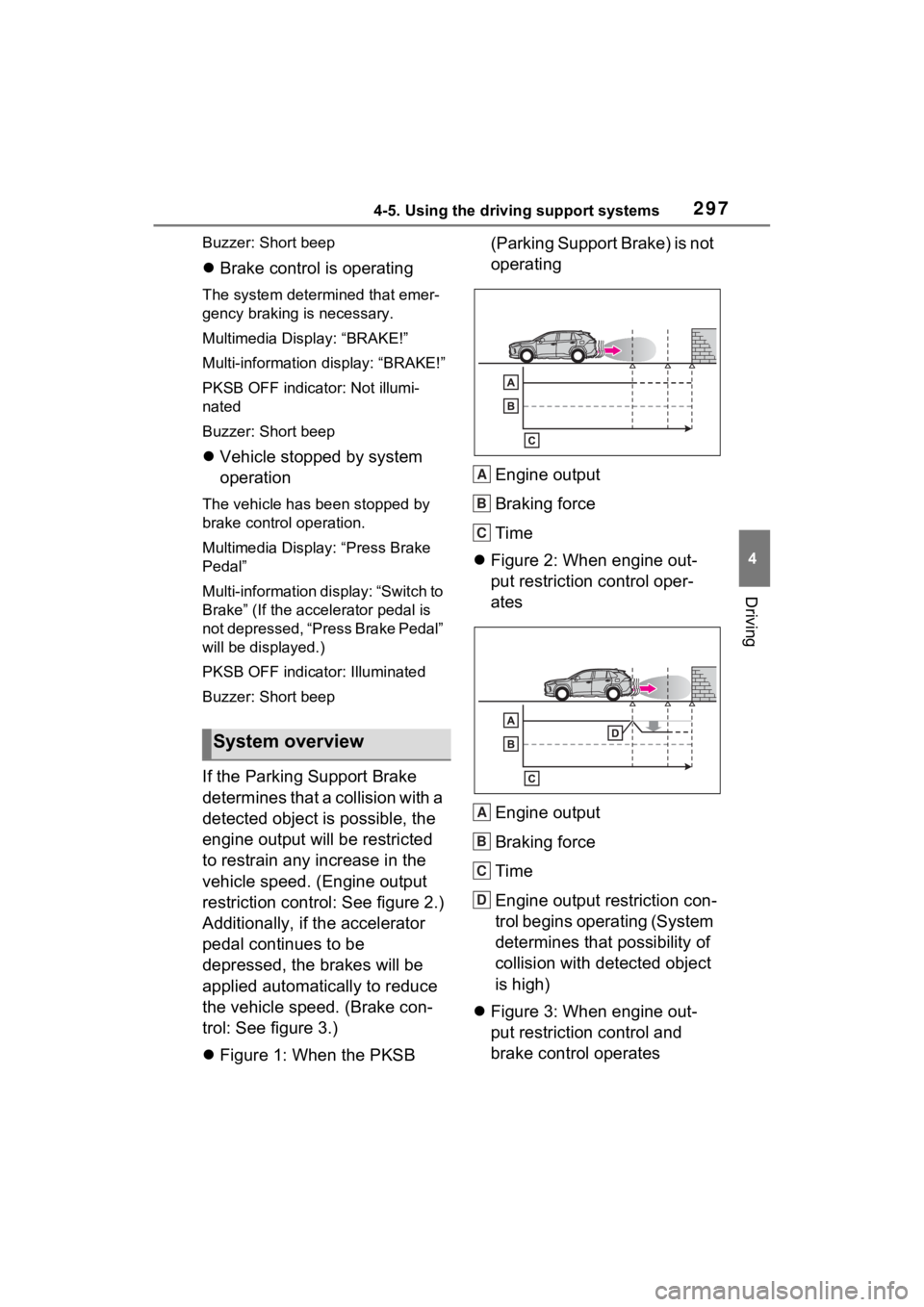
If the Parking Support Brake
determines that a collision with a
detected object is possible, the
engine output will be restricted
to restrain any increase in the
vehicle speed. (Engine output
restriction control: See figure 2.)
Additionally, if the accelerator
pedal continues to be
depressed, the brakes will be
applied automatically to reduce
the vehicle speed. (Brake con-
trol: See figure 3.)
Figure 1: When the PKSB (Parking Support Brake) is not
operating
Engine output
Braking force
Time
Figure 2: When engine out-
put restriction control oper-
ates
Engine output
Braking force
Time
Engine output restriction con-
trol begins operating (System
determines that possibility of
collision with detected object
is high)
Figure 3: When engine out-
put restriction control and
brake control operates
System overview
A
B
C
A
B
C
D