2023 TOYOTA RAV4 HYBRID ESP
[x] Cancel search: ESPPage 193 of 586

1913-5. Opening, closing the windows and moon roof
3
Before driving
1Stop the vehicle.
2 Turn the power switch to ON.
3 Slide and hold the switch
or switch forward. Continue
sliding and holding the switch for
approximately 10 seconds after
the panoramic moon roof or elec-
tronic sunshade closes and
reopens. The panoramic moon
roof and electronic sunshade will
start to close.
*
4Check that the panoramic moon
roof and electronic sunshade are
fully closed and release the
switch.
*: If the switch is released at the
incorrect time, the procedure will
have to be performed again from
the beginning.
If the panoramic moon roof or elec-
tronic sunshade does not fully close
even after performing the above
procedure correctly, have the vehi-
cle inspected by your Toyota dealer.
■Panoramic moon roof open
reminder function
A buzzer sounds and a message is
shown on the multi -information dis-
play when the power switch is
turned to OFF and the driver’s door
is opened with the panoramic moon
roof open.
■Customization
Settings (e.g. linked door lock oper-
ation) can be changed. (Customiz-
able features: P.525)
WARNING
Observe the following precau-
tions.
Failure to do so m ay result in
death or serious injury.
■Opening and closing the elec-
tronic sunshade
●Check to make sure that all pas-
sengers do not have any part of
their body in a pos ition where it
could be caught when the elec-
tronic sunshade is being oper-
ated.
●Do not let a child operate the
electronic sunshade. Closing
the electronic sunshade on
someone can cau se death or
serious injury.
■Opening the panoramic moon
roof
●Do not allow any passengers to
put their hands or head outside
the vehicle while it is moving.
●Do not sit on top of the pan-
oramic moon roof.
■Opening and closing the pan-
oramic moon roof
●The driver is responsible for
panoramic moon roof opening
and closing operations.
In order to prevent accidental
operation, especially by a child,
do not let a child operate the
panoramic moon roof. It is pos-
sible for children and other pas-
sengers to have body parts
caught in the panoramic moon
roof.
Page 198 of 586

1964-1. Before driving
up, and the road could be slip-
pery.
●Drive carefully when it starts to
rain, as the road surface could be
especially slippery.
●Refrain from high speeds when
driving on an expressway in the
rain, because there may be a
layer of water between the tires
and the road surface, preventing
the steering and brakes from
operating properly.
■ECO Accelerator Guidance
( P.107)
It is easier to drive in an Eco-friendly
manner by driving while referring to
the ECO Accelerator Guidance dis-
play. Also, by using the ECO Accel-
erator Guidance it is easier to
increase the “Eco Score” evaluation.
●When starting off:
While staying within the ECO
Accelerator Guidance range,
gradually depress the accelerator
pedal and accelerate to the
desired speed. If excessive accel-
eration is avoided, the “Start”
score will increase.
●When driving:
After accelerating to the desired
speed, release the accelerator
pedal and drive at a stable speed
within the ECO Acce lerator Guid-
ance range. By keeping the vehi-
cle within the E CO Accelerator
Guidance range, the “Cruise”
score will increase.
●When stopping:
When stopping the vehicle, early
releasing the accelerator pedal
will cause the “Stop” score to
increase.
■Restraining the hybrid system
output (Brake Override System)
●When the accelerator and brake
pedals are depressed at the same
time, the hybrid system output
may be restrained.
●A warning message is displayed
on the multi-information display while the system is operating.
■Breaking in your new Toyota
To extend the life of the vehicle,
observing the following precautions
is recommended:
●For the first 200 miles (300 km):
Avoid sudden stops.
●For the first 500 miles (800 km):
Do not tow a trailer.
●For the first 600 miles (1000 km):
• Do not drive at extremely high speeds.
• Avoid sudden acceleration.
• Do not drive continuously in low gears.
• Do not drive at a constant speed for extended periods.
■Operating your v ehicle in a for-
eign country
Comply with the relevant vehicle
registration laws and confirm the
availability of the correct fuel.
( P.497)
WARNING
Observe the following precau-
tions.
Failure to do so may result in
death or serious injury.
■When starting the vehicle
Always keep your foot on the
brake pedal while stopped with
the “READY” indica tor is illumi-
nated. This prevents the vehicle
from creeping.
Page 199 of 586

1974-1. Before driving
4
Driving
WARNING
■When driving the vehicle
●Do not drive if y ou are unfamil-
iar with the location of the brake
and accelerator pedals to avoid
depressing the wrong pedal.
• Accidentally depressing the accelerator pedal instead of the
brake pedal will result in sudden
acceleration that may lead to an
accident.
• When backing up, you may twist your body around, leading to a
difficulty in operating the pedals.
Make sure to operate the pedals
properly.
• Make sure to keep a correct driving posture even when mov-
ing the vehicle only slightly. This
allows you to depress the brake
and accelerator pedals properly.
• Depress the brake pedal using your right foot. Depressing the
brake pedal using your left foot
may delay respon se in an emer-
gency, resulting in an accident.
●The driver should pay extra
attention to pedestrians when
the vehicle is powered only by
the electric motor (traction
motor). As there is no engine
noise, the pedestrians may mis-
judge the vehicle’s movement.
Even though the vehicle is
equipped with the Acoustic
Vehicle Alerting System, drive
with care as pedestrians in the
vicinity may still not notice the
vehicle if the surrounding area
is noisy.
●Do not drive the vehicle over or
stop the vehicle near flammable
materials such as leaves, paper
or rags.
The exhaust system and
exhaust gases can be
extremely hot. These hot parts
may cause a fire if there is any
flammable material nearby.
●During normal driving, do not
turn off the hybrid system. Turn-
ing the hybrid s ystem off while
driving will not cause loss of
steering or braking control, how-
ever, power assist to the steer-
ing will be lost. This will make it
more difficult to steer smoothly,
so you should pull over and stop
the vehicle as soon as it is safe
to do so. In the event of an
emergency, such as if it
becomes impossible to stop the
vehicle in the normal way:
P.449
●Use engine braking (downshift)
to maintain a safe speed when
driving down a steep hill.
Using the brakes continuously
may cause the brakes to over-
heat and lose effectiveness.
( P.226)
●Do not adjust the position of the
steering wheel, the seat, or the
inside or outside rear view mir-
rors while driving.
Doing so may result in a loss of
vehicle control.
●Always check that all passen-
gers’ arms, head or other parts
of their body are not outside the
vehicle.
●Do not drive in excess of the
speed limit. Even if the legal
speed limit permits it, do not
drive over 85 mph (140 km/h)
unless your vehicle has high-
speed capability tires. Driving
over 85 mph (140 km/h) may
result in tire fa ilure, loss of con-
trol and possible injury. Be sure
to consult a tire dealer to deter-
mine whether the tires on your
vehicle are high-speed capabil-
ity tires or not before driving at
such speeds.
Page 209 of 586
2074-1. Before driving
4
Driving
●Dynamic radar cruise control with
full-speed range (P.282)
●PKSB (Parking Support Brake) (if
equipped) ( P.312)
●BSM (Blind Spot Monitor) (if
equipped) ( P.293)
●Intuitive parking assist (if
equipped) ( P.298)
●RCTA (Rear Cross Traffic Alert)
function (if equipped) ( P.293)
WARNING
■Trailer towing precautions
To tow a traile r safely, use
extreme care and drive the vehi-
cle in accordance with the trailer’s
characteristics and operating con-
ditions. Failure to do so could
cause an accident resulting in
death or serious injury. Vehicle
stability and braking performance
are affected by trailer stability,
brake setting and performance,
and the hitch. Your vehicle will
handle differently when towing a
trailer.
■To avoid accident or injury
●Do not exceed the TWR,
unbraked TWR, GCWR, GVWR
or GAWR.
●Adjust the tongue weight within
the appropriate range. Place
heavier loads as close to the
trailer axle as possible.
●Do not exceed 65 mph (104
km/h), the posted towing speed
limit or the spee d limit for your
trailer as set forth in your trailer
owner’s manual, whichever is
lowest. Slow down sufficiently
before making a turn, in cross
winds, on wet or slippery sur-
face, etc. to help avoid an acci-
dent. If you experience a
vehicle-trailer instability from
reducing a certain speed, slow
down and make sure you keep
your vehicle speed under the
speed of which you experience
the instability.
●Do not make jer ky, abrupt or
sharp turns.
●Do not apply the brakes sud-
denly as you may skid, resulting
in jackknifing and loss of vehicle
control. This is especially true
on wet or slippery surfaces.
●Do not exceed the trailer hitch
assembly weight, gross vehicle
weight, gross axle weight and
trailer tongue w eight capacities.
●Do not use dynamic radar
cruise control with full-speed
range when towing.
●Slow down and downshift
before descending steep or long
downhill grades. Do not make
sudden downshifts while
descending steep or long down-
hill grades.
Page 215 of 586

2134-1. Before driving
4
Driving
increases. Exceeding speed
limits may cause loss of con-
trol.
Before starting out, check the
trailer lights, tires and the
vehicle-trailer connections.
Recheck after driving a short
distance.
Practice turning, stopping and
reversing with the trailer
attached in an area away
from traffic until you become
accustomed to the feel of the
vehicle-trailer combination.
Reversing with a trailer
attached is difficult and
requires practice. Grip the
bottom of the steering wheel
and move your hand to the
left to move the trailer to the
left. Move your hand to the
right to move the trailer to
right. (This is generally oppo-
site to reversing without a
trailer attached.) Avoid sharp
or prolonged turning. Have
someone guide you when
reversing to reduce the risk of
an accident.
As stopping distance is
increased when towing a
trailer, vehicle-to vehicle dis-
tance should be increased.
For each 10 mph (16 km/h) of
speed, allow at least one
vehicle and trailer length.
Avoid sudden braking as you
may skid, resulting in the
trailer jackknifing and a loss of vehicle control. This is espe-
cially true on wet or slippery
surfaces.
Avoid jerky starts or sudden
acceleration.
Avoid jerky steering and
sharp turns, and slow down
before making turn.
Note that when making a turn,
the trailer wheels will be
closer than the vehicle wheels
to the inside of the turn. Com-
pensate by making a wider
than normal turning radius.
Slow down before making a
turn, in cross winds, on wet or
slippery surfaces, etc.
Increasing vehicle speed can
destabilize the trailer.
Take care when passing other
vehicles. Passing requires
considerable distance. After
passing a vehicle, do not for-
get the length of your trailer,
and be sure you have plenty
of room before changing
lanes.
To maintain engine braking
efficiency, when using engine
braking, do not use the trans-
mission in D.
Instability happens more fre-
quently when descending
steep or long downhill grades.
Before descending, slow
down and downshift. Do not
make sudden downshifts
while descending steep or
Page 254 of 586

2524-5. Using the driving support systems
4-5.Using the driving support systems
■PCS (Pre-Collision System)
P.257
■LTA (Lane Tracing Assist)
P.268
■AHB (Automatic High
Beam)
P.240
■RSA (Road Sign Assist) (if
equipped)
P.279
■Dynamic radar cruise con-
trol with full-speed range
P.282 Two types of sensors, located
behind the front grille and wind-
shield, detect information neces-
sary to operate the drive assist
systems.
Radar sensor
Front camera
Toyota Safety Sense
2.5
The Toyota Safety Sense
2.5 consists of the following
drive assist systems and
contributes to a safe and
comfortable driving experi-
ence:
Driving assist system
WARNING
■Toyota Safety Sense 2.5
The Toyota Safety Sense 2.5 is
designed to operate under the
assumption that the driver will
drive safely, and is designed to
help reduce the impact to the
occupants and the vehicle in the
case of a collision or assist the
driver in normal driving condi-
tions.
As there is a limit to the degree of
recognition accuracy and control
performance that this system can
provide, do not overly rely on this
system. The driver is always
responsible for paying attention to
the vehicle’s su rroundings and
driving safely.
Sensors
A
B
Page 260 of 586
2584-5. Using the driving support systems
a pedestrian is high and that
there is sufficient space for the
vehicle to be steered into within
its lane, and the driver has
begun evasive maneuver or
steering, emergency steering
assist will assist the steering
movements to help enhance the
vehicle stability and for lane
departure prevention. During
operation, the indicator will illu-
minate in green.
■Intersection right/left turn
assistance
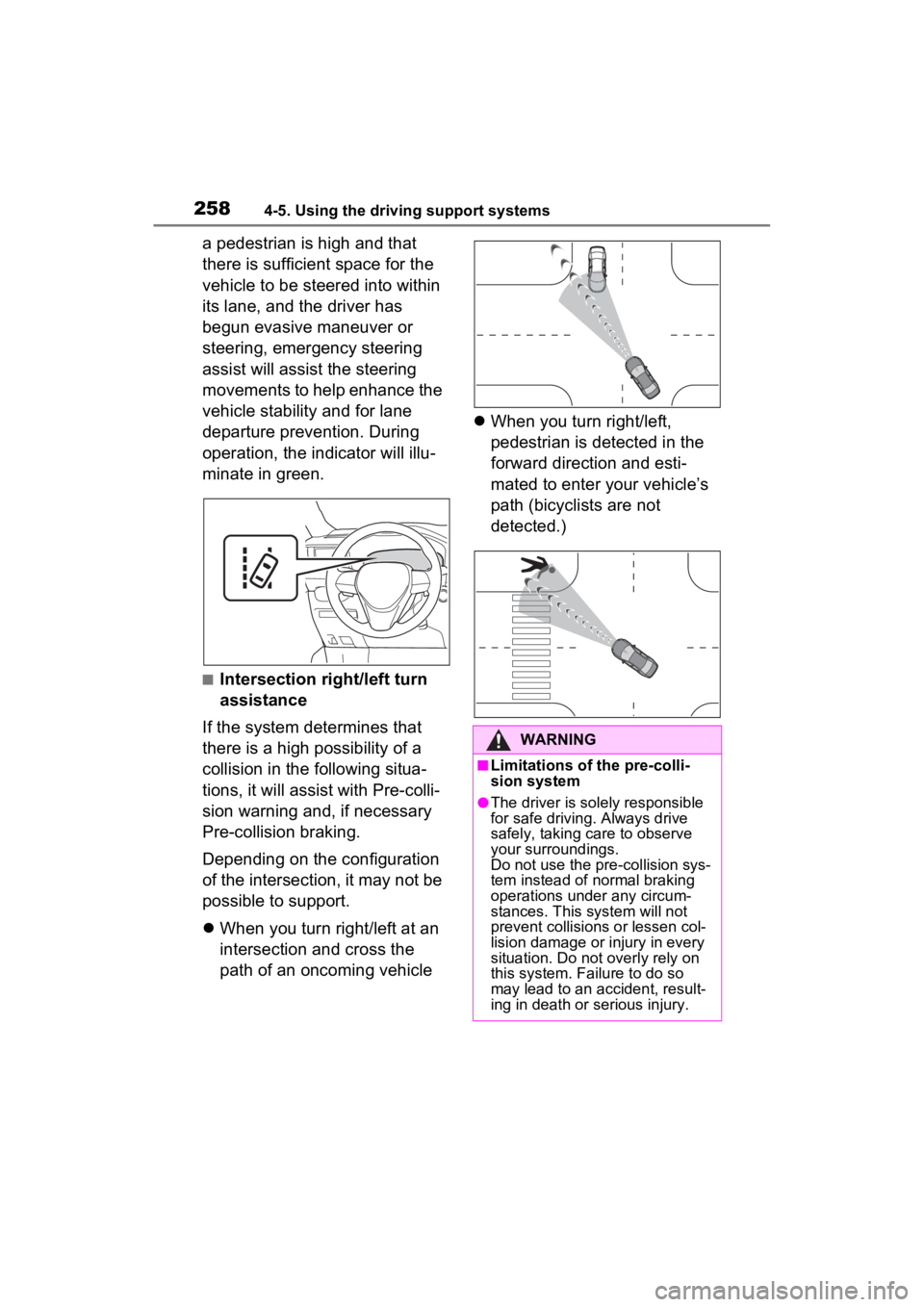
If the system determines that
there is a high possibility of a
collision in the following situa-
tions, it will assist with Pre-colli-
sion warning and, if necessary
Pre-collision braking.
Depending on the configuration
of the intersection, it may not be
possible to support.
When you turn right/left at an
intersection and cross the
path of an oncoming vehicle
When you turn right/left,
pedestrian is detected in the
forward direction and esti-
mated to enter your vehicle’s
path (bicyclists are not
detected.)
WARNING
■Limitations of the pre-colli-
sion system
●The driver is solely responsible
for safe driving. Always drive
safely, taking care to observe
your surroundings.
Do not use the pre-collision sys-
tem instead of normal braking
operations under any circum-
stances. This system will not
prevent collisions or lessen col-
lision damage or injury in every
situation. Do not overly rely on
this system. Failure to do so
may lead to an accident, result-
ing in death or serious injury.
Page 270 of 586
2684-5. Using the driving support systems
LTA (Lane Tracing
Assist)
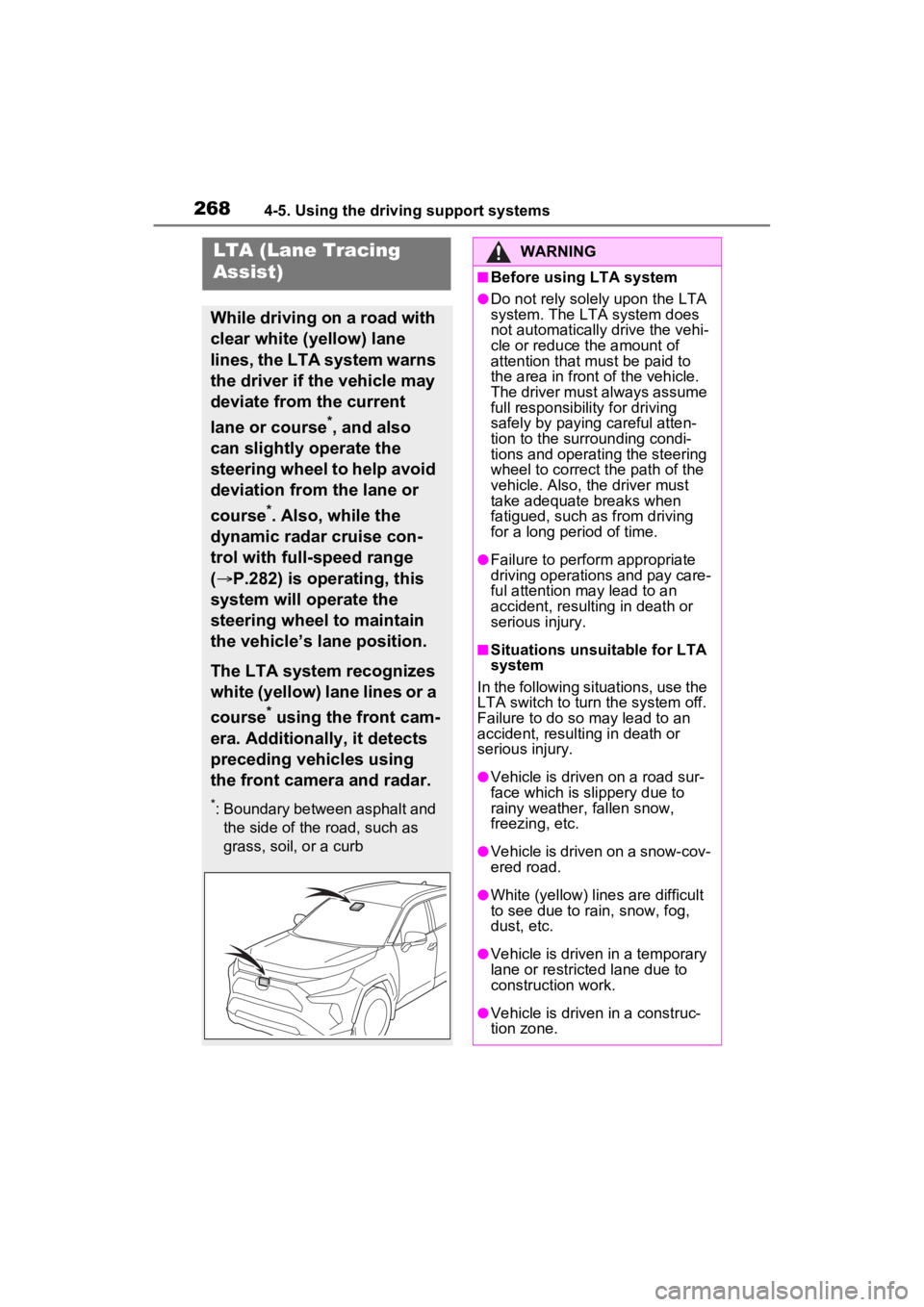
While driving on a road with
clear white (yellow) lane
lines, the LTA system warns
the driver if the vehicle may
deviate from the current
lane or course
*, and also
can slightly operate the
steering wheel to help avoid
deviation from the lane or
course
*. Also, while the
dynamic radar cruise con-
trol with full-speed range
( P.282) is operating, this
system will operate the
steering wheel to maintain
the vehicle’s lane position.
The LTA system recognizes
white (yellow) lane lines or a
course
* using the front cam-
era. Additionally, it detects
preceding vehicles using
the front camera and radar.
*: Boundary between asphalt and the side of the road, such as
grass, soil, or a curb
WARNING
■Before using LTA system
●Do not rely solely upon the LTA
system. The LTA system does
not automatically drive the vehi-
cle or reduce the amount of
attention that m ust be paid to
the area in front of the vehicle.
The driver must always assume
full responsibilit y for driving
safely by paying careful atten-
tion to the surrounding condi-
tions and operating the steering
wheel to correct the path of the
vehicle. Also, the driver must
take adequate breaks when
fatigued, such as from driving
for a long period of time.
●Failure to perform appropriate
driving operations and pay care-
ful attention may lead to an
accident, resulting in death or
serious injury.
■Situations unsuitable for LTA
system
In the following situations, use the
LTA switch to turn the system off.
Failure to do so may lead to an
accident, resulting in death or
serious injury.
●Vehicle is driven on a road sur-
face which is slippery due to
rainy weather, fallen snow,
freezing, etc.
●Vehicle is driven on a snow-cov-
ered road.
●White (yellow) lin es are difficult
to see due to rain, snow, fog,
dust, etc.
●Vehicle is driven in a temporary
lane or restricted lane due to
construction work.
●Vehicle is driven in a construc-
tion zone.