Page 102 of 516

1002-1. Instrument cluster
RAIZE_OM_General_BZ358E
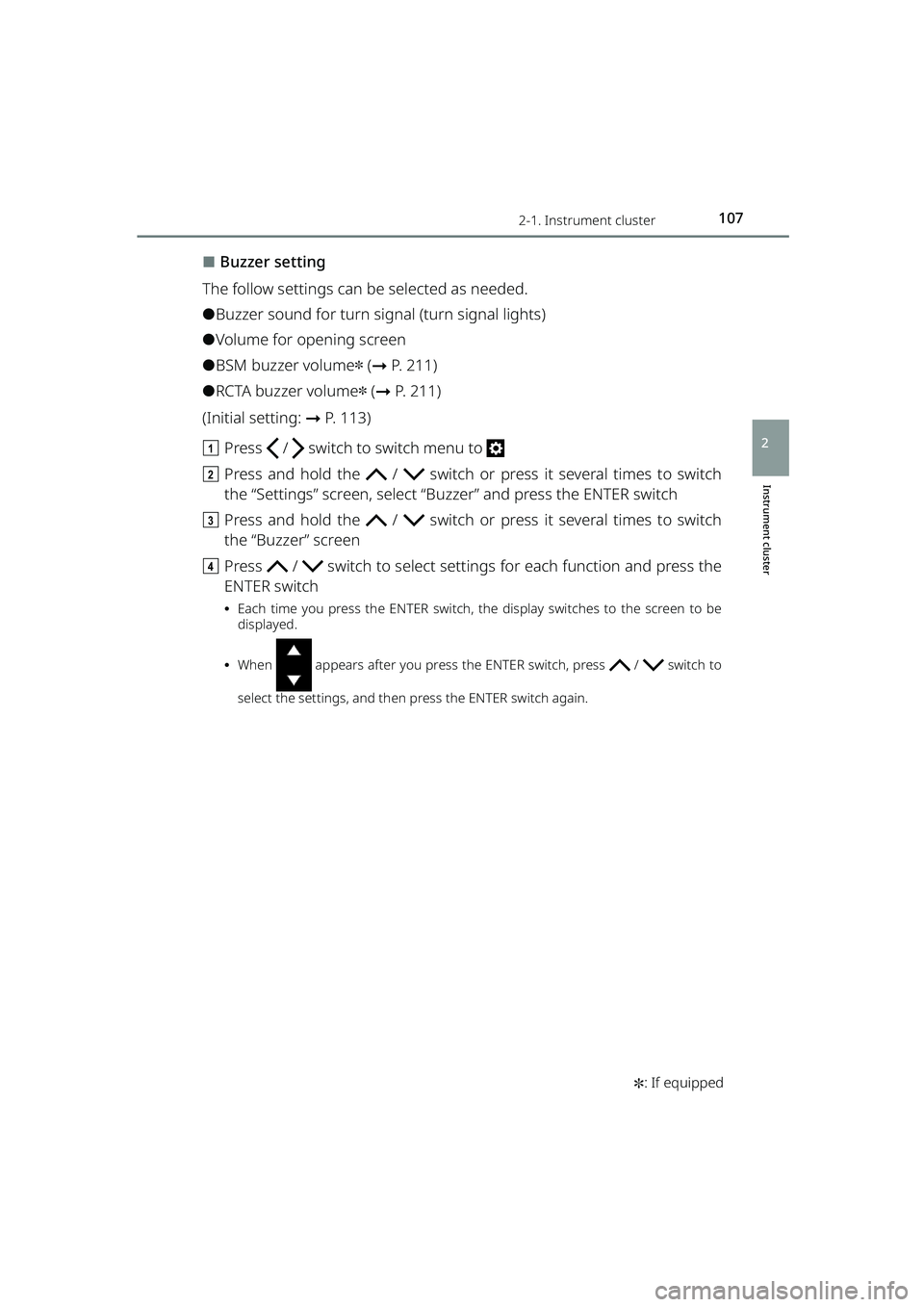
Basic screens
TFT color multi-information display switches between 4 types of basic
screens.
(Initial setting: ➞P. 113)
a Press / switch to switch menu to
b Press the / switch and select “Designs”, and then press the
ENTER switch
c Press / switch to select a screen and press the ENTER switch
Trip information
Each time you press the TRIP switch, the indication changes as follows.
a Odometer
Displays the total distance the vehicle has been driven.
bTrip meter A*
Displays the distance the vehicle has been driven since the meter was last reset.
To reset the Trip meter, press and hold the TRIP switch for more than 1 second,
while trip meter A is displayed.
cTrip meter B*
Displays the distance the vehicle has been driven since the meter was last reset.
To reset the Trip meter, press and hold the TRIP switch for more than 1 second,
while trip meter B is displayed.
*Trip meters A and B can be used to reco rd and display different distances inde-
pendently.
RAIZE_OM_General_BZ358E.book 100 ページ 2022年5月17日 火曜日 午後1時59分
Page 104 of 516
1022-1. Instrument cluster
RAIZE_OM_General_BZ358E
Warning messages
turns yellow only when a warning message with further confirmation is
available.
Press / switch to switch menu to .
When a malfunction is found, messages regarding the issue and the
measure to be taken are displayed.
When more than 2 messages are disp layed, press / switch to tog-
gle the messages.
When no message is stored, “No Messages” will be displayed.
Steering wheel position monitor
When the shift lever is set to R, the orientation of front wheel tires dis-
played.
At the same time, the operating condition of front corner sensor/reverse sensor
(➞ P. 221) is also displayed.
RAIZE_OM_General_BZ358E.book 102 ページ 2022年5月17日 火曜日 午後1時59分
Page 106 of 516

1042-1. Instrument cluster
RAIZE_OM_General_BZ358E✽
: If equipped
Settings
While the vehicle is parked with the engine switch turned “ON”, you can
specify or adjust the display and configure the function settings by press-
ing the / switch to change the menu to .
Note that the screen is not operable while the vehicle is running. Be sure
to operate the screen when the ve hicle is stopped in a safe place.
The following items can be set and adjusted.
⚫Instrument panel illumination
adjustment (➞ P. 104)
⚫Time and date ( ➞P. 105)
⚫Display options ( ➞P. 106)
⚫Screens ( ➞P. 1 0 0 )
⚫Buzzers (➞ P. 107)
⚫Notification dates ( ➞P. 108)
⚫BSM/RCTA✽ (➞ P. 109)
⚫Door lock ( ➞P. 109)
⚫Windshield wipers ( ➞P. 110)
⚫Turn signal lights ( ➞P. 111)
⚫Maintenance ( ➞P. 111)
⚫Engine oil deterioration warning
reset
✽ (➞ P. 112)
⚫Initialization of display settings
(➞ P. 113)
⚫Language (➞ P. 114)
⬛Instrument panel illumination adjustment
Day illumination or ni ght illumination (➞P. 114) for the meter can be
adjusted.
(Initial setting: ➞P. 113)
a Press / switch to switch menu to
b Press the / switch and select “Display Brightness”, and then
press the ENTER switch
c After pressing the ENTER switch, pr ess / switches to adjust the
brightness
⦁ After is displayed, press / to adjust the brightness, and then press
the ENTER switch again.
⦁ Adjust day illumination by turnin g off the front position lights.
⦁ Adjust night illumination by turning on the front position lights.
⦁ Illumination can be adjusted in 10 steps.
RAIZE_OM_General_BZ358E.book 104 ページ 2022年5月17日 火曜日 午後1時59分
Page 107 of 516
1052-1. Instrument cluster
RAIZE_OM_General_BZ358E
Instrument cluster
2
⬛Time and date
Time and date can be set.
Vehicles equipped with 9 inch display audio pairable with smart phones:
ON/OFF for automatic correction of date and time can be set.
a Press / switch to switch menu to
b Press the / switch and select “Time and Date”, and then press
the ENTER switch
c Press / / / switch to select an item you need to set, and
press the ENTER switch
⦁ Each time you press the ENTER switch, “Auto Time ADJ” is switched “ON” or “OFF”.
⦁ When “Auto Time ADJ” is set to “ON”, the date and time adjustment is not availa-
ble.
⦁ For Year/Hour/Minute, after appears, use / switch to set the value,
and press the ENTER switch again.
The clock starts counting from 0 second, which is the reset state of the set time.
⦁ For “12H/24H”, “12H” (12-hour format) and “24H” (24-hour format) will be
switched every time the ENTER switch is pressed.
⦁ Regardless of the “12H/24H” setting, the time is displayed in the 24-hour format
during time adjustment.
⬛Screen selection
Basic screens can be changed. ( ➞P. 100)
RAIZE_OM_General_BZ358E.book 105 ページ 2022年5月17日 火曜日 午後1時59分
Page 108 of 516
1062-1. Instrument cluster
RAIZE_OM_General_BZ358E
⬛Settings of display options
The follow settings can be selected as needed.
⚫ON/OFF of eco driving assist illumination
⚫ON/OFF of resetting average fuel economy when fueling
⚫ON/OFF of resetting Trip meter A when fueling
⚫ON/OFF of opening screen display
⚫Settings of ending screen display (Eco, Standard, OFF)
⚫ON/OFF of steering wheel position monitor (display of steering wheel
position)
(Initial setting: ➞P. 113)
a Press / switch to switch menu to
b Press the / switch and select “Display Settings”, and then press
the ENTER switch
c Press and hold the / switch or press it several times to switch
the “Display Settings” screen
d Press / switch to select setting s for each function and press the
ENTER switch
⦁ Each time you press the ENTER switch, the display switches to the screen to be
displayed.
⦁ When appears after you press the ENTER switch, press / switch to
select the settings, and then press the ENTER switch again.
RAIZE_OM_General_BZ358E.book 106 ページ 2022年5月17日 火曜日 午後1時59分
Page 109 of 516
1072-1. Instrument cluster
RAIZE_OM_General_BZ358E✽
: If equipped
Instrument cluster
2
⬛Buzzer setting
The follow settings can be selected as needed.
⚫Buzzer sound for turn signal (turn signal lights)
⚫Volume for opening screen
⚫BSM buzzer volume✽ ( ➞ P. 211)
⚫RCTA buzzer volume✽ (➞ P. 211)
(Initial setting: ➞P. 113)
a Press / switch to switch menu to
b Press and hold the / switch or press it several times to switch
the “Settings” screen, select “B uzzer” and press the ENTER switch
c Press and hold the / switch or press it several times to switch
the “Buzzer” screen
d Press / switch to select setting s for each function and press the
ENTER switch
⦁ Each time you press the ENTER switch, the display switches to the screen to be
displayed.
⦁ When appears after you press the ENTER switch, press / switch to
select the settings, and then press the ENTER switch again.
RAIZE_OM_General_BZ358E.book 107 ページ 2022年5月17日 火曜日 午後1時59分
Page 110 of 516
1082-1. Instrument cluster
RAIZE_OM_General_BZ358E
⬛Settings of notification dates
Notification dates to be displayed on the opening screen can be set for
birthday, anniversary, date of vehicle inspection, and date of inspection.
(Initial setting: ➞P. 113)
a Press / switch to switch menu to
b Press and hold the / switch or press it several times to switch
the “Settings” screen, select “Notif ication Day Settings” and press the
ENTER switch
c Press the / switch to select a value between 1 and 10 for “Date”
and press the ENTER switch
Specified days from 6 to 10 can be di splayed by pressing and holding /
switch, or press it several times.
d In “Category”, when appears after pressing the ENTER switch, use
/ switch to select items
Select one of the following from “Birthday”, “Anniversary”, “Car Inspection Day”, or
“Maintenance Day”, and pres s the ENTER switch again.
ePress the / switch to select the year, month, and day for “Date”
and press the ENTER switch
⦁After appears, use / switch to set the value, and press the ENTER switch again.
⦁For “Birthday” and “Anniversary”, there is no “Year” setting.
f When setting is complete, press the RETURN switch
The selected category and will be displayed.
RAIZE_OM_General_BZ358E.book 108 ページ 2022年5月17日 火曜日 午後1時59分
Page 111 of 516

1092-1. Instrument cluster
RAIZE_OM_General_BZ358E✽
: If equipped
Instrument cluster
2
⬛Settings of BSM/RCTA✽
The follow settings can be selected as needed.
⚫ON/OFF of BSM ( ➞P. 211)
⚫ON/OFF of RCTA ( ➞P. 2 1 1 )
⚫Luminance of outside rear view mirror indicators ( ➞P. 211)
(List of customizable features: ➞ P. 430)
a Press / switch to switch menu to
b Press and hold the / switch or press it several times to switch the
“Settings” screen, select “Vehicle Settings” and press the ENTER switch
c Press the / switch to select “BSM/RCTA” and press the ENTER
switch
d Press / switch to select setting s for each function and press the
ENTER switch
⦁ Each time you press the ENTER switch, the display switches to the screen to be
displayed.
⬛Settings of door locking
The follow settings can be selected as needed.
⚫ON/OFF of speed linked door locking ( ➞P. 136)
Setting this ON will turn OFF the setting for door locking linked with shifting✽.
⚫ON/OFF of door locking linked with shifting ✽(➞ P. 136)
When this set to ON, the setting for speed linked door locking turns OFF.
⚫ON/OFF of door unlocking linked with shifting ✽(➞ P. 136)
When this is set to ON, the setting for door unlocking at the time of the ignition OFF
(when the engine switch is “OFF”) turns OFF.
⚫ON/OFF of door unlocking at the time of the ignition OFF (when the
engine switch is “OFF”) ( ➞P. 136)
Setting this ON will turn OFF the setting for door unlocking linked with shifting✽.
⚫Buzzer volume for answering back (s ignal for key-free system activation)
( ➞ P. 1 2 1 )
⚫ON/OFF of emergency flashers for answering back (signal for key-free
system activation) ( ➞P. 121)
(List of customizable features: ➞ P. 430)
RAIZE_OM_General_BZ358E.book 109 ページ 2022年5月17日 火曜日 午後1時59分