2023 TOYOTA PRIUS Drive Mode Select switch
[x] Cancel search: Drive Mode Select switchPage 5 of 770

3
1
8
7
6
5
4
3
2
PRIUS_OM_OM47F32E_(EE)
4-1. Before driving
Driving the vehicle .............220
Cargo and luggage ............231
Trailer towing
(2WD models)..................233
Trailer towing
(AWD models) .................243
4-2. Driving procedures
Power (ignition) switch .......244
EV drive mode ...................250
Hybrid transmission ...........253
Turn signal lever ................259
Parking brake.....................260
4-3. Operating the lights
and wipers
Headlight switch.................261
AHB (Automatic High
Beam) ..............................266
Fog light switch ..................270
Windshield wipers and
washer .............................271
Rear window wiper and
washer .............................275
4-4. Refueling
Opening the fuel tank
cap ...................................277
4-5. Using the driving
support systems
Toyota Safety Sense ......... 282
PCS (Pre-Collision
System) ........................... 296
LTA
(Lane Tracing Assist) ...... 307
RSA (Road Sign Assist) .... 323
Dynamic radar cruise
control with full-speed
range ............................... 329
Cruise control .................... 346
Driving mode select
switch .............................. 351
Speed limiter ..................... 353
BSM
(Blind Spot Monitor) ........ 356
• The Blind Spot Monitor
function ......................... 372
• The Rear Crossing
Traffic Alert function ...... 375
Toyota parking
assist-sensor ................... 381
Parking Support Brake
function ........................... 394
S-IPA (Simple Intelligent
Parking Assist
System) ........................... 405
GPF (Gasoline Particulate
Filter) system .................. 440
Driving assist systems....... 441
4-6. Driving tips
Hybrid vehicle driving
tips .................................. 449
Winter driving tips.............. 452
4Driving
Page 20 of 770

18Pictorial index
PRIUS_OM_OM47F32E_(EE)
■Switches (Left-hand drive vehicles)
Instrument cluster light control switch . . . . . . . . . . . . . . . . P. 102
S-IPA (Simple Intelligent Parking Assist System)
switch*1 . . . . . . . . . . . . . . . . . . . . . . . . . . . . . . . . . . . . . . . . . P. 408
VSC OFF switch . . . . . . . . . . . . . . . . . . . . . . . . . . . . . . . . . . . P. 443
Automatic High Beam switch*1. . . . . . . . . . . . . . . . . . . . . . P. 266
“HUD” (Head-up display) switch*1 . . . . . . . . . . . . . . . . . . . P. 161
Camera switch*1, 2
Driving mode select switch . . . . . . . . . . . . . . . . . . . . . . . . . P. 351
EV drive mode switch . . . . . . . . . . . . . . . . . . . . . . . . . . . . . . P. 250
Seat heater switches*1. . . . . . . . . . . . . . . . . . . . . . . . . . . . . P. 469
Window lock switch . . . . . . . . . . . . . . . . . . . . . . . . . . . . . . . P. 210
Outside rear view mirror switches . . . . . . . . . . . . . . . . . . . . .P. 207
Door lock switches . . . . . . . . . . . . . . . . . . . . . . . . . . . . . . . . P. 179
Power window switches . . . . . . . . . . . . . . . . . . . . . . . . . . . . P. 210
1
2
3
4
5
6
7
8
9
10
11
12
13
Page 26 of 770

24Pictorial index
PRIUS_OM_OM47F32E_(EE)
■Switches (Right-hand drive vehicles)
EV drive mode switch . . . . . . . . . . . . . . . . . . . . . . . . . . . . . . P. 250
Driving mode select switch . . . . . . . . . . . . . . . . . . . . . . . . . P. 351
Camera switch*1, 2
S-IPA (Simple Intelligent Parking Assist System)
switch*1 . . . . . . . . . . . . . . . . . . . . . . . . . . . . . . . . . . . . . . . . . P. 408
VSC OFF switch . . . . . . . . . . . . . . . . . . . . . . . . . . . . . . . . . . . P. 443
“HUD” (Head-up display) switch*1 . . . . . . . . . . . . . . . . . . . P. 161
Automatic High Beam switch . . . . . . . . . . . . . . . . . . . . . . . . P. 266
Outside rear view mirror switches . . . . . . . . . . . . . . . . . . . . P. 207
Window lock switch . . . . . . . . . . . . . . . . . . . . . . . . . . . . . . . P. 210
Power window switches . . . . . . . . . . . . . . . . . . . . . . . . . . . . P. 210
Door lock switches . . . . . . . . . . . . . . . . . . . . . . . . . . . . . . . . P. 179
Seat heater switches*1. . . . . . . . . . . . . . . . . . . . . . . . . . . . . P. 469
1
2
3
4
5
6
7
8
9
10
11
12
Page 151 of 770
1492. Instrument cluster
2
Instrument cluster
PRIUS_OM_OM47F32E_(EE)
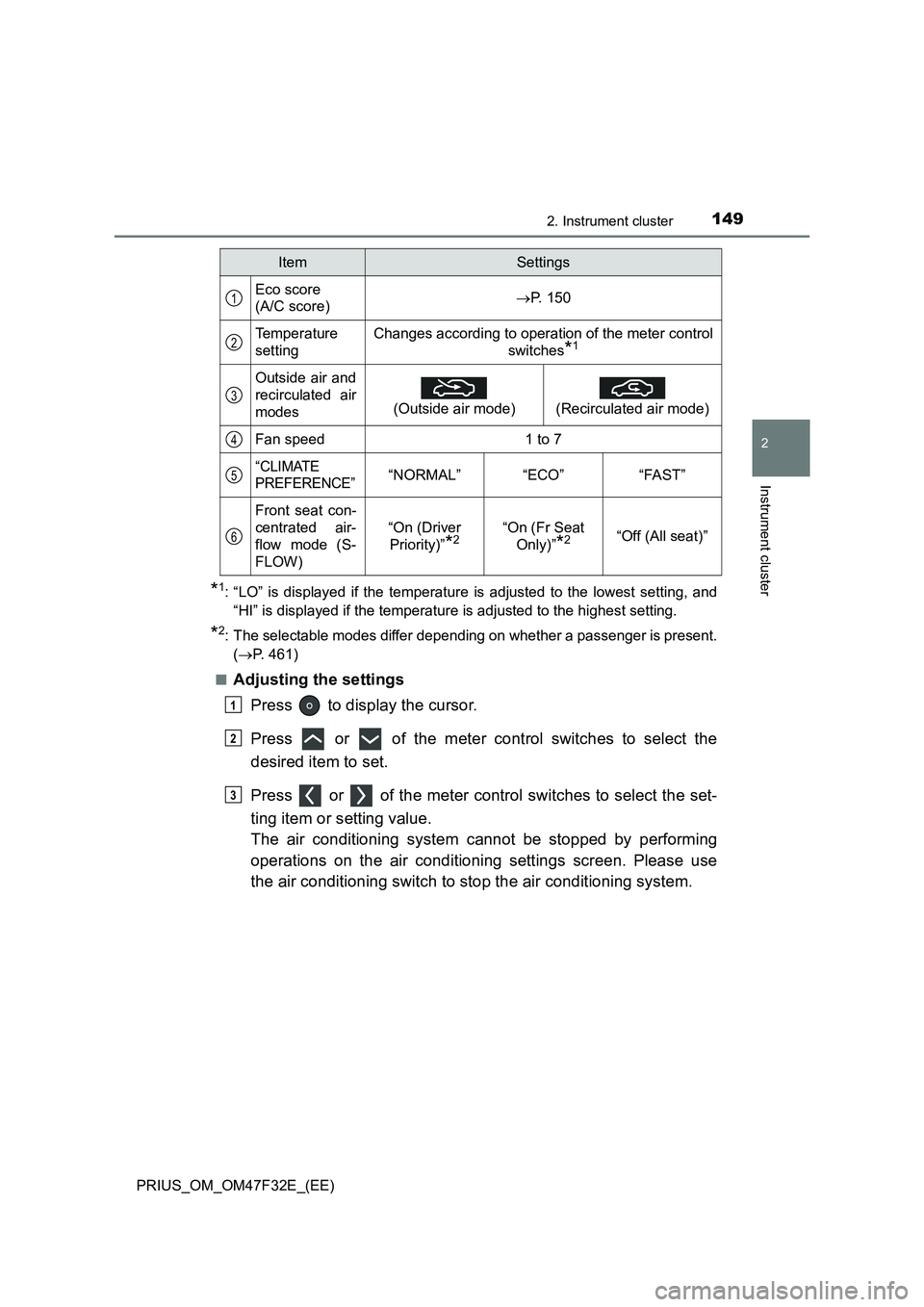
*1: “LO” is displayed if the temperature is adjusted to the lowest setting, and
“HI” is displayed if the temperature is adjusted to the highest setting.
*2: The selectable modes differ depending on whether a passenger is present.
(P. 461)
■
Adjusting the settings
Press to display the cursor.
Press or of the meter control switches to select the
desired item to set.
Press or of the meter control switches to select the set-
ting item or setting value.
The air conditioning system cannot be stopped by performing
operations on the air conditioning settings screen. Please use
the air conditioning switch to stop the air conditioning system.
ItemSettings
Eco score
(A/C score)P. 150
Temperature
settingChanges according to operation of the meter control
switches
*1
Outside air and
recirculated air
modes
(Outside air mode)
(Recirculated air mode)
Fan speed1 to 7
“CLIMATE
PREFERENCE”“NORMAL”“ECO”“FAST”
Front seat con-
centrated air-
flow mode (S-
FLOW)
“On (Driver
Priority)”
*2“On (Fr Seat
Only)”
*2“Off (All seat)”
1
2
3
4
5
6
1
2
3
Page 221 of 770

219
4Driving
PRIUS_OM_OM47F32E_(EE)4-1. Before driving
Driving the vehicle ............. 220
Cargo and luggage ............ 231
Trailer towing
(2WD models).................. 233
Trailer towing
(AWD models) ................. 243
4-2. Driving procedures
Power (ignition) switch ....... 244
EV drive mode ................... 250
Hybrid transmission ........... 253
Turn signal lever ................ 259
Parking brake .................... 260
4-3. Operating the lights
and wipers
Headlight switch ................ 261
AHB (Automatic High
Beam) .............................. 266
Fog light switch .................. 270
Windshield wipers and
washer ............................. 271
Rear window wiper and
washer ............................. 275
4-4. Refueling
Opening the fuel tank
cap ................................... 2774-5. Using the driving
support systems
Toyota Safety Sense ......... 282
PCS (Pre-Collision
System) ........................... 296
LTA
(Lane Tracing Assist)....... 307
RSA (Road Sign Assist)..... 323
Dynamic radar cruise
control with full-speed
range ............................... 329
Cruise control..................... 346
Driving mode select
switch............................... 351
Speed limiter ...................... 353
BSM
(Blind Spot Monitor) ......... 356
• The Blind Spot Monitor
function .......................... 372
• The Rear Crossing
Traffic Alert function ...... 375
Toyota parking
assist-sensor ................... 381
Parking Support Brake
function ............................ 394
S-IPA (Simple Intelligent
Parking Assist
System) ........................... 405
GPF (Gasoline Particulate
Filter) system ................... 440
Driving assist systems ....... 441
4-6. Driving tips
Hybrid vehicle driving
tips ................................... 449
Winter driving tips .............. 452
Page 257 of 770

2554-2. Driving procedures
4
Driving
PRIUS_OM_OM47F32E_(EE)
■For the shift positions
●When the power switch is off, the shift position cannot be changed.
●When the power switch is in ON mode (the hybrid system is not operating),
the shift position can only be changed to N. The shift position will be
changed to N even if the shift lever is shifted to D or R and held in that posi-
tion.
●When the “READY” indicator is on, the shift position can be changed from P
to D, N or R.
●When the “READY” indicator is flashing, the shift position cannot be
changed from P to another position even if the shift lever is operated. Wait
until the “READY” indicator changes from a flashing to a solid light, and then
operate the shift lever again.
●The shift position can only be changed to B directly from D.
In addition, if an attempt is made to change the shift position by moving the
shift lever or by pressing the P position switch in any of the following situa-
tions, the buzzer will sound and the shifting operation will be disabled or the
shift position will automatically change to N. When this happens, select an
appropriate shift position.
●Situations where the shifting operation will be disabled:
• When an attempt is made to change the shift position from P to another
position by moving the shift lever without depressing the brake pedal.
• When the shift lever is moved to attempt to change the shift position from
P or N with the accelerator pedal depressed and the vehicle stopped.
• When an attempt is made to change the shift position from P or N to B by
moving the shift lever.
●Situations where the shift position will automatically change to N:
• When the P position switch is pressed while the vehicle is running.
*1
• When an attempt is made to select the R position by moving the shift
lever when the vehicle is moving forward.
*2
• When an attempt is made to select the D position by moving the shift
lever when the vehicle is moving in reverse.
*3
• When an attempt is made to change the shift position from R to B by
moving the shift lever.
*1: Shift position may be changed to P when driving at extremely low
speeds.
*2: Shift position may be changed to R when driving at low speeds.
*3: Shift position may be changed to D when driving at low speeds.
●If N is selected while driving at a certain speed, even if the shift lever is not
held in the N position, the shift position changes to N. In this situation, the
buzzer sounds and a confirmation message is displayed on the multi-infor-
mation display to inform the driver that the shift position has changed to N.
Page 258 of 770
2564-2. Driving procedures
PRIUS_OM_OM47F32E_(EE)■Restraining sudden start (Drive-Start Control)
P. 222
■Automatic P position selection function
In the following situations, the shift position is automatically changed to P.
●When pressing the power switch with the vehicle stopped while the power
switch is in ON mode and the shift position is in a position other than P (after
the shift position has changed to P, the power switch will turn off)
*
●If the driver’s door is opened and all of the following conditions are met,
while the shift position is in a position other than P
• The power switch is in ON mode.
• The driver is not wearing the seat belt.
• The brake pedal is not depressed.
To start off the vehicle after the shift position is changed to P, operate the
shift lever again.
*: When the power switch is pressed while driving at extremely slow speeds,
such as immediately before stopping the vehicle, the shift position may
automatically change to P. Make sure that the vehicle is completely stopped
before pressing the power switch.
The shift position may also automatically switch to P if one of the following
conditions is detected while the vehicle is stopped by dynamic radar cruise
control with full-speed range (if equipped).
●Driver’s seat belt is not fastened
●Driver’s door is opened
●Approximately 3 minutes elapse after the vehicle stopped
■If the shift position cannot be shifted from P
There is a possibility that the 12-volt battery is discharged. Check the 12-volt
battery in this situation. (P. 639)
■About engine braking
When shift position B is selected, releasing the accelerator pedal will apply
engine braking.
●When the vehicle is driven at high speeds, compared to ordinary gasoline-
fueled vehicles, the engine braking deceleration is felt less than that of other
vehicles.
●The vehicle can be accelerated even when shift position B is selected.
If the vehicle is driven continuously in the B position, fuel efficiency will
become low. Usually, select the D position.
■After recharging/reconnecting the 12-volt battery
P. 523
Page 354 of 770

3524-5. Using the driving support systems
PRIUS_OM_OM47F32E_(EE)
Normal mode
Suitable for normal driving.
When normal mode is selected, the “ECO MODE” and “PWR MODE”
indicators turn off.
Power mode
Suitable for when crisp handling and enhanced accelerator
response are desired, such as when driving on mountainous roads.
When power mode is selected, the “PWR MODE” indicator will illumi-
nate on the main display.
Eco drive mode
Suitable for driving that improves fuel economy by generating
torque in response to accelerator pedal operations more smoothly
than in normal mode.
When Eco drive mode is selected, the “ECO MODE” indicator will illumi-
nate on the main display.
While the air conditioning is being used, the system automatically
switches to air conditioning eco mode (P. 462), allowing for driving
that leads to even better fuel economy.
■When canceling Eco drive mode/power mode
●Press the switch again. Also, power mode will be canceled automatically
when the power switch is turned off.
●However, Normal mode and Eco drive mode will not be canceled automati-
cally until the switch is pressed, even if the power switch is turned off.
■Switching the driving mode when in EV drive mode
P. 251
1
2
3