Page 113 of 770
1112. Instrument cluster
2
Instrument cluster
PRIUS_OM_OM47F32E_(EE)
Warning lights inform the driver of malfunctions in any of the vehicle’s
systems.
Warning lights
Warning lightsPages
*1Brake system warning light (Red) P. 580
*1Brake system warning light (Yellow) P. 580
*1Charging system warning light P. 580
*1Low engine oil pressure warning light P. 581
*1Malfunction indicator lamp P. 581
*1SRS warning light P. 581
*1ABS warning light P. 581
*1Electric power steering system warning light
(Red/yellow) P. 581
*1, 2PCS warning light (if equipped) P. 582
LTA indicator (Orange) (if equipped) P. 582
*1Slip indicator light P. 582
*1High coolant temperature warning light P. 583
*1, 3PKSB OFF indicator (if equipped) P. 583
Open door warning light P. 583
Page 118 of 770
1162. Instrument cluster
PRIUS_OM_OM47F32E_(EE)
WARNING
■If a safety system warning light does not come on
Should a safety system light such as the ABS and SRS warning light not
come on when you start the hybrid system, this could mean that these sys-
tems are not available to help protect you in an accident, which could result
in death or serious injury. Have the vehicle inspected by any authorized
Toyota retailer or Toyota authorized repairer, or any reliable repairer imme-
diately if this occurs.
NOTICE
■ To prevent damage to the engine and its components
The engine may be overheating if the high coolant temperature warning
light comes on or flashes. In this case, immediately stop the vehicle in a
safe place, and check the engine after it has cooled completely. ( P. 645)
Page 132 of 770
1302. Instrument cluster
PRIUS_OM_OM47F32E_(EE)
◆Energy monitor
The energy monitor can be used to check the vehicle drive status,
hybrid system operation status and energy regeneration status.
When energy is flowing, an arrow appears and a bright point of light
moves to show the direction of the flow of energy. When energy is
not flowing, the bright point of light is not displayed.
Gasoline engine
Electric motor
(traction motor)
Hybrid battery
(traction battery)
Tire
Bright point of light showing
the flow of energy
As an example, all arrows are shown in the illustration, but the actual con-
tents of the display will differ.
(Display example)
●When the hybrid battery (traction battery) is being charged, the
bright point of light moves towards .
●During driving, the bright point of light moves from or (or
both depending on the situation) towards .
*
●During driving, the image of the tires rotates.
*: The display may differ depending on the driving status.
1
2
3
4
5
3
12
4
Page 133 of 770

1312. Instrument cluster
2
Instrument cluster
PRIUS_OM_OM47F32E_(EE)
■Hybrid battery (traction battery) status
●The display changes in 8 levels according to the remaining charge amount
of the hybrid battery (traction battery).
●The hybrid battery (traction battery) status is also displayed on the following
screen, but the contents of the display are the same.
• Sub-screen of the main display (P. 125)
• Hybrid System Indicator (P. 132)
• Head-up display (if equipped) (P. 161)
●The charge amount of the hybrid battery (traction battery) is automatically
controlled by the hybrid system. For this reason, even if electricity is recov-
ered via the regenerative braking, or electricity is generated via the gasoline
engine, the displayed hybrid battery (traction battery) charge amount may
not reach the highest level (level 8). However, this does not indicate a mal-
function.
■Remaining charge amount warning of hybrid battery (traction battery)
●The buzzer sounds intermittently when the hybrid battery (traction battery)
remains without charging while the shift position is in N, or the remaining
charge amount drops below a certain level.
If the remaining charge amount drops further, the buzzer sounds continu-
ously.
●When a warning message is shown on the multi-information display and the
buzzer sounds, follow the instructions displayed on the screen to perform
troubleshooting.Low
High
1
2
Page 134 of 770
1322. Instrument cluster
PRIUS_OM_OM47F32E_(EE)
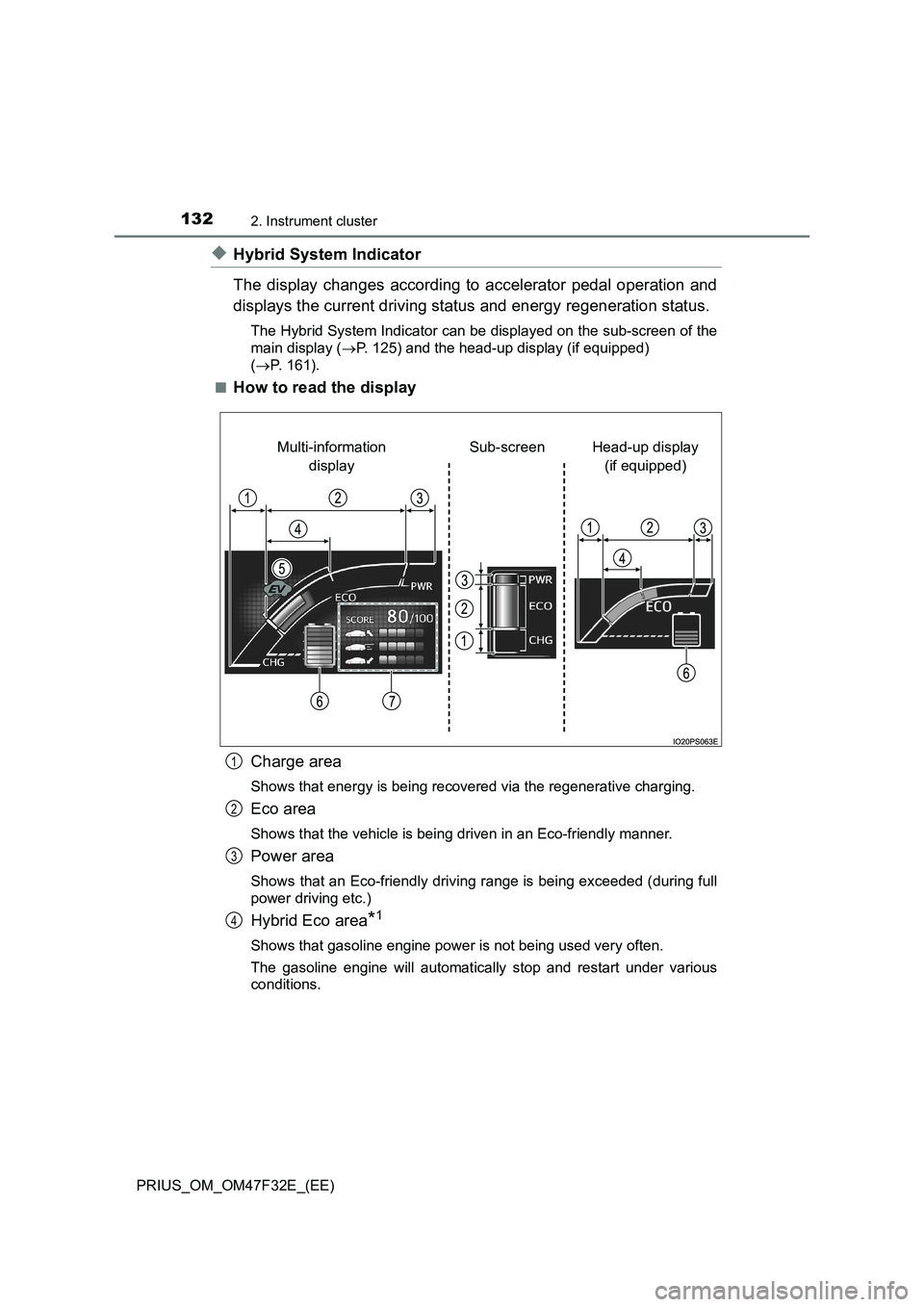
◆Hybrid System Indicator
The display changes according to accelerator pedal operation and
displays the current driving status and energy regeneration status.
The Hybrid System Indicator can be displayed on the sub-screen of the
main display (P. 125) and the head-up display (if equipped)
(P. 161).
■
How to read the display
Charge area
Shows that energy is being recovered via the regenerative charging.
Eco area
Shows that the vehicle is being driven in an Eco-friendly manner.
Power area
Shows that an Eco-friendly driving range is being exceeded (during full
power driving etc.)
Hybrid Eco area*1
Shows that gasoline engine power is not being used very often.
The gasoline engine will automatically stop and restart under various
conditions.
Head-up display
(if equipped) Sub-screen Multi-information
display
1
2
3
4
Page 135 of 770
1332. Instrument cluster
2
Instrument cluster
PRIUS_OM_OM47F32E_(EE)
EV indicator*2, 3
The EV indicator comes on when the vehicle is driven using only the
electric motor (traction motor) or the gasoline engine is stopped.
Hybrid battery (traction battery) status
P. 1 3 1
Eco score
P. 1 3 4
●By keeping the indicator within Eco area, more Eco-friendly driv-
ing can be achieved.
●Charge area indicates regeneration
*4 status. Regenerated
energy will be used to charge the hybrid battery (traction battery).
*1: Not displayed on the sub-screen.
*2: Not displayed on the sub-screen or head-up display.
*3: The EV indicator function can be turned off in the “Meter Customize”
settings. (P. 156)
*4: When used in this manual, “regeneration” refers to the conversion of
energy created by the movement of the vehicle into electrical energy.
■
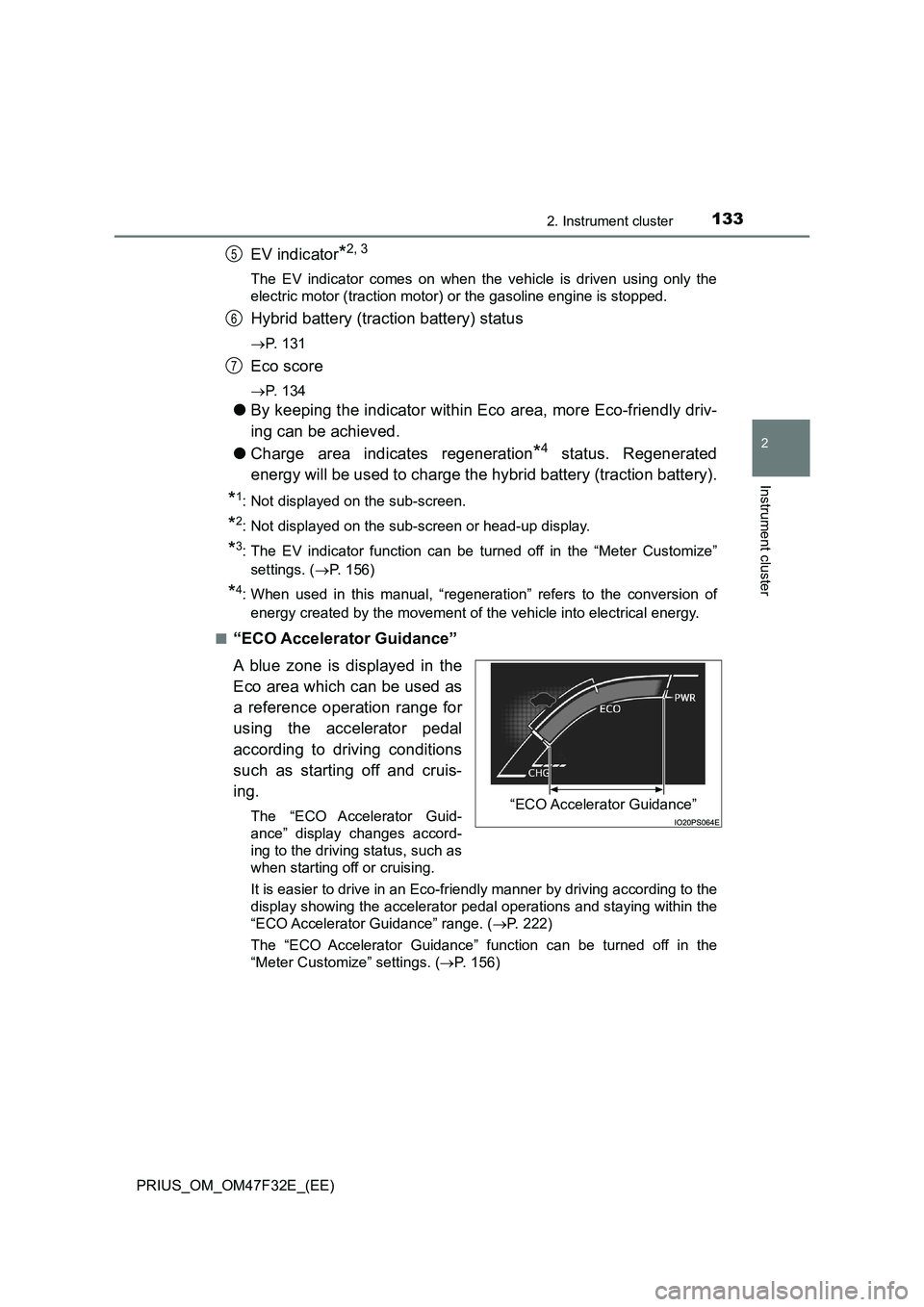
“ECO Accelerator Guidance”
A blue zone is displayed in the
Eco area which can be used as
a reference operation range for
using the accelerator pedal
according to driving conditions
such as starting off and cruis-
ing.
The “ECO Accelerator Guid-
ance” display changes accord-
ing to the driving status, such as
when starting off or cruising.
It is easier to drive in an Eco-friendly manner by driving according to the
display showing the accelerator pedal operations and staying within the
“ECO Accelerator Guidance” range. (P. 222)
The “ECO Accelerator Guidance” function can be turned off in the
“Meter Customize” settings. (P. 156)
5
6
7
“ECO Accelerator Guidance”
Page 169 of 770
1672. Instrument cluster
2
Instrument cluster
PRIUS_OM_OM47F32E_(EE)■
Reading the display
The arrows will appear in accordance with the energy flow. When
there is no energy flow, arrows will not be displayed.
The color of the arrows will change as follows.
Green: When the hybrid battery (traction battery) is regenerated or
charged.
Yellow: When the hybrid battery (traction battery) is in use.
Red: When the gasoline engine is in use.
Navigation or multimedia system screen
Gasoline engine
Front electric motor (traction
motor)
Rear electric motor (traction
motor) (AWD models)
Hybrid battery (traction bat-
tery)
Front tires
Rear tires
The image shows all the arrows as an example. The actual display
will vary depending on conditions.
Navigation or multimedia system screen (Home screen)
Gasoline engine
Hybrid battery (traction bat-
tery)
Tires
The image shows all the arrows as an example. The actual display
will vary depending on conditions.
1
2
3
4
5
6
1
2
3
Page 225 of 770

2234-1. Before driving
4
Driving
PRIUS_OM_OM47F32E_(EE)
WARNING
Observe the following precautions.
Failure to do so may result in death or serious injury.
■ When starting the vehicle
Always keep your foot on the brake pedal while stopped with the “READY”
indicator is illuminated. This prevents the vehicle from creeping.
■ When driving the vehicle
● Do not drive if you are unfamiliar with the location of the brake and accel-
erator pedals to avoid depressing the wrong pedal.
• Accidentally depressing the accelerator pedal instead of the brake
pedal will result in sudden acceleration that may lead to an accident.
• When backing up, you may twist your body around, leading to a diffi-
culty in operating the pedals. Make sure to operate the pedals properly.
• Make sure to keep a correct driving posture even when moving the
vehicle only slightly. This allows you to depress the brake and accelera-
tor pedals properly.
• Depress the brake pedal using your right foot. Depressing the brake
pedal using your left foot may delay response in an emergency, result-
ing in an accident.
● The driver should pay extra attention to pedestrians when the vehicle is
powered only by the electric motor (traction motor). As there is no engine
noise, the pedestrians may misjudge the vehicle’s movement. Even
though the vehicle is equipped with the vehicle proximity notification sys-
tem, drive with care as pedestrians in the vicinity may still not notice the
vehicle if the surrounding area is noisy.
● Do not drive the vehicle over or stop the vehicle near flammable materials
such as leaves, paper or rags.
The exhaust system and exhaust gases can be extremely hot. These hot
parts may cause a fire if there is any flammable material nearby.
● During normal driving, do not turn off the hybrid system. Turning the hybrid
system off while driving will not cause loss of steering or braking control,
however, power assist to the steering will be lost. This will make it more
difficult to steer smoothly, so you should pull over and stop the vehicle as
soon as it is safe to do so. In the event of an emergency, such as if it
becomes impossible to stop the vehicle in the normal way: P. 569